适用于 Paper/Purpur 1.21.x 和 26.x 的自定义护身符、球体及被动装备。
FunTalismans 是一个高度可配置的 RPG 装备系统,允许服务器管理员使用干净的 HOCON 配置文件创建自定义护身符、球体、被动装备和自定义不死图腾。
创建具有自定义名称、描述、模型、属性、被动药水效果、稀有度、装备要求、高级规则、自定义图腾破碎(TotemPop)能力等功能的物品——无需修改插件代码。
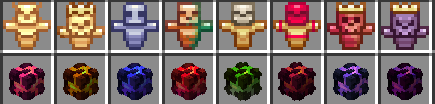
下载 FunTalismans 资源包 以在游戏中预览和测试包含的自定义护身符模型。
兼容性
- 服务端软件: Paper / Purpur
- Minecraft: 1.21.x, 26.1.x 和 26.2
- Java: Java 21
- 配置格式: HOCON
- 必需依赖: PacketEvents
- 可选集成: WorldGuard 和 PlaceholderAPI
- 可选资源包: Minecraft 1.21.1 至 26.2
FunTalismans 不需要 NBT-API。
重要提示: 当前版本的 FunTalismans 需要 PacketEvents。请确保在启动服务器之前已安装它。
功能
- 创建无限数量的自定义护身符、球体和装备物品。
- 配置具有独特激活能力的自定义不死图腾。
- 当护身符图腾被消耗时应用自定义效果。
- 保留或完全禁用原版不死图腾的药水效果。
- 在图腾激活动画期间显示护身符自己的自定义模型数据(Custom Model Data)。
- 针对不同伤害来源可靠地检测图腾激活。
- 根据物品装备的位置应用被动药水效果。
- 添加属性修饰符,如生命值、伤害、速度、护甲、攻击速度、幸运值等。
- 支持主手、副手、盔甲槽和背包中的被动效果。
- 配置自定义名称、描述、传统颜色、HEX 颜色和 MiniMessage 渐变。
- 使用数字或现代字符串形式的自定义模型数据。
- 通过 Minecraft 纹理 URL、
base64: 值或原始 Base64 使用玩家头颅纹理。
- 配置附魔、发光、耐久度、不可破坏物品和物品标志。
- 配置自定义最大堆叠数量。
- 添加持久数据 / 自定义 NBT 风格值。
- 创建可配置的稀有度系统。
- 支持盔甲纹饰和染色装备。
- 支持自定义烟花、山羊角和书与笔。
- 创建复杂的世界、区域、权限和游戏模式要求。
- 使用
and、or 和 oneof 构建复杂规则。
- 无需 PlaceholderAPI 即可使用内置占位符。
- 当安装了 PlaceholderAPI 时,使用 PlaceholderAPI 占位符。
- 使用 WorldGuard 区域和共享全局标志。
- 无需重启服务器即可重新加载定义。
- 安全更新已存在的护身符。
- 自动从
/talismans 目录及其子文件夹加载 .conf 文件。
自定义 TotemPop 系统
任何使用以下配置的 FunTalisman:
material: "totem_of_undying"
都可以使用自定义 totemPop 系统。
示例:
totemPop {
  enabled: true
  vanillaEffects: false
  delayTicks: 1

  ambient: false
  particles: true
  icon: true

  effects: [
    {
      type: "speed"
      amplifier: 1
      duration: 10
    },
    {
      type: "strength"
      amplifier: 0
      durationTicks: 100
      durationMode: "SET"
    }
  ]
}
vanillaEffects 控制原版 Minecraft 不死图腾的药水效果:
vanillaEffects: true
保留正常的原版效果并应用你的自定义效果。
vanillaEffects: false
保留复活机制,但抑制正常的原版再生、吸收和抗火效果。
仅应用 totemPop.effects 内定义的效果。
TotemPop 持续时间
你可以使用秒数:
duration: 10
或者 Minecraft 刻:
durationTicks: 200
20 刻 = 1 秒。
durationMode 是可选的:
durationMode: "SET"
使用配置的持续时间。
durationMode: "ADD"
将配置的持续时间添加到兼容的现有效果中。
如果省略,将自动使用 SET。
被动效果
只要护身符保持在有效的配置槽位中,被动效果就会保持激活状态。
支持的槽位:
mainhand(主手)hand(手)offhand(副手)hands(双手)head(头部)chest(胸部)legs(腿部)feet(脚部)armor(盔甲)any(任意)inventory(背包)
示例:
effects {
  slot: "offhand"
  ambient: true
  particles: false
  icon: true

  list: [
    {
      type: "speed"
      amplifier: 1
    },
    {
      type: "fire_resistance"
      amplifier: 0
    }
  ]
}
药水强化等级从零开始计数:
0 = I 级
1 = II 级
2 = III 级
效果也可以单独覆盖视觉设置:
{
  type: "regeneration"
  amplifier: 1
  ambient: false
  particles: true
  icon: false
}
inventory 用于被动药水效果。属性修饰符应使用装备槽位,如 mainhand、offhand 或盔甲槽位。
属性
护身符可以增加或修改 Minecraft 属性。
示例:
attributes: [
  {
    type: "max_health"
    amount: 4.0
    operation: "ADD_NUMBER"
    slot: "offhand"
  },
  {
    type: "movement_speed"
    amount: 0.10
    operation: "ADD_SCALAR"
    slot: "offhand"
  },
  {
    type: "attack_damage"
    amount: 0.15
    operation: "MULTIPLY_SCALAR_1"
    slot: "mainhand"
  }
]
支持的运算包括:
ADD_NUMBERADD_SCALARMULTIPLY_SCALAR_1
规则和限制
护身符可以通过以下方式受到限制:
- 世界
- 世界白名单 / 黑名单
- WorldGuard 区域
- 区域白名单 / 黑名单
- 权限
- 游戏模式
- 占位符表达式
- 嵌套
and 条件
- 嵌套
or 条件
- 有序
oneof 条件
示例:
rules {
  gamemode: "SURVIVAL"
  permission: "funtalismans.example.use"

  worlds {
    enabled: true
    mode: "BLACKLIST"
    list: ["lobby", "spawn_world"]
  }

  regions {
    enabled: true
    mode: "BLACKLIST"
    list: ["safezone", "afk"]
  }

  or: [
    {
      world: "world"
    },
    {
      permission: "funtalismans.example.bypass"
    }
  ]

  denyActions {
    message: "&cYou do not meet the requirements to use this talisman."
    sound: "ENTITY_VILLAGER_NO"
  }
}
规则动作会尊重配置的护符槽位。例如,处于副手(offhand)的被动护符在仅手持于主手时不会执行其规则动作。
内置占位符
FunTalismans 包含内部占位符,不需要 PlaceholderAPI:
%player_name%
%player_world%
%player_uuid%
%player_gm%
还支持目标玩家变体:
%target_player_name%
%target_player_world%
%target_player_uuid%
%target_player_gm%
示例:
if: "%player_gm% === SURVIVAL"
当安装 PlaceholderAPI 时,可以混合使用内置占位符和 PlaceholderAPI 占位符。
示例:
if: "%player_gm% === SURVIVAL && %vault_eco_balance% >= 1000"
FunTalismans 会优先解析其内部占位符,然后再处理 PlaceholderAPI 占位符。
自动加载护符配置
FunTalismans 会自动加载位于以下目录中的 .conf 文件:
plugins/FunTalismans/talismans/
支持子文件夹。
示例:
plugins/FunTalismans/talismans/
├── talismans.conf
├── spheres.conf
├── example.conf
├── events/
│   ├── halloween.conf
│   └── christmas.conf
└── custom/
    └── server-talismans.conf
插件捆绑的 .conf 文件在不存在时会自动导出。
现有配置文件绝不会自动覆盖。
这允许未来的 FunTalismans 版本包含额外的示例或内容包,而无需手动注册每个文件。
WorldGuard 支持
WorldGuard 集成是可选的。
FunTalismans 使用共享的全局标志,而不是为每个护符创建单独的标志。
fun-talismans-passive 控制区域内的被动护符效果。fun-talismans-use 控制一般护符使用机制。
示例:
/rg flag <region> fun-talismans-passive deny
或者:
/rg flag <region> fun-talismans-use deny
区域要求也可以直接在单个护符的规则中配置。
更改 config.conf 中的自定义 WorldGuard 标志名称后需要重启服务器。
普通的护符配置更改可以使用 /ftalismans reload。
热重载与物品更新
FunTalismans 可以在不需要正常重启服务器的情况下重新加载护符定义。
物品更新系统可以安全地刷新存储在以下位置的护符:
- 玩家背包。
- 主手和副手。
- 盔甲槽位。
- 在线玩家附近的掉落物品。
- 物品展示框 (Item Frames)。
- 发光物品展示框 (Glow Item Frames)。
- 打开的容器。
- 箱子。
- 潜影盒。
- 已加载区块(通过可配置的每刻限制)。
这使得管理员能够在保持已创建护符同步的同时,重新平衡属性、更改效果、替换模型或更新描述文本。
普通配置更改后请使用:
/ftalismans reload
当你希望更广泛地扫描已加载的护符物品时,请使用:
/ftalismans forceupdate
命令
/ftalismans give <player> <id> [amount]
/ftalismans reload
/ftalismans forceupdate
别名:
/ft
/talisman
/tali
/talismans
权限:
funtalismans.give
funtalismans.reload
funtalismans.update
完整的自定义不死图腾护符示例
以下示例演示了与自定义不死图腾(Totem of Undying)护符相关的大多数选项。
talismans {

  infinity-totem {

    # ------------------------------------------------------------
    # 物品标识
    # ------------------------------------------------------------

    name: "<gradient:#18FF00:#50FFA4><b>Infinity Talisman</b></gradient>"
    material: "totem_of_undying"
    rarity: "epic"

    # 数字型自定义模型数据。
    custom_model_data: 101

    # 也可以使用现代字符串型自定义模型数据:
    # custom_model_data: "funtalismans:infinity_totem"

    lore: [
      "",
      "&7A mysterious talisman that protects its owner.",
      "&7Equip it in the offhand to activate its passive power.",
      "",
      "<#18FF00>Passive: <#FFFFFF>Speed, Resistance and regeneration",
      "<#18FF00>TotemPop: <#FFFFFF>Custom resurrection effects",
      ""
    ]

    # ------------------------------------------------------------
    # 基础物品选项
    # ------------------------------------------------------------

    unbreakable: false

    # 添加附魔光效视觉。
    glow: true

    # 即使存在附魔/光效,也禁用附魔闪烁。
    disableEnchantGlow: false

    # false = 玩家死亡时物品正常消失。
    keepItemOnDeath: false

    # 通常对图腾来说应为 false。
    glider: false

    # ------------------------------------------------------------
    # 自定义堆叠数量
    # ------------------------------------------------------------

    useMaxStack: false
    maxStack: 1

    # ------------------------------------------------------------
    # 耐久度
    # ------------------------------------------------------------

    # 通常对不死图腾来说是不必要的。
    # -1 表示 FunTalismans 不强制该值。

    damage: -1
    maxDurability: -1
    durability: -1
    isDurabilityBasedOnUsage: false

    # ------------------------------------------------------------
    # 默认材质属性
    # ------------------------------------------------------------

keepDefaultAttributes: true
    ignoreKeepDefaultAttributesFeature: false
    sumDefaultAttributes: false

    # ------------------------------------------------------------
    # 掉落物品设置
    # ------------------------------------------------------------

    dropSettings {
      glowDrop: true
      glowDropColor: "GREEN"
      displayNameDrop: true
    }

    # ------------------------------------------------------------
    # 物品标签
    # ------------------------------------------------------------

    flags: [
      "hide_attributes",
      "hide_enchants",
      "hide_unbreakable"
    ]

    # ------------------------------------------------------------
    # 附魔
    # ------------------------------------------------------------

    enchantments {
      unbreaking: 3
    }

    # ------------------------------------------------------------
    # 属性
    # ------------------------------------------------------------

    attributes: [
      {
        type: "max_health"
        amount: 4.0
        operation: "ADD_NUMBER"
        slot: "offhand"
      },
      {
        type: "movement_speed"
        amount: 0.05
        operation: "ADD_SCALAR"
        slot: "offhand"
      }
    ]

    # ------------------------------------------------------------
    # 被动效果
    # ------------------------------------------------------------

    effects {
      slot: "offhand"

      ambient: true
      particles: false
      icon: true

      list: [
        {
          type: "speed"
          amplifier: 1
        },
        {
          type: "fire_resistance"
          amplifier: 0
        },
        {
          type: "water_breathing"
          amplifier: 0
        },
        {
          type: "health_boost"
          amplifier: 0
        },
        {
          type: "regeneration"
          amplifier: 0
        },
        {
          type: "resistance"
          amplifier: 0
        }
      ]
    }

    # ------------------------------------------------------------
    # 自定义图腾激活
    # ------------------------------------------------------------

    totemPop {

      enabled: true

      # true:
      # 保留原版再生、吸收和抗火效果。
      #
      # false:
      # 保留复活功能,但抑制原版的药水效果。
      vanillaEffects: false

      # 应用自定义效果前的延迟(刻)。
      delayTicks: 1

      # 所有图腾激活效果的默认视觉设置。
      ambient: false
      particles: true
      icon: true

      effects: [

        {
          type: "speed"

          # amplifier 0 = 速度 I
          # amplifier 1 = 速度 II
          amplifier: 1

          # 持续时间(秒)。
          duration: 10

          # 可选。默认为 SET。
          durationMode: "SET"
        },

        {
          type: "strength"
          amplifier: 0

          # 使用 Minecraft 刻的替代持续时间。
          # 20 刻 = 1 秒。
          durationTicks: 100

          durationMode: "SET"

          # 每个效果的视觉覆盖设置。
          ambient: false
          particles: true
          icon: true
        },

        {
          type: "regeneration"
          amplifier: 1
          duration: 5

          # ADD 会将时间添加到兼容的现有效果上。
          durationMode: "ADD"
        }
      ]
    }

    # ------------------------------------------------------------
    # 规则
    # ------------------------------------------------------------

    rules {

      # 原生游戏模式规则。
      gamemode: "SURVIVAL"

      # 可选的权限要求。
      permission: "funtalismans.infinity.use"

      # 支持内置占位符表达式。
      #
      # 示例:
      #
      # if: "%player_gm% === SURVIVAL"
      #
      # 配合 PlaceholderAPI 使用:
      #
      # if: "%player_gm% === SURVIVAL && %vault_eco_balance% >= 1000"

      worlds {
        enabled: true

        # 黑名单 / 拒绝 / 阻止
        # 白名单 / 允许 / 仅
        mode: "BLACKLIST"

        list: [
          "lobby",
          "spawn_world"
        ]
      }

      regions {
        enabled: true
        mode: "BLACKLIST"

        list: [
          "safezone",
          "afk"
        ]
      }

      # `and` 中的所有条目都必须通过。
      and: [
        {
          gamemode: "SURVIVAL"
        }
      ]

      # `or` 中至少有一个条目必须通过。
      or: [
        {
          world: "world"
        },
        {
          permission: "funtalismans.infinity.bypass"
        }
      ]

      # ONEOF 按顺序检查条目并选择第一个有效的条目。
      #
      # 仅当护身符位于配置的有效槽位时,操作才会运行。
      oneof: [

        {
          region: [
            "pvp",
            "arena"
          ]

          actions {
            message: "&c战斗护身符模式已启用。"
            sound: "entity.player.levelup"
          }
        },

        {
          gamemode: "SURVIVAL"

          actions {
            message: "&a标准护身符模式已启用。"
            sound: "block.amethyst_block.chime"
          }
        }
      ]

      denyActions {
        message: "&c您不符合使用此护身符的要求。"
        sound: "entity.villager.no"
      }
    }

    # ------------------------------------------------------------
    # 自定义持久化数据
    # ------------------------------------------------------------

    nbt {
      category: "totem"
      series: "infinity"

      power: 100
      multiplier: 1.25

      tradeable: true

      "1" {
        key: "custom_example"
        value: "example_value"
      }
    }
  }
}
删除您的护身符不需要的任何部分。
特定材质配置
某些 FunTalismans 选项仅对特定的 Minecraft 材质有意义,因此未包含在上述的不死图腾示例中。
玩家头颅
material: "player_head"

texture: "http://textures.minecraft.net/texture/<texture-id>"
texture 接受以下值:
- Minecraft 纹理 URL。
base64: 前缀的值。- 原始 Base64 编码的纹理数据。
染色物品
兼容颜色的物品(如皮革护甲)可以使用:
color: "#18FF00"
护甲纹饰
兼容的护甲可以使用:
armorTrim {
  material: "gold"
  pattern: "silence"
}
烟花
firework_rocket 支持:
fireworkData {
  power: 2

  effects: [
    {
      type: "BALL_LARGE"
      trail: true
      colors: ["#FF0000", "GOLD"]
      fadeColors: ["#FFFFFF"]
    }
  ]
}
山羊角
goat_horn 支持:
instrumentData {
  instrument: "yearn_goat_horn"
}
已书写的书
written_book 支持:
bookData {
  author: "FunTalismans"
  title: "&5&lAncient Tome"

  pages: [
    "&7Page one...",
    "&7Page two..."
  ]
}
可选资源包
可选的 FunTalismans Resource Pack 包含专为 FunTalismans talismans 和自定义图腾设计的自定义模型。
- 支持 1.21.1 至 26.2 版本的 Minecraft 客户端。
- 支持传统与现代 Custom Model Data 格式。
- 包含自定义图腾模型。
- 支持自定义 TotemPop 激活动画。
- 优化了第一人称、第三人称、掉落物品及 GUI 视图下的模型显示。
下载 FunTalismans Resource Pack
在您的符咒配置中使用匹配的 custom_model_data 值以显示正确的模型。
安装与更新
全新安装步骤:
- 停止服务器。
- 安装 PacketEvents。
- 将 FunTalismans
.jar 文件放入 /plugins 目录。
- 启动服务器。
- 配置您的符咒。
- 如果使用自定义模型,请安装可选的资源包。
更新 FunTalismans 时:
- 完全停止服务器。
- 备份
/plugins/FunTalismans/ 目录。
- 替换旧的 FunTalismans
.jar 文件。
- 根据您的 Minecraft 版本要求更新 PacketEvents。
- 正常启动服务器。
- 查看新的配置示例或选项。
- 当有较新版本可用时,更新可选资源包。
替换 FunTalismans JAR 文件时,请勿使用 /reload、PlugMan 或其他插件热重载系统。
常规配置更改可使用:
/ftalismans reload
注意事项
- 必须安装 PacketEvents。
- WorldGuard 为可选插件。
- PlaceholderAPI 为可选插件。
- FunTalismans 内置占位符无需 PlaceholderAPI 即可工作。
- 核心插件不依赖 NBT-API。
- 替换配置文件前请务必创建备份。
- 进行常规配置更改后,请使用
/ftalismans reload。
- 当现有符咒物品需要更广泛的刷新时,请使用
/ftalismans forceupdate。
- 现有的自动导出的
.conf 文件不会被覆盖。
/talismans 目录及其子文件夹内的额外 .conf 文件会自动加载。- 更新插件 JAR 时,请使用完整的服务器重启。
FunTalismans 提供了一个灵活的基础框架,适用于 RPG 进度系统、可收集装备、自定义战斗机制、被动神器、自定义图腾以及可配置的服务器进度系统。
Custom Talismans, Spheres and Passive Equipment for Paper/Purpur 1.21.x and 26.x.
FunTalismans is a highly configurable RPG equipment system that allows server owners to create custom talismans, spheres, passive equipment and custom Totems of Undying using clean HOCON configuration files.
Create items with custom names, lore, models, attributes, passive potion effects, rarities, equipment requirements, advanced rules, custom TotemPop abilities and much more — without modifying plugin code.
Download the FunTalismans Resource Pack to preview and test the included custom talisman models in-game.
Compatibility
- Server software: Paper / Purpur
- Minecraft: 1.21.x, 26.1.x and 26.2
- Java: Java 21
- Configuration format: HOCON
- Required dependency: PacketEvents
- Optional integrations: WorldGuard and PlaceholderAPI
- Optional resource pack: Minecraft 1.21.1 through 26.2
FunTalismans does not require NBT-API.
Important: PacketEvents is required by current FunTalismans versions. Make sure it is installed before starting the server.
Features
- Create unlimited custom talismans, spheres and equipment items.
- Configure custom Totems of Undying with unique activation abilities.
- Apply custom effects when a talisman totem is consumed.
- Keep or completely disable the vanilla Totem of Undying potion effects.
- Display the talisman's own Custom Model Data during the totem activation animation.
- Reliable totem activation detection across different damage sources.
- Apply passive potion effects depending on where an item is equipped.
- Add attribute modifiers such as health, damage, speed, armor, attack speed, luck and more.
- Support main hand, offhand, armor slots and inventory passive effects.
- Configure custom names, lore, legacy colors, HEX colors and MiniMessage gradients.
- Use numeric or modern string Custom Model Data.
- Use player-head textures through Minecraft texture URLs,
base64: values or raw Base64.
- Configure enchantments, glow, durability, unbreakable items and item flags.
- Configure custom maximum stack sizes.
- Add Persistent Data / custom NBT-style values.
- Create configurable rarity systems.
- Support armor trims and dyed equipment.
- Support custom fireworks, goat horns and written books.
- Create advanced world, region, permission and gamemode requirements.
- Build complex rules using
and, or and oneof.
- Use built-in placeholders without PlaceholderAPI.
- Use PlaceholderAPI placeholders when PlaceholderAPI is installed.
- Use WorldGuard regions and shared global flags.
- Reload definitions without restarting the server.
- Safely update already existing talismans.
- Automatically load
.conf files from the /talismans directory and its subfolders.
Custom TotemPop system
Any FunTalisman using:
material: "totem_of_undying"
can use the custom totemPop system.
Example:
totemPop {
  enabled: true
  vanillaEffects: false
  delayTicks: 1

  ambient: false
  particles: true
  icon: true

  effects: [
    {
      type: "speed"
      amplifier: 1
      duration: 10
    },
    {
      type: "strength"
      amplifier: 0
      durationTicks: 100
      durationMode: "SET"
    }
  ]
}
vanillaEffects controls the normal Minecraft Totem of Undying potion effects:
vanillaEffects: true
Keeps the normal vanilla effects and also applies your custom effects.
vanillaEffects: false
Keeps the resurrection mechanic but suppresses the normal vanilla Regeneration, Absorption and Fire Resistance effects.
Only the effects defined inside totemPop.effects are applied.
TotemPop duration
You can use seconds:
duration: 10
or Minecraft ticks:
durationTicks: 200
20 ticks = 1 second.
durationMode is optional:
durationMode: "SET"
Uses the configured duration.
durationMode: "ADD"
Adds the configured duration to a compatible existing effect.
If omitted, SET is used automatically.
Passive effects
Passive effects stay active while the talisman remains in a valid configured slot.
Supported slots:
mainhandhandoffhandhandsheadchestlegsfeetarmoranyinventory
Example:
effects {
  slot: "offhand"
  ambient: true
  particles: false
  icon: true

  list: [
    {
      type: "speed"
      amplifier: 1
    },
    {
      type: "fire_resistance"
      amplifier: 0
    }
  ]
}
Potion amplifiers are zero-based:
0 = Level I
1 = Level II
2 = Level III
Effects may also override visual settings individually:
{
  type: "regeneration"
  amplifier: 1
  ambient: false
  particles: true
  icon: false
}
inventory is intended for passive potion effects. Attribute modifiers should use equipment slots such as mainhand, offhand or armor slots.
Attributes
Talismans can add or modify Minecraft attributes.
Example:
attributes: [
  {
    type: "max_health"
    amount: 4.0
    operation: "ADD_NUMBER"
    slot: "offhand"
  },
  {
    type: "movement_speed"
    amount: 0.10
    operation: "ADD_SCALAR"
    slot: "offhand"
  },
  {
    type: "attack_damage"
    amount: 0.15
    operation: "MULTIPLY_SCALAR_1"
    slot: "mainhand"
  }
]
Supported operations include:
ADD_NUMBERADD_SCALARMULTIPLY_SCALAR_1
Rules and requirements
Talismans can be restricted by:
- World
- World whitelist / blacklist
- WorldGuard region
- Region whitelist / blacklist
- Permission
- Gamemode
- Placeholder expressions
- Nested
and conditions
- Nested
or conditions
- Ordered
oneof conditions
Example:
rules {
  gamemode: "SURVIVAL"
  permission: "funtalismans.example.use"

  worlds {
    enabled: true
    mode: "BLACKLIST"
    list: ["lobby", "spawn_world"]
  }

  regions {
    enabled: true
    mode: "BLACKLIST"
    list: ["safezone", "afk"]
  }

  or: [
    {
      world: "world"
    },
    {
      permission: "funtalismans.example.bypass"
    }
  ]

  denyActions {
    message: "&cYou do not meet the requirements to use this talisman."
    sound: "ENTITY_VILLAGER_NO"
  }
}
Rule actions respect the configured talisman slot. For example, an offhand passive talisman will not execute its rule actions while being held only in the main hand.
Built-in placeholders
FunTalismans includes internal placeholders that do not require PlaceholderAPI:
%player_name%
%player_world%
%player_uuid%
%player_gm%
Target-player variants are also available:
%target_player_name%
%target_player_world%
%target_player_uuid%
%target_player_gm%
Example:
if: "%player_gm% === SURVIVAL"
When PlaceholderAPI is installed, built-in placeholders and PlaceholderAPI placeholders can be used together.
Example:
if: "%player_gm% === SURVIVAL && %vault_eco_balance% >= 1000"
FunTalismans resolves its internal placeholders first and then processes PlaceholderAPI placeholders.
Automatic talisman configuration loading
FunTalismans automatically loads .conf files located inside:
plugins/FunTalismans/talismans/
Subfolders are supported.
Example:
plugins/FunTalismans/talismans/
├── talismans.conf
├── spheres.conf
├── example.conf
├── events/
│   ├── halloween.conf
│   └── christmas.conf
└── custom/
    └── server-talismans.conf
Bundled .conf files included with the plugin are automatically exported when they do not already exist.
Existing configuration files are never automatically overwritten.
This allows future FunTalismans releases to include additional example or content packs without requiring every file to be manually registered.
WorldGuard support
WorldGuard integration is optional.
FunTalismans uses shared global flags instead of creating a separate flag for every talisman.
fun-talismans-passive controls passive talisman effects inside a region.fun-talismans-use controls general talisman use mechanics.
Example:
/rg flag <region> fun-talismans-passive deny
or:
/rg flag <region> fun-talismans-use deny
Region requirements can also be configured directly inside individual talisman rules.
Restart the server when changing custom WorldGuard flag names in config.conf.
Normal talisman configuration changes can use /ftalismans reload.
Live reload and item updates
FunTalismans can reload talisman definitions without requiring a normal server restart.
The item update system can safely refresh talismans stored in:
- Player inventories.
- Main hand and offhand.
- Armor slots.
- Dropped items near online players.
- Item Frames.
- Glow Item Frames.
- Open containers.
- Chests.
- Shulker Boxes.
- Loaded chunks through configurable per-tick limits.
This allows administrators to rebalance attributes, change effects, replace models or update lore while keeping already-created talismans synchronized.
Use:
/ftalismans reload
after normal configuration changes.
Use:
/ftalismans forceupdate
when you want a wider scan of already loaded talisman items.
Commands
/ftalismans give <player> <id> [amount]
/ftalismans reload
/ftalismans forceupdate
Aliases:
/ft
/talisman
/tali
/talismans
Permissions:
funtalismans.give
funtalismans.reload
funtalismans.update
Complete custom Totem Talisman example
The following example demonstrates most options that are relevant to a custom Totem of Undying talisman.
talismans {

  infinity-totem {

    # ------------------------------------------------------------
    # ITEM IDENTITY
    # ------------------------------------------------------------

    name: "<gradient:#18FF00:#50FFA4><b>Infinity Talisman</b></gradient>"
    material: "totem_of_undying"
    rarity: "epic"

    # Numeric Custom Model Data.
    custom_model_data: 101

    # Modern string Custom Model Data can also be used instead:
    # custom_model_data: "funtalismans:infinity_totem"

    lore: [
      "",
      "&7A mysterious talisman that protects its owner.",
      "&7Equip it in the offhand to activate its passive power.",
      "",
      "<#18FF00>Passive: <#FFFFFF>Speed, Resistance and regeneration",
      "<#18FF00>TotemPop: <#FFFFFF>Custom resurrection effects",
      ""
    ]

    # ------------------------------------------------------------
    # BASIC ITEM OPTIONS
    # ------------------------------------------------------------

    unbreakable: false

    # Adds visual enchantment glow.
    glow: true

    # Disables enchantment glint even if enchantments/glow exist.
    disableEnchantGlow: false

    # false = item disappears normally when the player dies.
    keepItemOnDeath: false

    # Usually false for a totem.
    glider: false

    # ------------------------------------------------------------
    # CUSTOM STACK SIZE
    # ------------------------------------------------------------

    useMaxStack: false
    maxStack: 1

    # ------------------------------------------------------------
    # DURABILITY
    # ------------------------------------------------------------

    # Usually unnecessary for a Totem of Undying.
    # -1 means FunTalismans does not force the value.

    damage: -1
    maxDurability: -1
    durability: -1
    isDurabilityBasedOnUsage: false

    # ------------------------------------------------------------
    # DEFAULT MATERIAL ATTRIBUTES
    # ------------------------------------------------------------

    keepDefaultAttributes: true
    ignoreKeepDefaultAttributesFeature: false
    sumDefaultAttributes: false

    # ------------------------------------------------------------
    # DROPPED ITEM SETTINGS
    # ------------------------------------------------------------

    dropSettings {
      glowDrop: true
      glowDropColor: "GREEN"
      displayNameDrop: true
    }

    # ------------------------------------------------------------
    # ITEM FLAGS
    # ------------------------------------------------------------

    flags: [
      "hide_attributes",
      "hide_enchants",
      "hide_unbreakable"
    ]

    # ------------------------------------------------------------
    # ENCHANTMENTS
    # ------------------------------------------------------------

    enchantments {
      unbreaking: 3
    }

    # ------------------------------------------------------------
    # ATTRIBUTES
    # ------------------------------------------------------------

    attributes: [
      {
        type: "max_health"
        amount: 4.0
        operation: "ADD_NUMBER"
        slot: "offhand"
      },
      {
        type: "movement_speed"
        amount: 0.05
        operation: "ADD_SCALAR"
        slot: "offhand"
      }
    ]

    # ------------------------------------------------------------
    # PASSIVE EFFECTS
    # ------------------------------------------------------------

    effects {
      slot: "offhand"

      ambient: true
      particles: false
      icon: true

      list: [
        {
          type: "speed"
          amplifier: 1
        },
        {
          type: "fire_resistance"
          amplifier: 0
        },
        {
          type: "water_breathing"
          amplifier: 0
        },
        {
          type: "health_boost"
          amplifier: 0
        },
        {
          type: "regeneration"
          amplifier: 0
        },
        {
          type: "resistance"
          amplifier: 0
        }
      ]
    }

    # ------------------------------------------------------------
    # CUSTOM TOTEM POP
    # ------------------------------------------------------------

    totemPop {

      enabled: true

      # true:
      # Keep vanilla Regeneration, Absorption and Fire Resistance.
      #
      # false:
      # Keep resurrection but suppress vanilla potion effects.
      vanillaEffects: false

      # Delay before applying custom effects.
      delayTicks: 1

      # Default visual settings for all TotemPop effects.
      ambient: false
      particles: true
      icon: true

      effects: [

        {
          type: "speed"

          # amplifier 0 = Speed I
          # amplifier 1 = Speed II
          amplifier: 1

          # Duration in seconds.
          duration: 10

          # Optional. Defaults to SET.
          durationMode: "SET"
        },

        {
          type: "strength"
          amplifier: 0

          # Alternative duration using Minecraft ticks.
          # 20 ticks = 1 second.
          durationTicks: 100

          durationMode: "SET"

          # Per-effect visual overrides.
          ambient: false
          particles: true
          icon: true
        },

        {
          type: "regeneration"
          amplifier: 1
          duration: 5

          # ADD adds time to a compatible existing effect.
          durationMode: "ADD"
        }
      ]
    }

    # ------------------------------------------------------------
    # RULES
    # ------------------------------------------------------------

    rules {

      # Native gamemode rule.
      gamemode: "SURVIVAL"

      # Optional permission requirement.
      permission: "funtalismans.infinity.use"

      # Built-in placeholder expressions are supported.
      #
      # Examples:
      #
      # if: "%player_gm% === SURVIVAL"
      #
      # With PlaceholderAPI:
      #
      # if: "%player_gm% === SURVIVAL && %vault_eco_balance% >= 1000"

      worlds {
        enabled: true

        # BLACKLIST / DENY / BLOCK
        # WHITELIST / ALLOW / ONLY
        mode: "BLACKLIST"

        list: [
          "lobby",
          "spawn_world"
        ]
      }

      regions {
        enabled: true
        mode: "BLACKLIST"

        list: [
          "safezone",
          "afk"
        ]
      }

      # All entries in `and` must pass.
      and: [
        {
          gamemode: "SURVIVAL"
        }
      ]

      # At least one entry in `or` must pass.
      or: [
        {
          world: "world"
        },
        {
          permission: "funtalismans.infinity.bypass"
        }
      ]

      # ONEOF checks entries in order and selects the first valid one.
      #
      # Actions only run while the talisman is in a valid configured slot.
      oneof: [

        {
          region: [
            "pvp",
            "arena"
          ]

          actions {
            message: "&cCombat talisman mode enabled."
            sound: "entity.player.levelup"
          }
        },

        {
          gamemode: "SURVIVAL"

          actions {
            message: "&aStandard talisman mode enabled."
            sound: "block.amethyst_block.chime"
          }
        }
      ]

      denyActions {
        message: "&cYou do not meet the requirements to use this talisman."
        sound: "entity.villager.no"
      }
    }

    # ------------------------------------------------------------
    # CUSTOM PERSISTENT DATA
    # ------------------------------------------------------------

    nbt {
      category: "totem"
      series: "infinity"

      power: 100
      multiplier: 1.25

      tradeable: true

      "1" {
        key: "custom_example"
        value: "example_value"
      }
    }
  }
}
Remove any section that your talisman does not need.
Material-specific configuration
Some FunTalismans options only make sense for specific Minecraft materials and are therefore not included in the Totem of Undying example above.
Player Heads
material: "player_head"

texture: "http://textures.minecraft.net/texture/<texture-id>"
texture accepts:
- Minecraft texture URLs.
base64: values.- Raw Base64 texture values.
Dyed items
Compatible colored items such as leather armor can use:
color: "#18FF00"
Armor trims
Compatible armor can use:
armorTrim {
  material: "gold"
  pattern: "silence"
}
Fireworks
firework_rocket supports:
fireworkData {
  power: 2

  effects: [
    {
      type: "BALL_LARGE"
      trail: true
      colors: ["#FF0000", "GOLD"]
      fadeColors: ["#FFFFFF"]
    }
  ]
}
Goat horns
goat_horn supports:
instrumentData {
  instrument: "yearn_goat_horn"
}
Written books
written_book supports:
bookData {
  author: "FunTalismans"
  title: "&5&lAncient Tome"

  pages: [
    "&7Page one...",
    "&7Page two..."
  ]
}
Optional Resource Pack
The optional FunTalismans Resource Pack contains custom models designed for FunTalismans talismans and custom totems.
- Supports Minecraft clients from 1.21.1 through 26.2.
- Supports legacy and modern Custom Model Data formats.
- Includes custom totem models.
- Supports the custom TotemPop activation animation.
- Optimized model display for first person, third person, dropped items and GUI views.
Download the FunTalismans Resource Pack
Use the matching custom_model_data value in your talisman configuration to display the correct model.
Installation and updating
For a clean installation:
- Stop the server.
- Install PacketEvents.
- Place the FunTalismans
.jar inside /plugins.
- Start the server.
- Configure your talismans.
- Install the optional resource pack if you use custom models.
When updating FunTalismans:
- Stop the server completely.
- Create a backup of
/plugins/FunTalismans/.
- Replace the old FunTalismans
.jar.
- Update PacketEvents if required by your Minecraft version.
- Start the server normally.
- Review new configuration examples or options.
- Update the optional resource pack when a newer version is available.
Avoid using /reload, PlugMan or other plugin hot-reload systems when replacing the FunTalismans JAR.
Normal configuration changes can use:
/ftalismans reload
Notes
- PacketEvents is required.
- WorldGuard is optional.
- PlaceholderAPI is optional.
- Built-in FunTalismans placeholders work without PlaceholderAPI.
- The core plugin does not require NBT-API.
- Always create a backup before replacing configuration files.
- Use
/ftalismans reload after normal configuration changes.
- Use
/ftalismans forceupdate when existing talisman items need a wider refresh.
- Existing automatically exported
.conf files are not overwritten.
- Additional
.conf files inside the /talismans directory and its subfolders are loaded automatically.
- Use a full server restart when updating the plugin JAR.
FunTalismans provides a flexible foundation for RPG progression, collectible equipment, custom combat mechanics, passive artifacts, custom totems and configurable server progression systems.


 插件

 插件
 插件
 插件
 插件
 插件
评论 0
登录后参与评分
还没有评论,来抢沙发吧