
Global Passwd 是一个 Minecraft 插件,安装到服务器后,允许你设置一个全局密码以锁定服务器。
当服务器被锁定时,所有尝试连接的玩家都会被提示输入密码。
如果密码正确,他们将成功连接;否则将被断开连接。
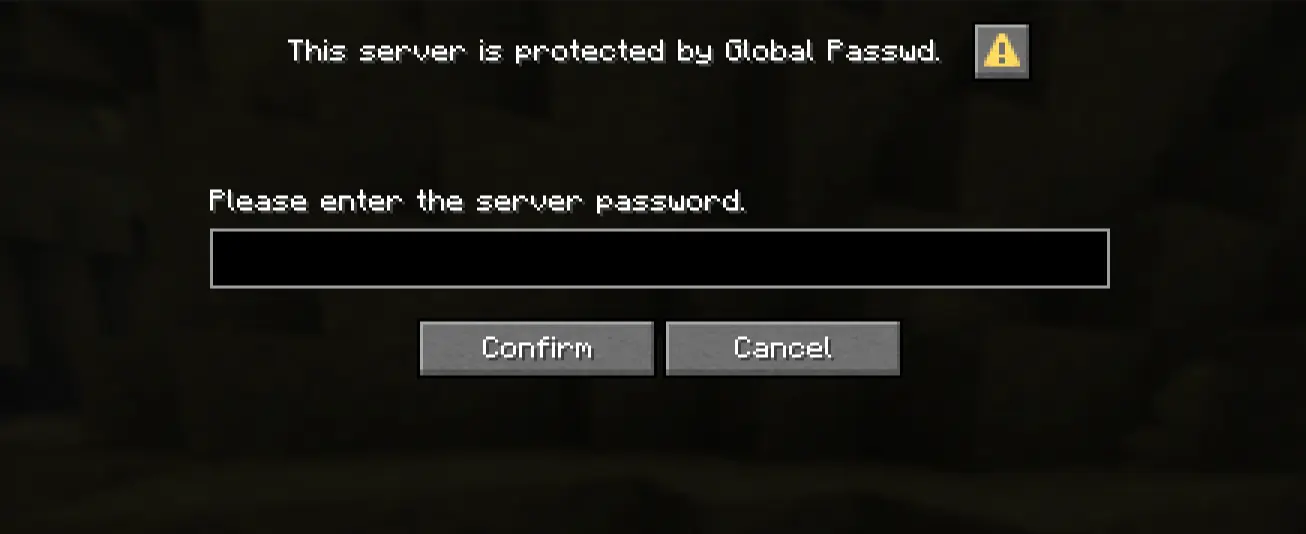
当你尝试加入服务器时,将出现以下界面:
安全性
密码存储在服务器硬件上,且永远不会离开服务器。
它使用 SHA256 哈希算法存储,这意味着保存后完全无法读取原始密码。
这也意味着如果你忘记密码,将无法恢复服务器的密码。
我发布的插件版本使用了未提交到 GitHub 的随机盐值(salt)。
请参阅本文档中的“文档”部分,了解如何编译带有自定义盐值的插件版本,以增强你的服务器安全性。
会话
为了提升用户体验,该插件附带了一个名为“会话(sessions)”的系统。
当尝试连接的玩家输入正确的密码后,他们的 UUID 将被保存到直接存储在你服务器上的本地数据库中。
会话不会永久有效。默认情况下,会话持续 30 天。你可以更改此值;详见下方文档中的“配置”部分。
可以禁用此系统。详见下方文档中的“配置”部分。
自定义
任何服务器管理员都可以通过直接在聊天中输入 passwd 命令,或编辑服务器上的 config.yml 文件来按喜好自定义插件。
如需更多信息,请参阅下方的文档。
开始使用插件
你可以在 Modrinth 和 Curseforge 上下载该插件。
你也可以使用该插件 GitHub 页面的 Releases 标签页。
下载完成后,将 .jar 文件放入 Minecraft 服务器的 ./plugins 目录中。
警告:该插件未附带默认密码。
这意味着如果你不设置密码,玩家将不会被要求输入密码。
请在插件安装后使用 'passwd change <password>' 命令。
文档
你可以在该插件 GitHub 项目的 README 中找到插件的文档。
报告错误
如果你在插件中发现任何错误或希望更改、添加等功能,请随时在该插件的 GitHub 页面上 创建 Issue。
致谢
本插件由 我 独立开发。开发过程中未使用任何 AI。
对 Paper 提供的 Dialog API 的使用以及超时系统的实现,灵感来源于 foenichs 开发的 Password 插件。
请查看他的作品,他制作了很多很酷的东西!
Global Passwd is a Minecraft plugin that, once installed on your server, lets you set a global password that locks the server.
When the server is locked, every player trying to connect will be prompted to enter the password.
If the password is correct, they will successfully be connected; otherwise they will be disconnected.
This screen will appear when you try to join the server :
Security
The password is stored on the server hardware and never leaves it.
It is stored using SHA256 hashing, meaning the password can't be read at all after being saved.
This also means you won't be able to recover your server password if you forget it.
The version of the plugin shipped by me uses a randomized salt that is not committed to GitHub.
See the "Documentation" section in this file to see how to compile your own version of the plugin with a custom salt to enhance your server security.
Sessions
To enhance the user experience, this plugin is shipped with a system called "sessions".
When a player trying to connect types in the right password, their UUID will be saved in a local database stored directly on your server.
Sessions don't last for a lifetime. By default, a session lasts 30 days. You can change this value; see the 'Configuration' part of the documentation below.
This system can be disabled. See the "Configuration" part of the documentation below.
Customization
Any server owner can customize the plugin to their liking by directly typing into the chat the "passwd" command, or by editing the config.yml file on your server.
For further information, please refer to the documentation below.
Start using the plugin
You can download the plugin on Modrinth and Curseforge.
You can also use the Releases tab on the GitHub page of this plugin.
Once downloaded, move the .jar file into the ./plugins directory of your Minecraft server.
Warning: The plugin isn't shipped with a default password.
This means that if you don't set up a password, no password will be asked of the player.
Please use the 'passwd change <password>' command once the plugin is installed.
Documentation
You can find the Documentation of this plugin in the README of the GitHub project.
Report a bug
Feel free to open an Issue on the GitHub page of this plugin if you encounter any bugs or things you would like to change, add, etc., in this plugin.
Credits
This plugin was developed entirely by me. No AI was used during the process.
The use of the Dialog API provided by Paper and the timeout system were inspired by the Password plugin developed by foenichs.
Please check his work, he makes very cool stuff!


 插件

 插件
 插件
 插件
 插件
 插件
评论 0
登录后参与评分
还没有评论,来抢沙发吧