通过共享的箱子菜单交换物品、货币和经验等级。
GoodsTrade 为双方玩家提供独立的报价区域,以便他们在确认前查看交易内容。一旦双方确认,插件将锁定报价并启动可配置的倒计时。关闭或取消交易会返还已提供的物品。
功能
- 通过一个库存菜单与其他玩家交易物品。
- 添加 Vault 货币、PlayerPoints、ExcellentEconomy 货币或 Minecraft 经验等级的报价。一次交易可以包含多种货币。
- 需要双方玩家确认,并在报价更改时重置确认状态。
- 使用
/gt sendtrade <player> 发送请求,或在启用该触发器时潜行右键点击对方。接收方可以通过潜行右键点击回来接受请求。
- 允许玩家开启或关闭收到的交易请求。
- 设置每个玩家的请求冷却时间和单独的请求过期时间。
- 按世界和距离限制交易,当玩家离开允许区域时自动取消交易。
- 可选择在受到伤害时取消交易、防止伤害,或在交易期间限制移动。
- 使用名称、描述(lore)、NBT 路径和值配置物品限制。
- 自定义菜单材质、名称、描述、数量按钮以及特定货币的按钮外观。
- 使用内置的英文或中文消息,支持可配置的语言文件。
- 管理员可以在不需要第二个玩家的情况下测试交易菜单。
游戏内交易
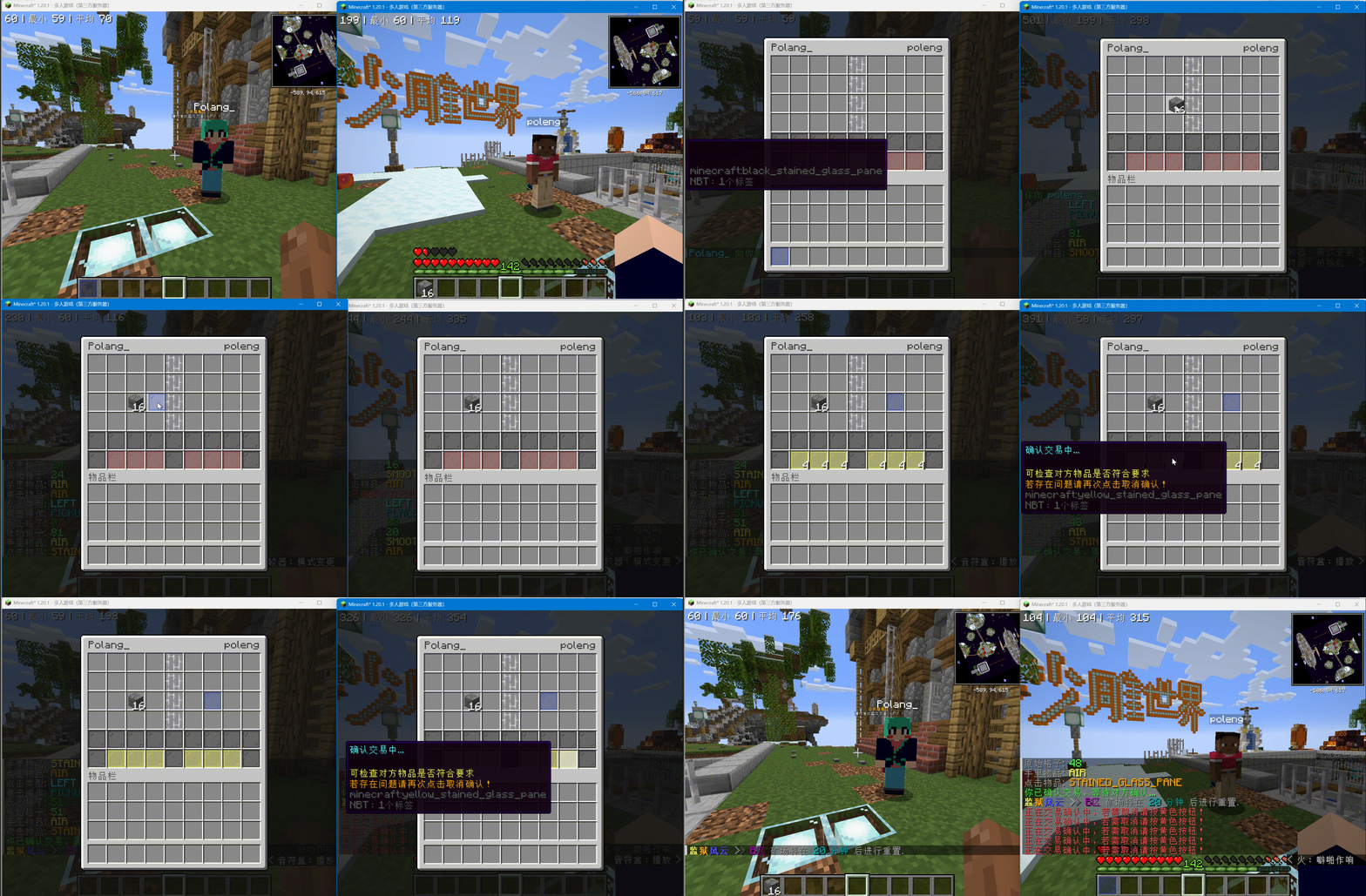
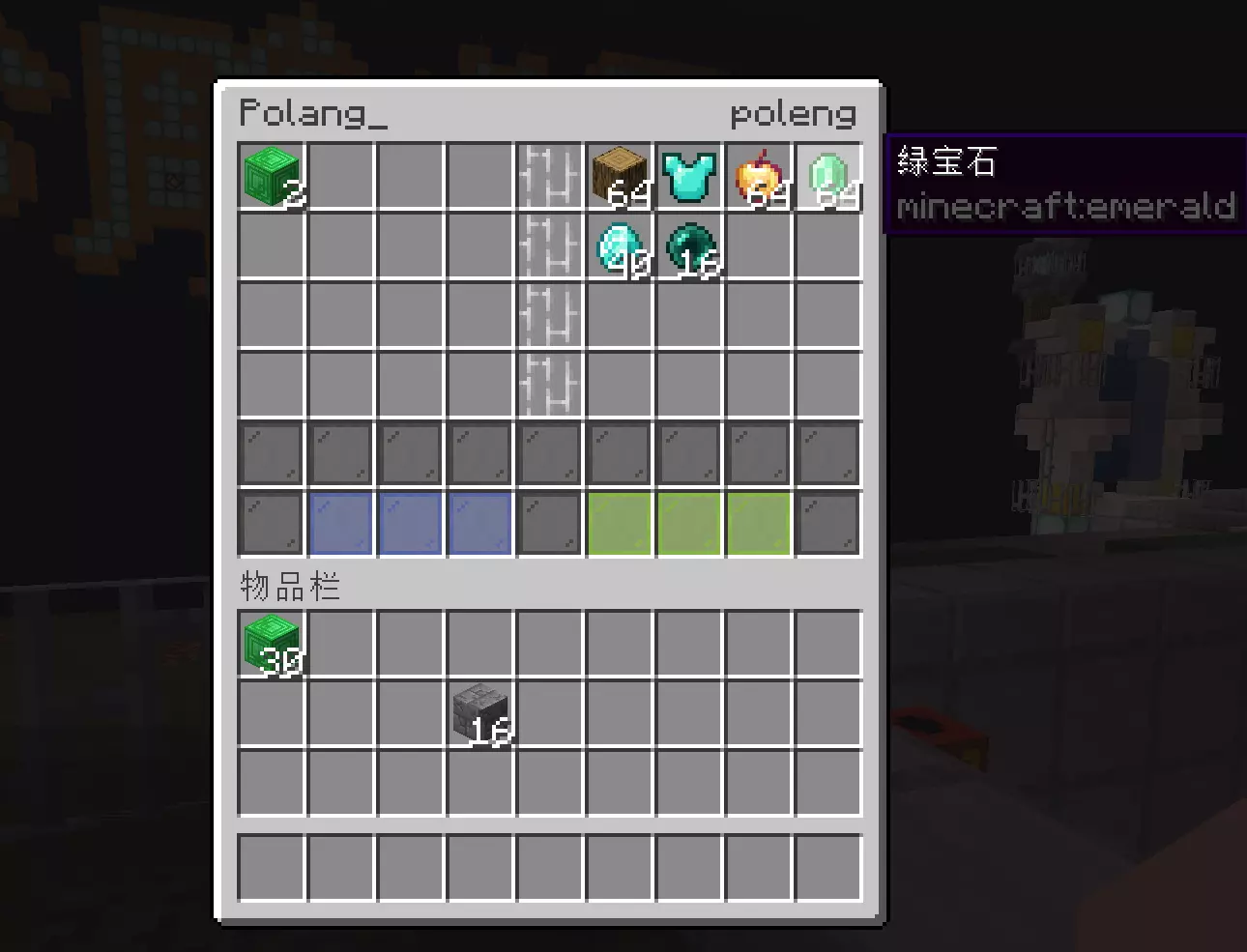
玩家将物品放入自己一侧的菜单中,并查看另一方的报价。确认和倒计时对双方玩家都可见。
要求
- Minecraft: 1.12–26.2。
- 服务端软件: Bukkit、Spigot 或 Paper。目前未声明支持 Folia。
- Java: 8 或更高版本。
- 物品交易: 无需安装经济插件。
- 货币交易: 安装所需的经济提供商。Vault 还需要兼容的经济插件;PlayerPoints 和 ExcellentEconomy 使用其自身的余额系统。
- 经验等级: 无需安装经济插件。
- PlaceholderAPI: 可选,用于
%goodstrade_stats% 占位符。
安装
- 下载
GoodsTrade-*-lite.jar 构建文件并将其放入服务器的 plugins/ 目录。
- 启动服务器以创建
plugins/GoodsTrade/config.yml、View.yml 以及语言文件。
- 启用你想要使用的货币和菜单选项。
- 编辑配置后运行
/gt reload。重新加载会取消当前活跃的交易并返还其物品,同时清除待处理的请求和请求冷却时间。
缺失或不可用的经济提供商将被跳过,因此物品交易仍可正常使用。
开始交易
- 运行
/gt sendtrade <player>,或潜行右键点击目标玩家。
- 接收方接受聊天邀请、潜行右键点击你,或运行
/gt accept。
- 将物品放入你的报价区域,并使用已启用的货币的数量按钮。
- 双方玩家确认他们的报价。
- 倒计时结束后,插件结算货币报价并交换物品。
任一玩家在完成前均可取消交易。无法放入所有者背包的物品将在该玩家所在位置掉落。
命令与权限
默认启用普通玩家命令:
/gt: 显示帮助。权限:goodstrade.command。/gt sendtrade <player>: 发送请求。权限:goodstrade.command.sendtrade。/gt accept [player]: 接受请求。权限:goodstrade.command.accept。/gt toggle [true|false]: 控制传入的请求。权限:goodstrade.command.toggle。
管理员命令默认仅对操作员开放:
/gt trade <sender> <receiver>: 在两名玩家之间启动交易。权限:goodstrade.command.trade。/gt test [test-name]: 控制测试交易的双方。权限:goodstrade.command.test。/gt reload: 重新加载配置和消息。权限:goodstrade.command.reload。
所有命令都需要基础的 goodstrade.command 权限。
货币与菜单设置
货币和经验交易默认处于关闭状态。设置 Trade.Economy.Enable: true 以启用它们。Vault 是唯一默认启用的货币条目;根据需要可在 Trade.Economy.Currencies 下启用其他提供商。每种货币支持显示名称和一到四个数量档位。
左击数量按钮可增加报价,右击可减少。左击中间分隔线可切换选定的货币;现有报价在分隔线中保持可见。双方玩家必须在切换货币前取消确认。
货币分别结算,不会相互转换。不要通过不同的提供商配置相同的底层账户。经验报价使用整数等级,并保留经验条进度。
View.yml 控制菜单外观。currency-defaults 设置提供商默认值,而 currency-buttons 覆盖特定货币的按钮。
配置指南 包含完整示例。
交易限制与请求
Trade.Enabled-Worlds: ["*"] 允许所有世界,包括新创建的世界。列出世界名称以仅允许这些世界,或在名称前加上 ! 以排除它。例如,["*", "!world"] 允许除 world 之外的所有世界。空列表将在所有地方禁用交易。双方参与者必须都在允许的世界中;进入被禁用的世界会清除相关请求并取消活跃交易,返还其物品。
默认情况下,玩家必须处于同一世界且距离在 4 格以内才能发送或接受请求并进行交易。交易过程中的限制为 8 格。距离计算包含高度差。超出活动限制会取消交易并返还物品。可在 Trade.Distance 下更改这些设置;设为 0 则禁用距离限制。跨世界交易需要 Same-World: false 以及 Start: 0 和 Trading: 0。
Trade.Request.Cooldown(请求冷却时间)默认为成功请求后的 5 秒,并对该发送者的所有接收者生效。设为 0 可禁用冷却时间。Trade.Request.Expire(请求过期时间)独立默认为 30 秒。无法通过向同一玩家重新发送请求来延长其有效期。正在交易的玩家无法发送或接受请求,开始交易会清除双方相关的请求。
Trade.Safe.Close-On-Damage: true(受伤时关闭交易)会在任一玩家受到未抵消的正向伤害时取消交易。默认关闭。Trade.Safe.Damage 启用伤害免疫并具有优先级;Trade.Safe.Move 限制交易期间的移动。
语言
默认语言跟随服务器的系统区域设置,简体中文作为后备语言。在 config.yml 中设置 Language: en_us 或 Language: zh_cn 以显式选择,然后运行 /gt reload。
现有的语言文件和翻译会被保留。启动或重载时,缺失的文件和翻译键会从捆绑的默认值中添加。帮助文本和玩家消息可在 plugins/GoodsTrade/lang/ 下编辑。
支持
请在 GitHub Issues 报告问题。中文用户还可以加入 QQ 群 620224543。
GoodsTrade 基于 GNU GPL v3 许可协议提供。如果您觉得它有用,请考虑 ⭐ GitHub Star。
使用统计
Exchange items, money, and experience levels through a shared chest menu.
GoodsTrade gives both players separate offer areas so they can review the exchange before confirming. Once both players confirm, the plugin locks the offers and starts a configurable countdown. Closing or cancelling the trade returns the offered items.
Features
- Trade items with another player through one inventory menu.
- Add offers in Vault currency, PlayerPoints, ExcellentEconomy currencies, or Minecraft experience levels. One trade can include several currencies.
- Require confirmation from both players and reset confirmation when an offer changes.
- Send requests with
/gt sendtrade <player>, or sneak-right-click when that trigger is enabled. Recipients can sneak-right-click back to accept.
- Let players turn incoming trade requests on or off.
- Set a per-player request cooldown and a separate request expiry time.
- Limit trading by world and distance, with automatic cancellation when players leave the allowed area.
- Optionally cancel trades on damage, prevent damage, or restrict movement while trading.
- Configure item restrictions using names, lore, NBT paths, and values.
- Customize menu materials, names, lore, amount buttons, and currency-specific button appearances.
- Use built-in English or Chinese messages, with configurable language files.
- Test the trade menu as an administrator without needing a second player.
Trading in game
Players put items on their own side of the menu and review the other player's offer. Confirmation and the countdown are visible to both players.
Requirements
- Minecraft: 1.12–26.2.
- Server software: Bukkit, Spigot, or Paper. Folia support is not currently claimed.
- Java: 8 or newer.
- Item trading: no economy plugin is required.
- Currency trading: install the provider you want to use. Vault also needs a compatible economy plugin; PlayerPoints and ExcellentEconomy use their own balances.
- Experience levels: no economy plugin is required.
- PlaceholderAPI: optional, for the
%goodstrade_stats% placeholder.
Installation
- Download the
GoodsTrade-*-lite.jar build and put it in your server's plugins/ directory.
- Start the server to create
plugins/GoodsTrade/config.yml, View.yml, and the language files.
- Enable the currencies and menu options you want to use.
- Run
/gt reload after editing the configuration. Reload cancels active trades and returns their items, then clears pending requests and request cooldowns.
Missing or unavailable economy providers are skipped, so item trading remains available.
Start a trade
- Run
/gt sendtrade <player>, or sneak-right-click the player.
- The recipient accepts the chat invitation, sneak-right-clicks you back, or runs
/gt accept.
- Put items into your offer area and use the amount buttons for enabled currencies.
- Both players confirm their offers.
- After the countdown, the plugin settles the currency offers and exchanges the items.
Either player can cancel before completion. Items that do not fit in the owner's inventory are dropped at that player's location.
Commands and permissions
Normal player commands are enabled by default:
/gt: show help. Permission: goodstrade.command./gt sendtrade <player>: send a request. Permission: goodstrade.command.sendtrade./gt accept [player]: accept a request. Permission: goodstrade.command.accept./gt toggle [true|false]: control incoming requests. Permission: goodstrade.command.toggle.
Administrator commands default to operators:
/gt trade <sender> <receiver>: start a trade between two players. Permission: goodstrade.command.trade./gt test [test-name]: control both sides of a test trade. Permission: goodstrade.command.test./gt reload: reload configuration and messages. Permission: goodstrade.command.reload.
The base goodstrade.command permission is required for all commands.
Currencies and menu settings
Money and experience trading are off by default. Set Trade.Economy.Enable: true to enable them. Vault is the only currency entry enabled by default; enable other providers under Trade.Economy.Currencies as needed. Each currency supports a display name and one to four amount steps.
Left-click an amount button to increase the offer, or right-click to decrease it. Left-click the center divider to change the selected currency; existing offers remain visible in the divider. Both players must cancel confirmation before switching currencies.
Currencies are settled separately and are not converted into one another. Do not configure the same underlying account twice through different providers. Experience offers use whole levels and preserve experience bar progress.
View.yml controls menu appearances. currency-defaults sets provider defaults, while currency-buttons overrides a specific currency's buttons.
The configuration guide contains complete examples.
Trade limits and requests
Trade.Enabled-Worlds: ["*"] allows all worlds, including newly created worlds. List world names to allow only those worlds, or prefix a name with ! to exclude it. For example, ["*", "!world"] allows every world except world. An empty list disables trading everywhere. Both participants must be in allowed worlds; entering a disabled world clears related requests and cancels an active trade, returning its items.
By default, players must be in the same world and within 4 blocks to send or accept a request and open a trade. The limit during trading is 8 blocks. Distances include height. Exceeding the active limit cancels the trade and returns items. Change these settings under Trade.Distance; 0 disables a distance limit. Cross-world trading requires Same-World: false and both Start: 0 and Trading: 0.
Trade.Request.Cooldown defaults to 5 seconds after a successful request and applies across all recipients for that sender. Set it to 0 to disable the cooldown. Trade.Request.Expire independently defaults to 30 seconds. An existing request to the same player cannot be resent to extend its lifetime. Players already trading cannot send or accept requests, and starting a trade clears related requests for both participants.
Trade.Safe.Close-On-Damage: true cancels a trade when either player takes uncancelled positive damage. It is off by default. Trade.Safe.Damage enables damage immunity and takes priority; Trade.Safe.Move restricts movement during trading.
Language
The default language follows the server's system locale, with Simplified Chinese as the fallback. Set Language: en_us or Language: zh_cn in config.yml to choose explicitly, then run /gt reload.
Existing language files and translations are preserved. Missing files and translation keys are added from the bundled defaults on startup or reload. Help text and player messages can be edited under plugins/GoodsTrade/lang/.
Support
Report problems on GitHub Issues. Chinese-speaking users can also use QQ group 620224543.
GoodsTrade is available under the GNU GPL v3. If you find it useful, a ⭐ GitHub Star is appreciated.
Usage statistics


 插件

 插件

 插件
 插件
 插件
 插件
评论 0
登录后参与评分
还没有评论,来抢沙发吧