
GreatCrafts
没有其他插件允许在配方原料中使用堆叠物品!
尽情使用你的附魔钻石吧——它需要 25,600 个钻石,或者如果你更“狠”的话,甚至需要钻石块来制作!
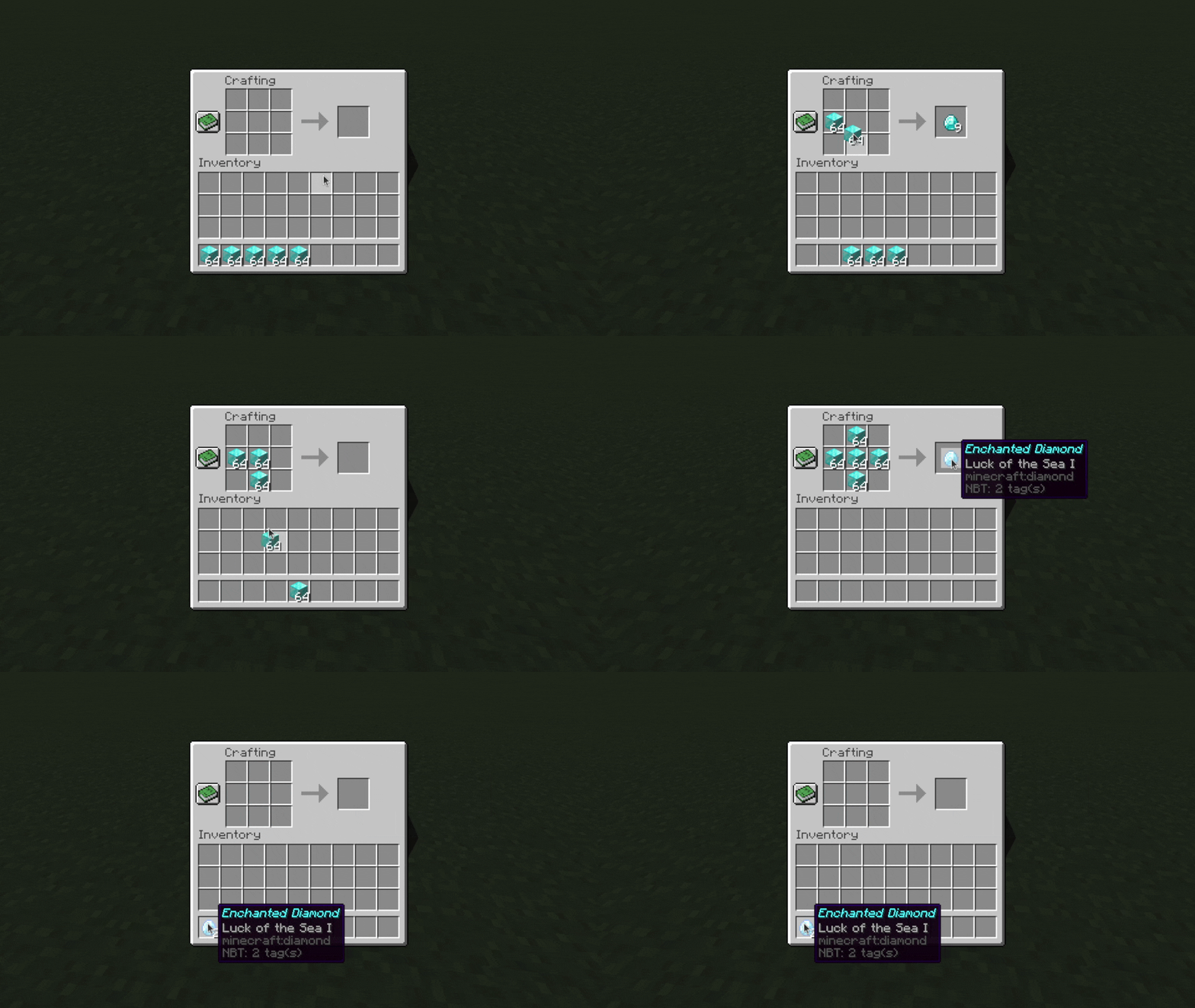
GreatCrafts 是一个合成配方插件,允许你创建并自定义自己的工作台合成配方。
⚠ 请确保下载正确的文件! Minecraft 1.19-1.20 和 1.21+ 有两个不同的版本文件。
功能
- 支持有形状和无形状的配方
- 支持精确的 NBT 匹配,可为每种原料单独定制
- 支持配方的多种选择(例如:任意类型的木板)
- 添加堆叠物品配方,需要成堆的原料
- 这允许你要求最多 576 个原料来合成单个物品
- 精确匹配仍然有效,且支持有形状和无形状的堆叠物品配方
- 支持 1.21+ 版本的自动合成器用于所有配方,包括堆叠物品
- 拥有简单易用的 GUI,供玩家和管理员使用
安装
下载 jar 文件,将其放入 plugins 文件夹,然后重启服务器!
命令
/recipes - 打开所有自定义配方的菜单(所有玩家均可使用)
/viewrecipe <namespace:name> - 查看某个配方的合成网格(所有玩家均可使用)
/addrecipe <namespace:name> - 添加新的自定义配方
/editrecipe <namespace:name> - 编辑自定义配方
/deleterecipe <namespace:name> - 删除自定义配方
/reloadrecipes - 重新加载对配方的任何更改(如果它们尚未被重新加载/激活)
/greatcraftsutil - 包含实用命令(见下文)
权限
greatcrafts.viewrecipes - 允许通过 /recipes 和 /viewrecipes 查看配方
greatcrafts.modifyrecipes - 允许通过 /addrecipe、/editrecipe 和 /reloadrecipes 修改配方
greatcrafts.greatcraftsutil - 允许使用 /greatcraftsutil
greatcrafts.greatcraftscommand - 允许使用 /greatcrafts(以及 /greatcrafts reload)
创建/编辑配方
视频教程:
有形状配方演示
无形状配方演示
精确匹配演示
材料选择演示
运行 /addrecipe <craft> 或 /editrecipe <craft>。
对于 <craft> 参数,需同时包含命名空间和名称,例如 myspecialnamespace:mycustomcraft。
注意:如果你的命名空间是 minecraft:...,则会覆盖该名称下现有的配方(如果有的话)。
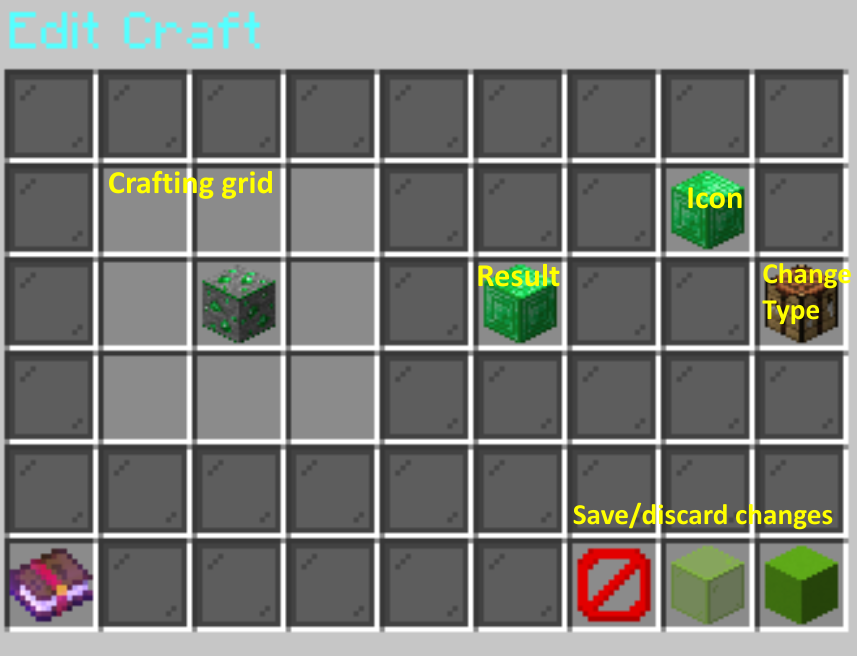
将物品放置在左侧的 3x3 合成网格中,中间为结果槽,右上角为图标槽(用于在 /recipes 菜单中标记合成)。
你可以在原料中放置堆叠物品或带有 NBT 的物品,它们会被保存,但除非你启用精确匹配和/或堆叠物品,否则玩家只需匹配物品类型即可。
对于每种原料,你还可以启用精确匹配或材料选择。 精确匹配要求 NBT 数据完全一致(例如:具有特定名称的物品或具有特定附魔的物品),而材料选择允许使用任意一种类型的物品(例如:任意类型的木板)。 左键按住 Shift 点击原料可切换精确匹配,右键按住 Shift 点击可切换材料选择。
点击右侧的工作台以更改配方的类型:
- 有形状(游戏中大多数配方的类型;网格的形状很重要)
- 无形状(原料的顺序可以任意)
- 堆叠物品有形状(每个槽位需要成堆的原料,而不是仅一个物品)
- 堆叠物品无形状
最后,点击屏障方块以丢弃更改,点击绿色玻璃以保存更改,或点击绿色混凝土以保存并激活更改。 激活更改会使合成立即对玩家可用,尽管客户端直到断开连接并重新连接后才能识别该合成。
查看配方
/recipes 显示玩家可用的所有配方,点击某个配方会显示该配方的合成网格。
/viewrecipe <namespace:name> 显示特定配方的合成网格。
堆叠物品
视频教程:
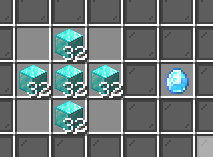
堆叠物品是一种特殊类型的配方,要求每种原料都需要成堆的数量,而不是每种仅需要一个。 在所示示例中,制作一个附魔钻石需要 160 个钻石块。 (如果玩家尝试用少于 160 个钻石块进行合成,将会收到错误消息。)
创建它们的流程相同;只需在合成网格中放置成堆的物品即可。 记得点击右侧的工作台,将配方类型更改为堆叠物品。
这些也可以像以前一样与精确匹配结合使用,所以如果你真的“狠”,你可以要求 160 个附魔钻石来制作一个附魔钻石块...
无形状堆叠物品的注意事项: 支持同一物品类型的多个堆叠,且必须完全匹配。 例如,如果需要 16 个钻石的堆叠和 32 个钻石的堆叠,玩家必须在配方中恰好使用 16 和 32 个钻石。 其他方式,如在一个槽位中使用 48 个钻石,或在三个槽位中各使用 16 个钻石,均无效。
额外设置
以下是你可以添加到配方中的一些额外设置。
你可以使用 /editrecipe <recipe> <setting name> <new value> 进行编辑,或通过点击编辑器 GUI 中的纸张图标进行修改。
自动解锁配方
在某些条件下,配方可以自动为玩家解锁。
这可以在配置文件的 automatically-unlock-recipes 下进行配置。
never- 永不自动解锁自定义配方have-each- 如果玩家拥有所有所需材料,则自动解锁自定义配方have-one- 如果玩家拥有至少一种所需材料,则自动解锁自定义配方always- 立即自动解锁所有自定义配方
为了实现更精细的控制,您还可以使用 /editrecipe <配方> auto-unlock-setting <输入设置> 来针对每个配方单独调整。
权限要求
你可以使用 /editrecipe <配方> permission-requirement <输入权限> 来为特定配方设置权限要求。
请注意,这将阻止合成者使用该配方。
合成限制
你可以使用 /editrecipe <recipe> craft-limit <number> 来限制某个配方的制作次数。
此限制针对每个玩家,且仅适用于堆叠物品配方。
(如果你有一个非堆叠物品的配方,只需将其改为堆叠物品并设置堆叠数量为 1,即可达到相同的效果。)
你还可以通过 config.yml 中的 persistent-crafting-limits 选项自定义制作限制是否在服务器重启时重置(例如用于小游戏)还是永久生效。
实用命令
/greatcraftsutil setcustomname <name... (使用 & 表示颜色)>
将手中物品的自定义名称设置为指定名称。
支持颜色(例如,&a绿色文本)。
/greatcraftsutil setloreline <行号(从 0 开始)> [<描述行内容...(使用 & 表示颜色)>]
修改你手中物品的描述文本。 指定行号(从 0 开始)以及要设置在该行的描述内容,留空则清除该行。 你可以指定一个大于当前描述行数(或当前无描述)的行号,系统会自动添加空的描述行。
/greatcraftsutil deletelorelines <行号(从 0 开始)> [<行号> <行号> ...]
删除指定行号的文本。 可以指定多个行号以进行删除。
/greatcraftsutil enchant <附魔(Minecraft ID)> <等级(设为 0 可移除)>
为手中的物品添加附魔。
你可以使用此命令为物品添加更高等级或不相容的附魔。
附魔参数使用 Minecraft ID,无需包含 minecraft: 前缀。
/greatcraftsutil duplicaterecipe <源命名空间:名称> <目标命名空间:名称>
复制一个配方。
源和目标配方的参数均采用 namespace:name 格式。
支持
如需获取支持、报告错误或提出功能建议,请访问 问题页面。
GreatCrafts
No other plugin allows for stacked items in recipe ingredients!
Have fun with your enchanted diamond block that requires 25,600 diamonds, or if you're even meaner, diamond blocks, to make!
GreatCrafts is a crafting recipe plugin that allows you to create and customize your own crafting table recipes.
⚠ Make sure you download the correct file! There are two different files for Minecraft 1.19-1.20 and 1.21+.
Features
- Supports shaped and shapeless recipes
- Supports exact NBT matching, customizable for each ingredient item
- Supports multiple choices for an ingredient (e.g., any type of wood plank)
- Adds stacked item recipes, which require stacks of ingredients
- This allows you to require up to 576 ingredients to craft a single item
- Exact choice still works, and both shaped and shapeless stacked item recipes are supported
- Supports 1.21+ crafters for all recipes, including stacked items
- Has a simple to use GUI for both players and admins
Installation
Download the jar file, place it in the plugins folder, and restart the server!
Commands
/recipes - Opens a menu of all custom recipes (can be used by all players)
/viewrecipe <namespace:name> - View the crafting grid for a recipe (can be used by all players)
/addrecipe <namespace:name> - Add a new custom recipe
/editrecipe <namespace:name> - Edit a custom recipe
/deleterecipe <namespace:name> - Delete a custom recipe
/reloadrecipes - Reloads any changes to recipes (if they weren't already reloaded/activated already)
/greatcraftsutil - Contains utility commands (see below)
Permissions
greatcrafts.viewrecipes - Allows viewing recipes through /recipes and /viewrecipes
greatcrafts.modifyrecipes - Allows modifying recipes through /addrecipe and /editrecipe and /reloadrecipes
greatcrafts.greatcraftsutil - Allows /greatcraftsutil
greatcrafts.greatcraftscommand - Allows /greatcrafts (and /greatcrafts reload)
Creating/editing recipes
Video tutorials:
Shaped recipe demo
Shapeless recipe demo
Exact choice demo
Material choice demo
Run /addrecipe <craft> or /editrecipe <craft>.
For the <craft> argument, include both the namespace and name, for example myspecialnamespace:mycustomcraft.
Note: If your namespace is minecraft:..., you will overwrite the existing recipe, if any, in that name.
Place the items in the 3x3 crafting grid to the left, the result slot in the middle, and the icon slot (used to label the craft in the /recipes menu) in the top right.
You can put stacks of items or items with NBT in the ingredients and they will be saved, but players will only have to match the item type unless you enable exact choice and/or stacked items.
For each ingredient, you can also enable exact choice or material choice. Exact choice requires an exact match of NBT data (e.g., an item with a specific name or an item with specific enchantments), and material choice allows one of any item type to be used (e.g., any type of plank). Shift left click on an ingredient to toggle exact choice, and shift right click to toggle material choice.
Click on the crafting table to the right to change the type of the recipe:
- Shaped (most recipes in the game; shape of the grid matters)
- Shapeless (the ingredients can be in any order)
- Stacked items shaped (require stacks of ingredients in each slot instead of just a single item)
- Stacked items shapeless
Finally, click the barrier block to discard your changes, the green glass to save your changes, or the green concrete to save and activate your changes. Activating your changes makes the craft available to players immediately, although the client doesn't recognize the craft until you disconnect and reconnect.
Viewing recipes
/recipes shows all recipes available to the player, and clicking on a recipe will show the crafting grid for that recipe.
/viewrecipe <namespace:name> shows the crafting grid for a specific recipe.
Stacked items
Video tutorial:
Stacked items are a special type of recipe that require stacks of each ingredient instead of just 1 of each. In the example shown, it would take 160 diamond blocks to make 1 enchanted diamond. (Players will get an error message if they try to craft it with fewer diamond blocks.)
Creating them is the same process; just put stacks of items in the crafting grid. Make sure to also click on the crafting table on the right to change the recipe type to stacked items.
These can also be combined with exact choice the same way as before, so if you're really mean you can require 160 enchanted diamonds to make an enchanted diamond block...
Note for shapeless stacked items: Multiple stacks of the same item type are supported, and they must be matched exactly. For example, if a stack of 16 and a stack of 32 diamonds are required, players must use exactly 16 and 32 diamonds in the recipe. Other ways, like 48 diamonds in 1 slot, or 16 diamonds in 3 slots, will not work.
Extra settings
These are some extra settings that you can add to recipes.
You can edit them with /editrecipe <recipe> <setting name> <new value>, or by clicking the paper icon in the editor GUI.
Automatically unlocking recipes
Recipes can be automatically unlocked for players under certain conditions.
This can be configured under automatically-unlock-recipes in the config file.
never- Never automatically unlocks custom recipeshave-each- Automatically unlocks custom recipes if the player has each of the required ingredientshave-one- Automatically unlocks custom recipes if the player has at least one of the required ingredientsalways- Automatically unlocks all custom recipes immediately
For more fine-grained control, you can also use /editrecipe <recipe> auto-unlock-setting <enter a setting> to adjust it for each recipe specifically.
Permission requirements
You can require a permission to make a specific recipe with /editrecipe <recipe> permission-requirement <enter a permission>.
Note that this will prevent crafters from using the recipe as well.
Craft limits
You can limit the number of times a recipe can be made with /editrecipe <recipe> craft-limit <number>.
This limit is per-player and only applies to stacked item recipes.
(If you have a non-stacked item recipe, just change it to stacked items with stack sizes of 1 for the same effect.)
You can also customize whether craft limits reset on server restart (e.g. minigames) or are permanent via the persistent-crafting-limits option in config.yml.
Utility commands
/greatcraftsutil setcustomname <name... (use & for colors)>
Sets the custom name of the item in your hand to the specified name.
Colors are supported (e.g., &agreen text).
/greatcraftsutil setloreline <line # (starts from 0)> [<lore line... (use & for colors)>]
Modifies the lore of the item in your hand. Specify the line number (starting from 0) and the lore to set on that line, or leave blank to clear it. You can specify a line number that is longer than the current lore (or if there is no current lore) and empty lore lines will automatically be added.
/greatcraftsutil deletelorelines <line # (starts from 0)> [<line #> <line #> ...]
Deletes the specified line numbers. You can specify multiple line numbers to delete.
/greatcraftsutil enchant <enchantment (Minecraft ID)> <level (0 to remove)>
Adds an enchant to the item in your hand.
You can use this command to add higher levels or incompatible enchants to items.
The enchantment argument uses Minecraft IDs without the minecraft: prefix.
/greatcraftsutil duplicaterecipe <source namespace:name> <target namespace:name>
Duplicates a recipe.
The source and target recipe arguments are both in the namespace:name format.
Support
To get support, report bugs, or make feature requests, please go to the issues page.

下载 GreatCrafts
需要联机服务器吗?
稳定流畅、一键部署,几分钟即可和朋友联机开服
最低仅需 8 元/月 即可畅快联机
下载 GreatCrafts
需要联机服务器吗?
稳定流畅、一键部署,几分钟即可和朋友联机开服
最低仅需 8 元/月 即可畅快联机
下载 GreatCrafts
需要联机服务器吗?
稳定流畅、一键部署,几分钟即可和朋友联机开服
最低仅需 8 元/月 即可畅快联机
下载 GreatCrafts
需要联机服务器吗?
稳定流畅、一键部署,几分钟即可和朋友联机开服
最低仅需 8 元/月 即可畅快联机
下载 GreatCrafts
需要联机服务器吗?
稳定流畅、一键部署,几分钟即可和朋友联机开服
最低仅需 8 元/月 即可畅快联机
下载 GreatCrafts
需要联机服务器吗?
稳定流畅、一键部署,几分钟即可和朋友联机开服
最低仅需 8 元/月 即可畅快联机
下载 GreatCrafts
需要联机服务器吗?
稳定流畅、一键部署,几分钟即可和朋友联机开服
最低仅需 8 元/月 即可畅快联机
下载 GreatCrafts
需要联机服务器吗?
稳定流畅、一键部署,几分钟即可和朋友联机开服
最低仅需 8 元/月 即可畅快联机
下载 GreatCrafts
需要联机服务器吗?
稳定流畅、一键部署,几分钟即可和朋友联机开服
最低仅需 8 元/月 即可畅快联机
下载 GreatCrafts
需要联机服务器吗?
稳定流畅、一键部署,几分钟即可和朋友联机开服
最低仅需 8 元/月 即可畅快联机
- 新增选项,使合成限制在服务器重启后保持不变
- 新增菜单,便于编辑配方的额外设置
- 在编辑界面中点击额外设置的纸张现在会显示额外设置菜单
- 配方查看器中新增了返回按钮,可返回配方列表
- 新增可配置的全局保存频率
- 更友好的错误提示信息
- 改进了材料选择物品列表的显示效果
- 当合成数量为 0 时不再弹出通知
本版本适用于 Minecraft 1.21+。
关于这个资源的讨论、问题反馈与使用心得
还没有讨论,来发第一帖吧
你是这个资源的作者?登录后可认领此资源。
相似资源
 插件

PacketEvents 是一款专为 Minecraft Java 版打造的协议库,旨在简化数据包的处理与传输。
 插件
ExyliaPlugins 的库。
 插件
通过对话框或铁砧界面帮助你的 Anthme
 插件
重新定义服务器上的生物运输方式。使用高度可定制的口袋道具,安全地捕获、存储和释放任何实体。
 插件
为基于 Spigot/Paper/Folia 的服务器添加对 Vivecraft 的支持
 插件
用于绘制游戏内地图或在浏览器中随探索实时进行地图绘制的实时地图。
评论 0
登录后参与评分
还没有评论,来抢沙发吧