hCaptureEvent
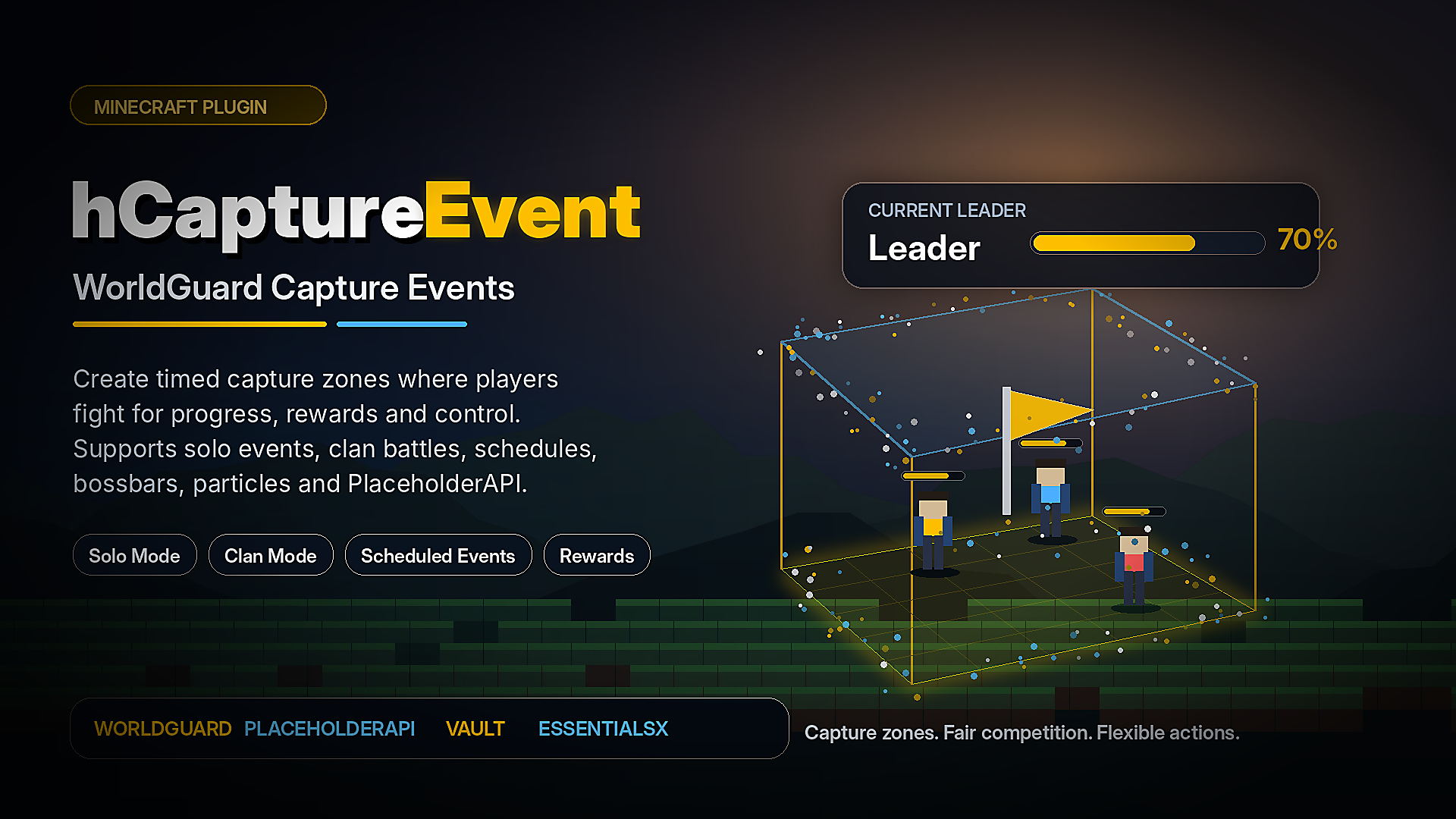
hCaptureEvent 是一款适用于 Minecraft 服务器的灵活事件捕获插件。
在 WorldGuard 区域内部创建定时捕获区,让玩家或氏族争夺控制权,实时追踪进度,并自动奖励表现最佳的参与者。
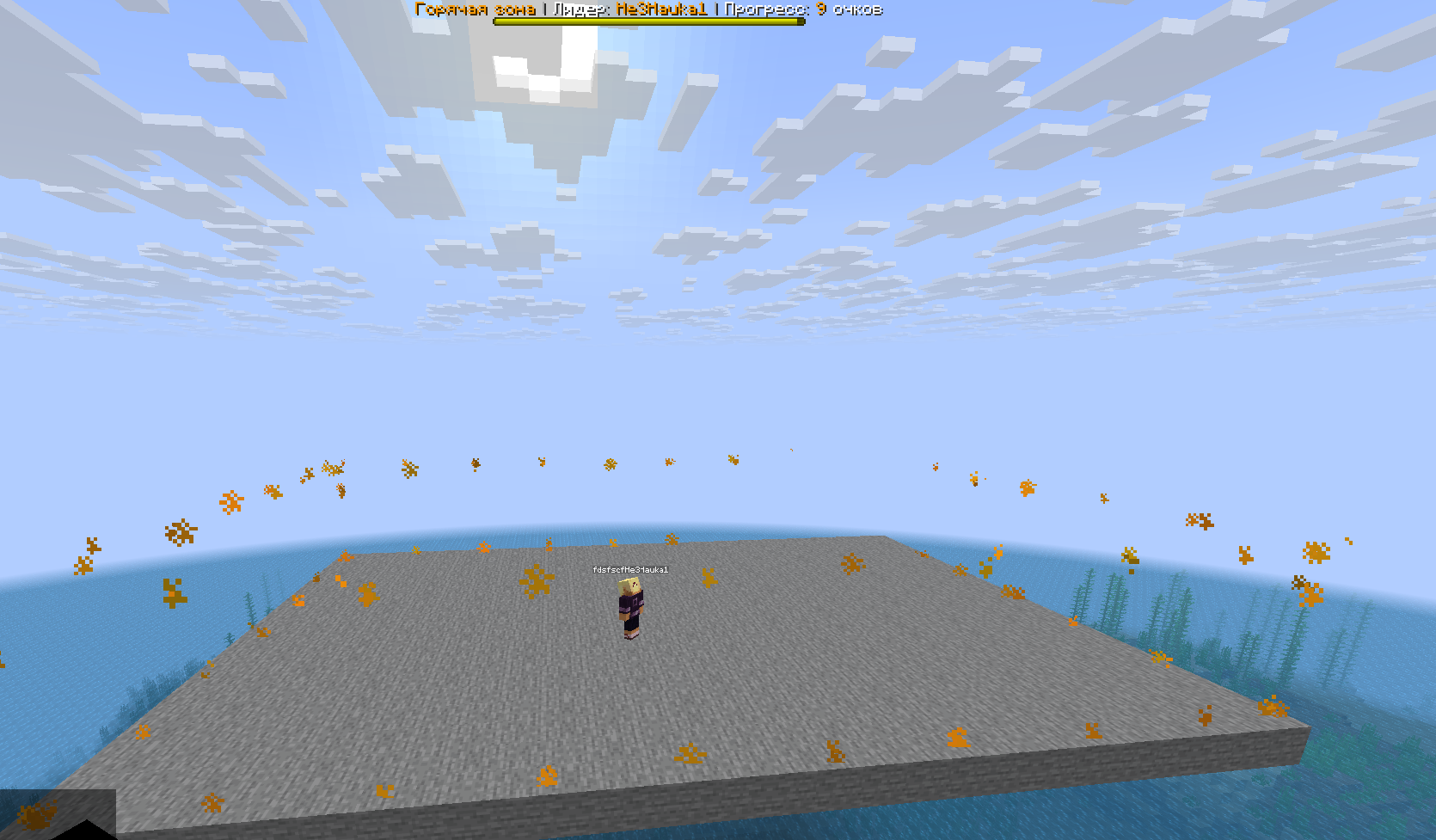
该插件专为需要活跃 PvP 事件、占领据点式玩法、氏族竞赛、定时热点区域、自定义奖励以及完全可配置的事件逻辑的服务器而设计。
概述
hCaptureEvent 允许你使用 WorldGuard 区域来创建捕获区。
当活动开始时,位于配置区域内的玩家开始积累捕获进度。插件会追踪参与者、领先者、剩余时间、最终排名以及奖励。
你可以运行简单的单人捕获活动,或者通过 hClans 启用氏族模式以创建团队竞争。
所有内容均通过 YAML 文件进行配置,因此每个捕获区都可以拥有自己的设置、时间表、奖励、视觉效果和规则。
主要功能
基于 WorldGuard 的捕获区
hCaptureEvent 使用 WorldGuard 区域作为捕获区域。
创建一个 WorldGuard 区域,将其连接到捕获区配置文件,插件便会在活动期间追踪该区域内的玩家。
每个捕获区都通过其独立的文件进行配置:
plugins/hCaptureEvent/captures/default.yml
plugins/hCaptureEvent/captures/clan.yml
区域 ID 取自文件名。
例如:
default.yml -> default
clan.yml -> clan
这使得创建和管理多个独立的捕获活动变得轻松易行。
多捕获区
你可以根据服务器需求创建任意数量的捕获区。
每个捕获区都可以拥有独立的:
- WorldGuard 区域
- 世界(World)
- 捕获持续时间
- 最低在线玩家数量要求
- 自动时间表
- Boss 栏(Boss Bar)
- 粒子显示
- 奖励
- 开始动作
- 停止动作
- 进入动作
- 离开动作
- 进度奖励
- 最终排名奖励
- 氏族模式设置
这让你能够创建适用于 PvP 竞技场、氏族战争、生存世界、季节性活动、日常竞赛或轮换热点区域的不同活动。
玩家捕获模式
在普通模式下,玩家以个人身份参与。
当玩家进入活跃的捕获区时,插件开始计算其进度。玩家在区域内停留的时间越长,获得的进度越多。
插件可以追踪:
- 当前领先者
- 玩家进度
- 捕获耗时
- 活动剩余时间
- 最终排名
- 顶级参与者
- 最终获胜者
此模式适用于占领据点活动、PvP 区域、竞技场比赛和基于奖励的活动区域。
氏族捕获模式
hCaptureEvent 支持通过 hClans 进行的基于氏族的捕获活动。
启用氏族模式后,玩家将与其氏族成员一起参与。插件会计算氏族进度并确定活动中的领先氏族。
氏族模式可用于:
- 仅允许拥有氏族的玩家参与
- 追踪氏族进度
- 检测领先氏族
- 检测获胜氏族
- 奖励获胜氏族
- 给予氏族经验值
- 在奖励动作中使用获胜氏族中表现最好的玩家
此模式适用于拥有氏族、派系、公会或团队 PvP 系统的服务器。
定时活动
每个捕获区都可以在配置的时间自动开始。
示例:
time:
  enable: true
  start:
    - "00:00"
    - "00:30"
  zone: "Europe/Moscow"
  format: "HH:mm"
你可以配置:
- 多个开始时间
- 时区
- 时间格式
- 最低在线人数要求
- 每个区域的独立时间表
这对于希望定期自动化活动而不需要工作人员手动介入的服务器非常有用。
手动活动控制
管理员可以手动启动和停止活动。
你可以同时启动所有区域,或仅启动特定区域。
示例:
/hcaptureevent start
/hcaptureevent start all
/hcaptureevent start default

/hcaptureevent stop
/hcaptureevent stop all
/hcaptureevent stop default
这让工作人员对活跃的捕获活动拥有完全的控制权。
最低在线人数要求
每个区域在开始前可以要求达到一定的最低在线玩家数量。
如果服务器在线玩家不足,活动将不会开始,并且你可以为此情况配置自定义动作。
这有助于防止在竞争不足时启动捕获活动。
Boss 栏支持
每个活跃的捕获区都可以显示带有实时活动信息的 Boss 栏。
Boss 栏可以显示:
{leader}
{progress}
{timeLeft}
{clan}
{clanProgress}
你可以配置:
- Boss 栏标题
- Boss 栏颜色
- Boss 栏样式
- Boss 栏标志
- Boss 栏可见的世界
Boss 栏有助于玩家在不使用命令的情况下了解当前活动状态。
粒子区域显示
捕获区可以通过 REDSTONE 粒子进行视觉高亮显示。
你可以配置:
这使游戏中的捕获区域更易于观察和理解。
灵活的动作系统
hCaptureEvent 包含一个强大的动作系统,允许你自定义活动的几乎所有重要部分。
可以在以下情况下执行动作:
- 活动开始
- 活动停止
- 玩家进入区域
- 玩家离开区域
- 玩家获得进度
- 领先者变更
- 在线玩家不足
- 玩家没有权限
- 在氏族模式中玩家没有氏族
- 玩家达到配置的进度里程碑
- 计算最终排名
支持的动作部分:
actions.start
actions.stop
actions.enter
actions.exit
actions.progress
actions.leaderChange
actions.minPlayers
actions.noPermission
actions.clanNoClan
actions.seconds
actions.places
支持的操作类型
该插件支持多种消息、命令、音效、标题、粒子效果和奖励的操作类型。
可用的操作类型包括:
[Message]
[Broadcast]
[Console]
[Player]
[Sound]
[Title]
[ActionBar]
[BossBar]
[Particle]
[Firework]
[Vault]
示例:
actions:
  start:
    - "[Broadcast] &6占领事件已开始!"
    - "[Sound] ENTITY_ENDER_DRAGON_GROWL"

  enter:
    - "[Message] &a你已进入占领区域。"

  exit:
    - "[Message] &c你已离开占领区域。"

  seconds:
    15:
      - "[Console] eco give {player} 2500"
      - "[Sound] ENTITY_PLAYER_LEVELUP:0.2:1.0"

  places:
    1:
      - "[Console] eco give {player} 15000"
      - "[Broadcast] &e{player} 赢得了占领事件!"
进度奖励
当玩家达到特定的占领进度里程碑时,你可以给予他们奖励。
例如,你可以在占领区域持续 15、30 或 60 秒后给予奖励。
示例:
actions:
  seconds:
    15:
      - "[Console] eco give {player} 1000"
    30:
      - "[Console] give {player} diamond 3"
    60:
      - "[Console] eco give {player} 5000"
这允许玩家不仅因获胜获得奖励,还能因积极参与而获得奖励。
最终名次奖励
在事件结束时,你可以根据玩家的最终名次给予奖励。
示例:
actions:
  places:
    1:
      - "[Console] eco give {player} 15000"
    2:
      - "[Console] eco give {player} 10000"
    3:
      - "[Console] eco give {player} 5000"
这使得事件更具竞争性,并激励玩家为更高的名次而战。
公平参与规则
hCaptureEvent 可以防止在占领事件中发生不公平的参与行为。
没有 bypass(绕过)权限的玩家在使用不公平优势时将被限制参与。
插件可以检测并阻止以下行为:
- 创造模式
- 旁观者模式
- 飞行
- Essentials 上帝模式
- Essentials 隐身模式
绕过权限:
hcaptureevent.bypass
这有助于确保普通玩家在占领事件中处于公平地位。
命令
| 命令 |
描述 |
/hcaptureevent |
显示帮助菜单 |
/hcaptureevent reload |
重新加载主配置文件和所有占领区域 |
/hcaptureevent start |
启动所有已加载的区域 |
/hcaptureevent start all |
启动所有已加载的区域 |
/hcaptureevent start <zoneId> |
启动特定区域 |
/hcaptureevent stop |
停止所有活动区域 |
/hcaptureevent stop all |
停止所有活动区域 |
/hcaptureevent stop <zoneId> |
停止特定区域 |
权限
| 权限 |
描述 |
默认值 |
hcaptureevent.admin |
允许访问管理命令 |
OP |
hcaptureevent.capture |
允许玩家参与占领区域 |
OP |
hcaptureevent.bypass |
绕过公平参与限制 |
OP |
重要提示:请授予 hcaptureevent.capture 给应被允许参与占领事件的玩家或群组。
PlaceholderAPI 支持
如果安装了 PlaceholderAPI,hCaptureEvent 会注册其自己的占位符。
占位符格式取决于区域 ID。
区域 ID 是捕获文件名去掉 .yml 后的名称。
示例:
default.yml -> default
default 区域的占位符:
%hcaptureevent_default_winnerPlayerName%
%hcaptureevent_default_timeForNext%
%hcaptureevent_default_captureTime%
%hcaptureevent_default_place_1%
%hcaptureevent_default_place_2%
%hcaptureevent_default_place_3%
这些占位符可用于计分板、TAB 插件、菜单、全息图和支持 PlaceholderAPI 的其他插件中。
PlaceholderAPI 列表
| 占位符 |
描述 |
%hcaptureevent_<zone>_winnerPlayerName% |
显示当前领先的玩家 |
%hcaptureevent_<zone>_timeForNext% |
显示到下一个预定事件的时间 |
%hcaptureevent_<zone>_captureTime% |
显示当前玩家的占领进度 |
%hcaptureevent_<zone>_place_1% |
显示排名第一的玩家 |
%hcaptureevent_<zone>_place_2% |
显示排名第二的玩家 |
%hcaptureevent_<zone>_place_3% |
显示排名第三的玩家 |
示例:
%hcaptureevent_default_winnerPlayerName%
%hcaptureevent_default_timeForNext%
%hcaptureevent_default_captureTime%
内部占位符
这些占位符可在插件消息和操作中使用。
| 占位符 |
描述 |
{prefix} |
插件前缀 |
{player} |
玩家名称 |
{progress} |
玩家进度 |
{timeLeft} |
剩余事件时间 |
{leader} |
当前领先者 |
{clan} |
玩家氏族名称 |
{clanProgress} |
氏族进度 |
{clanExp} |
配置的氏族经验奖励 |
{place} |
玩家最终名次 |
示例:
actions:
  leaderChange:
    - "[Broadcast] &e{player} 现在是占领事件的领先者!"
  stop:
    - "[Broadcast] &6事件已结束。获胜者:&e{leader}"
要求
必需项
| 要求 |
状态 |
| Java 21 或更高版本 |
必需 |
| WorldGuard |
必需 |
| WorldEdit |
必需 |
可选集成
| 插件 |
用途 |
| PlaceholderAPI |
启用外部占位符 |
| hClans |
启用氏族占领模式 |
| EssentialsX |
用于隐身和上帝模式检测 |
| Vault |
用于 Vault 经济操作 |
建议使用 Paper 或 Purpur 以获得最佳体验。
安装
- 安装 WorldEdit 和 WorldGuard。
- 将
hCaptureEvent.jar 放入服务器的 plugins 文件夹中。
- 重启服务器。
- 为你的占领区域创建或编辑 WorldGuard 区域。
- 打开插件文件夹:
plugins/hCaptureEvent/
- 在以下位置配置占领区域:
plugins/hCaptureEvent/captures/
- 给予玩家所需的权限:
hcaptureevent.capture
- 手动启动一个区域:
/hcaptureevent start <zoneId>
或在区域文件中配置自动启动时间。
示例区域文件
插件内置了示例捕获区域配置:
default.yml
clan.yml
default.yml 是一个基于普通玩家的捕获区域示例。
clan.yml 是一个使用 hClans 的基于公会的捕获区域示例。
你可以将这些文件作为模板,用于创建你自己的活动。
基础设置示例
创建一个 WorldGuard 区域:
/rg define capture_zone
创建或编辑一个捕获配置文件:
plugins/hCaptureEvent/captures/default.yml
在区域配置中设置区域和世界,然后启动活动:
/hcaptureevent start default
拥有相应权限的玩家即可参与捕获活动。
适用场景
hCaptureEvent 可用于多种不同类型的服务器活动:
- 据点争夺战(King of the Hill)
- PvP 热点区域
- 公会占领活动
- 每日奖励活动
- 定时服务器活动
- 季节性竞赛
- 生存世界活动区域
- 基于竞技场的 PvP 活动
- 类似阵营的领土战
- 基于奖励的玩家互动活动
该插件并不强制限定某一种玩法风格。你可以根据服务器的规则和经济学体系,自定义每个区域的配置。
为什么选择 hCaptureEvent?
hCaptureEvent 为你的服务器提供了一个完整的捕获事件系统,具备灵活的配置和实用的集成支持。
无需修改插件代码,即可创建简单的捕获区域、竞争性 PvP 活动、公会战争或定时奖励活动。
插件内置功能包括:
- WorldGuard 区域支持
- 多个独立区域
- 基于玩家的捕获模式
- 基于公会的捕获模式
- 自动调度功能
- Boss 栏支持
- 粒子区域显示
- 灵活的动作系统
- 进度奖励
- 最终排名奖励
- PlaceholderAPI 支持
- 可选的 hClans 支持
- 可选的 Vault 支持
- 公平的参与检查
所有内容均可通过 YAML 文件进行配置。
注意事项
请确保你的 WorldGuard 区域已正确创建,且玩家拥有所需权限:
hcaptureevent.capture
对于公会活动,请在启用公会模式前安装并配置好 hClans。
对于 PlaceholderAPI 占位符,请确保服务器上已安装 PlaceholderAPI。
hCaptureEvent
hCaptureEvent is a flexible capture-event plugin for Minecraft servers.
Create timed capture zones inside WorldGuard regions, let players or clans fight for control, track progress in real time, and reward the best participants automatically.
The plugin is designed for servers that need active PvP events, King of the Hill-style gameplay, clan competitions, scheduled hot zones, custom rewards and fully configurable event logic.
Overview
hCaptureEvent allows you to create capture zones using WorldGuard regions.
When an event starts, players inside the configured region begin gaining capture progress. The plugin tracks participants, leaders, time left, final places and rewards.
You can run simple player-based capture events or enable clan mode through hClans to create team-based competitions.
Everything is configured through YAML files, so each capture zone can have its own settings, schedule, rewards, visuals and rules.
Main Features
WorldGuard-Based Capture Zones
hCaptureEvent uses WorldGuard regions as capture areas.
Create a WorldGuard region, connect it to a capture zone config, and the plugin will track players inside that region while the event is active.
Each capture zone is configured through its own file:
plugins/hCaptureEvent/captures/default.yml
plugins/hCaptureEvent/captures/clan.yml
The zone ID is taken from the file name.
For example:
default.yml -> default
clan.yml -> clan
This makes it easy to create and manage multiple independent capture events.
Multiple Capture Zones
You can create as many capture zones as your server needs.
Each zone can have its own:
- WorldGuard region
- World
- Capture duration
- Minimum online player requirement
- Automatic schedule
- Boss bar
- Particle display
- Rewards
- Start actions
- Stop actions
- Enter actions
- Exit actions
- Progress rewards
- Final place rewards
- Clan mode settings
This allows you to create different events for PvP arenas, clan wars, survival worlds, seasonal events, daily competitions or rotating hot zones.
Player Capture Mode
In normal mode, players participate individually.
When a player enters an active capture zone, the plugin starts counting their progress. The longer the player stays inside the region, the more progress they gain.
The plugin can track:
- Current leader
- Player progress
- Capture time
- Event time left
- Final places
- Top participants
- Final winner
This mode is suitable for King of the Hill events, PvP zones, competitive arenas and reward-based activity zones.
Clan Capture Mode
hCaptureEvent supports clan-based capture events through hClans.
When clan mode is enabled, players participate together with their clan. The plugin calculates clan progress and determines the leading clan during the event.
Clan mode can be used to:
- Allow only players with a clan to participate
- Track clan progress
- Detect the leading clan
- Detect the winning clan
- Reward the winning clan
- Give clan experience
- Use the best player from the winning clan in reward actions
This mode is useful for servers with clans, factions, guilds or team-based PvP systems.
Scheduled Events
Each capture zone can start automatically at configured times.
Example:
time:
  enable: true
  start:
    - "00:00"
    - "00:30"
  zone: "Europe/Moscow"
  format: "HH:mm"
You can configure:
- Multiple start times
- Timezone
- Time format
- Minimum online requirement
- Separate schedule for each zone
This is useful for servers that want regular automated events without manual staff involvement.
Manual Event Control
Administrators can start and stop events manually.
You can start all zones at once or only a specific zone.
Examples:
/hcaptureevent start
/hcaptureevent start all
/hcaptureevent start default

/hcaptureevent stop
/hcaptureevent stop all
/hcaptureevent stop default
This gives staff full control over active capture events.
Minimum Online Requirement
Each zone can require a minimum number of online players before it starts.
If the server does not have enough players online, the event will not begin, and you can configure custom actions for this case.
This helps prevent capture events from starting when there is not enough competition.
Boss Bar Support
Each active capture zone can display a boss bar with live event information.
The boss bar can show:
{leader}
{progress}
{timeLeft}
{clan}
{clanProgress}
You can configure:
- Boss bar title
- Boss bar color
- Boss bar style
- Boss bar flags
- Worlds where the boss bar is visible
The boss bar helps players understand the current event state without using commands.
Particle Zone Display
Capture zones can be visually highlighted with REDSTONE particles.
You can configure:
- Whether particles are enabled
- Particle color
- Particle size
- Display density
This makes the capture area easier to see and understand in-game.
Flexible Action System
hCaptureEvent includes a powerful action system that lets you customize almost every important part of an event.
Actions can be executed when:
- An event starts
- An event stops
- A player enters the zone
- A player leaves the zone
- A player gains progress
- The leader changes
- There are not enough players online
- A player does not have permission
- A player has no clan in clan mode
- A player reaches a configured progress milestone
- Final places are calculated
Supported action sections:
actions.start
actions.stop
actions.enter
actions.exit
actions.progress
actions.leaderChange
actions.minPlayers
actions.noPermission
actions.clanNoClan
actions.seconds
actions.places
Supported Action Types
The plugin supports different action types for messages, commands, sounds, titles, particles and rewards.
Available action types include:
[Message]
[Broadcast]
[Console]
[Player]
[Sound]
[Title]
[ActionBar]
[BossBar]
[Particle]
[Firework]
[Vault]
Example:
actions:
  start:
    - "[Broadcast] &6The capture event has started!"
    - "[Sound] ENTITY_ENDER_DRAGON_GROWL"

  enter:
    - "[Message] &aYou entered the capture zone."

  exit:
    - "[Message] &cYou left the capture zone."

  seconds:
    15:
      - "[Console] eco give {player} 2500"
      - "[Sound] ENTITY_PLAYER_LEVELUP:0.2:1.0"

  places:
    1:
      - "[Console] eco give {player} 15000"
      - "[Broadcast] &e{player} won the capture event!"
Progress Rewards
You can reward players when they reach specific capture progress milestones.
For example, you can give rewards after 15, 30 or 60 seconds of holding the zone.
Example:
actions:
  seconds:
    15:
      - "[Console] eco give {player} 1000"
    30:
      - "[Console] give {player} diamond 3"
    60:
      - "[Console] eco give {player} 5000"
This allows players to receive rewards not only for winning, but also for active participation.
Final Place Rewards
At the end of the event, you can reward players based on their final place.
Example:
actions:
  places:
    1:
      - "[Console] eco give {player} 15000"
    2:
      - "[Console] eco give {player} 10000"
    3:
      - "[Console] eco give {player} 5000"
This makes events more competitive and motivates players to fight for higher positions.
Fair Participation Rules
hCaptureEvent can prevent unfair participation during capture events.
Players without the bypass permission can be restricted from participating while using unfair advantages.
The plugin can check and block:
- Creative mode
- Spectator mode
- Flight
- Essentials god mode
- Essentials vanish
Bypass permission:
hcaptureevent.bypass
This helps keep capture events fair for regular players.
Commands
| Command |
Description |
/hcaptureevent |
Shows the help menu |
/hcaptureevent reload |
Reloads the main config and all capture zones |
/hcaptureevent start |
Starts all loaded zones |
/hcaptureevent start all |
Starts all loaded zones |
/hcaptureevent start <zoneId> |
Starts a specific zone |
/hcaptureevent stop |
Stops all active zones |
/hcaptureevent stop all |
Stops all active zones |
/hcaptureevent stop <zoneId> |
Stops a specific zone |
Permissions
| Permission |
Description |
Default |
hcaptureevent.admin |
Allows access to administrative commands |
OP |
hcaptureevent.capture |
Allows players to participate in capture zones |
OP |
hcaptureevent.bypass |
Bypasses fair participation restrictions |
OP |
Important: give hcaptureevent.capture to players or groups that should be allowed to participate in capture events.
PlaceholderAPI Support
If PlaceholderAPI is installed, hCaptureEvent registers its own placeholders.
The placeholder format depends on the zone ID.
The zone ID is the name of the capture file without .yml.
Example:
default.yml -> default
Placeholders for the default zone:
%hcaptureevent_default_winnerPlayerName%
%hcaptureevent_default_timeForNext%
%hcaptureevent_default_captureTime%
%hcaptureevent_default_place_1%
%hcaptureevent_default_place_2%
%hcaptureevent_default_place_3%
These placeholders can be used in scoreboards, TAB plugins, menus, holograms and other plugins that support PlaceholderAPI.
PlaceholderAPI List
| Placeholder |
Description |
%hcaptureevent_<zone>_winnerPlayerName% |
Shows the current leading player |
%hcaptureevent_<zone>_timeForNext% |
Shows the time until the next scheduled event |
%hcaptureevent_<zone>_captureTime% |
Shows the current player's capture progress |
%hcaptureevent_<zone>_place_1% |
Shows the player in first place |
%hcaptureevent_<zone>_place_2% |
Shows the player in second place |
%hcaptureevent_<zone>_place_3% |
Shows the player in third place |
Example:
%hcaptureevent_default_winnerPlayerName%
%hcaptureevent_default_timeForNext%
%hcaptureevent_default_captureTime%
Internal Placeholders
These placeholders can be used inside plugin messages and actions.
| Placeholder |
Description |
{prefix} |
Plugin prefix |
{player} |
Player name |
{progress} |
Player progress |
{timeLeft} |
Remaining event time |
{leader} |
Current leader |
{clan} |
Player clan name |
{clanProgress} |
Clan progress |
{clanExp} |
Configured clan experience reward |
{place} |
Final player place |
Example:
actions:
  leaderChange:
    - "[Broadcast] &e{player} is now leading the capture event!"
  stop:
    - "[Broadcast] &6The event has ended. Winner: &e{leader}"
Requirements
Required
| Requirement |
Status |
| Java 21 or newer |
Required |
| WorldGuard |
Required |
| WorldEdit |
Required |
Optional Integrations
| Plugin |
Usage |
| PlaceholderAPI |
Enables external placeholders |
| hClans |
Enables clan capture mode |
| EssentialsX |
Used for vanish and god mode checks |
| Vault |
Used for Vault economy actions |
Paper or Purpur is recommended for the best experience.
Installation
- Install WorldEdit and WorldGuard.
- Place
hCaptureEvent.jar into your server's plugins folder.
- Restart the server.
- Create or edit WorldGuard regions for your capture zones.
- Open the plugin folder:
plugins/hCaptureEvent/
- Configure capture zones in:
plugins/hCaptureEvent/captures/
- Give players the required permission:
hcaptureevent.capture
- Start a zone manually:
/hcaptureevent start <zoneId>
Or configure automatic start times in the zone file.
Example Zone Files
The plugin includes example capture zone configurations:
default.yml
clan.yml
default.yml is an example of a normal player-based capture zone.
clan.yml is an example of a clan-based capture zone using hClans.
You can use these files as templates for your own events.
Basic Setup Example
Create a WorldGuard region:
/rg define capture_zone
Create or edit a capture config file:
plugins/hCaptureEvent/captures/default.yml
Set the region and world in the zone configuration, then start the event:
/hcaptureevent start default
Players with the required permission will be able to participate in the capture event.
What You Can Use It For
hCaptureEvent can be used for many different server event types:
- King of the Hill events
- PvP hot zones
- Clan capture events
- Daily reward events
- Scheduled server activities
- Seasonal competitions
- Survival world activity zones
- Arena-based PvP events
- Faction-style territory battles
- Reward-based player engagement events
The plugin does not force one specific gameplay style. You can configure each zone to match your server's rules and economy.
Why Choose hCaptureEvent?
hCaptureEvent gives your server a complete capture-event system with flexible configuration and useful integrations.
You can create simple capture zones, competitive PvP events, clan wars or scheduled reward events without changing the plugin code.
The plugin includes:
- WorldGuard region support
- Multiple independent zones
- Player-based capture mode
- Clan-based capture mode
- Automatic scheduling
- Boss bar support
- Particle zone display
- Flexible action system
- Progress rewards
- Final place rewards
- PlaceholderAPI support
- Optional hClans support
- Optional Vault support
- Fair participation checks
Everything is configurable through YAML files.
Notes
Make sure that your WorldGuard regions are created correctly and that players have the required permission:
hcaptureevent.capture
For clan events, install and configure hClans before enabling clan mode.
For PlaceholderAPI placeholders, make sure PlaceholderAPI is installed on the server.


 插件
 插件
 插件
 插件

 插件
 插件

评论 0
登录后参与评分
还没有评论,来抢沙发吧