Logo by Artist: Skyana
Contact: Discord(skyana)
HostBenchmark 是一款 Minecraft 服务器基准测试插件,旨在回答一个简单的问题:
这个主机在运行 Minecraft 方面表现如何?
不依赖营销宣传、CPU 型号名称或通用的 VPS 基准测试结果,HostBenchmark 直接在您的 Minecraft 服务器内部运行完整的基准测试,并生成一份报告,您可以将其与本地数据进行比较,或上传至 HostBenchmark.net。
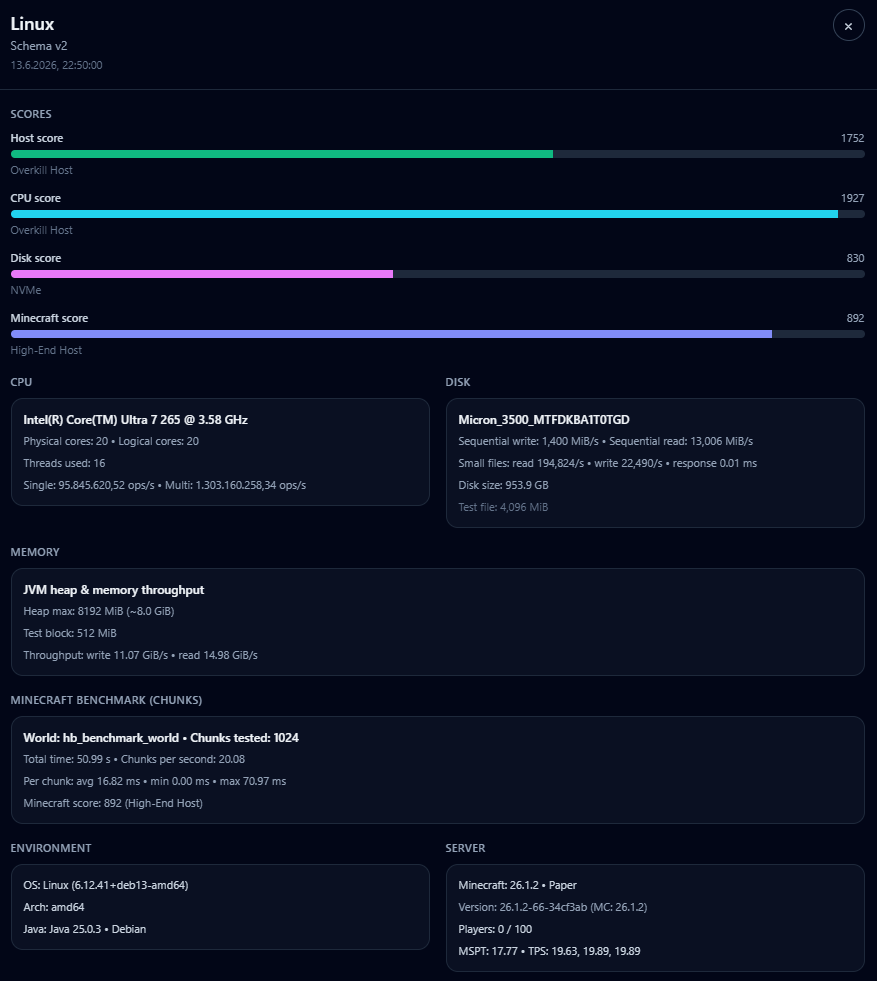 HostBenchmark 测量内容
HostBenchmark 测试对 Minecraft 服务器最重要的主机部分:
- CPU 性能
- 磁盘性能
- Java 内存吞吐量
- 真实的 Minecraft 工作负载
- 临时世界
- 区块生成/加载
- 实体
- 方块更新
- 主线程压力
结果是一组清晰的评分:
- 主机评分 (Host Score)
- CPU 评分 (CPU Score)
- 磁盘评分 (Disk Score)
- Minecraft 评分 (Minecraft Score)
每个评分还附带一个简单的等级标签,例如:
入门级主机 (Entry Host)中端主机 (Midrange Host)高端主机 (High-End Host)性能过剩主机 (Overkill Host)
为什么使用它?
Minecraft 主机性能不仅仅取决于拥有“多核”或“NVMe 存储”。
一个好的 Minecraft 主机需要:
- 强大的 CPU 单线程性能
- 稳定的磁盘性能
- 良好的 JVM 行为
- 在类似真实服务器的负载下流畅的主线程性能
HostBenchmark 将这些因素整合为一个易于阅读的评分,同时如果您想更深入地比较主机,它也会提供详细的数值数据。
简单用法
安装插件,启动服务器并运行:
/hostbench start
或者:
/hostbenchmark start
插件将自动运行完整的基准测试。
完成后,JSON 报告将保存至以下位置:
plugins/HostBenchmark/exports/
您可以将报告保留在本地,或上传至:
HostBenchmark.net
网站与排行榜
配套网站允许您上传基准测试报告,并与其他主机进行比较。
在网站中,您可以:
- 比较主机评分 (Host Scores)
- 比较 CPU、磁盘和 Minecraft 评分
- 查看详细的基准测试报告
- 添加您的托管提供商和计划
- 浏览其他用户的公开结果
这使得使用真实的 Minecraft 相关数据来比较 VPS、专用服务器和游戏托管提供商变得更加容易。
临时基准测试世界
HostBenchmark 会为 Minecraft 工作负载测试创建一个临时世界。
该世界的名称为:
hb_benchmark_world
基准测试结束后,该世界将被卸载并删除。
请勿将该名称用于您自己的世界。
安全须知
为了获得最清晰且最具可比性的结果:
- 请在空闲的服务器上运行基准测试
- 避免在有玩家在线时运行
- 不要在基准测试运行时停止服务器
- 确保有足够的磁盘空间用于临时测试文件
基准测试故意设计得较为繁重,因为它旨在揭示真实的主机性能。
总结
HostBenchmark 帮助您确定某款主机是否真的适合运行 Minecraft。
使用它可以比较:
- VPS 与游戏主机
- 新的专用服务器与旧的专用服务器
- 不同的托管提供商
- 同一提供商的不同计划
您将得到清晰的评分、详细的报告以及用于实际比较的公共排行榜。
无需猜测,无需营销数字。只有专注于 Minecraft 的基准测试结果。
基准测试免责声明
HostBenchmark 旨在提供有用的、专注于 Minecraft 的比较结果,但没有任何基准测试是完美的。
根据服务器负载、后台任务、JVM 状态、磁盘缓存、操作系统行为以及主机上的其他活动,每次运行的结果可能会有所不同。应将结果视为一种强有力的实用指标,而不是对服务器所有能力或局限性的 100% 精确测量。
Logo by Artist: Skyana
Contact: Discord(skyana)
HostBenchmark is a Minecraft server benchmarking plugin built to answer one simple question:
How good is this host for actually running Minecraft?
Instead of relying on marketing claims, CPU model names or generic VPS benchmarks, HostBenchmark runs a full benchmark directly inside your Minecraft server and creates a report you can compare locally or upload to HostBenchmark.net.
What HostBenchmark Measures
HostBenchmark tests the parts of a host that matter most for Minecraft servers:
- CPU performance
- single-thread and multi-thread workload
- Disk performance
- write speed, read speed and small-file behavior
- Java memory throughput
- useful for understanding JVM-side performance
- Real Minecraft workload
- temporary world
- chunk generation/loading
- entities
- block updates
- main-thread pressure
The result is a clear set of scores:
- Host Score
- CPU Score
- Disk Score
- Minecraft Score
Each score also gets a simple tier label such as:
Entry HostMidrange HostHigh-End HostOverkill Host
Why Use It?
Minecraft hosting performance is not just about having "many cores" or "NVMe storage".
A good Minecraft host needs:
- strong single-thread CPU performance
- stable disk performance
- good JVM behavior
- smooth main-thread performance under real server-like work
HostBenchmark combines these into one easy-to-read result, while still giving you the detailed numbers if you want to compare hosts more deeply.
Simple Usage
Install the plugin, start your server and run:
/hostbench start
or:
/hostbenchmark start
The plugin will run the full benchmark automatically.
When it finishes, a JSON report is saved here:
plugins/HostBenchmark/exports/
You can keep the report locally or upload it to:
HostBenchmark.net
Website & Leaderboard
The companion website lets you upload your benchmark report and compare it with other hosts.
On the website you can:
- compare Host Scores
- compare CPU, Disk and Minecraft scores
- view detailed benchmark reports
- add your hosting provider and plan
- browse public results from other users
This makes it easier to compare VPS, dedicated servers and game hosting providers using real Minecraft-relevant data.
Temporary Benchmark World
HostBenchmark creates a temporary world for the Minecraft workload test.
The world is named:
hb_benchmark_world
It is unloaded and deleted after the benchmark finishes.
Do not use that name for your own worlds.
Safety Notes
For the cleanest and most comparable results:
- run the benchmark on an idle server
- avoid running it while players are online
- do not stop the server while the benchmark is running
- make sure enough disk space is available for the temporary test files
The benchmark is intentionally heavy because it is meant to reveal real host performance.
Summary
HostBenchmark helps you find out whether a host is actually good for Minecraft.
Use it to compare:
- a VPS against a game host
- a new dedicated server against your old one
- different hosting providers
- different plans from the same provider
You get a clear score, a detailed report and a public leaderboard for real-world comparison.
No guesswork. No marketing numbers. Just Minecraft-focused benchmark results.
Benchmark Disclaimer
HostBenchmark is designed to give useful, Minecraft-focused comparison results, but no benchmark is perfect.
Results can vary between runs depending on server load, background tasks, JVM state, disk cache, operating system behavior and other activity on the host. A result should be treated as a strong practical indicator, not as a 100% exact measurement of everything the server can or cannot do.


 插件

 插件
 插件
 插件
 插件
 插件
评论 0
登录后参与评分
还没有评论,来抢沙发吧