它可以用在哪里?
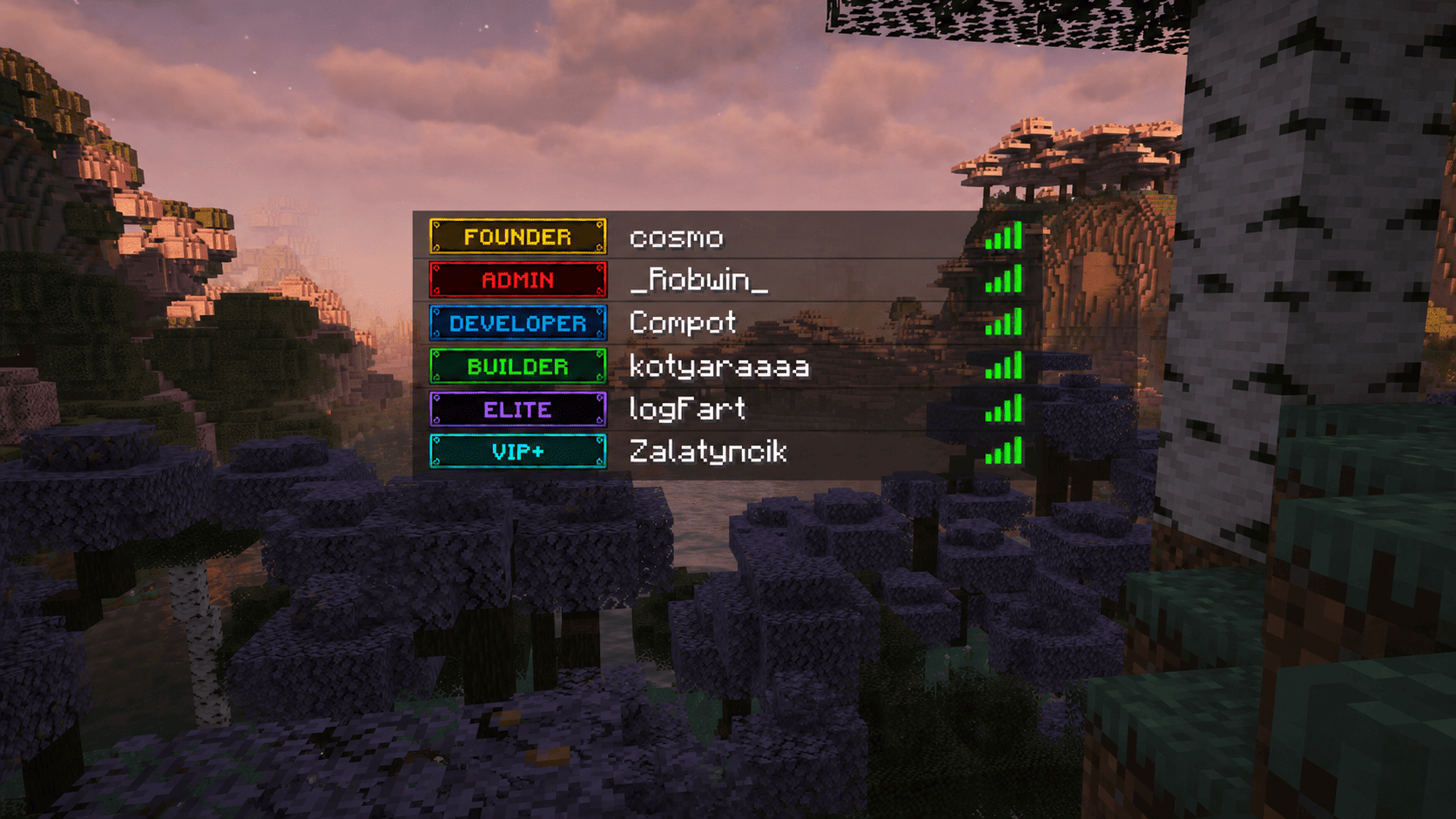
将任意图片转换为由 MineSkin 支持的头部纹理网格,然后在聊天、TAB 页眉/页脚、前缀/后缀、姓名板、全息图、标题、计分板等地方使用。
Image Display 非常适合用于服务器 Logo、图标、装饰、职级视觉特效、全息艺术、大厅品牌展示以及其他无需强制安装资源包的视觉 UI 元素。
功能
- 无需资源包即可显示图片
- 自动将 PNG/JPG/JPEG/WEBP 图片转换为玩家头部组件。你不需要手动裁剪图片——插件会自动为你处理!
- 无需摆弄资源捆绑包或寻找字形,只需上传图片并使用一个占位符即可!
- 使用简单的占位符来显示图片,例如:
%imagedisplay_<image_name>%
- 通过 ProtocolLib 组件替换在任何聊天中工作
- 生成后使用本地 JSON 图片缓存
- 使用权限控制
- 为不支持的客户端提供备用文本
- 多 API Key 池:支持配置中最多 10 个 MineSkin 密钥,具备自动平衡和
--apikey 选择功能
- 实时 BossBar,包含百分比、瓦片计数器和 Mojang 队列状态
- 通过
/imagedisplay cancel 即时取消正在运行的任务
- 带有自动重试功能的 Mojang 速率限制保护
剧透
1.21.9 版本之前的客户端无法看到此类图片。对于它们,你可以在配置中指定备用文本
如何添加和使用任意图片?
1. 上传图片
将你的图片放入:
plugins/ImageDisplay/pictures/
⚠️ 确保图片尺寸是 8 像素的倍数。
示例:
40x8(推荐用于捐赠者职级)
16x16
32x32
64x8
64x64
80x8
96x8
128x64
128x128
256x128
- 高度规则:对于单行文本(聊天、前缀、TAB),请使用 8 像素 的高度,因为 Minecraft 字体字符的高度为 8px。更高的图片将在多行中渲染。
- 提示:以 1:1 像素画 风格绘制高度为 8px 的图片,以确保图标清晰、像素完美且无模糊!
2. 在插件配置中指定你的 MineSkin API 密钥
它是免费的:你可以在此处获取
将你的密钥粘贴到 config.yml 中。你可以添加多个密钥,以便在不触发 Mojang 速率限制的情况下同时生成多张图片:
ImageDisplay:
  mineskin-api-keys:
    1: "your_primary_api_key"
    2: "optional_second_api_key"
3. 生成图片数据
运行命令:
/imagedisplay generate <image.png> [可选自定义ID] [--apikey <槽位>]
4. 监控或取消生成
查看显示进度和队列状态的实时 BossBar。如有需要,你可以随时取消正在进行的生成任务:
/imagedisplay cancel <id>
/imagedisplay cancel all
5. 使用占位符
在支持的任何位置使用生成的占位符:
%imagedisplay_your_image_name%
权限
每个生成的图片都拥有独立的权限节点:
imagedisplay_<id>
示例:
%imagedisplay_logo%
需要:
imagedisplay_logo
此权限检查仅在玩家尝试在聊天中使用 Image Display 占位符时生效。我计划在未来扩展权限功能。
所需插件
Image Display 需要:
可选:
工作原理?
Image Display 会获取一张图片,将其分割为 8x8 像素的图块,将这些图块发送给 MineSkin,并接收带有签名的玩家头颅纹理。
插件随后将结果存储在本地 JSON 缓存文件中。生成完成后,服务器无需再次处理原始图片。占位符仅渲染缓存的头颅组件。Image Display 旨在确保在服务器正常运行期间保持轻量级。
已测试并兼容的插件:
- TAB
- Chatty
- ChatEx
- Citizens
- FancyNPC
- DeluxeHub
- LuckPerms
- EssentialsX
- EssentialsX Chat
- FancyHolograms
- LPC-Minimessage
- DecentHolograms
以及更多……
注意事项
- 如果你使用 TAB 插件,则默认启用了 MiniMessage 支持以处理组件——此时前缀/后缀中的图片渲染将无法工作。请在 TAB 配置中禁用它:
components:
  minimessage-support: false
然后运行该命令
/tab reload
- 支持多种本地化语言
- 推荐字体:Minecraftia、Press Start 2P,或任何像素艺术风格的位图字体/默认字体。
Where can it be used?
Turn any image into a grid of MineSkin-powered head textures, then use it in chat, TAB header/footer, prefixes/suffixes, nametags, holograms, titles, scoreboard and other.
Image Display is perfect for server logos, icons, decorations, rank visuals, hologram art, lobby branding, and other visual UI elements without forcing a resource pack.
Features
- Display images without a resource pack
- Auto convert PNG/JPG/JPEG/WEBP images into player-head components. You don't need to manually crop images - the plugin will do it for you!
- You don't need to mess with resource bundles or search for glyphs, just upload your images and use a single placeholder!
- Use images with simple placeholders like:
%imagedisplay_<image_name>%
- Works in any chat through ProtocolLib component replacement
- Uses local JSON image cache after generation
- Permission control for usage
- Fallback text for unsupported clients
- Multi-API Key Pool: Supports up to 10 MineSkin keys in config with auto-balancing and
--apikey selection
- Real-time BossBar with percentage, tile counters, and Mojang queue status
- Instant cancellation of running tasks via
/imagedisplay cancel
- Mojang rate-limit protection with automatic retry
Spoiler
Clients before version 1.21.9 cannot see such images. For them, you can specify a fallback text in the config
How to add and use any image?
1. Upload your image
Put your image into:
plugins/ImageDisplay/pictures/
⚠️ Make sure the image size is a multiple of 8 pixels.
Examples:
40x8 (recomended for donator ranks)
16x16
32x32
64x8
64x64
80x8
96x8
128x64
128x128
256x128
- Height rule: Use a height of 8 pixels for single-line text (chat, prefixes, TAB), as Minecraft font characters are 8px tall. Taller images will render across multiple lines.
- Tip: Draw your images as 1:1 pixel art with an 8px height to ensure crisp, pixel-perfect icons without any blur!
2. Specify your MineSkin API key in the plugin configuration
It's free: You can get it here
Paste your key(s) into config.yml. You can add multiple keys to generate several images concurrently without hitting Mojang rate limits:
ImageDisplay:
  mineskin-api-keys:
    1: "your_primary_api_key"
    2: "optional_second_api_key"
3. Generate the image data
Run the command:
/imagedisplay generate <image.png> [optional_custom_id] [--apikey <slot>]
4. Monitor or cancel generation
Watch the live BossBar showing progress and queue status. If needed, you can cancel running generations at any time:
/imagedisplay cancel <id>
/imagedisplay cancel all
5. Use the placeholder
Use the generated placeholder anywhere supported:
%imagedisplay_your_image_name%
Permissions
Every generated image gets its own permission node:
imagedisplay_<id>
Example:
%imagedisplay_logo%
requires:
imagedisplay_logo
This permission check is applied only when players try to use Image Display placeholders in chat. I plan to expand the permissions in the future.
Required plugins
Image Display requires:
Optional:
How it works?
Image Display takes an image, splits it into 8x8 pixel tiles, sends those tiles to MineSkin, and receives signed player head textures.
The plugin then stores the result in local JSON cache files. After generation, the server does not need to process the original image again. The placeholder simply renders the cached head components. Image Display is designed to be lightweight during normal server usage.
Tested and works with plugins:
- TAB
- Chatty
- ChatEx
- Citizens
- FancyNPC
- DeluxeHub
- LuckPerms
- EssentialsX
- EssentialsX Chat
- FancyHolograms
- LPC-Minimessage
- DecentHolograms
and more....
Notes
- If you use plugin TAB then has default MiniMessage support enabled for components — image rendering not work in prefixes/suffixes. Disable it in TAB config:
components:
  minimessage-support: false
Then run the command
/tab reload
- Support for multiple localizations
- I recommend fonts: Minecraftia, Press Start 2P, any bitmap-style or default font in pixel art style.


 插件

 插件

 插件
 插件
 插件
 插件
评论 0
登录后参与评分
还没有评论,来抢沙发吧