尚未支持你使用的语言?如果你愿意,欢迎在 Crowdin 上为我们贡献翻译!
关于
想在你的服务器中以炫酷的方式展示信息吗?
或者你想在主基地里放置一个漂亮的动态电视屏幕?
那么这款插件正是为你量身打造的!
想要高清且全彩的图片显示效果?
请查看 ImageFrame Client,这是 ImageFrame 的 配套模组!
视频演示
想看实际操作演示吗?这里有一些由优秀玩家制作的视频!
ServerMiner 提供的英文版本:
KasaiSora 提供的英文版本:
功能特性
1. 将图片加载到地图和物品展示框中
- 支持从 URL 加载图片!
- 支持 PNG、JPEG、WEBP 和 GIF 格式!
- 可以生成地图形式或 直接 放置在物品展示框上!(使用智能选择工具选择你的物品展示框!)
- 自动适配图片尺寸,确保图片不会被拉伸变形!
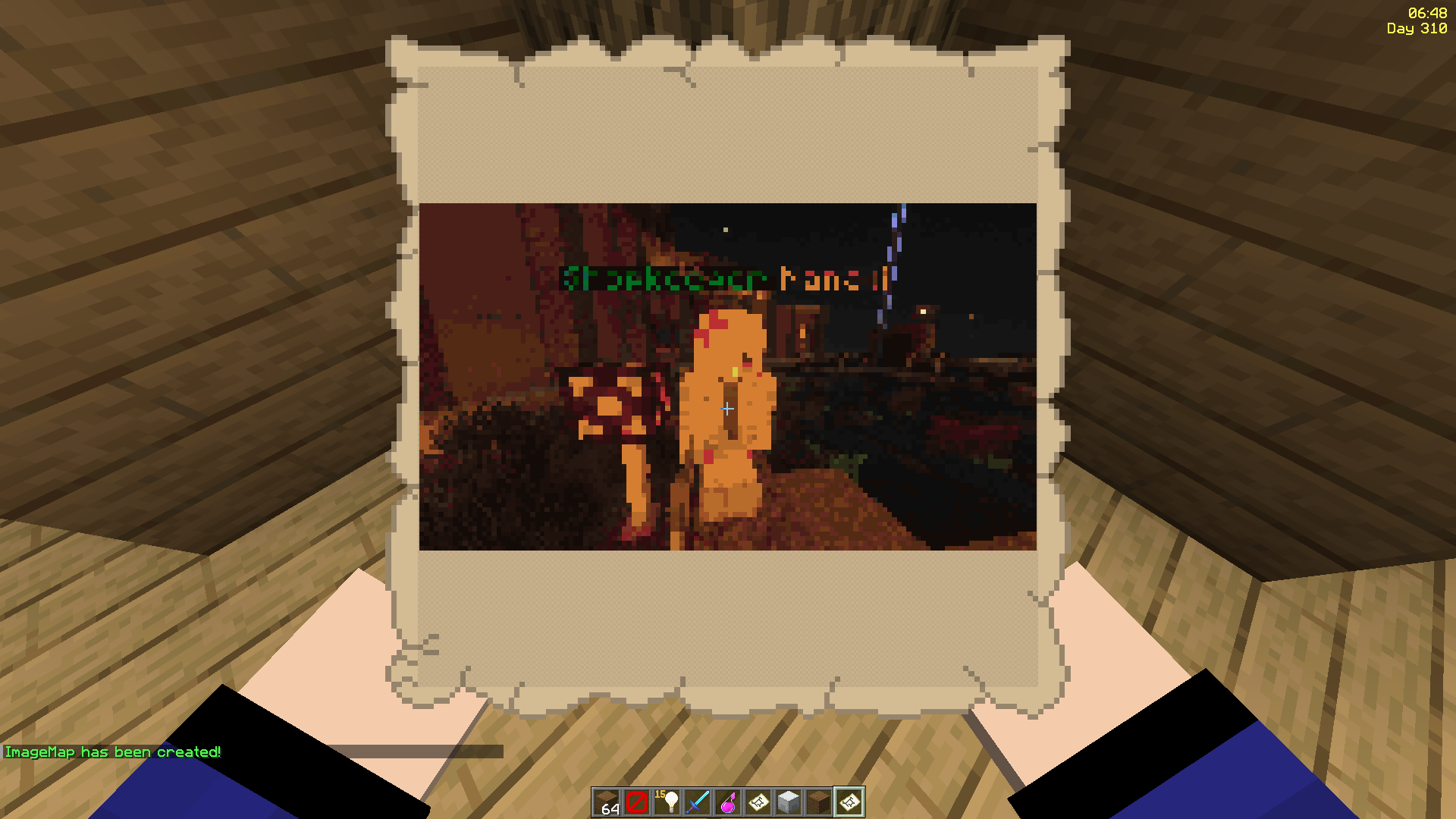
2. 完美支持动态 GIF!
- 如果是 GIF 图片,将会以动画形式播放!
- 动画帧率最高可达每秒 1/20 秒!
- 动画渲染任务在异步线程中运行
3. 自定义宽度和高度
- 让你的图片跨越多个地图显示
- 自动适配功能同样适用于所有尺寸!
- 非常适合在物品展示框上展示!

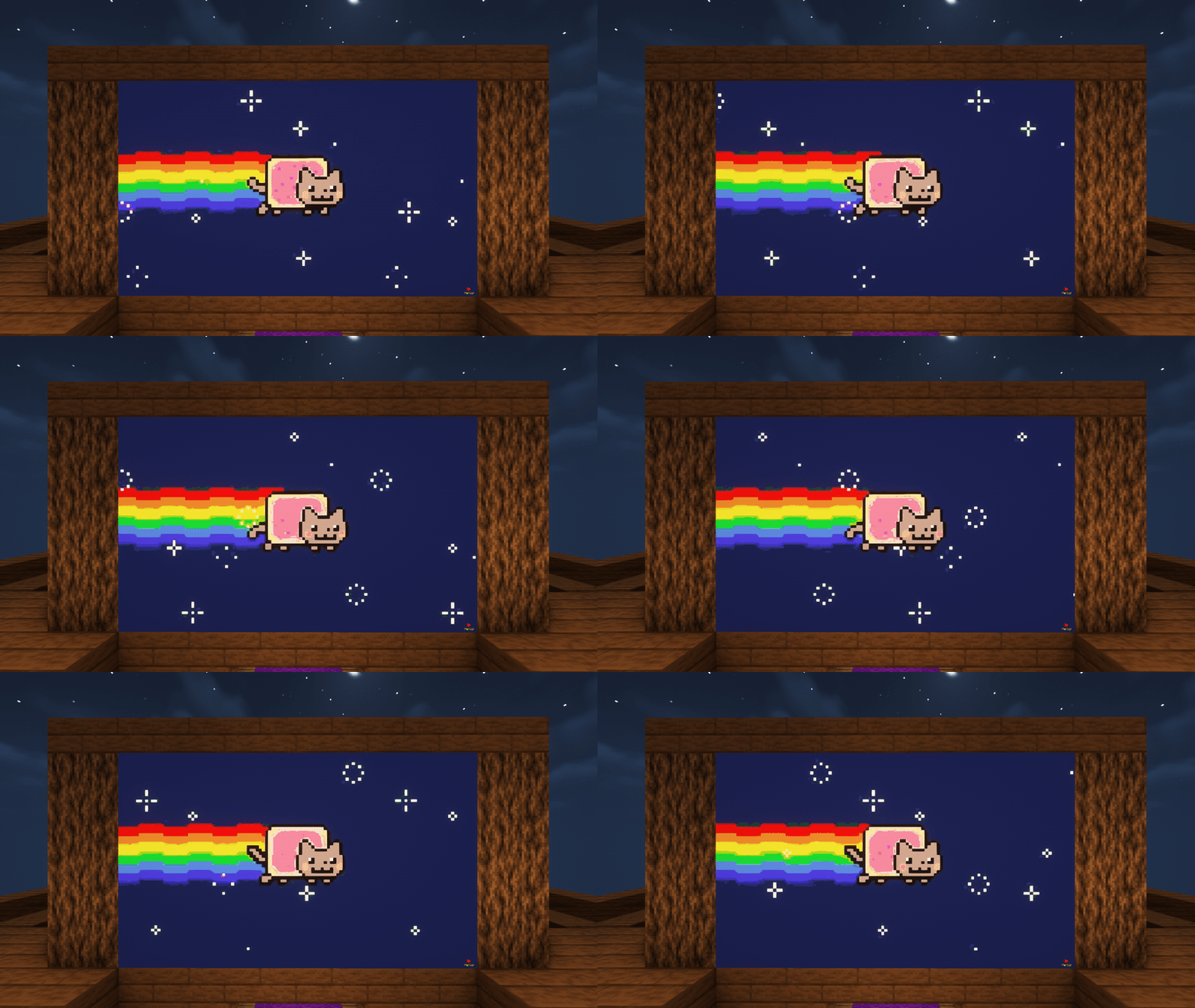
^ 这些地铁站台标志看起来很棒,不是吗?它们是由 ImageFrame 和隐形发光物品展示框组合而成的!
4. 为原版地图添加覆盖层!
- 手持原版地图即可创建带有图像覆盖层的地图
- 或者通过选中多个物品展示框来跨越多张地图进行设置!
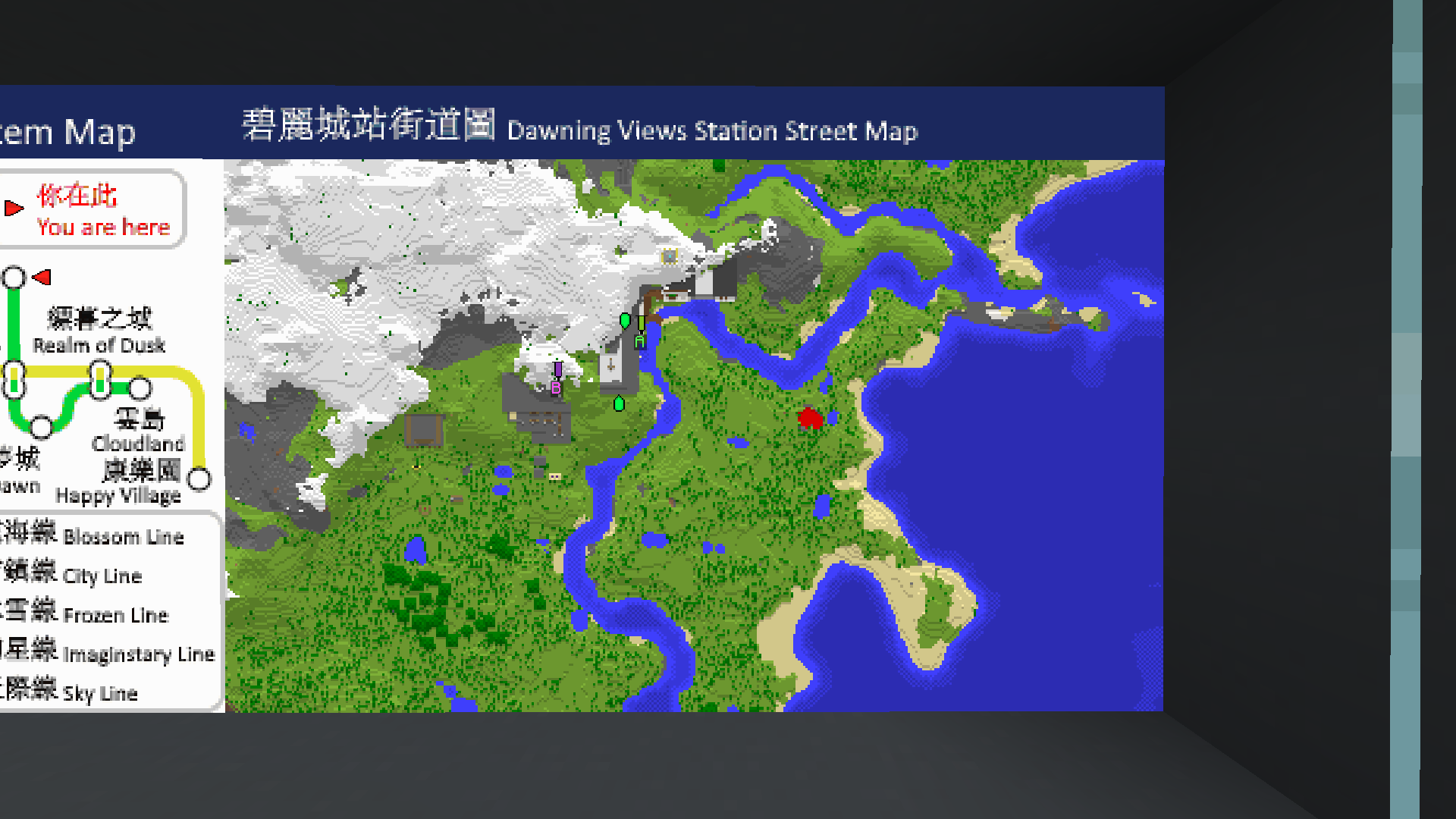
^ 注意地图顶部带有蓝色背景的那行额外文字了吗?
5. 合并式 ImageMap 便于快速放置!
- 将整个多部分的 ImageMap 作为一个合并后的物品获取!
- 自动搜索空间,将 ImageMap 放置在物品展示框墙壁(或地板/天花板)上
- 如果有足够空间,点击的物品展示框将被视为左上角起点
- 当被破坏时,整个合并地图会被移除,并返还一个合并后的地图物品!
- 尊重其他插件对物品展示框的保护机制!(通过调用 Bukkit 事件实现)
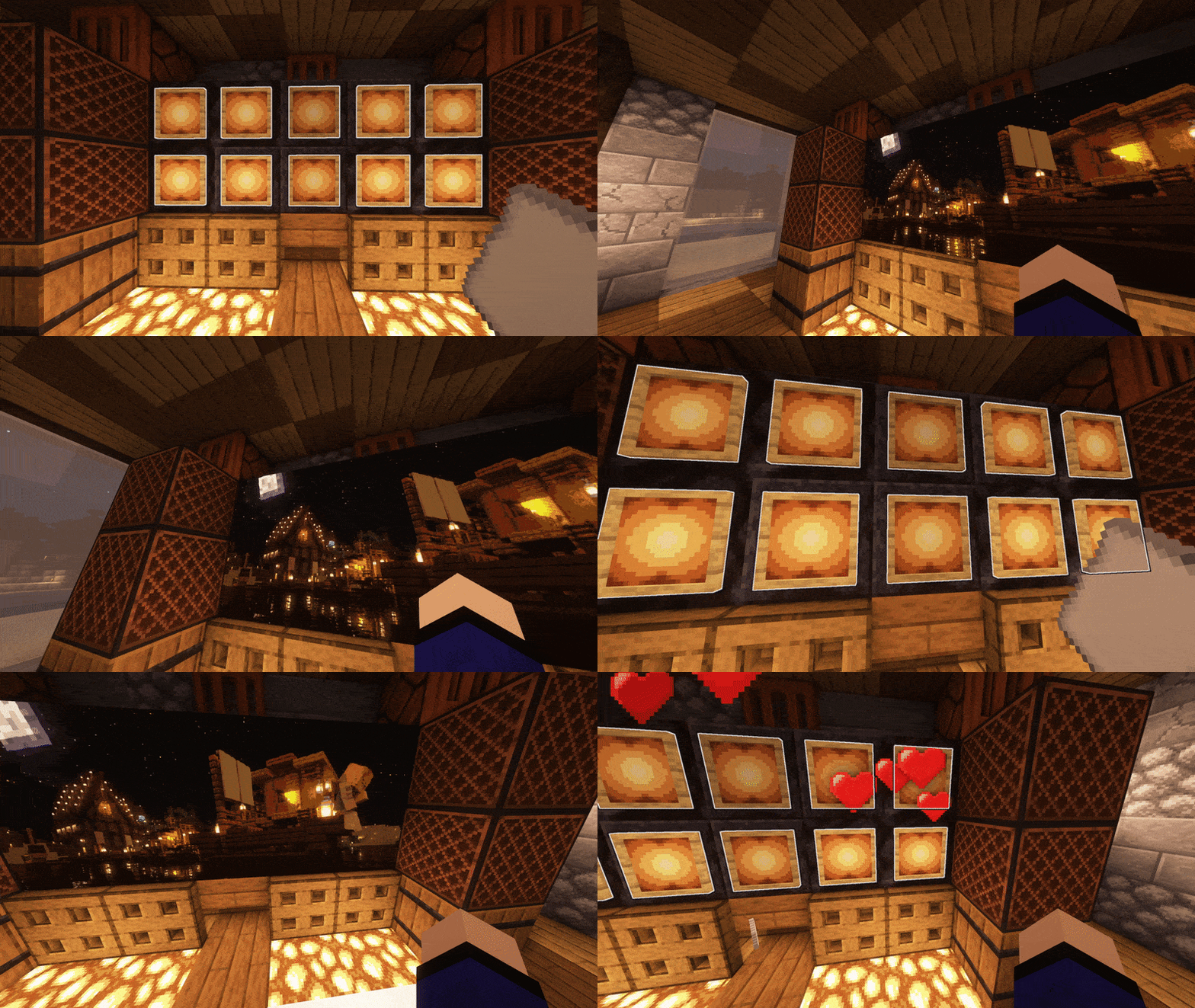
^ 爱心粒子效果来自 另一个插件,该插件监听了 EntityDamageEvent
^ 内置隐形物品展示框系统
6. 轻松刷新地图!
- 只需一条简单命令,即可刷新源自同一 URL 的所有相同图像地图副本!
- 非常适合用于展示那些需要偶尔更新的全服信息,无需逐一替换每张地图
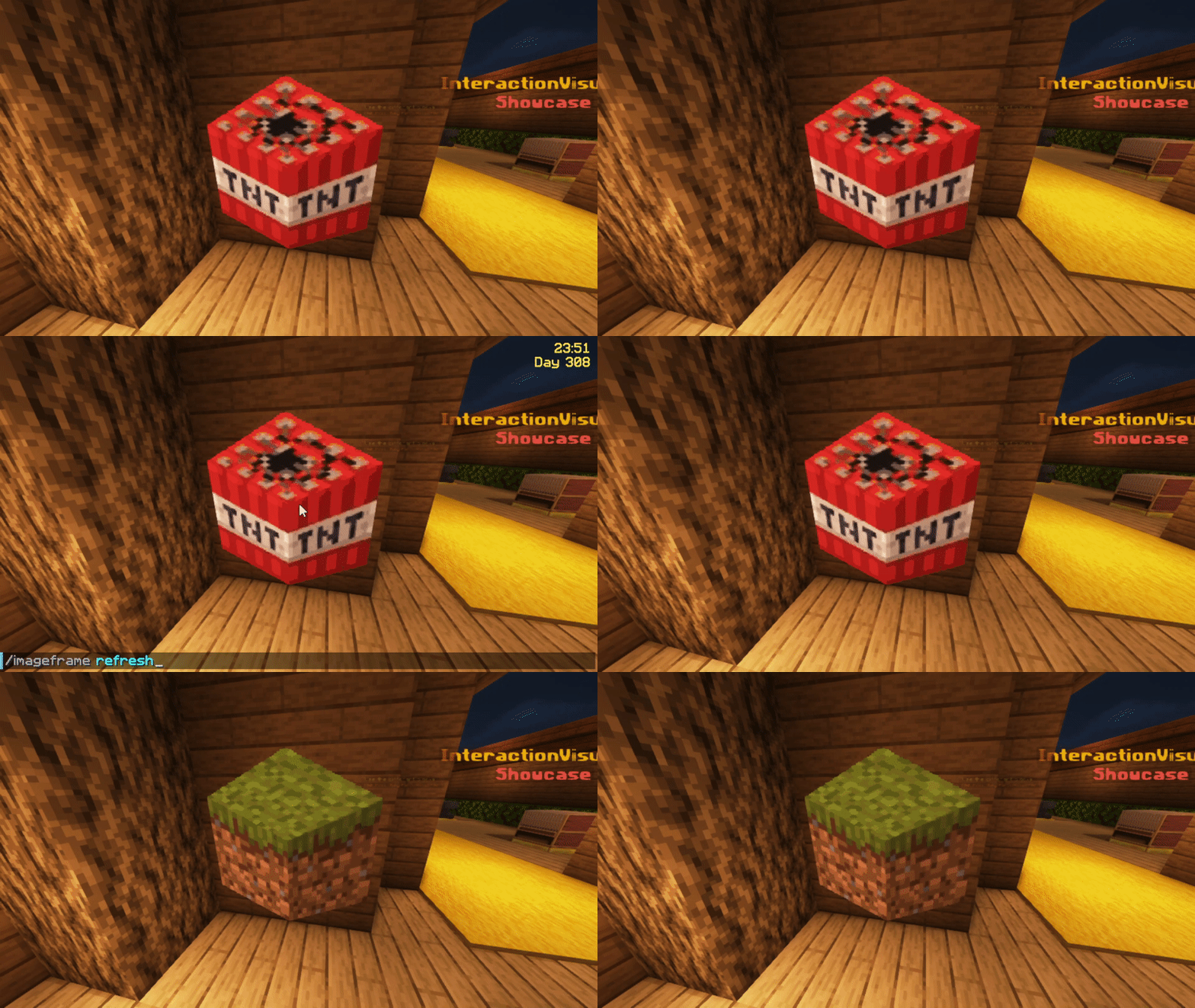
^ 我已在源 URL 处上传并用草方块替换了 TNT 方块,同时我手中拿着 4 张地图中的一张
7. 为你的图片添加地图标记!
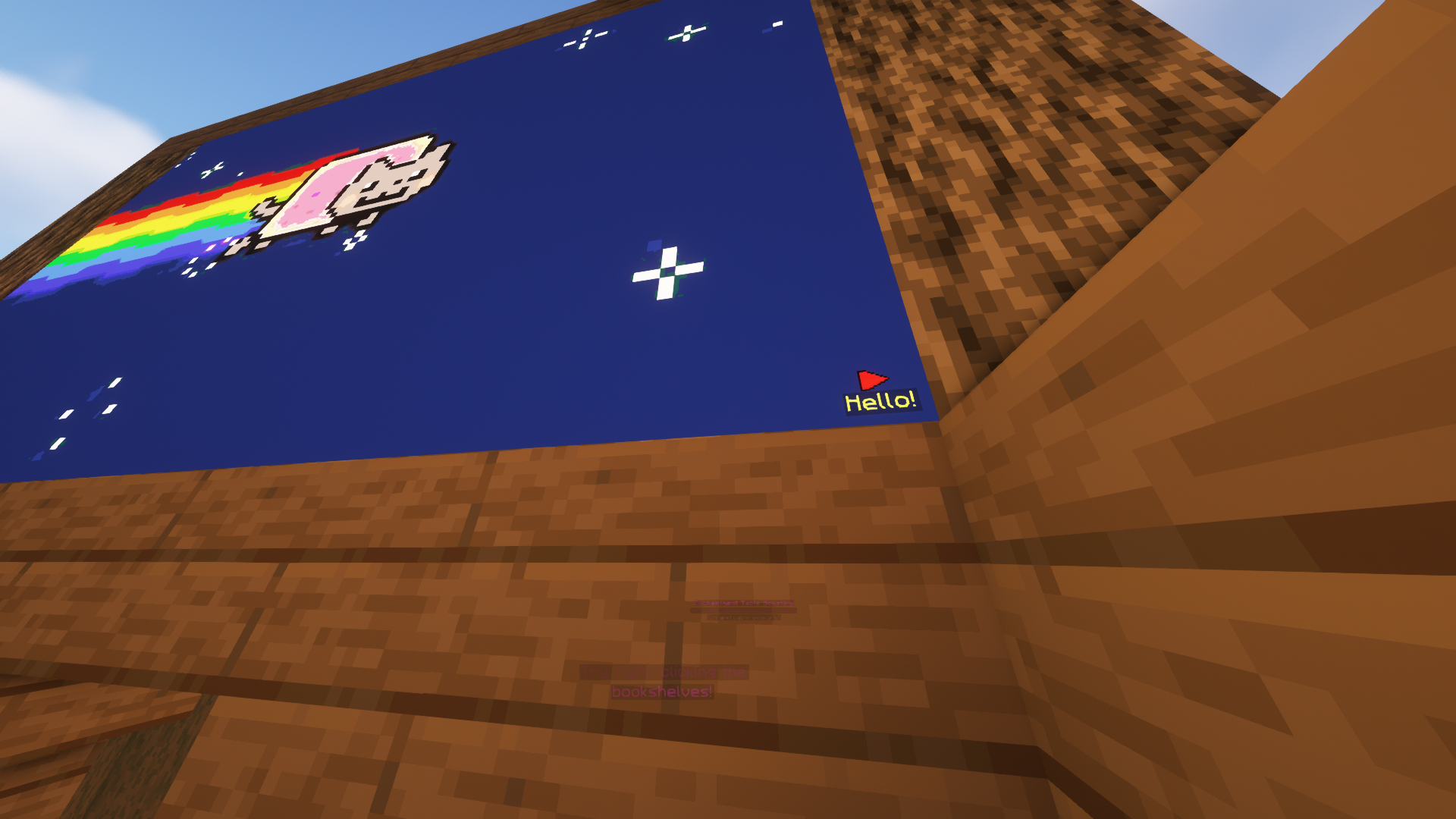
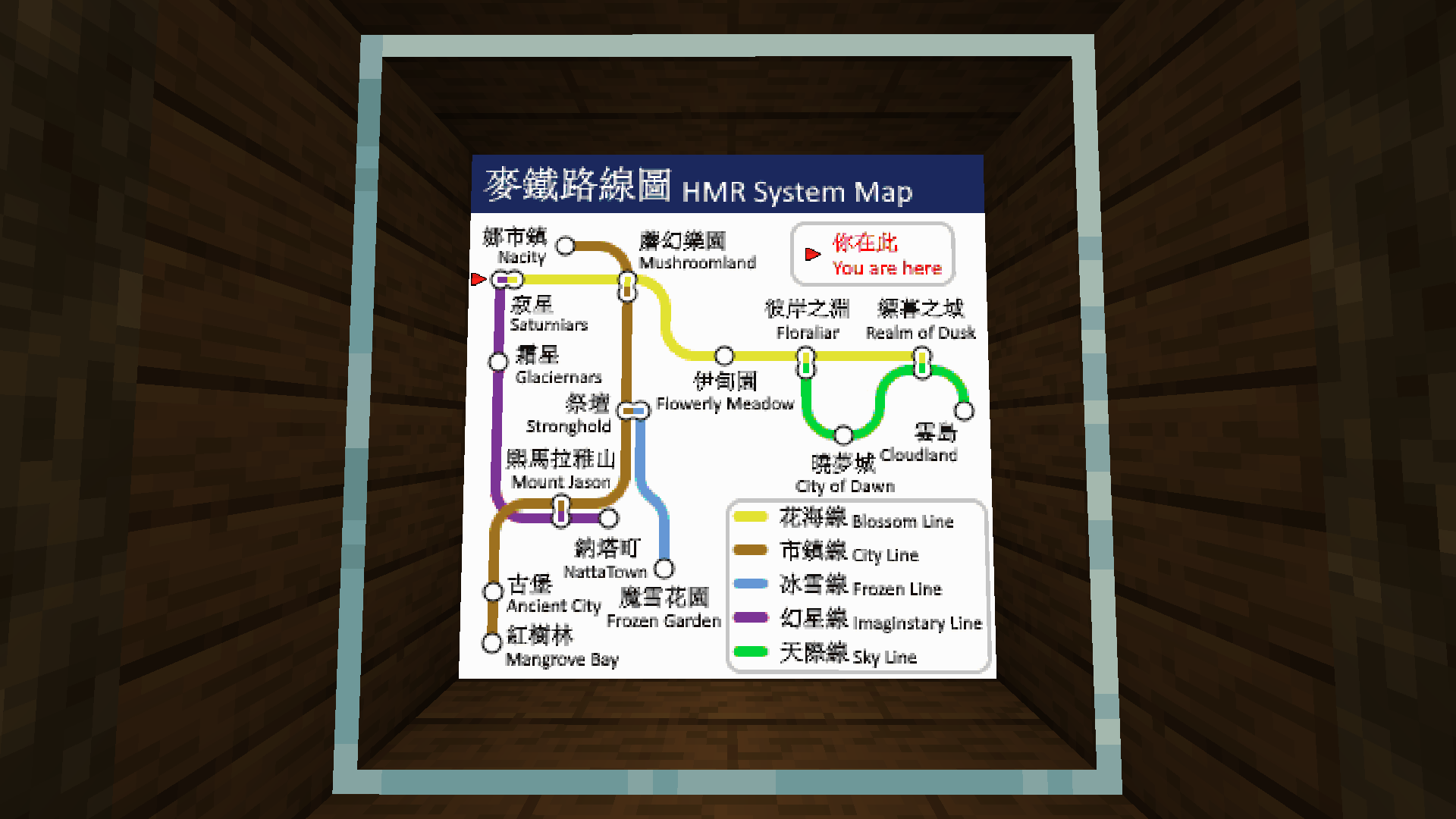
- 可使用任意地图图标!例如原版制图师地图中的宅邸和神殿图标!
- 它们下方还可以附加一行可选的文字说明
- 可配置每张地图的最大标记数量
- 非常适合在自定义图像地图上标记位置!
8. 生存模式友好
- 要求 生存模式 下的玩家在库存中拥有空白地图才能创建图像地图(使用玩家指令)
- 即使在物品展示框上直接创建图片或获取合并式 ImageMap 物品时也有效!
- 可在配置文件中调整
9. 易于追踪和管理
- 提供多种命令帮助你和管理员管理你自己或全服玩家创建的图像地图
- 可以向其他玩家授予 ImageMaps 的使用权限!
- 可为不同玩家设置不同的权限级别
- 例如列出某玩家的所有地图、重命名等
- 可设置每个玩家的图片创建上限(可为每个玩家单独设置!)
- 可设置单个物品展示框的最大尺寸!(始终可自定义)
- 支持从 ImageMap、ImageOnMap 和 DrMap 迁移数据(如需更多插件支持请求,请联系我)
10. 隐形物品展示框
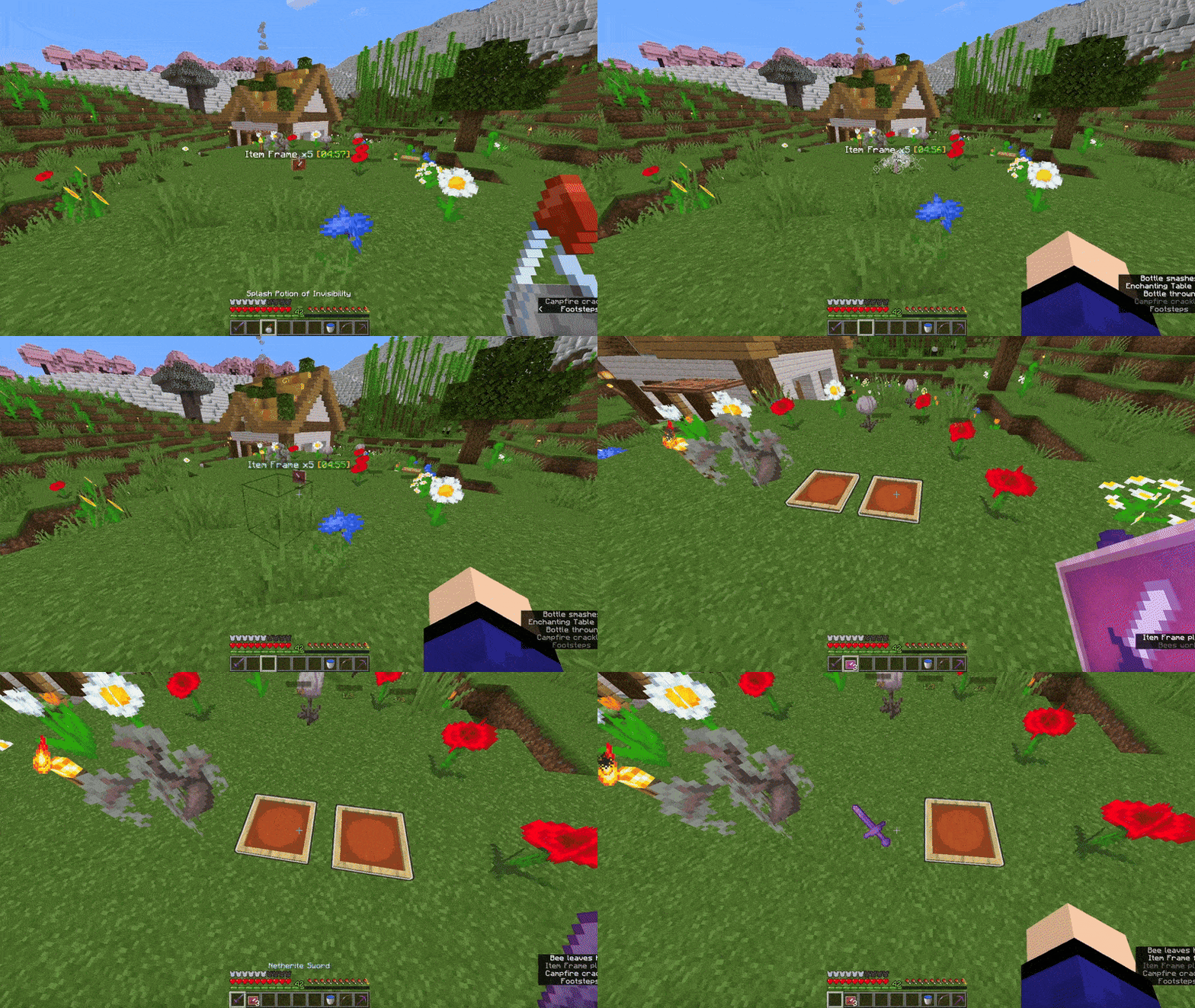
- 内置对生存模式友好的隐形物品展示框的支持!
- 使用隐身药水喷洒物品展示框即可获得隐形效果。
- 可在配置文件中进行调整。
11. 多语言支持
- 所有面向玩家的提示信息会根据玩家客户端的语言自动翻译成相应语言。
- 如果尚未支持你所使用的语言,请在 Crowdin 上贡献翻译,让我们一起打造更好的插件!
12. 配套模组
- 查看此 配套模组,它能让玩家以高清、全彩等方式查看图片!
13. 多服务器支持
- 借助 MySQL 存储支持,你可以在服务器网络中的多台服务器上共享相同的地图!(无需在 Bungeecord/Velocity 代理端安装此插件)
依赖项
安装方法
- 将 ImageFrame.jar 放入 plugins 文件夹,并包含所需的依赖项
- 启动服务器
- 编辑配置文件(如有需要)
- 重启服务器(如果在第 3 步中修改了配置文件)
开发版本

Jenkins
展示服务器
想看看插件的实际效果吗?
IP: mc.loohpjames.com

命令
说明:
对于命令 "<name>" / "<image_name>" 的参数,
如果你拥有权限,
可以通过以下语法访问其他玩家的地图:
"<player>:<name>"
例如:/if get LOOHP:map combined
管理命令:
/imageframe reload - 重新加载插件
/imageframe update - 检查更新
/imageframe storagemigrate - 存储类型迁移
玩家命令:
/imageframe select - 选择物品展示框以放置图像地图
/imageframe create <name> <url> <width> <height> - 创建新的图像地图
/imageframe create <name> <url> selection - 创建新的图像地图并直接放置在选定的物品展示框中
/imageframe create <name> <url> <width> <height> combined - 创建新的图像地图并获取其组合式 ImageMap 物品
/imageframe overlay <name> <url> - 创建一个新图像地图,在你手持的 Minecraft 原版地图上叠加一层覆盖层
/imageframe overlay <name> <url> selection - 创建一个新图像地图,在你选定的物品展示框中的 Minecraft 原版地图上叠加一层覆盖层
/imageframe clone <name> <new_name> - 创建一个具有与原图像地图相同属性的新图像地图
/imageframe clone <name> <new_name> selection - 创建一个具有与原图像地图相同属性的新图像地图,并直接放置在选定的物品展示框中
/imageframe clone <name> <new_name> combined - 创建一个具有与原图像地图相同属性的新图像地图,并获取其组合式 ImageMap 物品
/imageframe playback <name> pause - 切换动画图像地图的暂停状态
/imageframe playback <name> jumpto <seconds> - 跳转到动画图像地图的指定秒数
/imageframe refresh [optional:image_name] [optional:new_url] - 刷新你从源 URL 创建的地图
/imageframe info - 获取你手持的图像地图的相关信息
/imageframe get <name> - 获取一个已存在的自定义图像地图
/imageframe get <name> selection - 将一个已存在的自定义图像地图直接放置在选定的物品展示框中
/imageframe get <name> combined - 以组合式 ImageMap 形式获取一个已存在的自定义图像地图
/imageframe delete <name> - 删除一个已创建的预存图像地图
/imageframe rename <name> <new_name> - 重命名一个已创建的预存图像地图
/imageframe list - 列出所有已创建的预存图像地图
/imageframe marker add <image_name> <marker_name> direction:0-15 <marker_type> [可选:caption] - 向你的地图添加标记
/imageframe marker remove <image_name> <marker_name> - 从你的地图移除标记
/imageframe marker clear <image_name> - 清除你地图上的所有标记
/imageframe setaccess <name> <player> <permission> - 设置其他玩家对你地图的访问权限
管理员命令:
/imageframe list <玩家> - 列出某玩家已有的图像地图
/imageframe giveinvisibleframe <发光/普通> [数量] [玩家] - 给予不可见的物品展示框
/imageframe adminsetcreator <图像ID> <玩家> - 更改图像地图的创建者
/imageframe adminmigrate <ImageMap/DrMap/ImageOnMap> - 从选定的受支持的第三方插件迁移数据
权限
permissions:
  imageframe.create:
    default: op
    description: 允许玩家创建新的图像地图
  imageframe.create.animated:
    default: op
    description: 允许玩家创建新的动态图像地图
  imageframe.create.others:
    default: op
    description: 允许玩家为其他玩家创建图像地图,适用于叠加和克隆,绕过拥有数量限制
  imageframe.overlay:
    default: op
    description: 允许玩家在原版地图上叠加图像
  imageframe.clone:
    default: op
    description: 允许玩家对自己拥有的图像地图进行深度复制
  imageframe.playback:
    default: op
    description: 允许玩家暂停或设置其自身动态图像地图的播放位置
  imageframe.select:
    default: op
    description: 允许玩家选择物品展示框
  imageframe.marker:
    default: op
    description: 允许玩家在图像地图上添加和移除标记
  imageframe.marker.unlimited:
    default: op
    description: 允许玩家在图像地图上添加无限制的标记
  imageframe.refresh:
    default: op
    description: 允许玩家刷新图像地图
  imageframe.rename:
    default: op
    description: 允许玩家重命名图像地图
  imageframe.info:
    default: true
    description: 允许玩家查看图像地图数据
  imageframe.list:
    default: true
    description: 允许玩家列出他们创建的所有图像地图
  imageframe.list.others:
    default: op
    description: 允许玩家列出某位玩家创建的所有图像地图
  imageframe.delete:
    default: op
    description: 允许玩家删除他们创建的图像地图
  imageframe.purge:
    default: false
    description: 允许玩家清除特定玩家创建的所有图像地图
  imageframe.purge.all:
    default: false
    description: 允许玩家一次性清除所有图像地图
  imageframe.get:
    default: op
    description: 允许玩家获取他们创建的图像地图
  imageframe.setaccess:
    default: op
    description: 允许玩家更改其图像地图的访问权限
  imageframe.adminbypass:
    default: op
    description: 绕过所有访问限制,允许用户使用和修改任何图像地图
  imageframe.adminsetcreator:
    default: op
    description: 允许玩家通过图像地图 ID 更改任何图像地图的创建者
  imageframe.admindelete:
    default: op
    description: 允许玩家通过图像地图 ID 删除任何图像地图
  imageframe.adminmigrate:
    default: op
    description: 允许玩家将来自支持插件的数据迁移到 ImageFrame
  imageframe.preference:
    default: true
    description: 允许玩家更新其个人偏好设置
  imageframe.preference.others:
    default: op
    description: 允许玩家更新其他玩家的个人偏好设置
  imageframe.giveinvisibleframe:
    default: op
    description: 允许玩家给予不可见的物品展示框
  imageframe.reload:
    default: op
    description: 允许你重新加载配置文件
  imageframe.resync:
    default: op
    description: 允许你强制从存储中同步更改
  imageframe.storagemigrate:
    default: op
    description: 允许你将数据传输到不同的存储类型
  imageframe.update:
    default: op
    description: 允许你接收更新消息
默认配置
带有描述的最新版配置
数据使用
在 上的使用统计数据将对公众可见,你的服务器将被包含在统计中。不会发送你服务器的任何私人信息。
版本检查也通过 进行,以便在新版本发布时通知你。不会发送你服务器的任何私人信息。
Speak a language that is not supported by ImageFrame yet? We would appreciate it if you contribute on Crowdin!
About
Want to display information on your server in a fancy way?
Or maybe you want to display a nice animated TV screen in your home base?
Then this is the plugin for you!
Want HD and Full-color Images?
Check out ImageFrame Client, the complimentary mod for ImageFrame!
Videos
Want video demonstrations? Here are some videos made by some awesome people!
Video by ServerMiner in English:
Video by KasaiSora in English:
Features
1. Load Images onto Maps and Item Frames
- Load images from URLs!
- PNG, JPEG, WEBP & GIFs are supported!
- Get them in Map form or directly on Item Frames! (Select your Item Frames with the smart selection tool!)
- Automatic image fitting means your images won't be stretched!
2. Even Works with Animated GIFs!
- Images will be animated if they are GIFs!
- Animated up to 1/20 of a second!
- Animation tasks run asynchronously
3. Define Custom Width and Height
- Have your image span across multiple maps
- Automatic image fitting works across all sizes too!
- Ideal for displaying on Item Frames!
^ These metro platform signs look awesome, don't they? Put together with ImageFrame and invisible glowing item frames!
4. Add Overlays to Regular Vanilla Maps!
- Create an image map with a regular vanilla map in your hand
- Or across multiple maps via selecting them in item frames!
^ Notice the extra text with a blue background at the top of the map?
5. Combined ImageMap for Easy Placement!
- Get an entire multi-part ImageMap as one combined item!
- Automatically searches for space to place the ImageMap on an Item Frame wall (or floor/ceiling)
- The clicked Item Frame is treated as top-left if there is enough space
- When broken, the whole combined map is removed with a single combined map returned!
- Respect Item Frame protections on other plugins! (via calling Bukkit events)
^ The hearts particle is from another plugin which listens to the EntityDamageEvent
^ Built-in Invisible Item Frames System
6. Refresh Maps Easily!
- Refresh all copies of the same image map from the URL source in one simple command!
- Ideal for displaying information that you'll have to update across your server every once a while, without having to go and replace every single one
^ I've uploaded and replaced the TNT block with the grass block at the source URL, and I am holding 1 of the 4 maps in my hand
7. Add Map Markers To Your Images!
- Any map icon can be used! Such as the mansion and temple icons on Vanilla cartographer maps!
- They can also have an optional line of text below them
- Configurable max markers per map
- Ideal for marking locations on custom image maps!
8. Survival Friendly
- Require players in survival to have empty maps in their inventory to be able to create image maps (using player commands)
- Even works when directly creating images on Item Frames or getting the Combined ImageMap item!
- Configurable in the config
9. Easy to Keep Track and Manage
- Commands available to help you (both as players and admins) manage your (or everybody's) created image maps
- Ability to give access to ImageMaps to other players!
- Different permission levels for different players you decided to share maps with.
- Such as listing all maps of a player, renaming etc.
- Option to set an image creation limit per player (Can be different for each player!)
- Option to set a maximum size for a single image frame! (Customizable as always)
- Migration available for ImageMap, ImageOnMap and DrMap (Message me for more plugin support requests)
10. Invisible Item Frames
- Built-in support for survival-friendly invisible item frames!
- Splash item frame items with invisibility potions to obtain.
- Can adjusted in the config.
11. Languages
- All player-facing messages are translated to different languages depending on the player's client language.
- If the language you speak is not yet supported, please contribute on Crowdin so we can build a better plugin for everyone together!
12. Complementary Mod
- Check out this complementary mod, which lets you see images in HD, full colours, and more!
13. Multi-Server Support
- With MySQL storage support, you can have the same maps across multiple servers in your server network! (Plugin does not need to be installed on the Bungeecord/Velocity proxy)
Dependencies
Installation
- Put ImageFrame.jar into the plugins folder along with the required dependencies
- Start the server
- Edit the config (if you need to)
- Restart the server (if you changed something in the config in step 3)
Development Builds
Jenkins
Showcase Server
Want to see the plugin in action?
IP: mc.loohpjames.com
Commands
Legend:
For command "<name>"/"<image_name>" arguments,
You can access another players map if you have permission
through this syntax:
"<player>:<name>"
For example: /if get LOOHP:map combined
Administration:
/imageframe reload - Reloads the plugin
/imageframe update - Check for updates
/imageframe storagemigrate - Storage type migration
Player:
/imageframe select - Select item frames to put image maps on
/imageframe create <name> <url> <width> <height> - Create a new image map
/imageframe create <name> <url> selection - Create a new image map and put it directly in your selected item frames
/imageframe create <name> <url> <width> <height> combined - Create a new image map and get its Combined ImageMap item
/imageframe overlay <name> <url> - Create a new image map that adds an overlay on a Minecraft Vanilla map you are holding
/imageframe overlay <name> <url> selection - Create a new image map that adds an overlay on a Minecraft Vanilla map in your selected item frames
/imageframe clone <name> <new_name> - Create a new image map with the same properties as the old one
/imageframe clone <name> <new_name> selection - Create a new image map with the same properties as the old one and put it directly in your selected item frames
/imageframe clone <name> <new_name> combined - Create a new image map with the same properties as the old one and get its Combined ImageMap item
/imageframe playback <name> pause - Toggle pause for an animated image map
/imageframe playback <name> jumpto <seconds> - Jump to a specific second for an animated image map
/imageframe refresh [optional:image_name] [optional:new_url] - Refresh a map you've created from source url
/imageframe info - Get info related to the image map you are holding
/imageframe get <name> - Get a self-created pre-existing image map
/imageframe get <name> selection - Put a self-created pre-existing image map directly on your selected item frames
/imageframe get <name> combined - Get a self-created pre-existing image map in its Combined ImageMap form
/imageframe delete <name> - Delete a self-created pre-existing image map
/imageframe rename <name> <new_name> - Rename a self-created pre-existing image map
/imageframe list - List all self-created pre-existing image maps
/imageframe marker add <image_name> <marker_name> <direction:0-15> <marker_type> [optional:caption] - Add a marker to your map
/imageframe marker remove <image_name> <marker_name> - Remove a marker from your map
/imageframe marker clear <image_name> - Clear all markers from your map
/imageframe setaccess <name> <player> <permission> - Set access permission of other players for your map
Moderation:
/imageframe list <player> - List a player's pre-existing image maps
/imageframe giveinvisibleframe <glowing/regular> [amount] [player] - Give invisible item frame items
/imageframe adminsetcreator <image_id> <player> - Change the creator of an image map
/imageframe adminmigrate <ImageMap/DrMap/ImageOnMap> - Migrate data from the selected and supported third-party plugin
Permissions
permissions:
  imageframe.create:
    default: op
    description: Allow players to create new image maps
  imageframe.create.animated:
    default: op
    description: Allow players to create new animated image maps
  imageframe.create.others:
    default: op
    description: Allow players to create image maps for other players, applies to overlay and clone, bypasses owning limit
  imageframe.overlay:
    default: op
    description: Allow players to overlay images on Vanilla maps
  imageframe.clone:
    default: op
    description: Allow players to make deep copies of their own image maps
  imageframe.playback:
    default: op
    description: Allow players to pause or set position of playback of their own animated image maps
  imageframe.select:
    default: op
    description: Allow players to select item frames
  imageframe.marker:
    default: op
    description: Allow players to add and remove markers on image maps
  imageframe.marker.unlimited:
    default: op
    description: Allow players to add unlimited markers on image maps
  imageframe.refresh:
    default: op
    description: Allow players to refresh image maps
  imageframe.rename:
    default: op
    description: Allow players to rename image maps
  imageframe.info:
    default: true
    description: Allow players to view image map data
  imageframe.list:
    default: true
    description: Allow players to list all image maps they've created
  imageframe.list.others:
    default: op
    description: Allow players to list all image maps a player have created
  imageframe.delete:
    default: op
    description: Allow players to delete an image map they've created
  imageframe.purge:
    default: false
    description: Allow players to purge all image maps created by a specific player
  imageframe.purge.all:
    default: false
    description: Allow players to purge all image maps at once
  imageframe.get:
    default: op
    description: Allow players to get an image map they've created
  imageframe.setaccess:
    default: op
    description: Allow players to change access permissions of their image maps
  imageframe.adminbypass:
    default: op
    description: Bypass all access restrictions and allow users to use and modify any image map
  imageframe.adminsetcreator:
    default: op
    description: Allow players to change the creator of any image map via the image map id
  imageframe.admindelete:
    default: op
    description: Allow players to delete any image map via the image map id
  imageframe.adminmigrate:
    default: op
    description: Allow players to migrate maps from supported plugins to ImageFrame
  imageframe.preference:
    default: true
    description: Allow players to update their player preferences
  imageframe.preference.others:
    default: op
    description: Allow players to update other players' player preferences
  imageframe.giveinvisibleframe:
    default: op
    description: Allow players to give invisible item frames
  imageframe.reload:
    default: op
    description: Allows you reload the config file
  imageframe.resync:
    default: op
    description: Allows you force sync changes from storage
  imageframe.storagemigrate:
    default: op
    description: Allows you to send data to a different storage type
  imageframe.update:
    default: op
    description: Allows you receive update messages
Default Config
Latest Config with Descriptions
Data usage
Usage statistics at will be visible to the public with your server included in the statistics. No private information of your server is sent.
Update checking is also done via to notify you whenever a new version is released. No private information of your server is sent.

 插件

 插件

 插件
 插件
 插件
 插件
评论 0
登录后参与评分
还没有评论,来抢沙发吧