
关于
这是我为另一个插件 InteractiveChat 制作的附加组件。 使用此附加组件,您可以将 InteractiveChat 占位符在 DiscordSRV Discord 消息中翻译。同时支持向 Discord 分享物品和背包内容,以及从 Discord 向游戏分享图片和 GIF!
功能
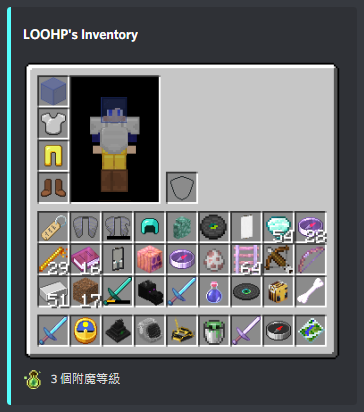
1. 在 Discord 上显示物品 / 背包 / 末影箱内容
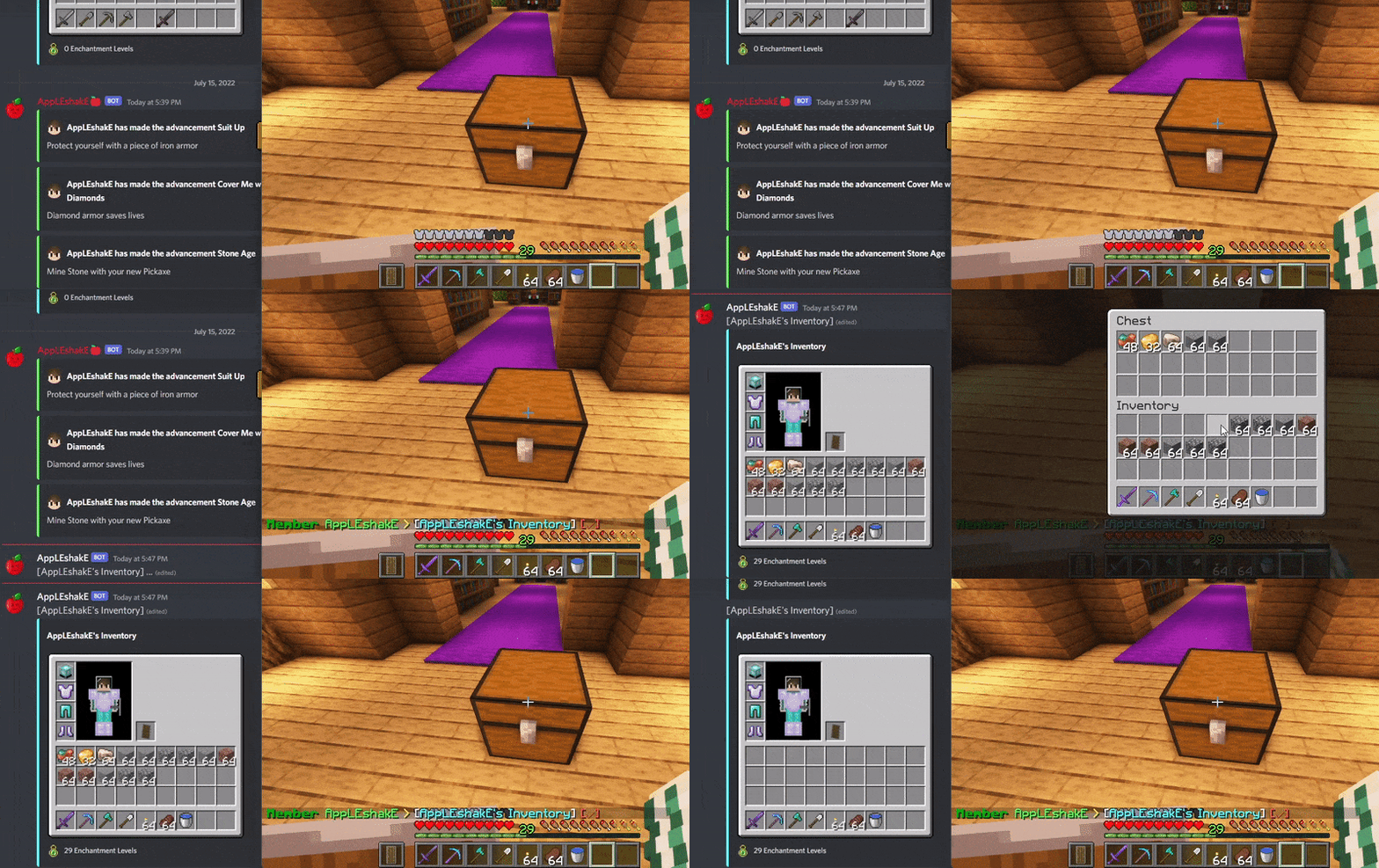
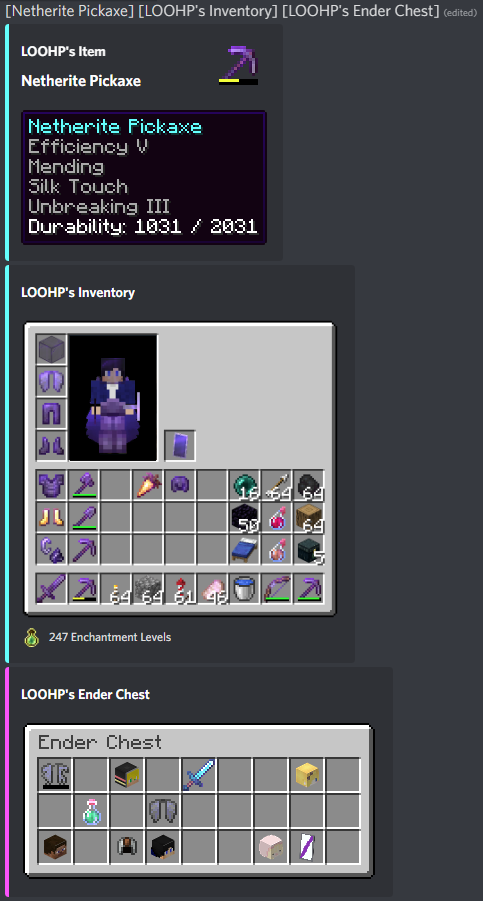
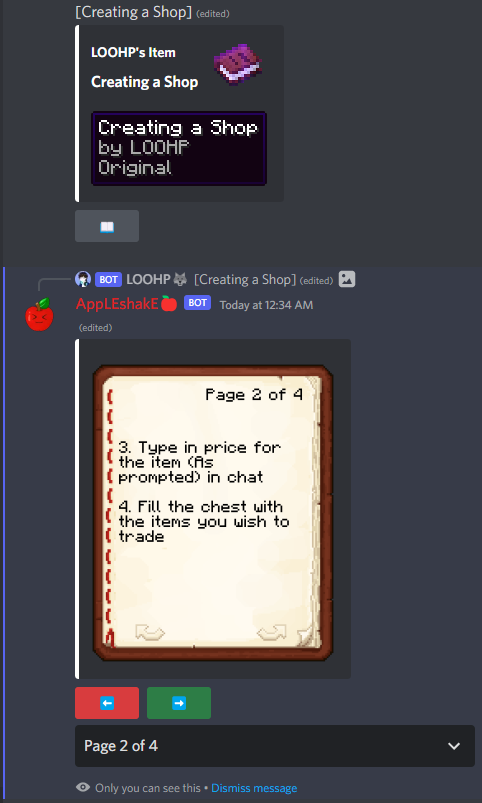
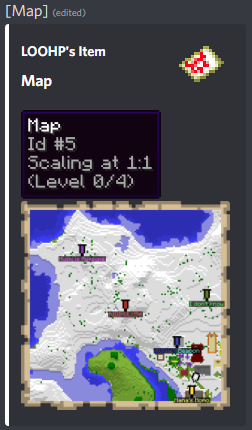
生成的背包 / 物品图片中包含:
- 背包背景
- 带有盔甲、鞘翅和帽子物品/方块的玩家背包傀儡
- 物品图片
- 耐久度指示器
- 物品数量
- 旗帜图案
- 装饰盾牌旗帜图案
- 附魔效果
- 染色皮革盔甲颜色
- 破损的鞘翅纹理
- 盔甲纹饰
- 装饰陶罐图案 (可能还有更多!)
**生成的物品描述 / 工具提示中包含:**
- 物品图片
- 物品数量
- 物品类型 / 显示名称
- 物品 Lore(描述)
- 物品药水效果
- 物品附魔
- 染色皮革盔甲 RGB 颜色
- 烟火火箭飞行持续时间
- 烟火数据
- 不可破坏
- 已填充地图内容(包括标记)
- 已填充地图数据
- 时钟时间
- 指南针方向
- 弩充能状态
- 弩充能物品
- 容器内容图片(例如潜影盒内容)
- 旗帜图案
- 盾牌图案
- 物品属性
- 物品 CanDestroy & CanPlaceOn 方块
- 可书写/已书写书的内容
- 已书写书数据
- bundles(包裹)内容
- 山羊角类型
- 盔甲纹饰
- 装饰陶罐图案 (可能还有更多!)
如果我有遗漏,请给我发消息!
2. 在 Discord 上翻译 InteractiveChat 占位符
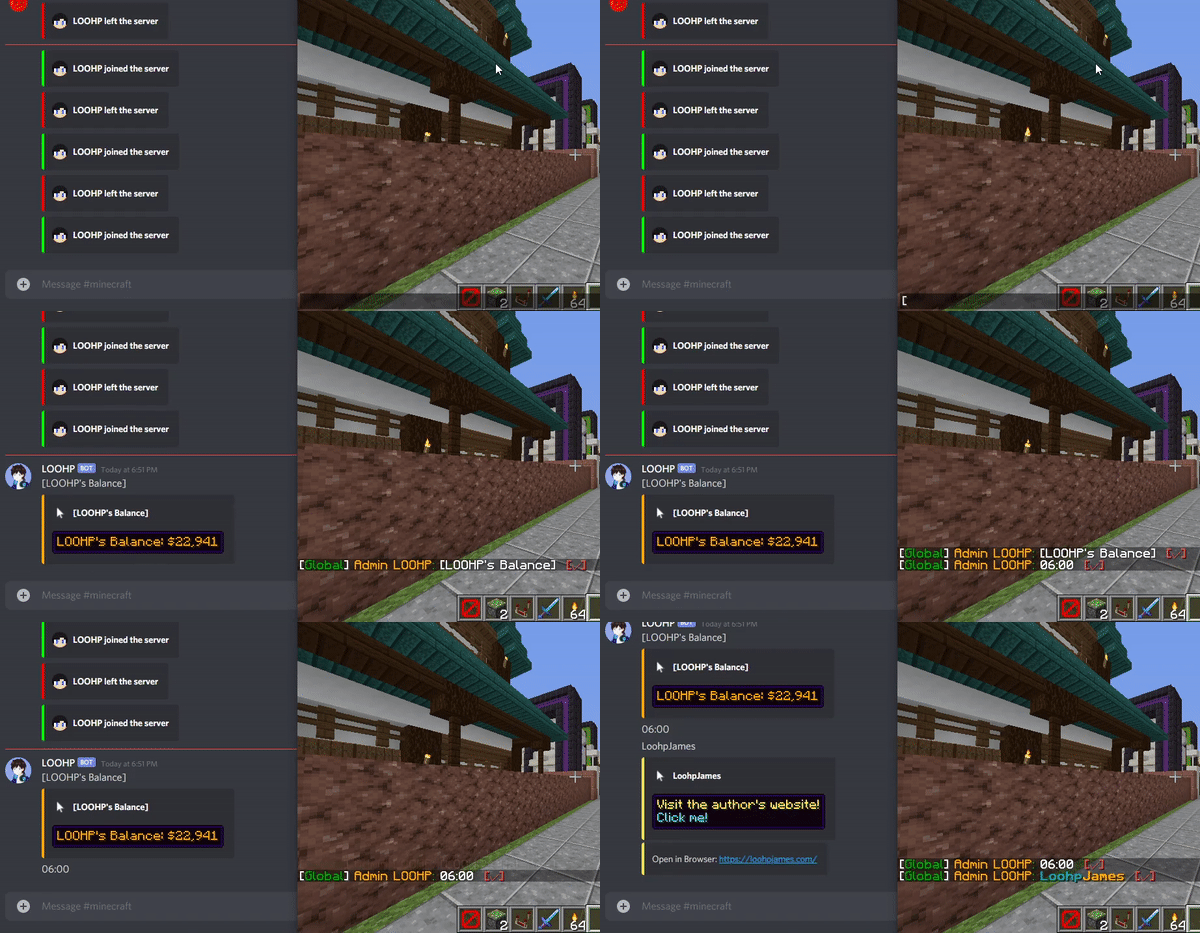
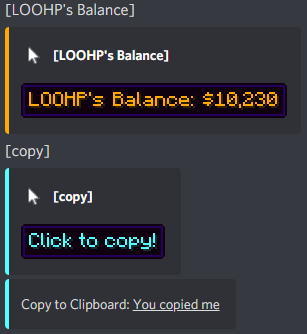
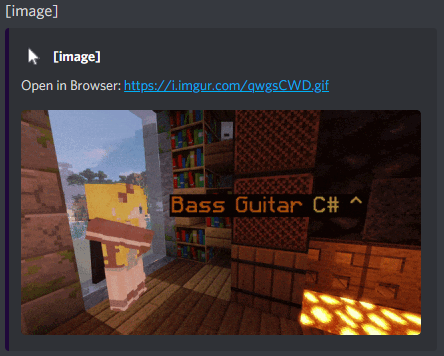
包含:
- 如果有替换文本,占位符将被替换为替换文本
- 如果有悬停文本,则显示悬停文本
- 如果有点击事件且类型为 OPEN_URL 或 COPY_TO_CLIPBOARD,则显示点击事件
3. 在地图上预览来自 Discord 的图片(支持 jpg, png 和 gif)
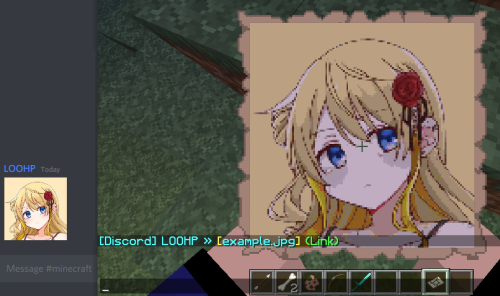
是的!GIF 将以每秒 20 帧的速度动画播放。
不用担心!您实际上无法将地图作为物品获取,也不会覆盖您手中的原始物品,因此它兼容生存服务器。
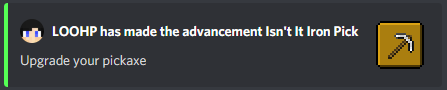
4. 美化进度消息
在 Discord 消息中显示进度的物品图标 也支持数据包进度!
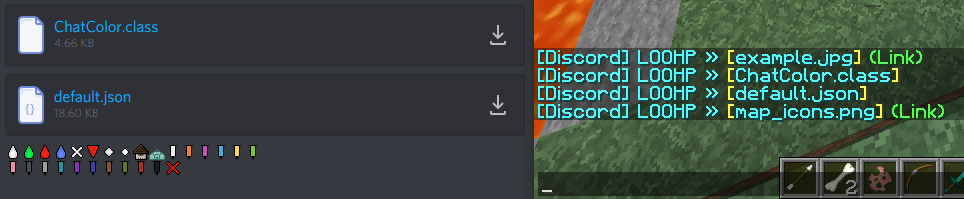
5. 将 Discord 附件转换为美观的可点击和悬停消息
6. Discord 命令
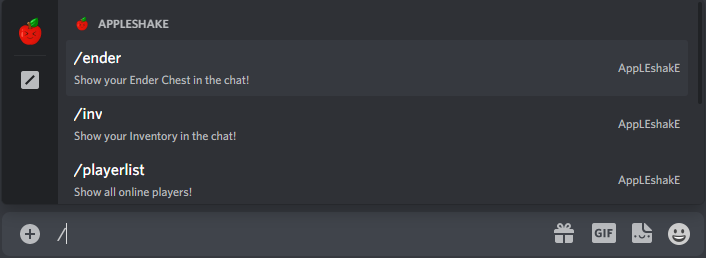
当前可用的命令: (不包括子命令)
- /item - 分享您选中槽位中的物品
- /inv - 分享您/某人 Discord 链接的游戏内账号的背包
- /ender - 分享您/某人 Discord 链接的游戏内账号的末影箱
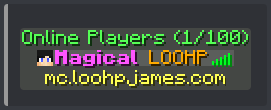
- /playerlist - 在线玩家的类似游戏内标签页风格的显示
- /playerinfo - 显示有关玩家的信息
- /resourcepack - 显示 ICD 上安装的资源包
7. 资源包支持
您可以应用自己的资源包,并享受在 Minecraft 客户端安装资源包后应有的所有效果!包括但不限于:
- 自定义字体
- 自定义纹理
- 自定义方块模型
- 更多信息:
8. 您选择的语言
某些消息(如物品名称)会根据配置文件中设置的首选语言进行翻译。语言文件将从 Mojang 自动下载,因此您无需自己翻译!
所有其他消息都可以在配置文件中更改。
格式可以在配置文件中根据您的喜好进行调整!
依赖项
- InteractiveChat (及其依赖项,需要最新的 dev build)
- DiscordSRV (1.26.0-SNAPSHOT 或更高版本)
安装
- 将 InteractiveChatDiscordSrvAddon.jar 放入 plugins 文件夹,并包含所需的依赖项
- 启动服务器 (注意:下载资产需要一些时间)
- 编辑配置文件(如果需要)
- 重启服务器(如果在第 3 步中更改了配置文件)
开发构建
展示服务器
想尝试一下这个插件吗?
IP: mc.loohpjames.com

API
命令
/interactivechatdiscordsrv reloadconfig - 重新加载配置文件(或 /icd reloadconfig) /interactivechatdiscordsrv reloadtexture [--redownload/reset] - 重新加载纹理(或 /icd reloadtexture) /interactivechatdiscordsrv update - 检查更新(或 /icd update)
权限
  interactivechatdiscordsrv.reloadconfig:
    description: 允许你重新加载配置文件
    default: op
  interactivechatdiscordsrv.reloadtexture:
    description: 允许你重新加载纹理
    default: op
  interactivechatdiscordsrv.update:
    description: 获取更新通知
    default: op
常见问题解答
如何安装我自己的资源包?
请查看此处信息:
我遇到了类似这样的错误,该怎么办?
[15:46:14] [Server thread/ERROR]: Error occurred while enabling InteractiveChatDiscordSrvAddon v4.0.3.17 (Is it up to date?)
github.scarsz.discordsrv.dependencies.jda.api.exceptions.ErrorResponseException: 50001: Missing Access
你需要在 Discord 机器人应用页面 上给你的机器人授予对斜杠命令的访问权限:
你需要按照下图所示,获取带有所需权限的邀请链接:
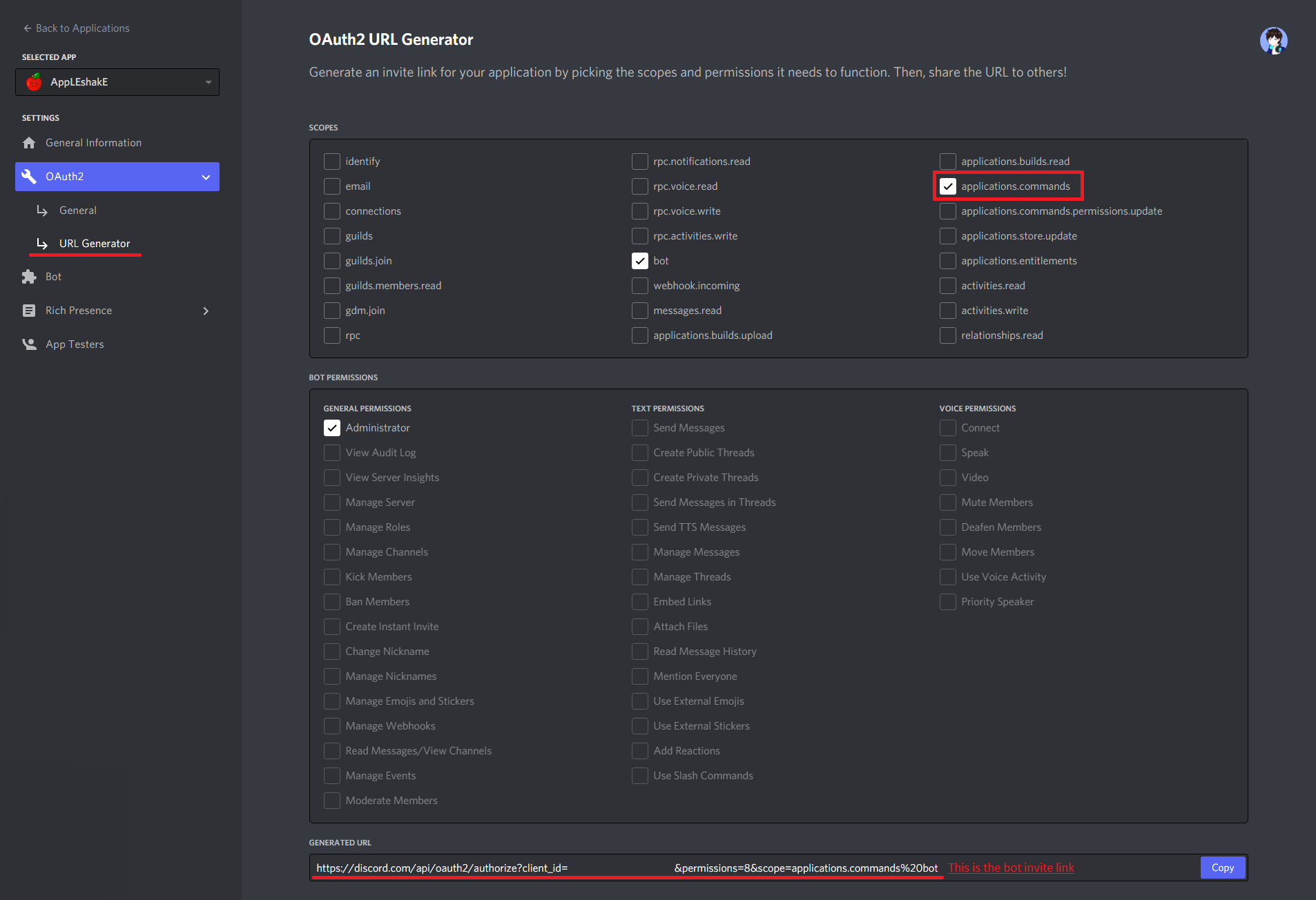
如果机器人已经在你的服务器中,你必须先将其踢出,然后再邀请它。
我收到了告诉我这个的错误信息,该怎么办?
No fonts provided by the JVM or the Operating System!
Check the Q&A section in https://www.spigotmc.org/resources/83917/ for more information
你需要在你的操作系统上安装 fontconfig。
- Debian/Ubuntu/Mint: apt-get install libfreetype6 fontconfig
- RHEL/CentOS/Fedora: yum install freetype fontconfig
- SLES/OpenSUSE: zypper install libfreetype6 fontconfig
这是因为较新的 JDK 要求操作系统提供字体支持。如果你使用的是 Minecraft 服务器托管服务,可能需要联系你的主机提供商。这里有一些有用的 文章 和 链接。
默认配置
数据使用情况
上的使用统计数据将对公众可见,并将包含你的服务器统计信息。不会发送你服务器的任何私人信息。
版本检查也通过 进行,以便在新版本发布时通知你。不会发送你服务器的任何私人信息。
Minecraft 资产将直接从 Mojang 下载。
额外资产从 和 下载,这些是插件正常运行所必需的。不会发送你服务器的任何私人信息。
About
This is an addon for my other plugin, InteractiveChat. With this addon, you will be able to have InteractiveChat Placeholders translated on DiscordSRV discord messages. As well as sharing items, and inventories to discord and sharing images and gifs to the game from discord!
Features
1. Display Item / Inventory / EnderChest Contents on Discord
Included in the generated inventory / item image:
- Inventory Background
- Player Inventory Puppet with Armor, Elytra and Hat Items/Blocks
- Item Image
- Durability Indicator
- Item Amount
- Banner Pattern
- Decorated Shield Banner Pattern
- Enchantment Effect
- Dyed Leather Armor Color
- Broken Elytra Texture
- Armor Trims
- Decorated Pot Patterns (And possibly more!)
Included in the generated item description / tooltip:
- Item Image
- Item Amount
- Item Type / Display Name
- Item Lore
- Item Potion Effects
- Item Enchantments
- Dyed Leather Armor RGB Color
- Firework Rocket Flight Duration
- Firework Data
- Unbreakable
- Filled Map Contents (Including Markings)
- Filled Map Data
- Clock Time
- Compass Direction
- Crossbow Charge State
- Crossbow Charged Item
- Container Contents Image (E.g. Shulker Box Contents)
- Banner patterns
- Shield patterns
- Item attributes
- Item CanDestroy & CanPlaceOn blocks
- Writable/Written Book Contents
- Written Book Data
- Bundle Contents
- GoatHorn Type
- Armor Trims
- Decorated Pot Patterns (And possibly more!)
If I missed any, send me a message!
2. Translate InteractiveChat Placeholders on Discord
Included:
- Placeholder replaced with Replace Text if available
- Hover Text showed if available
- Click Event showed if available and is type OPEN_URL or COPY_TO_CLIPBOARD
3. Preview Images from Discord on Maps (Works with jpg, png and gif)
Yes! Gif will be animated up to 20 frames per second.
Do not worry! You cannot actually get the map as an item nor will your original item in hand be overridden, so it is survival server friendly.
4. Beautify Advancement Messages
Show the Item icon of the advancement in the discord message Works with datapack advancements as well!
5. Convert Attachments from Discord into Pretty Clickable and Hoverable Messages
6. Discord Commands
Currently available commands: (excluding sub-commands)
- /item - Share the item in your inventory at the selected slot
- /inv - Share the inventory of your/someone's discord linked in-game account
- /ender - Share the ender chest of your/someone's discord linked in-game account
- /playerlist - An in-game tablist style display of online players
- /playerinfo - Show info regarding a player
- /resourcepack - Show resource packs installed on ICD
7. Resource Packs Support
You can apply your own resource pack and have anything you'd expect from installing a resource pack on your Minecraft client applied! That includes but not limited to:
- Custom Fonts
- Custom Textures
- Custom Block Models
- More Info:
8. Language of Your Choice
Certain messages (Such as item names) are translated to your preferred language set in the config. The language file will be automatically downloaded from Mojang so you won't have to translate them yourself!
All other messages can be changed in the config.
The formatting can be altered in the config to suit your liking!
Dependencies
- InteractiveChat (And its dependencies, requires the latest dev build)
- DiscordSRV (1.26.0-SNAPSHOT or above)
Installation
- Put InteractiveChatDiscordSrvAddon.jar into the plugins folder along with the required dependencies
- Start the server (Note that it will take some time to download the assets)
- Edit the config (if you need to)
- Restart the server (if you changed something in the config in step 3)
Development Builds
Showcase Server
Want to give the plugin a try?
IP: mc.loohpjames.com
API
Commands
/interactivechatdiscordsrv reloadconfig - Reloads the config (or /icd reloadconfig) /interactivechatdiscordsrv reloadtexture [--redownload/reset] - Reloads the textures (or /icd reloadtexture) /interactivechatdiscordsrv update - Check for updates (or /icd update)
Permissions
  interactivechatdiscordsrv.reloadconfig:
    description: Allows you to reload the config
    default: op
  interactivechatdiscordsrv.reloadtexture:
    description: Allows you to reload the texture
    default: op
  interactivechatdiscordsrv.update:
    description: Get updater notifications
    default: op
Q&A
How do I install my own resource pack?
Please take a look at the information here:
I got an error like this, what should I do?
[15:46:14] [Server thread/ERROR]: Error occurred while enabling InteractiveChatDiscordSrvAddon v4.0.3.17 (Is it up to date?)
github.scarsz.discordsrv.dependencies.jda.api.exceptions.ErrorResponseException: 50001: Missing Access
You need to give you bot access to SlashCommands on discord on the discord bot application page here:
You need to get an invite link with the required permissions as shown in this image:
If the bot is already in your server, you will have to kick it first and then invite it.
I got an error telling me this, what should I do?
No fonts provided by the JVM or the Operating System!
Check the Q&A section in https://www.spigotmc.org/resources/83917/ for more information
You need to install fontconfig onto your operating system.
- Debian/Ubuntu/Mint: apt-get install libfreetype6 fontconfig
- RHEL/CentOS/Fedora: yum install freetype fontconfig
- SLES/OpenSUSE: zypper install libfreetype6 fontconfig
This is due to newer jdk requiring the operating system to provide fonts. If you are using a Minecraft server hosting service, you might want to contact your host. Here are some useful articles and links.
Default Config
Data usage
Usage statistics at will be visible to the public with your server included in the statistics. No private information of your server is sent.
Update checking is also done via to notify you whenever a new version is released. No private information of your server is sent.
Minecraft assets will be downloaded from Mojang directly.
Additional assets are downloaded from and , they are required for the plugin to function normally. No private information of your server is sent.

下载 InteractiveChat DiscordSRV Addon
需要联机服务器吗?
稳定流畅、一键部署,几分钟即可和朋友联机开服
最低仅需 8 元/月 即可畅快联机
下载 InteractiveChat DiscordSRV Addon
需要联机服务器吗?
稳定流畅、一键部署,几分钟即可和朋友联机开服
最低仅需 8 元/月 即可畅快联机
下载 InteractiveChat DiscordSRV Addon
需要联机服务器吗?
稳定流畅、一键部署,几分钟即可和朋友联机开服
最低仅需 8 元/月 即可畅快联机
下载 InteractiveChat DiscordSRV Addon
需要联机服务器吗?
稳定流畅、一键部署,几分钟即可和朋友联机开服
最低仅需 8 元/月 即可畅快联机
下载 InteractiveChat DiscordSRV Addon
需要联机服务器吗?
稳定流畅、一键部署,几分钟即可和朋友联机开服
最低仅需 8 元/月 即可畅快联机
下载 InteractiveChat DiscordSRV Addon
需要联机服务器吗?
稳定流畅、一键部署,几分钟即可和朋友联机开服
最低仅需 8 元/月 即可畅快联机
下载 InteractiveChat DiscordSRV Addon
需要联机服务器吗?
稳定流畅、一键部署,几分钟即可和朋友联机开服
最低仅需 8 元/月 即可畅快联机
下载 InteractiveChat DiscordSRV Addon
需要联机服务器吗?
稳定流畅、一键部署,几分钟即可和朋友联机开服
最低仅需 8 元/月 即可畅快联机
下载 InteractiveChat DiscordSRV Addon
需要联机服务器吗?
稳定流畅、一键部署,几分钟即可和朋友联机开服
最低仅需 8 元/月 即可畅快联机
下载 InteractiveChat DiscordSRV Addon
需要联机服务器吗?
稳定流畅、一键部署,几分钟即可和朋友联机开服
最低仅需 8 元/月 即可畅快联机
- 修复了药水染色颜色
- 修复了 TextureAtlasSourceType SINGLE 的位置
版本号对齐更新
关于这个资源的讨论、问题反馈与使用心得
还没有讨论,来发第一帖吧
你是这个资源的作者?登录后可认领此资源。
相似资源
 插件

PacketEvents 是一款专为 Minecraft Java 版打造的协议库,旨在简化数据包的处理与传输。
 插件
ExyliaPlugins 的库。
 插件
通过对话框或铁砧界面帮助你的 Anthme
 插件
自定义你的Minecraft头像!
 插件
重新定义服务器上的生物运输方式。使用高度可定制的口袋道具,安全地捕获、存储和释放任何实体。
 插件
为基于 Spigot/Paper/Folia 的服务器添加对 Vivecraft 的支持
评论 0
登录后参与评分
还没有评论,来抢沙发吧