功能特性
- 独特的商店 GUI,仅支持物品交易,无法使用货币或金币
- iShop 2.27+ 版本仅支持 Minecraft 1.20.5+(对应 MC 版本号 26.1+),旧版 Minecraft 可尝试使用 v2.26 或更低版本,但需自行承担风险
- 通过 Geyser 插件连接的基岩版玩家现在可以与用户名中的任何字符兼容
- 基岩版玩家必须在视频设置中使用“经典 UI 配置文件”以匹配 Java 版的 GUI
- 提供 2 个交易/出售槽位,共 4 个!
- 每个商店拥有 5 行物品交易栏
- 在 GUI 中使用
/shop shops 命令列出服务器中的所有商店
- 商店列表将显示拥有者的玩家头像(含皮肤)及商店 ID 号码
- 如果
enableStockAccessFromShopGUI 设置为 true,可通过点击商店 GUI 中的箱子图标访问库存
- 可使用命令
/shop out 列出缺货的商店
- 易于设置、使用和配置!
- 使用 SQLite 数据库保存商店和库存数据
- 可延迟加载商店数据库至任意时长!如果自定义世界或其他插件在服务器启动时加载较慢,此功能非常有用
- 所有已知和报告的复制漏洞/错误均已修复,使该插件高度安全且可靠!
- 使用
/shop list 时,“管理”和“商店”文本可点击,以便远程管理或购物
- 使用
/shop sold 时,“上一页”和“下一页”文本可点击,以查看错过的商店消息
- 只有商店所有者或拥有
ishop.admin 权限的管理员才能在商店方块上放置/破坏物品展示框或告示牌!放置时需要潜行(按住 Shift 键),但破坏时不需要
- 配置文件中的选项和消息高度可定制
- 如果配置文件中的
shopBlock 和 stockBlock 相同,且 enableShopBlock 为 true,则点击该方块将打开商店 GUI
- 您可以设置无限数量的方块作为商店或库存 GUI 方块
- 设置一个距离限制,玩家必须在该范围内才能访问库存
- 禁用在配置文件中列出的世界中创建商店!
- 禁用商店中列出物品的交易(包括潜影盒和捆绑包内的物品)
- 左键或右键点击商店方块即可激活 GUI
- 仅当左键点击时才会激活库存方块 GUI!如堆肥桶、末影箱或任何可使用的方块仍可作为库存方块使用!
- 只有潜行(按住 Shift 键)时才能破坏库存方块
- 限制库存仅包含玩家商店中正在交易的活跃物品
- 防止玩家创建重复的交易
- 管理员可以远程管理玩家的商店和库存
- 管理员商店在 GUI 中具有广播选项,会在聊天中显示商店购买记录
- 如果玩家在线且有人试图购买缺货物品,玩家将收到一条消息!
- 如果
enableShopSoldMessage 为 true,商店所有者可以输入 /shop sold 查看错过的商店消息
- 商店售出消息将在服务器重启或使用
/shop sold clear 时清除
- 可以将物品放入潜影盒中进行交易,从而在节省商店空间的同时容纳更多物品交易!
- 可在配置文件中禁用商店或库存方块,仅使用命令代替!
- 物品展示框及其内部物品将受到爆炸保护,但告示牌不受保护
- 配置文件选项可控制:除非玩家至少设置了一个商店,否则无法访问库存 GUI
- 支持 GriefPrevention 和 WorldGuard!
- 如果配置文件中
enableWorldGuardFlag 设置为 true,请使用 WorldGuard 创建一个区域并将标志设为 ishop,以允许用户在该区域创建商店
如何使用 iShop
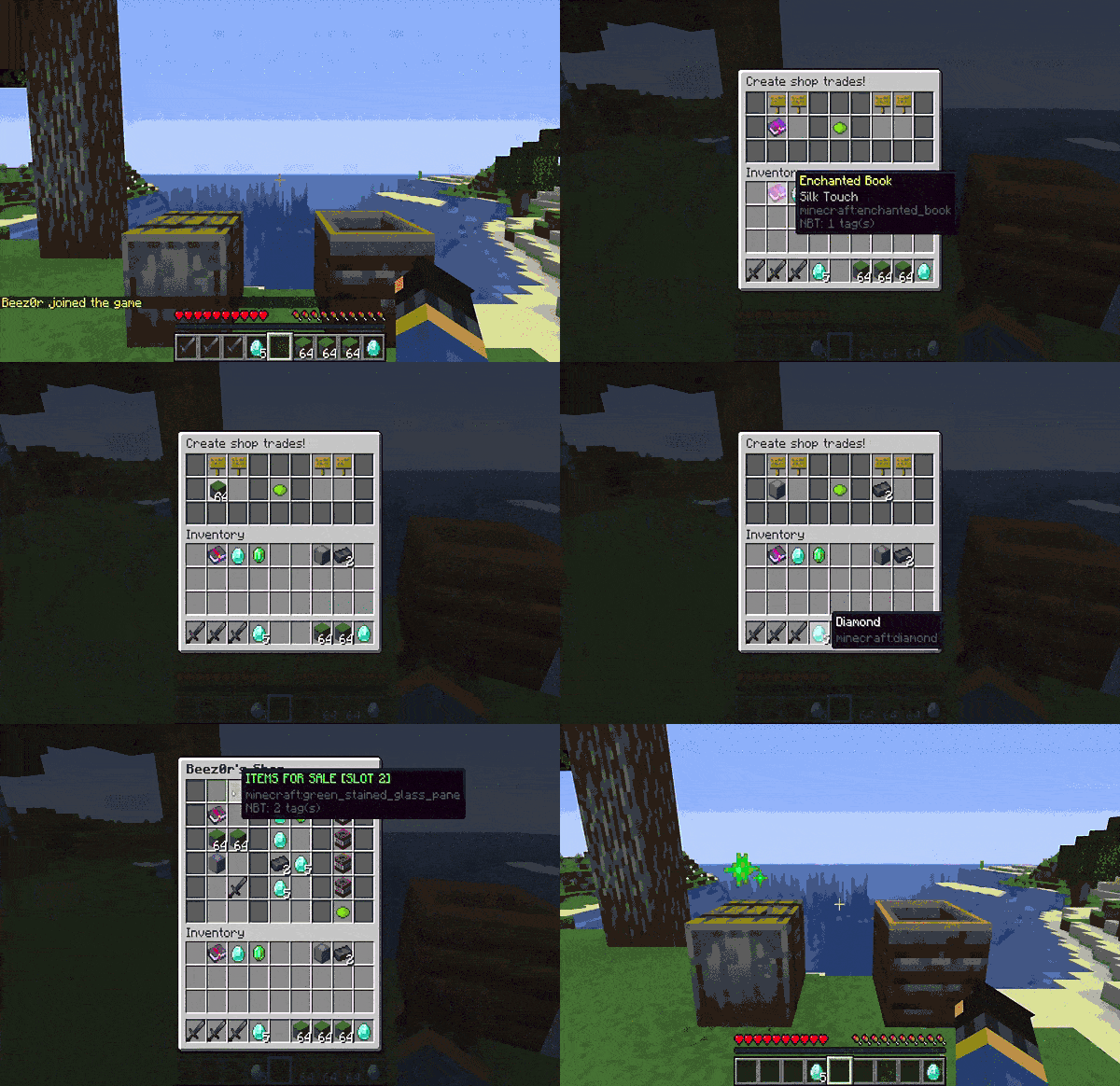
- 简易指南(GIF 动图)
- 要创建商店,请瞄准可用的商店方块(默认为木桶)并输入
/shop create
- 要删除商店,请瞄准所需的商店方块并输入
/shop delete
- 通过左键点击库存方块(默认为堆肥桶)或在启用时输入
/shop stock 来为您的商店补充货物
- 要列出带有位置和 ID 的您的商店,请输入
/shop list
- 如果
remoteManage 设置为 true,要管理您的商店,请输入 /shop manage <id>
- 您也可以通过左键或右键点击属于您自己的任何商店来管理它们
- 要创建无需库存的管理员商店,请瞄准可用的商店方块并输入
/shop adminshop
- 如果
/shop 命令被其他插件占用,您可以改用 /ishop
- 管理员可以通过输入
/shop createshop <player> 为玩家创建商店,这将始终绕过最大商店数量限制
为您的商店创建交易的步骤
- 左键或右键点击您的商店方块,或在启用时输入
/shop manage <id>
- 点击绿色的创建物品按钮(青染色的染料)
- 将您想要出售的物品拖到左侧槽位,然后拖回您的背包
- 将您物品的价格拖到右侧槽位,然后拖回背包
- 点击绿色的创建物品按钮(青染色的染料)
移除您的商店交易的步骤
命令
通用命令
/shop copy <id> -- 创建一个副本商店,其交易内容与指定 ID 的商店相同
/shop count <item> -- 统计库存中指定物品的数量
/shop create -- 在瞄准位置创建玩家商店
/shop delete -- 删除瞄准位置的商店
/shop deleteid <id> -- 删除您拥有的指定 ID 的商店
/shop find <item> -- 在所有玩家商店中搜索正在出售的指定物品
/shop list -- 显示带有位置的您的商店列表
/shop manage <id> -- 如果 remoteManage 为 true,管理指定 ID 的玩家商店
/shop move <id> -- 将指定 ID 的商店移动到新瞄准的位置
/shop out -- 列出有行和物品缺货的商店
/shop stock <page> -- 如果 enableStockCommand 为 true,远程管理您自己的库存
/shops shops -- 列出服务器中的所有商店,显示拥有者玩家头像皮肤和商店 ID 号码
/shop sold <page/clear> -- 显示错过的商店消息,可选择分页或清除它们
/shop view <id> -- 如果 remoteShopping 为 true,远程查看玩家的商店
管理员命令
/shop adminshop -- 在目标位置创建一个无需库存的管理员商店
/shop createlocation <玩家> <x> <y> <z> <世界> -- 在指定位置和世界中为玩家创建商店。控制台也可使用该命令
/shop createshop <玩家> -- 在目标位置为指定玩家创建商店,绕过任何商店限制
/shop delete -- 删除目标位置的商店
/shop deleteid <id> -- 删除具有给定 ID 编号的商店。控制台可以使用此命令
/shop deletelocation <x> <y> <z> <world> -- 删除指定位置和世界的商店。控制台可以使用此命令
/shop list <player> -- 显示给定玩家的商店列表及其位置
/shop listadmin -- 显示管理员商店列表
/shop liststock -- 显示库存中有物品的玩家列表
/shop lockdown -- 为没有 ishop.admin 权限的玩家开启或关闭商店、库存及命令功能
/shop manage <id> -- 远程管理指定 ID 的玩家商店
/shop managestock <player> <page> -- 远程管理指定玩家的库存
/shop out <player> -- 列出指定玩家缺货的行与物品
/shop purgestock <player> confirm -- 删除指定玩家的库存
/shop reload -- 重新加载插件配置文件。控制台可使用此命令
/shop removeallshops <玩家> -- 移除指定玩家的所有商店
权限
ishop.admin -- 允许使用管理员命令和访问
ishop.bypassfindcooldown -- 绕过查找命令冷却计时器
ishop.create -- 如果 usePermissions 设置为 true,则允许玩家创建商店
ishop.create.limit.bypass -- 允许玩家绕过商店数量限制
ishop.create.limit.n -- 将 n 替换为所需的最大商店数量;例如 ishop.create.limit.5
ishop.find -- 允许使用 /shop find <item> 命令
ishop.list -- 允许使用 /shop list <player> 命令
ishop.move -- 允许使用 /shop move <id> 命令
ishop.pages.n -- 将 n 替换为玩家库存页面的限制数量(必须小于或等于 maxStockPages);例如 ishop.pages.10
ishop.remotemanage -- 允许使用 /shop manage <id> 命令
ishop.remoteshopping -- 允许使用 /shop view <id> 命令
ishop.shops -- 允许使用 /shop shops 命令
ishop.stock -- 允许使用 /shop stock 命令并绕过所有限制
如果 usePermissions 设置为 false,所有玩家都可以创建最多达到 config 中设置的 defaultShopLimit 的商店
可选依赖项
- GriefPrevention -- 在创建商店时检查领地权限以确认位置
- Lands -- 在创建商店时检查目标位置是否有 BLOCK_PLACE 标志
- SuperiorSkyblock2 -- 在创建商店时检查目标位置是否有 Build 特权
- Towny -- 在创建商店时检查目标位置的建造权限和商店地块类型
- Vault -- 用于为
/shop create 命令添加价格功能
- WorldGuard -- 用于为商店创建区域
配置文件
- 当更新插件 jar 文件时,配置文件会自动更新至最新版本!
- 仍建议重新生成配置文件以获取最新的注释说明!
官方 iShop 测试服务器
Features
- Unique shop GUI that will only trade items, cannot use money or currency
- iShop version 2.27+ only supports Minecraft 26.1+ versions, previous Minecraft versions may use v2.26 or below at your own risk
- Bedrock players via Geyser plugin now compatible with any characters within username
- Bedrock players must use Classic UI Profile in Video Settings for GUI to match Java
- 2 item slots to trade or sell with, 4 total!
- 5 rows of item trades per shop
- List every shop in the server within GUI using /shop shops
- Shop list will show owner player heads with skin and shop id number
- Stock Inventory can now be accessed by clicking chest item in Shop GUI if enableStockAccessFromShopGUI is true
- Shops with items out of stock can be listed with command /shop out
- Easy to setup, use, and configure!
- SQLite database used for saving shops and stock
- Delay loading of shops database to any amount of time! Useful if custom worlds or other plugins take time to load during server startup
- All known and reported dupes/bugs have been fixed, making this plugin very secure and reliable!
- Clickable MANAGE & SHOP text when using /shop list to manage or remotely shop
- Clickable Previous & Next text when using /shop sold to view missed shop messages
- Only shop owners or ishop.admin can place/break item frames or signs on shop blocks! Sneaking (holding shift key) required to place but not break
- Highly customizable options and messages in configuration file
- If shopBlock and stockBlock are identical in config, shop GUI will open if enableShopBlock is true
- You are able to set an unlimited amount of blocks as shop or stock GUI blocks
- Set a range limit from shops that players must be within to access stock inventory
- Disable creating shops with worlds listed in config!
- Disable trading of listed items in shops (including within shulkers & bundles)
- Shop block will activate GUI if left or right clicked
- Stock block will activate GUI only if left clicked! Blocks like composters, ender chest, or anything usable can still be used and also be a stock block!
- Stock blocks can only be destroyed if sneaking (holding shift key)
- Restrict stock inventory to only active items being traded in players shops
- Prevent players from creating duplicate trades
- Admins are able to remotely manage player shops and stock
- Admin shops have broadcast option in GUI that will display shop purchases in chat
- Players will receive a message if they are online and someone tries to buy an out of stock item!
- If enableShopSoldMessage is true, shop owners can type /shop sold for missed shop messages
- Shop sold messages will clear on server restart or using /shop sold clear
- Items can be put into a shulker box and traded to accommodate more item trading while saving shop space!
- Disable shop or stock blocks in config and only use commands instead!
- Item frames and items within will be protected from explosions, signs are not protected
- Config option to control if players cannot access stock GUI unless they have at least 1 shop setup
- Supports GriefPrevention & WorldGuard!
- If enableWorldGuardFlag is set to true in the config, create a region with WorldGuard and set the flag ishop to allow users to create a shop in that region
How to use iShop
- Simple guide via gif
- To create a shop, target an available shop block (barrel by default) and type /shop create
- To delete a shop, target desired shop block and type /shop delete
- Stock your shops with items by left clicking on stock block (composter by default) or if enabled type /shop stock
- To list your shops with location and id, type /shop list
- To manage your shops if remoteManage is set to true, type /shop manage <id>
- You can also manage your shops by left or right clicking any of your own shops
- To create an admin shop that does not need stock, target an available shop block and type /shop adminshop
- If /shop command is being used by another plugin, you are able to use /ishop instead
- Admins can create shops for players that will always bypass max shop limit by typing /shop createshop <player>
Steps to create trades for your shop
- Left or Right click on your shop block or if enabled type /shop manage <id>
- Click on green create item (lime dye)
- Drag the items YOU WANT TO SELL to the left slots and drag back to your inventory
- Drag PRICE FOR YOUR ITEMS to the right slots and drag back to inventory
- Click on green create item (lime dye)
Steps to remove trades for your shop
- Remove trades by clicking on TNT delete item
Commands
General Commands
/shop copy <id> -- creates a shop that will copy the trades of given shop id
/shop count <item> -- count amount of given item in stock inventory
/shop create -- Creates player shop at the targeted location
/shop delete -- Deletes shop at the targeted location
/shop deleteid <id> -- Deletes a shop you own with the given id number
/shop find <item> -- Search all player shops for given item that is for sale
/shop list -- Shows list of your shops with location
/shop manage <id> -- Manage your player shop with given id if remoteManage is true
/shop move <id> -- Move given shop id to a new targeted location
/shop out -- List shops with rows and items that are out of stock
/shop stock <page> -- Manage your own stock remotely if enableStockCommand is true
/shop shops -- List every shop in the server with owner player head skins and shop id number
/shop sold <page/clear> -- Show missed shop messages with optional page or clear them
/shop view <id> -- View a players shop remotely if remoteShopping is true
Admin Commands
/shop adminshop -- Creates an admin shop that does not require stock at the targeted location
/shop createlocation <player> <x> <y> <z> <world> -- Create shop for a player at given location and world. Console can use this command
/shop createshop <player> -- Create shop for given player at targeted location bypassing any shop limits
/shop delete -- Deletes shop at the targeted location
/shop deleteid <id> -- Deletes shop with given id number. Console can use this command
/shop deletelocation <x> <y> <z> <world> -- Delete shop at given location and world. Console can use this command
/shop list <player> -- Shows a list of given players shops with location
/shop listadmin -- Shows list of admin shops
/shop liststock -- Shows list of players that have items in their stock inventory
/shop lockdown -- Toggle on/off shops, stock, and commands for players without ishop.admin permission
/shop manage <id> -- Remotely manage players shop with given id
/shop managestock <player> <page> -- Remotely manage stock of given player
/shop out <player> -- List shops with rows and items that are out of stock for given player
/shop purgestock <player> confirm -- Deletes given players stock inventory
/shop reload -- Reload plugin configuration file. Console can use this command
/shop removeallshops <player> -- Remove all shops of given player
Permissions
ishop.admin -- Allows use of admin commands and access
ishop.bypassfindcooldown -- Bypass find command cooldown timer
ishop.create -- Allows players to create a shop if usePermissions is set to true
ishop.create.limit.bypass -- Allows players to bypass shop limit
ishop.create.limit.n -- Replace n with number desired as max shop limit; i.e. ishop.create.limit.5
ishop.find -- Allows use of /shop find <item> command
ishop.list -- Allows use of /shop list <player> command
ishop.move -- Allows use of /shop move <id> command
ishop.pages.n -- Replace n with number desired as stock page limit for player (must be less than or equal to maxStockPages); i.e. ishop.pages.10
ishop.remotemanage -- Allows use of /shop manage <id> command
ishop.remoteshopping -- Allows use /shop view <id> command
ishop.shops -- Allows use of /shop shops command
ishop.stock -- Allows use of /shop stock command bypassing any restrictions
If usePermissions is set to false, all players can create shops up to defaultShopLimit set in config
Optional Dependencies
- GriefPrevention -- Check claim permissions upon creation for shop location
- Lands -- Check for BLOCK_PLACE flag at target location upon creation for shop
- SuperiorSkyblock2 -- Check for Build privilege at target location upon creation for shop
- Towny -- Check for build permission and shop plot type at targeted location upon creation for shop
- Vault -- To add a price for "/shop create" command
- WorldGuard -- To create regions for shops
Configuration File
- Config file automatically updates to latest version when updating plugin jar file!
- Config regeneration still recommended for updated comments!
Official iShop Test Server


 插件

 插件
 插件
 插件
 插件

评论 0
登录后参与评分
还没有评论,来抢沙发吧