ItemChatSRV

在聊天中展示你的物品、背包和位置,并自动将其同步到 Discord。
是否曾想炫耀那把附魔钻石剑,或者向朋友们展示你确切的位置,而不必输入一大段文字?只需在你的消息中加入一个简单的标签,剩下的交给插件处理即可。
✨ 功能特性
[i] / [item] — 显示你手中当前持有的物品。在聊天中悬停可查看完整详情(背景故事、附魔、自定义名称)。点击可打开一个只读的预览 GUI,精确展示该物品。
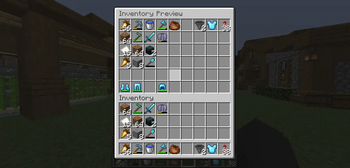
[inv] — 在聊天中显示 [Inventory]。点击可打开一个包含 54 个格子的快照,展示你发送消息那一刻的整个背包状态(36 主栏 + 护甲栏 + 副手栏)——仅用于安全预览,不可实时编辑。
[pos] — 显示你当前的坐标。悬停可查看所在的世界,点击可直接将坐标复制到剪贴板。
- 自动同步至 Discord — 如果已安装并运行 DiscordSRV,任何包含上述标签的消息都会自动以清晰的嵌入卡片形式转发到你的主 Discord 频道,其中包括玩家名称、头像以及可读的消息版本(例如将原始标签显示为
[Diamond Sword])。
? 为什么选择这个插件?
与大多数物品聊天插件不同,ItemChatSRV 直接与你现有的 DiscordSRV 配置对接——无需单独的机器人,无需额外的 Discord 应用,也无需重复配置。如果你的服务器已经运行着 DiscordSRV,它即可直接生效。
尚未安装 DiscordSRV?没问题——该插件可以独立运行,所有游戏内聊天预览功能均正常工作。一旦检测到 DiscordSRV,Discord 同步功能便会自动激活。
? 依赖要求
- Paper 或 Spigot 1.20+
- DiscordSRV (可选,仅用于 Discord 同步功能)
? 权限说明
| 权限 |
描述 |
默认值 |
itemchat.use |
允许在聊天中使用 [i] / [item] / [inv] / [pos] 标签 |
true(所有人) |
? 备注
- 物品图标从公共 Minecraft 纹理镜像获取并本地缓存,因此首次使用后渲染速度极快。少数由 Minecraft 本身以 3D 方式渲染的物品(箱子、床、旗帜、盾牌)将显示占位符图标而非平面贴图——这是 Minecraft 渲染机制的特性,并非 Bug。
- 轻量级且无外部依赖:不捆绑任何外部库,完全通过其自身 API 与 DiscordSRV 通信。
ItemChatSRV

Show off your items, inventory, and location right in chat — and have it all relay straight to Discord, automatically.
Ever wanted to brag about that enchanted Diamond Sword or show your friends exactly where you're standing, without typing out a paragraph? Just drop a simple tag into your message and let the plugin do the rest.
✨ Features
[i] / [item] — Displays the item currently in your hand. Hover over it in chat to see the full details (lore, enchantments, custom name). Click it to open a read-only preview GUI showing the exact item.
[inv] — Displays [Inventory] in chat. Click to open a 54-slot snapshot of your entire inventory (36 main slots + armor + offhand) captured at the exact moment the message was sent — no live editing, just a safe preview.
[pos] — Displays your current coordinates. Hover to see which world you're in, click to copy the coordinates straight to your clipboard.
- Automatic Discord relay — If DiscordSRV is installed and running, any message containing the tags above is automatically relayed to your main Discord channel as a clean embed, complete with the player's name, avatar, and a readable version of the message (e.g.
[Diamond Sword] instead of raw tags).
? Why this one?
Unlike most item-chat plugins, ItemChatSRV talks directly to your existing DiscordSRV setup — no separate bot, no extra Discord app, no duplicate configuration. If DiscordSRV is already running on your server, it just works.
Don't have DiscordSRV installed? No problem — the plugin runs perfectly fine on its own, with all in-game chat previews working normally. The Discord relay simply activates automatically the moment DiscordSRV is detected.
? Requirements
- Paper or Spigot 1.20+
- DiscordSRV (optional, only needed for the Discord relay feature)
? Permissions
| Permission |
Description |
Default |
itemchat.use |
Allows using [i] / [item] / [inv] / [pos] tags in chat |
true (everyone) |
? Notes
- Item icons are fetched from a public Minecraft texture mirror and cached locally, so renders load fast after the first use. A small handful of items that Minecraft itself renders in 3D (chests, beds, banners, shields) will show a placeholder icon instead of a flat sprite — this is a Minecraft rendering quirk, not a bug.
- Lightweight and dependency-free: no external libraries bundled, talks to DiscordSRV purely through its own API.
评论 0
登录后参与评分
还没有评论,来抢沙发吧