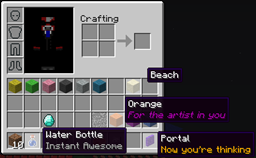
受够了名为 Sand 的方块了吗?想让你的末影珍珠显示为 Grenade 吗?想在物品名称下方添加额外的文本行吗?使用 ItemRenamer 实现所有这些功能以及更多。你可以为服务器中的所有物品创建自定义名称,同时仍允许用户通过铁砧进行重命名。你还可以创建自己的语言包!
安装
- 下载 ProtocolLib 并将其放入 plugins 文件夹
- 将 ItemRenamer.jar 放入 plugins 文件夹,服务器启动时将生成配置文件
- 通过将世界设置为运行示例包来测试示例配置,以了解其工作原理
- 尽情发挥创意,制作你自己的语言包
开发版本
此项目的开发版本可从提供的持续集成服务器获取。
这些版本未经 BukkitDev 工作人员批准。请自行承担责任使用。
Jenkins 服务器
面向开发者
ItemRenamer 2.0.0 包含一个完善的 API。点击 这里 获取更多信息。
配置
默认配置文件可在 这里 找到。
| 配置项 | 默认值 | 范围 | 描述 |
|---|
| autoupdate | true | [true/false] | 当有新版本可用时会提醒你 |
| creativedisable | true | [true/false] | 在你处于创造模式时将禁用 ItemRenamer |
| worlds.<worldname> | | 包名称 | 将此世界设置为运行你在此处指定的包 |
| packs.<packname>.<itemid>.<data>.name | | 任意字符串 | 将 itemid:data 重命名为你的字符串 |
| packs.<packname>.<itemid>.all.name | | 任意字符串 | 将所有 itemid 数据值重命名为你的字符串 |
| packs.<packname>.<itemid>.other.name | | 任意字符串 | 将所有未设置的 itemid 数据值重命名为你的字符串 |
| packs.<packname>.<itemid>.<data>.name | | 任意字符串 | 将你的名称添加到 itemid:data |
| packs.<packname>.<itemid>.<data>.lore | | 任意字符串 | 将你的描述列表添加到 itemid:data |
| packs.<packname>.<itemid>.<first>-<last>.name | | 任意字符串 | 将你的名称添加到所有数据值在给定范围内的 itemid。 |
| packs.<packname>.<itemid>.<first>-<last>.lore | | 任意字符串 | 将你的描述列表添加到所有数据值在给定范围内的 itemid。 |
| packs.<packname>.<itemid>.all.lore | | 任意字符串 | 将你的描述列表添加到所有 itemid 数据值 |
| packs.<packname>.<itemid>.other.lore | | 任意字符串 | 将你的描述列表添加到所有未设置的 itemid 数据值 |
- 注意:描述内容请使用 [方括号] 或 以短横线 - 开头的单独行
玩家专属包
如果你想为特定的一组玩家定制重命名包,而不管他们所在的世界如何,你可以使用玩家信息中的 itempack 配合所需的重命名包。此功能需要 Vault 以及支持玩家信息的权限/聊天插件。
使用 PermissionEx 可以按如下方式实现:
users:
  Player:
    group:
     - Members
    options:
      itempack: none
使用方法
可以不接触配置文件或使用更复杂(但功能强大)的命令来配置 ItemRenamer。只需选择你想要重命名的物品,然后输入以下内容:
这将选择你当前手持物品的 ID 和耐久度(盔甲和工具除外),以及任何附魔、药水/烟花效果等。然后使用 set name 和 add lore 来重命名该物品及服务器上所有类似的物品:
/renamer set name Nameless Tool
/renamer add lore Unknown Artifact
这将自动应用于你当前所在的世界。使用 "renamer set pack" 将其应用到不同的物品包,或者传送到你想要重命名的物品包所在的世界。
命令
所有命令默认需要 OP 权限,但也支持其他权限设置。
修改附魔
还可以为任意物品添加或移除已有的附魔。最简单的方法是在快捷栏中选中你要修改的物品,然后输入以下命令:
/renamer select hand
/renamer add enchantment NO_ATTRIBUTES 1
所有原版附魔均受支持:
- 弓:POWER、PUNCH、INFINITY、FLAME
- 武器:SHARPNESS、BANE_OF_ARTHROPODS、SMITE、FIRE_ASPECT、KNOCKBACK、LOOTING、UNBREAKING
- 工具:FORTUNE、EFFICIENCY、UNBREAKING、SILK_TOUCH
- 盔甲:RESPIRATION、PROTECTION、BLAST_PROTECTION、FEATHER_FALLING、FIRE_PROTECTION、PROJECTILE_PROTECTION、THORNS、AQUA_AFFINITY
还有三个自定义附魔:
- GLOW 1:保留附魔发光效果,但不显示附魔名称
- NO_ATTRIBUTES 1:移除在 1.6.1 和 1.6.2 版本中引入的所有属性行。
- NO_DURABILITY 0:移除物品上任何可见的耐久度显示。将 0 替换为其他任意数字可强制设定一个耐久度值。
权限
itemrenamer.config.get — 只读访问配置文件
itemrenamer.config.set — 可编辑配置文件或从磁盘重新加载
itemrenamer.update — 在更新可用时获取通知,并可使用更新命令
说明
- 加入我们的 IRC 频道:irc://esper.net/ItemRenamer
- 创造模式菜单中的物品仅对客户端生效,因此无法通过此插件进行重命名。但创造模式玩家会在主物品栏中看到他们的物品已被重命名。
- 此插件实际上并未修改任何物品数据,它们只是看起来被重命名了……如果你突然停止使用此插件,所有物品应恢复正常。
- 如果玩家在铁砧中重命名了物品,该名称将优先于 ItemRenamer 设置的名称。
- 在游戏中设置描述(lore)时,请确保用方括号包裹文本,每行之间用逗号分隔,若包含特殊字符则需用引号括起来。
源代码
通过 GitHub 访问源代码:
捐赠
指标

Tired of blocks called Sand? Want your enderpearls to say Grenade instead? Want to add extra lines of text below item names? Do all that and more with ItemRenamer. You can create your own custom item names for all items in your server, but still let users rename with an anvil. You can create your very own language pack!
Installation
- Download ProtocolLib and put it in your plugins folder
- Place ItemRenamer.jar in your plugins folder, on server start the configuration will be generated
- Test out the example config by setting your world to run the example pack, to see how it works
- Go crazy and make your own language pack
Developer Build
Development builds of this project can be acquired at the provided continuous integration server.
These builds have not been approved by the BukkitDev staff. Use them at your own risk.
Jenkins server
For developers
ItemRenamer 2.0.0 contains a fully-fledged API. Click here for more information.
Configuration
Default configuration can be found here.
| Config | Default | Ranges | Description |
|---|
| autoupdate | true | [true/false] | Will remind you when a new version is available |
| creativedisable | true | [true/false] | Will disable ItemRenamer while you're in creative mode |
| worlds.<worldname> | | Pack name | Will set this world to run the pack you put here |
| packs.<packname>.<itemid>.<data>.name | | Any string | Will rename itemid:data to your string |
| packs.<packname>.<itemid>.all.name | | Any string | Will rename all itemid data values to your string |
| packs.<packname>.<itemid>.other.name | | Any string | Will rename all unset itemid data values to your string |
| packs.<packname>.<itemid>.<data>.name | | Any string | Will add your name to itemid:data |
| packs.<packname>.<itemid>.<data>.lore | | Any string | Will add your lore list to itemid:data |
| packs.<packname>.<itemid>.<first>-<last>.name | | Any string | Will add your name to every itemid with a data value of the give range. |
| packs.<packname>.<itemid>.<first>-<last>.lore | | Any string | Will add your lore list to every itemid with a data value of the give range. |
| packs.<packname>.<itemid>.all.lore | | Any string | Will add your lore list to all itemid data values |
| packs.<packname>.<itemid>.other.lore | | Any string | Will add your lore list to all unset itemid data values |
- Note: place lore in [square brackets] OR on seperate lines starting with a dash -
Player-specific packs
If you want to customize the renamer pack for a specific group of players, regardless of world, you may use the player info itempack along with the desired renamer pack. This feature requires Vault and a permission/chat plugins that supports player info.
This can be done as follows with PermissionEx:
users:
  Player:
    group:
     - Members
    options:
      itempack: none
Usage
It's possible to configure ItemRenamer without ever having to touch the configuration file or deal with the more complicated (but powerful) commands. Simply select an item you want to rename, and type the following:
That will select your current item's ID and durability (except for armor and tools), along with any enchantments, potion/fireworks effect, etc. Then use set name and add lore to rename the item and every other like it on the server:
/renamer set name Nameless Tool
/renamer add lore Unknown Artifact
This will automatically be applied to the current world you're in. Use "renamer set pack" to apply it to a different item pack, or teleport to the world with the item pack you want to rename.
Commands
- Change whether or not to automatically check for updates:
/renamer set setting autoupdate [true|false]
- Get what item pack has been assigned to a particular world:
/renamer get world [world_name]
- Assign an item pack to the given world:
/renamer set world [world_name] [pack_name]
- Add a new item pack:
/renamer add pack [pack_name]
- Delete an item pack:
/renamer delete pack [pack_name]
- Select a item pack to use for all subsequent commands:
/renamer select pack [pack_name]
- Rename all items similar to the one the player currently is holding:
/renamer select hand
- Deselect the current item pack, going back to manually typing it:
/renamer select none
- Get the rename rule for a particular item:
/renamer get item [pack_name] [itemID] [all|other|0-32767]
- Set the name of an item(s) matching a single or multiple damage values:
/renamer set name [pack_name] [itemID] [all|other|0-32767] [0-32767] [name (with spaces)]
- Add a new lore line to an item(s) matching a single or multiple damage values:
/renamer add lore [pack_name] [itemID] [all|other|0-32767] [0-32767] [lore (with spaces)]
- Remove all the existing lores for a particular set of items:
/renamer delete lore [pack_name] [itemID] [all|other|0-32767] [0-32767]
- Add a new enchantment to a set of items:
/renamer add enchantment [pack_name] [itemID] [all|other|0-32767] [0-32767] [enchantment_name] [level]
- Remove an existing enchantment for a set of items:
/renamer remove enchantment [pack_name] [itemID] [all|other|0-32767] [0-32767] [enchantment_name] [level]
- Reload configuration:
/renamer reload
- Save configuration now instead of during server shutdown:
/renamer save
All commands default to OP, but also have permissions.
Modify enchantments
It is also possible to add or remove existing enchantments to any given item. The easiest method is to mark the item you want to modify in your hotbar, and type the following command:
/renamer select hand
/renamer add enchantment NO_ATTRIBUTES 1
Every vanilla enchantment is supported:
- Bow: POWER, PUNCH, INFINITY, FLAME
- Weapon: SHARPNESS, BANE_OF_ARTHROPODS, SMITE, FIRE_ASPECT, KNOCKBACK, LOOTING, UNBREAKING
- Tool: FORTUNE, EFFICIENCY, UNBREAKING, SILK_TOUCH
- Armor: RESPIRATION, PROTECTION, BLAST_PROTECTION, FEATHER_FALLING,
FIRE_PROTECTION, PROJECTILE_PROTECTION, THORNS, AQUA_AFFINITY
There's also three custom enchantments:
- GLOW 1: Preserve the enchantment glow with no visible enchantment name
- NO_ATTRIBUTES 1: Remove all the attribute lines introduced in 1.6.1 and 1.6.2.
- NO_DURABILITY 0: Remove any visible durability on the item. Switch out 0 with any other number to force a durability value.
Permissions
itemrenamer.config.get — read-only access to configs
itemrenamer.config.set — can edit configs or reload from disk
itemrenamer.update — gets a notification when update is ready, and can use update command
Notes
- Join us on irc at: irc://esper.net/ItemRenamer
- Items in the creative menu are only client-side, and thus cannot be renamed by this plugin. But creative players will see their items renamed in the main inventory bar.
- This plugin doesn't actually edit any items, they just appear renamed .. if you were to suddenly stop using this plugin all items should go back to normal
- If a player renames an item in an anvil, that name should take precedence over the ItemRenamer one
- When setting lore in game make sure to wrap the text in square brackets, each line separated by a comma, and enclosed in quotes if it contains special characters
Sourcecode
Access the source code via GitHub:
Donate
Metrics

 插件
 插件

 插件
 插件

 插件
 插件
评论 0
登录后参与评分
还没有评论,来抢沙发吧