
JBlockGlitch 可防止在受保护区域内出现幽灵物品和方块故障。
演示
插件配置为 medium(中等)检测模式。测试使用每秒 100 次点击的自动点击器完成。每个演示时长为 10 秒。
运行环境
- Paper 26.x(已在 26.2-26.3 版本上测试)
- Java 25
功能
两个独立的检测系统。每个系统均可单独启用、禁用和配置。
受保护方块故障防护
当 WorldGuard 或 GriefPrevention 等保护插件拒绝放置方块时,JBlockGlitch 会重新发送真实的方块状态,并阻止玩家穿过客户端生成的“幽灵方块”。它涵盖了普通放置和水桶放置(水、岩浆、粉末雪),并使用多种事件路径以保持与不同处理水桶逻辑的保护插件的兼容性。
medium:在放置被拒绝时,将玩家拉回其之前的位置。strict:增加移动和位置检查,防止玩家站在被拒绝的方块内部或穿过该方块。
原版幽灵物品与幽灵方块防护
检测常见的幽灵物品技巧,如 F+Q、快捷栏切换、丢弃物品以及方块放置。
medium:检测常见的幽灵物品模式。hard:还监控库存操作事件,包括创造模式下的库存交互。brute-force:持续同步玩家的库存。
插件还可以定期同步每位玩家周围的方块(一个 2x2x4 的区域),以修复由那些从未触发服务端放置事件的客户端模组导致的客户端幽灵方块。间隔时间可配置,且此功能可独立禁用。
命令
| 命令 |
权限节点 |
备注 |
/jblockglitch help |
jblockglitch.help |
显示基本的插件文档。 |
/jblockglitch reload |
jblockglitch.reload |
重载 config.yml 和 messages.yml。 |
/jblockglitch config <key> <value> |
jblockglitch.config |
在游戏中更改配置选项并立即生效,无需重载。 |
/jbg |
jblockglitch.help |
/jblockglitch 的简短别名。 |
配置
config.yml 包含针对受保护方块检测、幽灵物品检测、附近方块同步以及更新检查器的独立选项。也可以使用 /jblockglitch config <key> <value> 在游戏中实时更改这些选项。帮助消息位于 messages.yml 中,以多行列表形式呈现。默认情况下,消息使用 MiniMessage 格式;在 config.yml 中设置 text-format: legacy 即可使用传统的 & 颜色代码。
支持
如果遇到任何问题,请重新生成所有配置文件并下载最新版本。如果问题仍然存在,请在问题跟踪器上报告。
JBlockGlitch prevents ghost items and block glitching in protected regions.
Demos
Plugin configured to medium detection mode. Tests done with autoclicker at 100 CPS. Each demonstration is 10 seconds long.
|
Without the plugin |
With the plugin |
| Protected Region |
 |
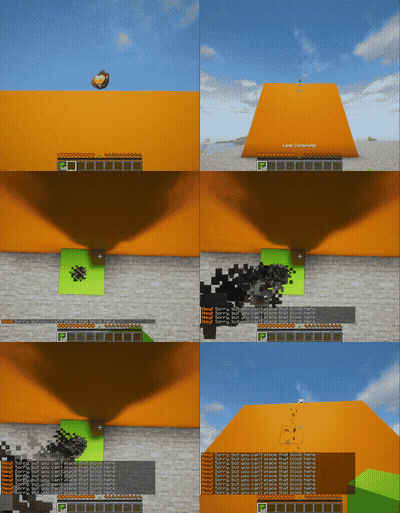 |
| Vanilla Ghost Item |
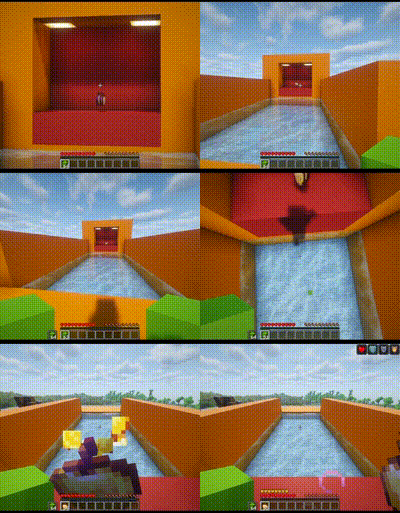 |
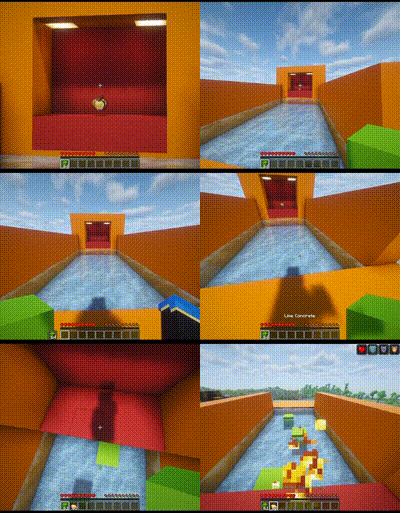 |
Requirements
- Paper 26.x (tested on 26.2-26.3)
- Java 25
Features
Two independent detection systems. Each can be enabled, disabled, and configured separately.
Protected-block glitch prevention
When a protection plugin such as WorldGuard or GriefPrevention denies a block placement, JBlockGlitch resends the real block state and stops the player from moving through the client-side ghost block. It covers normal and bucket placements (water, lava, powder snow) and uses multiple event paths to stay compatible with protection plugins that handle buckets differently.
medium: rubberbands the player to their previous position on a denied placement.strict: adds movement and position checks so players cannot stand inside or move through a denied block.
Vanilla ghost item and ghost block prevention
Detects common ghost item techniques such as F+Q, hotbar switching, dropping items, and block placement.
medium: detects common ghost item patterns.hard: also monitors inventory manipulation events, including creative-mode inventory interactions.brute-force: continuously resynchronizes player inventories.
The plugin can also periodically resync the blocks around each player (a 2x2x4 region) to fix client-side ghost blocks from client mods that never trigger a server-side placement event. The interval is configurable and this can be disabled independently.
Commands
| Command |
Permission |
Notes |
/jblockglitch help |
jblockglitch.help |
Shows basic plugin documentation. |
/jblockglitch reload |
jblockglitch.reload |
Reloads config.yml and messages.yml. |
/jblockglitch config <key> <value> |
jblockglitch.config |
Changes a config option in-game and applies it immediately, no reload needed. |
/jbg |
jblockglitch.help |
Short alias for /jblockglitch. |
Configuration
config.yml has independent options for protected-block detection, ghost-item detection, nearby block resync, and an update checker. Options can also be changed live in-game with /jblockglitch config <key> <value>. The help message lives in messages.yml as a multiline list. Messages use MiniMessage by default; set text-format: legacy in config.yml to use legacy & color codes.
Support
If you run into issues, regenerate all configuration files and download the latest version. If the problem persists, report it on the issue tracker.

 插件

 插件

 插件
 插件
 插件
 插件
评论 0
登录后参与评分
还没有评论,来抢沙发吧