JCinematic 是一款高级 Minecraft 插件,允许服务器管理员和玩家创建、保存并回放流畅的电影式过场动画。非常适合用于服务器预告片、导览、活动介绍以及故事叙述,JCinematic 以极少的设置成本提供专业级别的镜头运动效果。
VIDEO
功能特性
- 轻松录制:通过一条简单命令即可录制你的移动轨迹和摄像机角度
- 流畅回放:先进的插值算法创造出流畅且具专业外观的过场动画
- 贝塞尔曲线路径:在关键点之间形成自然的曲线路径,而非直线
- 缓动函数:实现逼真的加速与减速效果,使运动更加自然
- 多语言支持:提供英语、西班牙语、俄语、日语和法语版本
- 玩家控制:在回放期间锁定摄像机移动并隐藏其他玩家
- 进度追踪:动作栏显示回放进度
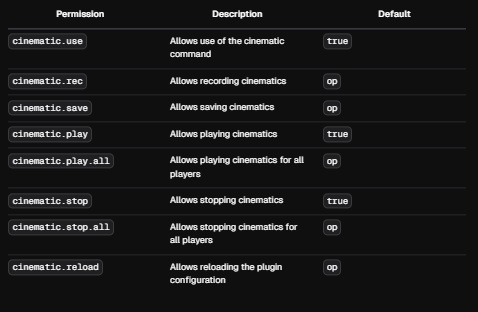
- 权限系统:对各项功能的使用权限进行精细控制
- 对服务器友好:经过优化,将性能影响降至最低
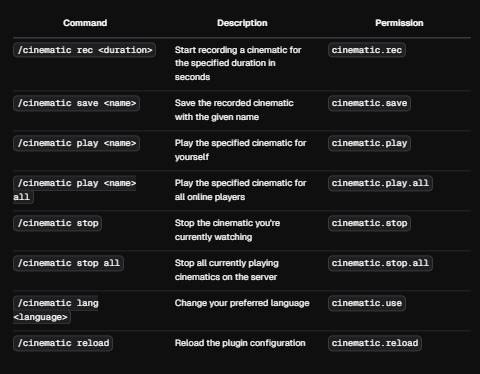
命令
权限
使用指南
录制过场动画
-
录制过场路径 /cinematic rec (持续时间),例如 /cinematic rec 10(这将记录你的玩家在 10 秒内经过的所有关键点)
-
保存所有路径以生成过场动画 /cinematic save (名称),例如 /cinematic save test(这将把你的过场动画保存为名为 "test" 的文件)
-
播放你的过场动画 /cinematic play(过场动画名称)(参数可以是 all 或玩家名称;all 表示所有玩家)
-
取消路径 /cinematic stop (all 或用户名),这将取消当前的过场动画路径
-
更改语言 /cinematic lang en, es, ru, 等(使用此命令无需修改配置文件即可更改插件语言)
-
重载插件,命令 /cinematic reload
-
删除过场动画 /cinematic delete (过场动画名称)
JCinematic is an advanced Minecraft plugin that allows server administrators and players to create, save, and play back smooth cinematic sequences. Perfect for server trailers, tours, event introductions, and storytelling, JCinematic offers professional-quality camera movements with minimal setup.
VIDEO
Features
- Easy Recording: Record your movements and camera angles with a simple command
- Smooth Playback: Advanced interpolation algorithms create fluid, professional-looking cinematics
- Bezier Curve Paths: Natural curved paths between points instead of straight lines
- Easing Functions: Realistic acceleration and deceleration for more natural movement
- Multi-language Support: Available in English, Spanish, Russian, Japanese, and French
- Player Control: Lock camera movement and hide other players during playback
- Progress Tracking: Action bar display shows playback progress
- Permission System: Fine-grained control over who can use each feature
- Server-friendly: Optimized for minimal performance impact
COMMANDS

PERMISSION

Usage Guide
Recording a Cinematic
-
Record the cinematic path /cinematic rec (duration) eg /cinematic rec 10 (this will record all the points your player is passing through for 10 seconds)
-
Save all paths to have the cinematic /cinematic save (NAME) eg /cinematic save test (this will save your cinematic with the name test)
-
Play your cinematic /cinematic play(cinematic name) (all or Player name) all = all
-
Cancel the path /cinematic stop (all or username) this will cancel the cinematic path
5 . Change language /cinematic lang en, es, ru, etc. (with this command you can change the plugin language without being in the config)
-
Reload the plugin, command /cinematic reload
-
Delete cinematics /cinematic delete (cinematic name)
评论 0
登录后参与评分
还没有评论,来抢沙发吧