JobSuite 提供了一种(相对)简单的方式,让玩家向服务器发布悬赏任务以换取奖励。该插件无需管理员进行任何操作——所有与任务相关的管理功能均由发布者本人掌控(经济系统可完全由玩家驱动)。
如需获取可用命令的帮助,只需输入:/job
信息
- Jenkins
1.1. 使用来自 Jenkins 的插件构建版本属于非官方、不受支持且未经 BukkitDev 工作人员批准!
- GitHub
功能特性
- 创建并发布可供全服查看的任务。
- 锁定任务,防止他人在最后一刻趁虚而入抢走你的任务。
- 当任务完成后,物品将暂时虚拟存储;你可以随时领取!(即使跨服务器重启或登出/登入也依然有效!)
- 发布任务时会立即从你的账户中扣除相应金额。你不会再遭遇那些拿了钱却不付款的人欺诈!
- 同时支持 SQLite 和 MySQL 数据库。
命令
/job make [name]
创建一个指定名称的任务。该名称会显示在任务信息头部以及玩家在任务列表中搜索时。同时会显示创建任务的下一步操作。
示例:/job make Demo
/job desc [description]
设置新创建任务的描述为指定内容。当玩家在任务列表中看到你的任务时会显示此描述。同时会显示任务创建的下一步操作。
示例:/job desc This is a demo job. Deliver 64 stone blocks and 32 dark wood.
/job reward [amount]
设置成功交付你所请求物品后的奖励金额。当你发布任务时,该金额会立即从你这里扣除。你不能使用没有的资金来设定奖励。同时会显示创建任务的下一步操作。
示例:/job reward 100
/job additem [type[:data]] [amount]
尝试通过 ID(第一种方式)或名称(第二种方式)添加指定物品,并附带指定的数据值。如果提供的数量超过该物品的最大堆叠大小,命令将失败。
示例:/job additem 1 64,/job additem 17:1 64
/job remitem [item id]
从当前任务创建会话中移除指定 ID 的物品。如果指定索引处没有物品,命令将失败。任务物品的索引从 0 开始。
示例:/job remitem 0
/job addenchant [item id] [enchantment id] [power]
尝试通过 ID 为指定物品添加附魔。在创建任务期间,你可以输入 /job listitems 来查看可用物品及其 ID。如果提供的等级过高(或过低)、附魔不存在,或者无法将该附魔添加到物品上,此命令将失败。
示例:/job addenchant 0 16 5
/job remenchant [item id] [enchantment id]
尝试移除具有指定附魔 ID 的物品上的任何附魔。如果物品不存在或指定附魔不在该物品上,此命令将失败。
示例:/job remenchant 0 16
/job post
发布你当前正在创建的任务,并退出“任务制作”模式。这还会分配一个任务 ID,你将通过它在游戏内与该任务交互。如果你在创建过程中跳过了任何步骤导致任务不完整,此命令将失败。
示例:/job post
/job quit
退出任务创建过程并清除你已完成的所有内容。此命令不可撤销,因此在使用前请务必确认!
示例:/job quit
/job cancel [job id]
取消你提供的 ID 所对应的任务。如果你不是任务的所有者,此命令将失败。如果你拥有权限 jobsuite.admin.cancel,则可以绕过所有者要求。该命令也可从控制台执行。
示例:/job cancel 1
/job list [page]
按 ID - 名称 - 描述的格式显示可用任务列表。
示例:/job list
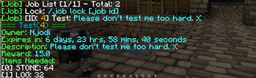
/job info [job id] [item id]
显示有关任务和完成它所需物品的所有相关信息。如果你指定了可选的 [item id] 参数,你可以查看关于该物品的更具体信息(如附魔或数据值)。
示例:job info 1
JobSuite adds a (relatively) simple way of posting requested items for a reward to the server's population. This requires no interaction from the part of an admin - all of a job's administrative functions are available to the person who posted it (the economy can be entirely player-driven).
To get help with the available commands, just type: /job
Information
- Jenkins
1.1. Use of the plugin builds from Jenkins is unofficial, unsupported and unapproved by BukkitDev Staff!
- GitHub
Features
- Create and post jobs for the entire server to view.
- Lock jobs to prevent other people from sneaking in and sniping you at the last second.
- When a job is completed, the items are stored virtually; claim them at your convenience! (even across server restarts or log in and log out!)
- Posting a job takes the money from your account immediately. You can't be scammed by someone who won't pay up!
- SQLite and MySQL are both supported.
Commands
/job make [name]
Creates a job with the specified name. This name is shown in the job info header and when players search for it in the job list. Also displays the next step in creating the job.
Example: /job make Demo
/job desc [description]
Sets the newly created job's description to the specified value. This is shown when players see your job in the job list. Also displays the next step in job creation.
Example: /job desc This is a demo job. Deliver 64 stone blocks and 32 dark wood.
/job reward [amount]
Sets the reward for successfully delivering the items that you request. This amount is taken from you immediately when you post the job. You cannot set a reward with funds you don't have. Also shows the next step in creating the job.
Example: /job reward 100
/job additem [type[:data]] [amount]
Attempts to add the specified item by either ID (first) or name (second), with the specified data value. Command will fail if the amount provided is higher than the maximum stack size for that item.
Examples: /job additem 1 64, /job additem 17:1 64
/job remitem [item id]
Removes the specified item by its id from your current job creation session. Fails if there is no item at the specified index. Job items start at index 0.
Example: /job remitem 0
/job addenchant [item id] [enchantment id] [power]
Attempts to add an enchantment to the specified item by its id. While creating a job, you can do /job listitems to show available items and their ID. This command will fail if the power level provided is too high (or too low), if the enchantment doesn't exist, or if the enchantment can't be added to the item.
Example: /job addenchant 0 16 5
/job remenchant [item id] [enchantment id]
Tries to remove any enchantments from the item with the specified enchantment ID. This command will fail if the item doesn't exist or if the specified enchantment isn't on the item.
Example: /job remenchant 0 16
/job post
Posts the job that you are currently created and exits "job make" mode. This also assigns the job ID, which is how you will interact with it in-game. This command will fail if you skipped any of the steps in creation and the job is not complete.
Example: /job post
/job quit
Quits the job creation process and clears out anything you've already done. This command can't be un-done, so be sure before you use it!
Example: /job quit
/job cancel [job id]
Cancels the job specified by the ID you provide. This command will fail if you are not the owner of the job. If you have the permission jobsuite.admin.cancel, you can bypass the owner requirement. Also works from the console.
Example: /job cancel 1
/job list [page]
Shows a list of available jobs, by their ID - Name - Description.
Example: /job list
/job info [job id] [item id]
Shows all of the relevant information about a job and the required items to fulfill it. If you specify the optional [item id] argument, you can see more specific information about that item (such as enchantments or data values).
Example: job info 1

 插件
 插件
 插件

 插件
 插件

 插件
评论 0
登录后参与评分
还没有评论,来抢沙发吧