
Join and Quit Messages 是一个插件,让你有机会自定义玩家加入或离开服务器时的消息。它非常容易使用,并能为你的 Minecraft 服务器增添个性化色彩。你可以通过更改配置文件中的信息轻松自定义自己的加入和退出消息。
为新玩家提供专属欢迎语,为每个权限组设置独立消息,按世界显示不同消息,让工作人员隐身加入,并使消息的任何部分可点击。
要求
- Spigot 或 Paper 1.16 或更高版本
- Java 17 或更高版本
- PlaceholderAPI(可选)
十六进制颜色
你可以使用十六进制颜色或标准 Minecraft 颜色。你可以在此处选择自己的十六进制颜色 here。你可以完全自定义自己的消息。但是,十六进制颜色的格式必须如下:<#RRGGBB>。这也在下面的配置中有所展示。

此配置的结果如下所示:

标准 Minecraft 颜色
你不必使用十六进制颜色。标准的 Minecraft 颜色也可以正常工作,并且你可以在同一条消息中混合使用两者。你可以从以下颜色中选择:
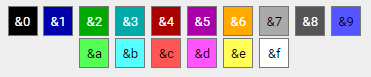
你的配置将如下所示:

然后,这将产生以下配置结果。

单个 & 如果后面没有跟随真正的颜色代码,则会原样保留,因此像 Tom & Jerry joined 这样的消息会原封不动地显示。
可点击和悬停消息
消息的任何部分都可以在悬停时运行命令、打开链接、复制文本或显示工具提示。
joinmessage: "&7[&2+&7]&a%player% <click:suggest_command:/msg %player% ><hover:show_text:&7发送消息>&8[msg]</hover></click>"
| 标签 |
作用 |
<click:run_command:/spawn>文本</click> |
以点击玩家的身份执行命令 |
<click:suggest_command:/msg Steve >文本</click> |
将命令填入聊天框 |
<click:open_url:https://example.com>文本</click> |
打开链接 |
<click:copy_to_clipboard:hello>文本</click> |
将文本复制到剪贴板 |
<hover:show_text:&7提示文本>文本</hover> |
悬停时显示提示文本 |
点击和悬停可以组合并嵌套,颜色会跨标签继承,占位符也可以在标签值内部使用。运行 /jqm test <消息> 来尝试一下——它会渲染出可点击的效果,并提示你标签是否存在拼写错误。
只有你自己配置文件中的消息才能创建可点击文本,因此其他插件提供的自定义昵称永远无法在你的加入消息中注入可点击命令。
首次加入消息
从未加入过的玩家会收到专属的消息。
first_join:
  enabled: true
  message: "&7[&2+&7] &6欢迎 &e%player% &6加入服务器!&7 (&a#%playercount_online%&7)"
基于权限的消息
为每个等级设置独立的加入和离开消息。拥有多个等级的玩家将获得 priority 下列出的第一个消息。
permission_messages:
  enabled: true
  priority:
    - myserver.premium
    - myserver.vip
  join:
    "myserver.vip": "&7[&6VIP+&7] &6%player% &7joined with style!"
    "myserver.premium": "&7[&5PREMIUM+&7] &5%player% &7entered the server!"
  leave:
    "myserver.vip": "&7[&6VIP-&7] &6%player% &7left the server"
    "myserver.premium": "&7[&5PREMIUM-&7] &5%player% &7departed"
按世界显示消息
根据玩家所在的世界显示不同的消息。你可以在游戏中直接设置,无需修改配置文件——更改会立即保存并生效。
/jqm world list
/jqm world add <world> <join|leave> <message>
/jqm world remove <world> [join|leave]
消息是 join 或 leave 之后的所有内容,因此不需要加引号。世界名称以及 join/leave 支持 Tab 补全。
按世界的消息基于玩家加入或退出时所在的当前世界,因此穿过传送门不会触发这些消息。
静默加入与退出
拥有 joinandquitmessages.silent 权限的玩家将完全不被广播消息。这适用于管理人员,并且与隐身插件配合使用效果良好。被抑制的消息仍会写入控制台,以便保留记录。
随机消息
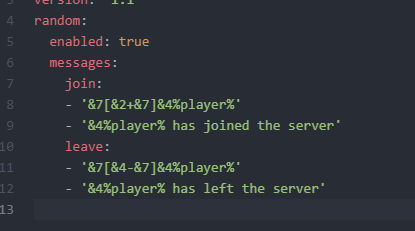
你可以显示任意的加入和离开消息,并且可以编辑这些列表。在 config.yml 中有两个用于消息的列表,可以修改它们以生成其他随机消息。同一行消息不会连续出现两次。
消息优先级
当有多个条件同时满足时,按照以下顺序确定显示的消息:
- Silent(静默)——拥有 silent 权限的玩家不会收到任何公告
- 首次加入消息
- 权限消息
- 世界消息
- 随机消息
- 默认的加入或离开消息
? 命令
| 命令 |
描述 |
权限 |
/jqm test |
测试已配置的玩家加入消息 |
joinandquitmessages.test |
/jqm test <message> |
测试自定义消息 |
joinandquitmessages.test |
/jqm quittest |
测试已配置的玩家退出消息 |
joinandquitmessages.test |
/jqm quittest <message> |
测试自定义退出消息 |
joinandquitmessages.test |
/jqm world list |
列出已配置了消息的世界列表 |
joinandquitmessages.world |
/jqm world add <world> <join|leave> <message> |
为指定世界设置消息 |
joinandquitmessages.world |
/jqm world remove <world> [join|leave] |
移除指定世界的消息 |
joinandquitmessages.world |
/jqm reload |
重载配置文件 |
joinandquitmessages.reload |
? 权限
| 权限 |
描述 |
默认值 |
joinandquitmessages.use |
访问主命令 |
true |
joinandquitmessages.test |
测试消息格式 |
true |
joinandquitmessages.reload |
重载配置 |
op |
joinandquitmessages.world |
添加和移除按世界设置的消息 |
op |
joinandquitmessages.silent |
加入/退出时不发送公告 |
false |
joinandquitmessages.checkupdate |
在有可用更新时接收通知 |
op |
占位符
- %player% : 玩家名称
- %displayname% : 玩家显示名称
- %world% : 玩家离开或加入的世界名称
- %playercount_online% : 当前在线玩家数量(也可使用 %online%)
- %playercount_max% : 最大玩家数量上限(也可使用 %max%)
Placeholder API
在加入和退出消息中,您还可以使用 Placeholder API。这允许您对消息进行更细致的自定义。有关可使用内容的更多信息,请参见此处。
指标统计
本插件使用 bStats 来记录实际使用的功能,以便开发团队了解服务器的真实配置情况。仅发送开关标志和计数数据,绝不会发送消息内容、玩家名称或世界名称。您可以在 plugins/bStats/config.yml 中关闭此功能。
Join and Quit Messages is a plugin that gives you the opportunity to customize the messages when a player joins or leaves your server. It is really easy to use and gives a personal touch to your Minecraft server. You can customize your own join and quit messages easily by changing the information within the config.
Give brand new players their own welcome, give each rank its own message, use different messages per world, let staff join unseen, and make any part of a message clickable.
Requirements
- Spigot or Paper 1.16 or newer
- Java 17 or newer
- PlaceholderAPI (optional)
Hex colors
It is possible to use hex colors or standard Minecraft colors. You can pick your own hex colors here. You can completely customize your own messages. However, the hex colors need to be like this: <#RRGGBB>. This is also shown in the config below.
The result of this config is the following:
Standard Minecraft colors
You do not have to use hex colors. The standard Minecraft colors work too, and you can mix both in the same message. You can choose from the following colors:
Your config will then look like the following:
Then this will be the result of this config.
A single & that is not followed by a real color code is left alone, so a message like Tom & Jerry joined shows exactly as written.
Clickable and hover messages
Any part of a message can run a command, open a link, copy text, or show a tooltip when hovered.
joinmessage: "&7[&2+&7]&a%player% <click:suggest_command:/msg %player% ><hover:show_text:&7Send a message>&8[msg]</hover></click>"
| Tag |
What it does |
<click:run_command:/spawn>text</click> |
Runs the command as the player who clicks |
<click:suggest_command:/msg Steve >text</click> |
Puts the command in their chat box |
<click:open_url:https://example.com>text</click> |
Opens a link |
<click:copy_to_clipboard:hello>text</click> |
Copies text to their clipboard |
<hover:show_text:&7Tooltip>text</hover> |
Shows a tooltip on hover |
Click and hover can be combined and nested, colors carry across a tag, and placeholders work inside a tag's value. Use /jqm test <message> to try one out — it renders the result clickable and tells you if a tag has a typo.
Only messages in your own config can create clickable text, so another plugin supplying a custom nickname can never inject a clickable command into your join messages.
First join messages
Players who have never joined before can get their own message.
first_join:
  enabled: true
  message: "&7[&2+&7] &6Welcome &e%player% &6to the server! &7(&a#%playercount_online%&7)"
Permission based Messages
Give each rank its own join and quit message. A player who holds several of these gets the one listed first under priority.
permission_messages:
  enabled: true
  priority:
    - myserver.premium
    - myserver.vip
  join:
    "myserver.vip": "&7[&6VIP+&7] &6%player% &7joined with style!"
    "myserver.premium": "&7[&5PREMIUM+&7] &5%player% &7entered the server!"
  leave:
    "myserver.vip": "&7[&6VIP-&7] &6%player% &7left the server"
    "myserver.premium": "&7[&5PREMIUM-&7] &5%player% &7departed"
Messages per world
Show a different message depending on which world the player is in. You can set these up in game, without touching the config file — changes save and apply straight away.
/jqm world list
/jqm world add <world> <join|leave> <message>
/jqm world remove <world> [join|leave]
The message is everything after join or leave, so it does not need quotes. World names and join/leave are tab-completable.
Per-world messages use the world the player is in at the moment they join or quit, so walking through a portal does not trigger them.
Silent join and quit
Players with the joinandquitmessages.silent permission are not announced at all. Useful for staff, and it works nicely alongside vanish plugins. Suppressed messages are still written to the console so you keep a record.
Random Messages
It is possible to show arbitrary join and quit messages and you can edit the list.
In the config.yml there are 2 lists for the messages, which can be edited for other random messages. The same line is never picked twice in a row.
Which message wins
When more than one could apply, they are used in this order:
- Silent — players with the silent permission are never announced
- First join message
- Permission message
- World message
- Random message
- The default join or quit message
? Commands
| Command |
Description |
Permission |
/jqm test |
Test configured join message |
joinandquitmessages.test |
/jqm test <message> |
Test custom message |
joinandquitmessages.test |
/jqm quittest |
Test configured quit message |
joinandquitmessages.test |
/jqm quittest <message> |
Test a custom quit message |
joinandquitmessages.test |
/jqm world list |
List worlds that have a message |
joinandquitmessages.world |
/jqm world add <world> <join|leave> <message> |
Set a message for a world |
joinandquitmessages.world |
/jqm world remove <world> [join|leave] |
Remove a world's message |
joinandquitmessages.world |
/jqm reload |
Reload configuration |
joinandquitmessages.reload |
? Permissions
| Permission |
Description |
Default |
joinandquitmessages.use |
Access to main command |
true |
joinandquitmessages.test |
Test message formatting |
true |
joinandquitmessages.reload |
Reload configuration |
op |
joinandquitmessages.world |
Add and remove per-world messages |
op |
joinandquitmessages.silent |
Join and quit without being announced |
false |
joinandquitmessages.checkupdate |
Be notified when an update is available |
op |
Placeholders
- %player% : Player name
- %displayname% : Player display name
- %world% : World name where the player leaves/joins
- %playercount_online% : Current amount of players (also works as %online%)
- %playercount_max% : Maximum amount of players (also works as %max%)
Placeholder API
Within the join and quit messages you can also use the placeholder API. This lets you customize the messages even more. More information about what you can use can be found here.
Metrics
This plugin uses bStats to record which features are actually used, so development can follow what servers really configure. Only on/off flags and counts are sent, never message content, player names or world names. You can turn it off in plugins/bStats/config.yml.


 插件

 插件
 插件
 插件
 插件
 插件
评论 0
登录后参与评分
还没有评论,来抢沙发吧