
信息
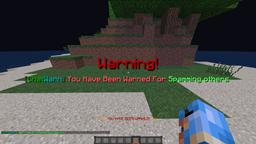
ChatWarn 是一款全新的插件,当你输入 /warn (玩家) (原因) 时,它会向你认为违反规则的发送者发送一条自定义警告消息,并附带屏幕弹出提示!ChatWarn 包含七个基本命令,每个命令都能帮助你处理聊天相关问题或协助管理插件。在发出一次警告后,后续的警告将通知工作人员对疑似违规的玩家进行静音处理,静音时长由服务器管理员在配置文件中定义的递增时间决定。当所有静音递增次数用完后,最后一次警告的工作人员会收到另一条消息,指示其封禁违规者。如果玩家在论坛提出封禁申诉,其警告等级将会重置,流程将继续执行两次。在玩家被三次封禁后,第三次封禁将成为永久封禁,意味着该玩家必须离开服务器且没有机会申诉;当然,你也可以使用 /resetuuid (玩家) 命令来重置其警告等级。如果你的服务器使用了带有封禁功能的插件,但玩家可以更改用户名并重新加入,你可以使用该插件的 /banuuid (玩家) 功能从服务器上封禁玩家的 UUID。如果玩家提出申诉,而你觉得应该解封他们,可以再次使用 /resetuuid (玩家) 命令。此插件正在不断更新和改进,并且可以根据每个服务器的需求进行高度定制!
命令
/chatload - 重载 ChatWarn 插件。/warn (玩家) (原因) - 向被警告的玩家发送消息和弹出窗口。
/chatwarn - 显示插件的主面板
/chatcredits (玩家) - 检查玩家的当前聊天警告等级。/checkup (玩家) - 检查玩家的当前聊天警告等级。
/banuuid (玩家) - 封禁玩家的 UUID,使其无法通过更改用户名重新加入。/resetuuid (玩家) - 重置玩家的 UUID 至无聊天警告状态。
/chatmute (玩家) - 静音指定的玩家(目前仅支持永久静音,直到对该玩家再次运行此命令)
权限
chatwarn.help - 帮助命令的权限节点。
chatwarn.reload - 重载命令的权限节点。
chatwarn.warn - 警告命令的权限节点。
chatwarn.credits - 积分命令的权限节点。
chatwarn.checkup - 检查命令的权限节点。
chatwarn.banuuid - 封禁 UUID 命令的权限节点。
chatwarn.uuid - 重置 UUID 命令的权限节点。
chatwarn.bypass - 绕过警告且不能被 UUID 封禁
chatwarn.bypassall - 绕过 chatwarn.bypass 权限,可以警告服务器上的任何人,但不能对拥有 chatwarn.bypass 权限的人进行 UUID 封禁
chatwarn.mute - 聊天静音命令的权限节点。
使用方法
使用 ChatWarn 其实非常简单。如果你看到有玩家违反了规则,即使与聊天无关,你也可以执行 /warn <玩家> <原因/违反的规则>>,系统会告知该玩家因其所述原因已被警告。
Information
ChatWarn is a new plugin that when you enter /warn (player) (reason) it will send the player that you believe has broken a rule a custom warning message that also includes an onscreen popup! ChatWarn has seven basic commands each of the commands will either help you with chat related issues or help with plugin the plugin's management. After one warning has already been issued the next one will notify the staff members to mute the alleged player for increasing increments defined by the server owner in the configuration file. After all of the mute increments have been used the last staff member warning them then receives another message telling them to ban the rule breaker and after the player decides to make a ban appeal on the forums their warning level will reset and the procedures will continue two more times. After the player has been banned 3 times the third ban will become a permanent ban, meaning that they need to leave the server and will not have a chance to appeal their ban; however, of course you can decide to use the /resetuuid (player) command and reset their warning level. If your server is using a plugin that has bans but the player can change their user name and join back in again, you can use the plugins /banuuid (player) feature banning player's UUID from the server, if the player makes an appeal and you feel as if the player should be unbanned use the /resetuuid (player) command again. This plugin is constantly being updated and improved and is extremely customizable to every server's needs!
Commands
/chatload - Reloads the ChatWarn plugin. /warn (player) (reason) - sends a message and pop-up to the player warned.
/chatwarn - Shows the general hub of the plugin
/chatcredits (player) - Check the players current chat warning level. /checkup (player) - Check the players current chat warning level.
/banuuid (player) - bans the UUID of the player so they cannot change usernames to rejoin. /resetuuid (player) - Resets the players UUID to no chat warnings.
/chatmute (player) - Mutes the player specified (currently only a permanent mute until the command is ran again for the same player)
Permissions
chatwarn.help - Permission node for the help command.
chatwarn.reload - Permission node for the reload command.
chatwarn.warn - Permission node for the warn command.
chatwarn.credits - Permission node for the credits command.
chatwarn.checkup - Permission node for the checkup command.
chatwarn.banuuid - Permission node for the ban UUID command.
chatwarn.uuid - Permission node for the reset UUID command.
chatwarn.bypass - Bypasses warnings and cannot be UUID banned
chatwarn.bypassall - Bypasses the chatwarn.bypass permission and can warn anybody on the server, but cannot UUID ban those with the chatwarn.bypass permission
chatwarn.mute - Permission node for the chatmute command.
How To Use
How to use ChatWarn is actually pretty easy. If you see a player that broke a rule and it doesn't even have to be chat related. You can do /warn <player> <reason/rule broken> and it will tell the player that they have been warned for said reason.
下载 ChatWarn
下载 ChatWarn
下载 ChatWarn
下载 ChatWarn
下载 ChatWarn
下载 ChatWarn
下载 ChatWarn
下载 ChatWarn
添加了多语言支持
关于这个资源的讨论、问题反馈与使用心得
还没有讨论,来发第一帖吧
你是这个资源的作者?登录后可认领此资源。
相似资源
 插件
ExyliaPlugins 的库。
 插件
自定义你的Minecraft头像!
 插件
重新定义服务器上的生物运输方式。使用高度可定制的口袋道具,安全地捕获、存储和释放任何实体。
 插件
一个在游戏内运行的 Minecraft 地图编辑器! 支持选区、蓝图、复制粘贴、笔刷和脚本。 可在创造模式中使用,也可在生存模式中临时使用。
 插件

创建用户友好的菜单以前往不同的世界
 插件
专为 Velocity 打造的自制聊天插件,功能丰富——支持跨服群组/全局/私聊消息,并集成 LibertyBans 的禁言功能。
评论 0
登录后参与评分
还没有评论,来抢沙发吧