
JPanel - 一款基于插件的 Bukkit Web 控制面板
这是什么?
JPanel 是一款用于你的 Minecraft 服务器的基于插件的控制面板。它可以通过网页浏览器查看,无需运行任何外部 Web 服务器,也不需要掌握 PHP 或数据库知识。本插件处于测试阶段(Beta),具备多项核心功能,包括:
- 实时查看服务器控制台
- 实时查看服务器内存使用情况、CPU 使用率和每秒刻数(TPS)
- 用户权限管理
- 修改玩家分组(需要 Vault)
- 轻松踢出或封禁在线玩家(在新版玩家管理器中尚未实现)
- 管理服务器文件
- 使用盐值哈希加密密码
安装前须知
此插件需要 Java 8。同时请注意,该插件仍处于测试阶段,可能存在 Bug 或未完善的功能。
安装方法
由于此插件除了 Bukkit 服务器外不需要其他依赖,安装过程非常简单
- 将插件 jar 文件放入你的 plugins 文件夹中
- 重启服务器
- 确保端口 4567 已进行端口转发(可以使用此工具进行测试)
- 在服务器控制台中,使用 /addlogin <用户名> <密码> 向面板添加用户
- 可选:停止服务器并编辑配置文件以允许你访问 JPanel 功能
面向开发者
从 JPanel Beta 5 开始,你现在可以向面板添加页面。更多信息,请参阅指南。
命令
- /addlogin <username> <passsword> - 允许向面板添加用户
- /passwd <username> <oldpassword> <newpassword> - 更改用户的密码
所有命令只能通过控制台执行,无论是通过 JPanel 还是标准的 Minecraft 控制台。
HTTPS 支持
在最新的测试版本(Beta 6)中,我添加了独立的 HTTPS 支持!这需要一些配置。
-
首先,你需要在 JPanel 文件夹中放置一个密钥库(keystore)文件。你可以尝试使用这些说明生成一个,或者从此处下载预制的密钥库文件。预制密钥库包含未签名的证书,大多数浏览器会显示安全警告,因此除非无法使用真实证书,否则不推荐使用。
-
停止服务器,并在 JPanel 的 config.yml 中,于 keystore-name 下输入密钥库文件名(含扩展名),在 keystore-password 下输入密钥库文件的密码。如果你使用的是预制密钥库,请使用密码 'password'(极度不安全)。
-
重启服务器,然后通过 https 正常访问面板。
现在 HTTPS 应该可以正常工作了!
面板权限
- canEditFiles - 允许 JPanel 用户编辑文件
- canChangeGroups - 允许 JPanel 用户更改用户的分组
- canSendCommands - 允许 JPanel 用户通过控制台发送命令
这些权限通过配置文件进行修改。修改后,请重启服务器。
非浏览器客户端
我正在开发一系列可用于访问面板的应用程序。目前,有一个适用于 Windows 10 的应用程序。
- Windows 10 应用 - (源代码将在稍后发布)
- Android 应用 - 即将推出!
- iPhone 应用 - 由于缺乏每年 99 美元的费用、一台 Mac 电脑以及一台测试设备,这款应用在近期似乎不太可能推出
源代码
所有源代码均在 GitHub 上提供,欢迎查阅!
JPanel - A plugin based web panel for Bukkit
What is this?
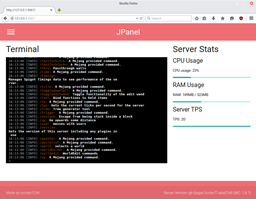
JPanel is a plugin based control panel for your minecraft server. It is viewable within a web browser, and does not require running any external web servers, or knowledge of PHP or databases. This plugin is in beta, and has a number of key features, including:
- A live view of the server console
- Live view of the server ram usage, cpu usage and ticks per second
- User permissions
- Modify player groups (requires vault)
- Easily kick or ban online players (not currently implemented in new player manager)
- Manage server files
- Passwords hashed with a salt
Before installing
THIS PLUGIN REQUIRES JAVA 8. ALSO BE AWARE IT'S STILL IN BUGS, AND THERE MIGHT BE BUGS OR INCOMPLETE FEATURES.
Installing
Since this plugin doesn't require anything else other than the Bukkit server, installation is extremely easy
- Put the plugin jar file in your plugins folder
- Restart the server
- Ensure that port 4567 are port forwarded (this can be tested with this tool here)
- In the server console, use /addlogin <username> <password> to add a user to the panel
- OPTIONAL: Stop the server and edit the config file to allow you access to the JPanel features
For developers
As of JPanel Beta 5, you can now add pages to the panel. For more information, please see the guide.
Commands
- /addlogin <username> <passsword> - allows you to add a user to a panel
- /passwd <username> <oldpassword> <newpassword> - change the password of a user
All commands can only be executed through the console, either via JPanel or a standard minecraft console.
HTTPS support
In the latest beta (Beta 6) I've added standalone https support! This requires some configuration.
-
First, you'll need to put a keystore file in the JPanel folder. You can either attempt to generate one using these instructions or download a premade keystore file from here. The pre-made keystore has an unsigned certificate that'll get you going with security warnings in most browsers, so isn't recommended unless you can't use an actual certificate.
-
Stop the server, and enter the name of the keystore file (with file extension) under keystore-name and the password for the keystore file under keystore-password in the JPanel config.yml. If you're using the premade keystore, use the password 'password' (ultra secure).
-
Restart the server, then access the panel normally except with https.
HTTPS should now be working!
Panel Permissions
- canEditFiles - allows a JPanel user to edit files
- canChangeGroups - allows a JPanel user to change the groups of a user
- canSendCommands - allows a JPanel user to send commands through the console
These are modified through the config file. Once modified, restart the server.
Non browser Clients
I'm developing a series of apps that you can use to access the panel. Currently, there is an app for windows 10.
- Windows 10 App - (source will be released later)
- Android app - coming soon!
- iPhone app - due to a lack of $99 a year, a Mac computer and a device to test on, this is unlikely to be coming any time soon
Source Code
All source code is avaliable on github, check it out!
下载 JPanel - Minecraft Webpanel
下载 JPanel - Minecraft Webpanel
下载 JPanel - Minecraft Webpanel
下载 JPanel - Minecraft Webpanel
下载 JPanel - Minecraft Webpanel
下载 JPanel - Minecraft Webpanel
下载 JPanel - Minecraft Webpanel
下载 JPanel - Minecraft Webpanel
下载 JPanel - Minecraft Webpanel
下载 JPanel - Minecraft Webpanel
JPanel Beta 7 大幅改进了桌面端和手机端的文件编辑器。
在电脑上查看时,JPanel 的 Web 面板现在采用微软在 Visual Studio Code 编辑器中使用的 Monaco 编辑器作为编辑视图。这将使我能够在未来实现一些更好的编辑功能。
在手机端,我基于一个简单的 <textarea> 实现了一个轻量级文本编辑器,而不是使用像 Monaco 这样复杂的编辑器。这意味着没有语法高亮功能,但仍保留了自动缩进支持。查看文件时,顶部栏也会隐藏以节省空间。
如果您遇到文件未复制到 JPanel-public 文件夹的问题,请在 config 文件夹中启用新的调试模式。这会在加载 JPanel 时使控制台输出大量信息,但能提供一些额外的信息,有助于调试。启用调试模式后成功加载的示例应类似于
这是测试版
关于这个资源的讨论、问题反馈与使用心得
还没有讨论,来发第一帖吧
你是这个资源的作者?登录后可认领此资源。
相似资源
 插件

PacketEvents 是一款专为 Minecraft Java 版打造的协议库,旨在简化数据包的处理与传输。
 插件
ExyliaPlugins 的库。
 插件
通过对话框或铁砧界面帮助你的 Anthme
 插件
重新定义服务器上的生物运输方式。使用高度可定制的口袋道具,安全地捕获、存储和释放任何实体。
 插件
为基于 Spigot/Paper/Folia 的服务器添加对 Vivecraft 的支持
 插件
用于绘制游戏内地图或在浏览器中随探索实时进行地图绘制的实时地图。
评论 0
登录后参与评分
还没有评论,来抢沙发吧