JukeboxRecords
license: NLL LICENSE
 JukeboxRecords 是一款功能丰富的自定义音乐插件,适用于 Paper Minecraft 1.21.x**它将传统的唱片机体验转变为一个完全可配置的音乐系统。它允许服务器管理员添加自己的 .ogg 音乐文件,将它们组织成互动式游戏内音乐库,并让玩家通过专用的“音乐唱片机”收听自定义曲目。
该插件设计为轻量级、可靠、易于配置,既适合私人服务器,也适合公共 Minecraft 社区。
特性
自定义音乐唱片机
JukeboxRecords 引入了一个全新的自定义物品——音乐唱片机。
与普通的 Minecraft 唱片机不同,音乐唱片机在内部使用持久化的插件数据进行标识,确保它可以可靠地区分于原版唱片机。
玩家可以:
制作音乐唱片机。
将其放置在世界中。
右键点击它以打开音乐库。
选择自定义歌曲。
停止当前播放的音乐。
破坏并拾取音乐唱片机。
再次放置而不会丢失其自定义身份。
原版唱片机完全不受影响,继续正常工作。
自定义合成配方
音乐唱片机可以使用可配置的配方进行合成。
默认配方使用八块橡木木板围绕空中心排列:
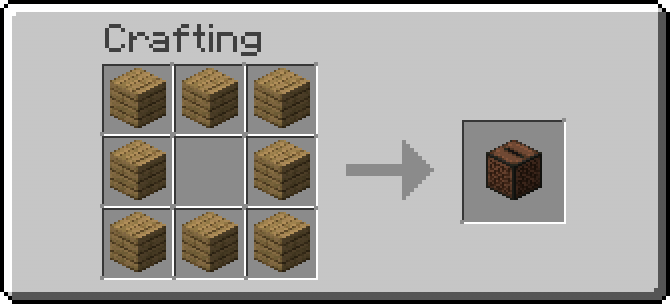
合成材料可以通过 config.yml 更改,允许服务器管理员根据服务器的经济或玩法风格自定义配方。
自定义 .ogg 音乐
添加音乐非常简单。
JukeboxRecords 会自动创建:
plugins/JukeboxRecords/rrecords/
管理员只需将 .ogg 文件放入此文件夹即可。
例如:
rrecords/
├── music1.ogg
├── epic_battle.ogg
├── boss-fight.ogg
├── peaceful_music.ogg
└── my_song.ogg
插件会自动扫描文件夹并检测可用曲目。
无需在配置文件中手动注册每首歌曲。
智能歌曲名称
文件名会自动转换为干净、易读的界面名称。
例如:
epic_battle.ogg
可以显示为:
Epic Battle
而:
boss-fight.ogg
可以显示为:
Boss Fight
这使得大型音乐库对玩家来说更容易浏览。
交互式音乐 GUI
右键点击音乐唱片机将打开一个基于库存的可配置音乐菜单。
每个可用歌曲都显示为单独的物品,具有可配置的图标和格式。
界面可以包括:
歌曲列表
歌曲名称
上一页
下一页
停止音乐
可配置标题
可配置行数
该系统通过使用分页支持大型音乐库,每页最多可容纳 45 首歌曲。
这意味着服务器可以拥有数十甚至数百首自定义歌曲,而无需创建巨大的库存界面。
玩家与区域播放
JukeboxRecords 支持多种播放模式。
PLAYER(玩家)
只有选择歌曲的玩家能听到音乐。
这非常适合个人音乐库,每个玩家都想听不同的内容。
AREA(区域)
音乐将在音乐唱片机周围一定半径内的玩家中播放。
例如:
mode: AREA
radius: 20.0
这使唱片机可以作为城镇、商店、活动、大厅或其他地点的实际环境音乐源。
音量、音调、流媒体行为和其他播放设置也可以配置。
音乐控制
JukeboxRecords 仔细管理活动声音,以防止音乐无限期地继续播放。
当以下情况发生时,音乐会停止:
玩家选择了另一首歌曲。
玩家按下停止按钮。
音乐唱片机被破坏。
玩家离开服务器。
插件被禁用。
服务器关闭。
这防止了被遗弃的声音和不必要的资源使用。
自动生成资源包
由于 Minecraft 无法直接播放任意服务器端 .ogg 文件作为自定义声音,JukeboxRecords 会自动生成包含音乐文件的资源包。
生成的文件位于:
plugins/JukeboxRecords/JukeboxRecords-resourcepack.zip
资源包包含所需的 Minecraft 声音结构,包括:
assets/
└── jukeboxrecords/
├── sounds/
│ ├── music1.ogg
│ ├── epic_battle.ogg
│ └── ...
└── sounds.json
插件还会自动生成必要的 pack.mcmeta 和 sounds.json 文件。
因此,管理员无需在每次添加歌曲时手动构建资源包。
自动更新资源包
当添加新音乐时,管理员可以使用:
/jukeboxrecords reload
或:
/jrecords reload
插件随后可以:
-
重新加载配置。
-
扫描音乐目录。
-
检测新歌曲。
-
检测已删除的歌曲。
-
重新生成资源包。
-
更新声音定义。
-
在适当时候更新已连接的玩家。
这使得在不重启 Minecraft 服务器的情况下扩展音乐库成为可能。
内置资源包服务器
JukeboxRecords 可以选择提供一个小型内置 HTTP 服务器,用于提供生成的资源包。
例如:
插件会计算资源包的 SHA-1 哈希值,并在向玩家发送资源包时使用它。
管理员可以配置资源包是否:
在玩家加入时自动发送。
可选。
必需。
带有自定义提示显示。
对于公共服务器,管理员必须确保配置的 URL 对玩家可访问。本地地址如 127.0.0.1 通常只能从同一台机器访问,不应用作公共 URL。
根据服务器设置,可能需要配置端口转发、公共 Web 服务器或 HTTPS 托管。
完全可配置
JukeboxRecords 旨在尽可能避免硬编码行为。
管理员可以配置以下内容:
音乐留声机名称。
描述(Lore)。
合成材料。
GUI 标题。
GUI 大小。
音乐文件夹。
声音命名空间。
播放模式。
播放半径。
音量。
音调。
流媒体支持。
资源包 URL。
资源包端口。
资源包提示。
自动分发资源包。
必需资源包行为。
插件消息。
这使得该插件适用于多种不同的服务器风格。
安全的原版兼容性
JukeboxRecords 不会替换或修改原版留声机。
插件通过持久元数据专门识别其自己的“音乐留声机”对象。
这确保了:
原版留声机保持原版状态。
原版留声机不会打开自定义 GUI。
自定义留声机不会与原版方块混淆。
破坏自定义留声机会返回正确的自定义物品。
插件不会意外转换普通留声机。
性能与可靠性
该插件在设计时充分考虑了服务器性能。
它避免了不必要的重复任务,并在不再需要时清理资源。
它还处理以下情况:
空音乐文件夹。
缺失的资源包文件。
无效的文件名。
缺失的歌曲。
玩家断开连接。
插件重载。
服务器关闭。
大型音乐库。
无效或不支持的文件会被忽略,而不会导致整个插件崩溃。
命令
重载
/jukeboxrecords reload
重载配置和音乐库并重新生成资源包。
别名:
/jrecords reload
权限
jukeboxrecords.admin
该权限控制管理命令,例如重载插件。
示例目录结构
首次启动后,插件会创建类似以下的目录结构:
plugins/
└── JukeboxRecords/
├── config.yml
├── JukeboxRecords-resourcepack.zip
└── rrecords/
├── epic_battle.ogg
├── peaceful_music.ogg
├── boss_fight.ogg
└── ...
只需将您的 .ogg 文件放入 rrecords 文件夹并运行:
/jrecords reload
插件会自动处理其余部分。
为 Modrinth 设计
JukeboxRecords 以专业的 Paper 插件项目结构构建,适合通过 Modrinth 进行分发。
该项目包含:
Maven 构建配置。
Paper API 依赖。
plugin.yml。
默认配置。
文档。
许可证。
更新日志。
整洁的 Java 包结构。
可直接构建的源代码。
生成的插件可以通过以下命令编译:
mvn clean package
生成一个 .jar 文件,准备好放置在服务器的以下文件夹中:
plugins/
兼容性
平台:Paper
Minecraft:1.21.x
Java:21
构建系统:Maven
音乐格式:.ogg
JukeboxRecords 旨在提供一种现代化、可扩展且对服务器友好的方式,让自定义音乐进入 Minecraft,而无需管理员手动配置每一个单独的音效。
无论您是想为生存城镇提供背景音乐、为 RPG 服务器提供氛围曲目、为自定义事件提供 Boss 音乐,还是拥有一个庞大的个人音乐库,JukeboxRecords 都能将普通的留声机变成一个完整的自定义音乐系统。
由 Unleashor! 提供支持
JukeboxRecords
license: NLL LICENSE
JukeboxRecords is a feature-rich custom music plugin for Paper Minecraft 1.21.xthat transforms the traditional jukebox experience into a fully configurable music system. It allows server administrators to add their own .ogg music files, organize them into an interactive in-game music library, and let players listen to custom tracks through a dedicated Musical Jukebox.
The plugin is designed to be lightweight, reliable, easy to configure, and suitable for both private servers and public Minecraft communities.
Features
Custom Musical Jukebox
JukeboxRecords introduces a completely custom item called Musical Jukebox.
Unlike a normal Minecraft jukebox, the Musical Jukebox is internally identified using persistent plugin data, ensuring that it can be reliably distinguished from vanilla jukeboxes.
Players can:
Craft the Musical Jukebox.
Place it in the world.
Right-click it to open the music library.
Select custom songs.
Stop currently playing music.
Break and pick up the Musical Jukebox.
Place it again without losing its custom identity.
Vanilla jukeboxes remain completely unaffected and continue working normally.
Custom Crafting Recipe
The Musical Jukebox can be crafted using a configurable recipe.
The default recipe uses eight oak planks arranged around an empty center:
The crafting material can be changed through config.yml, allowing server administrators to customize the recipe to fit their server's economy or gameplay style.
Custom .ogg Music
Adding music is extremely simple.
JukeboxRecords automatically creates:
plugins/JukeboxRecords/rrecords/
Administrators can simply place their .ogg files inside this folder.
For example:
rrecords/
├── music1.ogg
├── epic_battle.ogg
├── boss-fight.ogg
├── peaceful_music.ogg
└── my_song.ogg
The plugin automatically scans the folder and detects available tracks.
There is no need to manually register every song in a configuration file.
Intelligent Song Names
File names are automatically converted into clean, readable names for the in-game interface.
For example:
epic_battle.ogg
can appear as:
Epic Battle
while:
boss-fight.ogg
can appear as:
Boss Fight
This makes large music libraries much easier for players to navigate.
Interactive Music GUI
Right-clicking a Musical Jukebox opens a configurable inventory-based music menu.
Each available song is displayed as an individual item, with configurable icons and formatting.
The interface can include:
Song list
Song names
Previous page
Next page
Stop music
Configurable title
Configurable number of rows
The system supports large music libraries by using pagination, allowing up to 45 songs per page.
This means servers can have dozens or even hundreds of custom songs without creating an enormous inventory interface.
Player and Area Playback
JukeboxRecords supports multiple playback modes.
PLAYER
Only the player who selected the song hears it.
This is ideal for personal music libraries where each player wants to listen to something different.
AREA
The song is played for players within a configurable radius of the Musical Jukebox.
For example:
mode: AREA
radius: 20.0
This allows the jukebox to function as an actual environmental music source for towns, shops, events, lobbies, or other locations.
Volume, pitch, streaming behavior, and other playback settings can also be configured.
Music Control
JukeboxRecords carefully manages active sounds to prevent music from continuing indefinitely.
Music is stopped when:
The player selects another song.
The player presses the stop button.
The Musical Jukebox is broken.
The player leaves the server.
The plugin is disabled.
The server shuts down.
This prevents abandoned sounds and unnecessary resource usage.
Automatic Resource Pack Generation
Because Minecraft cannot directly play arbitrary server-side .ogg files as custom sounds, JukeboxRecords automatically generates a resource pack containing the music files.
The generated file is:
plugins/JukeboxRecords/JukeboxRecords-resourcepack.zip
The resource pack contains the required Minecraft sound structure, including:
assets/
└── jukeboxrecords/
├── sounds/
│ ├── music1.ogg
│ ├── epic_battle.ogg
│ └── ...
└── sounds.json
The plugin also generates the necessary pack.mcmeta and sounds.json files automatically.
Administrators therefore do not need to manually build a resource pack every time they add a song.
Automatic Resource Pack Updates
When new music is added, administrators can use:
/jukeboxrecords reload
or:
/jrecords reload
The plugin can then:
-
Reload the configuration.
-
Scan the music directory.
-
Detect new songs.
-
Detect removed songs.
-
Regenerate the resource pack.
-
Update the sound definitions.
-
Update connected players when appropriate.
This makes it possible to expand the music library without restarting the Minecraft server.
Built-in Resource Pack Server
JukeboxRecords can optionally provide a small built-in HTTP server capable of serving the generated resource pack.
For example:
The plugin calculates the resource pack's SHA-1 hash and can use it when sending the resource pack to players.
Administrators can configure whether the resource pack is:
Automatically sent when players join.
Optional.
Required.
Displayed with a custom prompt.
For public servers, administrators must ensure that the configured URL is accessible to players. A local address such as 127.0.0.1 is generally only accessible from the same machine and should not be used as the public URL.
Depending on the server setup, port forwarding, a public web server, or HTTPS hosting may be required.
Fully Configurable
JukeboxRecords is designed to avoid hard-coded behavior wherever practical.
Administrators can configure:
Musical Jukebox name.
Lore.
Crafting material.
GUI title.
GUI size.
Music folder.
Sound namespace.
Playback mode.
Playback radius.
Volume.
Pitch.
Streaming.
Resource pack URL.
Resource pack port.
Resource pack prompt.
Automatic resource pack delivery.
Required resource pack behavior.
Plugin messages.
This makes the plugin suitable for many different server styles.
Safe Vanilla Compatibility
JukeboxRecords does not replace or modify vanilla jukeboxes.
The plugin specifically identifies its own Musical Jukebox objects using persistent metadata.
This ensures that:
Vanilla jukeboxes remain vanilla.
Vanilla jukeboxes do not open the custom GUI.
Custom jukeboxes are not confused with vanilla blocks.
Breaking a custom jukebox returns the correct custom item.
The plugin does not accidentally convert ordinary jukeboxes.
Performance and Reliability
The plugin is designed with server performance in mind.
It avoids unnecessary repeating tasks and cleans up resources when they are no longer required.
It also handles situations such as:
Empty music folders.
Missing resource-pack files.
Invalid file names.
Missing songs.
Players disconnecting.
Plugin reloads.
Server shutdown.
Large music libraries.
Invalid or unsupported files are ignored rather than causing the entire plugin to fail.
Commands
Reload
/jukeboxrecords reload
Reloads the configuration and music library and regenerates the resource pack.
Alias:
/jrecords reload
Permission
jukeboxrecords.admin
The permission controls administrative commands such as reloading the plugin.
Example Directory
After the first startup, the plugin creates a structure similar to:
plugins/
└── JukeboxRecords/
├── config.yml
├── JukeboxRecords-resourcepack.zip
└── rrecords/
├── epic_battle.ogg
├── peaceful_music.ogg
├── boss_fight.ogg
└── ...
Simply place your .ogg files into the rrecords folder and run:
/jrecords reload
The plugin handles the rest.
Designed for Modrinth
JukeboxRecords is structured as a professional Paper plugin project and is suitable for distribution through Modrinth.
The project includes:
Maven build configuration.
Paper API dependency.
plugin.yml.
Default configuration.
Documentation.
License.
Changelog.
Clean Java package structure.
Build-ready source code.
The resulting plugin can be compiled with:
mvn clean package
producing a .jar file ready to place inside the server's:
plugins/
folder.
Compatibility
Platform: Paper
Minecraft: 1.21.x
Java: 21
Build System: Maven
Music Format: .ogg
JukeboxRecords is intended to provide a modern, expandable, and server-friendly way of bringing custom music into Minecraft without requiring administrators to manually configure every individual sound.
Whether you want background music for a survival town, atmospheric tracks for an RPG server, boss music for custom events, or a massive personal music library, JukeboxRecords turns the humble jukebox into a complete custom music system
Support by Unleashor


 插件

 插件
 插件
 插件
 插件
 插件
评论 0
登录后参与评分
还没有评论,来抢沙发吧