KeepMeGrowing
当区块被卸载时,作物和被动生物仍会继续成熟:当有人再次加载该区域时,插件会一次性应用“缺失”的进度,使生长感觉自然,而不是受限于在线玩家的数量。
摘要
KeepMeGrowing 跟踪植物方块和支持的动物在区块中最后一次持久化的时间。在区块加载时,它会查看自上次卸载以来的墙钟时间,应用你配置的节奏,并推进生长的进度(如作物、藤蔓、树苗、藤等)以及已启用的被动生物老化。需要 Spigot/Paper 1.13+(API);被动生物模拟需要 Minecraft 1.10+。WorldGuard 通过 offline-growth 标志可选。
将营销截图放入 assets/ 目录作为 crops.png 和 animals.png,以便在 GitHub 上渲染以下图片。
展示
支持的作物
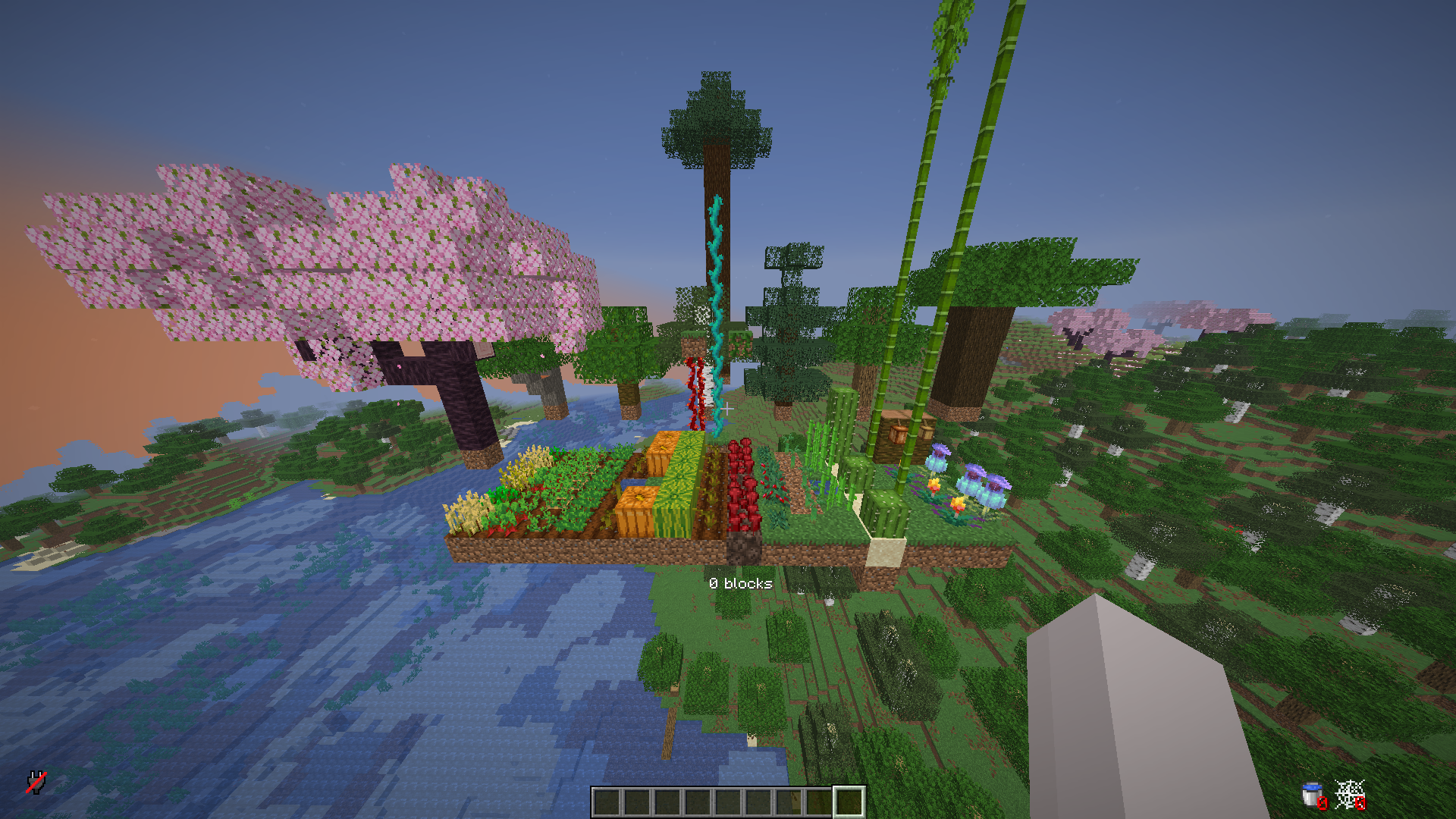
支持的动物

工作原理
当包含受追踪植物或符合条件的动物的区块被加载时,插件知道该区块(或其保存的状态)大约闲置了多久。它不会实时模拟每一个刻;相反,它使用该经过的时间和你的 config.yml 中的节奏设置来快进生长进度,让玩家看到作物和生物“赶上”进度,仿佛它们一直在进展。
以下是使用 config.yml 中胡萝卜的默认节奏的一个具体示例(20 分钟 ≈ “完全成熟”的节奏目的 — 你可以为每种作物更改此值):
- 如果区块离开超过 ≥ 20 分钟,胡萝卜的进度就像经过了完整的生长窗口一样(它们可以从空田达到完全阶段,具体取决于生长逻辑如何应用该时间)。
- 如果离开时间为 10 分钟,胡萝卜将获得约 一半 的节奏预算。
- 如果离开时间为 10 分钟 并且 胡萝卜在区块卸载时已经是半成长状态,剩余进度将与保存的进度叠加 — 它们在加载后可以达到完全阶段。
确切的行为取决于作物类型、方块状态、修饰符(/growth rate、冲刺、冻结)以及 WorldGuard offline-growth。在 plants-minutes-to-full-growth 中调整每种作物,在 mobs-minutes-to-full-growth 中调整每种生物,以匹配你的服务器。
作物与植物
这些使用离线式进度处理(名称匹配常见的 Bukkit 材料 / 农场方块):
- 胡萝卜
- 土豆
- 小麦
- 甜菜根
- 下界疣
- 可可豆
- 甜浆果丛
- 树苗: 橡树、白桦、云杉、丛林、金合欢、深色橡木、樱桃 — 包括 2×2 巨型树 设置(例如四株云杉、丛林或深色橡木树苗)
- 仙人掌
- 甘蔗
- 西瓜(茎 和 西瓜方块)
- 南瓜(茎 和 南瓜方块)
- 海带
- 垂滴藤
- 扭曲藤
- 竹子
- 洞穴藤蔓
- 红树林气生根
- 火把花
- 猪笼草
支持的被动生物
如果服务器版本允许追踪生物,这些类型可以获得离线式老化 / 特殊情况(例如,幼崽 → 成年节奏,绵羊羊毛再生,其中已实现):
- 鸡
- 猪
- 牛
- 绵羊(包括羊毛再生计时)
- 蘑菇牛
- 兔子
- 狼
- 猫鼬
- 马
- 村民
- 北极熊
- 骡子
- 驴
- 骆驼
- 海龟
- 行商骆驼
- 狐狸
- 猫
- 蜜蜂
- 熊猫
- 炽足兽
- 山羊
- 美西螈
- 青蛙
- 蝌蚪
- 嗅探兽
- 骆驼
- 犰狳
功能
- 离线作物生长:当区块重新加载时,由每种可配置植物的“完全生长所需分钟数”驱动
- 可选的离线被动生物进度:在支持的版本上
- 加载区块额外刻:确保农场在玩家附近时仍然尊重
/growth 乘数
- WorldGuard 集成:
offline-growth 标志(DENY 阻止该区域的模拟)
- 持久化:通过 JSON 或外部数据库(参见
config.yml)
- 管理员命令:用于重载、调试、冲刺 / 冻结 / 基础速率
安装
- 构建或下载 shadow JAR
keepmegrowing-2.0.jar(如果需要所有数据库驱动程序在一个文件中,则使用 keepmegrowing-bundled-2.0.jar)。
- 将其放入服务器的
plugins 文件夹。
- 启动服务器;配置文件将在
plugins/KeepMeGrowing/ 下创建。
- 编辑
config.yml,然后运行 /growth reload 或 /keepmegrowing reload(相同的权限)。
从旧版“OfflineGrowthPro”文件夹升级: 重命名/复制 plugins/OfflineGrowthPro/ → plugins/KeepMeGrowing/,以便现有数据与新插件名称保持一致。旧的记分板标签不会自动迁移。
用法
命令
| 命令 |
别名 |
权限 |
描述 |
/keepmegrowing |
/kmg |
keepmegrowing.admin |
帮助 / 与 /growth 相同的子命令 |
/growth |
/gth |
keepmegrowing.admin |
reload、debug、sprint、freeze、unfreeze、rate <n> |
权限
| 权限 |
默认 |
描述 |
keepmegrowing.admin |
op |
上述所有管理员命令 |
配置
主文件:plugins/KeepMeGrowing/config.yml。
| 区块 |
用途 |
plants-minutes-to-full-growth |
每种作物的进度提示(数值越低,离线追赶速度越快) |
mobs-minutes-to-full-growth |
适用于受支持的中性生物的同理逻辑 |
growth-rate |
基础与加速倍率 |
loaded-chunk-growth |
区块保持加载时额外获得的生长刻数 |
unload-chunk-scan-crops |
卸载区块时可选的全区块扫描(开销较大) |
blacklisted-worlds / disable-spawn-chunks |
世界策略 |
database |
JSON 或 SQL/Mongo 设置 |
YAML 键名保持稳定;仅调整注释和值。
兼容性
Paper 与 Spigot,Minecraft 1.13+ 作为 API 基线;生物特性需要上文所述的 1.10+ 游戏行为。WorldGuard 为软依赖。
实时图表(使用 keepmegrowing 的服务器)
KeepMeGrowing
Crops and passive mobs keep maturing while chunks are unloaded: when someone loads the area again, the plugin applies the “missing” progress in one shot so growth feels natural instead of time-gated by online players.
Summary
KeepMeGrowing tracks when plant blocks and supported animals were last persisted for a chunk. On chunk load, it looks at wall-clock time since last unload, applies your configured pacing, and advances growth (crops, stems, saplings, vines, etc.) plus passive mob ageing where enabled. Requires Spigot/Paper 1.13+ (API); passive mob simulation needs Minecraft 1.10+. WorldGuard is optional via the offline-growth flag.
Drop your marketing screenshots into assets/ as crops.png and animals.png so the images below render on GitHub.
Showcase
Supported crops
Supported animals
How it works
When a chunk that contains tracked plants or eligible animals is loaded, the plugin knows roughly how long that chunk (or its saved state) sat unloaded. It does not simulate every tick in real time; instead it fast-forwards growth using that elapsed time and your config.yml pacing so players see crops and mobs “catch up” as if they had been progressing the whole time.
Here is a concrete example using the default pacing for carrots in config.yml (20 minutes ≈ “full maturity” for pacing purposes — you can change this per crop):
- If the chunk was away for ≥ 20 minutes, carrots advance as if a full growth window elapsed (they can reach full stage from an empty field, subject to how the growth logic applies that time).
- If it was away for 10 minutes, carrots get about half that pacing budget applied.
- If it was away for 10 minutes and the carrots were already half-grown when the chunk unloaded, the remaining progress stacks with what was saved — they can reach full stage after load.
Exact behaviour depends on crop type, block state, modifiers (/growth rate, sprint, freeze), and WorldGuard offline-growth. Tune every crop in plants-minutes-to-full-growth and mobs in mobs-minutes-to-full-growth to match your server.
Crops & plants
These are handled with offline-style progression (names match common Bukkit materials / farm blocks):
- Carrots
- Potatoes
- Wheat
- Beetroots
- Nether wart
- Cocoa
- Sweet berry bush
- Saplings: oak, birch, spruce, jungle, acacia, dark oak, cherry — including 2×2 mega tree setups (e.g. four spruce, jungle, or dark oak saplings)
- Cactus
- Sugar cane
- Melon (stem and melon blocks)
- Pumpkin (stem and pumpkin blocks)
- Kelp
- Weeping vines
- Twisting vines
- Bamboo
- Cave vines
- Mangrove propagules
- Torchflower
- Pitcher crop
Supported passive mobs
If the server version allows mob tracking, these types can receive offline-style ageing / special cases (e.g. baby → adult pacing, sheep wool regrowth where implemented):
- Chicken
- Pig
- Cow
- Sheep (including wool regrowth timing)
- Mooshroom
- Rabbit
- Wolf
- Ocelot
- Horse
- Villager
- Polar bear
- Mule
- Donkey
- Llama
- Turtle
- Trader llama
- Fox
- Cat
- Bee
- Panda
- Strider
- Goat
- Axolotl
- Frog
- Tadpole
- Sniffer
- Camel
- Armadillo
Features
- Offline crop growth when chunks reload, driven by configurable “minutes to full growth” per plant type
- Optional offline passive mob progression on supported versions
- Loaded-chunk bonus ticks so farms still respect
/growth multipliers when players are nearby
- WorldGuard integration:
offline-growth flag (DENY blocks simulation in that region)
- Persistence via JSON or external databases (see
config.yml)
- Admin commands for reload, debug, sprint / freeze / base rate
Installation
- Build or download the shadow JAR
keepmegrowing-2.0.jar (or keepmegrowing-bundled-2.0.jar if you need all DB drivers in one file).
- Place it in the server
plugins folder.
- Start the server; config is created under
plugins/KeepMeGrowing/.
- Edit
config.yml, then /growth reload or /keepmegrowing reload (same permission).
Upgrading from older “OfflineGrowthPro” folders: rename/copy plugins/OfflineGrowthPro/ → plugins/KeepMeGrowing/ so existing data stays with the new plugin name. Legacy scoreboard tags are not migrated automatically.
Usage
Commands
| Command |
Aliases |
Permission |
Description |
/keepmegrowing |
/kmg |
keepmegrowing.admin |
Help / same subcommands as /growth |
/growth |
/gth |
keepmegrowing.admin |
reload, debug, sprint, freeze, unfreeze, rate <n> |
Permissions
| Permission |
Default |
Description |
keepmegrowing.admin |
op |
All admin commands above |
Configuration
Main file: plugins/KeepMeGrowing/config.yml.
| Section |
Purpose |
plants-minutes-to-full-growth |
Pacing hint per crop (lower = faster offline catch-up) |
mobs-minutes-to-full-growth |
Same idea for supported passive mobs |
growth-rate |
Base and sprint multipliers |
loaded-chunk-growth |
Extra ticks while chunks stay loaded |
unload-chunk-scan-crops |
Optional full-chunk scan on unload (heavier) |
blacklisted-worlds / disable-spawn-chunks |
World policy |
database |
JSON or SQL/Mongo settings |
YAML keys are stable; adjust comments and values only.
Compatibility
Paper and Spigot, Minecraft 1.13+ for the API baseline; mob features need 1.10+ game behaviour as noted above. WorldGuard soft-depend.
Live chart (servers using keepmegrowing)


 插件

 插件
 插件
 插件
 插件
 插件
评论 0
登录后参与评分
还没有评论,来抢沙发吧