Kingdoms 2 是什么?
Kingdoms 2 是一个基于区块的城镇-国家层级系统,其设计 loosely(松散地)借鉴了 Towny。该插件自 2011 年 12 月起便在我们的服务器上运行。我们决定开发此系统的主要原因之一是,当时 Towny 非常不稳定且不可靠,我们需要花费大量精力去修补它,而且它还缺乏 MySQL 支持。因此,我们创建了这款插件以填补这些空白,并加入了自己的特色。
Beta 版本现已在下载部分提供!如有任何问题,请通过 GitHub 工单系统反馈给我。谢谢!
那 Kingdoms 1 怎么了?
Kingdoms 1 是我对城镇-国家层级的首次尝试,它使用 WorldGuard 作为保护系统,而不是自行开发(这也是为什么我们的 API 中有专门针对 WorldGuard/WorldEdit 的部分)。当时我们认为这样做非常有益,因为我们无需维护插件的这一方面,可以专注于更宏大的功能。这是一个好主意,但随之而来了一大堆 Bug。因此,最近我决定开发 Kingdoms 2 来解决这些问题。
如果您希望在安装前查看此插件的效果,可以访问我们的服务器 @mc.imdeity.com 并输入 /hub 前往当前正在测试该插件的中枢大厅。
功能特性
- MySQL 支持!
- 由 DeityProtect 提供支持!
- 城镇/王国权限系统
- 内置好友系统
- 城镇的高级助手可以通过城镇投票取代镇长
- 城镇边界,防止其他城镇向你的领地扩张
- 王国边界,除非国王允许,否则无法在你的土地上创建任何新城镇
- 税收系统!
- 玩家可以按照自己的意愿管理土地,控制谁可以在他们的地块上建造/破坏/使用物品/行走
- 如果城镇属于某个王国,居民可以在该王国的多个城镇中认领地块!
- 城镇/王国聊天系统(配合 DeityChat 使用)
- 多世界支持
- 城镇可以创建自己的 PvP 竞技场!
需求条件
命令列表
注意:以下所有命令目前均已在 ImDeity Kingdoms Minecraft Server 上成功实现。
另外请注意,借助 DeityAPI,所有这些命令都有游戏内的帮助文件,你可以使用 /<command> help <page-number> 来查看帮助。
居民命令
- /resident info <player-name> <-o>: 此命令将显示你或“玩家名称”的状态。等同于当前 kingdoms 中的 /resident [player-name] 命令 - 需要权限 kingdoms.resident.info
- /resident add-friend [player-name]: 此命令会将一名居民添加到你的好友列表中。主要用于当你决定使用 F 权限时 - 需要权限 kingdoms.resident.add-friend
- /resident remove-friend [player-name]: 此命令会将一名居民从你的好友列表中移除。主要用于当你决定使用 F 权限时 - 需要权限 kingdoms.resident.remove-friend
- /resident set gender [male/female]: 这将更改你在游戏中的性别。用于用户头衔 - 需要权限 kingdoms.resident.set
- /resident set permissions edit [P/F/T/K/TS/KS]: 见下方的权限部分。默认为 TS - 需要权限 kingdoms.resident.set
- /resident set permissions use [P/F/T/K/TS/KS]: 见下方的权限部分。默认为 TS - 需要权限 kingdoms.resident.set
- /resident set permissions access [P/F/T/K/TS/KS]: 见下方的权限部分。默认为 T - 需要权限 kingdoms.resident.set
城镇命令
- /town list: 列出所有当前存在的城镇 - 需要权限 kingdoms.town.list
- /town info <town-name> <-o>: 显示某个城镇的状态 - 需要权限 kingdoms.town.info
- /town create [town-name]: 创建一个新城镇,你将担任镇长 - 需要权限 kingdoms.town.create
请注意,你现在必须遵守距离限制,并且可能需要远离现有城镇更远的地方进行创建。
- /town chat <message>: 允许你与你的城镇成员聊天 - 需要权限 kingdoms.town.chat
- /town delete: 删除你的城镇 - 需要权限 kingdoms.town.delete
- /town claim: 认领一个新的城镇地块。注意,此命令适用与城镇创建命令相同的限制条件 - 需要权限 kingdoms.town.claim
- /town unclaim: 此命令将取消认领你当前所站立的地块 - 需要权限 kingdoms.town.unclaim
- /town add [player-name]: 将一名居民添加到你的城镇(前提是该玩家在线) - 需要权限 kingdoms.town.add
- /town kick [player-name]: 将一名居民踢出你的城镇 - 需要权限 kingdoms.town.kick
- /town set town-board [message]:此命令将更改你的城镇公告板——需要权限 kingdoms.town.set
- /town set plot-price [amount]:此命令将更改城镇地块的默认价格——需要权限 kingdoms.town.set
- /town set spawn:此命令将更改城镇重生点。请注意,重生点必须位于未被认领的地块上——需要权限 kingdoms.town.set
- /town set public [on-off]:此命令将限制城镇仅对城镇成员可见——需要权限 kingdoms.town.set
- /town set permissions edit [P/F/T/K/TS/KS]:请参阅下方的权限部分。默认为 T——需要权限 kingdoms.town.set
- /town set permissions use [P/F/T/K/TS/KS]:请参阅下方的权限部分。默认为 T——需要权限 kingdoms.town.set
- /town set permissions access [P/F/T/K/TS/KS]:请参阅下方的权限部分。默认为 P——需要权限 kingdoms.town.set
- /town spawn <town-name>:此命令会将你传送至该城镇的重生点——需要权限 kingdoms.town.spawn
- /town leave:此命令会将你移出城镇——需要权限 kingdoms.town.leave
- /town deposit <town> [amount]:此命令会将资金存入城镇——需要权限 kingdoms.town.deposit
- /town withdraw [amount]:此命令将从城镇提取资金(前提是你拥有高级助理及以上权限)——需要权限 kingdoms.town.withdraw
- /town promote [player-name]:此命令会将指定玩家晋升至下一个等级。注意:通过晋升高级助理可以任命新镇长——需要权限 kingdoms.town.promote
- /town demote [player-name]:此命令会将指定玩家降级至下一个等级——需要权限 kingdoms.town.demote
- /town vote create:此命令尚未实现。此命令将为新镇长创建助理投票——需要权限 kingdoms.town.vote
- /town vote [assistant-name]:此命令尚未实现。此命令将为你支持的助理投出一票。注意:只有助理才能投票——需要权限 kingdoms.town.vote
- /town vote check:此命令尚未实现。此命令将显示当前投票的状态——需要权限 kingdoms.town.vote
- /town warp list:此命令将列出所有城镇传送点——需要权限 kingdoms.town.warp.list
- /town warp [warp-name]:此命令会将你传送到指定传送点(需支付费用)——需要权限 kingdoms.town.warp.use
- /town warp add [warp-name]:此命令将添加一个城镇传送点(需支付可配置的费用,助理及以上权限可用)——需要权限 kingdoms.town.warp.add
- /town warp remove [warp-name]:此命令将移除一个城镇传送点(助理及以上权限可用)——需要权限 kingdoms.town.warp.remove
地块指令
- /plot claim:如果该地块正在出售,此命令将为你认领该地块——需要权限 kingdoms.plot.claim
- /plot unclaim:此命令将取消认领你的地块;如果你拥有助理及以上权限,则取消认领你所站立的地块——需要权限 kingdoms.plot.unclaim
- /plot set for-sale <price>:此命令将把地块设为出售状态,价格为城镇默认价格或指定价格。注意:这是助理及以上权限的命令——需要权限 kingdoms.plot.set
- /plot set not-for-sale:此命令将把地块从出售列表中移除。注意:这是助理及以上权限的命令——需要权限 kingdoms.plot.set
- /plot set mob-spawning [allow/deny]:此命令将允许或禁止在地块上生成生物。注意:这是助理及以上权限的命令——需要权限 kingdoms.plot.set
- /plot set pvp [allow/deny]:此命令将允许或禁止在地块上进行 PvP。注意:这是助理及以上权限的命令——需要权限 kingdoms.plot.set
- /plot set explode [allow/deny]:此命令将允许或禁止在地块上发生爆炸。注意:这是助理及以上权限的命令——需要权限 kingdoms.plot.set
王国指令
- /kingdom list:此命令将列出所有王国——需要权限 kingdoms.kingdom.list
- /kingdom info <kingdom-name>:此命令将显示王国的状态——需要权限 kingdoms.kingdom.info
- /kingdom create [kingdom-name]:此命令将创建一个王国。注意:与城镇一样,设有距离检查机制——需要权限 kingdoms.kingdom.create
- /kingdom chat <message>:此命令将允许你与王国成员聊天——需要权限 kingdoms.kingdom.chat
- /kingdom remove [town-name]:此命令将把指定城镇从你的王国中移除——需要权限 kingdoms.kingdom.remove
- /kingdom leave:此命令将把你的城镇从王国中移除(前提是你不是国王)——需要权限 kingdoms.kingdom.leave
- /kingdom withdraw [amount]:此命令将从王国金库中提取资金。注意:仅限国王使用——需要权限 kingdoms.kingdom.withdraw
- /kingdom deposit <kingdom-name> [amount]:此命令将向指定王国存入资金——需要权限 kingdoms.kingdom.deposit
- /kingdom request list: 仅国王可用,用于接受/拒绝申请- 需要 kingdoms.kingdom.request
- /kingdom request accept [request-id]: 仅国王可用,用于接受加入其王国的申请- 需要 kingdoms.kingdom.request
- /kingdom request deny [request-id]: 仅国王可用,用于拒绝加入其王国的申请- 需要 kingdoms.kingdom.request
- /kingdom request join [kingdom-name]: 城镇或潜在城镇可用于加入一个王国- 需要 kingdoms.kingdom.request
当国王接受申请时,如果该用户没有城镇,系统将授予其在王国领土内建造城镇的许可(目前要求距离任何王国领土至少1000格)。当用户创建城镇时,它将自动归属于接受其申请的王国。如果用户已有城镇,则直接将其城镇添加到该王国中。如果被拒绝,则需要远离该王国以建立自己的城镇,或者寻找其他可加入的王国。
Kingdoms Command
- /kingdoms info: 提供有关插件及王国/城镇/居民的一些信息- 需要 kingdoms.kingdoms.info
- /kingdoms prices: 列出与城镇/王国相关的价格- 需要 kingdoms.kingdoms.prices
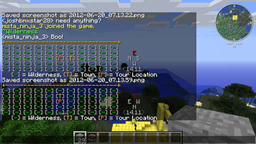
- /kingdoms map <on/off>: 开启地图,让你查看城镇相对于你的位置- 需要 kingdoms.kingdoms.map
请注意,此地图的最上方(聊天栏最高行)对应你面朝的方向,如果感到困惑请使用右侧的指南针
Possible Ranks
- The King: 最高统治者,拥有所有城镇并控制其王国内的所有事务
- The Mayor: 城镇之首,拥有该城镇并具备所有城镇权限
- The Senior Assistant: 第二负责人,可在市长缺席时代为管理或在紧急情况下承担重任,同样拥有所有城镇权限
- The Assistant: 虽非最高管理者,但是受信任的成员。可通过 /plot set 和 /plot un-claim 命令编辑地块权限
Town/Resident Permissions
存在多种不同的权限类型/组,下文将逐一说明
Permission Types
- Edit: 此权限允许用户破坏和放置方块
- Use: 此权限允许用户切换红石状态以及放置船只、矿车等物品
- Access: 此权限允许用户行走于你的区块上。如果他们通过某种方式传送至受限区块,当他们离开你的土地时该权限将生效。
Permission Groups
- Public [P]: 最低级别的组,任何人都可访问该权限类型
- Friend [F]: 适用于居民地块。仅好友可访问该权限类型
- Town [T]: 仅城镇成员可访问该权限类型
- Kingdom [K]: 仅王国成员可访问该权限类型
- TownStaff [TS]: 仅城镇工作人员可访问该权限类型
- KingdomStaff [KS]: 仅王国工作人员可访问该权限类型
Extra Links

What is Kingdoms 2?
Kingdoms 2 is a chunk based town-nation hierarchy very loosely based on Towny.This plugin has been running on our server since December of 2011. One of the major reasons we were pushed to create this system is at that time Towny was very very unstable and unreliable and we had to do a lot to patch it up, as well as it was lacking MySQL support. We then created this plugin to fill those holes as well as put our own spin on the plugin.
Beta release is now available in the downloads section!. Please forward any issues over to me view the github ticket system. Thank you!
But what happened to Kingdoms 1?
Kingdoms 1 was my first attempt at the town-nation hierarchy and it used WorldGuard for its protection system instead of creating our own (Hense why our API has WorldGuard/WorldEdit sections dedicated to it). At the time we thought this was very beneficial as we wouldn't have to maintain that aspect of the plugin and could do bigger things. It was a good idea, but from it came a large list of bugs. So recently I decided to develop up Kingdoms 2 to fix those issues.
If you would like to take a look at this plugin before installing you can check out our server @mc.imdeity.com and type /hub to go to the hub where we are testing it atm
Features
- MySQL!
- DeityProtect backing it up!
- Town/Kingdom permission system
- Built in friend system
- Town's senior assistants can replace the mayor with a town vote
- Town borders so that other towns cannot expand towards yours
- Kingdom border so that any town cannot be created within your land unless the king allows it.
- Tax system!
- Players manage their land the way they want with control over who can build/destroy/use items/walk on their plots
- If a town belongs to a Kingdom, residents can claim plots in multiple towns within the kingdom!
- Town/Kingdom Chat system (for use with DeityChat)
- Multi-world support
- Towns can create their own Pvp Arenas!
Requirements
Long list of commands
Note: All of these commands are currently implemented successfully on the ImDeity Kingdoms Minecraft Server.
Also note that there is in-game help files for all these commands with the use of DeityAPI so you can /<command> help <page-number>
Resident Commands
- /resident info <player-name> <-o>: This command will show your or 'player-name''s status. It is equivalent to the /resident [player-name] command in the current kingdoms- Requires kingdoms.resident.info
- /resident add-friend [player-name]: This command will add a resident to your friends list. This is mostly if you decide to use the F permission- Requires kingdoms.resident.add-friend
- /resident remove-friend [player-name]: This command will remove a resident from your friend list. This is mostly if you decide to use the F permission- Requires kingdoms.resident.remove-friend
- /resident set gender [male/female]: This will change your gender in the game. Used for user titles- Requires kingdoms.resident.set
- /resident set permissions edit [P/F/T/K/TS/KS]: See the permissions section below. Default is TS- Requires kingdoms.resident.set
- /resident set permissions use [P/F/T/K/TS/KS]: See the permissions section below. Default is TS- Requires kingdoms.resident.set
- /resident set permissions access [P/F/T/K/TS/KS]: See the permissions section below. Default is T- Requires kingdoms.resident.set
Town Commands
- /town list: This will list all current towns- Requires kingdoms.town.list
- /town info <town-name> <-o>: This will show a town's status- Requires kingdoms.town.info
- /town create [town-name]: This will create a new town with you as the mayor.- Requires kingdoms.town.create
Note that you must abide by distance restrictions now, and may be required to move farther away from towns
- /town chat <message>: This will allow you to chat with your town- Requires kingdoms.town.chat
- /town delete: This will remove your town- Requires kingdoms.town.delete
- /town claim: This will claim a new town plot. Note that the same restrictions apply for this as the town create command- Requires kingdoms.town.claim
- /town unclaim: This command will unclaim the town plot you are currently standing on- Requires kingdoms.town.unclaim
- /town add [player-name]: This will add a resident to your town pending that they are online- Requires kingdoms.town.add
- /town kick [player-name]: This will kick a resident from your town- Requires kingdoms.town.kick
- /town set town-board [message]: This will change your town board- Requires kingdoms.town.set
- /town set plot-price [amount]: This will change the default plot price of the town- Requires kingdoms.town.set
- /town set spawn: This will change the town spawn location. Note that the spawn has to be located on an unclaimed plot- Requires kingdoms.town.set
- /town set public [on-off]: This will restrict the town to towns-members only- Requires kingdoms.town.set
- /town set permissions edit [P/F/T/K/TS/KS]: See the permissions section below. Default is T- Requires kingdoms.town.set
- /town set permissions use [P/F/T/K/TS/KS]: See the permissions section below. Default is T- Requires kingdoms.town.set
- /town set permissions access [P/F/T/K/TS/KS]: See the permissions section below. Default is P- Requires kingdoms.town.set
- /town spawn <town-name>: This will teleport you to the towns spawn- Requires kingdoms.town.spawn
- /town leave: This will remove you from the town- Requires kingdoms.town.leave
- /town deposit <town> [amount]: This will deposit money into the town- Requires kingdoms.town.deposit
- /town withdraw [amount]: This will withdraw money from the town pending on you being senior assistant+- Requires kingdoms.town.withdraw
- /town promote [player-name]: This will move 'player-name' up to the next rank. Note you set the new mayor by promoting a senior assistant- Requires kingdoms.town.promote
- /town demote [player-name]: This will move 'player-name' down to the next rank- Requires kingdoms.town.demote
- /town vote create: This command is not yet implemented. This will create an assistant vote for a new mayor- Requires kingdoms.town.vote
- /town vote [assistant-name]: This command is not yet implemented. This will cast your vote for the assistant. Note only assistants will be able to vote- Requires kingdoms.town.vote
- /town vote check: This command is not yet implemented. This will show the status of the current vote- Requires kingdoms.town.vote
- /town warp list: This command will give a list of town warps- Requires kingdoms.town.warp.list
- /town warp [warp-name]: This command will warp you to a warp, for a price- Requires kingdoms.town.warp.use
- /town warp add [warp-name]: This command will add a town warp, for a configurable price (Assistant+)- Requires kingdoms.town.warp.add
- /town warp remove [warp-name]: This command will remove a town warp (Assistant+)- Requires kingdoms.town.warp.remove
Plot Commands
- /plot claim: If the plot is for-sale, this command will claim the plot for you- Requires kingdoms.plot.claim
- /plot unclaim: This will unclaim your plot, or if you are a helper+ it will unclaim the plot you are standing on- Requires kingdoms.plot.unclaim
- /plot set for-sale <price>: This will set the plot for sale for either the default town price or the specified price. Note: This is an assistant+ command- Requires kingdoms.plot.set
- /plot set not-for-sale: This will remove the plot from buyers. Note: This is an assistant+ command- Requires kingdoms.plot.set
- /plot set mob-spawning [allow/deny]: This will either allow or deny mob spawning on a plot. Note: This is an assistant+ command- Requires kingdoms.plot.set
- /plot set pvp [allow/deny]: This will either allow or deny pvp on a plot. Note: This is an assistant+ command- Requires kingdoms.plot.set
- /plot set explode [allow/deny]: This will either allow or deny explosions on a plot. Note: This is an assistant+ command- Requires kingdoms.plot.set
Kingdom Commands
- /kingdom list: This command will list all kingdoms- Requires kingdoms.kingdom.list
- /kingdom info <kingdom-name>: This will show the kingdoms status- Requires kingdoms.kingdom.info
- /kingdom create [kingdom-name]: This will create a kingdom. Note that a distance check is in place as with the towns- Requires kingdoms.kingdom.create
- /kingdom chat <message>: This will allow you to chat with your kingdom- Requires kingdoms.kingdom.chat
- /kingdom remove [town-name]: This will remove 'town-name' from your kingdom- Requires kingdoms.kingdom.remove
- /kingdom leave: This will remove your town from the kingdom provided that you are not the king- Requires kingdoms.kingdom.leave
- /kingdom withdraw [amount]: This will take money out of the kingdom bank. Note this is a king only command- Requires kingdoms.kingdom.withdraw
- /kingdom deposit <kingdom-name> [amount]: This will add money to a kingdom- Requires kingdoms.kingdom.deposit
- /kingdom request list: This is for the king only to accept /deny requests- Requires kingdoms.kingdom.request
- /kingdom request accept [request-id]: This is for the king only, to accept requests to join his kingdom- Requires kingdoms.kingdom.request
- /kingdom request deny [request-id]: This is for the king only, to deny requests to join his kingdom- Requires kingdoms.kingdom.request
- /kingdom request join [kingdom-name]: This is for towns or prospective towns to join a kingdom- Requires kingdoms.kingdom.request
When a king accepts a request, if that user does not have the town it will give them a permit to make a town in the kingdoms land (atm 1000 blocks away from any kingdom land). When the user creates their town it will automatically be assigned to the kingdom that accepted them. If the user does have a town already it will simply add their town to the kingdom. If you are denied then you will either have to walk farther away from the kingdom in order to make your town, or find another kingdom to join.
Kingdoms Command
- /kingdoms info: Gives some information about the plugin and the kingdoms/towns/residents- Requires kingdoms.kingdoms.info
- /kingdoms prices: List town/kingdom related prices- Requires kingdoms.kingdoms.prices
- /kingdoms map <on/off>: Turns on a map for you to see where towns are relative to you- Requires kingdoms.kingdoms.map
Note that this map's top (highest up chat line) is in the direction you are facing, use the compass on the right if you are confused
Possible Ranks
- The King: He is the top dog, He owns all towns and has control over everything within his kingdom
- The Mayor: He is the top of the bunch, He owns the town and has access to all town permissions
- The Senior Assistant: He is the second in charge, He is there to take a bullet for the mayor or take over in his absence, he also has access to all town permissions
- The Assistant: He may not be the top dog, but he is a trusted member. He has access to edit plot permissions with the /plot set and /plot un-claim commands
Town/Resident Permissions
There are several different permission types/groups and i will outline them below
Permission Types
- Edit: This permission will give users both block breaking and placing access
- Use: This permission will give users the ability to toggle redstone as well as place items such as boats and minecarts
- Access: This permission will allow a user to walk on your chunk. If they somehow teleport onto a restricted chunk, the permission will kick in when they step off your land.
Permission Groups
- Public [P]: This is the lowest form of group, Anyone has access to the permission type
- Friend [F]: This is applicable for resident plots. Only your friends will have access to the permission type
- Town [T]: Only the town's members will have access to the permission type
- Kingdom [K]: Only the kingdom's members will have access to the permission type
- TownStaff [TS]: Only the town's staff will have access to the permission type
- KingdomStaff [KS]: Only the kingdom's staff will have access to the permission type
Extra Links

 插件
 插件
 插件
 插件

 插件
 插件

评论 0
登录后参与评分
还没有评论,来抢沙发吧