


Labyrinth

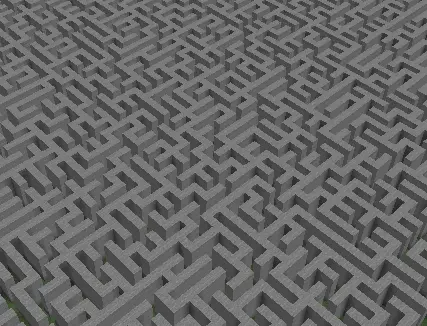
这是一个插件,允许你创建无限迷宫图案,为你的服务器增加挑战性!
专为原版设计,但可用于所有模式(监狱、阵营、原版、生存、城镇……),它还支持多种配置方式,例如墙壁或地面的材质、通过一条命令生成新的迷宫等!
⚡️功能⚡️
- 可以创建无限迷宫
- 可以设置迷宫的高度
- 可以设置迷宫的墙壁间距
- 可以通过命令修改材质
- 可以通过命令重新生成迷宫
- 可以检查迷宫是否可解
- 可以为特定迷宫添加无限个起始点
- 可以为特定迷宫添加无限个箱子
- 可以移除迷宫中的箱子
- 可以移除迷宫的起始点
- 可以配置所有消息
- 支持 RGB 颜色
- 无依赖项
⚡️命令⚡️
- lab <create> <name> <x> <y> <height> <wallSpace> 用于创建迷宫
- lab <help> 查看帮助命令
- lab <list> 列出所有迷宫
- lab <modify> <name> <wallMaterial|groundMaterial|regenerate> [material1.percentage,material2.percentage,...]
- lab <reload> 重载插件配置
- lab <remove> <name> [chest|start|end] [{number}] 用于移除迷宫或其箱子/起始点/终点位置
- lab <resolve> <name> 尝试从起点到终点解决迷宫
- lab <schematic> <name> 创建迷宫的结构图(schematic)
- lab <start> <name> [[random] | [number]] 用于列出起始点、随机传送至起始点或传送到特定的起始点
- lab <set> <end|start|chest> <name> 为迷宫添加终点、起始点或箱子位置
- lab <wall> <add|remove> 在迷宫中添加或移除墙壁

⚡️权限⚡️
- labyrinth.create.command
- labyrinth.help.command
- labyrinth.list.command
- labyrinth.modify.command
- labyrinth.reload.command
- labyrinth.remove.command
- labyrinth.resolve.command
- labyrinth.schematic.command
- labyrinth.start.command
- labyrinth.set.command
- labyrinth.wall.command
⚡️bStats⚡️
⚡️配置⚡️
config.yml
# # # # # # # # # # # # # # # # # # # # # # # # # # # # # # # # # # # # # # # # # # # # # # # # #
# #
# Labyrinth #
# Created by eliotesta98 & xSavior_of_God #
# #
# # # # # # # # # # # # # # # # # # # # # # # # # # # # # # # # # # # # # # # # # # # # # # # # #
Configuration:
# Set whether various plugins should be hooked into (i will also check if is enabled).
Hooks:
WorldEdit: false
# Show in console the dimension of Labyrinth
ShowDimensionInConsole: true
# Choose the wall material of all labyrinth
# If you want more materials at the same time
# just add another section with material name and the percentage
# Example:
# STONE: 50
# WOOD: 50
# P.S. The percentage must be between 0 and 100 and the sum of all percentages must be 100!
WallMaterials:
STONE: 100
# Choose the ground material of all labyrinth
# If you want more materials at the same time
# just add another section with material name and the percentage
# Example:
# GRASS_BLOCK: 50
# WOOD: 50
# P.S. The percentage must be between 0 and 100 and the sum of all percentages must be 100!
GroundMaterials:
GRASS_BLOCK: 100
# Choose the end location material of all labyrinth
EndLocationMaterial: STONE_PRESSURE_PLATE
# Choose the resolve material for algorithm
ResolveMaterial: GOLD_BLOCK
# Backup Time of Labyrinths in minutes
BackupTimer: 1
# Show backup in console
ShowBackupInConsole: true
# Velocity of block place at creation in milliseconds. ATTENTION! if you cannot want tps down set at >= 10
VelocityPlace: 10
宝箱:
启用:false
# 迷宫中随机生成的宝箱数量
# 注意:如果迷宫无法生成你想要的数量的宝箱,它将生成最大可能值
数量:10
# 宝箱的战利品表
# 注意:百分比必须在 0 到 100 之间,且所有百分比之和必须为 100!
# 示例:
# ANCIENT_CITY: 90
# CREEPER: 10
# 你可以在以下网址找到战利品表列表:
# https://hub.spigotmc.org/javadocs/spigot/org/bukkit/loot/LootTables.html
战利品表:
ANCIENT_CITY: 50
CREEPER: 50
# 奖励
奖励:
启用:false
操作:
- "give %player% STONE 1"
- "tp %player% 0 0 0"
# 你可以使用十六进制颜色代码来改变消息的颜色。例如 &{#FFFF00}(黄色)。
# 命令示例:'/labyrinth &{#FFFF00}<reload>&{#000000} command reload Labyrinth plugin'
消息:
前缀:'&eLabyrinth &r'
命令:
页脚:'&7(&7&l(&c&l!&7&l)&7) &9[] 可选值, <> 必填值'
创建:' &e/labyrinth &6<create> <name> <width> <length> <height> <wallSpace> &7用于创建迷宫'
重载:' &e/labyrinth &6<reload> &7用于重载 Labyrinth 插件'
帮助:' &e/labyrinth &6<help> &7用于查看帮助命令'
移除:' &e/labyrinth &6<remove> <name> [chest|start|end] [{number}] &7用于移除迷宫或其宝箱/起点/终点位置'
修改:' &e/labyrinth &6<modify> <name> <wallMaterial|groundMaterial|regenerate> [material1.percentage,material2.percentage,...] &7用于修改材质并重新生成迷宫'
解决:' &e/labyrinth &6<resolve> <name> [{number}] &7此命令尝试解析指定名称的迷宫并选择起始位置'
设置:' &e/labyrinth &6<set> <end|start|chest> <name> &7添加迷宫的终点、起点或宝箱位置'
起点:' &e/labyrinth &6<start> <name> [[random]|[{number}]] &7此命令传送至选定的起点位置'
列表:' &e/labyrinth &6<list> &7列出所有迷宫'
墙壁:' &e/labyrinth &6<wall> <add|remove> &7用于在迷宫中添加或移除墙壁'
结构图:' &e/labyrinth &6<schematic> <name> &7用于创建迷宫的结构图'
恢复:' &e/labyrinth &6<restore> [file] &7允许你从备份文件恢复 H2Database 数据库或查看备份文件列表'
成功:
移除:'{prefix}&a&l迷宫已成功移除'
解决:'{prefix}&a&l迷宫可解'
移除起点:'{prefix}&a&l起点位置已成功移除'
移除终点:'{prefix}&a&l终点位置已成功移除'
墙壁添加正确:'{prefix}&a&l墙壁已成功添加,如果你想添加新墙壁,请重新输入命令 /lab <wall> <add>'
墙壁移除正确:'{prefix}&a&l墙壁已成功移除,如果你想移除新墙壁,请重新输入命令 /lab <wall> <remove>'
结构图:'{prefix}&a成功在 {path} 创建了结构图'
已恢复:'{prefix}&a数据库已成功恢复'
列表:
命令:'{prefix}&a&l迷宫列表:{list}'
起点位置:'{prefix}&a&l位置列表:{list}'
宝箱位置:'{prefix}&a&l位置列表:{list}'
终点位置:'{prefix}&a&l位置列表:{list}'
文件:'{prefix}&7文件列表:'
文件行:'&5文件:{fileName}'
警告:
重新生成:'{prefix}&e&l我无法检查此迷宫的可解性,请重新生成它'
设置起点位置:'{prefix}&e&l我无法添加此起点位置,因为迷宫备份尚未完成,正在尝试保存...'
设置终点位置:'{prefix}&e&l我无法添加此终点位置,因为迷宫备份尚未完成,正在尝试保存...'
设置宝箱位置:'{prefix}&e&l我无法添加此宝箱位置,因为迷宫备份尚未完成,正在尝试保存...'
设置墙壁位置:'{prefix}&e&l我无法添加此墙壁位置,因为迷宫备份尚未完成,正在尝试保存...'
移除墙壁位置:'{prefix}&e&l我无法移除此墙壁位置,因为迷宫备份尚未完成,正在尝试保存...'
错误:
墙壁间距:'{prefix}&c&l嘿!&7 墙壁之间的间距必须是偶数!'
高度:'{prefix}&c&l嘿!&7 高度必须大于 0!'
迷宫不存在:'{prefix}&c&l嘿!&7 此迷宫不存在!'
不可解:'{prefix}&c&l迷宫不可解'
材质不存在:'{prefix}&c&l嘿!&7 此材质不存在!'
百分比:'{prefix}&c&l嘿!&7 这不是有效的百分比!'
非玩家:'{prefix}&c你不是玩家'
命令未找到:'{prefix}&c命令未找到'
权限不足:'{prefix}&c权限不足'
迷宫太小:'{prefix}&c&l嘿!&7 此迷宫太小了!'
迷宫已存在:'{prefix}&c&l嘿!&7 此迷宫已存在!'
位置错误:'{prefix}&c&l嘿!&7 这不是迷宫位置!请重新输入命令 /lab <wall> <add|remove>'
钩子禁用:'{prefix}&c请在 config.yml 中启用 {hook}!'
结构图:'{prefix}&c此结构图已存在!'
添加墙壁:'{prefix}&7现在你可以在特定位置放置方块以创建墙壁'
移除墙壁:'{prefix}&7现在你可以在特定位置点击方块以移除墙壁'
调试:
# 命令执行时间
命令:false
# 界面打开执行时间
界面打开执行:false
# 启用状态执行时间
启用:false
# 禁用状态执行时间
禁用:false
如果你需要支持或想要添加功能,请不要犹豫,在 Discord 或通过 SpigotMC 报告。
- 感谢 xSavior_of_God 帮助我实现我的一个项目。
- 特别感谢来自 BG-Softwarse 的 [USER=25629]@Ome_R[/USER],他允许我们使用他的类来处理配置文件 <3
- 本插件使用 HikariCP 作为 H2 数据库的连接池
Labyrinth

It's a plugin that allows you to create an inifnity pattern of a labyrinth for add a challenge in your server!
Designed for a Vanilla but usable in all modalities (Prison, Factions, Vanilla, Survival, Towny...), it is also configurable in many ways such as the material ground or wall, the regeneration of labyrinth with one command and so on!
⚡️Features⚡️
- Possibility to create infinity Labyrinth
- Possibility to set the height of Labyrinth
- Possibility to set the wall space of Labyrinth
- Possibility to modify the materials with a command
- Possibility to regenerate a labyrinth with a command
- Possibility to control if Labyrinth is solvable
- Possibility to add infinity start locations of a specific Labyrinth
- Possibility to add infinity chest of a specific Labyrinth
- Possibility to remove chest of a Labyrinth
- Possibility to remove start locations of a Labyrinth
- Possibility to configure all messages
- RGB Color support
- No Dependency
⚡️Commands⚡️
- lab <create> <name> <x> <y> <height> <wallSpace> for create a labyrinth
- lab <help> for help commands
- lab <list> for list of all labyrinths
- lab <modify> <name> <wallMaterial|groundMaterial|regenerate> [material1.percentage,material2.percentage,...]
- lab <reload> for reload plugin configurations
- lab <remove> <name> [chest|start|end] [{number}] to remove a labyrinth or its chest/start/end locations
- lab <resolve> <name> for try resolve a labyrinth from start to end
- lab <schematic> <name> for create a schematic of a labyrinth
- lab <start> <name> [[random] | [number]] for list of start locations, for tp at random start location and for tp at specific start location
- lab <set> <end|start|chest> <name> add a end, start or chest location for the labyrinth
- lab <wall> <add|remove> for add or remove a wall in the labyrinth

⚡️Permissions⚡️
- labyrinth.create.command
- labyrinth.help.command
- labyrinth.list.command
- labyrinth.modify.command
- labyrinth.reload.command
- labyrinth.remove.command
- labyrinth.resolve.command
- labyrinth.schematic.command
- labyrinth.start.command
- labyrinth.set.command
- labyrinth.wall.command
⚡️bStats⚡️
⚡️Config⚡️
config.yml
# # # # # # # # # # # # # # # # # # # # # # # # # # # # # # # # # # # # # # # # # # # # # # # # #
# #
# Labyrinth #
# Created by eliotesta98 & xSavior_of_God #
# #
# # # # # # # # # # # # # # # # # # # # # # # # # # # # # # # # # # # # # # # # # # # # # # # # #
Configuration:
# Set whether various plugins should be hooked into (i will also check if is enabled).
Hooks:
WorldEdit: false
# Show in console the dimension of Labyrinth
ShowDimensionInConsole: true
# Choose the wall material of all labyrinth
# If you want more materials at the same time
# just add another section with material name and the percentage
# Example:
# STONE: 50
# WOOD: 50
# P.S. The percentage must be between 0 and 100 and the sum of all percentages must be 100!
WallMaterials:
STONE: 100
# Choose the ground material of all labyrinth
# If you want more materials at the same time
# just add another section with material name and the percentage
# Example:
# GRASS_BLOCK: 50
# WOOD: 50
# P.S. The percentage must be between 0 and 100 and the sum of all percentages must be 100!
GroundMaterials:
GRASS_BLOCK: 100
# Choose the end location material of all labyrinth
EndLocationMaterial: STONE_PRESSURE_PLATE
# Choose the resolve material for algorithm
ResolveMaterial: GOLD_BLOCK
# Backup Time of Labyrinths in minutes
BackupTimer: 1
# Show backup in console
ShowBackupInConsole: true
# Velocity of block place at creation in milliseconds. ATTENTION! if you cannot want tps down set at >= 10
VelocityPlace: 10
Chests:
Enabled: false
# Number of chests randomized in the labyrinth
# P.S. if the labyrinth cannot generate the number of chests you want, it will generate the maximum possible
Number: 10
# The loot tables of the chests
# P.S. The percentage must be between 0 and 100 and the sum of all percentages must be 100!
# Example:
# ANCIENT_CITY: 90
# CREEPER: 10
# You can found the list of loot tables at this url:
# https://hub.spigotmc.org/javadocs/spigot/org/bukkit/loot/LootTables.html
LootTables:
ANCIENT_CITY: 50
CREEPER: 50
# Reward
Reward:
Enabled: false
Actions:
- "give %player% STONE 1"
- "tp %player% 0 0 0"
# you can use a different coloring by using a hexadecimal. for all messages Ex. &{#FFFF00}(yellow).
# Example for a command: '/labyrinth &{#FFFF00}<reload>&{#000000} command reload Labyrinth plugin'
Messages:
Prefix: '&eLabyrinth &r'
Commands:
Footer: '&7(&7&l(&c&l!&7&l)&7) &9[] optional value, <> required'
Create: ' &e/labyrinth &6<create> <name> <width> <length> <height> <wallSpace> &7for create a labyrinth'
Reload: ' &e/labyrinth &6<reload> &7for reload Labyrinth plugin'
Help: ' &e/labyrinth &6<help> &7for help commands'
Remove: ' &e/labyrinth &6<remove> <name> [chest|start|end] [{number}] &7to remove a labyrinth or its chest/start/end locations'
Modify: ' &e/labyrinth &6<modify> <name> <wallMaterial|groundMaterial|regenerate> [material1.percentage,material2.percentage,...] &7for modify materials and regenerate labyrinth'
Resolve: ' &e/labyrinth &6<resolve> <name> [{number}] &7this command try to resolve the labyrinth with name assigned and a selected start location'
Set: ' &e/labyrinth &6<set> <end|start|chest> <name> &7add a end, start or chest location for the labyrinth'
Start: ' &e/labyrinth &6<start> <name> [[random]|[{number}]] &7this command tp at selected start location'
List: ' &e/labyrinth &6<list> &7for list of all labyrinths'
Wall: ' &e/labyrinth &6<wall> <add|remove> &7for add or remove a wall in the labyrinth'
Schematic: ' &e/labyrinth &6<schematic> <name> &7for create a schematic of a labyrinth'
Restore: ' &e/labyrinth &6<restore> [file] &7Allows you to restore a H2Database from backup file or see the list of backup files'
Success:
Remove: '{prefix}&a&lLabyrinth successfully removed'
Solve: '{prefix}&a&lLabyrinth solvable'
RemoveStart: '{prefix}&a&lStart Location successfully removed'
RemoveEnd: '{prefix}&a&lEnd Location successfully removed'
WallAddedCorrectly: '{prefix}&a&lWall successfully added, if you want add a new wall please retype the command /lab <wall> <add>'
WallRemovedCorrectly: '{prefix}&a&lWall successfully removed, if you want remove a new wall please retype the command /lab <wall> <add>'
Schematic: '{prefix}&aSuccessfully created schematic in {path}'
Restored: '{prefix}&aSuccessfully restored database'
Lists:
Commands: '{prefix}&a&lLabyrinths: {list}'
StartLocations: '{prefix}&a&lLocations: {list}'
ChestLocations: '{prefix}&a&lLocations: {list}'
EndLocations: '{prefix}&a&lLocations: {list}'
Files: '{prefix}&7Files List:'
FilesLine: '&5File: {fileName}'
Warnings:
Regen: '{prefix}&e&lI can''t check the solubility of this Labyrinth, please regenerate it'
SetStartLocation: '{prefix}&e&lI can''t add this start location because the Labyrinth backup is not yet finished, attempt for saving...'
SetEndLocation: '{prefix}&e&lI can''t add this end location because the Labyrinth backup is not yet finished, attempt for saving...'
SetChestLocation: '{prefix}&e&lI can''t add this chest location because the Labyrinth backup is not yet finished, attempt for saving...'
SetWallLocation: '{prefix}&e&lI can''t add this wall location because the Labyrinth backup is not yet finished, attempt for saving...'
RemoveWallLocation: '{prefix}&e&lI can''t remove this wall location because the Labyrinth backup is not yet finished, attempt for saving...'
Errors:
LabWallSpace: '{prefix}&c&lHEY!&7 The space between the walls must be an even number!'
Height: '{prefix}&c&lHEY!&7 The height must be over 0!'
LabNotExist: '{prefix}&c&lHEY!&7 This labyrinth not exist!'
NotSolve: '{prefix}&c&lLabyrinth not solvable'
MaterialNotExist: '{prefix}&c&lHEY!&7 This material not exist!'
Percentage: '{prefix}&c&lHEY!&7 This is not a valid percentage!'
NoPlayer: '{prefix}&cYou are not a player'
CommandNotFound: '{prefix}&cCommand not found'
InsufficientPermission: '{prefix}&cInsufficient permission'
LabTooSmall: '{prefix}&c&lHEY!&7 This labyrinth is too small!'
LabAlreadyExist: '{prefix}&c&lHEY!&7 This labyrinth already exist!'
LocationChest: '{prefix}&c&lHEY!&7 This is not a labyrinth location!'
LastStartLocation: '{prefix}&c&lHEY!&7 You cannot remove the last start location!'
LastEndLocation: '{prefix}&c&lHEY!&7 You cannot remove the last end location!'
IncorrectLocation: '{prefix}&c&lHEY!&7 This is not a labyrinth location! Please retype the command /lab <wall> <add|remove>'
HooksDisabled: '{prefix}&cPlease enabled {hook} in config.yml!'
Schematic: '{prefix}&cThis schematic already exist!'
AddWall: '{prefix}&7Now you can place a block to create a wall at specific location'
RemoveWall: '{prefix}&7Now you can remove a wall with a click on a block at specific location'
Debug:
# Commands time execution
Commands: false
# Interface open time execution
InterfaceOpenExecution: false
# Enabled time execution
Enabled: false
# Disabled time execution
Disabled: false
If you want support or add a feature, don't hesitate to report it either on Discord or via SpigotMC.
- Thanks xSavior_of_God for helping me to realize one of my project.
- BIG THANKS goes to [USER=25629]@Ome_R[/USER] () from BG-Softwarse who allowed us to use his class for handling configuration files <3
- This plugin uses HikariCP for H2 Database ()
评论 0
登录后参与评分
还没有评论,来抢沙发吧