


哇哦,伙计们,感谢大家超过 4000 次下载!
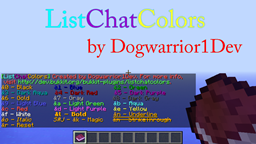
你是否厌倦了在浏览器中的颜色代码页面和 Minecraft 之间不断来回切换?如果是的话,那么这个插件非常适合你!ListChatColors 让你只需输入 /listchatcolors 或 /lcc,它就会直接发送一条包含所有颜色代码的消息给你!另外,如果你更喜欢使用书本,现在当你输入 /listchatcolorsbook 或 /lccb 时,你可以获得一本包含所有聊天颜色的书随身携带!或者,如果你喜欢告示牌,你现在可以通过将第一行设置为 [lcc] 来创建一个 ListChatColors 告示牌!要使用你创建的告示牌,只需右键点击它即可!ListChatColors 是一个简单、轻量级的插件,非常实用!
需要帮助使用 ListChatColors 吗?希望更深入地了解 ListChatColors?点击这里!
命令

目前,可用的命令有:
- /listchatcolors
- /lcc
- /listchatcolorsbook
- /lccb
安装

只需将其拖放到你的 \plugins 目录中,然后重新加载或重启服务器即可使用!
权限

到目前为止,共有 6 个权限:
- listchatcolors.*
- listchatcolors.listcolors
- listchatcolors.getbook
- listchatcolors.searchcolors
- listchatcolors.createsign
- listchatcolors.usesign
配置

目前,该插件没有配置文件,因为我觉得目前没有必要进行配置。
更新日志

注意:此部分仅显示最近的 5 次更新!更多详细信息请查看详细的更新日志!
- V1.3.2 - 重写了 ListChatColors!增加了更多可搜索的颜色,现在你可以搜索:&0,&1, &2, &3, &4, &5, &6, &7, &8, &9, &a, &b, &c, &d, &e, black, blue, green, dark_aqua, dark_red, dark_purple, gold, gray, dark_gray, light_blue, light_green, aqua, red, light_purple, 和 yellow.
- V1.3.3 - 完成了添加其余可搜索颜色的功能!现在你可以通过使用 /listchatcolors <颜色代码 / 颜色名称> 或 /lcc <颜色代码 / 颜色名称> 搜索 Minecraft 中的所有颜色。
- V1.4 - 添加了新的 ListChatColors 告示牌!你只需要放置一个告示牌,然后在第一行输入 [lcc],之后右键点击告示牌即可查看所有颜色!本次更新新增的权限为 listchatcolors.createsign 和 listchatcolors.usesign。
- V1.5 - 添加了 PluginMetrics
- V1.6 - 在使用主要的 ListChatColors 命令时添加了酷炫的新音效!即将推出配置文件,允许更改这些声音或关闭它们!
若要查看包含所有更新的更详细更新日志,点击此处!
未来计划

- 如果有足够多的人请求,我将致力于添加让插件实际支持人们在前缀带有 "&" 符号的文本时使用彩色聊天的功能。所以,如果你想让我添加这个功能,随时可以告诉我!
能够输入 /listchatcolorsbook 或 /lccb 并获得一本包含所有颜色代码并可以随身携带的书的功能!已在 v1.1 中添加!- 自动更新搜索功能!
告示牌支持!已在 v1.4 中添加!更整洁的布局!已在 v1.2 中添加!- 支持英国和美国用户!
可搜索的颜色/颜色代码!已在 v1.3 中添加!使用命令时的音效已在 v1.6 中添加!- 此外,如果你希望在这个插件中添加其他任何功能,只需留言或私信我即可! :D
图片/视频


想看 EpicTimoZz 制作的视频?点击这里!他视频中唯一没有提到的是,你可以使用 /lcc <颜色代码 / 颜色名称> 来搜索颜色。例如:/lcc &c 或 /lcc red
目标

500 次下载1000 次下载2000 次下载3000 次下载4000 次下载- 在达到 5000 次下载时将推出特别更新!
补充说明

- 由于黑色不够显眼,我不得不将消息中显示“&0 - Black(黑色)”的部分改为金色。希望这不会给你造成太多困扰!
- 在《ListChatColors》书中,由于黄色和白色在书籍的白色背景上过于刺眼,我将“&e - Yellow(黄色)”和“&f - White(白色)”改为了黑色。同样,希望这不会给你造成太多困扰!
- 我希望听到你的反馈!如果可能的话,请回答我创建的一些投票,以便我知道未来如何改进这个插件!提前感谢!
- 重要提示:此插件包含 PluginMetrics 功能。如需退出,请进入 \plugins 文件夹中的 PluginMetrics 文件夹,打开配置文件,并将 opt-out 设置为 true。但在禁用它之前请注意,它不会收集任何对你有害的信息。;)
BukkitColors
喜欢我的作品吗?捐赠链接即将推出!
WOW guys, thanks for 4000+ downloads!
Ever get tired of constantly switching back and forth between a color codes page in your browser and Minecraft? If so, then this plugin is perfect for you! ListChatColors makes it so that whenever you say /listchatcolors or /lcc, it will send you a message with all the color codes right there in front of you! Also, if you would rather have a book, now you can get a book with all the chat colors in it to carry around with you when you say /listchatcolorsbook or /lccb! Or, if you like signs better, you can now create a ListChatColors sign by setting the first line as [lcc]! To use your created sign, just right click on it! ListChatColors is a simple, lightweight plugin that is very useful to have!
Need help using ListChatColors? Want ListChatColors to be explained more in-depth? Click Here!
Commands
Currently, the commands are:
- /listchatcolors
- /lcc
- /listchatcolorsbook
- /lccb
Installation
Simply drag and drop into your \plugins directory and reload or restart your server and you're good to go!
Permissions
So far, there are 6 permissions:
- listchatcolors.*
- listchatcolors.listcolors
- listchatcolors.getbook
- listchatcolors.searchcolors
- listchatcolors.createsign
- listchatcolors.usesign
Configuration
Currently, this plugin has no configuration because I feel there is no need for one at this time.
Changelog
NOTE: This section only shows the 5 most recent updates! For more, go to the in-depth changelog!
- V1.3.2 - Recoded ListChatColors! Added more searchable colors as well, now what you can search is: &0,&1, &2, &3, &4, &5, &6, &7, &8, &9, &a, &b, &c, &d, &e, black, blue, green, dark_aqua, dark_red, dark_purple, gold, gray, dark_gray, light_blue, light_green, aqua, red, light_purple, and yellow.
- V1.3.3 - Finished adding the rest of the colors that can be searched! You can now search all colors in minecraft by using /listchatcolors <color code / color name> or /lcc <color code / color name>
- V1.4 - Added a new ListChatColors Sign! All you have to do is put down a sign, then on the first line put [lcc], and then you can right click on the sign to see all the colors! New permissions with this update are listchatcolors.createsign and listchatcolors.usesign.
- V1.5 - Added PluginMetrics
- V1.6 - Added a cool new noise whenever you use the main ListChatColors commands! A config is coming soon with the option to change these sounds or turn them off!
To view a more detailed changelog with all updates, click here!
Future Plans
- If enough people request it, then I will work on adding the functionability for the plugin to actually have people talk in colored chat with the "&" symbol in front of text. So, if you want me to add it, then feel free to ask away!
Ability to be able to say /listchatcolorsbook or /lccb and get a book with all the color codes that you can carry around with you!Added in v1.1!- Automatic update searching!
Sign support!Added in v1.4!Neater Layout!Added in v1.2!- Support for British and American speakers!
Searchable colors/color codes!Added in v1.3!Sounds whenever you use commandsAdded in v1.6!- Also, if you want to see anything else added to this plugin, just write a comment or PM me! :D
Pictures/Videos
To see a video done by EpicTimoZz, Click Here! The only thing that he does not mention in his video is that you can search colors by using /lcc <color code / color name> Example: /lcc &c or /lcc red
Goals
500 downloads1000 downloads2000 downloads3000 downloads4000 downloads- SPECIAL UPDATE COMING AT 5000 DOWNLOADS!
Additional Notes
- I had to make the part of the message that says &0 - Black in gold color because black was not noticable enough. Hope it doesn't mess you up too much!
- In the ListChatColors Book, I had to make &e - Yellow and &f - White in Black color because they were too bright to see against the white backround of books. Once again, hope it doesn't mess you up too much!
- I want to know your feedback! If possible, please respond to some polls that I have created so that I know what to do with the plugin in the future! Thanks in advance!
- IMPORTANT: This plugin includes the PluginMetrics Feature. To opt out, go in the PluginMetrics folder in your \plugins folder, open up the config, and set opt-out to true. However, before you disable it know that it does not collect any information that is harmful to you. ;)
BukkitColors
Like my work? Donation link coming soon!
下载 ListChatColors
下载 ListChatColors
下载 ListChatColors
下载 ListChatColors
下载 ListChatColors
下载 ListChatColors
下载 ListChatColors
下载 ListChatColors
下载 ListChatColors
下载 ListChatColors
- 在使用主要的 ListChatColors 命令时,新增了一个酷炫的提示音!即将推出配置选项,允许你自定义这些音效或将其关闭!
关于这个资源的讨论、问题反馈与使用心得
还没有讨论,来发第一帖吧
你是这个资源的作者?登录后可认领此资源。
相似资源
 插件

PacketEvents 是一款专为 Minecraft Java 版打造的协议库,旨在简化数据包的处理与传输。
 插件
ExyliaPlugins 的库。
 插件
通过对话框或铁砧界面帮助你的 Anthme
 插件
自定义你的Minecraft头像!
 插件
重新定义服务器上的生物运输方式。使用高度可定制的口袋道具,安全地捕获、存储和释放任何实体。
 插件
为基于 Spigot/Paper/Folia 的服务器添加对 Vivecraft 的支持
评论 0
登录后参与评分
还没有评论,来抢沙发吧