欢迎来到我重新制作的插件 logCaptcha!
新版本带来了全新的 验证码类型、多项 改进 以及完全重构且更简洁的线程设计!
关于
那么,logCaptcha 是什么?
logCaptcha 是一种 保护你的服务器免受机器人攻击 的简便方法。该插件的主要功能是 验证码。但你可以在下方查看完整的功能列表。
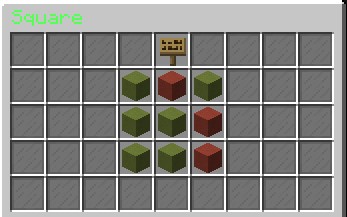
这是一个 库存验证码类型 的示例:
配置
如果你想在下载之前阅读插件的配置和语言文件,只需展开下方的折叠框即可!
Config.yml:
剧透
########################################################################################################
# ___                         ____                          __               __                        #
#/\_ \                       /\  _`\                       /\ \__           /\ \                       #
#\//\ \      ___      __     \ \ \/\_\     __      _____   \ \ ,_\    ___   \ \ \___       __          #
#  \ \ \    / __`\  /'_ `\    \ \ \/_/_  /'__`\   /\ '__`\  \ \ \/   /'___\  \ \  _ `\   /'__`\        #
#   \_\ \_ /\ \L\ \/\ \L\ \    \ \ \L\ \/\ \L\.\_ \ \ \L\ \  \ \ \_ /\ \__/   \ \ \ \ \ /\ \L\.\_      #
#   /\____\\ \____/\ \____ \    \ \____/\ \__/.\_\ \ \ ,__/   \ \__\\ \____\   \ \_\ \_\\ \__/.\_\     #
#   \/____/ \/___/  \/___L\ \    \/___/  \/__/\/_/  \ \ \/     \/__/ \/____/    \/_/\/_/ \/__/\/_/     #
#                     /\____/                        \ \_\                                             #
#                     \_/__/                          \/_/                                             #
########################################################################################################
#感谢你下载 logCaptcha!
#在开始配置此插件之前,请阅读以下文本。
#如果你不理解某些选项的作用,请不要更改它们或阅读其上方的说明。
#如果阅读后仍不明白,且你确实想更改它,你可以在 Spigot 上联系我。
#这很重要,因为如果你改错了内容,可能会导致整个插件崩溃。
#
#重要提示:如果你发现任何错误,请联系我。我会尽力帮助你并尽快修复错误!
#
#好的,就是这样。祝你配置愉快! ^^
logCaptcha:

  #所有消息的前缀
  Prefix: '&clogCaptcha&7 |  '

  #可用语言:en-EN, de-DE
  #默认值:en-EN
  Language: en-EN

  #部分命令的权限
  Permissions:
    CaptchaCMD: logCaptcha.CaptchaCMD
    LogAdminCMD: logCaptcha.Admin
    LogBanCMD: logCaptcha.Admin

  #如果为 true,插件将使用自定义验证码列表。你可以在 customCaptcha.yml 文件中创建自定义
  #问题和正确答案。
  #如果在文件中需要使用颜色代码,请使用 '(paragraph)' 代替 '&'。
  #(此选项目前仅适用于库存验证码。)
  #注意:对于每个正确答案,都必须有对应顺序的问题
  #这意味着如果你的问题列表中的第一项是例如:“点击名为 Zero 的方块”
  #那么正确答案列表中的第一项必须是 Zero。
  #IF YOU USE CHAT CAPTCHA:
  #你可以在 customCaptcha.yml 文件中创建自定义词汇。
  #但请注意:这些自定义词汇不能包含空行。
  #例如:CORRECT: Sample1 INCORRECT: Sample 1
  UseCustomCaptchas: false

  #一些其他选项
  Options:
    #WaitingTime 是玩家解决验证码所需的时间(以秒为单位)
    #如果你使用上升式验证码类型,我建议将其设置为 35;如果你使用
    #聊天验证码或库存验证码类型,则建议设置为 20。当然,具体设置由你决定。
    WaitingTime: 35

    #CheckCooldown 是“插件等待”玩家加入后的冷却时间。
    #在此时间之后,插件开始检查。默认为 1。(单位为秒)
    CheckCooldown: 1

    #如果为 true,你将使用聊天验证码方法而不是库存方法
    #在此方法中不支持 bWaves,且玩家不会被踢出!
    UseChatCaptcha: false

    #如果为 true,你将使用上升式验证码方法而不是其他方法
    UseRaisingCaptcha: false

    #如果为 true,你将使用库存验证码方法而不是上升式或聊天方法
    #这是一种简单的方法,我建议用它来替代聊天方法
    UseInventoryCaptcha: false

    #这种方法类似于聊天验证码。但你点击聊天消息,而不是
    #在聊天中输入。我建议使用它来替代聊天验证码,但这取决于你。
    UseClickChatCaptcha: false

    #这种验证码非常简单。如果你想获得非常快速的验证码类型,我建议使用它。
    #我建议将 WaitingTime 设置为约 10 或 15,因为这种类型真的很容易。
    #这是默认方法
    UseSquareCaptcha: true

    #如果为 true,插件将防止玩家与物品交互
    #(例如大厅指南针),这样他们就无法使用它们。建议使用此功能。
    AntiRightlick: true

    #如果为 true,插件将收集一些统计数据,例如多少玩家失败。
    #建议使用此功能,但如果你不想使用它,也不会限制插件的任何功能。
    #(除了 logcaptcha stats 命令外)
    UseStatistics: true

    #如果为 true,保存所有已完成验证码的玩家列表将每 1200 秒被清除一次。
    #(注意:如果你想使用此功能,必须启用 SaveAlreadyDone 选项!)
    ResetAlreadyDoneList: false

    #如果为 true,每个通过验证码的玩家都不会再次解决验证码
    #直到他被从 Captcha.yml 列表中移除为止
    SaveAlreadyDone: false

#如果为真,插件将在玩家失败 5 次后自动将其封禁
    UseBWaves: false

    #如果为真,则插件自身的统计信息以百分比显示
    ShowStatisticsInPercent: true

    #ChatCaptcha(聊天验证码)选项
    ChatCaptcha:
      #如果为真,则使用随机字符而非单词
      UseRandomizedChars: false

  #用于标识插件确切版本的构建编号
  #(当出现无版本号变更的发布版本时)
  Build: 172
  #请勿更改此项!
  Version: 1.2.3
Language.yml:
隐藏内容
zh-CN:
  Messages:
    FailedCaptcha: '&c你未能通过 &e验证码&c!'
    SuccessCaptcha: '&a你已成功通过 &e验证码&a!'
    CaptchaUsage: '&c用法:&4/captcha [玩家名称] - 手动检查某位玩家'
    JoinMessage: '&c请通过 &e验证码&c!'
    MoveMessage: '&c在通过 &e验证码&c之前,你无法移动!'
    FailedCaptchaInTime: '&c你在规定时间内未能解开 &e验证码&c!'
BannedByBWaves: '&c你因未能通过 &ecaptchas &c超过 &45 &c次而被封禁!'
PlayerNotAvailable: '&c该玩家不在线!'
OpenManagementGUI: '&7正在打开 &e管理界面&7...'
LogBanUsage: '&c用法:/logban <玩家>'
PlayerBanned: '&c你已将玩家添加到 &ebWaves 的封禁名单中!'
ResetList: '&7你已重置 &e已完成列表&7!'
ResetConfig: '&7你已重置 &e配置文件&7!'
ClickChatCaptchaMessage: '&c&l点击 &e&l此 &c&l文本以 &e&l证明 &c&l你不是 &4&l机器人&c&l!'
ClickChatCaptchaHoverMessage: '&c点击 ðis &ctext 以 &eprove &cthat you''re not a &4bot&c!'
de-DE:
Messages:
FailedCaptcha: '&c你未通过 &e验证码 &c测试!'
SuccessCaptcha: '&a你已通过 &e验证码 &a测试!'
CaptchaUsage: '&c用法:&4/captcha [玩家名称] - 手动检查一名玩家'
JoinMessage: '&c请先通过 &c验证码&c!'
MoveMessage: '&c在你通过 &e验证码 &c之前,无法移动!'
FailedCaptchaInTime: '&c你为 &e验证码 &c花费了过多时间!'
BannedByBWaves: '&c你已被封禁,因为你超过 &45 &c次未能通过 &e验证码!'
PlayerNotAvailable: §c该玩家不在线!
OpenManagementGUI: '&7打开 &e管理界面&7...'
LogBanUsage: '&c用法: /logban <玩家>'
PlayerBanned: '&c你已将玩家添加到 &ebWaves &c封禁名单中!'
ResetList: '&7你已重置 &e已完成列表&7!'
ResetConfig: '&7你已重置 &e配置文件&7!'
ClickChatCaptchaMessage: '&c&l点击 &e&l此处 &c&lu 以证明你并非
&4&l机器人 &c&l!'
ClickChatCaptchaHoverMessage: '&c点击 &e此处 &u 以证明你并非
&4机器人 &c!'
命令:
使用命令是配置插件的好方法,无需打开任何文件。
如果你想了解 logCaptcha 包含哪些命令,请向下滚动。
- 4 种不同类型的验证码
- 支持 2 种语言
- 插件自带统计功能
- 多种配置选项
- 可自定义语言(约 90%)
- 检查服务器版本以确保插件兼容性
- 支持自动封禁
- 游戏内用户管理
- 记录所有重要操作
Welcome to my renewed plugin logCaptcha!
The new version have new captcha types, many improvements and a complete new and cleaner thread design!
About
So what is logCaptcha?
logCaptcha is a easy way to protect your server against bots. The main feature of this plugin are the captchas. But you can see a full list of all features down below.
Here is an example for one inventory captcha type:
Config
If you want to read the config and language file from the plugin before you download it, just open the spoilers below!
Config.yml:
Spoiler
########################################################################################################
# ___                         ____                          __               __                        #
#/\_ \                       /\  _`\                       /\ \__           /\ \                       #
#\//\ \      ___      __     \ \ \/\_\     __      _____   \ \ ,_\    ___   \ \ \___       __          #
#  \ \ \    / __`\  /'_ `\    \ \ \/_/_  /'__`\   /\ '__`\  \ \ \/   /'___\  \ \  _ `\   /'__`\        #
#   \_\ \_ /\ \L\ \/\ \L\ \    \ \ \L\ \/\ \L\.\_ \ \ \L\ \  \ \ \_ /\ \__/   \ \ \ \ \ /\ \L\.\_      #
#   /\____\\ \____/\ \____ \    \ \____/\ \__/.\_\ \ \ ,__/   \ \__\\ \____\   \ \_\ \_\\ \__/.\_\     #
#   \/____/ \/___/  \/___L\ \    \/___/  \/__/\/_/  \ \ \/     \/__/ \/____/    \/_/\/_/ \/__/\/_/     #
#                     /\____/                        \ \_\                                             #
#                     \_/__/                          \/_/                                             #
########################################################################################################
#Thank you for downloading logCaptcha!
#Before you start to configurate this plugin, please read this text.
#If you don't understand what some option can do don't change it or read the texts above it.
#If you don't get it after that, and you definetly want to change it you can contact me on Spigot.
#This is important because if you change something wrong you can crash the complete plugin.
#
#Important: If you found any bugs please contact me. I'll help you and fix the bug as fast as I can!
#
#Okay, that should be it. Have fun to configurate this plugin! ^^
logCaptcha:

  #Prefixes for all!
  Prefix: '&clogCaptcha&7 |  '

  #Available languages: en-EN, de-DE
  #Default: en-EN
  Language: en-EN

  #Permissions for some commands
  Permissions:
    CaptchaCMD: logCaptcha.CaptchaCMD
    LogAdminCMD: logCaptcha.Admin
    LogBanCMD: logCaptcha.Admin

  #If that's is true, the plugin uses the custom captcha list. You can create custom
  #Questions and correct answers in the customCaptcha.yml file.
  #If you want to use color codes use '(paragraph)' instead of '&' in the file.
  #(This option is only for inventory captchas (for now).)
  #Attention: You need for every correct answer a question in the CORRECT ORDER
  #That means if your first entry at the question list is for example: Click on the Block named Zero
  #Then the first entry of the correct answer list MUST be Zero.
  #IF YOU USE CHAT CAPTCHA:
  #You can create custom words in the customCaptcha.yml file.
  #But ATTENTION: These custom words can not contain blank lines.
  #For example: CORRECT: Sample1 INCORRECT: Sample 1
  UseCustomCaptchas: false

  #Just some options
  Options:
    #The WaitingTime is the time (in seconds) the player has to solve the captcha
    #I recommend to set it to 35 if you use the raising captcha type and if you use
    #the chat captcha or the inventory captcha type set it to 20. But it's on you how
    #time you set.
    WaitingTime: 35

    #The CheckCooldown is the cooldown that the "plugin wait" when a player joins.
    #After this time the plugin starts the check. Default is 1. (In seconds)
    CheckCooldown: 1

    #If that is true, you use the chat captcha method instead of the inventory method
    #In this method there is no support for bWaves and the player don't get kicked!
    UseChatCaptcha: false

    #If that's is true, you use the raising captcha method instead of the other methods
    UseRaisingCaptcha: false

    #If that is true, you use the inventory captcha method instead of the raising or chat method
    #This method is a simple method and I recommend it to use it instead of the chat method
    UseInventoryCaptcha: false

    #This method is like the chat captcha. But you click on the chat message, instead of
    #type them in the chat. I would recommend it to use it instead of the chat captcha but it's on you.
    UseClickChatCaptcha: false

    #This captcha is a very easy type. I would recommend it if you want a very fast captcha type.
    #And I recommend to set the WaitingTime to about 10 or 15 because this type is really easy.
    #This is the default method
    UseSquareCaptcha: true

    #If that's is true the plugin will prevent players from interacting with items
    #(for example a lobby compass) so that they can't use them. I recommend to use it.
    AntiRightlick: true

    #If that is true, the plugin will collect some statistics like how many players failed.
    #I recommend to use this, but if you don't want to use it it will not restrict any functions of the plugin.
    #(Except the logcaptcha stats command)
    UseStatistics: true

    #If that is true, the list which save all players who done the captcha already will get
    #cleared every 1200 seconds.
    #(Note: If you want to use this, you must enable the option SaveAlreadyDone!)
    ResetAlreadyDoneList: false

    #If that is true, every player which passed the captcha don't solve a captcha again
    #until he/she got removed from the list in Captcha.yml
    SaveAlreadyDone: false

    #If that is true, the plugin will ban a player automatically after 5 fails
    UseBWaves: false

    #If that true, then the plugin's own statistics are given in percent
    ShowStatisticsInPercent: true

    #ChatCaptcha options
    ChatCaptcha:
      #If this is true use randomized chars instead of words
      UseRandomizedChars: false

  #This is the build number to identify the exact version of the plugin
  #(If a release with no version number changes comes)
  Build: 172
  #Do not change this!
  Version: 1.2.3
Language.yml:
Spoiler
en-EN:
Messages:
FailedCaptcha: '&cYou failed the &ecaptcha&c!'
SuccessCaptcha: '&aYou successed the &ecaptcha&a!'
CaptchaUsage: '&cUsage: &4/captcha [Playername] - Checks a player manually'
JoinMessage: '&cPass the &ecaptcha&c!'
MoveMessage: '&cYou cant move until you passed the &ecaptcha&c!'
FailedCaptchaInTime: '&cYou needed to much time to solve the &ecaptcha&c!'
BannedByBWaves: '&cYou are banned for failing the &ecaptchas &cmore than &45 &ctimes!'
PlayerNotAvailable: '&cThis player is not online!'
OpenManagementGUI: '&7Opening &eManagement-GUI&7...'
LogBanUsage: '&cUsage: /logban <Player>'
PlayerBanned: '&cYou added the player to the &ebWaves §cbans!'
ResetList: '&7You reset the &eAlreadyDoneList&7!'
ResetConfig: '&7You reset the &econfig file&7!'
ClickChatCaptchaMessage: '&c&lClick on &e<his &c<ext to &e&lprove &c<hat
you''re &c&lnot a &4&lbot&c&l!'
ClickChatCaptchaHoverMessage: '&cClick on ðis &ctext to &eprove &cthat you''re
not a &4bot&c!'
de-DE:
Messages:
FailedCaptcha: '&cDu hast das &eCaptcha &cnicht bestanden!'
SuccessCaptcha: '&aDu hast das &eCaptcha &abestanden!'
CaptchaUsage: '&cBenutze: &4/captcha [Playername] - Checkt einen Spieler manuell'
JoinMessage: '&cBestehe zuerst das &cCaptcha&c!'
MoveMessage: '&cDu kannst dich nicht bewegen bis du das &eCaptcha &cbestanden
hast!'
FailedCaptchaInTime: '&cDu hast zu viel Zeit für das &eCaptcha &cgebraucht!'
BannedByBWaves: '&cDu wurdest gebannt, weil du mehr als &45 &cMal ein &eCaptcha
&cnicht bestanden hast!'
PlayerNotAvailable: §cDieser Spieler ist nicht online!
OpenManagementGUI: '&7Öffne &eManagement-GUI&7...'
LogBanUsage: '&cBenutze: /logban <Spieler>'
PlayerBanned: '&cDu hast den Spieler zu den &ebWaves &cbans hinzugefügt!'
ResetList: '&7Du hast die &eAlreadyDone-Liste &7zurückgesetzt!'
ResetConfig: '&7Du hast die &eConfig Datei &7zurückgesetzt!'
ClickChatCaptchaMessage: '&c&lKlicke &e&lhier &c&lum zu beweisen, dass du kein
&4&lBot &c&lbist!'
ClickChatCaptchaHoverMessage: '&cKlicke &ehier &cum zu beweisen, dass du kein
&4Bot &cbist!'
Commands:
Commands are a good way to configurate a plugin without open any file.
And if you want to know what commands logCaptcha contains just scroll down.
- 4 different types of captchas
- 2 languages supported
- Plugin own statistics
- Many configuration options
- Customisable language (About 90%)
- Checks the server version for the plugin compability
- Auto-Ban support
- Ingame user management
- Logs all important actions

 插件

 插件

 插件
 插件
 插件
 插件
评论 0
登录后参与评分
还没有评论,来抢沙发吧