LPC – LuckPerms Chat Formatter ✨
一款支持 MiniMessage 的灵活聊天格式化插件
由 MiniMessage 驱动的现代聊天格式化方案,完整支持 LuckPerms 元数据、组/轨道格式以及 PlaceholderAPI。
? 兼容性
|
|
| Minecraft |
26.1.2 |
| 服务端 |
Paper(推荐)或 Spigot |
| Java |
25+ |
? 依赖项
✅ 功能特性
格式化
- 完整支持 MiniMessage,具备按组和轨道特定的格式
- 可选的 PlaceholderAPI 集成及
[item] 占位符(Paper 上悬停显示提示)
- 按等级区分消息样式和按等级渐变名称 (
{gradient-name})
- 通过
disabled-worlds 实现按世界切换开关
社交 (默认开启)
- @提及通知 – 高亮在线玩家名称 + 声音/动作栏提示 (Paper)
- Emoji 快捷方式 – 例如
:heart: → ❤ (完全可配置)
- 可点击链接 – 在 Paper 上 URL 变为
openUrl 链接,在 Spigot 上着色
管理 (默认关闭)
- 防刷屏冷却、重复消息拦截、大写过滤、脏话屏蔽、反广告
- 按玩家静音 (
/lpc mute) + 用于惩罚插件的 LuckPerms 静音节点
服务器消息 (默认关闭)
- MiniMessage 加入 / 离开 / 首次加入 / 死亡消息
便利性
/lpc reload · version · help · mute · unmute 并支持 Tab 补全
- 内置 Modrinth 更新检查器
- 设计安全 – 玩家消息永远无法注入
click/hover/命令组件
- 同时适用于 Paper (Adventure 渲染) 和 Spigot (旧版回退)
⌨️ 命令
| 命令 |
权限 |
描述 |
/lpc reload |
lpc.reload |
重新加载配置文件 |
/lpc version |
– |
显示已安装版本 |
/lpc help |
– |
列出可用命令 |
/lpc mute <player> [duration] |
lpc.mute |
静音某玩家(例如 10m, 2h; 省略则为永久) |
/lpc unmute <player> |
lpc.mute |
解除某玩家的静音 |
?? 权限
| 权限 |
默认值 |
描述 |
lpc.reload |
op |
重新加载配置文件 |
lpc.chatcolor |
false |
在聊天中使用颜色代码和装饰性 MiniMessage 标签 |
lpc.itemplaceholder |
false |
在聊天中使用 [item] 占位符 |
lpc.update |
op |
加入时接收更新通知 |
lpc.emoji |
true |
使用 Emoji 快捷方式(仅在 emoji.require-permission 启用时强制执行) |
lpc.chatlinks |
true |
将 URL 转换为可点击链接 |
lpc.mention.exempt |
false |
选择不接收提及通知 |
lpc.mute |
op |
使用 /lpc mute 和 /lpc unmute |
lpc.muted |
false |
标记玩家为静音状态(通常由惩罚插件设置) |
lpc.bypass.spam / .repeat / .caps / .profanity / .advert |
op |
绕过相应的管理过滤器 |
ℹ️ 即使拥有 lpc.chatcolor 权限,玩家消息中也仅认可装饰性标签(颜色、装饰以及可选的渐变/彩虹效果)。交互式标签 (click, hover, insertion, …) 始终会被剥离。
⚙️ 配置 (config.yml)
# 主聊天格式 (MiniMessage!)
chat-format: "{prefix}{name}<dark_gray> »<reset> {message}"
# 按组格式 (可选)
group-formats:
# default: "<gray>[User]</gray> {name}<dark_gray> »<reset> {message}"
# admin: "<red>[Admin]</red> {name}<dark_gray> »<reset> {message}"
# 按轨道格式 (可选) – 组的优先级高于轨道
track-formats:
# staff_track: "<gold>[Staff]</gold> {name}<dark_gray> »<reset> {message}"
# 启用 [item] 占位符
use-item-placeholder: true
# 允许拥有 lpc.chatcolor 权限的玩家使用 <gradient> / <rainbow>
allow-gradient-tags: true
# LPC 不处理聊天的世界列表
disabled-worlds: []
# 启动时检查 Modrinth 更新
update-checker: true
# 重载消息
reload-message: "<green>Reloaded LPC configuration!"
? 可用占位符
| 占位符 |
描述 |
{message} |
聊天消息(安全插入,不会重新解析) |
{name} |
玩家名称 |
{displayname} |
显示名称 / 昵称 |
{world} |
玩家当前所在的世界 |
{prefix} / {suffix} |
最高优先级的 前缀 / 后缀 |
{prefixes} / {suffixes} |
所有前缀 / 后缀,按优先级从高到低排列 |
{username-color} / {message-color} |
来自 LuckPerms 元数据的颜色值 |
ℹ️ 所有颜色值(前缀、后缀等)必须采用 MiniMessage 格式 – 不支持旧版代码 (&a, §b)。
? 安装
- 停止你的服务器
- 将
LPC-<version>.jar 放入 /plugins 文件夹
- 启动服务器以生成
config.yml
- 根据需要编辑配置文件
- 运行
/lpc reload 应用更改 ✅
?️ 构建
./gradlew shadowJar
# 输出:build/libs/LPC-<version>.jar
需要 JDK 25。
? 注意事项
? 预览
聊天格式示例

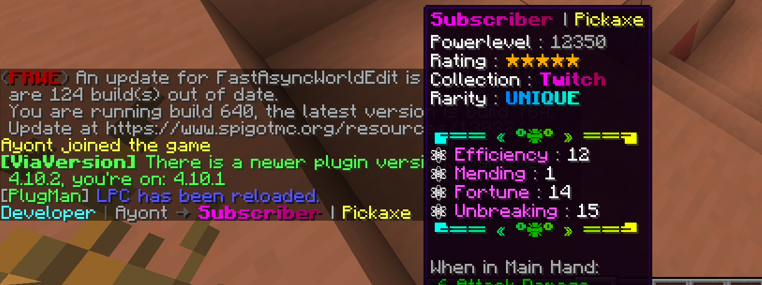
[ITEM] 占位符示例

? 安装
- 停止你的服务器
- 将
LPC.jar 放入 /plugins 文件夹中
- 启动服务器以生成配置文件
- 根据需要编辑
config.yml
- 使用
/lpc reload 应用更改 ✅

LPC – LuckPerms Chat Formatter ✨
A flexible chat formatting plugin with MiniMessage support for LuckPerms
Modern chat formatting powered by MiniMessage, full LuckPerms metadata support, group/track formats, and PlaceholderAPI.
? Compatibility
|
|
| Minecraft |
26.1.2 |
| Server |
Paper (recommended) or Spigot |
| Java |
25+ |
? Requirements
✅ Features
Formatting
- Full MiniMessage support, with group- and track-specific formats
- Optional PlaceholderAPI integration and
[item] placeholder (hover tooltip on Paper)
- Per-rank message styling and per-rank gradient names (
{gradient-name})
- Per-world toggle via
disabled-worlds
Social (on by default)
- @Mention pings – highlight online names + sound/action-bar ping (Paper)
- Emoji shortcuts – e.g.
:heart: → ❤ (fully configurable)
- Clickable links – URLs become
openUrl links on Paper, coloured on Spigot
Moderation (off by default)
- Anti-spam cooldown, repeated-message blocker, caps filter, profanity mask, anti-advertising
- Per-player mute (
/lpc mute) + LuckPerms mute node for punishment plugins
Server messages (off by default)
- MiniMessage join / quit / first-join / death messages
Quality of life
/lpc reload · version · help · mute · unmute with tab completion
- Built-in Modrinth update checker
- Safe by design – player messages can never inject
click/hover/command components
- Works on both Paper (Adventure rendering) and Spigot (legacy fallback)
⌨️ Commands
| Command |
Permission |
Description |
/lpc reload |
lpc.reload |
Reload the configuration |
/lpc version |
– |
Show the installed version |
/lpc help |
– |
List available commands |
/lpc mute <player> [duration] |
lpc.mute |
Mute a player (e.g. 10m, 2h; omit for permanent) |
/lpc unmute <player> |
lpc.mute |
Unmute a player |
?? Permissions
| Permission |
Default |
Description |
lpc.reload |
op |
Reload the configuration |
lpc.chatcolor |
false |
Use colour codes & cosmetic MiniMessage tags in chat |
lpc.itemplaceholder |
false |
Use the [item] placeholder in chat |
lpc.update |
op |
Receive an update notification on join |
lpc.emoji |
true |
Use emoji shortcuts (only enforced if emoji.require-permission) |
lpc.chatlinks |
true |
Have URLs turned into clickable links |
lpc.mention.exempt |
false |
Opt out of receiving mention pings |
lpc.mute |
op |
Use /lpc mute and /lpc unmute |
lpc.muted |
false |
Marks a player as muted (usually set by a punishment plugin) |
lpc.bypass.spam / .repeat / .caps / .profanity / .advert |
op |
Bypass the matching moderation filter |
ℹ️ Even with lpc.chatcolor, only cosmetic tags (colours, decorations, and optionally gradients/rainbow) are honoured in player messages. Interactive tags (click, hover, insertion, …) are always stripped.
⚙️ Configuration (config.yml)
# Main chat format (MiniMessage!)
chat-format: "{prefix}{name}<dark_gray> »<reset> {message}"
# Per-group formats (optional)
group-formats:
# default: "<gray>[User]</gray> {name}<dark_gray> »<reset> {message}"
# admin: "<red>[Admin]</red> {name}<dark_gray> »<reset> {message}"
# Per-track formats (optional) – groups take priority over tracks
track-formats:
# staff_track: "<gold>[Staff]</gold> {name}<dark_gray> »<reset> {message}"
# Enable the [item] placeholder
use-item-placeholder: true
# Allow <gradient> / <rainbow> for players with lpc.chatcolor
allow-gradient-tags: true
# Worlds where LPC does NOT format chat
disabled-worlds: []
# Check Modrinth for updates on startup
update-checker: true
# Reload message
reload-message: "<green>Reloaded LPC configuration!"
? Available Placeholders
| Placeholder |
Description |
{message} |
The chat message (inserted safely, never re-parsed) |
{name} |
Player's name |
{displayname} |
Display name / nickname |
{world} |
Player's current world |
{prefix} / {suffix} |
Highest priority prefix / suffix |
{prefixes} / {suffixes} |
All prefixes / suffixes, highest priority first |
{username-color} / {message-color} |
Colour values from LuckPerms meta |
ℹ️ All colour values (prefix, suffix, etc.) must be in MiniMessage format – no legacy codes (&a, §b).
? Installation
- Stop your server
- Drop
LPC-<version>.jar into your /plugins folder
- Start the server to generate
config.yml
- Edit the config to your liking
- Run
/lpc reload to apply changes ✅
?️ Building
./gradlew shadowJar
# output: build/libs/LPC-<version>.jar
Requires JDK 25.
? Notes
- Not affiliated with LuckPerms – please do not contact the LuckPerms author for support.
- Legacy version available at: GitHub Legacy LPC
? Previews
Chat Format Example

[ITEM] Placeholder Example

? Installation
- Stop your server
- Place the
LPC.jar into your /plugins folder
- Start the server to generate configuration files
- Edit the
config.yml to your liking
- Use
/lpc reload to apply your changes ✅
评论 0
登录后参与评分
还没有评论,来抢沙发吧