


LPC – LuckPerms Chat Formatter ✨
一款支持 MiniMessage 的灵活聊天格式化插件
由 MiniMessage 驱动的现代聊天格式化方案,完整支持 LuckPerms 元数据、组/轨道格式以及 PlaceholderAPI。
? 兼容性
| Minecraft | 26.1.2 |
| 服务端 | Paper(推荐)或 Spigot |
| Java | 25+ |
? 依赖项
- LuckPerms (必需) – 权限插件
- PlaceholderAPI (可选) – 额外的占位符
✅ 功能特性
格式化
- 完整支持 MiniMessage,具备按组和轨道特定的格式
- 可选的 PlaceholderAPI 集成及
[item]占位符(Paper 上悬停显示提示) - 按等级区分消息样式和按等级渐变名称 (
{gradient-name}) - 通过
disabled-worlds实现按世界切换开关
社交 (默认开启)
- @提及通知 – 高亮在线玩家名称 + 声音/动作栏提示 (Paper)
- Emoji 快捷方式 – 例如
:heart:→ ❤ (完全可配置) - 可点击链接 – 在 Paper 上 URL 变为
openUrl链接,在 Spigot 上着色
管理 (默认关闭)
- 防刷屏冷却、重复消息拦截、大写过滤、脏话屏蔽、反广告
- 按玩家静音 (
/lpc mute) + 用于惩罚插件的 LuckPerms 静音节点
服务器消息 (默认关闭)
- MiniMessage 加入 / 离开 / 首次加入 / 死亡消息
便利性
/lpc reload · version · help · mute · unmute并支持 Tab 补全- 内置 Modrinth 更新检查器
- 设计安全 – 玩家消息永远无法注入
click/hover/命令组件 - 同时适用于 Paper (Adventure 渲染) 和 Spigot (旧版回退)
⌨️ 命令
| 命令 | 权限 | 描述 |
|---|---|---|
/lpc reload |
lpc.reload |
重新加载配置文件 |
/lpc version |
– | 显示已安装版本 |
/lpc help |
– | 列出可用命令 |
/lpc mute <player> [duration] |
lpc.mute |
静音某玩家(例如 10m, 2h; 省略则为永久) |
/lpc unmute <player> |
lpc.mute |
解除某玩家的静音 |
?? 权限
| 权限 | 默认值 | 描述 |
|---|---|---|
lpc.reload |
op | 重新加载配置文件 |
lpc.chatcolor |
false | 在聊天中使用颜色代码和装饰性 MiniMessage 标签 |
lpc.itemplaceholder |
false | 在聊天中使用 [item] 占位符 |
lpc.update |
op | 加入时接收更新通知 |
lpc.emoji |
true | 使用 Emoji 快捷方式(仅在 emoji.require-permission 启用时强制执行) |
lpc.chatlinks |
true | 将 URL 转换为可点击链接 |
lpc.mention.exempt |
false | 选择不接收提及通知 |
lpc.mute |
op | 使用 /lpc mute 和 /lpc unmute |
lpc.muted |
false | 标记玩家为静音状态(通常由惩罚插件设置) |
lpc.bypass.spam / .repeat / .caps / .profanity / .advert |
op | 绕过相应的管理过滤器 |
ℹ️ 即使拥有
lpc.chatcolor权限,玩家消息中也仅认可装饰性标签(颜色、装饰以及可选的渐变/彩虹效果)。交互式标签 (click,hover,insertion, …) 始终会被剥离。
⚙️ 配置 (config.yml)
# 主聊天格式 (MiniMessage!)
chat-format: "{prefix}{name}<dark_gray> »<reset> {message}"

# 按组格式 (可选)
group-formats:
#  default: "<gray>[User]</gray> {name}<dark_gray> »<reset> {message}"
#  admin: "<red>[Admin]</red> {name}<dark_gray> »<reset> {message}"

# 按轨道格式 (可选) – 组的优先级高于轨道
track-formats:
#  staff_track: "<gold>[Staff]</gold> {name}<dark_gray> »<reset> {message}"

# 启用 [item] 占位符
use-item-placeholder: true

# 允许拥有 lpc.chatcolor 权限的玩家使用 <gradient> / <rainbow>
allow-gradient-tags: true

# LPC 不处理聊天的世界列表
disabled-worlds: []

# 启动时检查 Modrinth 更新
update-checker: true

# 重载消息
reload-message: "<green>Reloaded LPC configuration!"
? 可用占位符
| 占位符 | 描述 |
|---|---|
{message} |
聊天消息(安全插入,不会重新解析) |
{name} |
玩家名称 |
{displayname} |
显示名称 / 昵称 |
{world} |
玩家当前所在的世界 |
{prefix} / {suffix} |
最高优先级的 前缀 / 后缀 |
{prefixes} / {suffixes} |
所有前缀 / 后缀,按优先级从高到低排列 |
{username-color} / {message-color} |
来自 LuckPerms 元数据的颜色值 |
ℹ️ 所有颜色值(前缀、后缀等)必须采用 MiniMessage 格式 – 不支持旧版代码 (
&a,§b)。
? 安装
- 停止你的服务器
- 将
LPC-<version>.jar放入/plugins文件夹 - 启动服务器以生成
config.yml - 根据需要编辑配置文件
- 运行
/lpc reload应用更改 ✅
?️ 构建
./gradlew shadowJar
# 输出:build/libs/LPC-<version>.jar
需要 JDK 25。
? 注意事项
- 与 LuckPerms 无关 – 请勿联系 LuckPerms 作者以寻求支持。
- 旧版本可在以下地址获取:GitHub Legacy LPC
? 预览
聊天格式示例

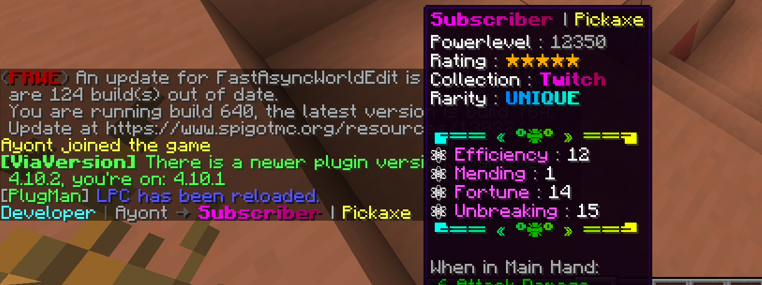
[ITEM] 占位符示例
? 安装
- 停止你的服务器
- 将
LPC.jar放入/plugins文件夹中 - 启动服务器以生成配置文件
- 根据需要编辑
config.yml - 使用
/lpc reload应用更改 ✅
LPC – LuckPerms Chat Formatter ✨
A flexible chat formatting plugin with MiniMessage support for LuckPerms
Modern chat formatting powered by MiniMessage, full LuckPerms metadata support, group/track formats, and PlaceholderAPI.
? Compatibility
| Minecraft | 26.1.2 |
| Server | Paper (recommended) or Spigot |
| Java | 25+ |
? Requirements
- LuckPerms (Required) – Permissions plugin
- PlaceholderAPI (Optional) – Additional placeholders
✅ Features
Formatting
- Full MiniMessage support, with group- and track-specific formats
- Optional PlaceholderAPI integration and
[item]placeholder (hover tooltip on Paper) - Per-rank message styling and per-rank gradient names (
{gradient-name}) - Per-world toggle via
disabled-worlds
Social (on by default)
- @Mention pings – highlight online names + sound/action-bar ping (Paper)
- Emoji shortcuts – e.g.
:heart:→ ❤ (fully configurable) - Clickable links – URLs become
openUrllinks on Paper, coloured on Spigot
Moderation (off by default)
- Anti-spam cooldown, repeated-message blocker, caps filter, profanity mask, anti-advertising
- Per-player mute (
/lpc mute) + LuckPerms mute node for punishment plugins
Server messages (off by default)
- MiniMessage join / quit / first-join / death messages
Quality of life
/lpc reload · version · help · mute · unmutewith tab completion- Built-in Modrinth update checker
- Safe by design – player messages can never inject
click/hover/command components - Works on both Paper (Adventure rendering) and Spigot (legacy fallback)
⌨️ Commands
| Command | Permission | Description |
|---|---|---|
/lpc reload |
lpc.reload |
Reload the configuration |
/lpc version |
– | Show the installed version |
/lpc help |
– | List available commands |
/lpc mute <player> [duration] |
lpc.mute |
Mute a player (e.g. 10m, 2h; omit for permanent) |
/lpc unmute <player> |
lpc.mute |
Unmute a player |
?? Permissions
| Permission | Default | Description |
|---|---|---|
lpc.reload |
op | Reload the configuration |
lpc.chatcolor |
false | Use colour codes & cosmetic MiniMessage tags in chat |
lpc.itemplaceholder |
false | Use the [item] placeholder in chat |
lpc.update |
op | Receive an update notification on join |
lpc.emoji |
true | Use emoji shortcuts (only enforced if emoji.require-permission) |
lpc.chatlinks |
true | Have URLs turned into clickable links |
lpc.mention.exempt |
false | Opt out of receiving mention pings |
lpc.mute |
op | Use /lpc mute and /lpc unmute |
lpc.muted |
false | Marks a player as muted (usually set by a punishment plugin) |
lpc.bypass.spam / .repeat / .caps / .profanity / .advert |
op | Bypass the matching moderation filter |
ℹ️ Even with
lpc.chatcolor, only cosmetic tags (colours, decorations, and optionally gradients/rainbow) are honoured in player messages. Interactive tags (click,hover,insertion, …) are always stripped.
⚙️ Configuration (config.yml)
# Main chat format (MiniMessage!)
chat-format: "{prefix}{name}<dark_gray> »<reset> {message}"

# Per-group formats (optional)
group-formats:
#  default: "<gray>[User]</gray> {name}<dark_gray> »<reset> {message}"
#  admin: "<red>[Admin]</red> {name}<dark_gray> »<reset> {message}"

# Per-track formats (optional) – groups take priority over tracks
track-formats:
#  staff_track: "<gold>[Staff]</gold> {name}<dark_gray> »<reset> {message}"

# Enable the [item] placeholder
use-item-placeholder: true

# Allow <gradient> / <rainbow> for players with lpc.chatcolor
allow-gradient-tags: true

# Worlds where LPC does NOT format chat
disabled-worlds: []

# Check Modrinth for updates on startup
update-checker: true

# Reload message
reload-message: "<green>Reloaded LPC configuration!"
? Available Placeholders
| Placeholder | Description |
|---|---|
{message} |
The chat message (inserted safely, never re-parsed) |
{name} |
Player's name |
{displayname} |
Display name / nickname |
{world} |
Player's current world |
{prefix} / {suffix} |
Highest priority prefix / suffix |
{prefixes} / {suffixes} |
All prefixes / suffixes, highest priority first |
{username-color} / {message-color} |
Colour values from LuckPerms meta |
ℹ️ All colour values (prefix, suffix, etc.) must be in MiniMessage format – no legacy codes (
&a,§b).
? Installation
- Stop your server
- Drop
LPC-<version>.jarinto your/pluginsfolder - Start the server to generate
config.yml - Edit the config to your liking
- Run
/lpc reloadto apply changes ✅
?️ Building
./gradlew shadowJar
# output: build/libs/LPC-<version>.jar
Requires JDK 25.
? Notes
- Not affiliated with LuckPerms – please do not contact the LuckPerms author for support.
- Legacy version available at: GitHub Legacy LPC
? Previews
Chat Format Example
[ITEM] Placeholder Example
? Installation
- Stop your server
- Place the
LPC.jarinto your/pluginsfolder - Start the server to generate configuration files
- Edit the
config.ymlto your liking - Use
/lpc reloadto apply your changes ✅

下载 LPC Minimessage - 聊天格式化器
需要联机服务器吗?
稳定流畅、一键部署,几分钟即可和朋友联机开服
最低仅需 8 元/月 即可畅快联机
下载 LPC Minimessage - 聊天格式化器
需要联机服务器吗?
稳定流畅、一键部署,几分钟即可和朋友联机开服
最低仅需 8 元/月 即可畅快联机
下载 LPC Minimessage - 聊天格式化器
需要联机服务器吗?
稳定流畅、一键部署,几分钟即可和朋友联机开服
最低仅需 8 元/月 即可畅快联机
下载 LPC Minimessage - 聊天格式化器
需要联机服务器吗?
稳定流畅、一键部署,几分钟即可和朋友联机开服
最低仅需 8 元/月 即可畅快联机
下载 LPC Minimessage - 聊天格式化器
需要联机服务器吗?
稳定流畅、一键部署,几分钟即可和朋友联机开服
最低仅需 8 元/月 即可畅快联机
下载 LPC Minimessage - 聊天格式化器
需要联机服务器吗?
稳定流畅、一键部署,几分钟即可和朋友联机开服
最低仅需 8 元/月 即可畅快联机
下载 LPC Minimessage - 聊天格式化器
需要联机服务器吗?
稳定流畅、一键部署,几分钟即可和朋友联机开服
最低仅需 8 元/月 即可畅快联机
下载 LPC Minimessage - 聊天格式化器
需要联机服务器吗?
稳定流畅、一键部署,几分钟即可和朋友联机开服
最低仅需 8 元/月 即可畅快联机
下载 LPC Minimessage - 聊天格式化器
需要联机服务器吗?
稳定流畅、一键部署,几分钟即可和朋友联机开服
最低仅需 8 元/月 即可畅快联机
下载 LPC Minimessage - 聊天格式化器
需要联机服务器吗?
稳定流畅、一键部署,几分钟即可和朋友联机开服
最低仅需 8 元/月 即可畅快联机
LPC 4.4.0 — 一个 JAR 包搞定一切
不再需要挑选正确的构建版本。LPC 4.4.0 提供了一个单一通用 JAR 包,同时支持 Paper 1.21.x(包括 1.21.11)和 Paper 26.2。只需下载 LPC-4.4.0.jar,无论你的服务器是什么版本,它都能正常运行。
为什么单个 JAR 包能兼容
该 JAR 包基于 Paper 1.21 / Adventure 4 / Java 21(api-version: 1.21)编译:
- Paper 26.2 接受
api-version: 1.21(向前兼容) - Java 21 字节码可在 Java 25 上运行
- LPC 所使用的 Adventure API 在 Adventure 4 到 5 之间保持二进制兼容性
新的 crossCompatTest CI 任务通过在一个 Adventure 5 运行时环境中运行由 Adventure 4 编译的测试来证明这一点——这正是 Paper 26.2 服务器所做的操作。(该测试已经发现并修复了一个真实的不兼容问题。)
? [item] 权限修复
使用 [item] 命令需要 lpc.itemplaceholder 权限——此前该权限默认值为 false,导致仅启用配置的用户(甚至是管理员)遇到问题。现在:
lpc.itemplaceholder默认为op→ 管理员可以立即使用[item]- 没有权限的玩家输入
[item]时,会收到友好的聊天提示 - 若要为所有玩家启用
[item]:/lp group default permission set lpc.itemplaceholder true
平台检测
- 启动日志显示:
Running on Paper (API 1.21-R0.1) on Java 21 [Paper/Adventure chat] /lpc version命令现在同时显示构建目标和当前运行时环境(API + Java)——这对技术支持非常有用
仍包含的功能
- 4.2.0 版本的聊天点击/悬停/插入漏洞修复(深度防御清理器)
- MiniMessage 聊天格式、LuckPerms 组/轨道格式、PlaceholderAPI、@提及、表情符号、可点击链接、[item]、管理工具包
要求
- LuckPerms(必需) · PlaceholderAPI(可选)
- Paper 1.21.x – 26.2、Folia 或 Spigot · Java 21+
完整更新日志:
关于这个资源的讨论、问题反馈与使用心得
还没有讨论,来发第一帖吧
你是这个资源的作者?登录后可认领此资源。
相似资源
 插件
ExyliaPlugins 的库。
 插件
自定义你的Minecraft头像!
 插件
重新定义服务器上的生物运输方式。使用高度可定制的口袋道具,安全地捕获、存储和释放任何实体。
 插件
一个在游戏内运行的 Minecraft 地图编辑器! 支持选区、蓝图、复制粘贴、笔刷和脚本。 可在创造模式中使用,也可在生存模式中临时使用。
 插件

创建用户友好的菜单以前往不同的世界
 插件
专为 Velocity 打造的自制聊天插件,功能丰富——支持跨服群组/全局/私聊消息,并集成 LibertyBans 的禁言功能。
评论 0
登录后参与评分
还没有评论,来抢沙发吧