
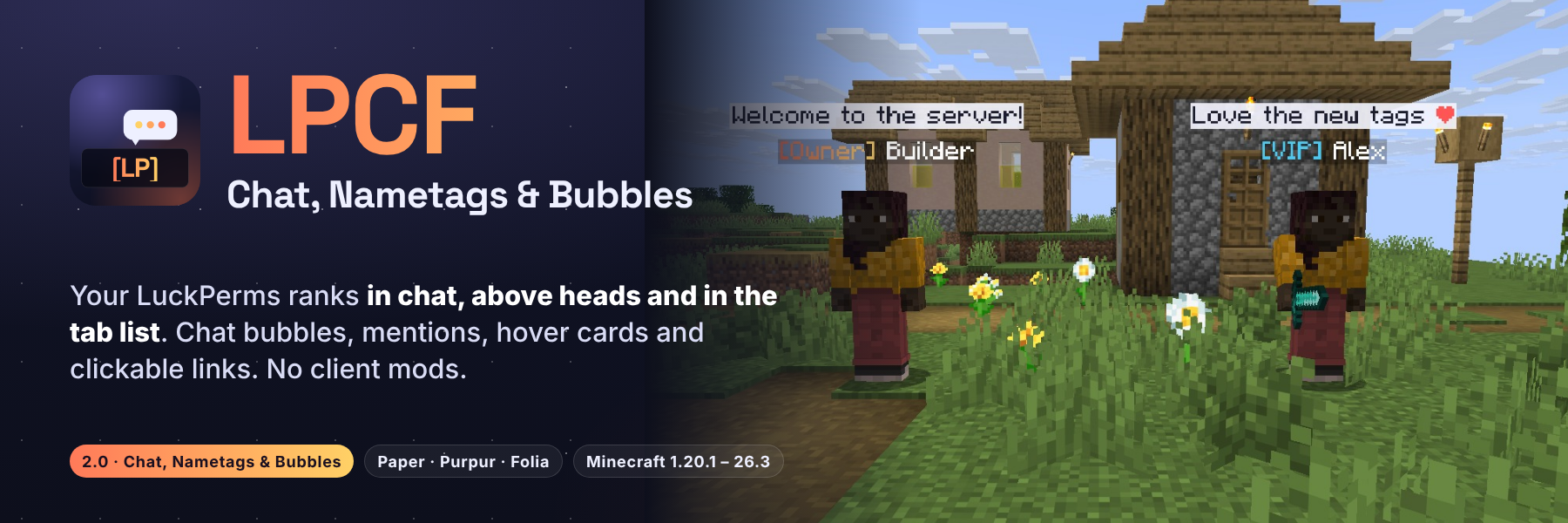
让你的 LuckPerms 等级在玩家视线所及之处随处可见。 LPCF 将你的前缀显示在聊天中、每个玩家的头顶上方以及标签列表中,支持完整的渐变色和十六进制颜色。公共聊天会以气泡形式悬浮在发言者上方,聊天中的名字带有悬停卡片,点击即可打开私聊,@提及 会触发玩家提示音。无需在客户端安装任何内容:没有模组、没有资源包、没有 ProtocolLib。
Paper、Purpur 和 Folia · Minecraft 1.20.1 至 26.3 合并为一个 jar 包 · 需要 LuckPerms,PlaceholderAPI 可选

2.0 版本 Chat, Nametags & Bubbles 将一个聊天格式化器转变为你整个服务器的等级显示系统:
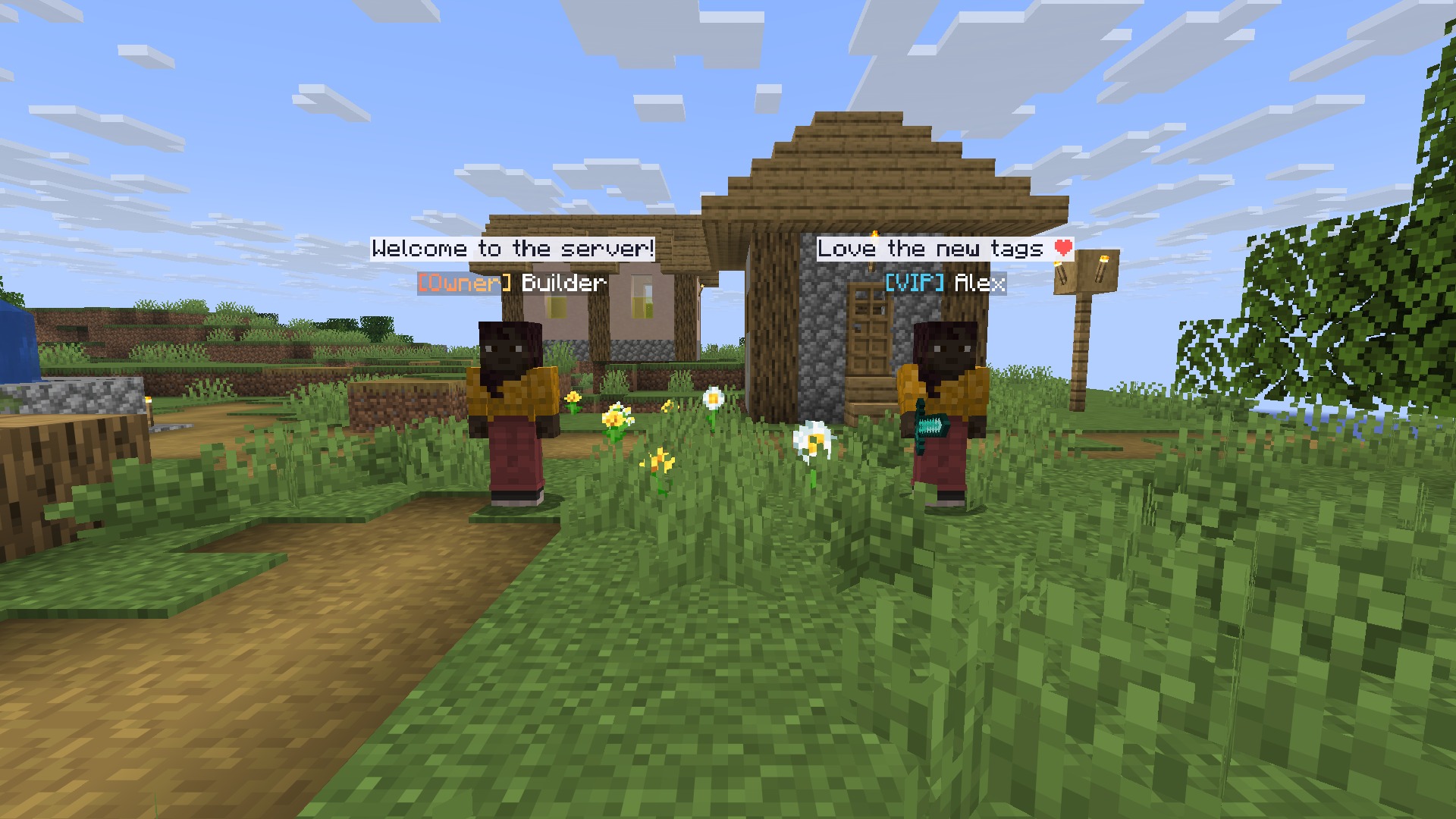
- 头顶上方的名称标签由文本显示构成:支持渐变色、十六进制颜色、多行、PlaceholderAPI,并且在 Folia 上也能使用
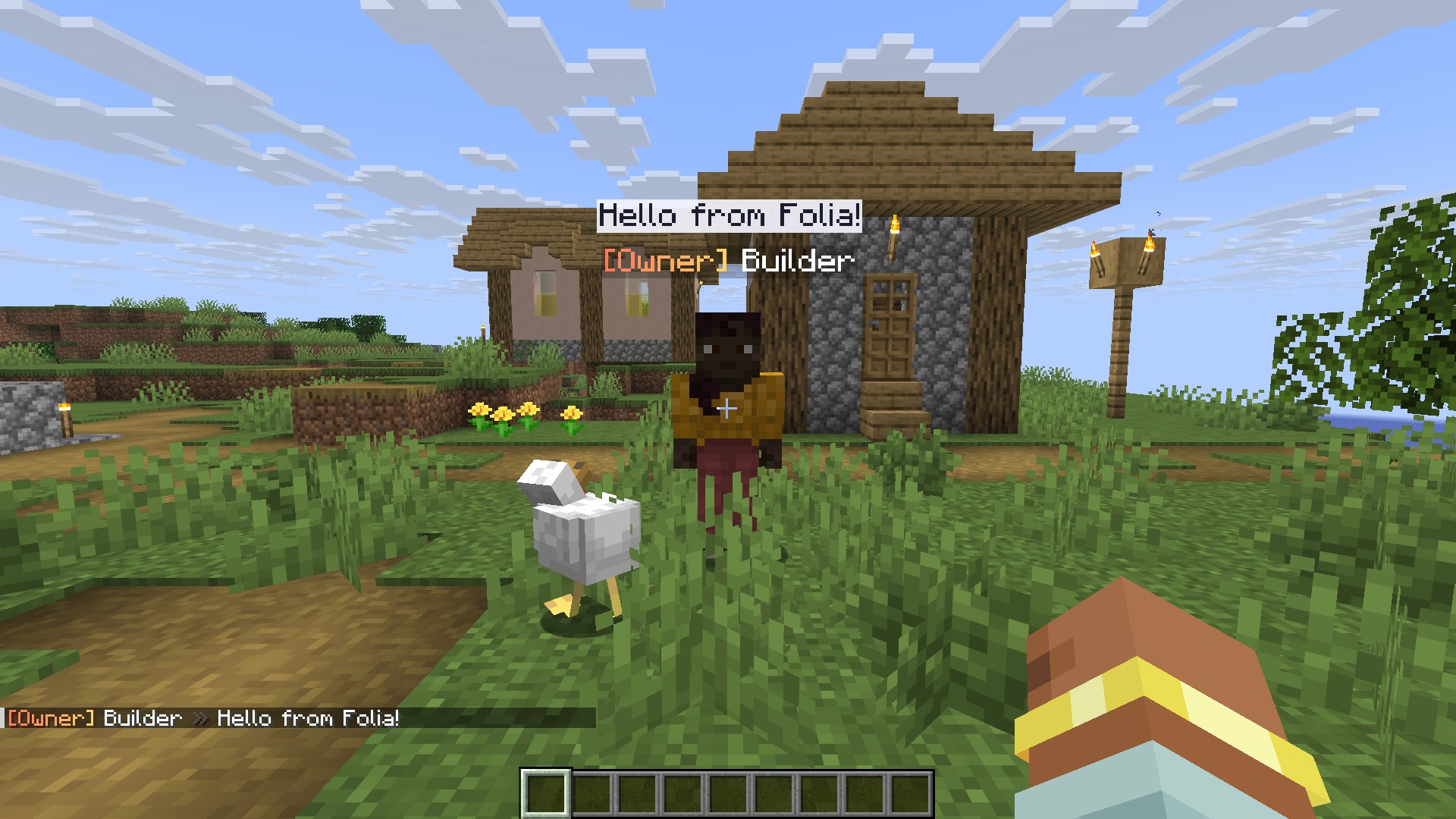
- 聊天气泡悬浮在正在说话的玩家上方
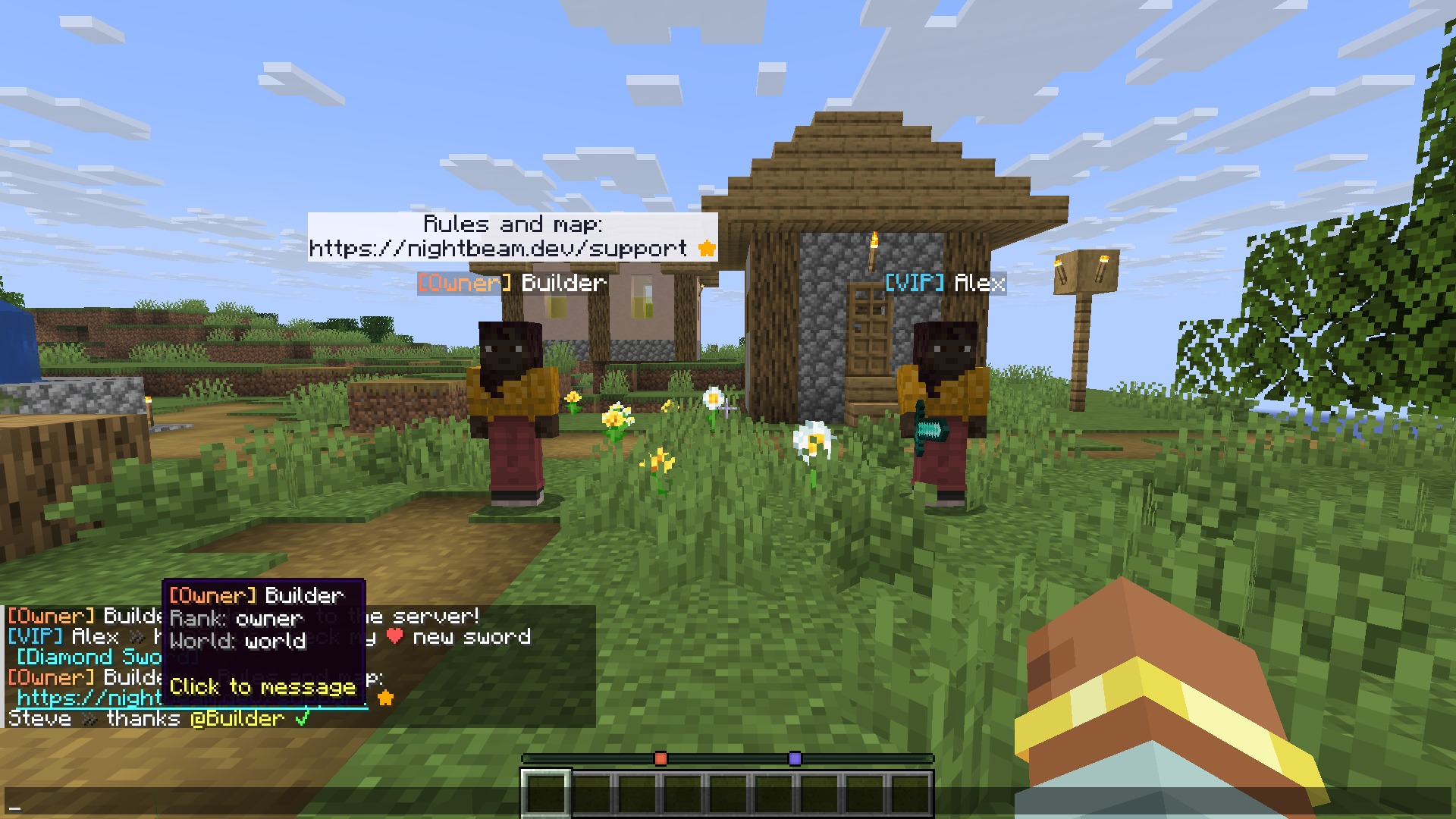
- 悬停卡片和点击发消息功能针对名字,@提及带有提示音,支持可点击链接和表情快捷方式
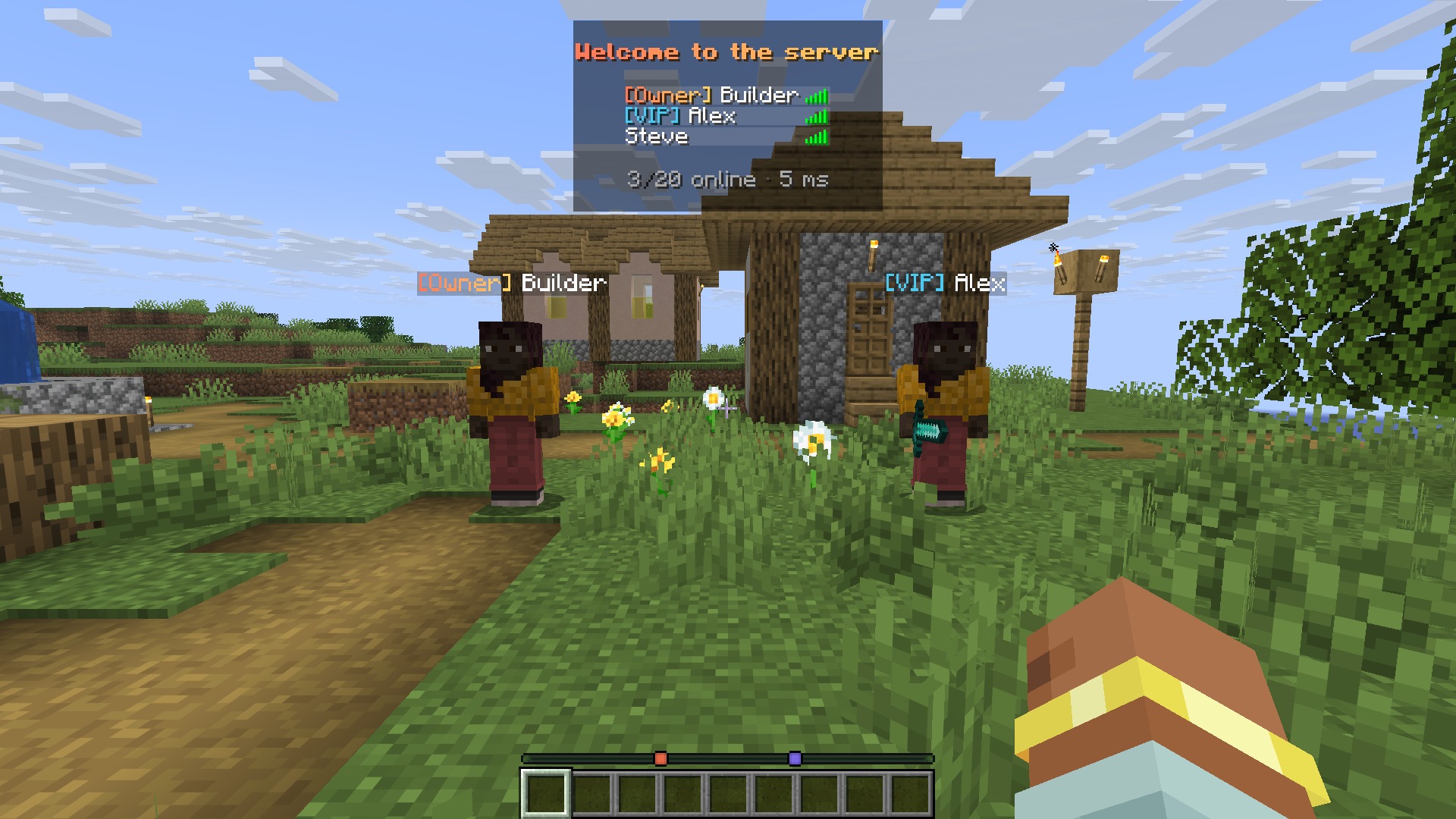
- 标签列表按 LuckPerms 权重排序,并带有页眉和页脚
- 每个分组都有独立的加入、首次加入和离开消息,以及世界格式
/lpcf debug可以回答“为什么我的前缀没有显示?”- 更安全的聊天:玩家输入的内容不再能触发占位符或点击事件
- 1.20.1 和 1.21.x 重新可用(1.2.4 和 1.2.5 仅在 26.x 上加载),且你的 1.x 配置可以迁移过来

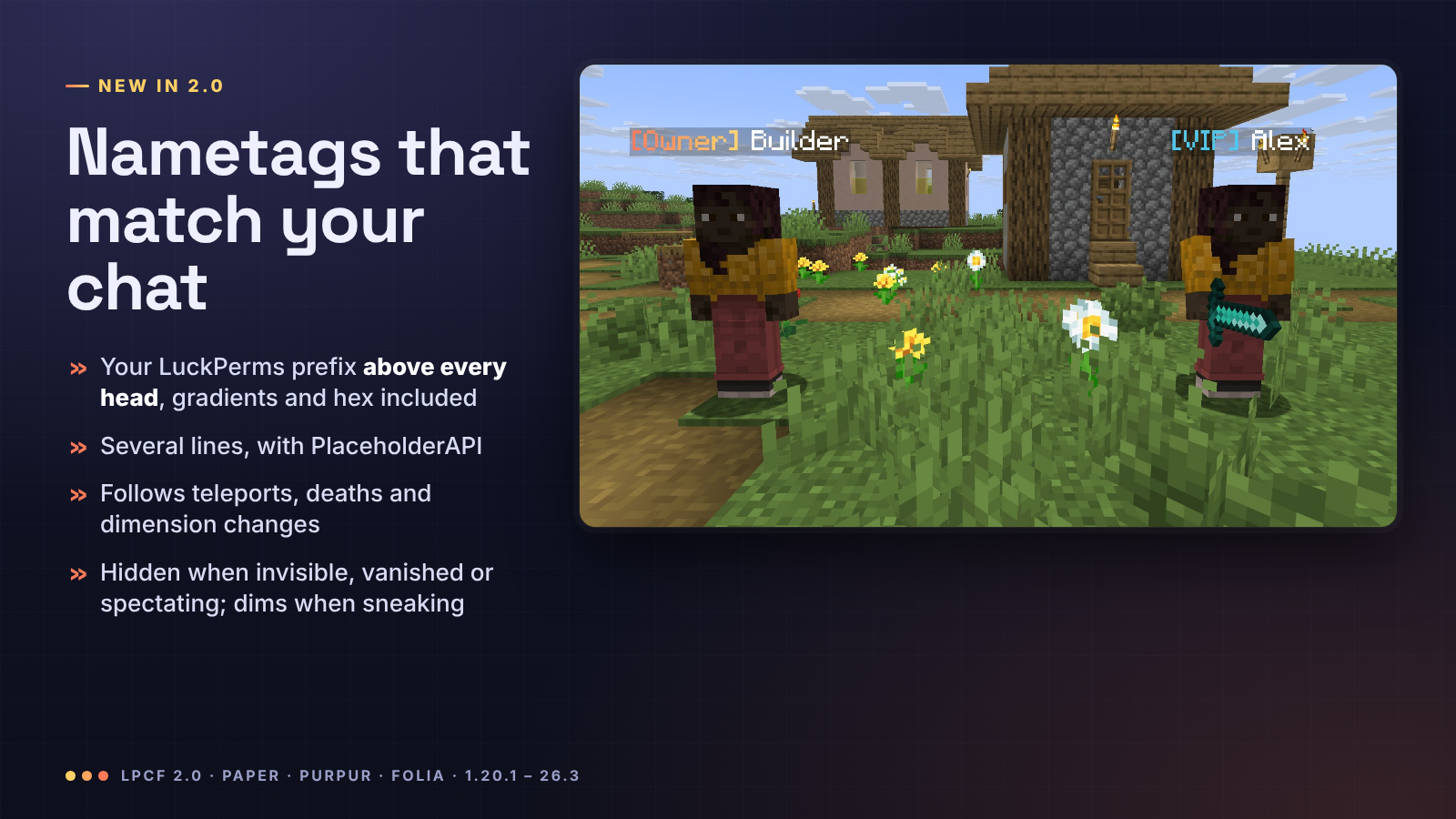
每个玩家都会获得一个基于 config.yml 中 nametags.lines 构建的名称标签:包含你的 LuckPerms 前缀、后缀和元数据、渐变色、十六进制颜色、任意数量的行以及任何 PlaceholderAPI 占位符(生命值、公会、等级等)。
- 当你在 LuckPerms 中更改等级时,它会自动刷新
- 它跟随传送、死亡、重生和维度变化,并且兼容
/home、/spawn和/tpa插件 - 当玩家处于隐形、旁观模式、死亡或隐身状态时会隐藏,潜行时会变暗
- 玩家永远不会在自己的摄像机前方看到自己的标签
- 原版名称会被隐藏,在 Folia 上也同样适用(Folia 没有记分板队伍;在那里标签附着在玩家身上,而 Minecraft 不会绘制携带物品的玩家的名称)
- 更喜欢旧的方式?
nametags.style: team保留经典的记分板队伍名称标签

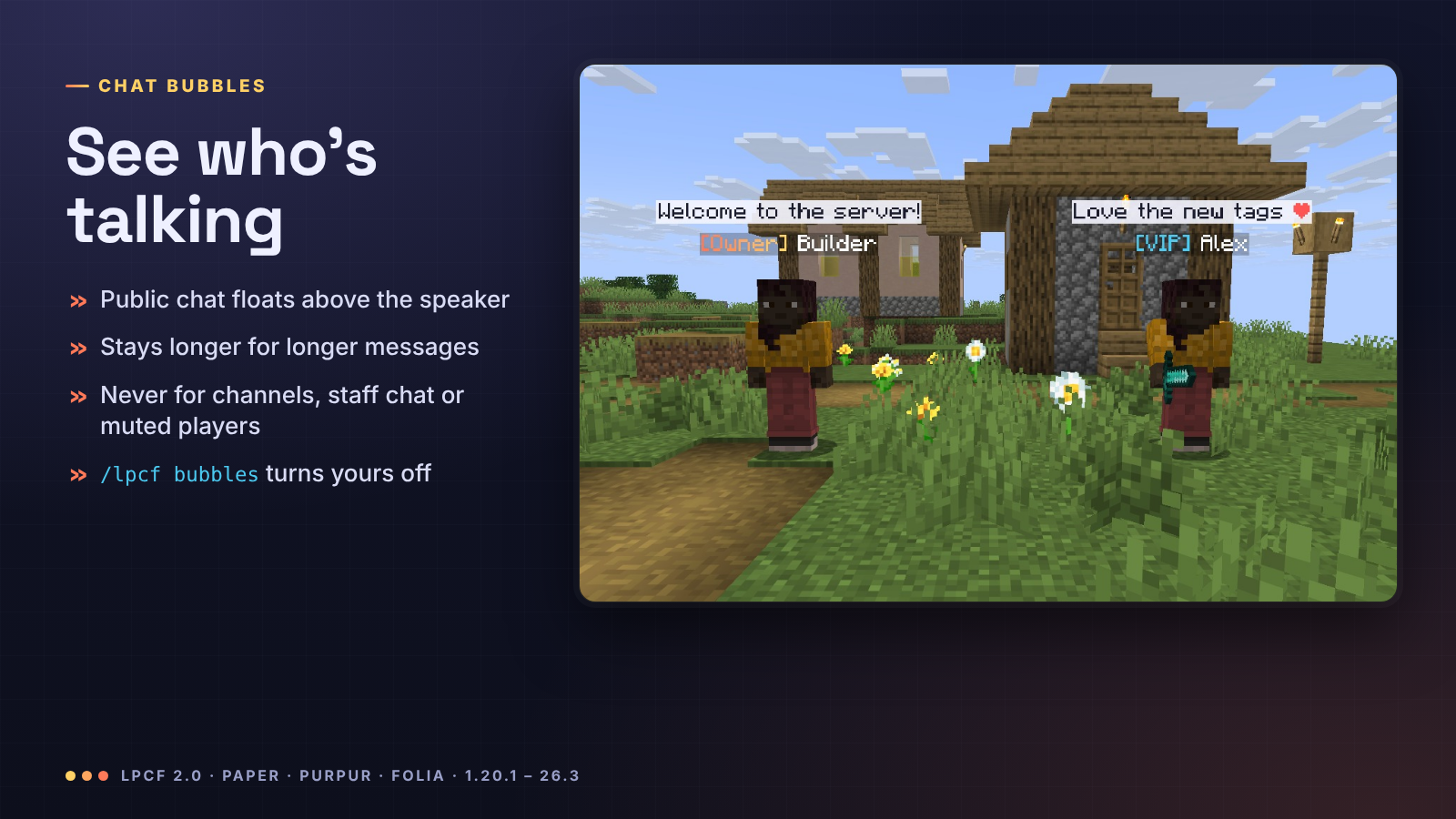
当玩家发送聊天消息时,该消息会在其头顶上方浮动 3 到 10 秒(较长的消息停留时间更长),以便附近的所有人都能看到谁说了什么。只有所有玩家都能收到的消息才会生成气泡:当另一个插件向频道、工作人员或小队聊天发送消息,或者取消消息(如禁言)时,不会有气泡。玩家可以使用 /lpcf bubbles off 关闭自己的气泡。

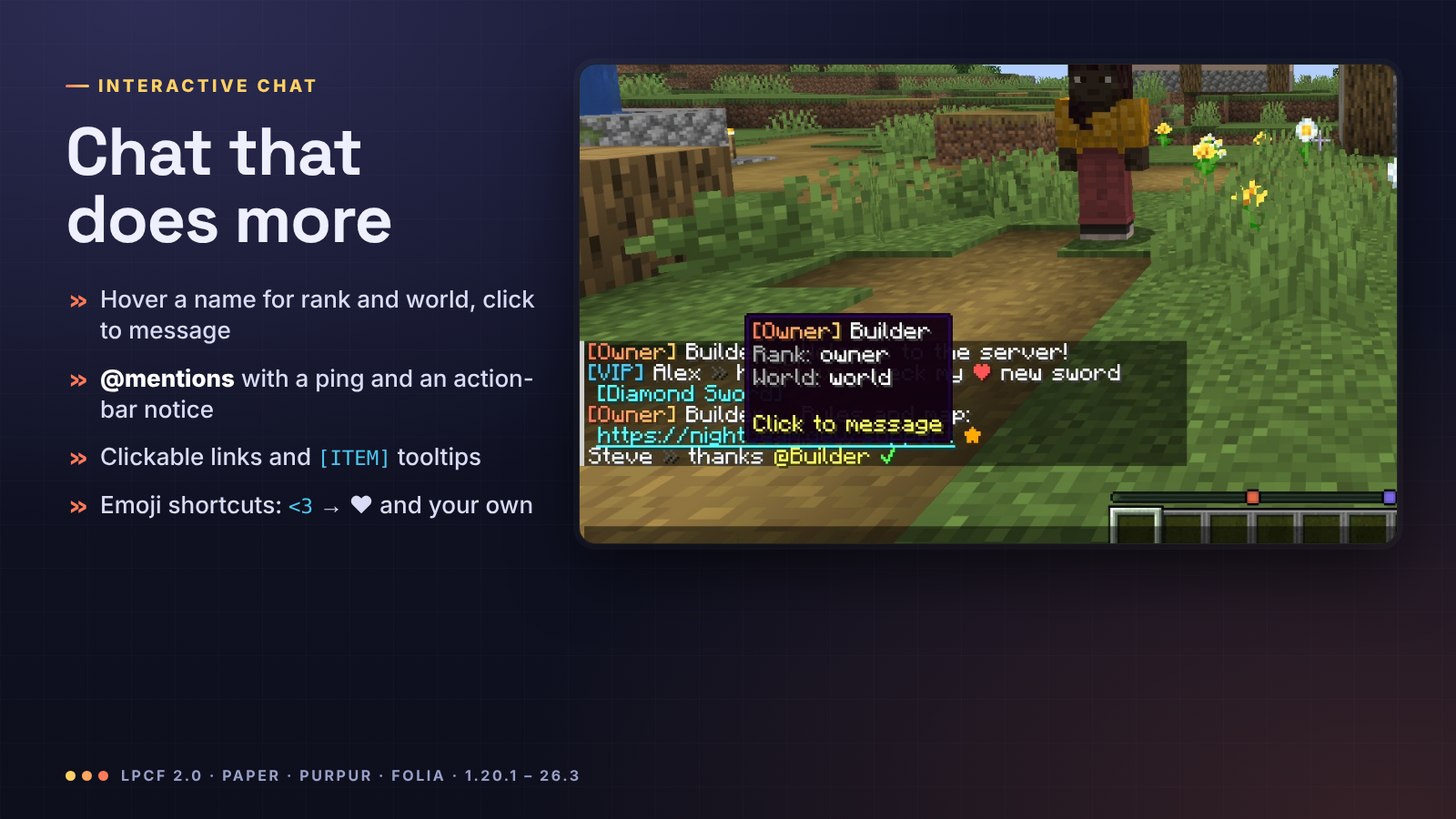
- 每个 LuckPerms 分组、每条轨道和每个世界都有独立的格式,默认回退到
chat-format,支持 MiniMessage 或&/&#RRGGBB代码,包含{prefix}、{suffix}、{group}、{world}、{username-color}、{message-color}和 PlaceholderAPI - 悬停名字可查看玩家的等级和世界(自定义行),点击名字开始
/msg私聊 - 提及:
@Steve或直接输入Steve都会被高亮显示,Steve 会听到提示音并看到“Alex 提到了你” - 链接变为可点击,
[ITEM]显示手持物品及其工具提示 - 表情快捷方式:
<3→ ❤,:star:→ ★,:check:→ ✔,:shrug:→ ¯\_(ツ)_/¯,以及你添加的任何其他表情

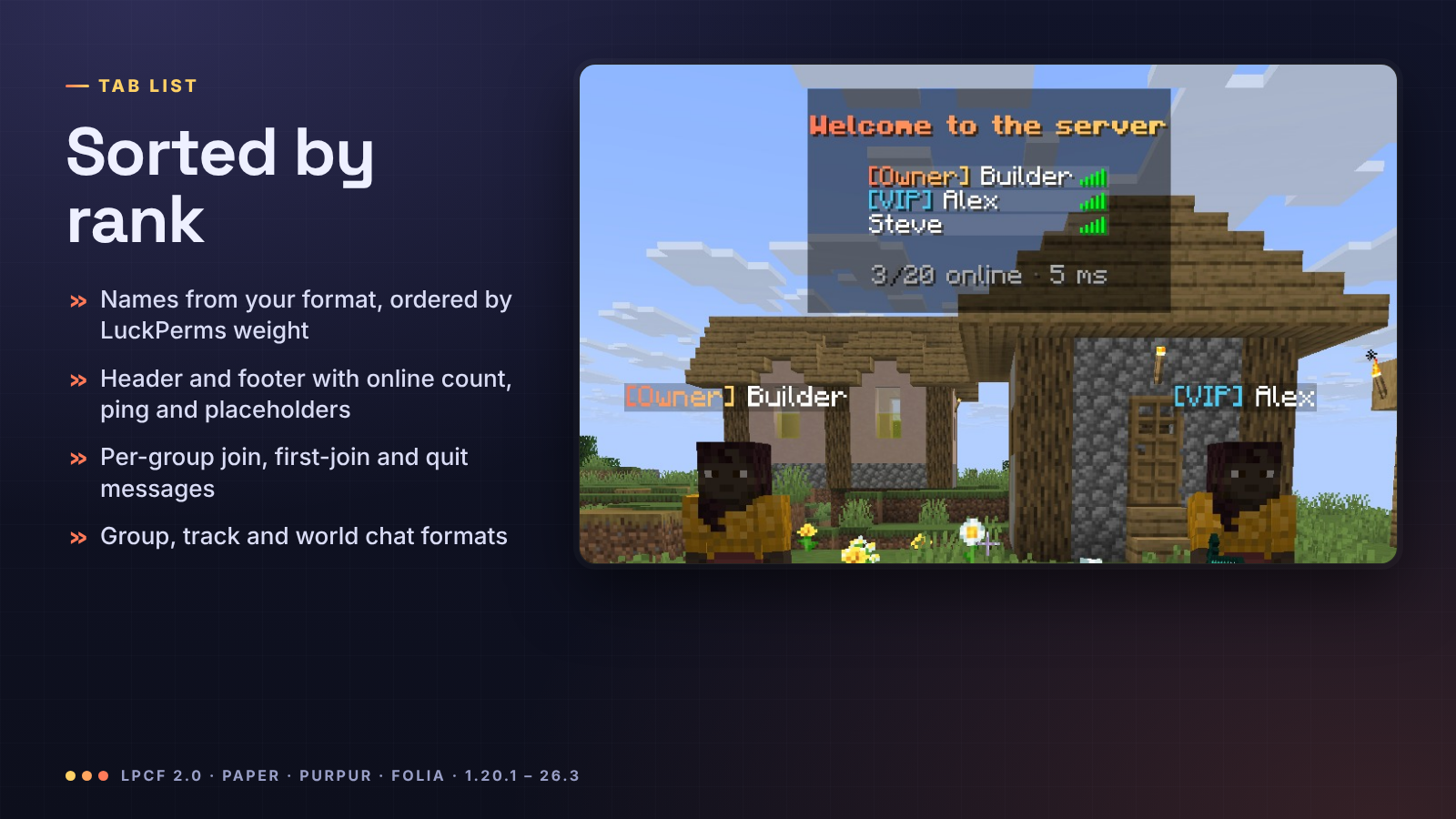
标签列表显示你的 nametag-format,按 LuckPerms 权重排序(最高优先:1.21.2 及更新版本包括 Folia 的组权重;在此之前通过团队名称的前缀权重,Folia 除外),页眉和页脚包含 {online}、{max-players}、{ping} 和占位符。加入、首次加入和离开消息可以根据分组不同而变化。

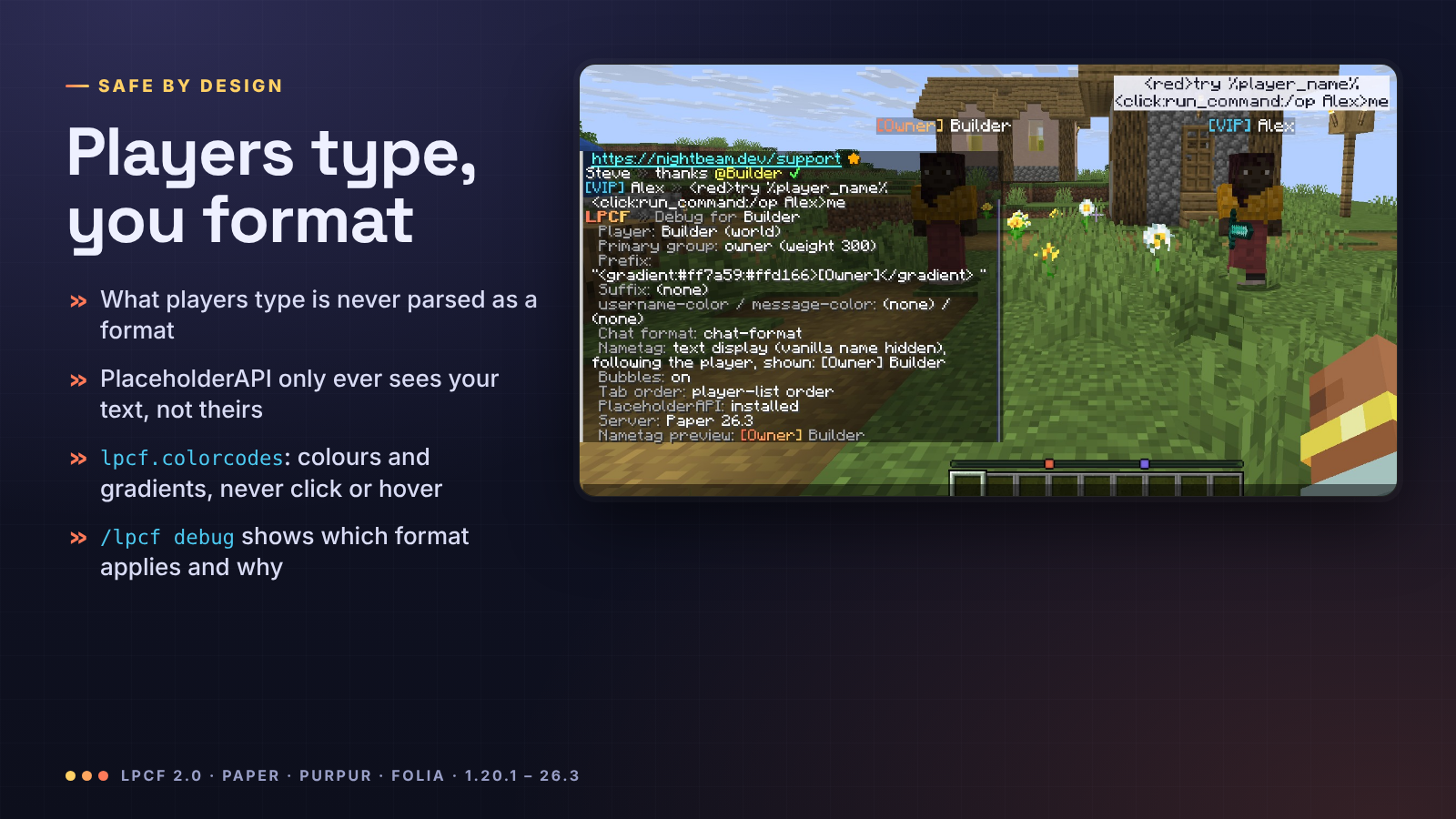
玩家输入的内容是在读取你的格式后添加到聊天行中的,因此它永远不会被视为格式内容,也不会传递给 PlaceholderAPI:输入 %player_ip% 或 <click:run_command:/op me> 只会显示这些字符。lpcf.colorcodes 允许受信任的玩家使用颜色、装饰、渐变和彩虹效果,但永远不能触发点击或悬停事件。
/lpcf debug <player> 列出玩家的分组和权重、前缀、后缀、元数据颜色、应用了哪个聊天格式以及原因,以及他们的名称标签显示内容。

| Command | Permission | Default | What |
|---|---|---|---|
/lpcf reload |
lpcf.reload |
op | 重载 config.yml |
/lpcf debug [player] |
lpcf.debug |
op | 分组、前缀、后缀、所选格式、名称标签 |
/lpcf preview <message> |
lpcf.preview |
op | 仅对你显示的聊天行预览 |
/lpcf bubbles [on/off] |
lpcf.bubbles.toggle |
everyone | 你自己的聊天气泡 |
其他权限:lpcf.colorcodes(聊天中的样式设置,默认无用户拥有),以及 lpcf.mention、lpcf.links、lpcf.replacements、lpcf.itemplaceholder、lpcf.bubbles(默认所有用户拥有)。lpcf.admin 授予管理员命令权限。

chat-format: "{prefix}{username-color}{name}<dark_gray> »<reset> {message-color}{message}"
group-formats:
  admin: "<gradient:#ff5f6d:#ffc371>[Admin]</gradient> {name}<dark_gray> »<reset> {message}"

nametags:
  style: auto        # auto(文本显示)、team(计分板队伍)、off(关闭)
  lines:
    - "{prefix}{username-color}{name}{suffix}"
    - "<red>❤ %player_health_rounded%"

bubbles:
  enabled: true
  format: "<#1b1d2e>{message}"
  background: "#E8F4F5FF"   # 格式为 #AARRGGBB,或设为 "default" 使用原版名称标签背景

tab:
  sort-by-weight: true
  header-footer:
    enabled: true
从 1.x 版本升级:替换 jar 文件并重启服务器。你的 plugins/LuckPermsChatFormatterFolia 文件夹将移动至 plugins/LPCF,旧配置文件保留为 config-1.x-backup.yml,新设置及其说明将被添加。你的名称标签将继续显示旧的 nametag-format,但现在支持完整颜色。完整参考文档见 README。

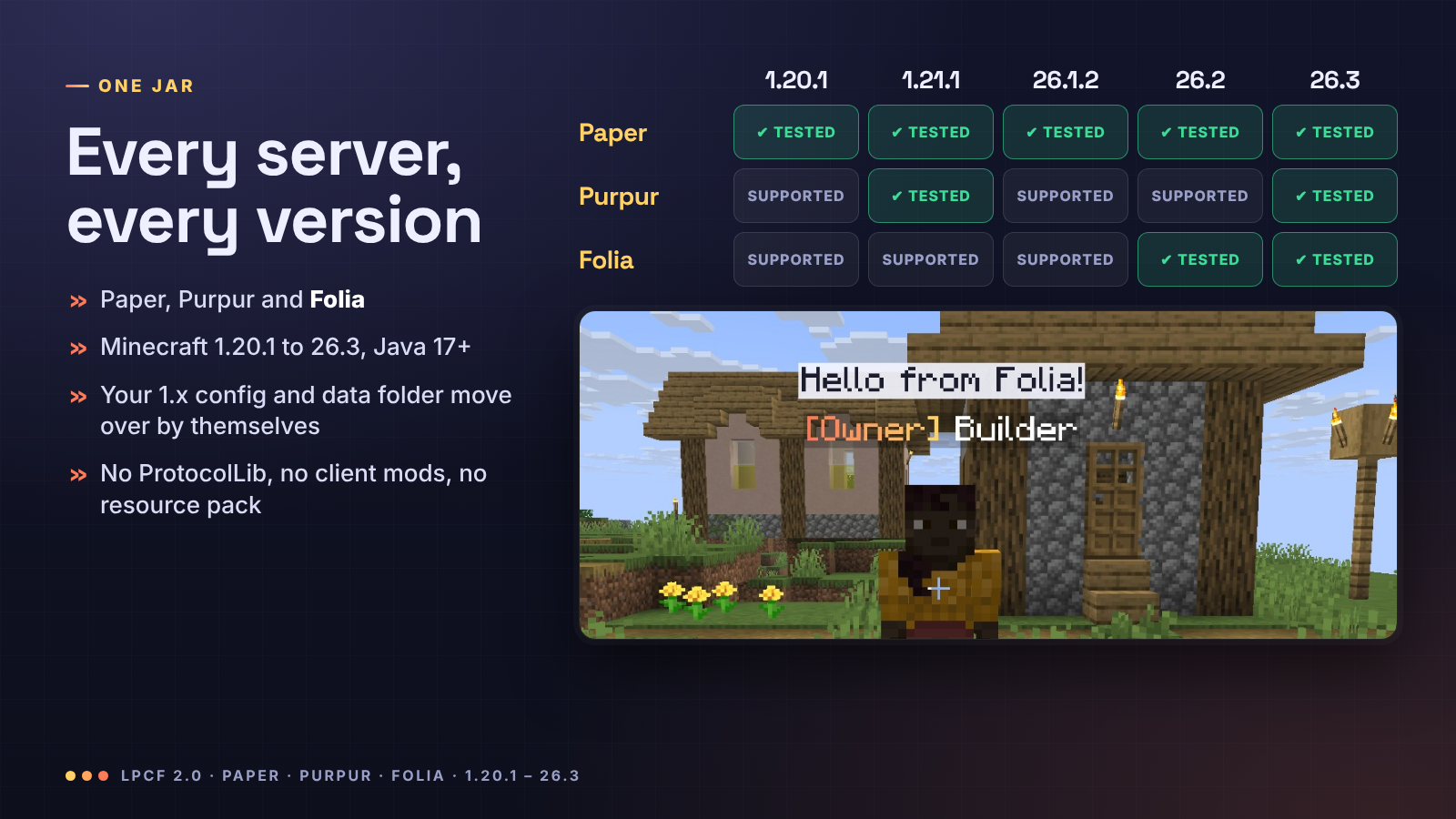
| 服务器类型 | Minecraft 版本 | 说明 |
|---|---|---|
| Paper | 1.20.1 到 26.3 | 全部功能 |
| Purpur | 1.20.1 到 26.3 | 全部功能 |
| Folia | 1.20.1 到 26.3 | 除经典 nametags.style: team 外的所有功能(Folia 不支持计分板队伍) |
仅需一个文件 LPCF-2.0.0.jar 即可适配以上所有服务器(需要 Java 17 或更高版本,与你服务器当前运行的版本一致即可)。已在 Paper 1.20.1、1.20.4、1.21.1、1.21.11、26.1.2、26.2 和 26.3,Purpur 1.21.1 和 26.3,以及 Folia 26.2 和 26.3 上使用真实客户端测试通过。依赖 LuckPerms;PlaceholderAPI 为可选。不支持 Spigot(LPCF 需要使用 Paper 的聊天 API)。

玩家是否需要安装模组或资源包? 不需要。名字标签和气泡是原版客户端自带的文本显示功能,所有客户端默认都会展示。
它是否与我的 Tab 列表或记分板插件兼容? 聊天和气泡始终兼容。头顶名字标签会通过记分板队伍隐藏原版名字,这与任何名字标签插件的工作原理相同;如果其他插件也管理队伍,请仅使用其中一个来显示名字标签(设置 nametags.style: off 可关闭 LPCF 的名字标签)。通过设置 tab.header-footer.enabled: false 可以关闭 LPCF 的 Tab 列表页眉/页脚。
/home、/spawn 或 /tpa 命令会失效吗? 不会。在 Paper 和 Purpur 服务器上,没有任何实体骑乘玩家:名字标签跟随玩家移动,因此传送效果与未安装 LPCF 时完全一致。在 Folia 上,名字标签会骑乘玩家,而 Folia 会将两者一起传送。我们在测试中已通过插件使用的相同 API 验证了这两种情况。
它在 Folia 上真的能正常工作吗? 是的,其名字标签、气泡、聊天和 Tab 列表的功能与 Paper 一致。由于 Folia 不支持记分板队伍,经典的 nametags.style: team 设置在 Folia 上无效;默认的文本显示名字标签会在 Folia 上骑乘玩家,同时也会隐藏原版名字。
消失的玩家会保留他们的标签吗? 不会:拥有 vanished 元数据(由消失插件设置)的消失玩家、隐身玩家和旁观者都没有标签和气泡。
我的前缀没有显示。 运行 /lpcf debug <player>:它会显示 LuckPerms 返回的内容以及使用的格式。

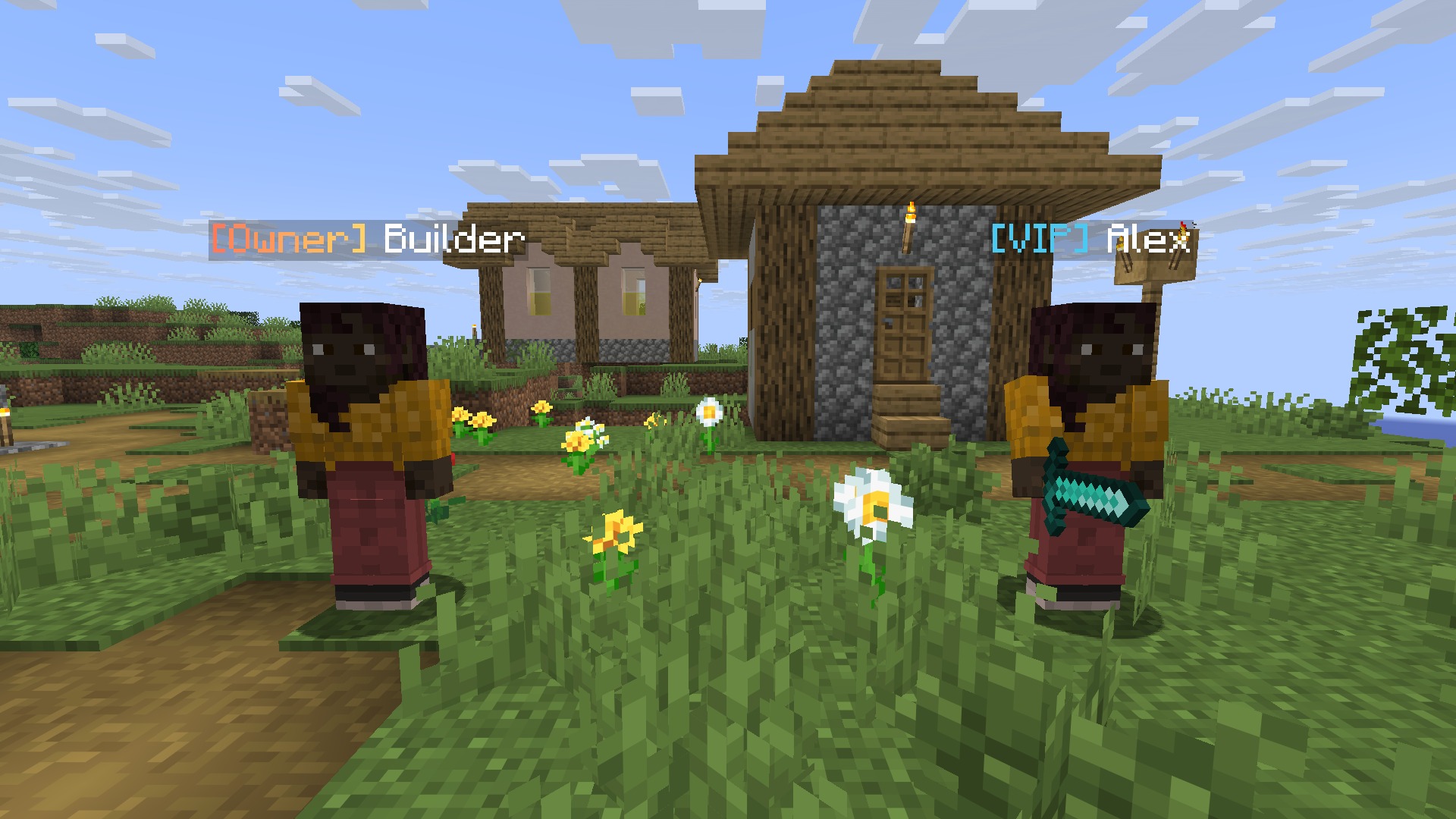

Your LuckPerms ranks everywhere players look. LPCF puts your prefixes in chat, above every player's head and
in the tab list, with full gradients and hex colours. Public chat pops up as a bubble over the speaker, names in
chat show a hover card and open a private message on click, and @mentions ping the player. Nothing to install on
the client: no mod, no resource pack, no ProtocolLib.
Paper, Purpur and Folia · Minecraft 1.20.1 to 26.3 in one jar · LuckPerms required, PlaceholderAPI optional
Version 2.0, Chat, Nametags & Bubbles, turns a chat formatter into the rank display for your whole server:
- Nametags above heads made of text displays: gradients, hex colours, several lines, PlaceholderAPI, and on Folia too
- Chat bubbles over the player who is talking
- Hover cards and click-to-message on names, @mentions with a ping, clickable links, emoji shortcuts
- Tab list sorted by LuckPerms weight, with a header and footer
- Join, first-join and quit messages per group, and world formats
/lpcf debuganswers "why is my prefix not showing?"- Safer chat: what players type can no longer trigger placeholders or click events
- 1.20.1 and 1.21.x work again (1.2.4 and 1.2.5 only loaded on 26.x), and your 1.x config carries over
Every player gets a nametag built from nametags.lines in config.yml: your LuckPerms prefix, suffix and meta,
gradients, hex colours, as many lines as you like and any PlaceholderAPI placeholder (health, guild, level...).
- It refreshes by itself when you change a rank in LuckPerms
- It follows teleports, deaths, respawns and dimension changes, and works with
/home,/spawnand/tpaplugins - It hides while the player is invisible, in spectator mode, dead or vanished, and dims while they sneak
- Players never see their own tag in front of their camera
- The vanilla name is hidden underneath, on Folia too (Folia has no scoreboard teams; there the tag rides the player, and Minecraft does not draw the name of a player carrying something)
- Prefer the old way?
nametags.style: teamkeeps classic scoreboard-team nametags
When a player chats, the message floats above their head for 3 to 10 seconds (longer messages stay longer), so
everyone nearby sees who said what. Only messages that reach every player get a bubble: when another plugin sends a
message to a channel, staff or party chat only, or cancels it (a mute), there is no bubble. Players turn their own
bubbles off with /lpcf bubbles off.
- Formats per LuckPerms group, per track and per world, falling back to
chat-format, in MiniMessage or&/&#RRGGBBcodes, with{prefix},{suffix},{group},{world},{username-color},{message-color}and PlaceholderAPI - Hover a name to see the player's rank and world (your lines), click it to start a
/msg - Mentions:
@Steveor justSteveis highlighted, and Steve hears a ping and sees "Alex mentioned you" - Links become clickable,
[ITEM]shows the held item with its tooltip - Emoji shortcuts:
<3→ ❤,:star:→ ★,:check:→ ✔,:shrug:→ ¯\_(ツ)_/¯, and any you add
The tab list shows your nametag-format, sorted by LuckPerms weight (highest first: the group weight on 1.21.2 and
newer, Folia included; the prefix weight through team names before that, except on Folia), under a header and footer
with {online}, {max-players}, {ping} and placeholders. Join, first-join and quit messages can differ per group.
What players type is added to the chat line after your format is read, so it is never treated as a format and never
reaches PlaceholderAPI: typing %player_ip% or <click:run_command:/op me> just shows those characters.
lpcf.colorcodes lets trusted players use colours, decorations, gradients and rainbow, but never click or hover events.
/lpcf debug <player> lists the player's group and weight, prefix, suffix, meta colours, which chat format applies
and why, and what their nametag shows.
| Command | Permission | Default | What |
|---|---|---|---|
/lpcf reload |
lpcf.reload |
op | Reload config.yml |
/lpcf debug [player] |
lpcf.debug |
op | Group, prefix, suffix, chosen format, nametag |
/lpcf preview <message> |
lpcf.preview |
op | Your chat line, shown only to you |
/lpcf bubbles [on/off] |
lpcf.bubbles.toggle |
everyone | Your own chat bubbles |
Other permissions: lpcf.colorcodes (styling in chat, nobody by default), and lpcf.mention, lpcf.links,
lpcf.replacements, lpcf.itemplaceholder, lpcf.bubbles (everyone by default). lpcf.admin grants the admin commands.
chat-format: "{prefix}{username-color}{name}<dark_gray> »<reset> {message-color}{message}"
group-formats:
  admin: "<gradient:#ff5f6d:#ffc371>[Admin]</gradient> {name}<dark_gray> »<reset> {message}"

nametags:
  style: auto        # auto (text displays), team (scoreboard teams), off
  lines:
    - "{prefix}{username-color}{name}{suffix}"
    - "<red>❤ %player_health_rounded%"

bubbles:
  enabled: true
  format: "<#1b1d2e>{message}"
  background: "#E8F4F5FF"   # #AARRGGBB, or "default" for the vanilla nametag background

tab:
  sort-by-weight: true
  header-footer:
    enabled: true
Upgrading from 1.x: replace the jar and restart. Your plugins/LuckPermsChatFormatterFolia folder moves to
plugins/LPCF, the old config is kept as config-1.x-backup.yml, and the new settings are added with their
explanations. Your nametags keep showing your old nametag-format, now with full colours. The full reference is in
the README.
| Server | Minecraft | Notes |
|---|---|---|
| Paper | 1.20.1 to 26.3 | Everything |
| Purpur | 1.20.1 to 26.3 | Everything |
| Folia | 1.20.1 to 26.3 | Everything except the classic nametags.style: team (Folia has no scoreboard teams) |
One file, LPCF-2.0.0.jar, for all of them (Java 17 or newer, whatever your server already runs). Tested in game with
real clients on Paper 1.20.1, 1.20.4, 1.21.1, 1.21.11, 26.1.2, 26.2 and 26.3, Purpur 1.21.1 and 26.3, and Folia
26.2 and 26.3. Requires LuckPerms; PlaceholderAPI is optional. Spigot is not supported (LPCF needs Paper's chat API).
Do players need a mod or resource pack? No. Nametags and bubbles are vanilla text displays that every client already shows.
Does it work with my tab or scoreboard plugin? Chat and bubbles always do. Above-head nametags hide the vanilla
name with a scoreboard team, like any nametag plugin; if another plugin also manages teams, use one of the two for
nametags (nametags.style: off turns LPCF's off). Turn off LPCF's tab header with tab.header-footer.enabled: false.
Will /home, /spawn or /tpa break? No. On Paper and Purpur nothing rides the player: the nametag follows
them, so teleports work exactly as without LPCF. On Folia the tag rides the player, and Folia teleports the two
together. Both are checked in our tests, through the same API teleport plugins use.
Does it really work on Folia? Yes, with the same nametags, bubbles, chat and tab list as Paper. Folia has no
scoreboard teams, so the classic nametags.style: team does nothing there; the default text-display nametags ride the
player on Folia, which also hides the vanilla name.
Do vanished players keep their tag? No: players with the vanished metadata that vanish plugins set, invisible
players and spectators have no tag and no bubbles.
My prefix does not show. Run /lpcf debug <player>: it shows what LuckPerms returns and which format is used.
Discord · Source and issues · Support us · Made by NightBeam Studio

下载 LPCF: Chat, Nametags & Bubbles
需要联机服务器吗?
稳定流畅、一键部署,几分钟即可和朋友联机开服
最低仅需 8 元/月 即可畅快联机
下载 LPCF: Chat, Nametags & Bubbles
需要联机服务器吗?
稳定流畅、一键部署,几分钟即可和朋友联机开服
最低仅需 8 元/月 即可畅快联机
下载 LPCF: Chat, Nametags & Bubbles
需要联机服务器吗?
稳定流畅、一键部署,几分钟即可和朋友联机开服
最低仅需 8 元/月 即可畅快联机
下载 LPCF: Chat, Nametags & Bubbles
需要联机服务器吗?
稳定流畅、一键部署,几分钟即可和朋友联机开服
最低仅需 8 元/月 即可畅快联机
下载 LPCF: Chat, Nametags & Bubbles
需要联机服务器吗?
稳定流畅、一键部署,几分钟即可和朋友联机开服
最低仅需 8 元/月 即可畅快联机
下载 LPCF: Chat, Nametags & Bubbles
需要联机服务器吗?
稳定流畅、一键部署,几分钟即可和朋友联机开服
最低仅需 8 元/月 即可畅快联机
下载 LPCF: Chat, Nametags & Bubbles
需要联机服务器吗?
稳定流畅、一键部署,几分钟即可和朋友联机开服
最低仅需 8 元/月 即可畅快联机
下载 LPCF: Chat, Nametags & Bubbles
需要联机服务器吗?
稳定流畅、一键部署,几分钟即可和朋友联机开服
最低仅需 8 元/月 即可畅快联机
下载 LPCF: Chat, Nametags & Bubbles
需要联机服务器吗?
稳定流畅、一键部署,几分钟即可和朋友联机开服
最低仅需 8 元/月 即可畅快联机
下载 LPCF: Chat, Nametags & Bubbles
需要联机服务器吗?
稳定流畅、一键部署,几分钟即可和朋友联机开服
最低仅需 8 元/月 即可畅快联机
LPCF 2.0.0:聊天、名称标签与气泡
LPCF 现已成为玩家视线所及之处(聊天框中、头顶上方以及标签页列表里)统一的 LuckPerms 等级显示方案,并支持聊天气泡、@提及、可点击链接和悬停卡片。单个 JAR 文件适用于 Paper、Purpur 和 Folia,兼容 Minecraft 1.20.1 至 26.3。
新增功能
- 文本显示名称标签:在每个玩家头顶上方显示多行 MiniMessage 格式内容(包括渐变、十六进制颜色),由
nametags.lines配置控制。标签会跟随传送、死亡和维度变化而移动;当 LuckPerms 数据变更时自动刷新;在玩家隐身、处于旁观者模式、死亡或隐匿状态下隐藏;潜行时会变暗。原版名称会被隐藏在其下方。它们在 Folia 上也能正常工作,因为 Folia 不支持计分板队伍:在此环境下,标签会附着于玩家实体之上,从而同时隐藏原版名称。而在 Paper 和 Purpur 上,没有实体附着于玩家,因此/home、/spawn和/tpa等插件仍可正常运行。 - 聊天气泡:公共聊天消息会以气泡形式悬浮在发言者头顶 3 到 10 秒。可通过命令
/lpcf bubbles [on|off]为每位玩家单独开启或关闭。 - 聊天中的名称悬停卡片与点击私聊(
name-hover)。 - @提及:输入
@name或直接输入名字时会被高亮显示;被提及的玩家会听到提示音并在操作栏收到通知。 - 可点击链接、表情快捷方式(如
<3、:star:、:check:、:x:、:shrug:、:tableflip:,支持自定义添加)。 - 标签页列表:支持页眉和页脚,包含
{online}、{max-players}、{ping}等占位符;并按 LuckPerms 组的权重排序。 - 加入、首次加入和离开消息:支持按组配置。
- 世界格式(
world-formats):优先级低于组和轨道格式。 /lpcf debug [player]:显示该玩家的所属组、权重、前缀、后缀、元数据颜色、应用的聊天格式及其原因、名称标签模式以及集成信息。/lpcf preview <message>:展示你自己的聊天行效果(从控制台执行时使用/lpcf preview <player> <message>,并附带该行的 JSON 数据)。- 全局支持
{group}占位符;[ITEM]现在会以查看者的语言显示物品名称及其数量。
修复
- 1.20.1 和 1.21.x 服务器现在可以再次运行 LPCF。版本 1.2.4 和 1.2.5 是使用 Java 25 编译的,只能在 26.x 环境加载。2.0 版本使用 Java 17 字节码,并基于 1.20.1 API 构建。
- 聊天注入问题:此前,玩家的消息会在 PlaceholderAPI 和 MiniMessage 解析之前就被插入到格式中,导致玩家可能在公共聊天中让服务器展开
%placeholders%。现在,消息会在解析后作为组件插入,不再传递给 PlaceholderAPI。 lpcf.colorcodes权限原先允许所有 MiniMessage 标签,包括点击和悬停事件。现在仅允许颜色、装饰、渐变和彩虹效果。- 没有
lpcf.colorcodes权限的玩家之前会丢失<和>之间的所有内容(例如 "<3" 会消失)。现在他们的文本将按原样完整显示。 - Folia:自 1.2.5 起头顶名称标签曾无法使用;现已恢复,采用文本显示实现。
变更
- 插件现更名为
LPCF(原名为LuckPermsChatFormatterFolia)。JAR 文件名为LPCF-2.0.0.jar,数据文件夹为plugins/LPCF:首次启动时会自动迁移旧文件夹。请删除旧的LuckPermsChatFormatterFolia-*.jar。/lpcf命令及所有lpcf.*权限保持不变。 config.yml新增config-version: 2及新配置段,并附有注释说明。你的原有配置值将被保留,旧配置文件将备份为config-1.x-backup.yml。升级后的服务器仍会在头顶显示其nametag-format(现支持完整颜色),且默认禁用标签页页眉/页脚及加入/离开消息。nametag-format现在同时设置标签页列表中的名称(仅在nametags.style: team时影响头顶名称标签)。- 不带参数执行
/lpcf将显示帮助信息;拥有lpcf.admin权限可获得所有管理命令的使用权。 - Spigot/Bukkit 已不再列出:LPCF 一直依赖 Paper 的聊天 API。
安装
用 LPCF-2.0.0.jar 替换原来的 LuckPermsChatFormatterFolia-1.2.x.jar 并重启服务器。需要安装 LuckPerms;PlaceholderAPI 为可选组件。
关于这个资源的讨论、问题反馈与使用心得
还没有讨论,来发第一帖吧
你是这个资源的作者?登录后可认领此资源。
相似资源
 插件

PacketEvents 是一款专为 Minecraft Java 版打造的协议库,旨在简化数据包的处理与传输。
 插件
ExyliaPlugins 的库。
 插件
通过对话框或铁砧界面帮助你的 Anthme
 插件
自定义你的Minecraft头像!
 插件
重新定义服务器上的生物运输方式。使用高度可定制的口袋道具,安全地捕获、存储和释放任何实体。
 插件
为基于 Spigot/Paper/Folia 的服务器添加对 Vivecraft 的支持
评论 0
登录后参与评分
还没有评论,来抢沙发吧