LsEnderChest
✨ 一款专为 Paper 26.3 打造的现代、轻量且注重安全性的末影箱插件。
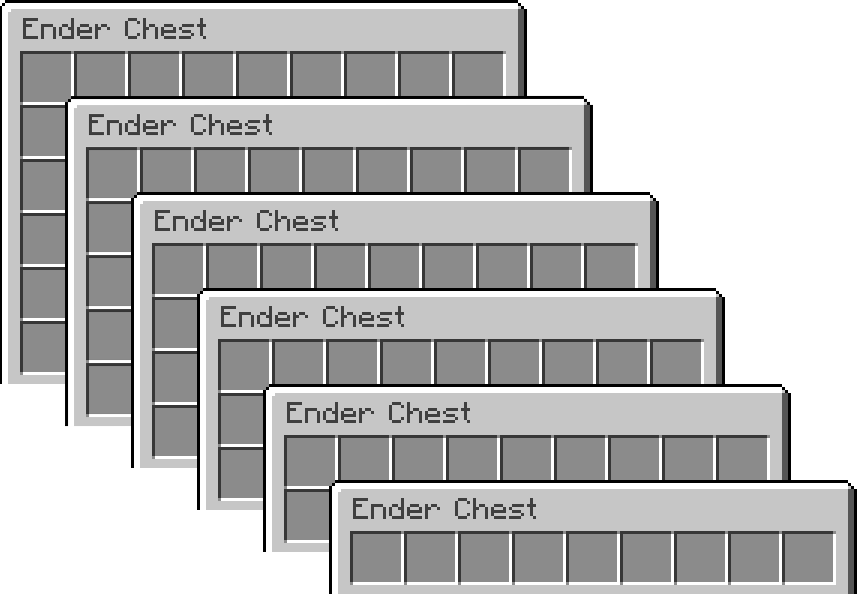
LsEnderChest 使用基于权限的虚拟存储替代原版末影箱,可为每位玩家提供 1–6 行的存储空间,底层支持 SQLite 或 MySQL。
版本 2.0.0 是一次重大重写,引入了实时共享储物箱会话、自动溢出保护、GUI 恢复历史、按玩家审计日志以及内置的原版末影箱转换器。
功能
- ?️ 高级反刷物品保护
- ?️ GUI 末影箱恢复
- ? 1–6 行末影箱
- ? 自动溢出保护
- ? 强大的管理工具
- ? 内置原版转换功能
- ? 详细的按玩家审计日志
- ? 高级物品拦截
- ? 支持 SQLite 与 MySQL
- ⚡ 异步存储
- ? 在线与离线 UUID 支持
- ? 管理员更新通知
2.0.0 新增内容
实时共享末影箱会话
LsEnderChest 现在为每个储物箱拥有者保持一个实时库存会话。如果拥有者已经打开了他们的储物箱,而管理员运行:
/ec <player>
双方用户将看到并编辑同一个实时库存。当拥有者在使用时,管理员不再被阻止访问,同时也避免了产生分离的陈旧可写副本。
只读模式的工作人员仍然可以查看其他玩家的储物箱,但无法对其进行修改。
自动溢出储物箱
失去等级或行数权限后,超出新储物箱容量的物品也不会再消失。
示例:玩家从 4 行降级到 1 行。
- 槽位 1–8 保持原位不变
- 第 9 个槽位变为溢出储物箱
- 从第 9 号槽位开始的所有物品都会被安全地移入其中
该规则同样适用于所有降级情况:新储物箱大小的最后一个槽位将成为溢出储物箱。
溢出储物箱是带有受保护的 LsEnderChest 元数据的普通 CHEST 物品。它们不可放置或用作可重复使用的存储;其实际内容保留在服务器端。令牌经过签名处理,绑定到其拥有者,并由唯一的存储 ID 支持,而不是依赖lore(描述文本)或可见元数据。
右键点击溢出储物箱会消耗它,并在玩家所在位置掉落所有存储的物品。 它无法被打开或填充,因此永远不会成为便携式的额外存储空间,其描述文本也会明确警告声称它是单次操作。
如果在后续的降级中捕获到未声明的溢出储物箱,其内容将被扁平化合并到新的溢出储物箱中,而不是嵌套存放。
权限变更会自动监控,并且下次打开时,离线玩家的存储状态也会被检查。
GUI 恢复系统
管理员可以通过以下命令打开玩家的恢复历史记录:
/ec restore <player>
GUI 显示了带时间戳的恢复点,工作人员可以在其中:
- 浏览之前的会话
- 预览确切的历史储物箱内容
- 选择恢复点
- 在第二个 GUI 中进行确认
一次正常的玩家会话变成一个恢复会话:
打开储物箱 → 进行任意次数的更改 → 关闭最后一个查看器 → 生成一个恢复点
单个物品的移动仍会单独记录以便审计。
在进行任何恢复之前,LsEnderChest 会创建一个恢复前备份,使得意外的恢复可以从同一 GUI 中撤销。
历史溢出储物箱也包含在内。当恢复旧的快照时,其溢出数据会在新的受保护 ID 下重新创建,而不是重用陈旧的令牌。
恢复功能仅对管理员开放。旧的库存状态可能会重现之前已移除的物品,因此此权限应仅授予可信的工作人员。
按玩家审计日志
旧的全球性 simple.log 和 detailed.log 系统已被替换为每个末影箱拥有者对应一个日志文件:
plugins/LsEnderChest/logs/players/<uuid>.log
日志记录了诸如以下信息:
- 储物箱的打开和关闭
- 确切的物品添加/移除
- 每次更改的责任人
- 管理员的打开和编辑
- 拦截物品的尝试
- 只读编辑尝试
- 溢出创建与一次性声明
- 行数降级
- 原版转换活动
- 恢复操作
- 机器可读的恢复快照
旧的 simple.log / detailed.log 文件归档至 logs/legacy/ 目录下而非删除,从而在升级期间保留现有的审计历史。
内置原版末影箱转换器
独立的 LsEnderChestConverter 不再需要。安全的原版迁移现在直接内置于 2.0.0 中:
- 加入时可选的自动一次性转换
/ec convert <player> 用于转换单个在线玩家/ec convert all 用于转换所有在线玩家- 仅在自定义存储成功保存后才清除原版储物箱内容
- 在清除前再次验证原版储物箱
- 如果迁移过程中内容发生变化,转换将回滚
- 绝不会盲目覆盖现有的不同 LsEnderChest 内容
- 可以检测并安全清理来自旧转换器的精确重复数据
为了安全起见,/ec convert all 不会立即启动。它会显示警告并要求:
/ec confirm
在配置的确认超时内执行。在此之前,不会进行任何转换。
如果旧转换器仍然安装,LsEnderChest 将禁用它并警告你移除旧的 JAR 文件。
命令
| 命令 |
描述 |
/ec |
打开你的末影箱 |
/ec <player> |
打开其他玩家的末影箱 |
/ec restore <player> |
打开管理员恢复历史 GUI |
/ec convert <player> |
安全迁移单个在线玩家的原版末影箱 |
/ec convert all |
为所有在线玩家准备批量转换 |
/ec confirm |
确认待处理的危险批量操作 |
/ec reload |
重载可重载的配置 |
/lsec 和 /enderchest 支持完全相同的子命令。
EssentialsX
/ec 和 /enderchest 被注册为完整的 Paper 根命令,而非别名。LsEnderChest 在 EssentialsX 之后加载,并有意接管裸 /ec 和 /enderchest 标签。如果需要,EssentialsX 的命名空间命令仍然可用。
权限
| 权限 |
描述 |
默认值 |
enderchest.use |
打开自己的 LsEnderChest |
true |
enderchest.admin |
编辑其他玩家的箱子,使用恢复和重载 |
op |
enderchest.view.other |
只读查看其他玩家的箱子 |
false |
enderchest.convert |
使用内置的原版转换器 |
op |
enderchest.bypass |
改用原版末影箱 |
false |
enderchest.blocked.bypass |
绕过物品限制 |
op |
enderchest.rows.1 |
提供 1 行 |
false |
enderchest.rows.2 |
提供 2 行 |
false |
enderchest.rows.3 |
提供 3 行 |
false |
enderchest.rows.4 |
提供 4 行 |
false |
enderchest.rows.5 |
提供 5 行 |
false |
enderchest.rows.6 |
提供 6 行 |
false |
系统会使用玩家拥有的最高行数权限。如果没有任何相关权限,则使用 settings.default-rows。
存储与安全
LsEnderChest 支持 SQLite 和 MySQL。
2.0.0 版本的存储/会话重写包括:
- 每个所有者共享一个实时箱子状态
- 专用工作线程上的有序数据库操作
- 针对临时故障的保存重试机制
- 具有更强同步持久性的 SQLite WAL(预写式日志)
- 恢复写入前的备份行为
- 带有服务端后备数据的签名一次性溢出箱子令牌
- 安全的溢出扁平化处理,而非嵌套
- 保存 → 验证 → 清除原版转换流程
- 转换验证失败时回滚
- 在箱子持久化之前进行最终的禁止物品清理
没有任何库存插件能保证抵御所有可能的服务器崩溃、文件系统故障、数据库故障或恶意第三方插件,但 2.0.0 旨在避免常见的陈旧副本、调整大小以及迁移过程中的数据重复/丢失路径。
物品屏蔽
blocked-items.yml 可以通过材质和支持的物品元数据/组件来限制物品。限制会在库存交互期间检查,并在最后一位观察者关闭箱子前再次检查。
兼容性
- Paper 26.3
- Java 25
- 兼容 Paper 的分叉版本可能可以使用,但 Paper 是主要支持的平台
安装 / 升级
- 停止服务器
- 在主版本升级前,备份服务器和
plugins/LsEnderChest 文件夹
- 如果存在旧的独立
LsEnderChestConverter.jar,请将其移除
- 将
LsEnderChest-2.0.0.jar 放入 plugins 文件夹
- 启动服务器
- 检查生成的
config.yml 和 blocked-items.yml
现有的 LsEnderChest 库存数据仍受支持。旧版审计日志会被归档而不是删除。
如果你喜欢这个插件,欢迎捐赠 :D
LsEnderChest
✨ A modern, lightweight and security-focused Ender Chest plugin for Paper 26.3.
LsEnderChest replaces the vanilla Ender Chest with permission-based virtual storage that can give each player 1–6 rows, backed by SQLite or MySQL.
Version 2.0.0 is a major rewrite with live shared chest sessions, automatic overflow protection, GUI restore history, per-player audit journals and a built-in vanilla Ender Chest converter.
Features
- ?️ Advanced Anti-Dupe Protection
- ?️ GUI Ender Chest Restores
- ? 1–6 Row Ender Chests
- ? Automatic Overflow Protection
- ? Powerful Admin Tools
- ? Built-In Vanilla Conversion
- ? Detailed Per-Player Audit Logs
- ? Advanced Item Blocking
- ? SQLite & MySQL
- ⚡ Asynchronous Storage
- ? Online & Offline UUID Support
- ? Admin Update Notifications
What's new in 2.0.0?
Live shared Ender Chest sessions
LsEnderChest now keeps one live inventory session per chest owner. If the owner already has their chest open and an administrator runs:
/ec <player>
both users see and edit the same live inventory. Admins are no longer blocked while the owner is using it, and separate stale writable copies are avoided.
Read-only staff can still view another player's chest without being able to modify it.
Automatic Overflow Chests
Losing a rank or row permission no longer makes items outside the new chest size disappear.
Example: a player goes from 4 rows to 1 row.
- Slots 1–8 stay where they are
- Slot 9 becomes an Overflow Chest
- Everything from slot 9 onward is safely moved into it
The same rule applies to every downgrade: the last slot of the new chest size becomes the Overflow Chest.
Overflow Chests are normal CHEST items with protected LsEnderChest metadata. They cannot be placed or used as reusable storage; their real contents stay server-side. Tokens are signed, tied to their owner and backed by a unique storage ID instead of trusting lore or visible metadata.
Right-clicking an Overflow Chest consumes it and drops every stored item at the player's location. It cannot be opened or filled, so it never becomes portable extra storage, and its lore clearly warns that claiming it is a one-time action.
If an unclaimed Overflow Chest is caught in a later downgrade, its contents are flattened into the new Overflow Chest instead of nesting them.
Permission changes are monitored automatically, and offline-player storage is checked the next time it is opened.
GUI restore system
Administrators can open a player's restore history with:
/ec restore <player>
The GUI shows timestamped restore points where staff can:
- Browse previous sessions
- Preview the exact historical chest contents
- Select a restore point
- Confirm it in a second GUI
A normal player session becomes one restore session:
open chest → make any number of changes → close the last viewer → one restore point
Individual item movements are still logged separately for auditing.
Before anything is restored, LsEnderChest creates a pre-restore backup, making accidental restores reversible from the same GUI.
Historical Overflow Chests are included too. When restoring an old snapshot, their overflow data is recreated under new protected IDs instead of reusing stale tokens.
Restore is intentionally administrator-only. Old inventory states can recreate items that were previously removed, so this permission should only be given to trusted staff.
Per-player audit journals
The old global simple.log and detailed.log system is replaced by one journal per Ender Chest owner:
plugins/LsEnderChest/logs/players/<uuid>.log
The journal records information such as:
- Chest opens and closes
- Exact item additions/removals
- The actor responsible for each change
- Admin opens and edits
- Blocked-item attempts
- Read-only edit attempts
- Overflow creation and one-time claims
- Row downgrades
- Vanilla conversion activity
- Restore actions
- Machine-readable restore snapshots
Old simple.log / detailed.log files are archived under logs/legacy/ instead of deleted, preserving existing audit history during the upgrade.
Built-in vanilla Ender Chest converter
The standalone LsEnderChestConverter is no longer required. Safe vanilla migration is now built directly into 2.0.0:
- Optional automatic one-time conversion on join
/ec convert <player> for one online player/ec convert all for all online players- Vanilla contents are only cleared after custom storage saves successfully
- The vanilla chest is verified again before clearing
- Conversion rolls back if its contents change during migration
- Different existing LsEnderChest contents are never blindly overwritten
- Exact duplicate data from the old converter can be detected and cleaned safely
For safety, /ec convert all does not start immediately. It shows a warning and requires:
/ec confirm
within the configured confirmation timeout. Until then, nothing is converted.
If the old converter is still installed, LsEnderChest disables it and warns you to remove the old JAR.
Commands
| Command |
Description |
/ec |
Open your Ender Chest |
/ec <player> |
Open another player's Ender Chest |
/ec restore <player> |
Open the admin restore-history GUI |
/ec convert <player> |
Safely migrate one online player's vanilla Ender Chest |
/ec convert all |
Arm bulk conversion for all online players |
/ec confirm |
Confirm the pending dangerous bulk action |
/ec reload |
Reload reloadable configuration |
/lsec and /enderchest support all of the exact same subcommands.
EssentialsX
/ec and /enderchest are registered as full Paper root commands rather than aliases. LsEnderChest loads after EssentialsX and intentionally takes ownership of the bare /ec and /enderchest labels. EssentialsX's namespaced commands remain available if needed.
Permissions
| Permission |
Description |
Default |
enderchest.use |
Open your own LsEnderChest |
true |
enderchest.admin |
Edit other players' chests, use restore and reload |
op |
enderchest.view.other |
View other players' chests read-only |
false |
enderchest.convert |
Use the built-in vanilla converter |
op |
enderchest.bypass |
Use the vanilla Ender Chest instead |
false |
enderchest.blocked.bypass |
Bypass item restrictions |
op |
enderchest.rows.1 |
Gives 1 row |
false |
enderchest.rows.2 |
Gives 2 rows |
false |
enderchest.rows.3 |
Gives 3 rows |
false |
enderchest.rows.4 |
Gives 4 rows |
false |
enderchest.rows.5 |
Gives 5 rows |
false |
enderchest.rows.6 |
Gives 6 rows |
false |
The highest row permission a player has is used. If none are present, settings.default-rows is used.
Storage & safety
LsEnderChest supports SQLite and MySQL.
2.0.0's storage/session rewrite includes:
- One shared live chest state per owner
- Ordered database work on a dedicated worker
- Save retries for transient failures
- SQLite WAL with stronger synchronous durability
- Restore backup-before-write behavior
- Signed one-time Overflow Chest tokens with server-side backing data
- Safe overflow flattening instead of nesting
- Save → verify → clear vanilla conversion flow
- Rollback when conversion verification fails
- Final blocked-item sweep before a chest is persisted
No inventory plugin can guarantee protection against every possible server crash, filesystem failure, database failure or malicious third-party plugin, but 2.0.0 is designed to avoid the common stale-copy, resize and migration duplication/data-loss paths.
Item Blocking
blocked-items.yml can restrict items by material and supported item metadata/components. Restrictions are checked during inventory interactions and again before the last viewer closes a chest.
Compatibility
- Paper 26.3
- Java 25
- Paper-compatible forks may work, but Paper is the primary supported platform
Installation / Upgrade
- Stop the server
- Back up your server and
plugins/LsEnderChest folder before a major-version upgrade
- Remove the old standalone
LsEnderChestConverter.jar if present
- Place
LsEnderChest-2.0.0.jar in the plugins folder
- Start the server
- Review the generated
config.yml and blocked-items.yml
Existing LsEnderChest inventory data remains supported. Legacy audit logs are archived rather than deleted.
If you enjoy the plugin, donations are appreciated :D


 插件

 插件
 插件
 插件
 插件
 插件
评论 0
登录后参与评分
还没有评论,来抢沙发吧