Lumen – Minecraft 高级光照系统
Lumen 是一款 Minecraft 插件,旨在通过优化光照来提升服务器的生活质量。它允许使用命令高效地照亮区域,并提供独特的物品:
- Lumen Torch(Lumen火把) – 以自定义光照等级自动照亮周围环境。
- Lumen Guard(Lumen守卫) – 防止敌对生物生成。
?注意: 无需资源包!专为 PaperMC 构建。

⚡️ 功能特性
- 智能光照优化: 根据光照强度自动跳过冗余的光源方块,在保持完美照明的同时减少方块数量。
- 放置安全: 智能避免在敏感方块(如树苗、红石机制等)附近放置光源,并支持配置安全距离。
- 动态光照 使用 命令 和 可合成的自定义物品 实现(无需资源包)。
- 自动照明 火把,支持自定义光照等级(Lumen Torch)。
- 怪物生成预防(Lumen Guard)。
- 集成 CoreProtect & FAWE。(推荐)
- 多语言支持 – 提供以下翻译:Spanish(西班牙语)、Chinese(中文)、English(英语)、French(法语)、German(德语)、Italian(意大利语)和 Brazilian Portuguese(巴西葡萄牙语)。
使用方法
玩家端
Lumen Torch 会自动照亮附近区域。
- 玩家手持 Lumen Torch 时右键点击空气,并在聊天栏中输入 0 到 15 之间的光照等级。
- 选定的光照等级将保存在火把中,并在放置时生效。
Lumen Guard 会阻止其范围内的怪物生成。- 移除火把不会导致物品丢失,且其效果会在移除后立即消失。
- 合成它们需要
lumen.craft.torch 和 lumen.craft.guard 权限。
合成配方
Lumen Torch
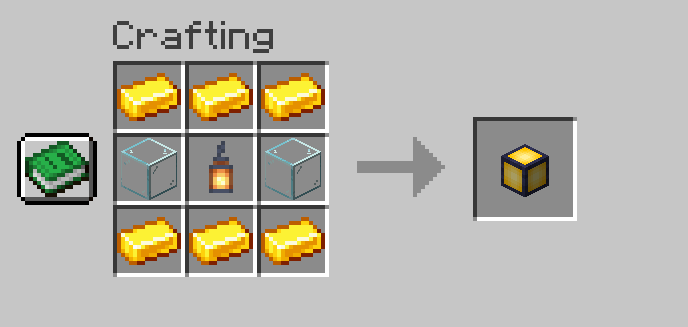
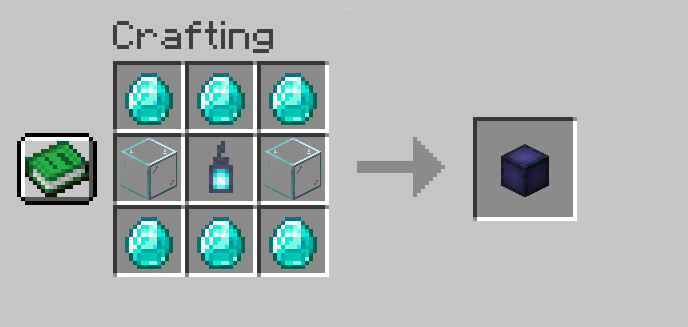
Lumen Guard
?️ 兼容集成
Lumen 可以利用其他工具来增强性能和功能:
- CoreProtect – 记录光源的放置和移除,允许回滚和审计。
- FastAsyncWorldEdit (FAWE) – 通过命令和 Lumen Torch 优化光源方块的放置,提升服务器性能。
? 命令与权限
命令
Lumen 还为每个命令 /lumen、/lu 和 /l 提供了多种别名。
/lumen light <range> <light_level> <include_skylight> – 动态放置光源。/lumen undo – 撤销之前的光源放置。/lumen redo – 重做被移除的光源。/lumen remove area <range> – 移除指定区域内的光源。/lumen clear confirm – 清除所有已注册的光源。/lumen give <player/all> <torch_type> <quantity> – 向玩家发放火把。/lumen reload – 重新加载配置和翻译文件。
权限
- OP 权限:
lumen.light – 使用 /lumen light 的权限。lumen.cancel – 取消当前活动的任务。lumen.undo – 撤销放置操作的权限。lumen.redo – 重做移除操作的权限。lumen.remove – 移除光源的权限。lumen.clear – 清除所有光源的权限。lumen.give – 发放 Lumen Torch 和 Lumen Guard 的权限。lumen.reload – 重新加载配置和翻译文件的权限。
- PLAYER 权限:
lumen.craft.* – 合成所有 Lumen 物品的权限。
lumen.craft.torch – 合成 Lumen Torch 的权限。lumen.craft.guard – 合成 Lumen Guard 的权限。
管理员端
- 智能间距: 通过
spacing_factor 控制光源方块的密度。
- 安全设置: 自定义要避免的方块类型及安全距离半径。
- 使用命令进行高级光照管理。
- 使用
/lumen remove 安全地移除光源。
- 使用
/lumen undo 和 /lumen redo 撤销或重做光源放置。
- 使用
/lumen clear 清除所有光源(危险操作)。
- 使用
/lumen give 分发物品。
- 通过
config.yml 和 Translations/ 目录中的翻译文件进行全面定制。
- 集成 CoreProtect 和 FAWE 以增强性能和控制力。
- 使用
/lumen reload 重新加载配置和翻译文件。
? 安装指南
安装
前置要求
在安装 Lumen 之前,请确保您的服务器满足以下要求:
- Minecraft Server: PaperMC 1.21.1 或更高版本。
- Java: 版本 21 或更高。
- 可选依赖项:
- CoreProtect(可选): 启用对放置或移除光源的追踪和回滚功能。
- FastAsyncWorldEdit(可选): 优化大量光源放置的性能。
步骤 1:下载插件
从 Modrinth 下载最新版本的 Lumen。
步骤 2:安装
- 将文件
Lumen.jar 上传到 PaperMC 服务器的 plugins/ 文件夹中。
- 重启服务器 以自动生成配置文件。
第三步:初始配置
- 进入配置文件目录:
plugins/Lumen/
- 编辑
config.yml 以调整性能和安全设置:
smart_lighting.spacing_factor: 控制照明过程中跳过的方块数量。safety.margin: 围绕敏感材料时避免的方块半径。safety.excluded_blocks: 需要避免的材料列表(如树苗、红石等)。command_lights_per_tick: 使用命令时的每秒灯光数。
- 如果使用 CoreProtect/FAWE, 在服务器启动时检查控制台日志,确认是否成功检测。
? 支持与联系
如果您有任何问题或遇到问题,请随时通过 Discord 联系我们
Lumen – Advanced Lighting for Minecraft
Lumen is a Minecraft plugin designed to enhance server quality of life by optimizing lighting. It allows efficient area illumination using commands and offers unique items:
- Lumen Torch – Automatically lights up the surroundings with custom light level.
- Lumen Guard – Prevents hostile mobs from spawning.
?Attention: NO resource pack needed! Built exclusively for PaperMC.
⚡️ Features
- Smart Lighting Optimization: Automatically skips redundant light blocks based on light intensity, reducing block count while maintaining perfect illumination.
- Placement Safety: Intelligently avoids placing lights near sensitive blocks (saplings, redstone mechanisms, etc.) with a configurable safety margin.
- Dynamic lighting using commands and custom crafteable items (No resource pack needed).
- Auto-lighting torches with custom light level (Lumen Torch).
- Mob spawn prevention (Lumen Guard).
- Integration with CoreProtect & FAWE. (Recommended)
- Multilingual Support – Available translations: Spanish, Chinese, English, French, German, Italian and Brazilian Portuguese.
Usage
For Players
- The
Lumen Torch automatically lights up nearby areas.
- Players can right-click the air while holding a Lumen Torch and input a light level between 0 and 15 in the chat.
- The selected light level will be stored in the torch and applied when placed.
- The
Lumen Guard prevents mob spawning within its range.
- Torches can be removed without being lost, and their effects disappear when removed.
- To craft them, you need
lumen.craft.torch and lumen.craft.guard permissions.
Crafting Recipes
Lumen Torch
Lumen Guard
?️ Compatible Integrations
Lumen can leverage other tools to enhance performance and functionality:
- CoreProtect – Logs light placements and removals, allowing rollbacks and audits.
- FastAsyncWorldEdit (FAWE) – Optimizes light block placement through commands and the Lumen Torch, improving server performance.
? Commands & Permissions
Commands
Lumen also provides a variety of aliases for each command /lumen, /lu, and /l.
/lumen light <range> <light_level> <include_skylight> – Places lights dynamically./lumen undo – Undoes previous light placements./lumen redo – Redoes removed lights./lumen remove area <range> – Removes lights in a specified area./lumen clear confirm – Clears all registered lights./lumen give <player/all> <torch_type> <quantity> – Gives torches to players./lumen reload – Reloads configuration and translations.
Permissions
- OP Permissions:
lumen.light – Permission to use /lumen light.lumen.cancel – Permission to cancel active tasks.lumen.undo – Permission to undo placements.lumen.redo – Permission to redo removed lights.lumen.remove – Permission to remove lights.lumen.clear – Permission to clear all lights.lumen.give – Permission to give Lumen Torch and Lumen Guard.lumen.reload – Permission to reload configuration and translations.
- PLAYER Permissions:
lumen.craft.* – Permission to craft all Lumen items.
lumen.craft.torch – Permission to craft the Lumen Torch.lumen.craft.guard – Permission to craft the Lumen Guard.
For Administrators
- Smart Spacing: Control the density of light blocks with
spacing_factor.
- Safety Settings: Customize which blocks to avoid and the safety margin radius.
- Advanced light management using commands.
- Safe light removal with
/lumen remove.
- Undo and redo light placements with
/lumen undo and /lumen redo.
- Clear all lights with
/lumen clear (Dangerous).
- Item distribution using
/lumen give.
- Full customization through
config.yml and translation files in Translations/.
- Integration with CoreProtect and FAWE for enhanced performance and control.
- Reload configuration and translations with
/lumen reload.
? Installation Guide
Installation
Prerequisites
Before installing Lumen, make sure your server meets the following requirements:
- Minecraft Server: PaperMC 1.21.1 or higher.
- Java: Version 21 or higher.
- Optional Dependencies:
- CoreProtect (Optional): Enables tracking and rollback of placed or removed lights.
- FastAsyncWorldEdit (Optional): Optimizes performance for placing large amounts of lights.
Step 1: Download the Plugin
Download the latest version of Lumen from Modrinth.
Step 2: Installation
- Upload the file
Lumen.jar to the plugins/ folder of your PaperMC server.
- Restart the server to automatically generate the configuration files.
Step 3: Initial Configuration
- Navigate to the configuration folder:
plugins/Lumen/
- Edit
config.yml to adjust performance and safety settings:
smart_lighting.spacing_factor: Control how many blocks are skipped during lighting.safety.margin: Radius of blocks to avoid around sensitive materials.safety.excluded_blocks: List of materials to avoid (saplings, redstone, etc.).command_lights_per_tick: Lights per tick when using commands.
- If using CoreProtect/FAWE, check the server console on startup for successful detection.
? Support & Contact
If you have any questions or encounter issues, feel free to contact us on Discord


 插件

 插件
 插件
 插件
 插件
 插件
评论 0
登录后参与评分
还没有评论,来抢沙发吧