
对战锤上限、附魔、战斗规则和所有者可见性的服务端控制。
| 功能 |
作用 |
配置方式 |
| 制作上限 |
限制全服可制作的追踪战锤数量 |
配置文件或图形界面 (GUI) |
| 附魔规则 |
允许选定的附魔,并为每种附魔强制执行最高等级 |
配置文件、图形界面 (GUI) 或命令 |
| 战斗平衡 |
添加可选的自定义战锤攻击冷却时间 |
配置文件、图形界面 (GUI) 或命令 |
| 所有者可见性 |
为所有者发光效果、掉落战锤和标签页列表名称着色 |
配置文件、图形界面 (GUI) 或命令 |
| 位置揭示 |
以可配置的间隔播报战锤持有者的位置 |
配置文件、图形界面 (GUI) 或命令 |
| 里程碑警报 |
播报战锤制作进度以及全服上限达成情况 |
配置文件或图形界面 (GUI) |
查看效果
从一个菜单配置战锤规则
运行 /maceconfig gui 来管理上限、战斗规则、所有者视觉效果、公告、追踪和重载。

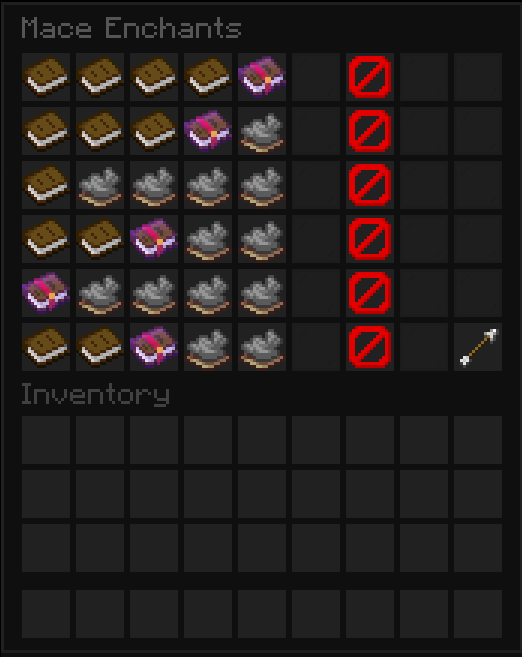
可视化设置附魔上限
打开附魔编辑器,以允许或阻止每种战锤附魔,并选择其最高等级。
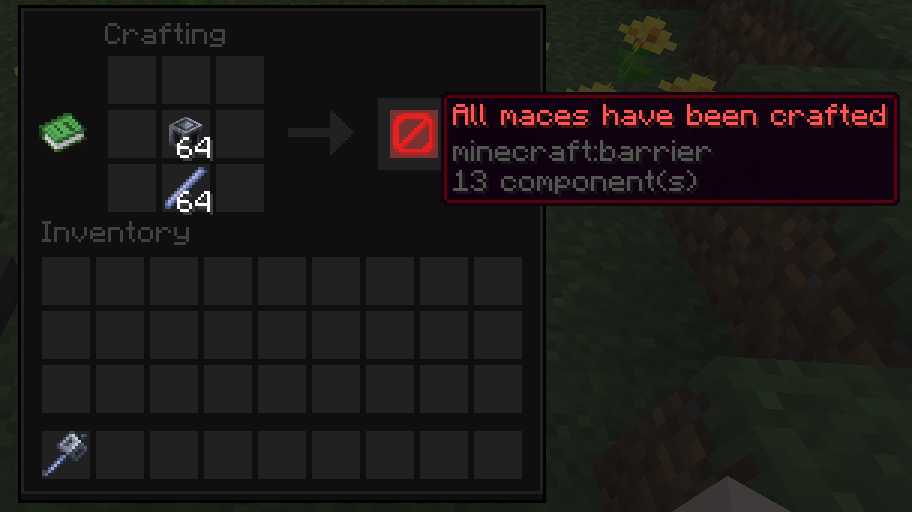
立即识别被阻止的制作
当达到战锤上限时,制作结果将变为不可制作的障碍指示物。
安装
- 为 Minecraft 26.1 或 26.2 安装一个受支持的基于 Bukkit 的服务端。
- 从 Modrinth 下载 Mace Config
.jar 文件。
- 将
.jar 文件放入服务端的 plugins 目录中。
- 重启服务端,然后确认
/plugins 列表中出现了 Mace Config。
Mace Config 没有硬性插件依赖。
兼容性
Mace Config 支持在以下平台上运行 Minecraft 26.1–26.2:
- CraftBukkit (Bukkit)
- Spigot
- Paper
- Purpur 及其他非区域化、兼容 Paper 的分叉版本
目前不支持 Folia 和其他基于区域线程的服务端软件。Mace Config 仅在服务端运行;玩家无需安装任何内容。
使用
- 拥有
maceconfig.admin 权限加入服务器;服务器操作员默认获得此权限。
- 运行
/maceconfig gui 打开主设置菜单。
- 选择一个类别来配置战锤上限、附魔、冷却时间、所有者视觉效果、位置揭示或公告。
- 在更改或恢复玩家存储后,运行
/maceconfig refresh 以重新统计在线玩家持有的追踪战锤数量。
- 在直接编辑
plugins/MaceConfig/config.yml 后,运行 /maceconfig reload。
提示: 刷新操作会扫描在线玩家的物品栏、末影箱和嵌套的潜影盒。它不会扫描离线玩家或任意世界容器。
命令
别名:/macecfg, /mcconfig
权限:maceconfig.admin
| 命令 |
用途 |
/maceconfig gui |
打开交互式设置菜单 |
/maceconfig reload |
重载 config.yml 并重启依赖配置的任务 |
/maceconfig refresh |
重新统计在线玩家存储中的追踪战锤数量 |
/maceconfig set limit <amount> |
设置制作上限;0 表示无限制 |
/maceconfig set cooldown <seconds> |
设置自定义攻击冷却时间;0 表示禁用 |
/maceconfig set revealinterval <seconds> |
设置位置揭示间隔;最小值为 5 秒 |
/maceconfig set color <color> |
设置共享的所有者、标签页列表和掉落战锤颜色 |
/maceconfig toggle <setting> |
切换 enchantable(可附魔)、glow(发光)、tab(标签页)、reveal(揭示)、craftedchat(制作聊天)、fullchat(完整聊天)或 fulltitle(完整标题) |
/maceconfig enchantlevel <enchantment> <max-level> |
设置允许附魔的最高等级 |
/maceconfig whitelist add <enchantment> |
允许战锤附带某种附魔 |
/maceconfig whitelist remove <enchantment> |
阻止战锤附带某种附魔 |
/maceconfig whitelist list |
显示允许的战锤附魔列表 |
从源代码构建
需要 JDK 25。从仓库根目录开始,构建覆盖整个受支持 Minecraft 版本的单一 API 目标:
gradle clean build
可分发的 jar 文件将写入 build/libs/MaceConfig-<version>.jar。该 jar 同样支持 Minecraft 26.1–26.2。
GPL-3.0-only · 2026 · NullKeeper-dev
Server-side control over mace limits, enchantments, combat rules, and owner visibility.
| Feature |
What it does |
Control |
| Craft limits |
Caps the number of tracked maces that can be crafted server-wide |
Config or GUI |
| Enchantment rules |
Allows selected enchantments and enforces a maximum level for each |
Config, GUI, or commands |
| Combat balance |
Adds an optional custom mace attack cooldown |
Config, GUI, or command |
| Owner visibility |
Colors owner glow, dropped maces, and tab-list names |
Config, GUI, or commands |
| Position reveals |
Announces mace wielder locations at a configurable interval |
Config, GUI, or commands |
| Milestone alerts |
Announces mace crafts and when the server-wide limit is reached |
Config or GUI |
See it in action
Configure mace rules from one menu
Run /maceconfig gui to manage limits, combat rules, owner visuals, announcements, tracking, and reloads.

Set enchantment limits visually
Open the enchantment editor to allow or block each mace enchantment and select its maximum level.

Recognize blocked crafts immediately
When the mace limit is reached, the crafting result becomes an uncraftable barrier indicator.

Install
- Install a supported Bukkit-based server for Minecraft 26.1 or 26.2.
- Download the Mace Config
.jar from Modrinth.
- Place the
.jar in the server's plugins directory.
- Restart the server, then confirm that Mace Config appears in
/plugins.
Mace Config has no hard plugin dependencies.
Compatibility
Mace Config supports Minecraft 26.1–26.2 on:
- CraftBukkit (Bukkit)
- Spigot
- Paper
- Purpur and other non-regionized, Paper-compatible forks
Folia and other region-threaded server software are not currently supported. Mace Config is server-side only; players do not need to install anything.
Use
- Join with the
maceconfig.admin permission; server operators receive it by default.
- Run
/maceconfig gui to open the main settings menu.
- Select a category to configure mace limits, enchantments, cooldowns, owner visuals, reveals, or announcements.
- Run
/maceconfig refresh after changing or restoring player storage to recount tracked maces held by online players.
- Use
/maceconfig reload after editing plugins/MaceConfig/config.yml directly.
Tip: A refresh scans online player inventories, ender chests, and nested shulker boxes. It does not scan offline players or arbitrary world containers.
Commands
Aliases: /macecfg, /mcconfig
Permission: maceconfig.admin
| Command |
Purpose |
/maceconfig gui |
Open the interactive settings menu |
/maceconfig reload |
Reload config.yml and restart configuration-dependent tasks |
/maceconfig refresh |
Recount tracked maces in online player storage |
/maceconfig set limit <amount> |
Set the crafting limit; 0 is unlimited |
/maceconfig set cooldown <seconds> |
Set the custom attack cooldown; 0 disables it |
/maceconfig set revealinterval <seconds> |
Set the position reveal interval; minimum 5 seconds |
/maceconfig set color <color> |
Set the shared owner, tab-list, and dropped-mace color |
/maceconfig toggle <setting> |
Toggle enchantable, glow, tab, reveal, craftedchat, fullchat, or fulltitle |
/maceconfig enchantlevel <enchantment> <max-level> |
Set an allowed enchantment's maximum level |
/maceconfig whitelist add <enchantment> |
Allow an enchantment on maces |
/maceconfig whitelist remove <enchantment> |
Block an enchantment on maces |
/maceconfig whitelist list |
Show allowed mace enchantments |
Build from source
JDK 25 is required. From the repository root, build the single API target that covers the full supported Minecraft range:
gradle clean build
The distributable jar is written to build/libs/MaceConfig-<version>.jar. The same jar supports Minecraft 26.1–26.2.
GPL-3.0-only · 2026 · NullKeeper-dev
评论 0
登录后参与评分
还没有评论,来抢沙发吧