MaxiWorld
MaxiWorld 源于我家孩子提出的一个简单问题:如果方块变大会怎样?
当时我正忙于 CityWorld/Conurbation,但如今终于有了这个问题的答案。

Version 0.53
<sub>(新版本的插件在通过审批流程时可能会有延迟,如果上述版本不可用,请稍等一小时后再查看)</sub>
Beta
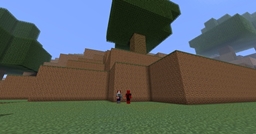
这是一个“简单”的世界生成器,它会创建一个类似 MineCraft 的世界,包含山丘、湖泊和树木,但有一个不同之处:一切都会稍微大一些。
具体来说,每个方块的高度是原来的四倍;如果你真的想体验蚂蚁般的视角,还可以将世界配置为八倍大小。
请注意,使用八倍大小的模式确实会导致世界运行变慢。
我不确定这个插件还能做些什么,所以它可能也就这样了,时间会给出答案。
把它当作一个“新奇世界”吧,玩得开心。欢迎在此留言或创建新主题,谢谢。
Technical info
- v0.53 在树叶中添加了日志记录,以应对玩家开始作弊的情况
- v0.51 1.2.3-R0.2 修复了一些字符串和权限问题
- v0.50 初始发布
- v0.49 1.1 R6 兼容
MaxiWorld 命令的权限(请使用你喜欢的权限插件)
- MaxiWorld.command (默认为 op)
配置文件现在会在 MaxiWorld 运行时生成。
这些选项仅影响“新生成的世界”,并且目前不具有世界特异性。
在世界生成后更改它们有时会产生一些奇怪的结果。
- Global.BlockSize (默认为 4)目前你可以选择 4 或 8,后者会让游戏稍慢一些
Installing
这纯粹是一个世界生成器。
如果你需要传送或世界管理支持,有很多插件可以为你做到这一点。
Bukkit 插件生态不需要更多的这类插件了。
这只是一个世界生成器。:-)
安装它你需要做三件事……
- 下载插件并将其放入 Bukkit 的 plugin 文件夹中。 如果你不知道 Bukkit 的 plugin 文件夹在哪里或是什么,请阅读这里。
- 现在通过 Bukkit 启动 Minecraft Server。 如果你不知道如何操作,我建议重新阅读这里。
此时,你可能会问自己:我如何到达城市?
有两种选择……
- 按 “T”,输入 “/MaxiWorld” 并按回车(如果这样做,请记住,在你修改 bukkit 的 YML 以包含对世界的引用之前,某些插件可能与 MaxiWorld 不兼容)
- 或者……你可以使用多世界插件,并将 MaxiWorld 作为其中一个世界的生成器。我们使用的是 Multiverse。
如果你仍然感到困惑,请再次阅读这里。:-)
MaxiWorld
MaxiWorld came from a simple question from my kids: What if the blocks were bigger?
I was kind of busy with CityWorld/Conurbation at the time but here is the answer to that question finally.
Version 0.53
<sub>(sometimes there is a delay in getting the new version of the plugin through the approval process, if the above version isn't available check back in an hour or so)</sub>
Beta
This is a "simple" world generator that creates a MineCraft like world with hills, lakes and trees with one twist: everything is a bit bigger.
Specifically every block is four times taller, or if you really want to feel like an ant you can configure the world to be eight times larger.
Mind you using the eight times bigger mode really causes the world to slow down.
I am not sure what else to do with this plugin so this might be all it ever is, only time will tell.
Consider it a "novelty world" and have fun. Feel free to add your comments to them or add a new thread, thanks.
Technical info
- v0.53 Added some logs into the leaves to keep them happy when people start hacking
- v0.51 1.2.3-R0.2 Happy and Fixed a few string and permission issues
- v0.50 Initial release
- v0.49 1.1 R6 Happy
Permissions for MaxiWorld command (used your favorite perms plugin)
- MaxiWorld.command (defaults to op)
Config option file is now generated when MaxiWorld runs.
These options only affect "new generation" and are not world specific (yet).
Changing them after a world has been generated will produce some odd results at times.
- Global.BlockSize (defaults to 4) currently you can pick 4 or 8, the later makes things a bit slower
Installing
This is purely a world generator.
If you need teleportation or world management support there are plenty of plugins that will do that for you.
The Bukkit plugin ecosystem does not need more of those puppies.
This is JUST A WORLD GENERATOR. :-)
To install it you will need to do three things...
- Download the plugin and place it in Bukkit's plugin folder. If you don't know where or what the Bukkit's plugin folder is, read this.
- Now start up Minecraft Server via Bukkit. If you don't know how to do this, I recommend rereading this.
At this point, you may be asking yourself: How do I get to the city?
There are two options...
- Press "T", type in "/MaxiWorld" and press return (if you do this, remember that some plugins might not work with MaxiWorld until you modify bukkit's YML to include a reference to the world)
- OR... you can use a multiverse plugin and use the MaxiWorld as the generator for one of your worlds. We use Multiverse.
If you are still confused then rereread this. :-)

 插件
 插件
 插件
 插件

 插件
 插件
评论 0
登录后参与评分
还没有评论,来抢沙发吧