迷宫生成器
KasaiSora 的史诗级展示
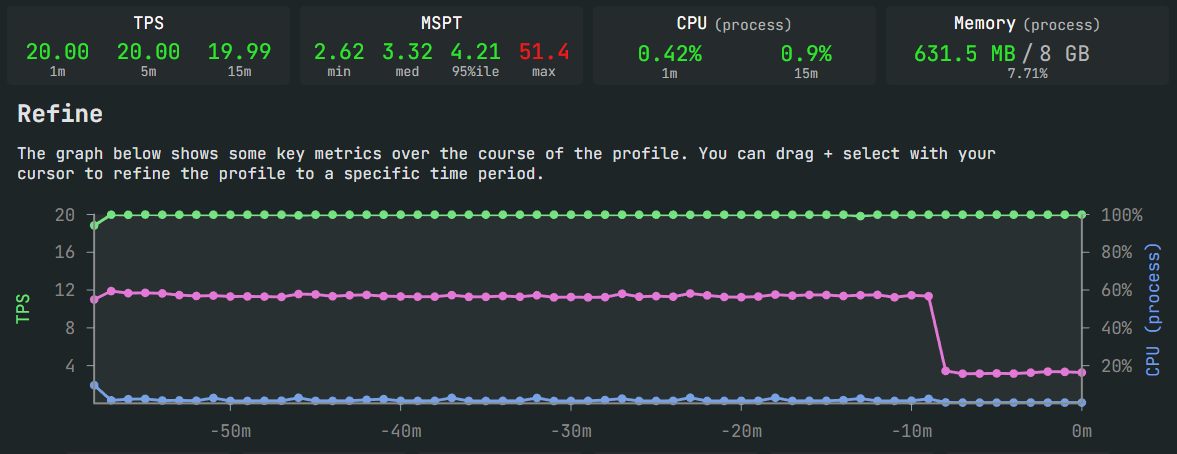
适用于低配服务器或大型拥挤服务器
? 欢迎随时通过 mazegenerator@radqnico.anonaddy.com 联系我
MazeGenerator ?
在 Modrinth 上下载
在 Minecraft 中构建巨大的、主题化的迷宫,而不会导致服务器卡顿。该插件增量式地生成迷宫布局,并随时间推移放置方块,具有可配置的每刻预算。工作按区块分组,且仅在需要放置方块的精确时刻按需加载区块。
功能 ✨
- 流式生成与放置 - 没有庞大的内存队列。
- 仅按需加载区块(从不预加载)。
- 自动调整的每刻时间预算以保护 TPS。
- 按区块分组的放置(每个任务多个单元格)以减少开销。
- 加权材质主题用于地板、墙壁和顶部(
themes.yml)。
- 支持空心墙壁和封闭屋顶选项。
- Tab 补全参数,以及
/maze help、/maze stop、/maze reload 命令。
安装 ⚙️
- 构建或下载插件 JAR 文件。
- 将 JAR 文件放入服务器的
plugins/ 文件夹中。
- 启动服务器一次以生成默认配置文件和数据文件。
创建/使用的文件:
plugins/MazeGenerator/config.yml - 性能和行为设置。plugins/MazeGenerator/themes.yml - 各主题的材质权重。plugins/MazeGenerator/messages.yml - 面向用户的消息。
更改这些文件后,请使用 /maze reload,或者重启插件/服务器。
命令 ⌨️
/maze - 开始构建,在您位置附近使用合理默认值。/maze stop - 停止所有活跃的迷宫构建。/maze help - 打印用法和参数参考。/maze reload - 重新加载 config.yml、themes.yml 和 messages.yml。
权限:
mazegenerator.maze - 使用 /maze 并查看状态。mazegenerator.reload - 使用 /maze reload。
参数 (key:value)
顺序无关紧要;Tab 补全会提示键和许多值。
x, y, z: 世界坐标(默认为您的位置)。world: 世界名称(默认为您的世界)。mazeSizeX, mazeSizeZ: 迷宫尺寸(以单元格为单位)(内部强制为奇数)。cellSize: 每个单元格足迹的方块宽度和长度。wallHeight: 垂直墙壁高度(不包括顶层)。hasExits: true|false - 确保迷宫边界至少有一个出口。additionalExits: 除第一个之外的额外出口数量(0..N)。hasRoom: true|false - 雕刻一个中央矩形房间。roomSizeX, roomSizeZ: 中央房间的尺寸(单元格)。erosion: 0..1 - 雕刻时在附近墙壁上偶尔产生小孔。closed: true|false - 路径上方也有屋顶(否则路径通向天空)。hollow: true|false - 墙壁单元格作为外壳(仅限边缘),以大幅节省方块。themeName: 来自 themes.yml 的主题键(Tab 补全会列出可用主题)。
示例:
/maze mazeSizeX:51 mazeSizeZ:51 cellSize:2 wallHeight:4 hasExits:true additionalExits:1 themeName:forest/maze world:world_nether x:100 y:80 z:-200 mazeSizeX:41 mazeSizeZ:41 themeName:snowy/maze mazeSizeX:75 mazeSizeZ:75 cellSize:3 wallHeight:5 hasExits:true hollow:true closed:false themeName:desert
配置 (config.yml) ?️
默认值经过调整,可在大多数服务器上保持 TPS。关键设置:
-
millis-per-tick (默认 3)
构建器每刻使用的基础时间预算。自动调整会在界限内上下调整此值。
-
jobs-batch-cells (默认 64)
调度器每次补充时尝试收集的迷宫单元格数量。较大的值会略微减少开销,但可能会增加突发性。
-
cells-per-job (默认 16)
为给定区块打包到单个放置作业中的单元格数量。较高的值可减少调度器开销和冗余的区块加载。
-
set-block-data (默认 false)
附加 CustomBlockData 到已放置的方块。对于大多数构建,应保持为 false(节省 I/O 和内存)。
-
defer-wall-fill (默认 false)
建造顺序选项:
true: 先雕刻(走廊快速出现),然后填充剩余墙壁;通常总写入次数较少。false: 先填充墙壁,然后雕刻;起初看起来像实心块,然后路径出现。
-
autotune: (默认启用)
min-millis-per-tick, max-millis-per-tick - 每刻时间预算的界限。increase-step, decrease-step - 预算增长或收缩的速度。spare-high, spare-low - 基于当前 50 ms 刻内剩余时间的阈值。
-
status-interval-jobs (默认 1000)
大致每执行 N 个任务就在聊天中打印进度更新。
注意: 插件在放置时按需加载区块。没有预加载,也没有后台区块预算。
示例:平滑(最小 TPS 影响)
millis-per-tick: 2
jobs-batch-cells: 32
cells-per-job: 8
set-block-data: false

autotune:
  enabled: true
  min-millis-per-tick: 1
  max-millis-per-tick: 4
  increase-step: 1
  decrease-step: 2
  spare-high: 18
  spare-low: 12

defer-wall-fill: true
status-interval-jobs: 500
示例:平衡(类默认)
millis-per-tick: 3
jobs-batch-cells: 64
cells-per-job: 16
set-block-data: false

autotune:
  enabled: true
  min-millis-per-tick: 1
  max-millis-per-tick: 8
  increase-step: 1
  decrease-step: 2
  spare-high: 18
  spare-low: 12

defer-wall-fill: false
status-interval-jobs: 1000
示例:快速(接受一定的尖峰风险)
millis-per-tick: 5
jobs-batch-cells: 128
cells-per-job: 32
set-block-data: false

autotune:
  enabled: true
  min-millis-per-tick: 2
  max-millis-per-tick: 10
  increase-step: 1
  decrease-step: 1
  spare-high: 20
  spare-low: 10
defer-wall-fill: true
status-interval-jobs: 750
主题(themes.yml)?
主题控制三个部分 floor(地面)、wall(墙壁)和 top(顶部)的加权材质选择。
示例:
desert:
  floor:
    SANDSTONE: 20
    RED_SANDSTONE: 10
  wall:
    SAND: 40
    CHISELED_SANDSTONE: 20
  top:
    SANDSTONE: 3

forest:
  floor:
    GRASS_BLOCK: 20
    DIRT: 2
  wall:
    OAK_LOG: 30
    OAK_LEAVES: 25
  top:
    OAK_LOG: 3
权重为正整数。权重越高,被选中的概率越大。如果某个部分为空,则回退使用 STONE(石头)。
提示:
- 在
wall 和 top 中使用更多样化的材质,以获得更自然的外观。
- 保持
top 的材质较轻,以营造有趣的轮廓效果。
消息(messages.yml)?
plugin-prefix、job-started、job-status、job-done、job-stopped、command-error、no-permission、config-reloaded。- 颜色代码使用
& 符号,并在发送时进行翻译。
Autotune 工作原理(快速概览)⚖️
- 测量当前 50 ms 服务器刻(tick)内的空闲时间(基于刻开始事件)。
- 如果空闲时间充足(
spare >= spare-high),它将每刻的时间预算增加 increase-step,最高可达 max-millis-per-tick。
- 如果刻时间紧张(
spare < spare-low),它将减少 decrease-step,最低降至 min-millis-per-tick。
- 生成器在每个刻中仅在
now + currentMillisPerTick 之前放置方块。
性能优化建议 ?
- 使用
hollow: true 并设置更大的 cellSize,以大幅减少总方块数。
- 增加
cells-per-job 和 jobs-batch-cells,以减少调度开销。
- 除非确实需要,否则请保持
set-block-data: false。
- 优先使用
defer-wall-fill: true 以实现更快的可见迷宫渲染时间并减少写入操作。
故障排除 ?
-
“迷宫似乎卡住了”或没有进展:
- 聊天更新是周期性的。降低
status-interval-jobs 可获得更频繁的反馈。
- 检查控制台是否有错误。如果区块距离极远,每个任务将按需加载它们;这可能会较慢,但不应导致停滞。
-
建造期间 TPS 下降:
- 降低
millis-per-tick、jobs-batch-cells 或 cells-per-job。
- 保持
autotune.enabled: true,以便自动退回预算。
-
主题看起来过于单一:
- 在
wall 和 top 部分中添加更多材质和权重。
玩得开心,干杯! ?
Maze Generator
Epic showcase by KasaiSora
Usable on low end servers or big crowded servers
? Feel free to contact me at mazegenerator@radqnico.anonaddy.com
MazeGenerator ?
Download on Modrinth
Build massive, themed mazes in Minecraft without freezing the server. The plugin generates the maze layout incrementally and places blocks over time with a configurable per-tick budget. Work is grouped per chunk, and chunks are only loaded on demand at the exact moment blocks need to be placed.
Features ✨
- Streaming generation and placement - no giant in-memory queues.
- On-demand chunk loading only (never preloads).
- Autotuned per-tick time budget to protect TPS.
- Chunk-grouped placement (multiple cells per job) to reduce overhead.
- Weighted material themes for floor, wall, and top (
themes.yml).
- Options for hollow walls and closed roofs.
- Tab-complete for arguments, plus
/maze help, /maze stop, /maze reload.
Installation ⚙️
- Build or download the plugin JAR.
- Drop the JAR into your server’s
plugins/ folder.
- Start the server once to generate default config and data files.
Files created/used:
plugins/MazeGenerator/config.yml - performance and behavior settings.plugins/MazeGenerator/themes.yml - material weights per theme.plugins/MazeGenerator/messages.yml - user-facing messages.
Use /maze reload after changing these files, or restart the plugin/server.
Commands ⌨️
/maze - starts a build with sensible defaults near your position./maze stop - stops all active maze builds./maze help - prints usage and argument reference./maze reload - reloads config.yml, themes.yml, and messages.yml.
Permissions:
mazegenerator.maze - use /maze and view status.mazegenerator.reload - use /maze reload.
Arguments (key:value)
Order does not matter; tab-complete suggests keys and many values.
x, y, z: World coordinates (defaults to your position).world: World name (defaults to your world).mazeSizeX, mazeSizeZ: Maze size in cells (odd enforced internally).cellSize: Block width and length of each cell footprint.wallHeight: Vertical wall height (excluding top layer).hasExits: true|false - ensure at least one exit at maze border.additionalExits: Extra exits on top of the first (0..N).hasRoom: true|false - carves a central rectangular room.roomSizeX, roomSizeZ: Room dimensions (cells) for the central room.erosion: 0..1 - occasional small holes in nearby walls while carving.closed: true|false - roof over paths as well (otherwise paths are open to sky).hollow: true|false - wall cells as a shell (edges only) for huge block savings.themeName: Theme key from themes.yml (tab-complete lists available themes).
Examples:
/maze mazeSizeX:51 mazeSizeZ:51 cellSize:2 wallHeight:4 hasExits:true additionalExits:1 themeName:forest/maze world:world_nether x:100 y:80 z:-200 mazeSizeX:41 mazeSizeZ:41 themeName:snowy/maze mazeSizeX:75 mazeSizeZ:75 cellSize:3 wallHeight:5 hasExits:true hollow:true closed:false themeName:desert
Configuration (config.yml) ?️
Defaults are tuned to preserve TPS on most servers. Key settings:
-
millis-per-tick (default 3)
Base time budget per tick used by the builder. Autotune adjusts this up or down within bounds.
-
jobs-batch-cells (default 64)
How many maze cells the scheduler tries to collect per top-up. Larger values reduce overhead a little, but can increase burstiness.
-
cells-per-job (default 16)
How many cells to pack into a single placement job for a given chunk. Higher values reduce scheduler overhead and redundant chunk loads.
-
set-block-data (default false)
Attach CustomBlockData to placed blocks. For most builds this should remain false (saves I/O and memory).
-
defer-wall-fill (default false)
Build order option:
true: carve first (corridors appear quickly), then fill remaining walls; generally fewer total writes.false: fill walls first, then carve; looks like a solid mass at first, then paths appear.
-
autotune: (enabled by default)
min-millis-per-tick, max-millis-per-tick - bounds for the per-tick time budget.increase-step, decrease-step - how fast the budget grows or shrinks.spare-high, spare-low - thresholds based on remaining time in the current 50 ms tick.
-
status-interval-jobs (default 1000)
Prints a progress update in chat roughly every N jobs executed.
Note: The plugin loads chunks on demand at placement time. There is no preloading and no background chunk budgets.
Example: Smooth (minimal TPS impact)
millis-per-tick: 2
jobs-batch-cells: 32
cells-per-job: 8
set-block-data: false

autotune:
  enabled: true
  min-millis-per-tick: 1
  max-millis-per-tick: 4
  increase-step: 1
  decrease-step: 2
  spare-high: 18
  spare-low: 12

defer-wall-fill: true
status-interval-jobs: 500
Example: Balanced (default-like)
millis-per-tick: 3
jobs-batch-cells: 64
cells-per-job: 16
set-block-data: false

autotune:
  enabled: true
  min-millis-per-tick: 1
  max-millis-per-tick: 8
  increase-step: 1
  decrease-step: 2
  spare-high: 18
  spare-low: 12

defer-wall-fill: false
status-interval-jobs: 1000
Example: Fast (accept some risk of spikes)
millis-per-tick: 5
jobs-batch-cells: 128
cells-per-job: 32
set-block-data: false

autotune:
  enabled: true
  min-millis-per-tick: 2
  max-millis-per-tick: 10
  increase-step: 1
  decrease-step: 1
  spare-high: 20
  spare-low: 10

defer-wall-fill: true
status-interval-jobs: 750
Themes (themes.yml) ?
Themes control weighted material selection for three sections: floor, wall, and top.
Example:
desert:
  floor:
    SANDSTONE: 20
    RED_SANDSTONE: 10
  wall:
    SAND: 40
    CHISELED_SANDSTONE: 20
  top:
    SANDSTONE: 3

forest:
  floor:
    GRASS_BLOCK: 20
    DIRT: 2
  wall:
    OAK_LOG: 30
    OAK_LEAVES: 25
  top:
    OAK_LOG: 3
Weights are positive integers. Higher weight means more likely. If a section is empty, it falls back to STONE.
Tips:
- Use more variety in
wall and top for a more organic look.
- Keep
top materials lighter for interesting silhouettes.
Messages (messages.yml) ?
plugin-prefix, job-started, job-status, job-done, job-stopped, command-error, no-permission, config-reloaded.- Color codes use
& and are translated on send.
How Autotune Works (Quick) ⚖️
- Measures spare time within the current 50 ms server tick (based on a tick start event).
- If there is plenty of spare time (
spare >= spare-high), it increases the per-tick time budget by increase-step up to max-millis-per-tick.
- If the tick is tight (
spare < spare-low), it decreases by decrease-step down to min-millis-per-tick.
- The builder places blocks only until
now + currentMillisPerTick in each tick.
Performance Tips ?
- Use
hollow: true and a larger cellSize to reduce total blocks dramatically.
- Increase
cells-per-job and jobs-batch-cells to reduce scheduling overhead.
- Keep
set-block-data: false unless you really need it.
- Prefer
defer-wall-fill: true for faster time-to-visible maze and fewer writes.
Troubleshooting ?
Have fun, cheers! ?


 插件
 插件
 插件

 插件

 插件
 插件
评论 0
登录后参与评分
还没有评论,来抢沙发吧