MazePvP
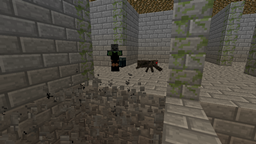
厌倦了在枯燥且易于导航的地形上与其他玩家战斗吗?使用此插件,你可以在一个不断变化的迷宫中战斗!即使是你,也能通过特定的物品来重塑迷宫。小心那些出现的怪物,并留意宝箱。
该插件的源代码包含在 jar 文件中,同时也托管在 github 上。
功能
- 能够创建任意大小的多个迷宫
- 无敌 Boss 可以传送并瞬间击杀玩家(默认设置)
- 投射物物品如鸡蛋、雪球和末影珍珠在迷宫内会有不同的表现
- 怪物和宝箱随机出现
深渊
地板上会出现洞穴,可能是自然生成或由玩家造成。这些洞穴底部布满尖刺,掉进去的人会立即死亡,所以千万别掉下去!如果时机和角度完全正确,是可以跳过这些深渊的。

物品
当玩家进入迷宫时,会获得一些可用物品。离开迷宫时,背包会被清空,所以如果你还打算在里面战斗,就不要靠近出口。你可以在宝箱中找到更多物品,并将它们存入末影箱,这样即使死亡也不会丢失。某些物品在迷宫内的行为会有所不同。
鸡蛋
鸡蛋可以用来破坏墙壁和地板。但是,它们无法破坏标记为苔石砖的“柱子”。地板在消失前会冒烟几秒钟,利用这段时间找到安全立足点吧!
雪球
你可以用雪球来修复部分地板或墙壁。只需将它们扔向柱子或深渊即可。
末影珍珠
你不会传送到珍珠落地的地方,而是传送到迷宫内的随机位置,并且不会受到任何伤害。如果你正掉进深渊或面对大量敌人时,这会非常有用!
Boss
Boss 是穿着黑色衣服并戴着凋灵骷髅面具的僵尸。默认情况下,每个迷宫都会出现一个。它可以传送到任何位置,所以你永远不知道何时会遇到它!如果它掉进深渊,会在触底前传送离开。它的生命值和强度可以在配置文件中自定义。默认情况下,它是不可被杀死的,并且一击就能杀死玩家。

使用方法/安装,快速设置
要安装此插件,只需将 jar 文件放入你的 plugins 文件夹中。
以下是一个快速设置示例:
- 使用命令 /mpcreate myMaze 4 2 2 创建一个名为 "myMaze" 的两层 4x4 迷宫,你站在其中
- 如果你希望玩家通过加入标志牌而不是入口进入迷宫,请在某处放置三个相邻的标志牌,看向第一个标志牌并输入 /mpjoinsign myMaze
- 通过输入 /mpsetplayernum myMaze 1 5 更改最少玩家数量
这将允许最多 5 名玩家加入,而 1 名玩家就足以开始战斗。
- 如果你希望在等待其他玩家时将玩家传送到等待区,请建造你的等待室并在其中输入 /mpsetwp myMaze
- 在等待区的某处竖起一个标志牌,然后看向它并输入 /mpleavesign myMaze
这将创建一个标志牌,允许玩家在感到无聊时离开等待区。
现在你已经准备好了!要测试你的迷宫,点击加入标志牌将其传送进去。如果你死亡 3 次或断开连接,你将带着之前的物品回到加入标志牌处。
只有在测试迷宫时才应将最少玩家数设置为 1。当准备好供其他玩家使用时,将其设置为更高的数字。
有关命令的详细信息,请查看下面的命令部分。你还可以通过编辑 config.yml 来更改标志牌的文本以及更多内容。查看配置部分以了解如何操作。
命令
这些命令可用于管理迷宫:
| /mpcreate <name> <width> [height] <entrancenum> [X] [Y] [Z] | 在 [X] [Y] [Z](或未指定时使用玩家位置)创建一个名为 <name> 的迷宫。<width> 是迷宫应有的 5x5 通道的数量(例如,设置为 5 将生成一个宽度为 25 个方块的迷宫)。[height] 是迷宫应有的楼层数(如果省略则为 1)。请注意,较大的迷宫生成时间会更长(宽度超过 10 可能需要几秒)。<entrancenum> 是迷宫应有的入口/出口数量。 |
| /mpdelete <name> | 移除指定名称的迷宫,删除其所有方块并杀死其中的所有怪物 |
| /mplist | 列出当前世界中所有迷宫及其位置 |
| /mpclear <name> | 清除迷宫,使其准备好进行新的战斗。它会移除其中所有实体并填平深渊 |
| /mpjoinsign <name> | 将玩家面前的标志牌变为指定迷宫的加入标志牌。如果加入标志牌的文本超过 4 行,则必须有更多相邻的标志牌。(如果使用默认文本,则需要 3 个相邻的标志牌) |
| /mpsetplayernum <name> <minplayers> <maxplayers> | 设置开始战斗所需的最少玩家数量和可加入的最大玩家数量。这仅适用于带有加入标志牌的迷宫。 |
| /mpsetwp <name> [X] [Y] [Z] | 设置迷宫的等待点位置为指定坐标,如果省略坐标,则设置为玩家当前位置。当玩家通过加入告示牌进入该迷宫时,会被传送至等待点。 |
| /mpleavesign <name> | 将玩家面前的告示牌变为“离开告示牌”,可用于离开指定迷宫的等待点。此告示牌应位于该迷宫的等待点内。 |
| /mpremovewp <name> | 移除迷宫的等待点。 |
| /mpstopfight <name> | 停止指定迷宫中的战斗。仅适用于设有加入告示牌的迷宫。 |
| /mpset [mazename] <property> <value> | 用于设置迷宫的属性。属性可在迷宫的配置文件中找到。如果省略迷宫名称,则设置默认属性(该属性会被复制到新创建的迷宫中)。你无法使用此命令设置物品属性(如 bosses.bossX.drops 或 startItems),请使用 /mpadditem 或 /mpremoveitem 代替。 |
| /mpget [mazename] <property> | 显示迷宫指定属性的当前值。如果省略迷宫名称,则显示默认属性。 |
| /mpadditem [mazename] <property> [itemID] [amount] [weigh] | 向物品属性(如 startitems)添加物品。如果省略 mazename,则设置默认属性。如果省略 itemID、amount 和 weigh,则使用玩家手中的物品(此插件的当前版本仅复制物品的 ID 和数量,不会复制附魔等特殊数据)。如果你指定类似 startitems.item2 的属性,则该物品会被覆盖,而不是添加新物品。 |
| /mpremoveitem | 有两种使用方式: |
- /mpremoveitem [mazename] <property> [itemID] [amount],其中 property 类似于 startitems
在这种情况下,从属性中移除指定 ID 和数量的物品。如果省略 itemID 和 amount,则使用玩家手中的物品。
- /mpremoveitem [mazename] <property>,其中 property 类似于 boss.drops.item2
在这种情况下,移除由 property 指定的物品。
| /mpaddboss [mazename] | 向迷宫(如果省略 mazename 则为默认配置)添加一个具有默认属性的新 Boss |
| /mpremoveboss [mazename] <bossNum> | 从迷宫中移除编号为 bossNum 的 Boss |
| /mpcopyboss [mazename] <bossNum> | 通过复制编号为 bossNum 的 Boss,向迷宫添加一个新 Boss |
| /mprecover <mazename> | 如果存在已保存的玩家数据(仅在服务器战斗期间崩溃时可能发生),此命令会恢复身处迷宫内的玩家的物品、末影箱内容、游戏模式和位置。 |
权限
mazepvp:授予访问 MazePvP 所有命令的权限。默认情况下,此权限赋予所有 OP。
配置
本插件包含一个 config.yml 文件,其中可更改各种设置。每个迷宫也有其自己的配置文件,位于 Minecraft 世界文件夹中,文件名为 <mazename>.yml。创建新迷宫时,它会从主 config.yml 文件中获取配置值。
某些设置可以通过编辑其配置文件或使用 /mpset 命令单独为每个迷宫更改。这些设置将在 斜体 中标记。
| showHeadsOnSpikes | 是否在被击败的玩家和生物的头上显示在尖刺上 |
| canPlayersSpectate | 是否在战斗已经开始后允许玩家以旁观者身份进入迷宫 |
| canSpectatorsSeeEachOther | 旁观者玩家是否可以看到其他旁观者 |
| replaceMobsWithBoss | 是否在重生时用 Boss 替换其他生物。这在限制每个区块允许的生物数量时可能很有用。 |
| protectMazes | 是否保护迷宫方块不被玩家破坏 |
| fightStartDelay | 在足够多的玩家加入后,战斗开始前的秒数。如果你希望战斗立即开始,可以将其设置为 0,但这样就没有时间让额外玩家在最后一刻加入。 |
| playerLives | 玩家在战斗中拥有的生命次数。如果耗尽,玩家将被抛出迷宫。 |
| bosses.bossCount | 迷宫中 Boss 的数量 |
| bosses.bossX.name | 应在聊天中显示的 Boss 名称 |
| bosses.bossX.hp | Boss 的生命值,以半颗心为单位。对于普通僵尸,此值为 20。如果此值为 0 或更小,则 Boss 拥有无限生命值。 |
| bosses.bossX.attack | Boss 的攻击力。如果此值为 0 或更小,则 Boss 拥有无限攻击力。 |
| bosses.bossX.mazeLevel | Boss 所绑定的迷宫楼层(1, 2, 3 等)。如果未绑定到任何楼层,则为 0。 |
| bosses.bossX.drops.itemX | Boss 可能掉落的物品。权重较高的物品有更高的掉落几率。 |
| bosses.bossX.drops.itemCount | 此数字表示 bosses.bossX.drops.* 中有多少个物品。例如,如果 bosses.bossX.drops 设置了 item1 和 item2,则此值应为 2。 |
| commands.* | 这些是在特定事件时执行的命令。你可以使用特殊符号,它们会被替换为其他内容。这些符号是: |
- <player>:触发该事件的玩家名称
- <allPlayers>:如果文本中包含此项,命令将对所有玩家执行,并将该项替换为对应的玩家名称
- <otherPlayers>:与 <allPlayers> 相同,但不包含触发该事件的玩家。
| commands.fightStarted | 战斗开始时执行的命令。<player> 不取值 |
| commands.fightRespawn | 玩家重生时执行的命令。<player> 为重生的玩家名称 |
| commands.fightPlayerOut | 战斗中的玩家离开迷宫(无论是退出游戏还是失去所有生命值)时执行的命令。<player> 是离开的玩家名称 |
| commands.fightWin | 玩家获胜时执行的命令。<player> 是获胜玩家的名称 |
例如,如果你想将所有玩家传送至重生的玩家处,应在 commands.fightRespawn 中填入以下内容:
tp <otherPlayers> <player>
| texts.* | 这些是在告示牌上显示或在战斗过程中发送给玩家的文本。你可以使用会被替换为其他内容的特殊符号。这些符号包括: |
- <name>:文本所指的迷宫名称
- <currentP>:当前加入迷宫的玩家数量
- <minP>:开始战斗所需的最少玩家数量
- <maxP>:迷宫允许的最大玩家数量
- <remainingP>:在战斗开始前还需要加入的玩家数量。这基本上等于 minP − currentP
- <state>:迷宫的状态:显示战斗是否已开始
- <timeLeft>:距离战斗开始剩余的秒数。此符号仅应出现在倒计时消息中
- <livesLeft>:玩家剩余的生命值数量。此符号仅应出现在重生消息中
如果你不确定如何使用这些符号,请查看默认配置文件以了解其用法。
| texts.startedState | 当战斗开始后,用于替换 <state> 的文本 |
| texts.waitingState | 当战斗尚未开始时,用于替换 <state> 的文本 |
| texts.joinSign | 出现在加入告示牌上的文本。可以有多行。如果超过4行,多余的文本将显示在下一个告示牌上 |
| texts.leaveSign | 与 texts.joinSign 相同,但用于离开等待区域的“离开告示牌” |
| texts.joinBroadcast | 当有其他玩家加入或离开时,发送给已加入玩家的消息 |
| texts.joinBroadcastWhenFull | 与 texts.joinBroadcast 相同,但在所需玩家数量已满时发送 |
| texts.countdown | 在倒计时期间每秒发送给已加入玩家的消息 |
| texts.fightStarted | 战斗开始时发送给已加入玩家的消息 |
| texts.fightRespawn | 玩家在战斗中重生时发送给他/她的消息 |
| texts.fightRespawnLastLife | 与 texts.fightRespawn 相同,但在玩家仅剩1点生命值时发送 |
| texts.fightPlayerOut | 当一名玩家失去所有生命值时,发送给仍在战斗中的玩家的消息 |
| texts.fightWin | 发送给最后幸存玩家的消息 |
| texts.fightStopped | 当有人使用 /mpstopfight 命令时发送的消息 |
| texts.onJoin | 玩家加入迷宫时发送的消息 |
| texts.onLeave | 玩家离开迷宫时发送的消息 |
| texts.onJoinAfterFightStarted | 当玩家尝试在战斗已经开始后加入迷宫时发送的消息 |
| texts.onJoinWhenMazeFull | 当玩家尝试加入已满员的迷宫时发送的消息 |
| texts.onJoinWhenAlreadyJoinedOtherMaze | 当玩家已在其他迷宫中时,尝试加入另一个迷宫所发送的消息 |
| probabilities.groundReappear | 地面裂隙愈合的速率。如果设置为较低的值,裂隙消失得会更慢 |
| probabilities.chestAppear | 宝箱在一定间隔内出现的概率。 |
| probabilities.enderChestAppear | 末影箱在一定间隔内出现的概率。 |
| probabilities.mobAppear | 生物在一定间隔内出现的概率。 |
| chestItems.itemX | 可能出现在宝箱内的物品。权重较高的物品有更高的几率出现在宝藏宝箱中。 |
| chestItems.itemCount | 类似于 bosses.bossX.drops.itemCount,这个数字表示 chestItems.* 中有多少项。例如,如果 chestItems 设置了 item1 到 item10,则该值应为 10 |
| startItems.itemX | 玩家进入迷宫时获得的物品 |
| startItems.itemCount | 类似于 bosses.bossX.drops.itemCount,这个数字表示 startItems.* 中有多少项。例如,如果 startItems 设置了 item1 到 item4,则该值应为 4 |
| blocks.* | 这些属性指定迷宫由何种方块构成。它们存储组成迷宫某一部分的方块的 ID 和数据值。例如,如果 blocks.floor 具有以下值: |
98:1 98 98 98:1
98 41 41 98
98 41 41 98
98:1 98 98 98:1
这意味着地板中间是金块,两侧是石砖,四个角落是苔石砖。
如果使用 /mpset 设置这些值,则对于该值,你需要将每一行的所有方块写为一行,并用不是 ":" 的字符分隔各个值(因为 ":" 用于指定方块的数据值)。例如,你可以使用以下命令将地板更改为上述图案:
/mpset blocks.floor 98:1_98_98_98:1_98_41_41_98_98_41_41_98_98:1_98_98_98:1
| blocks.wall | 迷宫墙壁使用的方块 |
| blocks.higherWall | 更高层级墙壁使用的方块 |
| blocks.outerWall | 最外层墙壁使用的方块 |
| blocks.pillar | 柱子使用的方块(默认覆盖有苔石圆石) |
| blocks.outerPillar | 最外层柱子使用的方块 |
| blocks.floor | 地板使用的方块 |
| blocks.higherWall | 更高层级地板使用的方块 |
| blocks.lowerFloor | 尖刺正下方部分使用的方块 |
| blocks.spikes | 深渊中尖刺使用的方块 |
| blocks.ceiling | 天花板使用的方块 |
支持
如果您有任何建议或遇到 bug,请发表评论或给我发送私信!
MazePvP
Tired of fighting other players on a dull, easy-to-navigate terrain? With this plugin, you can fight in a maze which is constantly changing shape while you're not looking! Even the players can reshape the maze with the right items. Beware of the mobs that appear and be on a lookout for treasure chests.
The source of this plugin is available in the jar files and also on github.
Features
- Ability to create multiple mazes of any size
- Indestructible bosses that can teleport and kill players instantly (by default)
- Projectile items such as eggs, snowballs and ender pearls behave differently inside mazes
- Mobs and chests randomly appear
Chasms
Holes can appear in the floor either naturally or because of players. They are filled with spikes, and anyone who falls into them instantly dies, so be sure not to fall! These can actually be jumped over if the timing and angle is exactly right.
Items
When a player enters a maze, he will get some items to use. When exiting the maze, the inventory gets cleared, so don't go near the exit if you are still planning to fight inside. You can find more items inside treasure chests, and you can store them in ender chests so that you don't lose them after dying. Some items behave differently inside mazes.
Eggs
Eggs can be used to break the walls and floor. However, they do not break the "pillars" that are marked as mossy stone bricks. The floor will smoke for a few seconds before disappearing, so use that time to find safe footing!
Snowballs
You can use snowballs to restore parts of the floor or walls. Just throw them at a pillar or in a chasm.
Ender pearls
Instead of teleporting to where the pearl landed, you will teleport to a random location inside the maze, and you won't suffer any damage. These can really come in handy if you're falling into a chasm or facing a lot of enemies!
Bosses
Bosses are zombies with black clothes and a wither skeleton mask. By default, one will appear in every maze. He can teleport to any location, so you never know when you'll encounter him! If he falls into a chasm, he will teleport away before hitting the bottom. His HP and strength can be customized in the config file. By default, he cannot be killed and he can kill players with one hit.
How to use/install, quick setup
To install the plugin, just drop the jar in your plugins folder.
Here's a quick example setup:
- Create a two-floored, 4x4 maze named "myMaze" where you are standing by using the command /mpcreate myMaze 4 2 2
- If you'd like your players to enter the maze using join signs instead of the entrances, put three signs next to each other somewhere, look at the first one and type /mpjoinsign myMaze
- Change the minimum amount of players by typing /mpsetplayernum myMaze 1 5
This will allow at most 5 players to join, and 1 player is enough to start the fight.
- If you want players to be transported to a waiting area while they are waiting for other players, build your waiting room and inside it, type /mpsetwp myMaze
- Put up a sign somewhere in the waiting area, then look at it and type /mpleavesign myMaze
This will create a sign that allows players to leave the waiting area if they get bored.
Now you're set! To test your maze, click on the join sign to get transported inside it. If you die 3 times or disconnect, you will return back to the join sign with your previous items.
You should only set the minimum players to 1 if you're testing the maze. When it's ready for other players to use, set it to a higher number.
Check the commands section below for details about the commands. You can also change the text of the signs and much more by editing the config.yml. Check the configuration section to see how.
Commands
These commands can be used to manage the mazes:
| /mpcreate <name> <width> [height] <entrancenum> [X] [Y] [Z] | Creates a maze with name <name> at [X] [Y] [Z] (or player's position if not specified). <width> is the number of 5x5 passages the maze should have, (for example, setting it to 5 will generaze a 25 block wide maze). [height] is the number of floors the maze should have (1 if omitted). Note that larger size mazes will take more time to generate (widths above 10 might take several seconds). <entrancenum> is the number of entrances/exits the maze should have. |
| /mpdelete <name> | Removes the maze with the specified name, deleting all its blocks and killing all mobs inside it |
| /mplist | Lists all mazes in the current world and their locations |
| /mpclear <name> | Clears a maze, making it ready for a new fight. It removes all entities in it and fills the chasms |
| /mpjoinsign <name> | Turns the sign in front of the player into a join sign for the specified maze. If the join sign's text is longer than 4 lines, there must be more signs next to each other. (If you use the default text, you need to have 3 signs next to each other) |
| /mpsetplayernum <name> <minplayers> <maxplayers> | Sets the minimum amount of players needed to start a fight and the maximum amount of players that can join. This only applies to mazes with join signs. |
| /mpsetwp <name> [X] [Y] [Z] | Sets the waiting place position for a maze to the specified coordinates, or to the players position if they are left out. When a player joins that maze using join signs, he gets teleported to the waiting place. |
| /mpleavesign <name> | Turns the sign in front of the player into a "leave sign" that can be used to leave the waiting place of the specified maze. This sign should be inside the waiting place of that maze |
| /mpremovewp <name> | Removes the waiting place for a maze. |
| /mpstopfight <name> | Stops the fight in the specified maze. This only applies to mazes with join signs. |
| /mpset [mazename] <property> <value> | Used to set a property for a maze. The properties can be found in the maze's config file. If the maze name is omitted, the default property (that gets copied to newly created mazes) is set instead. You cannot set the item properties (like bosses.bossX.drops or startItems) with this. For that, use /mpadditem or /mpremoveitem instead |
| /mpget [mazename] <property> | Shows the current value of the specified property of a maze. If the maze name is omitted, it shows the default property instead |
| /mpadditem [mazename] <property> [itemID] [amount] [weigh] | Adds an item to an item property, like startitems. If mazename is omitted, the default property is set. If itemID, amount and weigh is omitted, the item in the player's hand is used (this only copies the id and amount of the item, but special data like enchantments aren't copied in the current version of this plugin). If you specify something like startitems.item2 for property, that item will be overwritten instead of a new item getting added |
| /mpremoveitem | There are two ways to use this command: |
- /mpremoveitem [mazename] <property> [itemID] [amount], the property being something like startitems
In this case, the item with the specified id and amount gets removed from the property. If itemID and amount is omitted, the item in the player's hand is used.
- /mpremoveitem [mazename] <property>, the property being something like boss.drops.item2
In this case, the item specified by property is removed.
| /mpaddboss [mazename] | Adds a new boss to a maze (or to the default config if mazename is omitted) with default properties |
| /mpremoveboss [mazename] <bossNum> | Removes the boss with number bossNum from the maze |
| /mpcopyboss [mazename] <bossNum> | Adds a new boss to the maze by copying the boss with number bossNum |
| /mprecover <mazename> | If there's saved player data for a maze (can only happen when the server crashed during a fight), this command recovers the items, enderchest content, gamemode and position of the players who were inside the maze |
Permissions
mazepvp: Gives access to all commands in MazePvP. By default, this is given to all ops.
Configuration
This plugin has a config.yml file, in which various settings can be changed. Each maze also has its own config file in the Minecraft world folder with the name <mazename>.yml. When a new maze is created, it gets the configuration values from the main config.yml file.
Some settings can be changed individually for each maze by editing their config file or with the /mpset command. These settings will be marked in italics.
| showHeadsOnSpikes | Whether the heads of fallen players and mobs should appear on the spikes |
| canPlayersSpectate | Whether players can enter the maze as spectators when the fight has already started |
| canSpectatorsSeeEachOther | Whether spectating players can see other spectators |
| replaceMobsWithBoss | Whether a boss should replace another mob when he respawns. This could be useful when there's a limit on how many mobs are allowed per chunk |
| protectMazes | Whether maze blocks should be protected from players breaking them |
| fightStartDelay | The amount of seconds before a fight starts after enough players have joined. You can set this to 0 if you want the fight to start immediately, but then there won't be time for additional players to join at the last moment |
| playerLives | The amount of lives a player has in a fight. If they run out, the player gets thrown out of the maze. |
| bosses.bossCount | The number of bosses in the maze |
| bosses.bossX.name | The name of the boss that should appear in the chat |
| bosses.bossX.hp | The health of the boss, in half-hearts. For a normal zombie, this value would be 20. If this is 0 or less, the boss will have infinite HP |
| bosses.bossX.attack | The strength of the boss. If this is 0 or less, the boss will have infinite attack |
| bosses.bossX.mazeLevel | The maze floor that the boss is bound to (1, 2, 3, etc.) 0 if he's not bound to any floor |
| bosses.bossX.drops.itemX | Items that the boss could drop. An item with higher weigh will have a higher chance of getting dropped |
| bosses.bossX.drops.itemCount | This number indicates how many items there are in bosses.bossX.drops.* For example, if bosses.bossX.drops has item1 and item2 set, this value should be 2 |
| commands.* | These are commands that get executed at certain events. You can use special symbols that get substituted as something else. These symbols are: |
- <player>: The name of the player who triggered the event
- <allPlayers>: If this is in the text, the command will execute for every player and their names will be substituted where this is found
- <otherPlayers>: Same as <allPlayers>, except that it doesn't contain the player who triggers the event.
| commands.fightStarted | The command to execute when the fight starts. <player> takes no value |
| commands.fightRespawn | The command to execute when a player respawns. <player> is the name of the respawning player |
| commands.fightPlayerOut | The command to execute when a fighting player leaves the maze, either by quitting or by losing all lives. <player> is the name of the leaving player |
| commands.fightWin | The command to execute when a player wins. <player> is the name of the winning player |
For example, if you want to teleport all players to the respawning player, you should put the following into commands.fightRespawn:
tp <otherPlayers> <player>
| texts.* | These are the texts that are showed to the players on a sign or during a fight. You can use special symbols that get substituted as something else. These symbols are: |
- <name>: The name of the maze the text is referring to
- <currentP>: The current number of players that joined the maze
- <minP>: The minimum number of players needed to start the fight
- <maxP>: The maximum number of players allowed in the maze
- <remainingP>: The number of players that have to join before the fight can start. This is basically minP − currentP
- <state>: The state of the maze: This shows whether the fight has started or not
- <timeLeft>: The amount of seconds left until the fight starts. This should only appear in the countdown message
- <livesLeft>: The amount of lives the player has left. This should only appear in the respawn message
If you're not sure how to use these, check the default configuration file to see how they are used.
| texts.startedState | The text that should replace <state> when the fight has started |
| texts.waitingState | The text that should replace <state> when the fight hasn't yet started |
| texts.joinSign | The text that appears on a join sign. This can have multiple lines. If it has more than 4 lines, the rest of the text is shown on the next sign |
| texts.leaveSign | Same as texts.joinSign, just for the "leave sign" that is used to leave a waiting area |
| texts.joinBroadcast | The message that gets sent to joined players when another player joins or leaves |
| texts.joinBroadcastWhenFull | Same as texts.joinBroadcast, except that this is sent when the required amount of players have joined already |
| texts.countdown | The message that gets sent to joined players each second during the countdown |
| texts.fightStarted | The message that gets sent to joined players when the fight starts |
| texts.fightRespawn | The message that gets sent to a player when he respawns during a fight |
| texts.fightRespawnLastLife | Same as texts.fightRespawn, except that this is sent when the player has 1 life left |
| texts.fightPlayerOut | The message that gets sent to players still in fight when a player loses all lives |
| texts.fightWin | The message that gets to the last remaining player |
| texts.fightStopped | The message that gets sent when someone uses the /mpstopfight command |
| texts.onJoin | The message that gets sent when a player joins a maze |
| texts.onLeave | The message that gets sent when a player leaves a maze |
| texts.onJoinAfterFightStarted | The message that gets sent when a player tries to join when the fight has already started |
| texts.onJoinWhenMazeFull | The message that gets sent when a player tries to join when the maze is full |
| texts.onJoinWhenAlreadyJoinedOtherMaze | The message that gets sent when a player tries to join a maze while he has joined another one |
| probabilities.groundReappear | The rate at which chasms in the ground will heal. If this is set to a low value, they will disappear slower |
| probabilities.chestAppear | The chance for a chest to appear at certain intervals. |
| probabilities.enderChestAppear | The chance for an ender chest to appear at certain intervals. |
| probabilities.mobAppear | The chance of a mob appearing at certain intervals. |
| chestItems.itemX | Items that can appear inside chests. Items with higher weigh will have a higher chance of appearing in treasure chests. |
| chestItems.itemCount | Like bosses.bossX.drops.itemCount, this number indicates how many items there are in chestItems.* For example, if chestItems has item1 through item10 set, this value should be 10 |
| startItems.itemX | Items that players get when entering a maze |
| startItems.itemCount | Like bosses.bossX.drops.itemCount, this number indicates how many items there are in startItems.* For example, if startItems has item1 through item4 set, this value should be 4 |
| blocks.* | These properties specify what kind of blocks the maze is made of. They store the block id and data of the blocks that make up some part of the maze. For example, if blocks.floor has the following value: |
98:1 98 98 98:1
98 41 41 98
98 41 41 98
98:1 98 98 98:1
That means that the floor has gold blocks in the middle, stone bricks on the sides, and mossy stone bricks at the four edges.
If these values are set using /mpset, then for the value you have to write all the blocks in each row as one line, with the values separated by some character that's not ":" (because that's used to specify the data value for a block). For example, you can change the floor to the above pattern with the following:
/mpset blocks.floor 98:1_98_98_98:1_98_41_41_98_98_41_41_98_98:1_98_98_98:1
| blocks.wall | The blocks for the walls of the maze |
| blocks.higherWall | The blocks for the walls of higher levels |
| blocks.outerWall | The blocks for the outermost walls |
| blocks.pillar | The blocks for the pillars (the ones that are by default covered with mossy cobblestone) |
| blocks.outerPillar | The blocks for the outermost pillars |
| blocks.floor | The blocks for the floor |
| blocks.higherWall | The blocks for the floor of higher levels |
| blocks.lowerFloor | The blocks for the part that's directly under the spikes |
| blocks.spikes | The blocks for the spikes in a chasm |
| blocks.ceiling | The blocks for the ceiling |
Support
If you have any suggestion or encounter a bug, post a comment or send me a PM!

 插件

 插件
 插件
 插件
 插件
 插件
评论 0
登录后参与评分
还没有评论,来抢沙发吧