MCEEW
适用于 Minecraft 服务器以及 Velocity、BungeeCord 和 Waterfall 代理网络的实时地震预警(EEW)插件。
功能特性
- 接收 JMA、CENC、四川、福建、CWA 和重庆的地震预警
- 接收来自 JMA 和 CENC 的最终地震列表报告
- 提供可配置的聊天和标题通知;Bukkit 和 Velocity 还支持其配置的声音通道
- 支持基于权限的通知发送和确定性测试警报
- 提供缓存的地震信息和安全配置重载命令
- 支持独立的 Spigot/Paper/Folia 服务器、Velocity 代理,以及兼容最终版 Waterfall 的 BungeeCord 构建版本
选择正确的构件
| 环境 |
安装方式 |
| 独立运行的 Spigot 1.13.2+ |
MCEEW-x.y.z.jar |
| 独立运行的 Paper 1.13.2+ |
MCEEW-x.y.z.jar |
| 独立运行的 Folia 1.19.4+ |
MCEEW-x.y.z.jar |
| Velocity 网络 |
仅放置在代理的 plugins/ 目录中:MCEEW-Velocity-x.y.z.jar |
| BungeeCord 网络 |
仅放置在代理的 plugins/ 目录中:MCEEW-BungeeCord-x.y.z.jar |
| Waterfall 最终版 1.21 发布版 |
使用相同的 MCEEW-BungeeCord-x.y.z.jar |
| MCEEW-Velocity 后端的后台服务器 |
请勿安装 Bukkit 版的 MCEEW 构件 |
| MCEEW-BungeeCord 后端的后台服务器 |
请勿安装 Bukkit 版的 MCEEW 构件 |
mceew-core 是一个内部库,并非由用户安装的插件。
重要的代理部署警告
当在代理上安装了 MCEEW-Velocity 或 MCEEW-BungeeCord 时,请勿在其后台服务器上安装 Bukkit 版的 MCEEW 插件。代理插件已经提供了整个网络的地震连接、缓存、通知、目标定位、权限检查、命令、信息查询和重载支持。
在同一网络中同时运行这两个构件是不受支持且不推荐的。它们是独立的插件:MCEEW 不会检测、协调、禁用或去重它们。同时安装两者可能会导致重复的 Wolfx 连接、玩家通知和控制台输出,并拥有独立的缓存和生命周期状态。避免这种部署是管理员的责任。
仅在单个后台服务器上安装 Bukkit 插件仍然是有效的独立 Bukkit 行为,但它不提供跨代理网络的目标定位功能。
安装步骤
独立的 Bukkit 家族服务器
- 下载或构建
MCEEW-x.y.z.jar。
- 将其放入 Spigot、Paper 或 Folia 服务器的
plugins/ 目录中。
- 启动服务器,并根据需要编辑生成的 Bukkit 配置文件。
此构件保留了既有的 Bukkit 连接、缓存、通知、命令、bStats 和更新器行为。无需任何代理设置。
Velocity 网络
- 下载或构建
MCEEW-Velocity-x.y.z.jar。
- 将其放入
Velocity/plugins/ 目录中。
- 启动一次 Velocity,以便创建并加载
plugins/mceew/config.yml。
- 根据需要配置通知和网络目标定位,然后使用
/eew reload 命令。
- 如果存在,请从后台服务器中移除 Bukkit 版的 MCEEW 插件。
无需后台 MCEEW 插件即可实现目标定位、权限检查、聊天、标题、支持的声音、命令、缓存/信息查询或重载功能。
BungeeCord / Waterfall 网络
- 下载或构建
MCEEW-BungeeCord-x.y.z.jar。
- 将其放入代理的
plugins/ 目录中。
- 启动一次代理,以便创建并加载
plugins/MCEEW/config.yml。
- 根据需要配置通知和网络目标定位,然后使用
/eew reload 命令。
- 如果存在,请从后台服务器中移除 Bukkit 版的 MCEEW 插件。
MCEEW 仅使用公开的 BungeeCord API。该构件与最终的 Waterfall 1.21 build 615 兼容,但 Waterfall 本身已归档且停止维护(EOL)。没有针对 Waterfall 的特定构件或代码路径。
要求和已测试的平台
| 构件 |
插件字节码 |
已测试的平台/运行时 |
MCEEW-x.y.z.jar |
Java 11 (major 55) |
Spigot/Paper 1.13.2+; Folia 1.19.4+ |
MCEEW-Velocity-x.y.z.jar |
Java 17 (major 61) |
Java 17+ 上的 Velocity 3.4.x,Java 21+ 上的 3.5.x,以及 Java 25+ 上的 4.x |
MCEEW-BungeeCord-x.y.z.jar |
Java 11 (major 55) |
BungeeCord builds 1999 和 2086;Waterfall 1.21 build 615,均在 Java 17 上运行 |
固定的自动化兼容性冒烟测试矩阵包括:Java 17 上的 Velocity 3.4.0 build 566,Java 21 上的 3.5.1 build 615,Java 25 上的 4.0.0 build 6,Java 17 上的 BungeeCord builds 1999 和 2086,以及 Java 17 上的 Waterfall build 615。这些检查证明了插件发现、生命周期、禁用运行时命令、重载、关闭和链接功能。它们不能替代真实客户端通知的端到端(E2E)测试。
较新的 Minecraft 服务器版本可能需要比 Bukkit 插件字节码本身更新的 Java 运行时。当服务器或代理所需的 Java 版本更高时,请使用该版本。
Velocity 传递的声音功能需要 Minecraft Java 客户端 1.19.3 或更高版本以及当前的后台连接。当声音无法传递时,聊天和标题通知仍会继续;仅跳过声音。没有数据包回退机制。BungeeCord 和 Waterfall 仅支持 broadcast(聊天)和 title;不支持声音,因为 MCEEW 的兼容性合约中没有可接受的公开 BungeeCord API 路径来实现它。
命令
/mceew 是 /eew 的别名。
| 命令 |
代理权限 |
行为 |
/eew |
无 |
显示插件版本及可用的命令路径 |
/eew info jma |
无 |
显示本地缓存中最新的 JMA 地震列表条目 |
/eew info cenc |
无 |
显示本地缓存中最新的 CENC 地震列表条目 |
/eew test forecast |
mceew.admin |
发送确定性 JMA 预报测试 |
/eew test alert |
mceew.admin |
发送确定性 JMA 警报测试 |
/eew test sc |
mceew.admin |
发送四川测试 |
/eew test fj |
mceew.admin |
发送福建/台湾测试 |
/eew test cwa |
mceew.admin |
发送台湾 CWA 测试 |
/eew test cenc |
mceew.admin |
发送中国 CENC 测试 |
/eew test cq |
mceew.admin |
发送重庆测试 |
/eew reload |
mceew.admin |
验证并原子化应用代理配置 |
信息类命令读取本地缓存;它们不会执行新的网络查询。在首次收到地震列表更新之前,数据可能不可用。
测试命令使用正常的代理通知、目标、通道和权限路径。其固定的测试警告是作为命令反馈分别发送给代理控制台和已连接玩家的。它不联系 Wolfx,也不会修改地震缓存。
在 Velocity 和 BungeeCord/Waterfall 上,/eew reload 会在提交之前验证完整的新配置。如果文件无效,工作配置和运行时状态将保持不变。从启用到启用的重载会保留现有的 Wolfx 连接和缓存;源、通知和目标更改仅应用于未来的数据。
代理权限
Velocity 通知权限
Velocity 的玩家推送需要同时具备 mceew.notify.all 和相应的源权限:
mceew.notify.jma.alertmceew.notify.jma.forecastmceew.notify.jma.eqlistmceew.notify.cenc.eqlistmceew.notify.scmceew.notify.fjmceew.notify.cwamceew.notify.cenc.eewmceew.notify.cq
所有通知权限默认允许,因此普通玩家无需显式授予权限即可接收通知。显式拒绝 mceew.notify.all 或适用的源权限中的任何一个,都会使该玩家退出接收。
BungeeCord / Waterfall 屏蔽权限
BungeeCord 和 Waterfall 使用正向屏蔽权限,因为其通用权限 API 是布尔类型。如果没有屏蔽权限,玩家将接收通知。具有 true 值的屏蔽权限会使该玩家退出接收:
mceew.suppress.allmceew.suppress.jma.alertmceew.suppress.jma.forecastmceew.suppress.scmceew.suppress.fjmceew.suppress.cwamceew.suppress.cenc.eewmceew.suppress.cqmceew.suppress.jma.eqlistmceew.suppress.cenc.eqlist
对于某个源,只有当 mceew.suppress.all 和该源的屏蔽节点都解析为 false 时,才会进行推送。请勿在 BungeeCord/Waterfall 上使用 Velocity 的 mceew.notify.* 节点。
MCEEW 仅查询具体节点;通配符语义由安装的权限提供者决定。因此,通过支持通配符的提供者授予 mceew.* 可能会同时授予 mceew.admin 和 mceew.suppress.*,从而屏蔽该管理员的通知。请直接授予 mceew.admin。
mceew.admin 控制两个代理版本上的测试和重载命令。它默认被拒绝,必须显式授予。
代理控制台通知是代理全局的。玩家目标成员资格、玩家权限以及后端特定的通道覆盖都不会影响控制台推送。
Velocity 配置
Velocity 的文件位于 plugins/mceew/config.yml。其当前的顶层架构如下:
platform_config_version: Velocity 架构版本;当前为 1global.enabled: 启用或禁用代理全局的 Wolfx 运行时global.sources: 实时处理开关 enable_jp、enable_sc、enable_fj、enable_cwa、enable_cenceew 和 enable_cqnotifications.time_format: 渲染报告共享的日期时间格式notifications.defaults: 全局的 broadcast(广播)、title(标题)和 alert(警报)推送开关notifications.sources: 源消息、标题、声音以及可选的源通道覆盖targets: 默认和基于源的玩家接收规则groups: 命名的一组 Velocity 后端服务器名称servers: 基于后端的 broadcast/title/alert 覆盖
global.sources 控制实时警告处理。JMA 和 CENC 的地震列表缓存更新独立于这些实时开关。独立的报告推送开关是 notifications.sources.jma_eqlist.broadcast 和 notifications.sources.cenc_eqlist.broadcast。禁用任一开关将停止该报告的广播,但其本地缓存和 /eew info 输出将继续更新。
当 global.enabled: false 时,运行的 Wolfx 运行时将被禁用,但插件外壳、/eew、/mceew 和 /eew reload 仍然可用。这是一个操作开关,而不是代理/后端共存模式。
目标 (Targets)
目标模式具有以下确切含义:
all: 当前通过此 Velocity 代理连接的所有玩家selected: 当前连接到明确列出的后端服务器或由列出组扩展的服务器上的玩家none: 无玩家接收者
targets.sources 下的基于源的条目完全替换 targets.default;服务器和组列表不会进行深度合并。
示例:
targets:
  default:
    mode: selected
    servers: [lobby]
    groups: [games]
  sources:
    jma_alert:
      mode: all

groups:
  games: [survival, creative]
有效的源键包括 jma_alert、jma_forecast、sichuan、fujian、cwa、cenc_eew、chongqing、jma_eqlist 和 cenc_eqlist。相同的键也用于 notifications.sources、targets.sources 以及服务器源覆盖。
推送通道优先级
对于 broadcast(聊天)、title 和 alert(启用音效)开关,配置值遵循最具体者优先原则:
server + source > server > source > global
后端覆盖示例:
servers:
  lobby:
    notifications:
      alert: false
    sources:
      jma_alert:
        title: false
通知源下的嵌套 sound 对象包含 Adventure 音效的 key、volume 和 pitch;它与布尔型的 alert 发送开关不同。
groups 和 servers 用于描述投递目标。它们不会为每个后端创建独立的连接、缓存、解析器或运行时:代理服务器拥有且仅拥有一个实例。
BungeeCord / Waterfall 配置
BungeeCord 配置文件位于 plugins/MCEEW/config.yml,使用 platform_config_version: 1。其主要部分包括 global、notifications、targets、groups 和 servers。其标准数据源键名为 jma_alert、jma_forecast、sichuan、fujian、cwa、cenc_eew、chongqing、jma_eqlist 和 cenc_eqlist。其通知频道仅限 broadcast 和 title;alert 和 sound 因不受支持而被拒绝。
目标模式有 all、selected 和 none。选定的目标是其显式后端服务器名称与其选定组扩展出的后端名称的并集。多个匹配的服务端/组路径会通过 UUID 去重,因此每位玩家只会收到一条通知。特定于数据源的目标会完全替换默认目标;它不会与默认目标合并。
对于两种 Bungee 频道,配置值均遵循最具体者优先原则:
server + source > server > source > global
代理控制台广播使用全局值后跟数据源覆盖值。它独立于玩家目标、抑制权限、当前后端、组和服务器特定的覆盖设置。
配置版本说明
各插件组件使用了有意分离的配置架构:
- Bukkit:
config-version: 9
- Velocity:
platform_config_version: 1
- BungeeCord / Waterfall:
platform_config_version: 1
这些是独立的平台架构。请勿将一个平台的配置复制到另一个平台的文件中。Bukkit 的部署行为保持独立,且不包含代理模式。
构建
运行:
mvn -B clean package
用户可安装的输出文件如下:
mceew-bukkit/target/MCEEW-x.y.z.jar
mceew-velocity/target/MCEEW-Velocity-x.y.z.jar
mceew-bungeecord/target/MCEEW-BungeeCord-x.y.z.jar
根 Maven ${revision} 属性是模块版本、插件元数据、工件文件名以及命令版本输出的唯一权威来源。
下载
- SpigotMC
— Bukkit 系列服务端工件
- Modrinth
— Bukkit、Velocity 和 BungeeCord/Waterfall 工件;代理版本必须在此处下载
截图
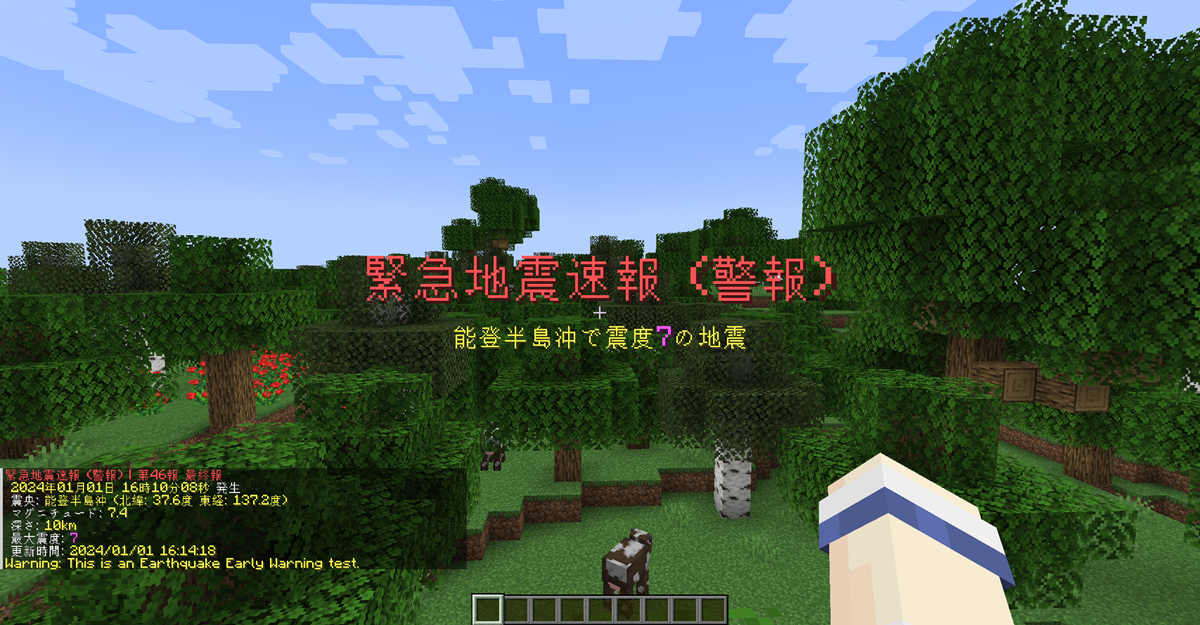
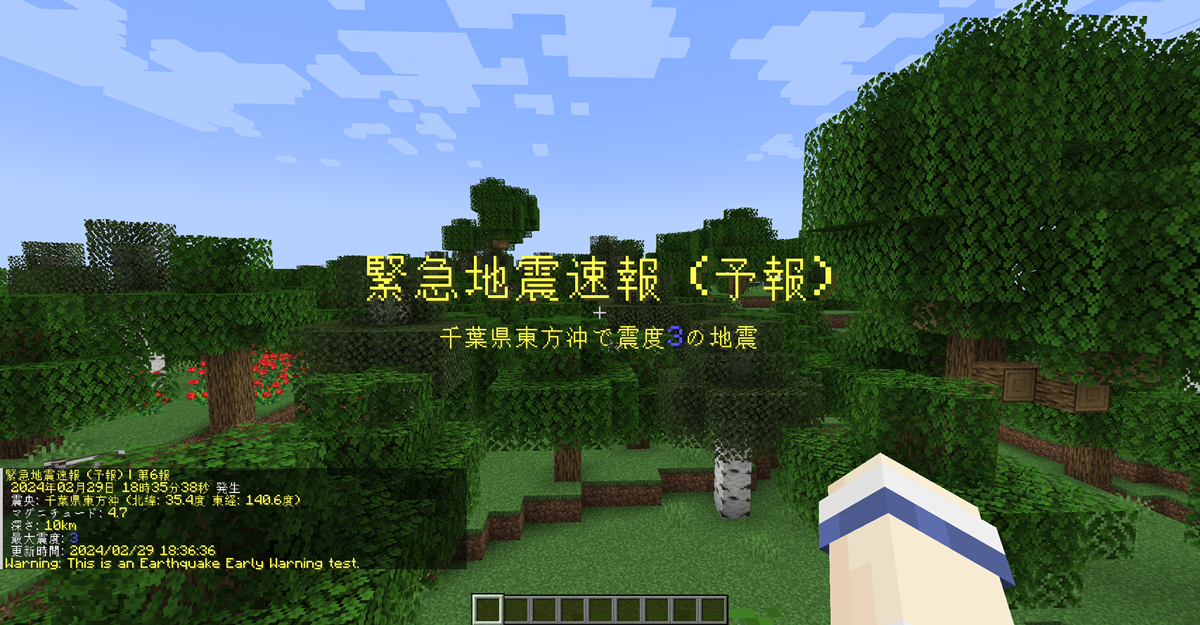
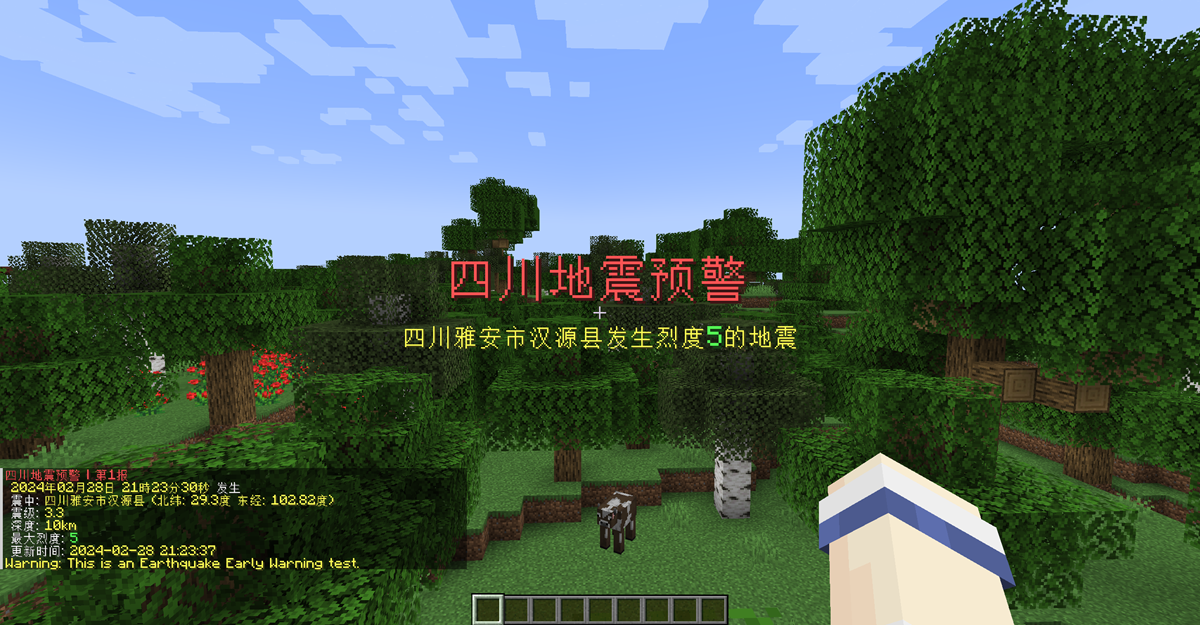
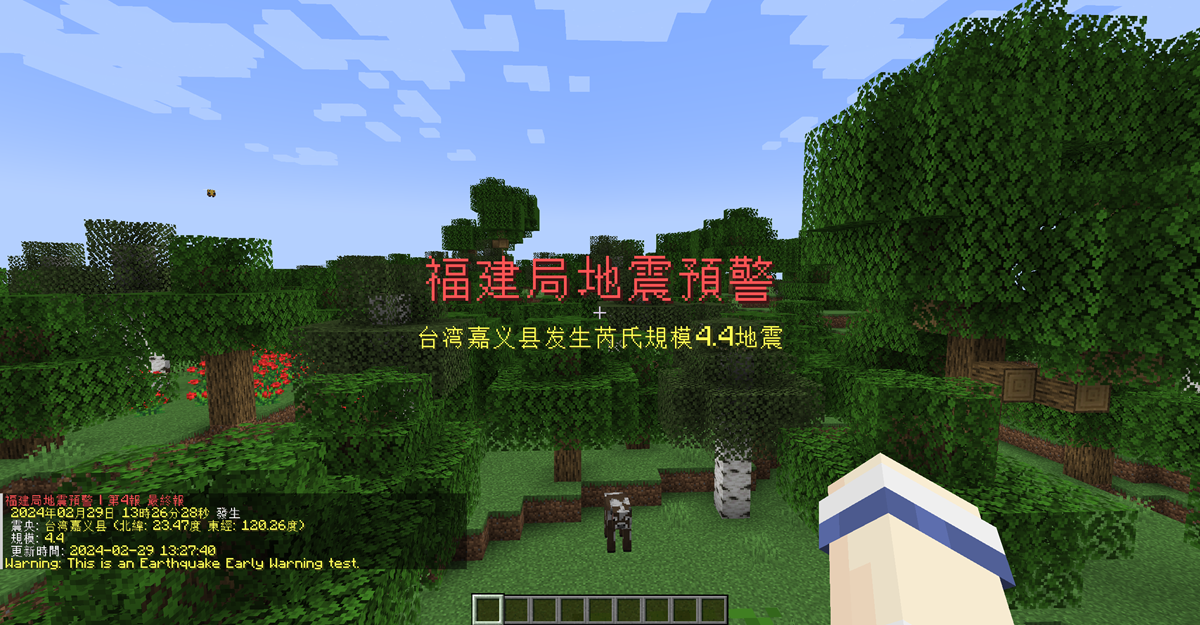
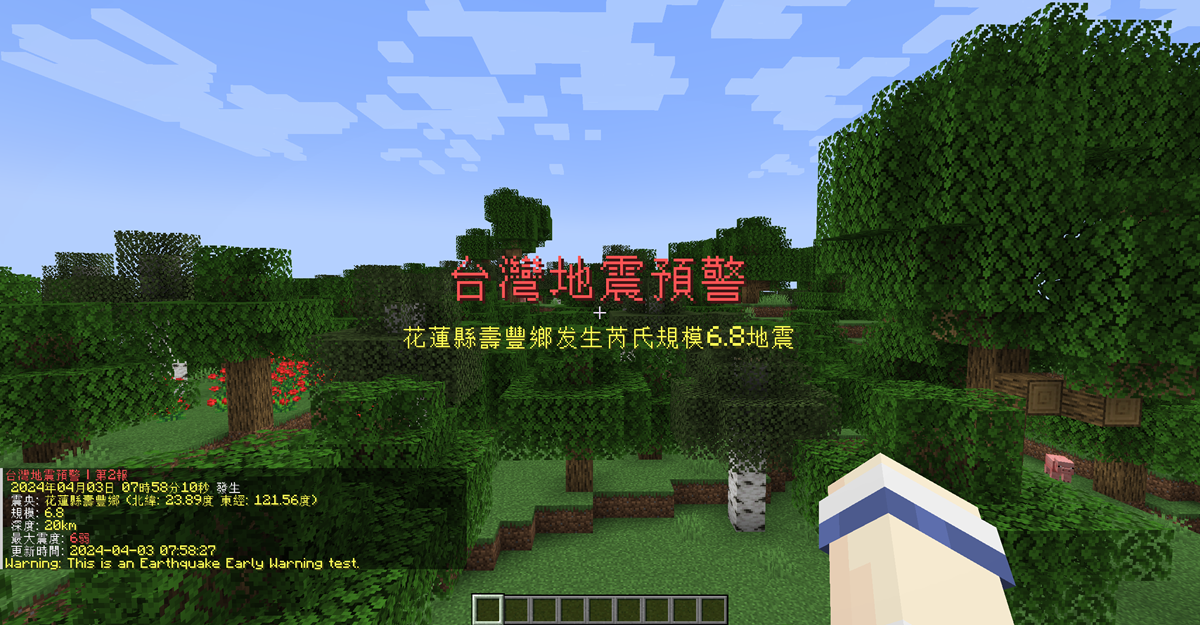
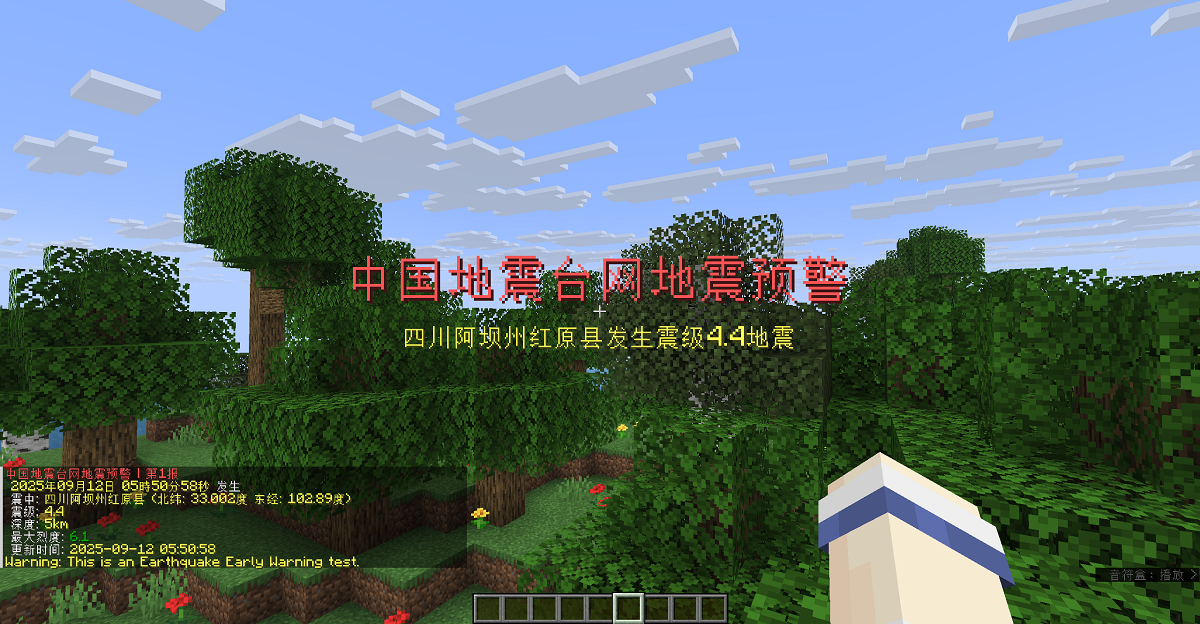

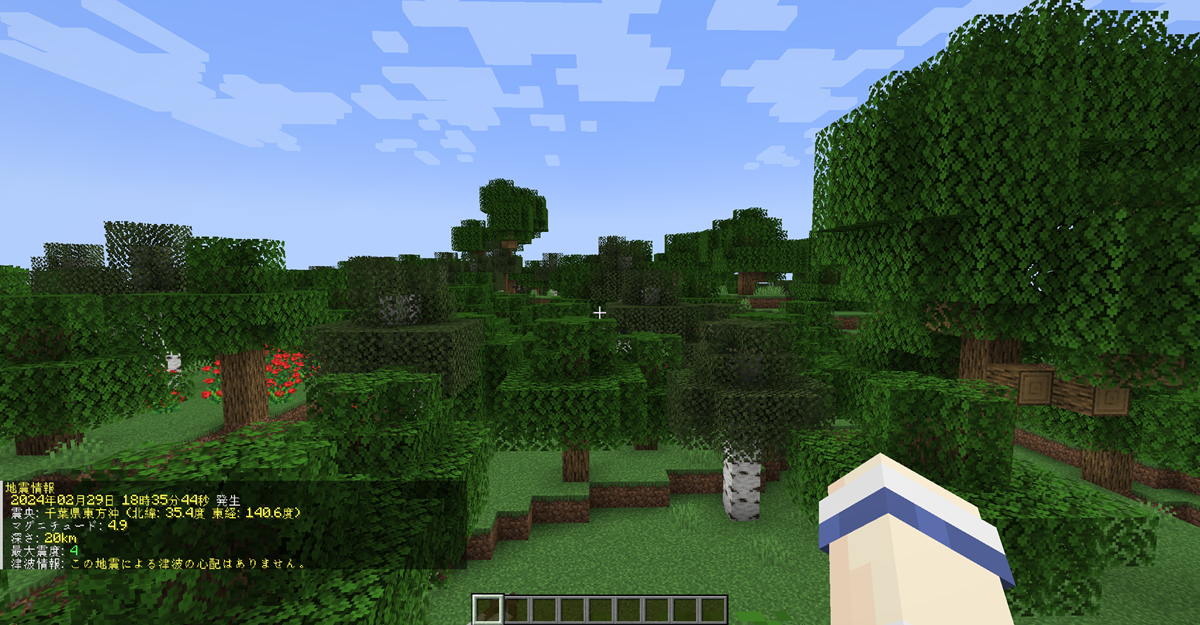
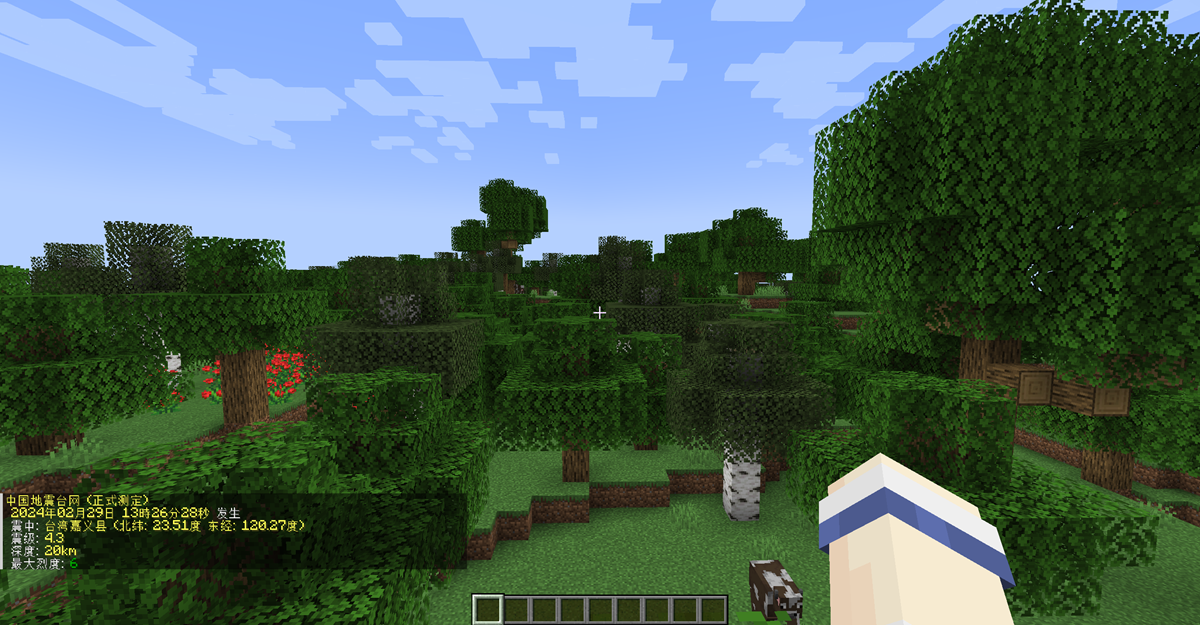
bStats
独立的 Bukkit 工件使用 bStats 项目 17261:
Velocity 工件使用其单独注册的 bStats 项目 33363:
BungeeCord/Waterfall 工件使用其单独注册的 bStats 项目 33371:
MCEEW
A real-time Earthquake Early Warning (EEW) plugin for Minecraft servers and
Velocity, BungeeCord, and Waterfall proxy networks.
Features
- Receives JMA, CENC, Sichuan, Fujian, CWA, and Chongqing earthquake warnings
- Receives final earthquake-list reports from JMA and CENC
- Delivers configurable chat and title notifications; Bukkit and Velocity also
support their configured sound channel
- Supports permission-based delivery and deterministic test alerts
- Provides cached earthquake information and safe configuration reload commands
- Supports standalone Spigot/Paper/Folia servers, Velocity proxies, and a
BungeeCord build compatible with the final Waterfall release
Choose the correct artifact
| Environment |
Install |
| Standalone Spigot 1.13.2+ |
MCEEW-x.y.z.jar |
| Standalone Paper 1.13.2+ |
MCEEW-x.y.z.jar |
| Standalone Folia 1.19.4+ |
MCEEW-x.y.z.jar |
| Velocity network |
MCEEW-Velocity-x.y.z.jar in the proxy's plugins/ directory only |
| BungeeCord network |
MCEEW-BungeeCord-x.y.z.jar in the proxy's plugins/ directory only |
| Waterfall final 1.21 release |
The same MCEEW-BungeeCord-x.y.z.jar |
| Backend behind MCEEW-Velocity |
Do not install the Bukkit MCEEW artifact |
| Backend behind MCEEW-BungeeCord |
Do not install the Bukkit MCEEW artifact |
mceew-core is an internal library and is not a user-installed plugin.
Important proxy deployment warning
When MCEEW-Velocity or MCEEW-BungeeCord is installed on a proxy, do not
install the Bukkit MCEEW plugin on its backend servers. The proxy plugin
already provides the network's earthquake connection, cache, notifications,
targeting, permission checks, commands, information lookup, and reload support.
Running both artifacts in the same network is unsupported and not recommended.
They are independent plugins: MCEEW does not detect, coordinate, disable, or
deduplicate them. Installing both may create duplicate Wolfx connections,
player notifications, and console output, with separate cache and lifecycle
state. Avoiding this deployment is the administrator's responsibility.
Installing only the Bukkit plugin on an individual backend remains valid
standalone Bukkit behavior, but it does not provide proxy-wide targeting.
Installation
Standalone Bukkit-family server
- Download or build
MCEEW-x.y.z.jar.
- Place it in the Spigot, Paper, or Folia server's
plugins/ directory.
- Start the server and edit the generated Bukkit configuration if needed.
This artifact retains the established Bukkit connection, cache, notifications,
commands, bStats, and updater behavior. No proxy settings are required.
Velocity network
- Download or build
MCEEW-Velocity-x.y.z.jar.
- Place it in
Velocity/plugins/.
- Start Velocity once so
plugins/mceew/config.yml is created and loaded.
- Configure notifications and network targeting as needed, then use
/eew reload.
- Remove the Bukkit MCEEW plugin from backend servers if it is present.
No backend MCEEW plugin is required for targeting, permission checks, chat,
titles, supported sound, commands, cache/info, or reload.
BungeeCord / Waterfall network
- Download or build
MCEEW-BungeeCord-x.y.z.jar.
- Place it in the proxy's
plugins/ directory.
- Start the proxy once so
plugins/MCEEW/config.yml is created and loaded.
- Configure notifications and network targeting as needed, then use
/eew reload.
- Remove the Bukkit MCEEW plugin from backend servers if it is present.
MCEEW uses only the public BungeeCord API. The same artifact is compatible with
the final Waterfall 1.21 build 615, but Waterfall itself is archived and
end-of-life. There is no Waterfall-specific artifact or code path.
Requirements and tested platforms
| Artifact |
Plugin bytecode |
Tested platform/runtime |
MCEEW-x.y.z.jar |
Java 11 (major 55) |
Spigot/Paper 1.13.2+; Folia 1.19.4+ |
MCEEW-Velocity-x.y.z.jar |
Java 17 (major 61) |
Velocity 3.4.x on Java 17+, 3.5.x on Java 21+, and 4.x on Java 25+ |
MCEEW-BungeeCord-x.y.z.jar |
Java 11 (major 55) |
BungeeCord builds 1999 and 2086; Waterfall 1.21 build 615, each on Java 17 |
The pinned automated compatibility smoke matrix is Velocity 3.4.0 build 566 on
Java 17, 3.5.1 build 615 on Java 21, 4.0.0 build 6 on Java 25, BungeeCord
builds 1999 and 2086 on Java 17, and Waterfall build 615 on Java 17. These
checks prove plugin discovery, lifecycle, disabled-runtime commands, reload,
shutdown, and linkage. They do not replace real-client notification E2E.
Newer Minecraft server releases can require a newer Java runtime than the
Bukkit plugin bytecode itself. Use the Java version required by the server or
proxy when it is higher.
Velocity-delivered sound requires a Minecraft Java client 1.19.3 or newer and
a current backend connection. When sound cannot be delivered, chat and title
notifications continue; only sound is skipped. There is no packet fallback.
BungeeCord and Waterfall support only broadcast (chat) and title; sound is
not supported because MCEEW's compatibility contract has no acceptable public
BungeeCord API path for it.
Commands
/mceew is an alias of /eew.
| Command |
Proxy permission |
Behavior |
/eew |
None |
Shows the plugin version and available command paths |
/eew info jma |
None |
Shows the latest locally cached JMA earthquake-list entry |
/eew info cenc |
None |
Shows the latest locally cached CENC earthquake-list entry |
/eew test forecast |
mceew.admin |
Sends the deterministic JMA forecast test |
/eew test alert |
mceew.admin |
Sends the deterministic JMA alert test |
/eew test sc |
mceew.admin |
Sends the Sichuan test |
/eew test fj |
mceew.admin |
Sends the Fujian/Taiwan test |
/eew test cwa |
mceew.admin |
Sends the Taiwan CWA test |
/eew test cenc |
mceew.admin |
Sends the China CENC test |
/eew test cq |
mceew.admin |
Sends the Chongqing test |
/eew reload |
mceew.admin |
Validates and atomically applies the proxy configuration |
The info commands read the local cache; they do not perform a fresh network
query. Data may be unavailable until the first earthquake-list update arrives.
The test command uses the normal proxy notification, targeting, channel, and
permission path. Its fixed test warning is command feedback sent separately to
the proxy console and connected players. It does not contact Wolfx or modify
the earthquake cache.
On Velocity and BungeeCord/Waterfall, /eew reload validates the complete new
configuration before it is committed. An invalid file leaves the working
configuration and runtime active. An enabled-to-enabled reload retains the
existing Wolfx connection and cache; source, notification, and target changes
apply to future data.
Proxy permissions
Velocity notification permissions
Velocity player delivery requires both mceew.notify.all and the applicable
source permission:
mceew.notify.jma.alertmceew.notify.jma.forecastmceew.notify.jma.eqlistmceew.notify.cenc.eqlistmceew.notify.scmceew.notify.fjmceew.notify.cwamceew.notify.cenc.eewmceew.notify.cq
All notification permissions default to allowed, so ordinary players receive
notifications without explicit permission grants. Explicitly denying either
mceew.notify.all or the applicable source permission opts that player out.
BungeeCord / Waterfall suppression permissions
BungeeCord and Waterfall use positive suppression permissions because their
generic permission API is boolean. With no suppression permission, a player
receives notifications. A true suppression permission opts that player out:
mceew.suppress.allmceew.suppress.jma.alertmceew.suppress.jma.forecastmceew.suppress.scmceew.suppress.fjmceew.suppress.cwamceew.suppress.cenc.eewmceew.suppress.cqmceew.suppress.jma.eqlistmceew.suppress.cenc.eqlist
For a source, delivery requires both mceew.suppress.all and that source's
suppression node to resolve false. Do not use the Velocity mceew.notify.*
nodes on BungeeCord/Waterfall.
MCEEW queries only concrete nodes; the installed permission provider owns
wildcard semantics. Granting mceew.* through a wildcard-aware provider may
therefore grant both mceew.admin and mceew.suppress.*, suppressing that
administrator's notifications. Grant mceew.admin directly instead.
mceew.admin controls test and reload commands on both proxy editions. It is
default-deny and must be granted explicitly.
Proxy-console notifications are proxy-global. Player target membership, player
permissions, and backend-specific channel overrides do not govern console
delivery.
Velocity configuration
The Velocity file is plugins/mceew/config.yml. Its current top-level schema is:
platform_config_version: Velocity schema version; currently 1global.enabled: enables or disables the one proxy-global Wolfx runtimeglobal.sources: realtime processing switches enable_jp, enable_sc,
enable_fj, enable_cwa, enable_cenceew, and enable_cqnotifications.time_format: date-time format shared by rendered reportsnotifications.defaults: global broadcast, title, and alert delivery
switchesnotifications.sources: source messages, titles, sounds, and optional
source channel overridestargets: default and source-specific player-recipient rulesgroups: named sets of Velocity backend server namesservers: backend-specific broadcast/title/alert overrides
global.sources controls realtime warning processing. JMA and CENC
earthquake-list cache updates remain independent of those realtime switches.
The independent report-delivery switches are
notifications.sources.jma_eqlist.broadcast and
notifications.sources.cenc_eqlist.broadcast. Disabling either switch stops
that report's broadcast while its local cache and /eew info output continue
to update.
With global.enabled: false, the operational Wolfx runtime is disabled, but
the plugin shell, /eew, /mceew, and /eew reload remain available. This is
an operational switch, not a proxy/backend coexistence mode.
Targets
Target modes have these exact meanings:
all: every player currently connected through this Velocity proxyselected: players currently connected to the explicitly listed backend
servers or servers expanded from the listed groupsnone: no player recipients
A source-specific entry under targets.sources completely replaces
targets.default; server and group lists are not deep-merged.
Example:
targets:
  default:
    mode: selected
    servers: [lobby]
    groups: [games]
  sources:
    jma_alert:
      mode: all

groups:
  games: [survival, creative]
Valid source keys are jma_alert, jma_forecast, sichuan, fujian, cwa,
cenc_eew, chongqing, jma_eqlist, and cenc_eqlist. The same keys are
used under notifications.sources, targets.sources, and server source
overrides.
Delivery-channel precedence
For the broadcast (chat), title, and alert (sound-enable) switches, the
most specific configured value wins:
server + source > server > source > global
Example backend overrides:
servers:
  lobby:
    notifications:
      alert: false
    sources:
      jma_alert:
        title: false
The nested sound object under a notification source contains the Adventure
sound key, volume, and pitch; it is distinct from the boolean alert
delivery switch.
groups and servers describe delivery. They do not create per-backend
connections, caches, parsers, or runtimes: the proxy owns exactly one of each.
BungeeCord / Waterfall configuration
The BungeeCord file is plugins/MCEEW/config.yml and uses
platform_config_version: 1. Its main sections are global, notifications,
targets, groups, and servers. Its canonical source keys are jma_alert,
jma_forecast, sichuan, fujian, cwa, cenc_eew, chongqing,
jma_eqlist, and cenc_eqlist. Its notification channels are only
broadcast and title; alert and sound are rejected as unsupported.
Target modes are all, selected, and none. A selected target is the union
of its explicit backend server names and the backend names expanded from its
selected groups. Multiple matching server/group paths are UUID-deduplicated,
so one player receives one notification. A source-specific target completely
replaces the default target; it does not merge with it.
For both Bungee channels, the most specific configured value wins:
server + source > server > source > global
Proxy-console broadcast uses the global value followed by the source override.
It is independent of player targeting, suppression permissions, current
backend, groups, and server-specific overrides.
Configuration lineage
The artifacts use intentionally separate configuration schemas:
- Bukkit:
config-version: 9
- Velocity:
platform_config_version: 1
- BungeeCord / Waterfall:
platform_config_version: 1
These are independent platform schemas. Do not copy one platform's
configuration over another platform's file. Bukkit's deployment behavior
remains standalone and contains no proxy mode.
Building
Run:
mvn -B clean package
The user-installable outputs are:
mceew-bukkit/target/MCEEW-x.y.z.jar
mceew-velocity/target/MCEEW-Velocity-x.y.z.jar
mceew-bungeecord/target/MCEEW-BungeeCord-x.y.z.jar
The root Maven ${revision} property is the single current-version authority
for module versions, plugin metadata, artifact filenames, and command version
output.
Downloads
- SpigotMC
— Bukkit-family server artifact
- Modrinth
— Bukkit, Velocity, and BungeeCord/Waterfall artifacts; proxy editions must
be downloaded here
Screenshots
bStats
The standalone Bukkit artifact uses bStats project 17261:
The Velocity artifact uses its separately registered bStats project 33363:
The BungeeCord/Waterfall artifact uses its separately registered bStats project 33371:


 插件

 插件
 插件
 插件
 插件
 插件
评论 0
登录后参与评分
还没有评论,来抢沙发吧