每个玩家在尝试理解某个商店插件时,都可能会有挫败感。通常这些插件带有大量的配置项或过多的功能,导致玩家难以掌握基本操作。MIGS(Minecraft Interactive GUI Shops)解决了这个问题。无需任何命令,只需使用木制工具、精确的物品显示与购买功能、开箱即用的配置以及 Multiverse 支持,这是一款非常优秀的用于玩家间交易的插件。
使用方法
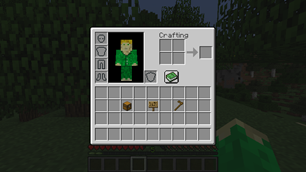
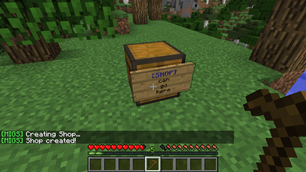
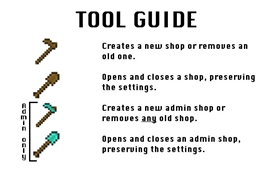
要创建商店,只需在箱子侧面放置一块告示牌,并用木锄右键点击它。你可以通过右键点击告示牌并在 GUI 中使用箭头来调整价格。左键点击可调整整数金额,右键点击可调整小数金额。箱子中的第一个物品将以指定价格出售。你可以使用木铲来临时开启和关闭你的商店。
你可以随时通过潜行点击来预览你的商店。
安装
要安装,请下载所需版本的 MIGS 以及对应的 Vault 版本。建议使用一个经济插件以充分发挥此插件的功能。将下载的插件放入服务器的 plugins 文件夹中。运行服务器即可完成设置。
命令
- /migs - 主要命令,显示用法
- /migs inspect <config> - 显示正在查看的告示牌的配置节点
- /migs is <config> - 同上
- /migs set <config> <int|string|double> - 设置配置节点
权限
- migs.admin - 创建管理员商店的权限
- migs.main - 创建商店的权限 - 1.7.2 及以后版本默认拥有
- migs.set - 用于 /migs set <config> <int|string|double>
- migs.get - 用于 /migs is <config>
功能列表
- 玩家买卖商店
- 游戏内配置编辑
- 跨世界支持
- 保留元数据(你不会失去附魔)
- 在保留设置的情况下开启和关闭商店
- 管理员商店
- 可以按 1、8 和 64 的倍数进行买卖
- 支持所有兼容 Vault 的插件
- 可以与其他商店插件同时使用
- 保护商店不被破坏
- 在菜单中显示所有者
- 自动更新器
- GUI 帮助书
- 不会禁用用于制作商店的工具
- GUI 错误消息
- 对称性
- 对玩家友好的 GUI
- 玩家或管理员无需命令
即将推出的功能
-管理员商店 已在 1.5 中添加
-更好的权限支持 已在 1.7 中添加
-GUI 内帮助 已在 1.8 中添加
-错误消息 已在 1.7 中添加
请在评论中提出更多建议!
Every player has had the feeling of frustration as they try to figure out a shop plugin. Often these plugins come with extensive configuration or so many features that you can't figure out the basics. MIGS, or Minecraft Interactive GUI Shops, fixes this problem. With no commands necessary, only wood level tools needed, EXACT item display and purchase, out-of-the-box configuration, and Multiverse support, this is a great plugin for inter-player trade.
How to Use
To create a shop, simple place a sign on the side of a chest and right-click it with a wooden hoe. You can adjust the price by right-clicking the sign and using the arrows in the GUI. To adjust dollar amounts, left-click. To adjust cent amounts, right-click. The first item in the chest will be sold for the specified amount. You can use a wooden shovel to temporally open and close your shop.
You can preview your shop at any time by sneak-clicking it.
Installation
To install, download the desired version of MIGS and the corresponding version of Vault. A economy plugin is recommended to get the most out of this plugin. Place the downloaded plugins in your server's plugins folder. Run the server to finish setup.
Commands
- /migs - main command to display usage
- /migs inspect <config> - shows configuration node of sign being looked at
- /migs is <config> - same as above
- /migs set <config> <int|string|double> - sets configuration node
Permisions
- migs.admin - permission to create admin shops
- migs.main - permission to create shops - default as of 1.7.2
- migs.set - for /migs set <config> <int|string|double>
- migs.get - for /migs is <config>
Feature List
- Buy and sell shops for players
- In-game configuration editing
- Cross world support
- Metadata preservation (you won't lose your enchantments)
- Opening and closing shops while preserving settings
- Admin shops
- Can buy and sell in multiples of 1, 8, and 64
- Supports all Vault-compatible plugins
- Can be used alongside other shop plugins
- Protects shops from being broken
- Displays owner in menu
- Auto updater
- In-GUI help books
- Doesn't disable tools used to make shops
- GUI error messages
- Symmetrical
- Player-friendly GUIs
- No commands necessary for players or admins
Upcoming Features
-Admin shops Added in 1.5
-Better permissions support Added in 1.7
-In-GUI help Added in 1.8
-Error messages Added in 1.7
Suggest more in the comments!

 插件

 插件
 插件
 插件
 插件

 插件
评论 0
登录后参与评分
还没有评论,来抢沙发吧