加入 Discord 服务器
支持
如果你喜欢该项目并希望支持未来的开发:
Patreon 现已开放,供支持者使用。(支持我。)

MinePanel
一款轻量、安全且现代的 Minecraft 服务器自托管 Web 管理面板。
MinePanel 允许服务器所有者直接在 Web 浏览器中监控、管理和维护他们的 Minecraft 服务器——无需依赖重量级的外部面板或复杂的基础设施。
专为希望获得快速、简单且强大的传统服务器管理解决方案替代品的服务器所有者而设计。
核心功能
MinePanel 将实时监控、远程管理、安全性和服务器管理整合到一个单一的嵌入式 Web 面板中。
基于 Web 的管理面板
完全通过浏览器管理你的 Minecraft 服务器。
功能:
- 由 NanoHTTPD 驱动的嵌入式 Web 服务器
- 无需外部依赖项
- 轻量级架构
- 自托管部署
- 可在本地或远程访问
无需安装外部控制面板。
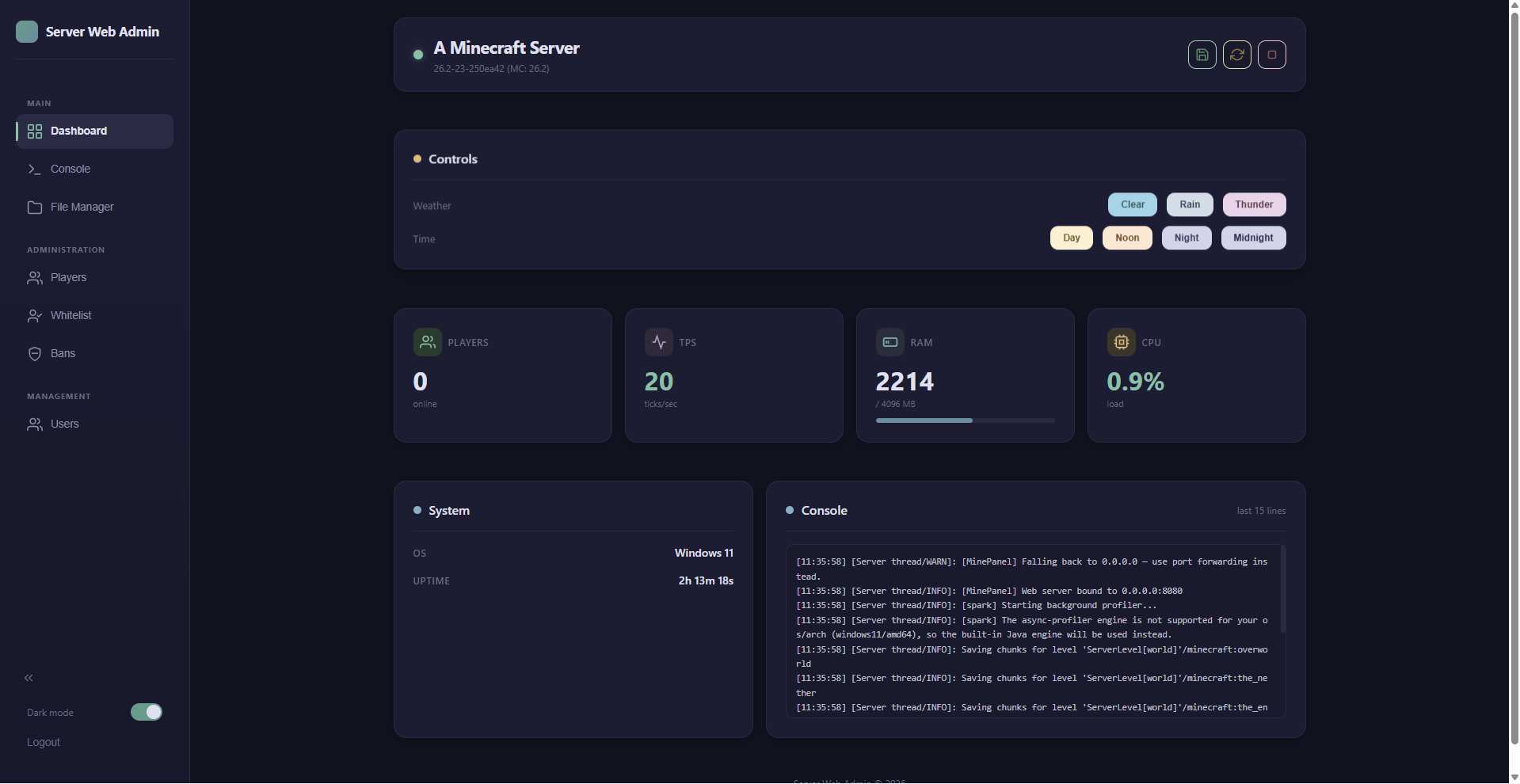
实时服务器监控
实时监控服务器健康状况。
可用指标:
- 在线玩家数量
- TPS 监控
- RAM 使用情况跟踪
- 实时 CPU 使用率监控
- 服务器运行时间跟踪
- 操作系统信息
专为快速服务器诊断而构建。
玩家管理系统
远程管理在线玩家。
支持的操作:
- 查看在线玩家
- 踢出玩家
- 封禁玩家
- 白名单管理
- 黑名单管理
- 玩家管理控制
无需直接访问 Minecraft 控制台。
实时控制台流
直接从浏览器查看服务器控制台日志。
功能:
- 实时控制台流式传输
- 自动刷新系统
- 基于浏览器的控制台监控
- 控制台直接集成到仪表板中
无需 SSH 即可监控你的服务器。
认证与安全
MinePanel 在设计时将安全性作为优先事项。
已实施的安全系统:
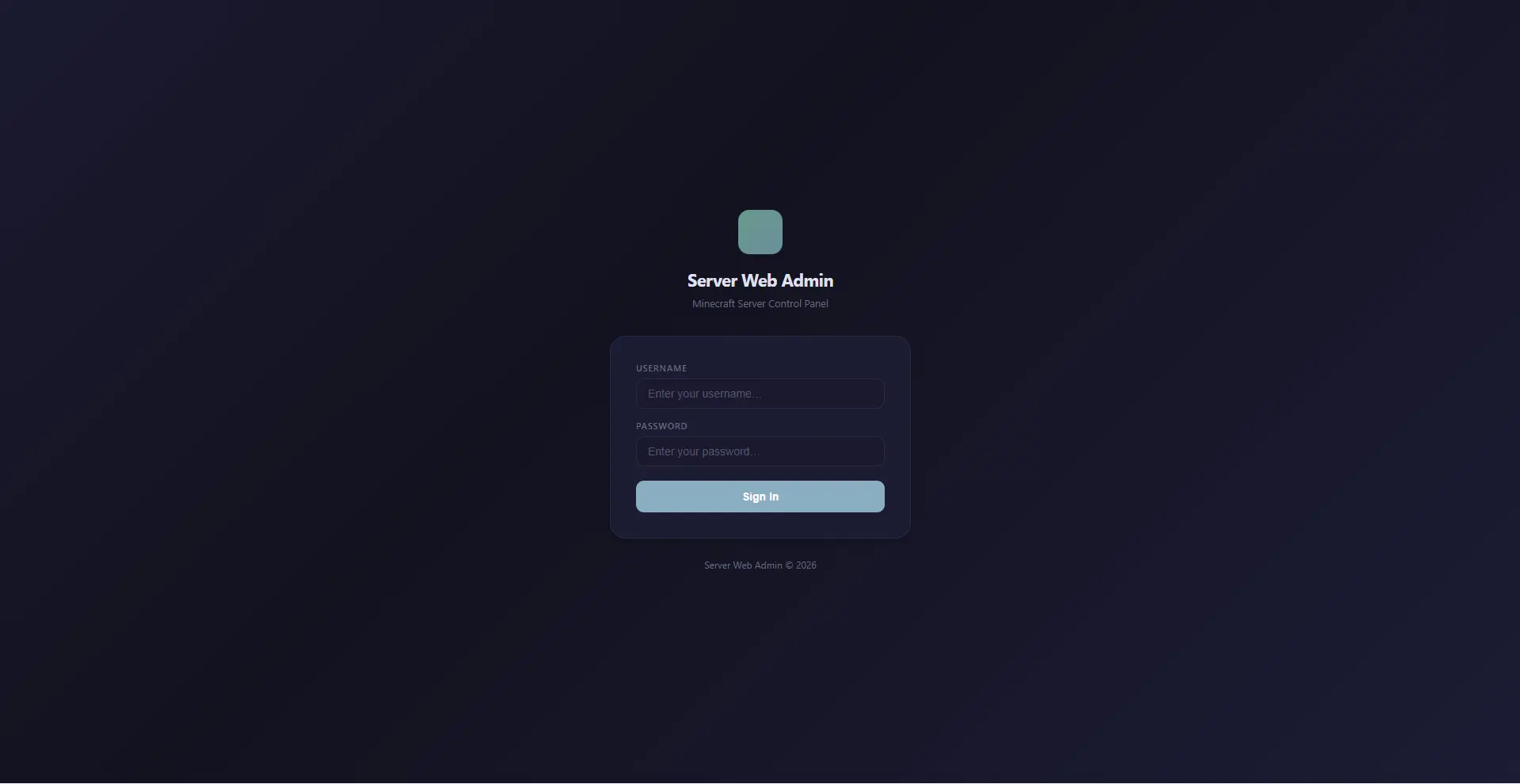
- 用户名/密码认证
- BCrypt 密码哈希
- UUID v4 会话令牌
- HttpOnly 安全 Cookie
- 会话非活动超时
- 自动登出系统
- 首次登录强制更改密码
默认安全。
多用户管理系统
支持多个管理员账户。
可用功能:
- 创建多个用户
- 删除用户
- 密码管理
- 安全的密码存储
- 用户隔离系统
专为多员工服务器管理而设计。
基于角色的访问控制 (RBAC)
为服务器工作人员提供细粒度的权限系统。
可用角色:
- Owner(所有者)
- Admin(管理员)
- Moderator(版主)
- Viewer(观察者)
权限架构包括:
- 前端 UI 限制
- 页面访问保护
- 后端 API 权限验证
三层安全架构可防止未经授权的访问。
内置文件管理器
直接从浏览器管理服务器文件。
可用功能:
- 浏览文件和文件夹
- 读取文本文件
- 编辑配置文件
- 保存文件更改
- 上传文件
- 下载文件
- 重命名文件和文件夹
- 删除文件和文件夹
- 创建文件夹
支持的文件管理权限:
- files.view
- files.read
- files.edit
- files.upload
- files.download
- files.delete
无需 FTP。
网络配置系统
灵活的网络部署选项。
支持的配置:
- 自定义 Web 服务器主机
- 自定义 Web 服务器端口
- 反向代理支持
- X-Forwarded-For 检测
- 仅限本地主机的部署模式
- 外部访问控制
- 公共 IP 兼容性改进
- 安全绑定回退系统
兼容多种托管环境。
现代用户界面
注重易用性设计。
功能:
- 响应式仪表板布局
- 浅色/深色主题支持
- 固定侧边栏导航
- 页面自动刷新
- 移动友好型设计
- 自定义确认模态框
- 感知权限的 UI 渲染
简洁极简的界面。
支持的版本
目前已在以下版本上测试并支持:
- 1.13.2
- 1.14.x
- 1.15.x
- 1.16.x
- 1.17.x
- 1.18.x
- 1.19.x
- 1.20.x
- 1.21.x
- 26.x
Java 兼容性:
- Java 8+
- 在 Java 8 上测试
- 在 Java 21 上测试
- 在 Java 25 上测试
支持的服务器软件:
未来版本可能会考虑遗留支持。
安装
下载最新版本。
将插件放入:
/plugins/
启动你的 Minecraft 服务器。
MinePanel 将自动生成所需的配置文件。
打开你的浏览器:
http://localhost:8080
默认端口可以在配置中更改。
默认登录
默认凭据在首次启动时自动生成。
Username: owner
Password: admin123
安全策略:
请立即更改默认密码。
配置示例
config.yml 示例
web:
  host: 0.0.0.0
  port: 8080
  allow-external: true

security:
  session-timeout-minutes: 5
反向代理支持
MinePanel 支持反向代理部署以增强安全性。
使用 Nginx 的示例:
server {
    listen 80;
    server_name panel.example.com;

    location / {
        proxy_pass http://127.0.0.1:8080;
        proxy_set_header X-Forwarded-For $proxy_add_x_forwarded_for;
    }
}
推荐架构:
MinePanel → 127.0.0.1:8080 → Nginx → Domain
命令
可用命令:
/webadmin reload
/webadmin players
/webadmin kick
/webadmin ban
Reload 命令会安全地重启嵌入式 Web 服务器并重新加载配置。
安全架构
MinePanel 实施了多层安全措施。
已实施的安全防护:
- BCrypt 密码哈希
- HttpOnly 安全 Cookie
- 会话过期机制
- 自动会话清理
- 安全的登出处理
- 反向代理兼容性
- 仅本地部署模式
- 基于权限的 API 保护
- 路径遍历攻击防护
- 危险文件类型拦截
- 受保护的服务器核心文件
秉持安全第一的设计理念。
截图
项目理念
MinePanel 的诞生源于一个简单想法。
为 Minecraft 服务器所有者提供一个轻量、安全、现代且可自托管的管理面板,无需依赖大型外部主机控制面板。
核心理念:
Simple

Fast

Secure

Reliable
只构建服务器所有者真正需要的功能。
贡献指南
社区反馈极具价值。
你可以通过以下方式帮助改进 MinePanel:
- 报告 Bug
- 建议新功能
- 提供测试反馈
- 在 GitHub 上提交 Issue
欢迎所有形式的反馈。
许可证
MinePanel 采用 GNU GPL v3 许可证授权。
你可以自由:
- 在个人服务器上使用该插件
- 在商业服务器上使用该插件
- 修改源代码
- Fork 该项目
- 重新分发修改后的版本
要求:
- 修改后的版本必须保持开源
- 修改后的版本也必须使用 GPL v3 许可证
- 重新分发时源代码必须公开可用
请尊重本项目并支持原始开发。
未来开发
MinePanel 根据真实的社区反馈积极开发中。
即将推出的改进可能包括:
- 高级文件管理
- 备份系统
- 更细粒度的权限控制
- 更多服务器管理工具
更多功能即将上线。
由 FlaxiLabs 用 ❤️ 构建
Join Discord server
Support
If you enjoy the project and want to support future development:
Patreon available for supporters.(Support me.)
MinePanel
A lightweight, secure, and modern self-hosted web management panel for Minecraft servers.
MinePanel allows server owners to monitor, manage, and administrate their Minecraft server directly from a web browser — without relying on heavyweight external panels or complex infrastructure.
Designed for server owners who want a fast, simple, and powerful alternative to traditional server management solutions.
Core Features
MinePanel combines real-time monitoring, remote administration, security, and server management into a single embedded web panel.
Web-Based Management Panel
Manage your Minecraft server entirely from your browser.
Features:
- Embedded web server powered by NanoHTTPD
- No external dependencies required
- Lightweight architecture
- Self-hosted deployment
- Accessible locally or remotely
No external control panel installation required.
Real-Time Server Monitoring
Monitor server health in real time.
Available metrics:
- Online player count
- TPS monitoring
- RAM usage tracking
- Real CPU usage monitoring
- Server uptime tracking
- Operating system information
Built for quick server diagnostics.
Player Management System
Manage online players remotely.
Supported actions:
- View online players
- Kick players
- Ban players
- Whitelist management
- Ban list management
- Player administration controls
No need to access the Minecraft console directly.
Live Console Streaming
View server console logs directly from the browser.
Features:
- Real-time console streaming
- Automatic refresh system
- Browser-based console monitoring
- Console integrated directly into dashboard
Monitor your server without SSH access.
Authentication & Security
MinePanel was designed with security as a priority.
Implemented security systems:
- Username/password authentication
- BCrypt password hashing
- UUID v4 session tokens
- HttpOnly secure cookies
- Session inactivity timeout
- Automatic logout system
- Forced password change on first login
Secure by default.
Multi-User Management System
Support multiple administrator accounts.
Available functions:
- Create multiple users
- Delete users
- Password management
- Secure password storage
- User isolation system
Designed for multi-staff server management.
Role-Based Access Control (RBAC)
Fine-grained permission system for server staff.
Available roles:
- Owner
- Admin
- Moderator
- Viewer
Permission architecture includes:
- Frontend UI restrictions
- Page access protection
- Backend API permission validation
Three-layer security architecture prevents unauthorized access.
Built-in File Manager
Manage server files directly from the browser.
Available functions:
- Browse files and folders
- Read text files
- Edit configuration files
- Save file changes
- Upload files
- Download files
- Rename files and folders
- Delete files and folders
- Create folders
Supported file management permissions:
- files.view
- files.read
- files.edit
- files.upload
- files.download
- files.delete
No FTP required.
Network Configuration System
Flexible network deployment options.
Supported configurations:
- Custom web server host
- Custom web server port
- Reverse proxy support
- X-Forwarded-For detection
- Localhost-only deployment mode
- External access control
- Public IP compatibility improvements
- Safe bind fallback system
Compatible with multiple hosting environments.
Modern User Interface
Designed for usability.
Features:
- Responsive dashboard layout
- Light/Dark theme support
- Fixed sidebar navigation
- Auto-refresh pages
- Mobile-friendly design
- Custom confirmation modals
- Permission-aware UI rendering
Clean and minimal interface.
Supported Versions
Currently tested and supported on:
- 1.13.2
- 1.14.x
- 1.15.x
- 1.16.x
- 1.17.x
- 1.18.x
- 1.19.x
- 1.20.x
- 1.21.x
- 26.x
Java compatibility:
- Java 8+
- Tested on Java 8
- Tested on Java 21
- Tested on Java 25
Supported server software:
- Spigot
- Paper
- Purpur (Experimental)
Legacy support may be considered in future releases.
Installation
Download the latest release.
Place the plugin inside:
/plugins/
Start your Minecraft server.
MinePanel will automatically generate required configuration files.
Open your browser:
http://localhost:8080
Default port can be changed inside configuration.
Default Login
Default credentials generated automatically on first startup.
Username: owner
Password: admin123
Security policy:
- Password change is mandatory on first login
Please change the default password immediately.
Configuration Example
Example config.yml
web:
  host: 0.0.0.0
  port: 8080
  allow-external: true

security:
  session-timeout-minutes: 5
Reverse Proxy Support
MinePanel supports reverse proxy deployments for additional security.
Example using Nginx:
server {
    listen 80;
    server_name panel.example.com;

    location / {
        proxy_pass http://127.0.0.1:8080;
        proxy_set_header X-Forwarded-For $proxy_add_x_forwarded_for;
    }
}
Recommended architecture:
MinePanel → 127.0.0.1:8080 → Nginx → Domain
Commands
Available commands:
/webadmin reload
/webadmin players
/webadmin kick
/webadmin ban
Reload command safely restarts the embedded web server and reloads configuration.
Security Architecture
MinePanel implements multiple security layers.
Implemented protections:
- BCrypt password hashing
- HttpOnly secure cookies
- Session expiration
- Automatic session cleanup
- Secure logout handling
- Reverse proxy compatibility
- Localhost-only deployment mode
- Permission-based API protection
- Path traversal protection
- Dangerous file type blocking
- Protected server core files
Security-first design philosophy.
Screenshots
Project Philosophy
MinePanel was created with one simple idea.
Provide Minecraft server owners with a lightweight, secure, modern, and self-hosted management panel without depending on large external hosting panels.
Core philosophy:
Simple

Fast

Secure

Reliable
Build only what server owners actually need.
Contributing
Community feedback is extremely valuable.
You can help improve MinePanel by:
- Reporting bugs
- Suggesting new features
- Providing testing feedback
- Opening GitHub issues
All feedback is welcome.
License
MinePanel is licensed under GNU GPL v3.
You are free to:
- Use the plugin for personal servers
- Use the plugin for commercial servers
- Modify the source code
- Fork the project
- Redistribute modified versions
Requirements:
- Modified versions must remain open source
- Modified versions must also use GPL v3 license
- Source code must remain publicly available when redistributed
Please respect the project and support original development.
Future Development
MinePanel is actively developed based on real community feedback.
Upcoming improvements may include:
- Advanced file management
- Backup systems
- Better permission granularity
- Additional server administration tools
More features coming soon.
Built with ❤️ by FlaxiLabs

 插件

 插件
 插件
 插件
 插件
 插件

评论 0
登录后参与评分
还没有评论,来抢沙发吧