

MinerTrack Anti-XRay

MinerTrack 是一款插件,能帮助你以与其他反 Xray 插件不同的方式,有效抓获服务器上使用 Xray 的捣蛋玩家。该插件不会隐藏矿石,因为隐藏矿石非常消耗资源。
它是如何工作的?
为了抓获 Xray 使用者,MinerTrack 使用了一种高级算法,结合了多个因素,如矿石稀缺度、特定时间段内开采的矿石数量、玩家前往矿石的路径以及其他许多方面。
人们还能继续使用 Xray 吗?
是的,也不是。确实,使用 Xray 的玩家有两种选择:
- 继续使用 Xray,但表现得像普通玩家以避免被发现。他们不能比正常玩家获取更多矿石,否则会被 MinerTrack 抓获。
- 卸载他们的 Xray,或者被抓到。
为什么选择 MinerTrack 而不是其他反 Xray 方案?
与 Paper Anti-XRay 和 Orebfuscator 相比:
- MinerTrack 轻量级。
- MinerTrack 的引擎具有创新性。
- MinerTrack 检测 Xray 使用者,由你决定采取何种制裁措施。
与其他反 Xray 解决方案相比:
- MinerTrack 支持最新的 Minecraft 版本。
- MinerTrack 已在拥有约 20 名同时在线玩家的服务器上经过测试,误报率极低(默认配置)。
- MinerTrack 是免费的。
看看用户怎么说:
评价


- 检测 XRayer
- 当玩家的 X-Ray 违规等级达到阈值时自动处理
- 当玩家行为恢复正常时自动降低违规等级
- 当玩家在洞穴中挖矿时,不会被错误检测
- 高度可配置的配置文件

/mtrack notify <message> - 向工作人员发送警报
/mtrack verbose - 启用详细模式,并在玩家违规等级增加时通知工作人员
/mtrack check <player> - 检查玩家的违规历史
/mtrack reset <player> - 重置玩家的违规记录
/mtrack help - 获取插件帮助
/mtrack kick <player> <reason> - 以特定理由踢出玩家
/mtrack reload - 重新加载插件配置
/mtrack update - 检查插件更新
/mtrack logs <log name.log> - 查看 MinerTrack 日志文件

minertrack.bypass - 绕过 X-Ray 检测
minertrack.notify - 接收通知和详细信息
minertrack.checkupdate - 接收更新信息并使用 /mtrack update
minertrack.use - 访问根命令 /mtrack
minertrack.check - 使用 /mtrack check
minertrack.kick - 使用 /mtrack kick
minertrack.logs - 使用 /mtrack logs
minertrack.help - 使用 /mtrack help
minertrack.reset - 使用 /mtrack reset
minertrack.sendnotify - 使用 /mtrack notify
minertrack.verbose - 使用 /mtrack verbose
minertrack.reload - 使用 /mtrack reload

- 从 Modrinth 下载最新版本的 MinerTrack。
- 将 .jar 文件放入 plugins 或 mods 文件夹。
- 重启服务器以生成配置文件和必要文件。

作为插件:
- Java 17 或更高版本
- Paper、Purpur、Folia 或其兼容分支(1.18 或更高版本)非 Spigot!
作为 Fabric 模组:
- Java 17 或更高版本
- Fabric 1.18 或更高版本
- Fabric API
- LuckPerms 5.0.0+(如需权限节点功能)
作为 Forge 模组:
- Java 17 或更高版本
- Forge 1.18 或更高版本
作为 NeoForge 模组:
- Java 17 或更高版本
- NeoForge 1.20.1 或更高版本

如果您遇到任何问题或有新功能建议,欢迎通过 Discord 联系我们或在插件的 GitHub 仓库中提交 Issue。
查看源码:
报告问题:
提交 Pull Request:
访问 Wiki:
加入 Discord:
支持本项目:
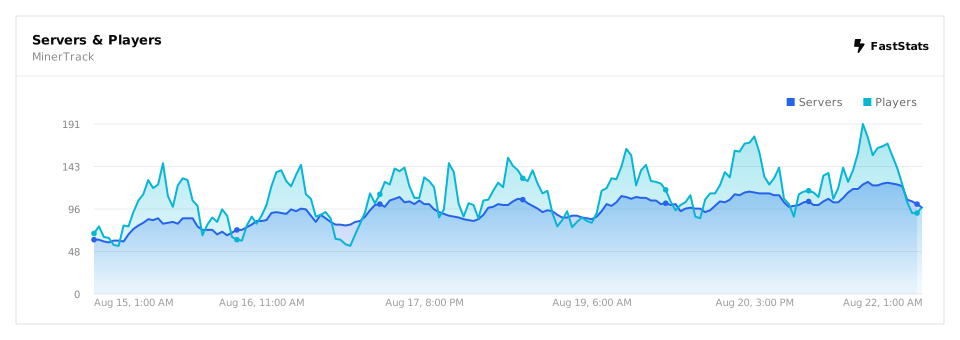
插件使用情况
模组使用情况


MinerTrack Anti-XRay

MinerTrack is a plugin that will really help you catch those naughty players using Xray on your server in a different way from other Anti-Xray plugins. This plugin doesn't hide ores, as hiding ores requires a lot of resources.
So how does it work?
To catch Xray, MinerTrack uses an advanced algorithm that combines several factors like ore scarcity, the amount of ores mined in a certain period, the player’s path to ores, and many other aspects.
But can't people still use Xray?
Yes and no. Indeed, a player using Xray has two options:
- Keep using Xray but behave like a normal player to avoid being caught. They can't get more ores than a normal player or they’ll be caught by MinerTrack.
- Uninstall their Xray or be caught.
Why choose MinerTrack over other AntiXray options?
Compared to Paper Anti-XRay and Orebfuscator:
- MinerTrack is lightweight.
- MinerTrack's engine is innovative.
- MinerTrack detects Xray users, leaving it to you to decide on sanctions.
Compared to other AntiXray solutions:
- MinerTrack supports the latest Minecraft version.
- MinerTrack has been tested on servers with about 20 simultaneous players, with very few false positives (default config).
- MinerTrack is free.
Look what users have to say:
Assessments


- Detect XRayer
- Automatically handle cases when a player's X-Ray violation level reaches a threshold
- Automatically reduce the violation level when the player's behavior normalizes
- When the player is mining in a cave, they will not be detected incorrectly
- Highly configurable profiles

/mtrack notify <message> - Send alerts to staff
/mtrack verbose - Enable Detailed Mode and notify staff with it enabled whenever a player’s violation level increases
/mtrack check <player> - Check a player’s violation history
/mtrack reset <player> - Reset a player's violation record
/mtrack help - Get plugin help
/mtrack kick <player> <reason> - Kick a player with a specific reason
/mtrack reload - Reload the plugin’s configuration
/mtrack update - Check for plugin updates
/mtrack logs <log name.log> - View a MinerTrack log file

minertrack.bypass - Bypass X-Ray detection
minertrack.notify - Receive notifications and verbose information
minertrack.checkupdate - Receive update information and use /mtrack update
minertrack.use - Access the root command /mtrack
minertrack.check - Use /mtrack check
minertrack.kick - Use /mtrack kick
minertrack.logs - Use /mtrack logs
minertrack.help - Use /mtrack help
minertrack.reset - Use /mtrack reset
minertrack.sendnotify - Use /mtrack notify
minertrack.verbose - Use /mtrack verbose
minertrack.reload - Use /mtrack reload

- Download the latest version of MinerTrack from Modrinth.
- Place the .jar file into the plugins or mods folder.
- Restart the server to generate the configuration and necessary files.

As plugin:
- Java 17 or higher
- Paper, Purpur, Folia or compatible forks (1.18 or newer) Not Spigot!
As Fabric mod:
- Java 17 or higher
- Fabric 1.18 or newer
- Fabric API
- LuckPerms 5.0.0+ (If you need permission node function)
As Forge mod:
- Java 17 or higher
- Forge 1.18 or newer
As NeoForge mod:
- Java 17 or higher
- NeoForge 1.20.1 or newer

If you encounter any issues or have suggestions for new features, feel free to reach out via Discord or open an issue on the plugin’s GitHub repository.
View Source:
Report Issue:
Pull Requset:
Visit Wiki:
Join Discord:
Support Project:
Plugin Usage
Mod Usage

评论 0
登录后参与评分
还没有评论,来抢沙发吧