
关于 mmoCore
mmoCore 为所有 mmoMinecraft 插件提供了通用的代码支持。对于服务器管理员而言,它还提供了用于设置插件配置值以及更新已安装的 mmoMinecraft 插件的命令。
mmoMinecraft 套件是一组插件的集合,旨在共同在 Minecraft 中营造更加类似 MMORPG 的体验。它们唯一共同依赖的插件是 mmoCore。

立即获取 Spoutcraft & Spoutplugin! >> 获取 Spout!
如果可用,将使用 Spout 来提供玩家反馈。客户端不需要安装 SpoutCraft(尽管推荐安装)。
这些插件仍在开发中,因此未来会有更多插件加入列表,列表中现有的插件也都会陆续推出!
插件列表
mmoMinecraft GUI 示例
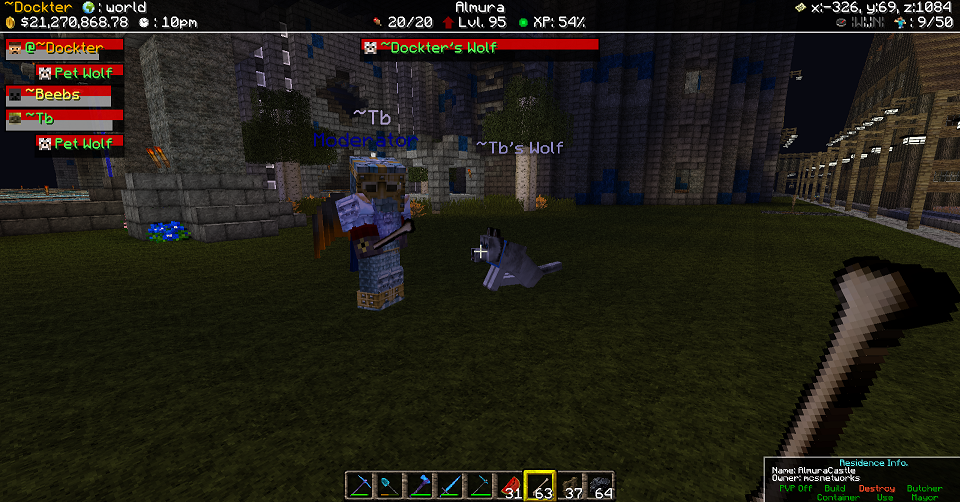
在下方的示例中,你可以看到上方的 GUI 元素。顶部的黑色条带以及你看到的附加令牌都属于 mmoInfo 套件插件,同时也涉及 mmoParty、mmoTarget 等插件的功能。
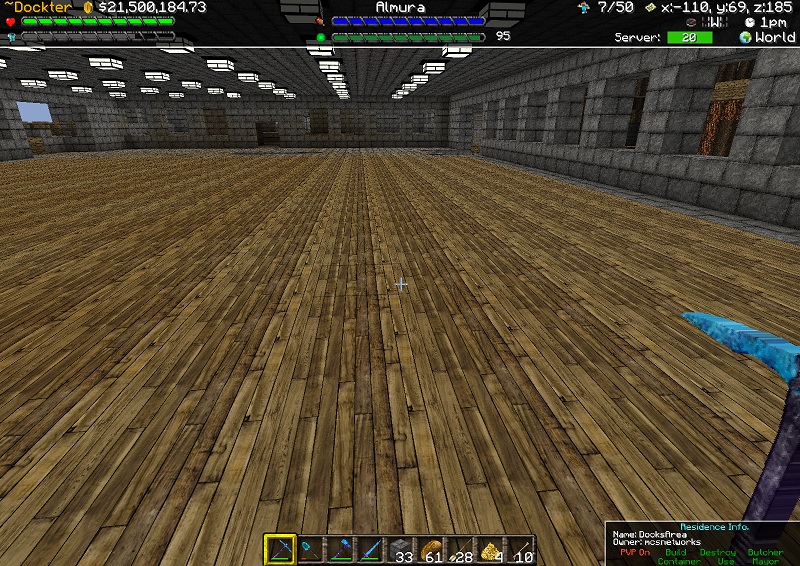
以下是生命值、护甲值、食物值、等级等新图形条显示的示例。
命令
- /mmoupdate - 更新所有 mmoMinecraft 插件。
- /mmoset - 显示已安装的 mmoMinecraft 插件。
- /mmoset <plugin> - 显示所有选项(与 plugin.yml 中的内容相同)。
- /mmoset <plugin> <option> - 显示选项的当前值(与 plugin.yml 中的内容相同)。
- /mmoset <plugin> <option> <value> - 设置选项(与 plugin.yml 中的内容相同)。
数据文件夹
通常情况下,所有插件都会在与其自身相同的目录下创建一个单独的文件夹用于存储文件。如果你在该目录下创建一个名为 "mmoMinecraft" 的文件夹,那么它们都将统一使用该文件夹。旧的 "*/config.yml" 文件将变为 "mmoMinecraft/*.yml"。任何特定的客户端图片等资源将位于该文件夹内的子文件夹中。
这样做是为了方便备份和恢复你的设置。
文件的移动是自动完成的(不过你也可以手动撤销此操作)。
致谢
许多人都为这个项目做出了贡献,我们对此深表感谢。以下是一些贡献者:
- Rycochet
- Dockter
- Flenix
- FlayaN
- Xaymar
依赖项
未来计划
- 翻译命令(用于其他 mmoMinecraft 插件)
- 图形界面,用于在不使用 /commands 的情况下设置 mmoMinecraft 插件的配置值。
- 图形界面,用于安装/更新 mmoMinecraft 插件。
- 改进的 Spout 布局代码,包括允许客户端重新排列受支持插件的布局的功能。
- 更多用于插件使用的支持组件。
更新日志
提交记录

About mmoCore
mmoCore provides the common code for all mmoMinecraft plugins to use. For server admins this also provides commands to set plugin config values and update installed mmoMinecraft plugins.
The mmoMinecraft suite is a collection of plugins that together attempt to create a more mmorpg-like experience in Minecraft. The only plugin that they all require is mmoCore.

Get Spoutcraft & Spoutplugin Now! >> Get Spout!
Uses Spout if available to give player feedback. The client-side SpoutCraft isn't required (although it is recommended).
These plugins are still being coded, so more will join the list over time, and all the ones on the list will actually get created too!
Plugin List
- mmoChat - Configurable channels, including Party chat.
- mmoChatPirate - Adds a "Pirate" filter to mmoChat.
- mmoChatTitle - Adds a permissions based "Title" filter to mmoChat.
- mmoDamage - Control PVP and PVE damage events more easily.
- mmoInfo - Info bar for use by other plugins.
- mmoInfoArmor - Displays Players Armor Values in 20/20 format or new graphical display.
- mmoInfoBed - Adds a {bed} token to the mmoInfo token list. Displays Players' bed location.
- mmoInfoCompass - Adds a {compass} token to the mmoInfo token list.
- mmoInfoCoords - Adds a {coords} token to the mmoInfo token list.
- mmoInfoFood - Displays Player Food Values
- mmoInfoHealth - Displays Players Health Values in 20/20 format or new graphical display.
- mmoInfoLevel - Displays Player Experience Level and Exp values
- mmoInfoXP - Displays Player Experience to Next Level
- mmoInfoGold - Displays Player Economy balance in gold or currency based values.
- mmoInfoOnline - Displays Player Count & Server Slots via {online} token.
- mmoInfoTicks - Displays Server performance TPS value via the {ticks} token.
- mmoInfoTime - Displays Server Time via {time} token.
- mmoInfoWorld - Displays Players current world via {world} token, configurable naming.
- mmoParty - Leadership based parties with damage protection.
- mmoPet - Eventually allow taming other creatures, and give extra abilities to pets.
- mmoTarget - Visible target display, including health, owner and target's target.
mmoMinecraft GUI Example
In the below example you can see the GUI elements above. This black bar along the top with the additional tokens you see are all part of mmoInfo Suite of plugins, as well as mmoParty, mmoTarget etc.

The below is an example of the new Graphics Bar displays for Health, Armor, Food, Level etc.

Commands
- /mmoupdate - Update all mmoMinecraft plugins.
- /mmoset - Show installed mmoMinecraft plugins.
- /mmoset <plugin> - Show all options (same as in plugin.yml).
- /mmoset <plugin> <option> - Show option current value (same as in plugin.yml).
- /mmoset <plugin> <option> <value> - Set option (same as in plugin.yml).
Data Folder
Normally all plugins have a separate folder in the same location as themselves for storing files. If instead you create a folder named "mmoMinecraft" in there then they will all use that instead. The old "*/config.yml" files become "mmoMinecraft/*.yml" instead. Any specific images etc for the client will be in a further folder inside that.
This is to make it easier to backup and restore your settings.
The file moving is automatic (you can manually undo it however).
Credits
A lot of people have contributed to this project and we greatly thank those involved. Here's a few of those Contributors:
- Rycochet
- Dockter
- Flenix
- FlayaN
- Xaymar
Dependencies
Future
- Translation command (for other mmoMinecraft plugins)
- GUI for setting mmoMinecraft plugin config values without having to use /commands.
- GUI for installing / updating mmoMinecraft plugins.
- Improved Spout layout code, including the ability for the client to re-arrange the layout of supported plugins.
- More support widgets for plugin use.
Changelog
Commit log
评论 0
登录后参与评分
还没有评论,来抢沙发吧