?️ ModerationGUI — 一站式员工管理插件
专为 Paper、Purpur 和 Folia 1.21+ 服务器打造的下一代高性能管理与服务器维护套件。
通过统一的 54 格可视化员工菜单、基于理由的自动封禁预设、实时红石延迟检测器、屏幕共享冻结功能以及实时物品栏检查,彻底消除命令疲劳。
? 游戏内员工控制中心
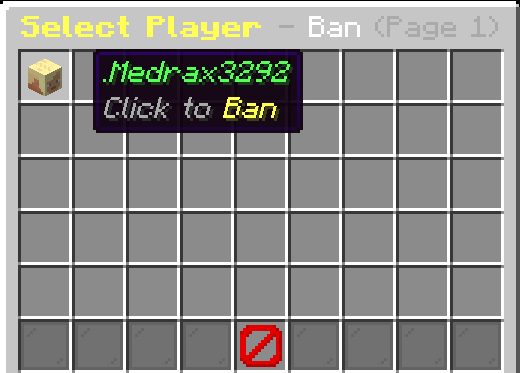
在游戏中使用 /mod 或 /moderation 即时打开
┌─────────────────────────────────────────────────────────────────────────────────┐
│                           54-GRADE MODERATION MATRIX                             │
├──────────────────┬──────────────────┬──────────────────┬────────────────────────┤
│ ? Slot 4: History│ ? Slot 11: Ban   │ ? Slot 13: Kick │ ? Slot 15: Mute       │
│ ? Slot 20: Freeze│ ? Slot 22: Warn  │ ✍️ Slot 24: Chat │ ? Slot 29: Unban      │
│ ? Slot 31: Warned│ ? Slot 33: Unmute│ ? Slot 38: InvSee│ ? Slot 40: Reports    │
│ ? Slot 42: Notes │ ? Slot 47: Maint │ ?️ Slot 49: Vanish│ ?️ Slot 51: Tickets    │
└──────────────────┴──────────────────┴──────────────────┴────────────────────────┘
? ModerationGUI 3.0 有何特别之处?
传统的服务器管理分散在多个缓慢的插件中。ModerationGUI 3.0 将所有的管理工作流整合到一个超快、零延迟的生态系统中。
? 核心架构亮点:
- ⚡ 零主线程延迟: 异步审计日志记录、文件保存和缓存索引确保 tick 率稳定保持在 20.0 TPS。
- ? 可视化 RBAC 安全性: 如果员工成员没有某个按钮的权限,该按钮会动态渲染为锁定的 Barrier(屏障) 图标。
- ? 交互式聊天输入: 无需笨拙的铁砧输入;时长和理由直接在聊天中键入,并带有自动超时保护。
- ? 真正的幽灵隐身: 完全静音,隐身玩家列表状态,隐藏加入/离开消息,以及无声的容器开启。
✨ 功能详解
⚡ 1. 基于理由的自动时长惩罚
再也不用记住封禁时长了。只需输入玩家名称和作弊名称:
- 示例:
/mod ban Steve killaura
- 立即解析
killaura(或其别名 aura、ka、forcefield)。
- 自动应用配置的时长:14 天。
- 格式化显示理由:
KillAura / Unfair Combat。
- 附加自定义备注:
/mod ban Steve killaura with fast hits -> 应用 14 天封禁,包含格式化理由和后缀备注。
- 手动覆盖:
/mod ban Steve 3d killaura -> 手动时长覆盖预设时长,同时保持整洁的理由样式。
- 预设静音:
/mod mute Steve spam(30分钟),/mod mute Steve toxicity(2小时),/mod mute Steve advertising(7天)。
? 2. 深入研究 25+ 种作弊类别
从顶级反作弊系统(Vulcan、GrimAC、Matrix、Polar)研究出的预设配置:
- 战斗类:
killaura(14天),reach(14天),hitbox(14天),velocity(14天),autoclicker(7天),criticals(7天)。
- 移动类:
fly(14天),speed(14天),jesus(7天),nofall(7天),timer(14天),step(7天)。
- 世界与漏洞利用:
xray(30天),lagmachine(30天),scaffold(14天),nuker(14天),fastbreak(7天),baritone(14天),dupe(永久)。
- 聊天违规:
spam(30分钟),toxicity(2小时),advertising(7天),hate(14天)。
? 3. 游戏内作弊与延迟测试套件
- ?
/test aura <player>: 在嫌疑人身后生成一个不可见的诱饵实体,以检测自动旋转锁定和 KillAura 作弊。
- ?️
/test totem <player>: 毫秒级审计副手图腾装备频率,以检测自动 AutoTotem 交换宏。
- ?
/test lag / /test lagmachine: 实时红石时钟监控。审计 TPS,计算每个区块的红石刻数和活塞循环次数,并标记实体聚集集群。
? 4. 冻结与屏幕共享 (SS) 系统
- 完全嫌疑人锁定 (
/freeze <player> / /ss <player>):
- 施加失明效果并锁定玩家位置、跳跃、攻击和方块交互。
- 广播持久的屏幕标题和聊天指令。
- 战斗登出保护: 如果冻结的嫌疑人断开连接,他们将因逃避屏幕共享而被自动封禁 14 天。
? 5. 实时物品栏与末影箱检查器
/invsee <player>: 实时查看目标玩家的盔甲、副手物品和完整物品栏内容。/enderchest <player> / /ec <player>: 按需打开并查看任何在线玩家的末影箱。
? 6. 完整的聊天管理与员工频道
/chat clear: 立即清除聊天记录以删除侮辱性词语或广告链接。/chat mute: 在服务器活动或公告期间静默全局聊天。/chat slow <seconds>: 强制实施玩家消息之间的冷却时间。/staffchat <message> / /sc: 专用的私人员工频道,具有持久化的聊天切换功能。
? 7. 服务器维护模式
/maintenance [on|off|toggle|status] / /maint:
- 仅允许操作员和拥有
moderation.maintenance.bypass 权限的员工访问服务器。
- 非员工玩家会收到自定义的踢出屏幕和标题,解释正在进行的维护工作。
? 8. 多账号追踪与员工备注
/alts <player>: 跨登录记录 IP 地址,若连接玩家的 IP 被封禁账号共享,则向员工发出警报。/notes <player> add|remove|list: 为每位玩家档案附加永久私人笔记本,用于员工间沟通。
? 主控命令参考
| 命令 |
别名 |
描述 |
权限节点 |
/mod |
/moderation |
打开 54 槽位的交互式管理 GUI |
moderation.use |
/mod ban <player> [dur] <reason> |
— |
封禁玩家(支持预设自动时长) |
moderation.ban |
/mod unban <player> |
— |
通过命令或 GUI 解除封禁 |
moderation.unban |
/mod mute <player> [dur] <reason> |
— |
禁言玩家(支持预设自动时长) |
moderation.mute |
/mod unmute <player> |
— |
通过命令或 GUI 解除禁言 |
moderation.unmute |
/mod kick <player> <reason> |
— |
将玩家踢出服务器 |
moderation.kick |
/mod warn <player> <reason> |
— |
警告玩家(触发自动化惩罚阶梯) |
moderation.warn |
/mod unwarn <player> |
— |
移除玩家的警告 |
moderation.unwarn |
/freeze <player> |
/ss |
冻结嫌疑人以便进行屏幕共享检查 |
moderation.freeze |
/invsee <player> |
— |
实时检查玩家物品栏和盔甲 |
moderation.invsee |
/enderchest <player> |
/ec |
打开并检查玩家的末影箱 |
moderation.enderchest |
/chat <clear|mute|slow> |
— |
管理全局聊天频道 |
moderation.chat.manage |
/alts <player> |
— |
审计关联的备用账号及共享 IP |
moderation.alts |
/notes <player> <add|remove|list> |
— |
管理持久的玩家员工备注 |
moderation.notes |
/test <aura|totem|lag> |
— |
作弊诱饵和红石延迟诊断 |
moderation.test |
/maintenance [on|off|toggle] |
/maint |
切换服务器维护锁定状态 |
moderation.maintenance |
/vanish |
/v |
切换无声幽灵隐身模式 |
moderation.vanish |
/staffchat <message> |
/sc |
专用员工通信频道 |
moderation.staffchat |
/report <player> <reason> |
— |
向员工工单台提交玩家报告 |
无(所有玩家) |
支持的时长格式: 30s 15m 2h 1d 7d 14d 30d permanent
? 权限与 LuckPerms 矩阵
| 权限节点 |
描述 |
默认角色 |
moderation.use |
打开 /mod GUI 菜单 |
OP |
moderation.ban |
通过 GUI 或命令封禁玩家 |
OP |
moderation.unban |
解除玩家封禁 |
OP |
moderation.mute |
通过 GUI 或命令禁言玩家 |
OP |
moderation.unmute |
解除玩家禁言 |
OP |
moderation.kick |
踢出玩家 |
OP |
moderation.warn |
发出警告并启用自动化阶梯 |
OP |
moderation.unwarn |
移除玩家警告 |
OP |
moderation.freeze |
冻结嫌疑人以便屏幕共享 |
OP |
moderation.freeze.bypass |
免疫冻结效果 |
OP |
moderation.invsee |
实时检查玩家物品栏 |
OP |
moderation.enderchest |
打开玩家末影箱 |
OP |
moderation.chat.manage |
清空、禁言或减缓聊天 |
OP |
moderation.chat.bypass |
绕过聊天禁言和慢速模式 |
OP |
moderation.alts |
审计玩家备用账号 |
OP |
moderation.alts.notify |
接收备用账号登录警报 |
OP |
moderation.notes |
查看和管理员工备注 |
OP |
moderation.test |
运行作弊和延迟诊断 |
OP |
moderation.maintenance |
切换维护锁定状态 |
OP |
moderation.maintenance.bypass |
在维护期间加入服务器 |
OP |
moderation.vanish |
进入无声幽灵隐身模式 |
OP |
moderation.staffchat |
访问员工通信频道 |
OP |
moderation.alerts.lag |
接收实时红石延迟警报 |
OP |
moderation.* |
完整的管理员根访问权限 |
OP |
? 即贴即用的 LuckPerms 设置
# 1. 管理员角色设置
/lp group mod permission set moderation.use true
/lp group mod permission set moderation.kick true
/lp group mod permission set moderation.mute true
/lp group mod permission set moderation.unmute true
/lp group mod permission set moderation.warn true
/lp group mod permission set moderation.freeze true
/lp group mod permission set moderation.invsee true
/lp group mod permission set moderation.enderchest true
/lp group mod permission set moderation.notes true
/lp group mod permission set moderation.staffchat true

# 2. 超级管理员角色设置
/lp group admin permission set moderation.* true
? 智能动态锁定: 拥有任何权限(例如 moderation.kick)的玩家均可打开 /mod。对于他们缺乏权限的操作,将以 屏障 (Barrier) 物品进行视觉锁定。
? 配置预览 (config.yml)
# 管理插件设置
prefix: "&c&lModeration &8» &7"

# 惩罚预设
presets:
  default-ban-duration: "30d"
  default-mute-duration: "1d"
  killaura:
    duration: "14d"
    reason: "KillAura / 不公平战斗"
    aliases:
      - "aura"
      - "ka"
      - "forcefield"
  fly:
    duration: "14d"
    reason: "飞行 / 移动作弊"
    aliases:
      - "flight"
  xray:
    duration: "30d"
    reason: "X-Ray / 非法挖矿"
  spam:
    type: "mute"
    duration: "30m"
    reason: "垃圾信息 / 聊天刷屏"

# 延迟机器检测器
lag-detector:
  enabled: true
  redstone-threshold: 250
  piston-threshold: 60
  entity-threshold: 80
  alert-cooldown-seconds: 10

# 维护模式
maintenance:
  enabled: false
  kick-message: "&c服务器目前正在进行维护!\n&e请稍后再试。"
⚙️ 要求与安装
| 要求项 |
支持版本 |
| 服务端平台 |
Paper, Purpur 或 Folia |
| Minecraft 版本 |
1.21.x (1.21 至 1.21.11) |
| Java 版本 |
Java 21+ |
| 权限插件 |
LuckPerms (推荐) |
安装步骤:
- 下载
ModerationGUI-3.0.jar。
- 将 jar 文件放入服务器的
plugins/ 文件夹中。
- 重启服务器(切勿使用
/reload)。
- 使用 LuckPerms 配置角色和权限。
- 在游戏中输入
/mod,享受轻松的服务器管理!
? 支持与社区
有 bug 需要报告或功能建议?加入我们的 Discord 社区:
直接邀请链接:
由 MDR Studios 用心制作 ❤️
?️ ModerationGUI — The All-in-One Staff Management Plugin
The next-generation, high-performance moderation and server administration suite built for Paper, Purpur, and Folia 1.21+ servers.
Eliminate command fatigue with a unified 54-slot visual staff menu, automated reason-based ban presets, real-time redstone lag detector, screenshare freeze, and live inventory inspection.
? In-Game Staff Control Center
Open instantly in-game using /mod or /moderation
┌─────────────────────────────────────────────────────────────────────────────────┐
│                           54-SLOT MODERATION MATRIX                             │
├──────────────────┬──────────────────┬──────────────────┬────────────────────────┤
│ ? Slot 4: History│ ? Slot 11: Ban   │ ? Slot 13: Kick │ ? Slot 15: Mute       │
│ ? Slot 20: Freeze│ ? Slot 22: Warn  │ ✍️ Slot 24: Chat │ ? Slot 29: Unban      │
│ ? Slot 31: Warned│ ? Slot 33: Unmute│ ? Slot 38: InvSee│ ? Slot 40: Reports    │
│ ? Slot 42: Notes │ ? Slot 47: Maint │ ?️ Slot 49: Vanish│ ?️ Slot 51: Tickets    │
└──────────────────┴──────────────────┴──────────────────┴────────────────────────┘
? What Makes ModerationGUI 3.0 Special?
Traditional server moderation is fragmented across multiple slow plugins. ModerationGUI 3.0 consolidates every administrative workflow into an ultra-fast, zero-lag ecosystem.
? Core Architectural Highlights:
- ⚡ Zero Main-Thread Lag: Asynchronous audit logging, file saving, and cache indexing keep tick rates at a steady 20.0 TPS.
- ? Visual RBAC Security: If a staff member lacks permission for any button, it dynamically renders as a locked Barrier icon.
- ? Interactive Chat Input: No clunky anvil inputs; durations and reasons are typed directly in chat with automatic timeout protection.
- ? True Ghost Vanish: Complete silence, vanished player list status, hidden join/leave messages, and silent container opening.
✨ Feature Breakdown
⚡ 1. Reason-Based Auto-Duration Punishments
Never remember ban durations again. Simply type the player and the cheat name:
- Example:
/mod ban Steve killaura
- Instantly resolves
killaura (or aliases aura, ka, forcefield).
- Automatically applies the configured duration: 14 Days.
- Formats display reason:
KillAura / Unfair Combat.
- Append Custom Notes:
/mod ban Steve killaura with fast hits -> applies 14d ban with formatted reason and suffix notes.
- Manual Override:
/mod ban Steve 3d killaura -> manual duration overrides preset duration while keeping clean reason styling.
- Preset Mutes:
/mod mute Steve spam (30m), /mod mute Steve toxicity (2h), /mod mute Steve advertising (7d).
? 2. Researched 25+ Hack Categories
Preset configurations researched from premier anticheats (Vulcan, GrimAC, Matrix, Polar):
- Combat:
killaura (14d), reach (14d), hitbox (14d), velocity (14d), autoclicker (7d), criticals (7d).
- Movement:
fly (14d), speed (14d), jesus (7d), nofall (7d), timer (14d), step (7d).
- World & Exploits:
xray (30d), lagmachine (30d), scaffold (14d), nuker (14d), fastbreak (7d), baritone (14d), dupe (permanent).
- Chat Violations:
spam (30m), toxicity (2h), advertising (7d), hate (14d).
? 3. In-Game Cheat & Lag Testing Suite
- ?
/test aura <player>: Spawns an invisible bait entity behind the suspect to detect automated rotation locks and KillAura hacks.
- ?️
/test totem <player>: Audits offhand totem equip frequency in milliseconds to detect automated AutoTotem swap macros.
- ?
/test lag / /test lagmachine: Real-time redstone clock monitor. Audits TPS, counts redstone ticks and piston loops per chunk, and flags entity clumping clusters.
? 4. Freeze & Screenshare (SS) System
- Total Suspect Lockdown (
/freeze <player> / /ss <player>):
- Applies blindness and locks player location, jumps, attacks, and block interactions.
- Broadcasts persistent screen titles and chat instructions.
- Combat Logout Guard: If a frozen suspect disconnects, they are automatically banned for 14 days for screenshare evasion.
? 5. Live Inventory & Ender Chest Inspector
/invsee <player>: Live-view target armor, offhand item, and full inventory contents in real time./enderchest <player> / /ec <player>: Open and view any online player's Ender Chest on demand.
? 6. Complete Chat Management & Staff Channel
/chat clear: Instantly wipe chat history to clear slurs or advertisement links./chat mute: Silence global chat during server events or announcements./chat slow <seconds>: Enforce cooldowns between player messages./staffchat <message> / /sc: Dedicated private staff channel with persistent chat toggle.
? 7. Server Maintenance Mode
/maintenance [on|off|toggle|status] / /maint:
- Locks server access exclusively to operators and staff with
moderation.maintenance.bypass.
- Non-staff players receive a custom kick screen and title explaining the ongoing maintenance.
? 8. Alt Account Tracker & Staff Notes
/alts <player>: Tracks IP addresses across joins and alerts staff if a connecting player shares an IP with banned accounts./notes <player> add|remove|list: Permanent private notebook attached to each player profile for staff communication.
? Master Command Reference
| Command |
Aliases |
Description |
Permission Node |
/mod |
/moderation |
Open the 54-slot interactive moderation GUI |
moderation.use |
/mod ban <player> [dur] <reason> |
— |
Ban player (supports preset auto-durations) |
moderation.ban |
/mod unban <player> |
— |
Unban a player via command or GUI |
moderation.unban |
/mod mute <player> [dur] <reason> |
— |
Mute player (supports preset auto-durations) |
moderation.mute |
/mod unmute <player> |
— |
Unmute a player via command or GUI |
moderation.unmute |
/mod kick <player> <reason> |
— |
Kick a player from the server |
moderation.kick |
/mod warn <player> <reason> |
— |
Warn a player (triggers automated punishment ladder) |
moderation.warn |
/mod unwarn <player> |
— |
Remove a player's warning |
moderation.unwarn |
/freeze <player> |
/ss |
Freeze suspect for screenshare inspection |
moderation.freeze |
/invsee <player> |
— |
Live inspect player inventory and armor |
moderation.invsee |
/enderchest <player> |
/ec |
Open and inspect player Ender Chest |
moderation.enderchest |
/chat <clear|mute|slow> |
— |
Manage global chat channel |
moderation.chat.manage |
/alts <player> |
— |
Audit linked alternate accounts and shared IPs |
moderation.alts |
/notes <player> <add|remove|list> |
— |
Manage persistent player staff notes |
moderation.notes |
/test <aura|totem|lag> |
— |
Cheat bait and redstone lag diagnostics |
moderation.test |
/maintenance [on|off|toggle] |
/maint |
Toggle server maintenance lockdown |
moderation.maintenance |
/vanish |
/v |
Toggle silent ghost vanish |
moderation.vanish |
/staffchat <message> |
/sc |
Private staff communication channel |
moderation.staffchat |
/report <player> <reason> |
— |
Submit player report to staff ticket desk |
None (All players) |
Supported Duration Formats: 30s 15m 2h 1d 7d 14d 30d permanent
? Permissions & LuckPerms Matrix
| Permission Node |
Description |
Default Role |
moderation.use |
Open the /mod GUI menu |
OP |
moderation.ban |
Ban players via GUI or command |
OP |
moderation.unban |
Unban players |
OP |
moderation.mute |
Mute players via GUI or command |
OP |
moderation.unmute |
Unmute players |
OP |
moderation.kick |
Kick players |
OP |
moderation.warn |
Issue warnings with automated ladder |
OP |
moderation.unwarn |
Remove player warnings |
OP |
moderation.freeze |
Freeze suspects for screenshare |
OP |
moderation.freeze.bypass |
Immunity to freeze |
OP |
moderation.invsee |
Live inspect player inventories |
OP |
moderation.enderchest |
Open player Ender Chests |
OP |
moderation.chat.manage |
Clear, mute, or slow chat |
OP |
moderation.chat.bypass |
Bypass chat mute and slowmode |
OP |
moderation.alts |
Audit player alt accounts |
OP |
moderation.alts.notify |
Receive alt account join alerts |
OP |
moderation.notes |
View and manage staff notes |
OP |
moderation.test |
Run cheat and lag diagnostics |
OP |
moderation.maintenance |
Toggle maintenance lockdown |
OP |
moderation.maintenance.bypass |
Join server during maintenance |
OP |
moderation.vanish |
Enter silent ghost vanish mode |
OP |
moderation.staffchat |
Access staff communication channel |
OP |
moderation.alerts.lag |
Receive real-time redstone lag alerts |
OP |
moderation.* |
Full administrative root access |
OP |
? Ready-to-Paste LuckPerms Setup
# 1. Moderator Role Setup
/lp group mod permission set moderation.use true
/lp group mod permission set moderation.kick true
/lp group mod permission set moderation.mute true
/lp group mod permission set moderation.unmute true
/lp group mod permission set moderation.warn true
/lp group mod permission set moderation.freeze true
/lp group mod permission set moderation.invsee true
/lp group mod permission set moderation.enderchest true
/lp group mod permission set moderation.notes true
/lp group mod permission set moderation.staffchat true

# 2. Administrator Role Setup
/lp group admin permission set moderation.* true
? Smart Dynamic Locking: Players with any permission (e.g. moderation.kick) can open /mod. Any actions they lack permissions for will be visually locked with a Barrier item.
? Configuration Preview (config.yml)
# Moderation Plugin Settings
prefix: "&c&lModeration &8» &7"

# Punishment presets
presets:
  default-ban-duration: "30d"
  default-mute-duration: "1d"
  killaura:
    duration: "14d"
    reason: "KillAura / Unfair Combat"
    aliases:
      - "aura"
      - "ka"
      - "forcefield"
  fly:
    duration: "14d"
    reason: "Flight / Movement Cheat"
    aliases:
      - "flight"
  xray:
    duration: "30d"
    reason: "X-Ray / Illegal Mining"
  spam:
    type: "mute"
    duration: "30m"
    reason: "Spam / Chat Flood"

# Lag machine detector
lag-detector:
  enabled: true
  redstone-threshold: 250
  piston-threshold: 60
  entity-threshold: 80
  alert-cooldown-seconds: 10

# Maintenance mode
maintenance:
  enabled: false
  kick-message: "&cServer is currently under maintenance!\n&ePlease check back later."
⚙️ Requirements & Installation
| Requirement |
Supported Version |
| Server Platform |
Paper, Purpur, or Folia |
| Minecraft Version |
1.21.x (1.21 to 1.21.11) |
| Java Version |
Java 21+ |
| Permissions Plugin |
LuckPerms (Recommended) |
Installation Steps:
- Download
ModerationGUI-3.0.jar.
- Drop the jar file into your server's
plugins/ folder.
- Restart your server (never use
/reload).
- Configure roles and permissions with LuckPerms.
- Type
/mod in-game and enjoy effortless server management!
? Support & Community
Have a bug to report or a feature to request? Join our Discord community:
Direct Invite Link:
Crafted with ❤️ by MDR Studios


 插件

 插件
 插件
 插件
 插件
 插件
评论 0
登录后参与评分
还没有评论,来抢沙发吧