myBukkitAdmin 是一款插件,允许服务器管理员通过托管在 mymchost.com 的网站来修改他们的服务器。该网页管理功能包括 Bukkit Minecraft 服务器内置的所有基本命令,以及服务器上已安装的任何插件所关联的所有可检测命令。myBukkitAdmin 和 Web 界面还允许您编辑插件的配置文件。

要使用此插件,请访问 并注册一个账户。注册完成后,点击页面左侧的“Add New Server”按钮创建服务器账户。在设置服务器账户时,指定一个隐私密钥(Privacy Key),用于唯一标识您希望控制的每个服务器。在网站完成服务器设置后,下载并安装 myBukkitAdmin 插件。您可以创建一个文件夹 /plugins/myBukkitAdmin/,或者启动服务器,该文件夹会自动为您创建。在此文件夹中,编辑您的 config.yml 文件,加入用于登录 mymchost.com 的用户名以及您为即将设置的服务器定义的隐私密钥。更新 config.yml 后,重新加载或重启服务器,您将开始在网站上看到服务器日志的更新,并且服务器状态将切换为 Active。
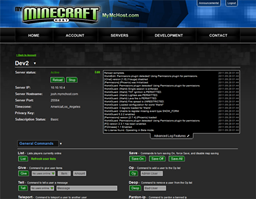
myBukkitAdmin is a plugin that allows server administrators to modify their server via a website hosted @ mymchost.com. The web administration includes all basic commands built into the Bukkit Minecraft Server as well as all detectable commands associated with any of the plugins installed on your server. myBukkitAdmin and the Web Interface also allow you to edit plugin configuration files.

To use this plugin, visit and register for an account. After registration is complete, create a server account by clicking the "Add New Server" button on the left side of the page. While setting up the server account, specify a Privacy Key that will be used to uniquely identify each server you wish to control. When you are done setting up the server on the website, download and install the myBukkitAdmin plugin. You can create a folder /plugins/myBukkitAdmin/ or start your server and the folder will be created for you. Within this folder, edit you config.yml to include the Username you use to login to mymchost.com and the Privacy Key that you defined for the server you are setting up. After you have updated your config.yml, reload or restart your server and you will start seeing your server's log updating on the website and the server status will switch to Active.
评论 0
登录后参与评分
还没有评论,来抢沙发吧