NearbyCraft+
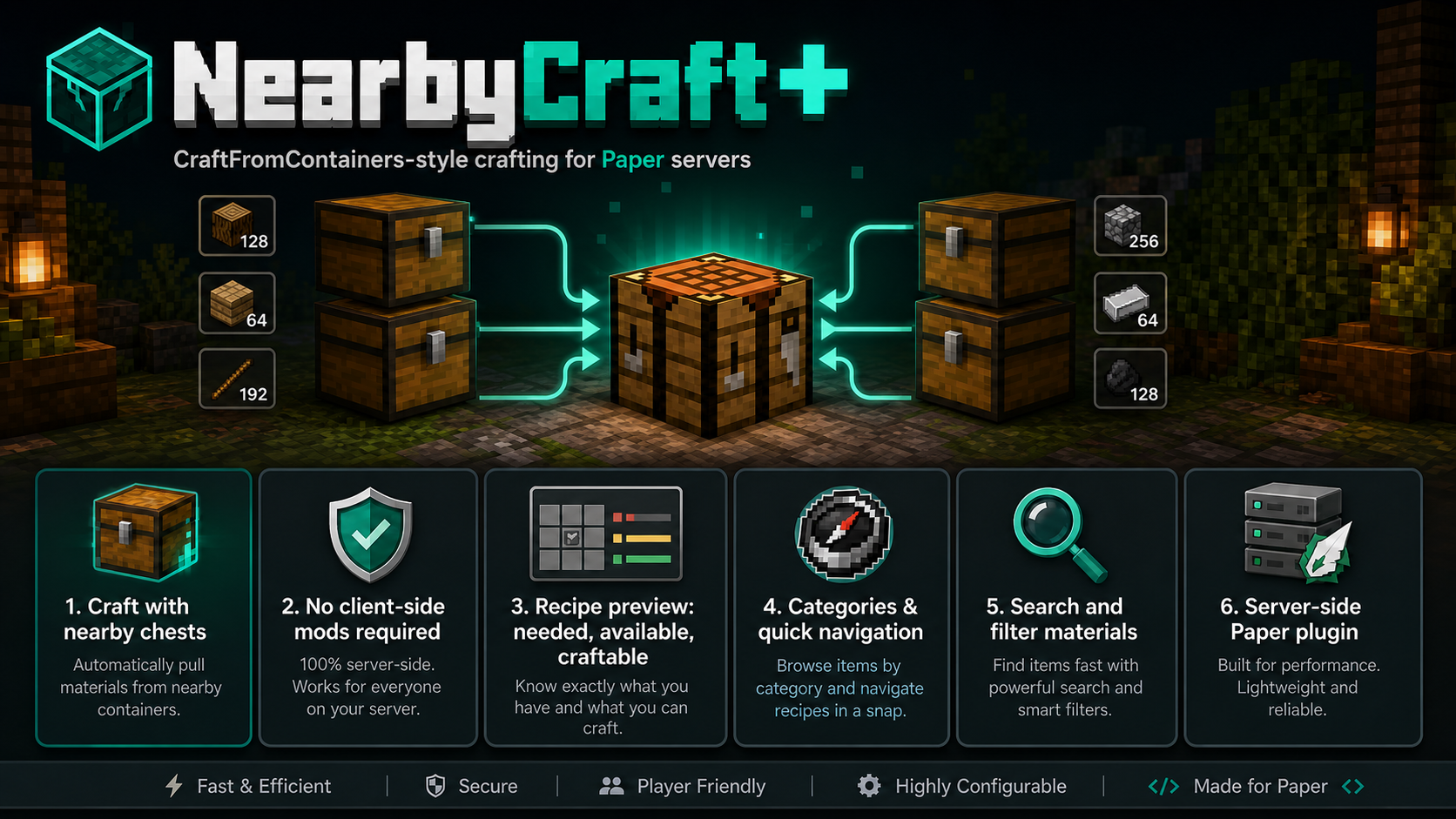
NearbyCraft+ 是一款 Paper 插件,它将广受欢迎的 CraftFromContainers 体验带入了 Paper 服务器——完全在服务端运行,且无需安装任何客户端模组。
玩家不再需要一个个打开箱子并手动收集材料,而是可以使用工作台,直接从附近的容器中选取物品进行合成。我开发 NearbyCraft+ 的目标是,以简洁、快速且直观的方式,将这种类似模组的舒适合成体验带给 Paper 服务器。
为什么选择 NearbyCraft+?
如果你熟悉模组玩法中 CraftFromContainers 带来的便利,那么这个插件基本上就是我为 Paper 服务器提供的解决方案。
通过 NearbyCraft+,你的玩家可以:
- 使用附近箱子中的材料进行合成
- 清楚地看到所需材料与已有材料
- 按类别浏览物品
- 快速切换类别
- 直接从菜单中搜索材料
- 无需安装客户端模组即可享受整个系统
这使得它非常适合以下类型的服务器:
- 生存服务器
- SMP(多人生存)服务器
- 建筑向服务器
- 存储密集的基地
- 注重生活质量的服务器配置
亮点
直接从附近容器合成
NearbyCraft+ 会扫描附近的箱子,让玩家可以直接在工作台使用这些材料进行合成。
再也不用在储物间和合成台之间来回奔波了。
智能配方预览
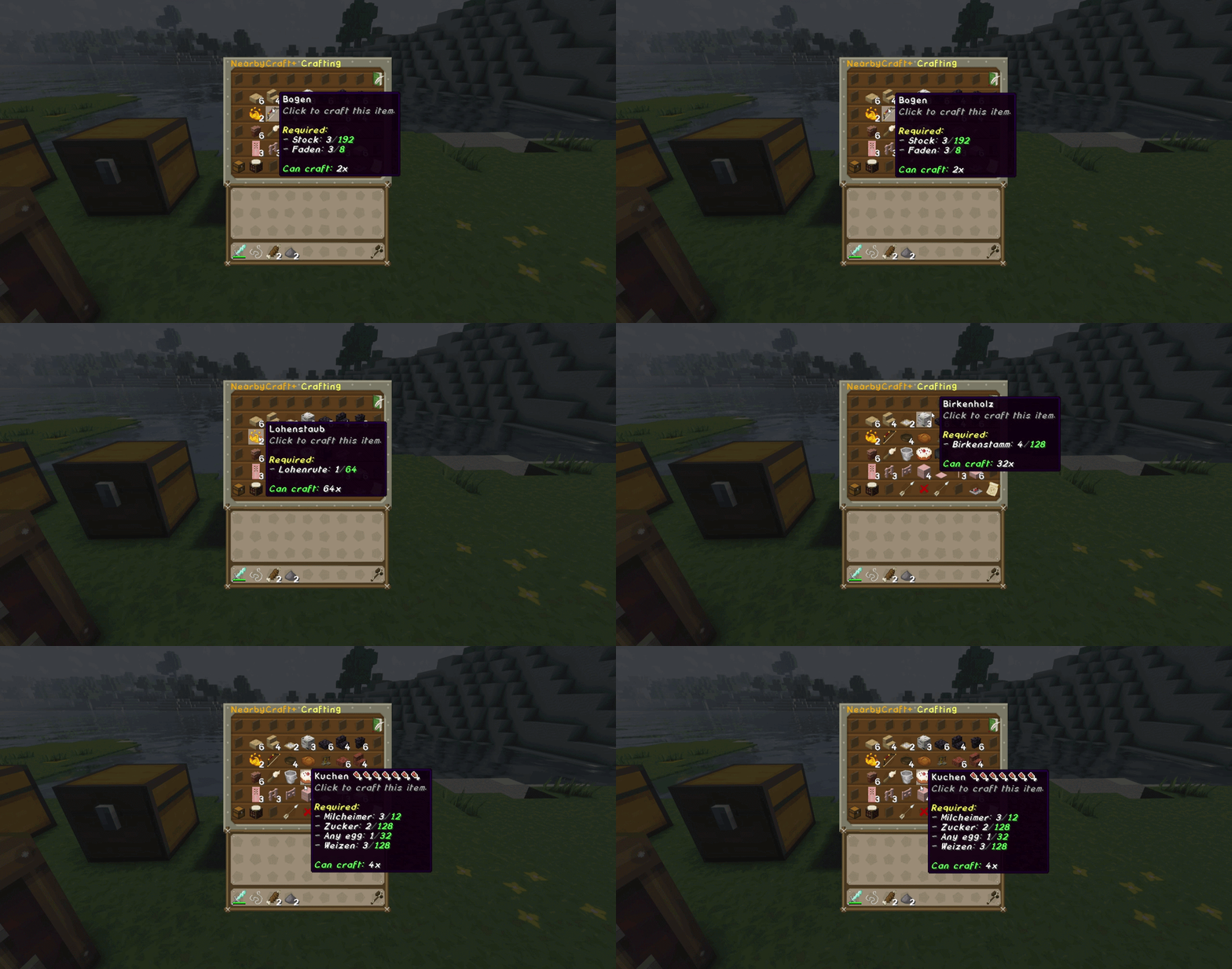
NearbyCraft+ 的一大亮点是其配方预览系统。
玩家可以立即看到:
这提供了非常清晰的概览,使合成变得更加轻松便捷。
分类与快速导航
配方和物品可以通过分类进行浏览。
还支持快速类别切换,通过左右键实现快速导航。
搜索与过滤系统
玩家可以使用搜索功能,按材料名称筛选物品。
例如,输入 axe 将显示所有匹配的材料/物品。
只需右键点击即可移除过滤器。
保护钩子支持
NearbyCraft+ 尊重容器保护机制。
如果玩家无权访问附近的容器,NearbyCraft+ 将不会扫描该容器,也不会计算其中的物品。
这对于受保护的领地(claims)和生存服务器尤为重要。
功能概览
- 适用于 Paper 服务器的 CraftFromContainers 风格合成
- 使用附近箱子中的物品进行合成
- 配方预览显示所需/可用/可合成数量
- 基于分类的浏览功能
- 快速类别切换
- 聊天输入框支持的搜索功能
- 简单的过滤器重置
- 分页浏览
- 整洁的菜单布局
- 界面中的扫描统计信息
- 可配置的附近容器扫描范围
- 工作台所有者保护
- 已放置工作台的信任系统
- SimpleClaimSystem 支持
- WorldGuard 支持
- JustLootIt 保护支持
- 战利品表与插件容器过滤
命令
主命令:
/nearbycraftplus/ncp/nearbycraft
| 命令 |
描述 |
权限 |
/ncp reload |
重新加载 NearbyCraft+ 配置文件和语言文件。 |
nearbycraftplus.command.reload |
/ncp scan |
运行扫描调试命令。 |
nearbycraftplus.command.scan |
/ncp recipereport |
生成配方报告。 |
nearbycraftplus.command.recipereport |
/ncp recipereport full |
生成完整的详细配方报告。 |
nearbycraftplus.command.recipereport |
/ncp give <player> [amount] |
给予玩家 NearbyCraft+ 工作台。 |
nearbycraftplus.command.give |
/ncp trust <player> |
允许其他玩家使用你放置的 NearbyCraft+ 工作台。 |
nearbycraftplus.workbench.trust |
/ncp untrust <player> |
从你的工作台中移除受信任的玩家。 |
nearbycraftplus.workbench.untrust |
/ncp trustlist |
显示你工作台的所有受信任玩家。 |
nearbycraftplus.workbench.trustlist |
权限
| 权限 |
描述 |
默认值 |
nearbycraftplus.admin |
授予所有 NearbyCraft+ 管理功能的访问权限。 |
OP |
nearbycraftplus.command.recipereport |
允许运行 NearbyCraft+ 配方报告命令。 |
OP |
nearbycraftplus.command.reload |
允许重新加载 NearbyCraft+。 |
OP |
nearbycraftplus.command.scan |
允许使用扫描调试命令。 |
OP |
nearbycraftplus.command.give |
允许给予 NearbyCraft+ 工作台。 |
OP |
nearbycraftplus.update |
允许接收 NearbyCraft+ 更新通知。 |
OP |
nearbycraftplus.workbench.use |
允许使用 NearbyCraft+ 工作台。 |
Everyone |
nearbycraftplus.workbench.place |
允许放置 NearbyCraft+ 工作台。 |
Everyone |
nearbycraftplus.workbench.break |
允许破坏 NearbyCraft+ 工作台。 |
Everyone |
nearbycraftplus.workbench.craft |
允许在 NearbyCraft+ 工作台内合成。 |
Everyone |
nearbycraftplus.workbench.trust |
允许为所属的 NearbyCraft+ 工作台信任玩家。 |
Everyone |
nearbycraftplus.workbench.untrust |
允许从所属的 NearbyCraft+ 工作台中移除受信任的玩家。 |
Everyone |
nearbycraftplus.workbench.trustlist |
允许查看所属的 NearbyCraft+ 工作台的受信任玩家列表。 |
Everyone |
nearbycraftplus.workbench.bypass.owner |
允许绕过 NearbyCraft+ 工作台的所有者保护。 |
OP |
nearbycraftplus.storage.use |
允许 NearbyCraft+ 使用附近的存储容器。 |
Everyone |
nearbycraftplus.protection.bypass |
允许绕过容器保护检查。 |
默认禁用 |
半径权限
默认扫描半径为 10。
最大扫描半径为 50。
NearbyCraft+ 技术上支持从 1 到配置的最大半径之间的所有半径权限。
示例:
/lp user Fedex permission set nearbycraftplus.radius.14 true
/lp user Fedex permission set nearbycraftplus.radius.32 true
/lp user Fedex permission set nearbycraftplus.radius.50 true
/lp group VIP permission set nearbycraftplus.radius.50 true
群组同样适用。
工作台所有权与信任系统
当玩家放置一个 NearbyCraft+ 工作台时,该玩家即成为该工作台的所有者。
如果启用了所有者保护,只有所有者和受信任的玩家才能使用该放置的工作台。
所有者可以通过以下方式信任其他玩家:
/ncp trust <player>
他们可以通过以下方式移除受信任的玩家:
/ncp untrust <player>
他们可以通过以下方式查看受信任的玩家:
/ncp trustlist
如果您希望所有放置的 NearbyCraft+ 工作台都能被所有人使用,也可以在配置中禁用此系统。
配置选项:
workbench:
  owner-protection: true

  trust:
    enabled: true
    max-trusted-players: 10
保护钩子与兼容性
NearbyCraft+ 在使用附近存储容器之前包含保护检查。
这意味着插件仅计算和扫描玩家实际有权访问的容器。
SimpleClaimSystem 支持
NearbyCraft+ 可选支持 SimpleClaimSystem。
如果附近的箱子位于另一个玩家的领地内,且该玩家无权访问它,NearbyCraft+ 将不会扫描或计算该箱子内的物品。
这对生存服务器非常重要,因为玩家绝不应能够使用他们不拥有或无法访问的保护容器中的物品进行合成。
WorldGuard 支持
如果在配置中启用,NearbyCraft+ 也可以使用 WorldGuard 保护检查。
这允许 NearbyCraft+ 尊重受保护的区域和容器访问规则。
JustLootIt 支持
NearbyCraft+ 设计为忽略 JustLootIt 战利品容器。
JustLootIt 箱子和其他战利品/插件容器会通过插件数据和战利品表检查进行过滤,因此它们不作为 NearbyCraft+ 合成的普通存储使用。
战利品与插件容器保护
NearbyCraft+ 可以忽略具有以下特征的容器:
- 插件区块数据
- 自定义容器数据
- 战利品表
- JustLootIt 战利品容器
这可以防止地牢宝箱、战利品宝箱、事件宝箱以及其他由插件管理的容器被用作存储。
软依赖
NearbyCraft+ 可以挂钩以下插件:
| 插件 |
类型 |
描述 |
| SimpleClaimSystem |
软依赖 |
防止 NearbyCraft+ 扫描玩家无权访问的领地内的容器。 |
| WorldGuard |
软依赖 |
可选的区域/容器保护支持。 |
| JustLootIt |
软依赖 |
防止战利品容器被用作 NearbyCraft+ 存储。 |
这些插件并非运行 NearbyCraft+ 所必需的,但在安装时会得到支持。
配置
点击显示默认 config.yml
file-version: 2

settings:
  # 启用或禁用主要的 NearbyCraft+ 功能。
  # DE: Aktiviert oder deaktiviert die Hauptfunktionen von NearbyCraft+.
  enabled: true

# 允许 NearbyCraft+ 使用附近的存储容器。
  # DE: Erlaubt NearbyCraft+, nahe Lager-Container zu verwenden.
  use-nearby-containers: true

  # 可以被 NearbyCraft+ 识别为存储的容器类型。
  # 访问保护会单独进行检查。
  # DE: Container-Typen, die NearbyCraft+ grundsätzlich als Lager erkennen darf.
  allowed-containers:
    - CHEST
    - TRAPPED_CHEST
    - BARREL
    - SHULKER_BOX

  # 如果为 true,配方只能使用普通的、未修改的物品。
  # 这将保护带有名称、描述、CustomModelData 或 PDC 数据的自定义物品。
  # DE: Wenn true, dürfen Rezepte nur echte unveränderte Items verwenden.
  require-plain-vanilla-items: true


language:
  # 插件默认语言。
  # 可用选项:de, en, es, fr, it
  # DE: Standardsprache des Plugins.
  default: "en"

  # 支持的语言。
  # DE: Verfügbare Sprachen.
  available:
    - de
    - en
    - es
    - fr
    - it

  # 如果为 true,每个玩家都可以选择自己的 GUI/消息语言。
  # 该选择将保存在 preferences.yml 中。
  # 如果为 false,所有人都使用上面设置的全局默认语言。
  # DE: Wenn true, kann jeder Spieler seine eigene Sprache wählen.
  allow-player-language: true

  # 如果在所选语言文件中缺少某个键值时使用的备用语言。
  # DE: Ersatzsprache, falls ein Text in einer Sprache fehlt.
  fallback: "en"


radius:
  # 普通玩家的默认半径。
  # DE: Standard-Radius für normale Spieler.
  default: 10

  # OP 和拥有 nearbycraftplus.admin 权限玩家的半径。
  # 此值故意低于硬性最大值。
  # DE: Radius für OPs und Spieler mit nearbycraftplus.admin.
  # Dieser Wert ist absichtlich niedriger als das harte Maximum.
  admin: 24

  # 可选的动态半径权限:
  # nearbycraftplus.radius.<amount>
  # 示例:nearbycraftplus.radius.37
  #
  # DE: Optionale dynamische Radius-Permission:
  # nearbycraftplus.radius.<zahl>
  # Beispiel: nearbycraftplus.radius.37


  # NearbyCraft+ 可使用的硬性最大半径。
  #
  # 注意:
  # 当玩家在半径范围内建造包含大量箱子、桶或潜影盒的大型仓库时,
  # 较高的半径值可能会增加扫描成本。
  # 由于 NearbyCraft+ 仅扫描容器并使用 StorageSnapshot 系统,
  # 因此半径 50 是可行的,但仍需谨慎使用。
  #
  # DE ACHTUNG:
  # Hohe Radius-Werte können mehr Scan-Aufwand erzeugen, wenn Spieler sehr große
  # Lagerhallen mit vielen Kisten, Fässern oder Shulkerboxen im Radius bauen.
  # Radius 50 ist durch Container-only Scanning und das StorageSnapshot-System möglich,
  # sollte aber trotzdem bewusst verwendet werden.
  max: 50

protection:
  # 启用保护检查,以便在 NearbyCraft+ 使用存储容器之前进行验证。
  # 如果启用,NearbyCraft+ 只会使用玩家有权访问的容器。
  # DE: Aktiviert Schutzprüfungen, bevor NearbyCraft+ einen Lager-Container verwendet.
  enabled: true

# 如果保护钩子无法安全地检查访问权限,则拒绝该容器。
  # 推荐用于经济/生存服务器。
  fail-safe-deny: true

  # 如果为 true,则忽略带有自定义方块数据的容器。
  # 这可以防止战利品/插件容器被用作储物箱。
  block-containers-with-pdc: true

  # 如果为 true,则忽略具有战利品表的容器。
  # 这可以防止地牢/战利品/插件容器被用作储物箱。
  block-containers-with-loot-table: true

hooks:
  # WorldGuard 的可选钩子。
  worldguard: true

  # SimpleClaimSystem 的可选钩子。
  simple-claim-system: true

  # JustLootIt 战利品容器的可选钩子。
  # NearbyCraft+ 绝不应将战利品容器用作储物箱。
  justlootit: true


performance:
  # 每次合成会话扫描的最大容器数量。
  # 防止巨大的储物室导致延迟。
  max-containers-per-scan: 150

  # 扫描物品栏槽位的额外安全限制。
  max-slots-per-scan: 8100


craft-success-feedback:
  # 在使用 NearbyCraft+ 合成后显示小型成功反馈。
  # 推荐设置为 false,以避免聊天刷屏。
  enabled: false

  # 可用模式:CHAT, ACTION_BAR
  # CHAT 将消息发送到聊天窗口。
  # ACTION_BAR 将其显示在快捷栏上方。
  mode: ACTION_BAR

  # 每个玩家的冷却时间(毫秒)。
  # 防止玩家在快速合成大量物品时造成刷屏。
  cooldown-ms: 1200

workbench:
  # 特殊的 NearbyCraft+ 工作台显示名称。
  display-name: "<gold>NearbyCraft+ Workbench"

  # 特殊工作台物品的描述。
  lore:
    - "<gray>Craft with nearby storage containers."
    - "<dark_gray>NearbyCraft+"

# 特殊工作台物品的材质。
# 它可以与原版合成台使用相同的材质,因为 NearbyCraft+
# 在内部通过隐藏的数据标签对该物品进行了标记。
# DE: Kann das gleiche Material wie eine normale Werkbank nutzen,
# weil NearbyCraft+ das Item intern unsichtbar markiert.
material: CRAFTING_TABLE

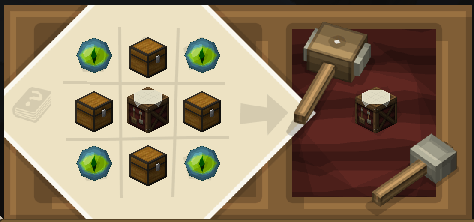
recipe:
    # 启用或禁用 NearbyCraft+ 工作台固定的合成配方。
    # 配方形状:
    # E C E
    # C W C
    # E C E
    #
    # E = ENDER_EYE(末影之眼)
    # C = CHEST(箱子)
    # W = CRAFTING_TABLE(合成台)
    #
    # DE: 启用或禁用 NearbyCraft+ 工作台的固定合成配方
    enabled: true

  # 是否可以将特殊工作台作为方块放置。
  # DE: 是否允许放置特殊工作台。
  placeable: true

  # 如果为 true,只有所有者和受信任的玩家才能使用已放置的 NearbyCraft+ 工作台。
  # 如果为 false,任何人都可以使用已放置的 NearbyCraft+ 工作台。
  # DE: 如果为 true,只有所有者和受信任的玩家才能使用已放置的工作台。
  # DE: 如果为 false,任何人都可以使用已放置的 NearbyCraft+ 工作台。
  owner-protection: true

  trust:
    # 允许所有者为其自己的工作台信任其他玩家。
    # DE: 允许所有者为他们的自定义工作台授权其他玩家。
    enabled: true

    # 每个工作台最多可信任的玩家数量。
    # DE: 每个工作台最大受信任玩家数量。
    max-trusted-players: 10


gui:
  # 默认类别点击模式。
  # QUICK = 类别按钮循环切换类别。
  # PAGE = 类别按钮打开单独的类别选择页面。
  # DE: 默认类别模式。
  # QUICK = 类别按钮循环切换类别。
  # PAGE = 类别按钮打开独立的类别选择界面。
  default-category-click-mode: "QUICK"

  # 如果为 true,玩家可以在 GUI 中切换自己的类别模式。
  # 该选择将保存在 preferences.yml 中。
  # DE: 如果为 true,玩家可以在 GUI 中更改自己的类别模式。
  allow-player-category-mode: true

  # 在工作台 GUI 中启用配方搜索系统。
  # DE: 在工作台 GUI 中启用配方搜索功能。
  search-enabled: true

  # 在搜索过滤配方之前所需的最少字符数。
  # DE: 搜索开始过滤配方所需的最小字符数。
  search-min-length: 1

  # 如果为 true,搜索还会检查配方材料名称。
  # 示例:搜索“diamond”可以显示钻石剑、钻石斧等。
  # DE: 如果为 true,搜索也会检索材料名称。
  search-material-names: true

  # 如果为 true,GUI 中将显示语言按钮。
  # DE: 如果为 true,将在 GUI 中显示语言按钮。
  show-language-button: true


recipe-browser:
  # 仅显示当前可以通过附近存储合成的配方。
  # 这是 NearbyCraft+ 的核心行为。
  # DE: 仅显示可以通过附近容器当前合成的配方。
  only-show-craftable: true

  # 在配方的lore中显示物品可以合成的次数。
  # DE: 在物品的lore中显示可以合成的数量。
  show-craftable-amount: true

  # 按物品名称对配方进行字母顺序排序。
  # DE: 按物品名称按字母顺序排列配方。
  sort-by-name: true

update-checker:
  # 启用 Modrinth 更新检查器。
  # DE: 启用 Modrinth 更新检查器。
  enabled: true

  # 将更新消息打印到控制台。
  # DE: 将更新消息输出到控制台。
  notify-console: true

  # 向在线管理员发送更新消息。
  # DE: 向在线的管理员发送更新消息。
  notify-admins: true

debug:
  # 将阻止的插件容器打印到控制台。
  # DE: 将阻止的插件容器输出到控制台。
  protection: false

  # 启用配方调试命令和详细的配方报告。
  # 建议:在生产服务器上设置为 false。
  # DE: 启用配方调试命令和详细的配方报告。
  recipes: false
展示
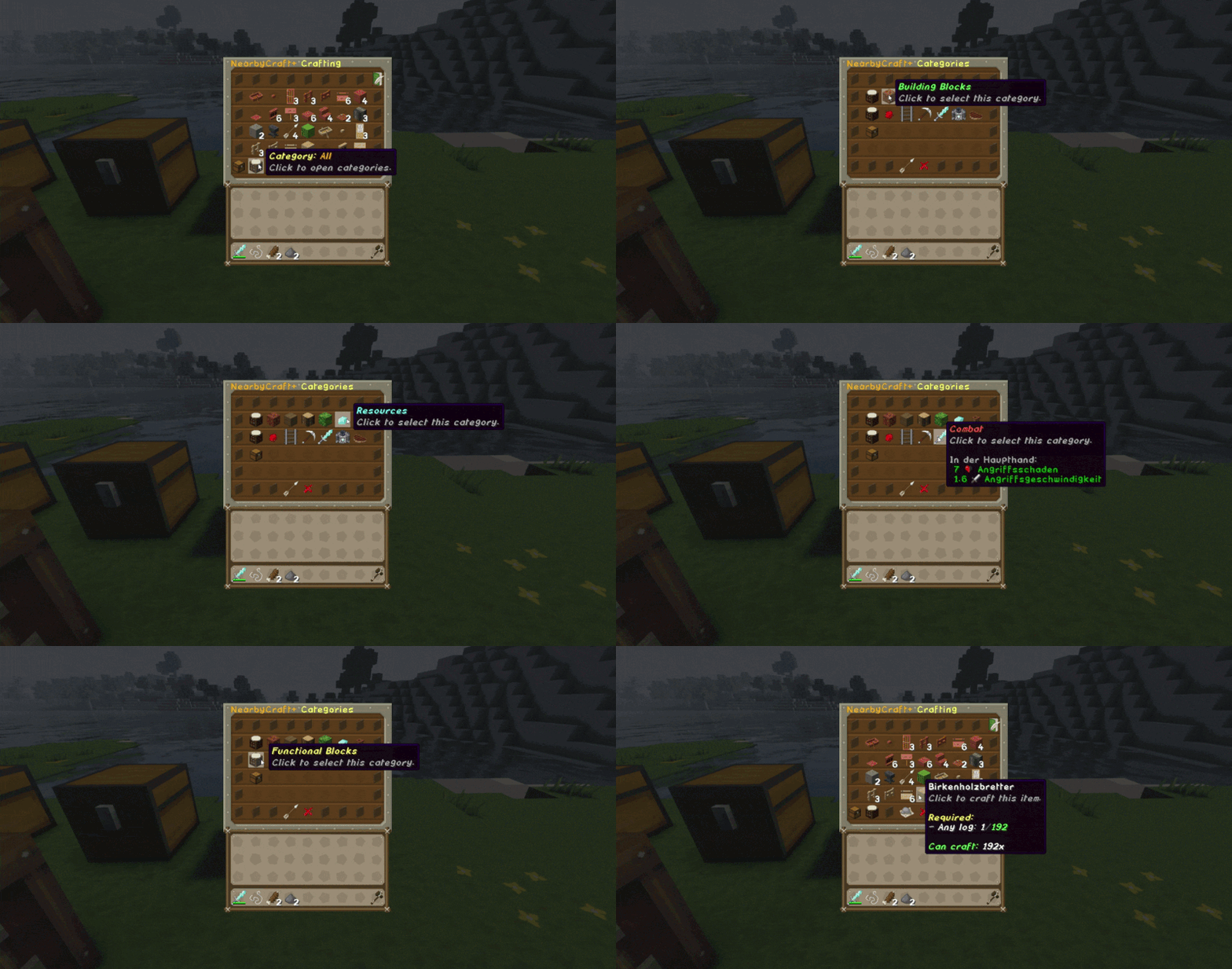
分类
显示菜单中可用的分类。
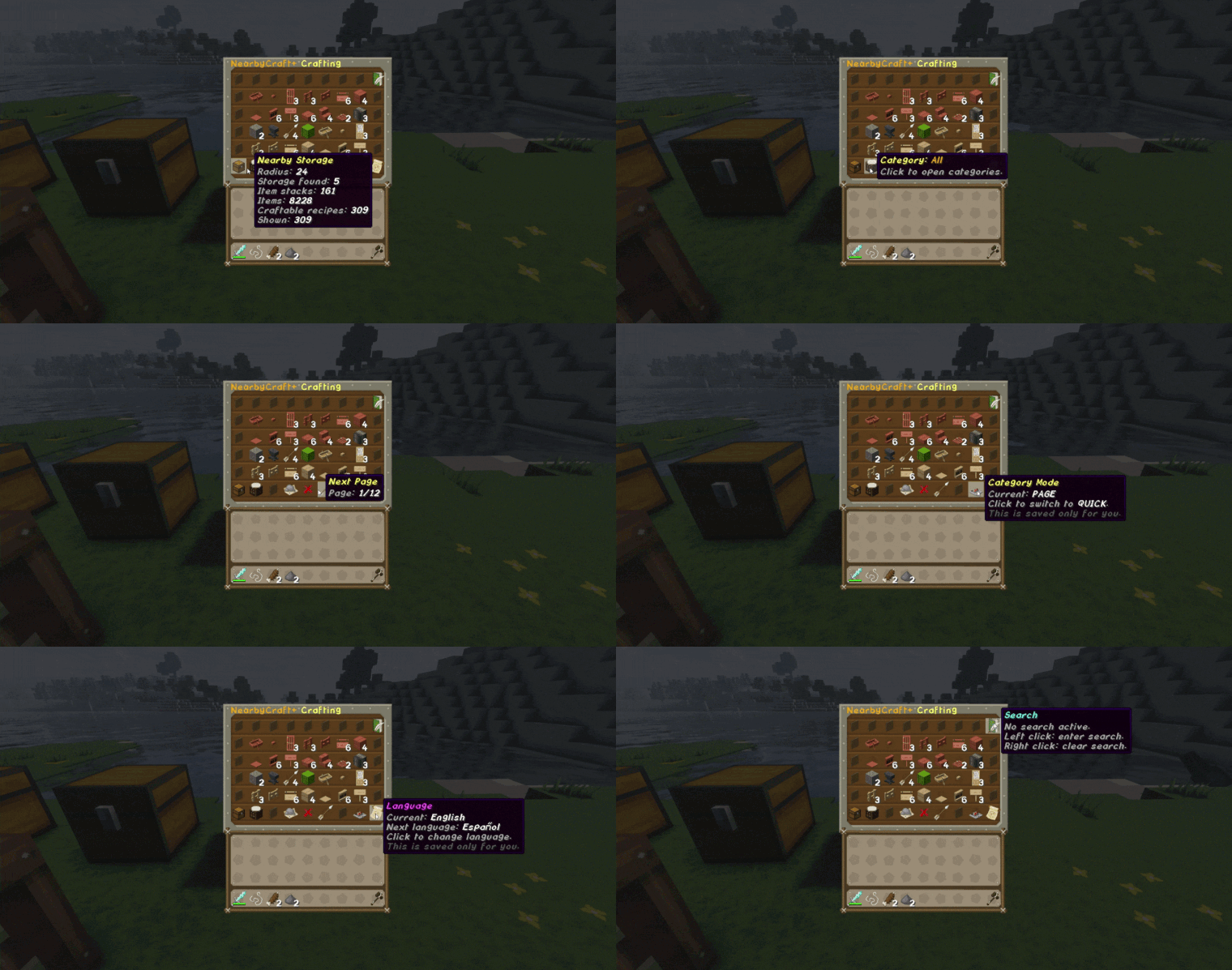
菜单 / 界面概览
显示菜单导航、按钮以及扫描到的箱子、物品和其他有用信息的显示。
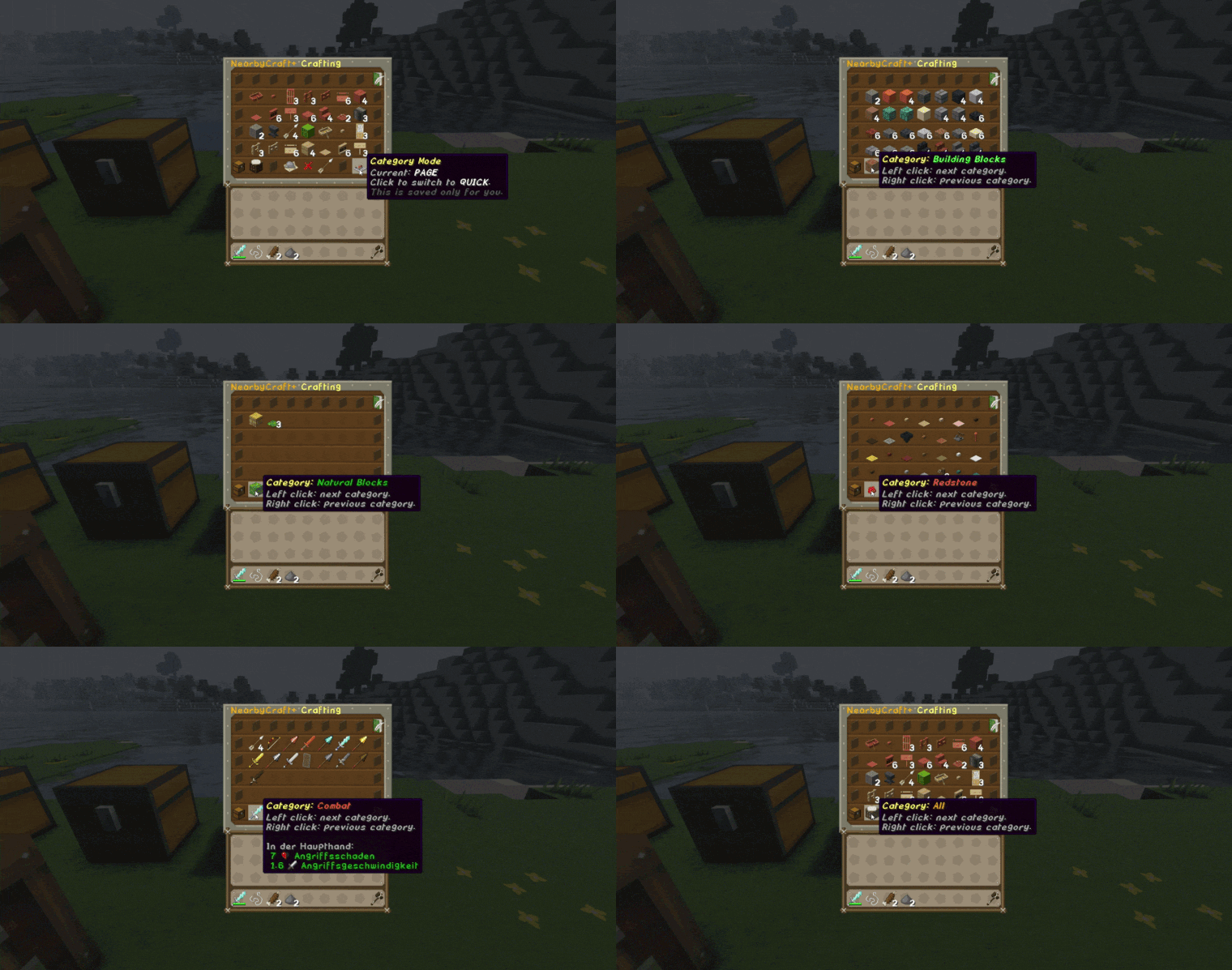
快速分类功能
演示如何通过左键和右键快速切换分类。
配方预览
这是 NearbyCraft+ 的主要亮点之一。
配方预览清晰地展示了:
动画预览
配方预览图片
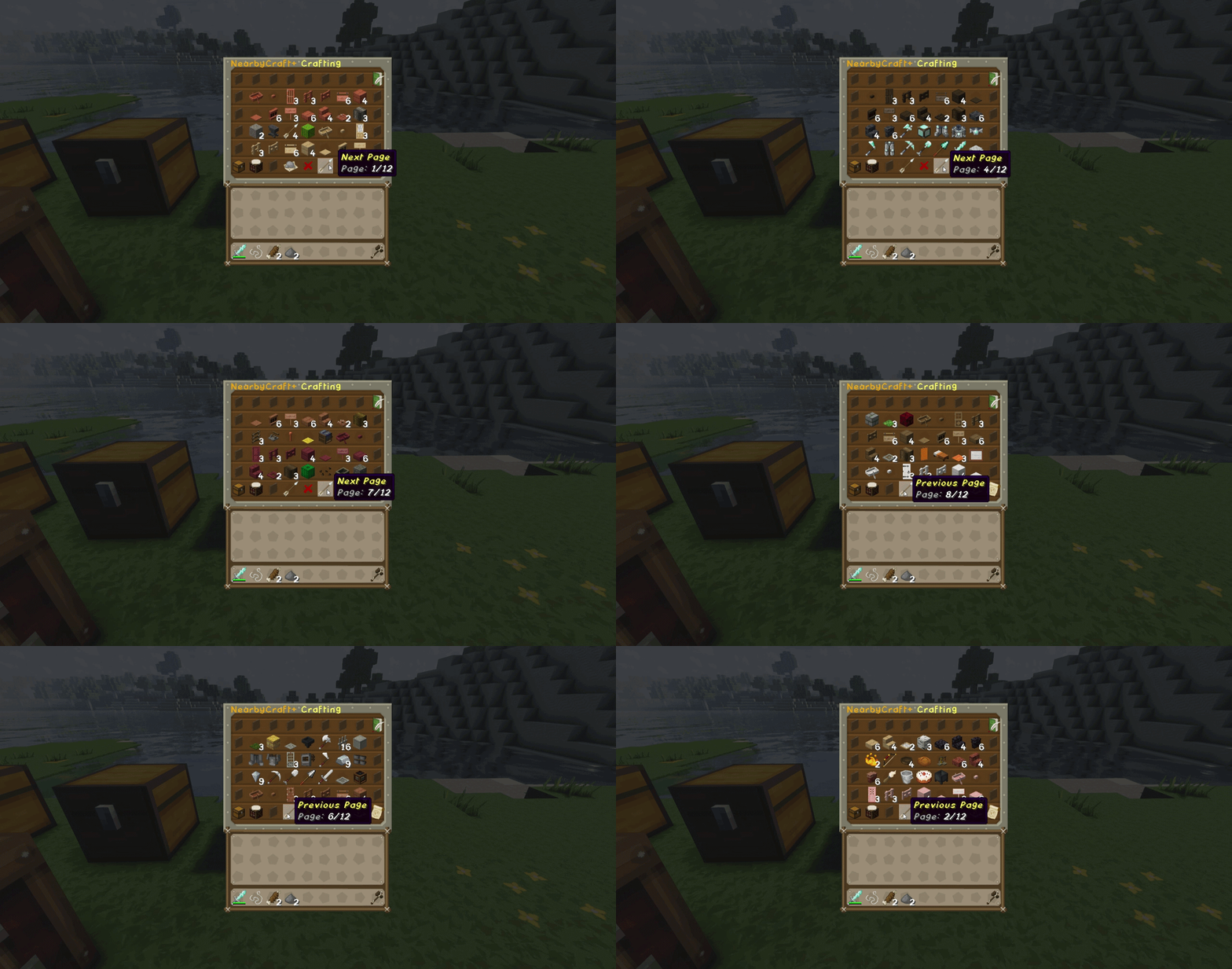
页面导航
显示在 ALL 分类中向前和向后浏览的过程。
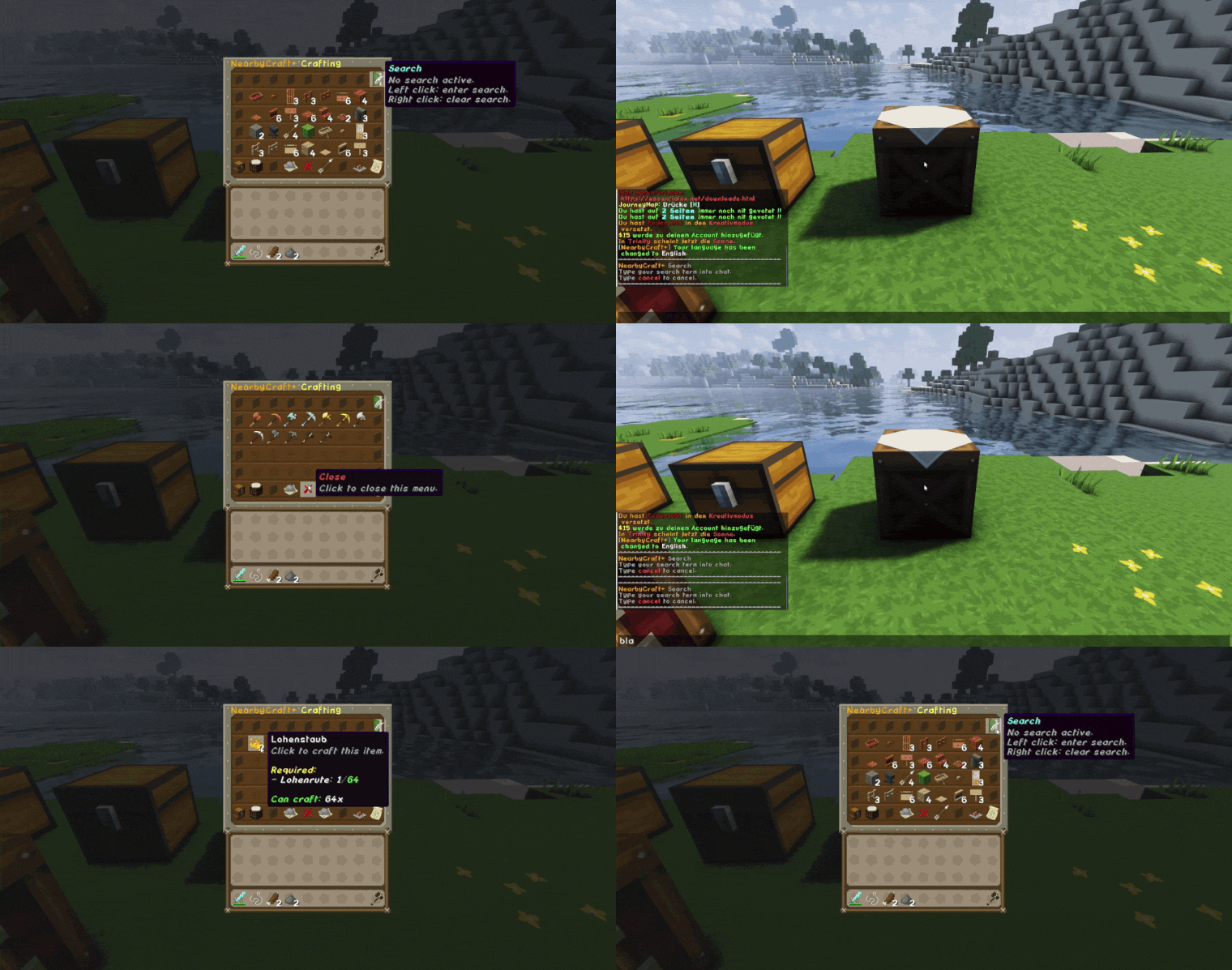
搜索功能
展示搜索功能的实际应用。
玩家可以在聊天中输入类似 axe 的内容,工作台将以激活的过滤器重新打开,显示匹配的材料。
通过右键点击搜索按钮可以再次禁用搜索过滤器。
结语
我创建 NearbyCraft+ 是为了将我喜欢的模组玩法中的某个特性带入 Paper 服务器世界。
如果你想要更舒适的合成体验、更顺畅的存储交互,以及为玩家提供真正的质量提升,NearbyCraft+ 正是为此而生。
NearbyCraft+
NearbyCraft+ is my Paper plugin that brings the well-known CraftFromContainers experience to Paper servers — fully server-side and without requiring any client-side mods.
Instead of opening chest after chest and manually collecting materials, players can use a workbench and craft with items from nearby containers directly. My goal with NearbyCraft+ was to bring that super comfortable mod-like crafting experience to Paper in a clean, fast, and intuitive way.
Why NearbyCraft+?
If you know the CraftFromContainers feeling from modded gameplay, this plugin is basically my Paper-server answer to it.
With NearbyCraft+ your players can:
- craft with materials from nearby chests
- see exactly what they need and what they already have
- browse items by categories
- switch quickly through categories
- search for materials directly from the menu
- enjoy the whole system without installing a client-side mod
That makes it perfect for:
- survival servers
- SMPs
- building-focused servers
- storage-heavy bases
- quality-of-life server setups
Highlights
Craft directly from nearby containers
NearbyCraft+ scans nearby chests and lets players use those materials directly at the workbench.
No more constant back-and-forth between storage and crafting table.
Smart recipe preview
One of the biggest highlights of NearbyCraft+ is the recipe preview system.
Players can instantly see:
- how many items are needed
- how many are available
- how often the recipe is craftable
This gives a very clear overview and makes crafting much more comfortable.
Categories and quick navigation
Recipes and items can be browsed through organized categories.
There is also a quick category switch for fast navigation with left and right click.
Search and filter system
Players can use the search function to filter items by material name.
For example, typing axe will show all matching materials/items.
The filter can be removed again with a simple right click.
Protection hook support
NearbyCraft+ respects container protection.
If a player is not allowed to access a nearby container, NearbyCraft+ will not scan it and will not count the items inside it.
This is especially important for protected claims and survival servers.
Feature Overview
- CraftFromContainers-style crafting for Paper servers
- Craft with items from nearby chests
- Recipe preview with needed / available / craftable counts
- Category-based browsing
- Quick category switching
- Search function with chat input
- Easy filter reset
- Paginated browsing
- Clean menu layout
- Scan statistics in the interface
- Configurable scan range for nearby containers
- Workbench owner protection
- Trust system for placed workbenches
- SimpleClaimSystem support
- WorldGuard support
- JustLootIt protection
- Loot table and plugin-container filtering
Commands
Main command:
/nearbycraftplus/ncp/nearbycraft
| Command |
Description |
Permission |
/ncp reload |
Reloads the NearbyCraft+ configuration and language files. |
nearbycraftplus.command.reload |
/ncp scan |
Runs the scan debug command. |
nearbycraftplus.command.scan |
/ncp recipereport |
Creates a recipe report. |
nearbycraftplus.command.recipereport |
/ncp recipereport full |
Creates a full detailed recipe report. |
nearbycraftplus.command.recipereport |
/ncp give <player> [amount] |
Gives NearbyCraft+ workbenches to a player. |
nearbycraftplus.command.give |
/ncp trust <player> |
Allows another player to use your placed NearbyCraft+ workbench. |
nearbycraftplus.workbench.trust |
/ncp untrust <player> |
Removes a trusted player from your workbench. |
nearbycraftplus.workbench.untrust |
/ncp trustlist |
Shows all trusted players for your workbench. |
nearbycraftplus.workbench.trustlist |
Permissions
| Permission |
Description |
Default |
nearbycraftplus.admin |
Grants access to all NearbyCraft+ admin features. |
OP |
nearbycraftplus.command.recipereport |
Allows running the NearbyCraft+ recipe report command. |
OP |
nearbycraftplus.command.reload |
Allows reloading NearbyCraft+. |
OP |
nearbycraftplus.command.scan |
Allows using the scan debug command. |
OP |
nearbycraftplus.command.give |
Allows giving NearbyCraft+ workbenches. |
OP |
nearbycraftplus.update |
Allows receiving NearbyCraft+ update notifications. |
OP |
nearbycraftplus.workbench.use |
Allows using the NearbyCraft+ workbench. |
Everyone |
nearbycraftplus.workbench.place |
Allows placing the NearbyCraft+ workbench. |
Everyone |
nearbycraftplus.workbench.break |
Allows breaking the NearbyCraft+ workbench. |
Everyone |
nearbycraftplus.workbench.craft |
Allows crafting inside the NearbyCraft+ workbench. |
Everyone |
nearbycraftplus.workbench.trust |
Allows trusting players for owned NearbyCraft+ workbenches. |
Everyone |
nearbycraftplus.workbench.untrust |
Allows removing trusted players from owned NearbyCraft+ workbenches. |
Everyone |
nearbycraftplus.workbench.trustlist |
Allows viewing trusted players of owned NearbyCraft+ workbenches. |
Everyone |
nearbycraftplus.workbench.bypass.owner |
Allows bypassing NearbyCraft+ workbench owner protection. |
OP |
nearbycraftplus.storage.use |
Allows NearbyCraft+ to use nearby storage. |
Everyone |
nearbycraftplus.protection.bypass |
Allows bypassing container protection checks. |
Disabled by default |
Radius Permissions
The default scan radius is 10.
The maximum scan radius is 50.
NearbyCraft+ technically supports every radius permission from 1 up to the configured maximum radius.
Examples:
/lp user Fedex permission set nearbycraftplus.radius.14 true
/lp user Fedex permission set nearbycraftplus.radius.32 true
/lp user Fedex permission set nearbycraftplus.radius.50 true
/lp group VIP permission set nearbycraftplus.radius.50 true
Groups work too.
Workbench Ownership & Trust System
When a player places a NearbyCraft+ workbench, that player becomes the owner of the workbench.
If owner protection is enabled, only the owner and trusted players can use that placed workbench.
Owners can trust other players with:
/ncp trust <player>
They can remove trusted players with:
/ncp untrust <player>
They can view trusted players with:
/ncp trustlist
This system can also be disabled in the configuration if you want all placed NearbyCraft+ workbenches to be usable by everyone.
Config option:
workbench:
  owner-protection: true

  trust:
    enabled: true
    max-trusted-players: 10
Protection Hooks & Compatibility
NearbyCraft+ includes protection checks before using nearby storage containers.
This means the plugin only counts and scans containers that the player is actually allowed to access.
SimpleClaimSystem Support
NearbyCraft+ has optional support for SimpleClaimSystem.
If a nearby chest is inside another player's claim and the player has no access to it, NearbyCraft+ will not scan or count the items inside that chest.
This is very important for survival servers because players should never be able to craft using items from protected containers they do not own or cannot access.
WorldGuard Support
NearbyCraft+ can also use WorldGuard protection checks when enabled in the configuration.
This allows NearbyCraft+ to respect protected regions and container access rules.
JustLootIt Support
NearbyCraft+ is designed to ignore JustLootIt loot containers.
JustLootIt chests and other loot/plugin containers are filtered through plugin data and loot table checks, so they are not used as normal storage for NearbyCraft+ crafting.
Loot & Plugin Container Protection
NearbyCraft+ can ignore containers with:
- plugin block data
- custom container data
- loot tables
- JustLootIt loot containers
This protects dungeon chests, loot chests, event chests, and other plugin-managed containers from being used as storage.
Soft Dependencies
NearbyCraft+ can hook into the following plugins:
| Plugin |
Type |
Description |
| SimpleClaimSystem |
Softdepend |
Prevents NearbyCraft+ from scanning containers inside claims where the player has no access. |
| WorldGuard |
Softdepend |
Optional region/container protection support. |
| JustLootIt |
Softdepend |
Prevents loot containers from being used as NearbyCraft+ storage. |
These plugins are not required to run NearbyCraft+, but they are supported when installed.
Configuration
Click to show default config.yml
file-version: 2

settings:
  # Enables or disables the main NearbyCraft+ functionality.
  # DE: Aktiviert oder deaktiviert die Hauptfunktionen von NearbyCraft+.
  enabled: true

  # Allows NearbyCraft+ to use nearby storage containers.
  # DE: Erlaubt NearbyCraft+, nahe Lager-Container zu verwenden.
  use-nearby-containers: true

  # Container types that NearbyCraft+ may detect as storage.
  # Access protection is checked separately.
  # DE: Container-Typen, die NearbyCraft+ grundsätzlich als Lager erkennen darf.
  allowed-containers:
    - CHEST
    - TRAPPED_CHEST
    - BARREL
    - SHULKER_BOX

  # If true, recipes may only use plain, unmodified items.
  # This protects custom items with names, lore, CustomModelData or PDC data.
  # DE: Wenn true, dürfen Rezepte nur echte unveränderte Items verwenden.
  require-plain-vanilla-items: true


language:
  # Default plugin language.
  # Available: de, en, es, fr, it
  # DE: Standardsprache des Plugins.
  default: "en"

  # Available languages.
  # DE: Verfügbare Sprachen.
  available:
    - de
    - en
    - es
    - fr
    - it

  # If true, every player may choose their own GUI/message language.
  # The choice will be saved in preferences.yml.
  # If false, everyone uses the global default language above.
  # DE: Wenn true, kann jeder Spieler seine eigene Sprache wählen.
  allow-player-language: true

  # Fallback language if a key is missing in the selected language file.
  # DE: Ersatzsprache, falls ein Text in einer Sprache fehlt.
  fallback: "en"


radius:
  # Default radius for normal players.
  # DE: Standard-Radius für normale Spieler.
  default: 10

  # Radius for OPs and players with nearbycraftplus.admin.
  # This is intentionally lower than the hard maximum.
  # DE: Radius für OPs und Spieler mit nearbycraftplus.admin.
  # Dieser Wert ist absichtlich niedriger als das harte Maximum.
  admin: 24

  # Optional dynamic radius permission:
  # nearbycraftplus.radius.<amount>
  # Example: nearbycraftplus.radius.37
  #
  # DE: Optionale dynamische Radius-Permission:
  # nearbycraftplus.radius.<zahl>
  # Beispiel: nearbycraftplus.radius.37


  # Hard maximum radius NearbyCraft+ can use.
  #
  # ATTENTION:
  # High radius values can increase scan cost when players build very large
  # storage rooms with many chests, barrels or shulker boxes in range.
  # Radius 50 is possible because NearbyCraft+ uses container-only scanning
  # and the StorageSnapshot system, but it should still be used with care.
  #
  # DE ACHTUNG:
  # Hohe Radius-Werte können mehr Scan-Aufwand erzeugen, wenn Spieler sehr große
  # Lagerhallen mit vielen Kisten, Fässern oder Shulkerboxen im Radius bauen.
  # Radius 50 ist durch Container-only Scanning und das StorageSnapshot-System möglich,
  # sollte aber trotzdem bewusst verwendet werden.
  max: 50

protection:
  # Enables protection checks before NearbyCraft+ uses a storage container.
  # If enabled, NearbyCraft+ will only use containers the player is allowed to access.
  # DE: Aktiviert Schutzprüfungen, bevor NearbyCraft+ einen Lager-Container verwendet.
  enabled: true

  # If a protection hook cannot safely check access, deny the container.
  # Recommended for economy/survival servers.
  # DE: Wenn ein Schutz-Hook nicht sicher prüfen kann, wird der Container blockiert.
  fail-safe-deny: true

  # If true, containers with custom block data are ignored.
  # This protects loot/plugin containers from being used as storage.
  # DE: Wenn true, werden Container mit Plugin-Daten am Block ignoriert.
  block-containers-with-pdc: true

  # If true, containers with a loot table are ignored.
  # This protects dungeon/loot/plugin containers from being used as storage.
  # DE: Wenn true, werden Container mit LootTable ignoriert.
  block-containers-with-loot-table: true

hooks:
  # Optional hook for WorldGuard.
  # DE: Optionaler Hook für WorldGuard.
  worldguard: true

  # Optional hook for SimpleClaimSystem.
  # DE: Optionaler Hook für SimpleClaimSystem.
  simple-claim-system: true

  # Optional hook for JustLootIt loot containers.
  # NearbyCraft+ should never use loot containers as storage.
  # DE: JustLootIt-Lootkisten sollen nie als Lager verwendet werden.
  justlootit: true


performance:
  # Maximum amount of containers scanned per crafting session.
  # Prevents huge storage rooms from causing lag.
  # DE: Maximale Anzahl Container pro Scan.
  max-containers-per-scan: 150

  # Additional safety limit for scanned inventory slots.
  # DE: Zusätzliche Sicherheitsgrenze für Inventar-Slots.
  max-slots-per-scan: 8100


craft-success-feedback:
  # Shows a small success feedback after crafting through NearbyCraft+.
  # Recommended: false to avoid chat spam.
  # DE: Zeigt eine kleine Erfolgsmeldung nach dem Craften über NearbyCraft+.
  # Empfehlung: false, damit der Chat nicht zugespammt wird.
  enabled: false

  # Available modes: CHAT, ACTION_BAR
  # CHAT sends the message into the chat.
  # ACTION_BAR shows it above the hotbar.
  # DE: Verfügbare Modi: CHAT, ACTION_BAR
  # CHAT sendet die Nachricht in den Chat.
  # ACTION_BAR zeigt sie über der Hotbar.
  mode: ACTION_BAR

  # Cooldown per player in milliseconds.
  # Prevents spam when players craft many items quickly.
  # DE: Cooldown pro Spieler in Millisekunden.
  # Verhindert Spam, wenn Spieler sehr schnell viele Items craften.
  cooldown-ms: 1200

workbench:
  # Display name of the special NearbyCraft+ workbench.
  # DE: Anzeigename der speziellen NearbyCraft+ Werkbank.
  display-name: "<gold>NearbyCraft+ Workbench"

  # Lore of the special workbench item.
  # DE: Beschreibung des Werkbank-Items.
  lore:
    - "<gray>Craft with nearby storage containers."
    - "<dark_gray>NearbyCraft+"

  # Material of the special workbench item.
  # It can use the same material as a vanilla crafting table because NearbyCraft+
  # marks the item internally with a hidden data tag.
  # DE: Kann das gleiche Material wie eine normale Werkbank nutzen,
  # weil NearbyCraft+ das Item intern unsichtbar markiert.
  material: CRAFTING_TABLE

  recipe:
    # Enables or disables the fixed crafting recipe for the NearbyCraft+ workbench.
    # Recipe shape:
    # E C E
    # C W C
    # E C E
    #
    # E = ENDER_EYE
    # C = CHEST
    # W = CRAFTING_TABLE
    #
    # DE: Aktiviert oder deaktiviert das feste Crafting-Rezept
    # für die NearbyCraft+ Werkbank.
    enabled: true

  # Whether the special workbench can be placed as a block.
  # DE: Ob die spezielle Werkbank platziert werden darf.
  placeable: true

  # If true, only the owner and trusted players can use a placed NearbyCraft+ workbench.
  # If false, everyone can use placed NearbyCraft+ workbenches.
  # DE: Wenn true, können nur Besitzer und vertraute Spieler die platzierte Werkbank benutzen.
  # DE: Wenn false, kann jeder platzierte NearbyCraft+ Werkbänke benutzen.
  owner-protection: true

  trust:
    # Allows owners to trust other players for their own workbench.
    # DE: Erlaubt Besitzern, andere Spieler für ihre eigene Werkbank freizuschalten.
    enabled: true

    # Maximum trusted players per workbench.
    # DE: Maximale Anzahl vertrauter Spieler pro Werkbank.
    max-trusted-players: 10


gui:
  # Default category click mode.
  # QUICK = category button cycles through categories.
  # PAGE = category button opens a separate category selection page.
  # DE: Standard-Kategorie-Modus.
  # QUICK = Kategorie-Button schaltet Kategorien durch.
  # PAGE = Kategorie-Button öffnet eine eigene Kategorie-Auswahl.
  default-category-click-mode: "QUICK"

  # If true, players may switch their own category mode in the GUI.
  # The choice will be saved in preferences.yml.
  # DE: Wenn true, können Spieler ihren eigenen Kategorie-Modus im GUI umstellen.
  allow-player-category-mode: true

  # Enables the recipe search system in the workbench GUI.
  # DE: Aktiviert die Rezept-Suche im Werkbank-GUI.
  search-enabled: true

  # Minimum characters required before search filters recipes.
  # DE: Mindestanzahl Zeichen, bevor die Suche Rezepte filtert.
  search-min-length: 1

  # If true, the search also checks recipe material names.
  # Example: searching "diamond" can show diamond sword, diamond axe, etc.
  # DE: Wenn true, sucht die Suche auch in Materialnamen.
  search-material-names: true

  # If true, the language button is shown in the GUI.
  # DE: Wenn true, wird der Sprach-Button im GUI angezeigt.
  show-language-button: true


recipe-browser:
  # Only show recipes that are currently craftable with nearby storage.
  # This is the core NearbyCraft+ behavior.
  # DE: Zeigt nur Rezepte an, die mit den nahen Lagern aktuell craftbar sind.
  only-show-craftable: true

  # Shows how many times an item can be crafted in the recipe lore.
  # DE: Zeigt in der Lore an, wie oft ein Item gecraftet werden kann.
  show-craftable-amount: true

  # Sort recipes alphabetically by item name.
  # DE: Sortiert Rezepte alphabetisch nach Itemnamen.
  sort-by-name: true

update-checker:
  # Enables the Modrinth update checker.
  # DE: Aktiviert den Modrinth Update-Checker.
  enabled: true

  # Prints update messages to the console.
  # DE: Gibt Update-Meldungen in der Konsole aus.
  notify-console: true

  # Sends update messages to online admins.
  # DE: Sendet Update-Meldungen an Admins, die online sind.
  notify-admins: true

debug:
  # Prints blocked plugin containers to the console.
  # DE: Gibt blockierte Plugin-Container in der Console aus.
  protection: false

  # Enables recipe debug commands and detailed recipe reports.
  # Recommended: false on live servers.
  # DE: Aktiviert Rezept-Debug-Befehle und detaillierte Rezeptberichte.
  recipes: false
Showcase
Categories
Shows the available categories in the menu.
Menu / Interface Overview
Shows the menu navigation, buttons, and the display of scanned chests, items, and other useful information.
Quick Category Function
Demonstrates how quickly categories can be switched using left and right click.
Recipe Preview
This is one of the main highlights of NearbyCraft+.
The recipe preview clearly shows:
- how many items are required
- how many are available
- how many times the recipe can be crafted
Animated Preview
Recipe Preview Image
Page Navigation
Shows browsing forward and backward through the ALL category.
Search Function
Shows the search feature in action.
A player can type something like axe into chat, and the workbench reopens with an active filter showing matching materials.
The search filter can be disabled again by right-clicking the search button.
Final Words
I created NearbyCraft+ to bring a feature I really like from modded gameplay into the Paper server world.
If you want a more comfortable crafting experience, smoother storage interaction, and a real quality-of-life upgrade for your players, NearbyCraft+ is made exactly for that.


 插件

 插件

 插件
 插件
 插件
 插件
评论 0
登录后参与评分
还没有评论,来抢沙发吧