NormalShops — 玩家与管理者指南
感谢 - Clickism
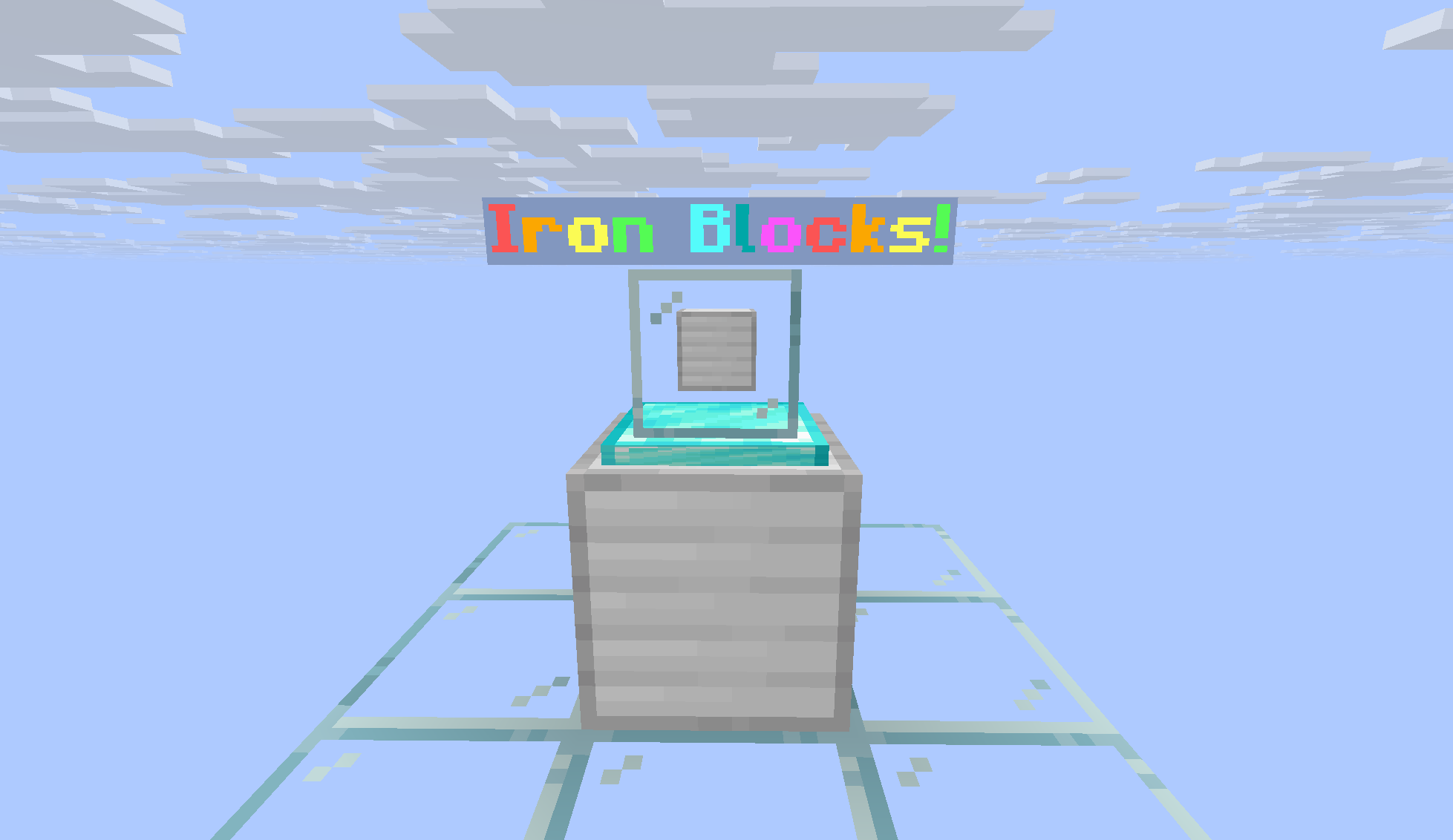
游戏内商店(门面)
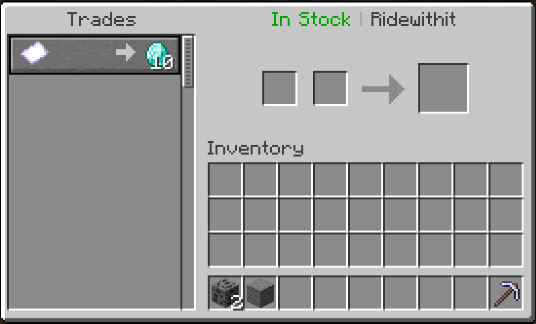
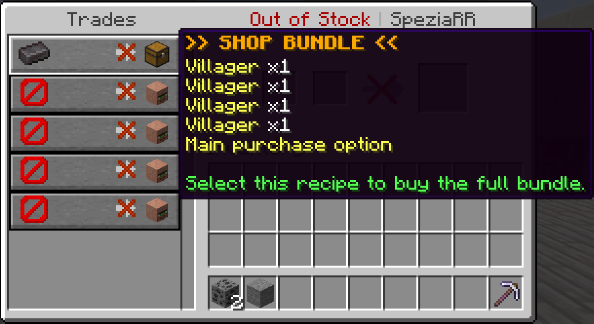
用作交易的村民菜单
自定义展示:物品展示架、玻璃/基岩方块,以及可选的促销浮动文字。
/shops — 公共商店浏览器
分页显示有货的商店列表;点击条目进行传送(若已启用)。
GUI 概览(主菜单)
创建/修改上架内容、所有者面板、访问权限选择器、购买流程、库存、设置等。
管理员 / 删除中心(Shift + 右键点击)
强制编辑、强制更改所有者、删除、历史记录、模拟销售 —— 敏感操作除了需要 normalshops.delete 权限外,还要求具有 op 权限。
创建商店(逐步教程)
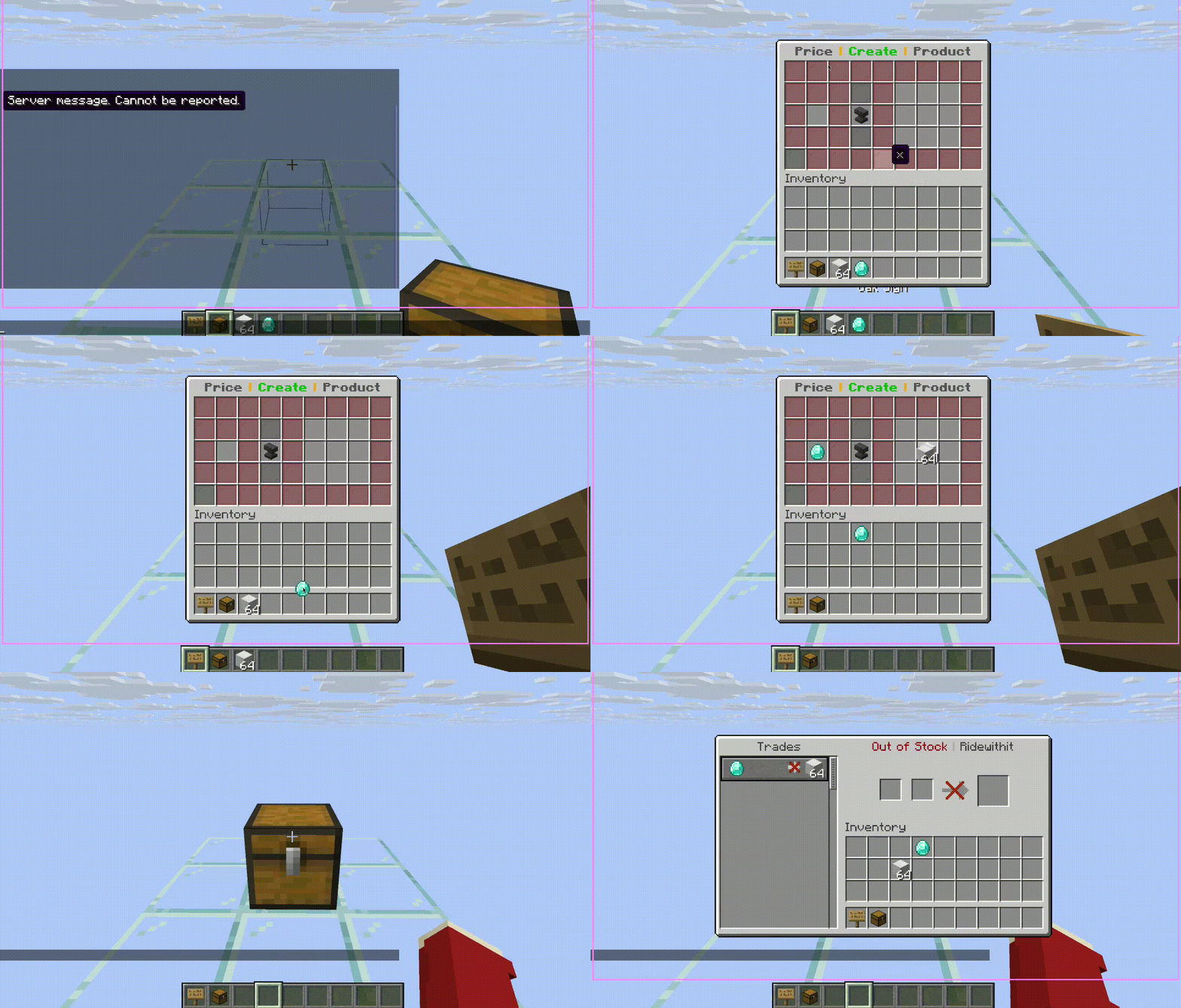
GIF:手持告示牌与空的箱子/桶交互,设置价格和商品,即可开业。(具体流程与您的服务器消息和 GUI 版本一致。)
指标数据
为什么选择 NormalShops?
NormalShops 将箱子和桶转变为完全互动的玩家商店,无需强迫玩家使用晦涩的命令。所有者获得一个精美的编辑器,买家拥有清晰的购买流程(经典 GUI 或 村民式交易),工作人员则获得实用工具——包括历史记录、模拟功能和所有权转移——并支持可选的 CoreProtect 集成。
无论您运营的是生存经济还是小游戏枢纽,NormalShops 都旨在提供原生 Minecraft 体验:使用玩家早已熟悉的告示牌、箱子、音效和界面。
功能概览
核心商店体验
| 能力 |
描述 |
| 基于方块的商店 |
在箱子或桶上使用告示牌(任意类型的告示牌)创建商店。容器必须为空且不能是双层箱子。 |
| 价格与商品 |
设置货币物品(及数量)以及一种或多种产品 —— 包括自定义物品、头颅,以及在启用 full-nbt-check 时支持 NBT 复杂的物品。 |
| 购买流程 |
顾客可使用购买 GUI 或村民商人界面(通过 villager-trading-menu 配置)。 |
| 远程库存池 |
链接远程箱子库存,使售出的物品从实际存储中扣除 —— 支持单店限额和可选的库存池保护。 |
| 收益管理 |
销售额计入内部收益;所有者通过分页收益箱提取(支持部分拾取和堆叠捆绑包)。 |
| 自定义展示 |
玻璃和物品框风格的商店展示、主题、颜色,以及玻璃上的可选促销文字。 |
| 音效与主题 |
每个商店独立的购买音效和菜单颜色主题,彰显个性。 |
|
所有者与团队工具
| 能力 |
描述 |
| 信任玩家 |
授予受信任权限,使助手可以管理库存和设置,而无需拥有该商店。 |
| 访问选择菜单 |
所有者/受信任用户可选择编辑器模式或顾客交易视图,以便预览买家看到的界面。 |
| 无上限内部库存 |
内部库存不受27格限制 —— 使用分页库存箱编辑(每页45格 + 导航功能)。 |
| 全生命周期分析 |
收入、销售次数、售出商品、浏览量、库存增减、净变化、利用率、转化率。 |
| 买家洞察 |
基于真实购买历史得出的独立买家数和顶级买家。 |
| 市场对比 |
查看其他商店对重叠商品的定价,并打开分页竞争对手列表。 |
| 商店信息卡 |
编辑器中的快速统计 Lore(包括总浏览量)。 |
|
详细功能指南
创建与编辑商店
- 手持任意告示牌,右键点击一个空的 箱子或桶(不要潜行,不能是双层箱子)以打开创建 GUI。
- 在指定区域放置您的价格(买家支付的内容)和商品(他们收到的内容)。
- 点击创建商店以完成设置。
编辑器控件(创建/更改商品菜单):
- 左键点击物品将其放入槽位。
- 右键点击持空手可将槽位中的数量减半。
- 右键点击持有与槽位相同物品可将数量增加一。
创建完成后,作为所有者(或受信任玩家)右键点击您的商店方块以打开访问菜单:选择打开编辑器进行管理,或选择打开交易以面向买家。
购买 —— GUI 模式 vs 村民模式
villager-trading-menu: true (默认值): 买家通过商人窗口进行交互。多商品捆绑包显示为高亮箱子配方(内容存储在方块状态元数据中),并使用带有屏障作为虚假“价格”的仅预览行,以确保真实商品清晰可见。false: 买家使用经典的BuyMenu箱子 GUI。
库存不足: 买家仍可以打开交易视图以查看透明度。标题会反映库存状态(例如:有货 vs 无货)。对于非管理员商店,当没有可交付的商品时,阻止履行交易——防止幽灵购买。
曝光量: 打开购买/交易流程会增加终身曝光量,用于转换分析。
库存管理(分页库存箱)
- 内部库存存储为带有分页功能的逻辑列表(每页 45 个物品槽 + 上一页/下一页/信息/返回编辑器)。
- 同一时间只允许一名玩家查看商店的库存 GUI,以减少漏洞利用面。
- 当另一名玩家在该商店上拥有活跃的村民交易会话时,阻止打开库存(反之亦然)。
- 修订计数器检测外部更改(例如编辑期间的销售),并刷新或使旧视图失效。
- 基于库存堆栈的移除操作仍与事务逻辑集成。
收益(分页收益箱)
- 收集会打开一个专用的收益库存,而不是将所有物品一次性倒入玩家的背包中。
- 所有者可以进行部分提取;捆绑包可以在 GUI 中堆叠以提高可读性。
- 顶部(收益)库存仅限提取——玩家不能将物品存入或左键单击放入收益槽位;他们的个人背包仍可自由移动。
- 与库存相同的单 viewers和修订理念。
库存堆栈与收益堆栈
- 库存堆栈: 连接额外的箱子以提供已售出的物品。可选的
protect-stockpiles 防止非关联玩家打开链接的箱子(绕过权限:normalshops.bypass-stockpile)。
- 收益堆栈: 中央末影箱“银行”,聚合来自多个商店的支付款项(受
config.yml 中的限制约束)。
- 系留: 链接时的可选粒子/绳索可视化 (
visualize-tethers)。
- 双层箱子: 堆栈位置经过规范化处理,左右两半解析为一个逻辑堆栈。
自定义与润色
- 菜单颜色、自定义商店名称(长度受限)、展示牌上的促销文本。
- 带有灯光、分层和“移至顶部”样式控制的框架与玻璃展示柜。
- 设置中的按商店通知和低库存警告。
- 存在无限库存模式,用于特殊情况(受限于
normalshops.unlimited-stock ——在经济服务器上故意设置为危险项)。
管理与审计追踪
使用 normalshops.delete 权限对商店执行 Shift + 右键点击,以打开管理员/删除中心——包括对你自己的商店。
重要提示: 强制编辑、强制更改所有者、删除他人的商店、历史记录以及模拟销售都需要 normalshops.delete 权限和服务器操作员身份 (isOp())。如果没有 op 权限,这些操作将被拒绝并记录日志。
| 管理员控制 |
功能 |
| 删除商店 |
移除 listings(可通过 operator-delete-shop-collect 选择性地由操作员收取收益)。 |
| 强制编辑 |
以工作人员身份打开完整的所有者编辑器,以调整价格、库存、展示等。 |
| 强制更改所有者 |
在聊天中提示输入用户名;通过 ShopManager 安全地转移所有权。 |
| 商店历史 |
分页的持久化按商店日志(购买、编辑、连接、模拟销售、村民购买等)。必要时回退到 CoreProtect 方块查找。 |
| 模拟销售 |
运行合成事务(库存 + 收益 + 统计 + 日志记录)用于测试或审核——在日志中标记为 NormalShops-EmulatedSale。 |
CoreProtect(可选): 如果安装了 CoreProtect 且启用了其 API,NormalShops 会记录交互风格的日志,涵盖创建、删除、购买(GUI 及村民)、库存堆栈更改、收益收集、连接/断开连接等——同时还将结构化行追加到 插件内历史记录 中以供 GUI 使用。
安全性与防重复设计
- 编辑器会话锁定: 同一时间只有一个管理会话“拥有”深层编辑权限;子菜单尊重相同的锁定消息。
- 打开和点击时的管理访问检查: 如果受信任的玩家在线时被移除,GUI 将停止接受操作并可安全关闭。
- 库存/收益修订 + 独占查看者减少了 GUI、商人和异步保存之间的竞争窗口。
- 村民交易上的履行检查确保在计算收入或销售额之前实际移除了库存。
安装
- 服务器: Paper 或 Spigot 1.20.x(API
1.20,如在 plugin.yml 中声明)。
- Java: 17。
- 将
NormalShops-*.jar 放入 plugins/ 目录。
- 可选: 安装 CoreProtect 以获取外部方块历史和更丰富的审计追踪。
- 重启一次,然后调整
plugins/NormalShops/config.yml、gui.yml 以及位于 plugins/NormalShops/messages/ 下的语言文件。
快速开始
| 步骤 |
操作 |
| 1 |
获取一个告示牌,并在不潜行的情况下右键点击一个空的箱子或桶。 |
| 2 |
在 GUI 中设置价格和商品,然后创建商店。 |
| 3 |
右键点击商店方块以管理或预览买家视图。 |
| 4 |
在编辑器中使用库存箱添加分页的内部库存。 |
| 5 |
使用收集箱打开收益箱并提取利润。 |
| 6 |
当单个方块容量不足时,从编辑器链接库存堆/ 收益堆。 |
权限
所有节点均以 normalshops. 为前缀。
| 权限 |
默认值 |
用途 |
normalshops.create |
true |
创建新商店 |
normalshops.buy |
true |
从商店购买商品 |
normalshops.customize |
true |
打开自定义流程 |
normalshops.display |
true |
构建高级展示 (需要 customize) |
normalshops.sale-text |
true |
编辑浮动促销文本 (需要 customize) |
normalshops.stockpile |
true |
连接库存堆 |
normalshops.earnings-pile |
true |
连接收益堆 |
normalshops.delete |
op |
Shift+潜行进入管理枢纽;危险操作也需要 op |
normalshops.bypass-stockpile |
op |
打开受保护的外部库存堆 |
normalshops.unlimited-stock |
op |
切换危险的无限库存模式 |
normalshops.reload |
op |
/normalshops reload |
normalshops.version |
true |
/normalshops version (Modrinth 版本对比) |
normalshops.viewshops |
true |
/viewshops, /normalshops view |
normalshops.shops |
true |
/shops 浏览器 + 传送功能 |
normalshops.region |
op |
/normalshops region …, /setpoint |
normalshops.restore |
op |
/normalshops restore |
normalshops.stats-holograms |
op |
/normalshops stats-holograms … |
normalshops.update-notify |
op |
当 Modrinth 上有新版本发布时在聊天中通知 |
normalshops.coreprotect-test |
op |
开发者 API 自测 |
normalshops.coreprotect-debug |
op |
CoreProtect 详细诊断日志 |
命令
| 命令 |
描述 |
/normalshops / /nshops |
根命令:view, reload, version, delete, restore, stats-holograms, region |
/normalshops reload |
重新加载 config.yml, gui.yml 和消息文件 |
/normalshops version |
Jar 版本 + Modrinth 更新状态 |
/normalshops delete |
查看一个商店(≤12 个方块);将其移除 (需要权限 + 管理员工作流) |
/normalshops restore |
从 shop-backups.yml 恢复到指定的箱子/桶 |
/normalshops stats-holograms |
list | cleanup 私有统计展示 |
/normalshops region |
make | cancel — 与 /setpoint 配合使用以定义 /shops 区域 |
/viewshops |
列出你的商店 + 受信任的商店;远程打开 |
/shops |
公开在售商品浏览器;可选物品过滤器 |
完整语法和默认值请参阅 Jar 包中的 plugin.yml 或 README 中的命令表。
配置
主要配置文件位于 plugins/NormalShops/ 目录下(如果已存在旧版文件夹 plugins/ClickShop/,则数据会自动迁移至该目录)。
| 文件 |
作用 |
config.yml |
语言、限制、库存堆保护、活塞规则、恢复模式、村民 GUI 开关、NBT 严格模式、距离、展示范围、/shops 区域、备份等 |
gui.yml |
菜单布局和图标材质 |
messages/*.yml |
可本地化的字符串(内置 en_US, de_DE, tr_TR;其他代码页以英文为基准填充) |
data.yml + shops/*.yml |
序列化的 ShopManager、按玩家划分的管理器以及按商店划分的文件 |
高亮选项说明:
| 键 |
控制内容 |
language |
消息包 (en_US, de_DE, …)。 |
check-update |
启动时检查 Modrinth 版本(加入时通知 op 或触发 update-notify)。 |
protect-stockpiles |
锁定对链接补给箱的外部访问。 |
villager-trading-menu |
为客户使用商人界面而非经典购买 GUI。 |
full-nbt-check |
对高级物品进行更严格的匹配(适用于经济服务器)。 |
max-connection-distance |
连接器可达的最大距离。 |
shop-limit-per-player / pile limits |
硬性上限以保护服务器性能。 |
recover-shop-files |
紧急同步 — 运行一次后自动禁用。 |
支持与贡献
NormalShops — Player & admin guide
Thanks to - Clickism
In-world shop (storefront)
Villager Menus used as trading
Custom display: item showcase, glass/base blocks, and optional sale-style floating text.
/shops — public shop browser
Paginated list of in-stock shops; click entries to teleport (when enabled).
GUI overview (main menus)
Create/change listing, owner panel, access chooser, buy flow, stock, settings, and more.
Admin / delete hub (shift + right-click)
Force edit, force change owner, delete, history, emulate sale — sensitive actions require op in addition to normalshops.delete.
Creating a shop (walkthrough)
GIF: interact with an empty chest/barrel with a sign, set price and products, and open for business. (Exact flow matches your server’s messages and GUI version.)
Metrics
Why NormalShops?
NormalShops turns chests and barrels into fully interactive player shops without forcing players through obscure commands. Owners get a polished editor, buyers get a clear purchase flow (classic GUI or villager-style trading), and staff get real tools — history, emulation, ownership transfer — backed by optional CoreProtect integration.
Whether you run a survival economy or a mini-game hub, NormalShops is built to feel native to Minecraft: signs, chests, sounds, and inventories players already understand.
Feature overview
Core shop experience
| Capability |
Description |
| Block-based shops |
Create shops on chests or barrels using a sign (any sign type). The container must be empty and not a double chest. |
| Price & products |
Set a currency item (and amount) plus one or more products — including custom items, heads, and NBT-heavy goods when full-nbt-check is enabled. |
| Buy flow |
Customers use either a Buy GUI or a villager merchant interface (configurable via villager-trading-menu). |
| Stockpiles |
Link remote chest inventories so sold items pull from real storage — with per-shop limits and optional stockpile protection. |
| Earnings |
Sales credit internal earnings; owners withdraw through a paged earnings chest (partial pickups, stacked bundles). |
| Custom displays |
Glass and item-frame style shop displays, themes, colors, and optional sale text on glass. |
| Sounds & themes |
Per-shop buy sounds and menu color themes for personality. |
|
Owner & team tools
| Capability |
Description |
| Trusted players |
Grant trusted access so helpers can manage stock and settings without owning the shop. |
| Access choice menu |
Owners/trusted users pick Editor vs customer trade view so they can preview exactly what buyers see. |
| Unlimited internal stock |
Internal stock is not capped at 27 slots — use paged stock chest editing (45 slots per page + navigation). |
| Lifetime analytics |
Revenue, sales count, products sold, impressions, stock added/removed, net change, utilization, conversion rate. |
| Buyer insights |
Unique buyers and top buyers derived from real purchase history. |
| Market comparison |
See how other shops price overlapping products and open a paginated competitor list. |
| Shop info card |
Quick stats lore in the editor (including total impressions). |
|
Detailed feature guide
Creating & editing shops
- Hold any sign and right-click an empty chest or barrel (not sneaking, not a double chest) to open the creation GUI.
- Place your price (what buyers pay) and products (what they receive) in the designated areas.
- Click Create Shop to finalize.
Editor controls (create / change product menus):
- Left-click with an item to place it in a slot.
- Right-click with an empty hand to halve the amount in a slot.
- Right-click with the same item as the slot to increase the amount by one.
After creation, right-click your shop block as the owner (or trusted player) to open the access menu: choose Open Editor for management or Open Trade for the buyer-facing experience.
Buying — GUI mode vs villager mode
villager-trading-menu: true (default): Buyers interact through a merchant window. Multi-product bundles appear as a highlighted chest recipe (contents stored in block state meta) with preview-only rows using a barrier as the fake “price” so the real product stays obvious.false: Buyers use the classic BuyMenu chest GUI instead.
Out of stock: Buyers can still open the trade view for transparency. The title reflects stock state (e.g. in stock vs out of stock). For non-admin shops, fulfilling trades is blocked when there is nothing to deliver — no ghost purchases.
Impressions: Opening buy/trade flows can increment lifetime impressions for conversion analytics.
Stock management (paged stock chest)
- Internal stock is stored as a logical list with pagination (45 item slots per page + prev/next/info/back to editor).
- One player at a time may view a shop’s stock GUI to reduce exploit surface.
- Opening stock is blocked while another player has an active villager trade session on that shop (and vice versa).
- Revision counters detect external changes (e.g. a sale while editing) and refresh or invalidate stale views.
- Stockpile-backed removal still integrates with Transaction logic.
Earnings (paged earnings chest)
- Collect opens a dedicated earnings inventory instead of dumping everything into the player’s inventory at once.
- Owners take partial withdrawals; bundles can stack in the GUI for readability.
- The top (earnings) inventory is withdraw-only — players cannot deposit or shift-click into earnings slots; their own inventory remains freely movable.
- Same single-viewer and revision philosophy as stock.
Stockpiles & earnings piles
- Stockpiles: Connect additional chests to supply sold items. Optional
protect-stockpiles keeps foreign players from opening linked chests (bypass: normalshops.bypass-stockpile).
- Earnings piles: Central ender chest “banks” that aggregate payouts from multiple shops (subject to limits in
config.yml).
- Tethers: Optional particle / rope visualization while linking (
visualize-tethers).
- Double chests: Pile locations are canonicalized so left/right halves resolve to one logical pile.
Customization & polish
- Menu colors, custom shop names (length-limited), sale text on displays.
- Frame & glass displays with lights, layering, and “move to top” style controls.
- Per-shop notifications and low-stock warnings in settings.
- Unlimited stock mode exists for special cases (gated behind
normalshops.unlimited-stock — intentionally dangerous on economy servers).
Administration & audit trail
Shift + right-click a shop with normalshops.delete to open the admin / delete hub — including on your own shops.
Important: Force edit, force change owner, deleting someone else’s shop, history, and emulate sale require normalshops.delete and server operator (isOp()). Without op, those actions are denied and logged.
| Admin control |
What it does |
| Delete shop |
Remove the listing (with optional operator earnings collection via operator-delete-shop-collect). |
| Force edit |
Open the full owner editor as staff to adjust price, stock, display, etc. |
| Force change owner |
Prompts for a username in chat; transfers ownership safely via ShopManager. |
| Shop history |
Paginated persistent per-shop log (buys, edits, connects, emulated sales, villager buys, …). Falls back to CoreProtect block lookup when needed. |
| Emulate sale |
Runs a synthetic transaction (stock + earnings + stats + logging) for testing or moderation — tagged distinctly in logs (NormalShops-EmulatedSale). |
CoreProtect (optional): If CoreProtect is present and its API is enabled, NormalShops records interaction-style logs for creates, deletes, buys (GUI & villager), stockpile changes, earnings collection, connects/disconnects, and more — while also appending structured lines to in-plugin history for the GUI.
Safety & anti-dupe design
- Editor session lock: Only one management session “owns” deep edits at a time; submenus respect the same lock messaging.
- Management access checks on open and click: if a trusted player is removed while online, GUIs stop accepting actions and can close safely.
- Stock / earnings revisions + exclusive viewers reduce race windows between GUIs, merchants, and async saves.
- Fulfillment checks on villager trades ensure stock is actually removed before counting revenue or sales.
Installation
- Server: Paper or Spigot 1.20.x (API
1.20 as declared in plugin.yml).
- Java: 17.
- Drop
NormalShops-*.jar into plugins/.
- Optional: Install CoreProtect for external block history and richer audit trails.
- Restart once, then tune
plugins/NormalShops/config.yml, gui.yml, and language files under plugins/NormalShops/messages/.
Quick start
| Step |
Action |
| 1 |
Get a sign and right-click an empty chest or barrel (not sneaking). |
| 2 |
Set price and products in the GUI, then Create Shop. |
| 3 |
Right-click the shop block to manage or preview the buyer view. |
| 4 |
Use Stock chest in the editor to add paged internal stock. |
| 5 |
Use Collect to open the earnings chest and withdraw profits. |
| 6 |
Link stockpiles / earnings piles from the editor when you outgrow a single block. |
Permissions
All nodes are prefixed with normalshops..
| Permission |
Default |
Purpose |
normalshops.create |
true |
Create new shops |
normalshops.buy |
true |
Purchase from shops |
normalshops.customize |
true |
Open customization flows |
normalshops.display |
true |
Build advanced displays (needs customize) |
normalshops.sale-text |
true |
Edit floating sale text (needs customize) |
normalshops.stockpile |
true |
Connect stockpiles |
normalshops.earnings-pile |
true |
Connect earnings piles |
normalshops.delete |
op |
Shift-sneak admin hub; dangerous actions also need op |
normalshops.bypass-stockpile |
op |
Open protected foreign stockpiles |
normalshops.unlimited-stock |
op |
Toggle dangerous unlimited stock |
normalshops.reload |
op |
/normalshops reload |
normalshops.version |
true |
/normalshops version (Modrinth compare) |
normalshops.viewshops |
true |
/viewshops, /normalshops view |
normalshops.shops |
true |
/shops browser + teleports |
normalshops.region |
op |
/normalshops region …, /setpoint |
normalshops.restore |
op |
/normalshops restore |
normalshops.stats-holograms |
op |
/normalshops stats-holograms … |
normalshops.update-notify |
op |
Chat when a newer release is on Modrinth |
normalshops.coreprotect-test |
op |
Developer API self-test |
normalshops.coreprotect-debug |
op |
Verbose CoreProtect diagnostics |
Commands
| Command |
Description |
/normalshops / /nshops |
Root: view, reload, version, delete, restore, stats-holograms, region |
/normalshops reload |
Reload config.yml, gui.yml, and messages |
/normalshops version |
Jar version + Modrinth update status |
/normalshops delete |
Look at a shop (≤12 blocks); removes it (permission + staff workflow) |
/normalshops restore |
Restore from shop-backups.yml onto targeted chest/barrel |
/normalshops stats-holograms |
list | cleanup private stats displays |
/normalshops region |
make | cancel — pairs with /setpoint for /shops regions |
/viewshops |
List your shops + trusted shops; remote open |
/shops |
Public in-stock browser; optional item filter |
For full syntax and defaults, see plugin.yml in the jar or the README command table.
Configuration
Key files live in plugins/NormalShops/ (or plugins/ClickShop/ if that legacy folder already exists — data migrates there automatically).
| File |
Role |
config.yml |
Language, limits, stockpile protection, piston rules, recovery mode, villager GUI toggle, NBT strictness, distances, display range, /shops regions, backups, … |
gui.yml |
Menu layouts and icon materials |
messages/*.yml |
Localizable strings (bundled en_US, de_DE, tr_TR; other codes seed from English) |
data.yml + shops/*.yml |
Serialized ShopManager, per-player managers, and per-shop files |
Highlighted options:
| Key |
What it controls |
language |
Message bundle (en_US, de_DE, …). |
check-update |
Modrinth version check on startup (join notify for ops / update-notify). |
protect-stockpiles |
Lock foreign access to linked supply chests. |
villager-trading-menu |
Use merchant UI vs classic buy GUI for customers. |
full-nbt-check |
Stricter matching for advanced items (economy servers). |
max-connection-distance |
How far connectors can reach. |
shop-limit-per-player / pile limits |
Hard caps to protect performance. |
recover-shop-files |
Emergency resync — auto-disables after one run. |
Support & contributing
- PRs: Keep changes focused; match existing code style and avoid unrelated refactors.
- Downloads: NormalShops on Modrinth


 插件
 插件
 插件

 插件
 插件

 插件
评论 0
登录后参与评分
还没有评论,来抢沙发吧