NoTime

NoTime 是一款轻量级的服务端 Minecraft 插件,用于定时命令和基于时间的登录控制。
它支持 Bukkit 系列服务器及 Folia 感知调度,只需一份配置即可处理夜间维护窗口、重复公告、每周奖励、重启倒计时以及玩家登录限制。
- 仅服务端
- 支持 Folia
- PlaceholderAPI 可选
- 无需数据库
寻找中文文档?请阅读 Chinese README。
功能
登录时间限制
在配置的时间窗口内阻止特定玩家加入。当该窗口开始时,NoTime 还可以踢出已在线的受影响玩家。
- 白名单模式允许选定的玩家绕过此限制。
- 将玩家添加到黑名单会切换到黑名单模式,此时仅列表中的玩家受到限制。
opposite: true 反转规则,使受影响玩家仅在配置的时间窗口内才能加入。- 踢出消息支持
%start%、%end%、旧版 & 颜色代码以及转义的 && 字符。
这可用于游玩时长限制、学校作息时间表、私人服务器开放时间或计划内的维护窗口。
定时命令
任务可以每天在 HH:mm 或 HH:mm:ss 运行一次,每天多次运行,或以固定间隔重复运行。
run:
  "morning-message":
    enable: true
    time: "08:00"
    command:
      - "@m &aGood morning! The server is ready."
对于一天内多次运行的情况,每个时间点与同一列表位置的命令配对:
run:
  "restart-countdown":
    enable: false
    time:
      - "02:55"
      - "02:59"
      - "03:00"
    command:
      - "@m &eServer restart in 5 minutes."
      - "@m &eServer restart in 1 minute."
      - "@k &cServer restarting now;@s"
重启倒计时预览
以下截图展示了计划的服务器重启倒计时,随后是服务器关闭消息:
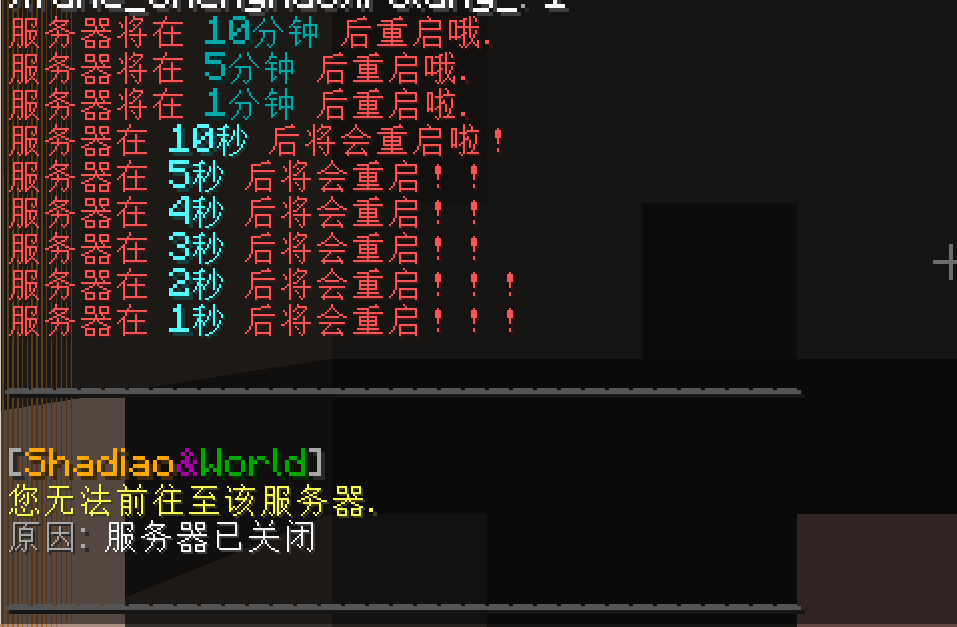
间隔任务使用 fortime。单位可以使用 s(秒)、m(分)、h(时)和 d(天)组合。
run:
  "tips":
    enable: true
    fortime: "30m"
    command:
      - "@m &bTip: use /spawn whenever you get lost."
星期和日期条件
在分号分隔的命令链开头放置条件。如果当前日期不匹配,NoTime 将跳过该链的其余部分。
run:
  "weekly-reward":
    enable: true
    time: "12:30"
    command:
      - "week=1;@m &eMonday rewards are live!"
      - "week=1;@all give @name@ cooked_chicken"

  "monthly-reward":
    enable: true
    time: "12:30"
    command:
      - "month=1;@m &eA fresh month means a fresh reward."
      - "month=1;@all give @name@ diamond 1"
week=1 到 week=7 代表周一到周日。也支持中文别名 周=。month=1 到 month=31 匹配月份中的日期。也支持中文别名 月=。- 这些是命令字符串内部的条件,而不是单独的 YAML 键。
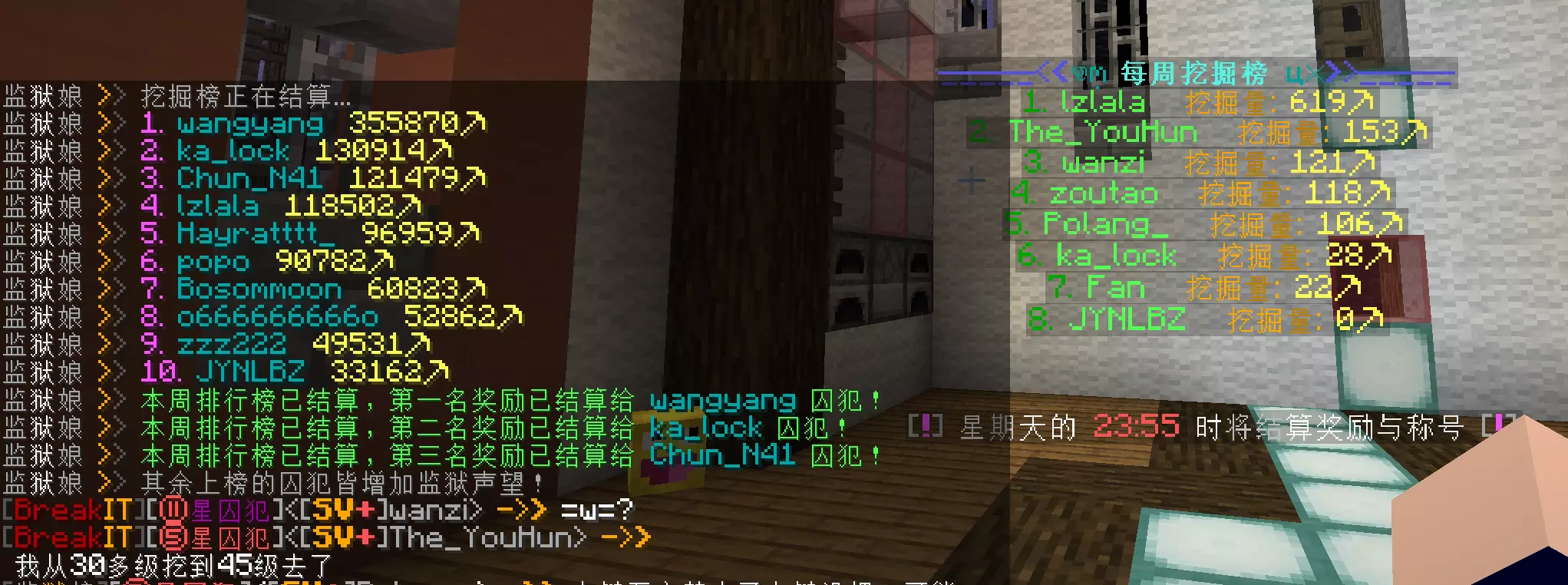
每周排行榜结算
NoTime 可以通过在配置的每周结算时间运行排行榜和奖励插件的命令来与其配合工作。
NoTime 负责安排结算和奖励命令;它本身不提供排行榜功能。
命令动作
| 前缀 |
动作 |
示例 |
@m |
向所有在线玩家广播消息 |
@m &aWelcome back! |
@all |
为每个在线玩家执行一次控制台命令,并将 @name@ 替换为玩家名称 |
@all give @name@ apple |
@all_command |
让每个在线玩家执行该命令 |
@all_command spawn |
@k |
使用提供的消息踢出受影响的在线玩家 |
@k &cMaintenance time |
@s |
关闭服务器 |
@s |
@papi |
将 PlaceholderAPI 占位符保留为字面文本供命令使用 |
@papi papi parse me %player_name% |
没有 @ 动作前缀的命令将从控制台执行。使用 ; 在一个条目中链接多个动作。
当安装了 PlaceholderAPI 时,NoTime 通常会在执行命令之前解析占位符。在子命令前加上 @papi 前缀可禁用此行为,以便其他插件能够接收原始的 %placeholder% 文本。
PlaceholderAPI 倒计时
NoTime 注册了直到下次预定执行时间剩余的占位符:
%notime_<task-name>_s%
%notime_<task-name>_m%
%notime_<task-name>_h%
%notime_<task-name>_d%
最后一个字母选择秒、分、时或天。在使用这些占位符时,避免在任务名称中使用下划线,因为下划线用于分隔占位符字段。
安装
- 从本页面顶部的 Versions 选项卡下载最新版本文件。
- 将 JAR 文件放入服务器的
plugins 文件夹。
- 启动或完全重启服务器以生成
plugins/NoTime/config.yml。
- 编辑配置文件并运行
/notime reload。
生成的配置文件是双语的:每条中文注释后都附有英文说明。
您也可以从 GitHub Releases 下载之前的版本。
命令和权限
| 命令 |
权限 |
用途 |
/notime |
notime.admin |
显示可用的子命令 |
/notime reload |
notime.admin |
重新加载配置并重建定时任务 |
/notime test <task> |
notime.admin |
立即运行配置的任务进行测试 |
notime.admin 权限默认授予服务器管理员。
测试命令仍会评估 week= 和 month= 条件。仅在当前日期匹配其条件时,受日期限制的任务才会继续执行。
配置说明
- 任务时间使用服务器所在机器的本地时间。
- 具有单个
time 值的任务每天运行一次。
- 多个
time 值列表会将每个时间与同一列表中对应位置的命令配对。
fortime 间隔从插件加载时开始计算,不与墙钟时间绑定。/notime reload 会重启调度器,导致间隔倒计时重新开始。startcommand 条目在插件启动后不久运行,并在服务器完全重启后再次运行。- PlaceholderAPI 为可选依赖。即使未安装,定时任务和登录控制功能仍可正常工作。
有关重启倒计时、每周和每月任务、间隔任务以及启动命令的完整双语配置,请参阅 完整双语配置文件。
可选依赖
PlaceholderAPI 为可选依赖。仅当你希望 NoTime 解析定时命令中的占位符或向其他插件提供 NoTime 倒计时占位符时,才需要安装它。
匿名指标
NoTime 使用 bStats 收集匿名使用统计数据,例如服务器软件版本和玩家数量。
服务器所有者可以通过在以下文件中设置 enabled: false 来禁用 bStats:
plugins/bStats/config.yml
支持与源代码
如果 NoTime 为你节省了一些服务器管理工作,请考虑在 GitHub 上给项目加星。
NoTime
NoTime is a lightweight, server-side Minecraft plugin for scheduled commands and time-based login control.
It supports Bukkit-family servers and Folia-aware scheduling, allowing one configuration to handle nightly maintenance windows, recurring announcements, weekly rewards, restart countdowns, and player login restrictions.
- Server-side only
- Folia supported
- PlaceholderAPI optional
- No database required
Looking for Chinese documentation? Read the Chinese README.
Features
Login time limits
Block selected players from joining during a configured time window. NoTime can also kick affected players who are already online when that window begins.
- Whitelist mode lets selected players bypass the restriction.
- Adding a player to the blacklist switches to blacklist mode, where only listed players are restricted.
opposite: true reverses the rule, allowing affected players to join only inside the configured window.- Kick messages support
%start%, %end%, legacy & color codes, and escaped && characters.
This can be used for playtime limits, school-night schedules, private server opening hours, or planned maintenance windows.
Scheduled commands
Tasks can run once per day at HH:mm or HH:mm:ss, at several times per day, or repeatedly at a fixed interval.
run:
  "morning-message":
    enable: true
    time: "08:00"
    command:
      - "@m &aGood morning! The server is ready."
For several times in one day, every time is paired with the command at the same list position:
run:
  "restart-countdown":
    enable: false
    time:
      - "02:55"
      - "02:59"
      - "03:00"
    command:
      - "@m &eServer restart in 5 minutes."
      - "@m &eServer restart in 1 minute."
      - "@k &cServer restarting now;@s"
Restart countdown preview
The following screenshot shows a scheduled restart countdown followed by the server shutdown message:
Interval tasks use fortime. Units can be combined using s for seconds, m for minutes, h for hours, and d for days.
run:
  "tips":
    enable: true
    fortime: "30m"
    command:
      - "@m &bTip: use /spawn whenever you get lost."
Weekday and day-of-month conditions
Place a condition at the beginning of a semicolon-separated command chain. If the current date does not match, NoTime skips the rest of that chain.
run:
  "weekly-reward":
    enable: true
    time: "12:30"
    command:
      - "week=1;@m &eMonday rewards are live!"
      - "week=1;@all give @name@ cooked_chicken"

  "monthly-reward":
    enable: true
    time: "12:30"
    command:
      - "month=1;@m &eA fresh month means a fresh reward."
      - "month=1;@all give @name@ diamond 1"
week=1 through week=7 represent Monday through Sunday. The Chinese alias 周= is also supported.month=1 through month=31 match the day of the month. The Chinese alias 月= is also supported.- These are conditions inside a command string, not separate YAML keys.
Weekly leaderboard settlement
NoTime can work with leaderboard and reward plugins by running their commands at a configured weekly settlement time.
NoTime schedules the settlement and reward commands; it does not provide the leaderboard itself.
Command actions
| Prefix |
Action |
Example |
@m |
Broadcasts a message to all online players |
@m &aWelcome back! |
@all |
Runs a console command once for every online player, replacing @name@ with the player's name |
@all give @name@ apple |
@all_command |
Makes every online player execute the command |
@all_command spawn |
@k |
Kicks affected online players with the supplied message |
@k &cMaintenance time |
@s |
Shuts down the server |
@s |
@papi |
Keeps PlaceholderAPI tokens as literal text for the command |
@papi papi parse me %player_name% |
Commands without an @ action prefix are executed from the console. Use ; to chain several actions in one entry.
When PlaceholderAPI is installed, NoTime normally resolves placeholders before executing a command. Prefixing a subcommand with @papi disables this behavior when another plugin needs to receive the raw %placeholder% text.
PlaceholderAPI countdowns
NoTime registers placeholders for the time remaining until the next scheduled execution:
%notime_<task-name>_s%
%notime_<task-name>_m%
%notime_<task-name>_h%
%notime_<task-name>_d%
The final letter selects seconds, minutes, hours, or days. Avoid underscores in task names when using these placeholders because underscores separate the placeholder fields.
Installation
- Download the latest file from the Versions tab on this page.
- Place the JAR in your server's
plugins folder.
- Start or fully restart the server to generate
plugins/NoTime/config.yml.
- Edit the configuration and run
/notime reload.
The generated configuration is bilingual: every Chinese comment is followed by an English explanation.
You can also download previous releases from GitHub Releases.
Commands and permissions
| Command |
Permission |
Purpose |
/notime |
notime.admin |
Displays the available subcommands |
/notime reload |
notime.admin |
Reloads the configuration and rebuilds scheduled tasks |
/notime test <task> |
notime.admin |
Immediately runs a configured task for testing |
The notime.admin permission defaults to server operators.
The test command still evaluates week= and month= conditions. A date-restricted task only continues when the current date matches its condition.
Configuration notes
- Task times use the server machine's local time.
- A task with one
time value runs once per day.
- A list of
time values pairs each time with the command in the same list position.
- A
fortime interval begins when the plugin loads and is not tied to a wall-clock time.
/notime reload restarts the schedulers, causing interval countdowns to begin again.startcommand entries run shortly after the plugin starts and run again after a full server restart.- PlaceholderAPI is optional. Scheduling and login controls work without it.
See the complete bilingual configuration for restart countdowns, weekly and monthly tasks, interval tasks, and startup commands.
Optional dependency
PlaceholderAPI is optional. Install it only if you want NoTime to resolve placeholders in scheduled commands or provide NoTime countdown placeholders to other plugins.
Anonymous metrics
NoTime uses bStats to collect anonymous usage statistics, such as the server software version and player count.
Server owners can disable bStats by setting enabled: false in:
plugins/bStats/config.yml
Support and source code
If NoTime saves you some server administration work, consider giving the project a star on GitHub.


 插件

 插件
 插件
 插件
 插件
 插件
评论 0
登录后参与评分
还没有评论,来抢沙发吧