OllamaChat
概述
OllamaChat 是一款前沿的 Minecraft 插件,集成了 Ollama 和 OpenAI 类 API,支持实时 AI 交互、多语言支持以及高级提示词和对话管理,旨在提供沉浸式的游戏体验。
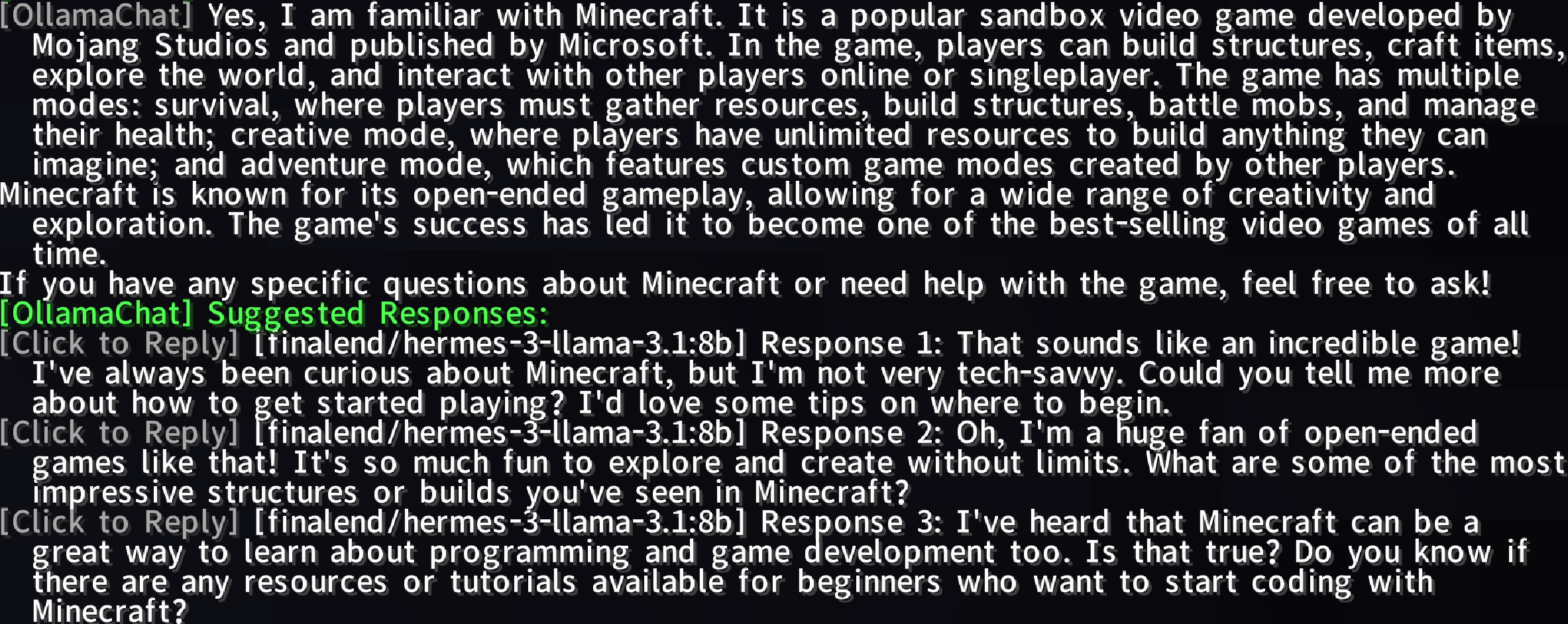
示例
功能
- AI 驱动对话:使用
@bot 或 @ai 前缀与 AI 聊天,获取动态且智能的回复。
- Ollama 与 OpenAI 集成:利用先进的 AI 模型增强你的 Minecraft 体验。
- 多语言支持:通过
lang 文件夹中的文件支持多种语言(例如英文、简体中文)。
- 切换 AI 服务:使用
/ollamachat toggle <ai-name> 启用/禁用 AI 服务。
- 提示词管理:创建、删除、列出、选择或清除自定义提示词,以定制 AI 交互。
- 对话管理:开始、切换、删除或查看玩家与 AI 实体的特定对话。
- 智能响应建议:生成可配置的、可点击的后续建议,带有悬停文本和速率限制。
- 进度显示:提示词回答生成的可视化状态栏(0% 到 100%)。
- 公共 API:
OllamaChatAPI 用于插件扩展性和 AI 查询支持。
用法
与 AI 聊天
在 Minecraft 聊天中输入 @bot 或 @ai,后跟你的消息即可与 AI 互动。
示例:
@bot 建造城堡的最佳方式是什么?
命令
| 命令 |
权限 |
描述 |
/ollamachat reload |
ollamachat.reload |
重新加载插件配置和语言文件。 |
/ollamachat help |
|
显示通用命令列表。 |
/ollamachat help <command> |
|
显示特定命令的详细帮助。 |
/ollamachat toggle <ai-name> |
ollamachat.toggle |
启用/禁用指定的 AI 服务。 |
/aichat <ai-name> <prompt> |
ollamachat.use |
与其他 AI 服务进行交互。 |
/ollamachat prompt set <promptName> <promptContent> |
ollamachat.prompt.set |
创建新提示词。 |
/ollamachat prompt delete <promptName> |
ollamachat.prompt.delete |
删除提示词。 |
/ollamachat prompt list |
ollamachat.prompt.list |
列出所有提示词。 |
/ollamachat prompt select <promptName> |
ollamachat.prompt.select |
设置默认提示词。 |
/ollamachat prompt clear |
ollamachat.prompt.select |
重置默认提示词。 |
/ollamachat conversation new <aiName> <convName> |
ollamachat.conversation.new |
开始新对话。 |
/ollamachat conversation select <aiName> <convName> |
ollamachat.conversation.select |
切换对话。 |
/ollamachat conversation delete <aiName> <convName> |
ollamachat.conversation.delete |
删除对话。 |
/ollamachat conversation list <aiName> |
ollamachat.conversation.list |
列出某个 AI 的对话。 |
/ollamachat suggests toggle |
ollamachat.suggests.toggle |
切换建议响应。 |
/ollamachat suggests-presets toggle |
ollamachat.suggests-presets.toggle |
切换预设建议响应。 |
/ollamachat search toggle |
ollamachat.search.toggle |
启用/禁用网络搜索功能。 |
/ollamachat search status |
ollamachat.search.status |
显示当前搜索配置。 |
/ollamachat search query <text> |
ollamachat.search.query |
执行手动网络搜索并获取 AI 回复。 |
/ollamachat search engine [name] |
ollamachat.search.engine |
显示或更改活动的搜索引擎。 |
/ollamachat search setkey <engine> <key> |
ollamachat.search.setkey |
为指定搜索引擎设置 API 密钥。 |
/ollamachat search setcount <number> |
ollamachat.search.setcount |
配置搜索结果数量(1-50)。 |
/ollamachat search addkeyword <word> |
ollamachat.search.keywords |
添加自动搜索的触发关键词。 |
/ollamachat search removekeyword <word> |
ollamachat.search.keywords |
移除触发关键词。 |
/ollamachat search listkeywords |
ollamachat.search.keywords |
列出所有已配置的触发关键词。 |
权限
| 权限 |
描述 |
ollamachat.reload |
允许重新加载插件配置和语言文件。 |
ollamachat.toggle |
允许启用/禁用 AI 服务。 |
ollamachat.use |
允许向 AI 服务发送消息。 |
ollamachat.prompt.set |
允许创建和保存新提示词。 |
ollamachat.prompt.delete |
允许删除提示词。 |
ollamachat.prompt.list |
允许列出所有提示词。 |
ollamachat.prompt.select |
允许选择或清除默认提示词。 |
ollamachat.conversation.new |
允许开始新对话。 |
ollamachat.conversation.select |
允许在对话之间切换。 |
ollamachat.conversation.delete |
允许删除对话。 |
ollamachat.conversation.list |
允许列出某个 AI 的对话。 |
ollamachat.suggests.toggle |
允许切换建议响应。 |
ollamachat.suggests-presets.toggle |
允许切换预设建议响应。 |
ollamachat.search.toggle |
允许启用/禁用网络搜索。 |
ollamachat.search.status |
允许查看搜索配置。 |
ollamachat.search.query |
允许执行手动网络搜索。 |
ollamachat.search.engine |
允许更改搜索引擎。 |
ollamachat.search.setkey |
允许为搜索引擎设置 API 密钥。 |
ollamachat.search.setcount |
允许配置搜索结果数量。 |
ollamachat.search.keywords |
允许管理触发关键词。 |
示例:
/aichat ollama 告诉我关于红石的事情
/ollamachat prompt set creativePrompt "扮演一个有创意的 Minecraft 建筑师"
/ollamachat suggests toggle
安装
- 下载:获取最新的 OllamaChat。
- 安装:将
.jar 文件放入服务器的 plugins 文件夹中。
- 配置:编辑
config.yml 以自定义 AI 设置、提示词和建议回复。
- 重载:使用
/ollamachat reload 应用更改。
配置
通过 config.yml 自定义 AI 交互:
# OllamaChat 配置文件

# ============================================================
# 常规设置
# ============================================================

# 要使用的语言文件 (en_us, zh_cn 等)
language: en_us

# 启用 Ollama 集成
ollama-enabled: true

# Ollama API URL
ollama-api-url: "http://localhost:11434/api/generate"

# 默认 Ollama 模型
model: "llama3"

# 每个对话保留的最大聊天记录数
max-history: 5

# 最大响应长度(字符)
max-response-length: 500

# 聊天触发前缀(以此开头的消息将发送给 AI)
trigger-prefixes:
  - "@bot"
  - "@ai"

# ============================================================
# 流式传输设置
# ============================================================

stream-settings:
  # 启用流式响应
  enabled: true

# ============================================================
# 提示词设置
# ============================================================

# 默认提示词名称(留空表示无默认值)
default-prompt: ""

# 自定义提示词
# 您可以在此处定义自定义提示词,并通过 /ollamachat prompt select 进行选择
# 示例:
# prompts:
#   expert: "You are an expert assistant. Provide detailed and professional answers."
#   friendly: "You are a friendly assistant. Keep responses casual and warm."
prompts: {}

# ============================================================
# 建议回复设置
# ============================================================

# 用于生成建议的 AI 模型
suggested-response-models:
  - "llama3"

# 启用建议回复功能
suggested-responses-enabled: true

# 生成的建议数量
suggested-response-count: 3

# 生成建议之间的冷却时间(秒,0 表示禁用)
suggested-response-cooldown: 10

# 启用预设建议(在 AI 不可用时或作为后备方案时使用)
suggested-response-presets-enabled: true

# 预设建议(在 AI 不可用时使用)
suggested-response-presets:
  - "I see what you mean."
  - "That's interesting!"
  - "Tell me more about that."

# 各个模型的建议切换开关
# 您可以为建议生成启用/禁用特定模型
# 示例:
# suggested-response-model-toggles:
#   llama3: true
#   gpt-3.5-turbo: false
suggested-response-model-toggles: {}

# ============================================================
# 网页搜索设置
# ============================================================

web-search:
  # 启用网页搜索功能
  enabled: false

  # 当消息包含触发关键词时自动触发搜索
  auto-trigger: true

  # 触发自动搜索的关键词
  # 当用户的消息包含以下任何词语时,将执行网页搜索
  trigger-keywords:
    - "search"
    - "find"
    - "look up"
    - "google"
    - "what is"
    - "who is"
    - "when did"
    - "where is"

  # 返回的搜索结果数量 (1-50)
  result-count: 5

  # ============================================================
  # 搜索引擎配置
  # ============================================================
  # 选择要使用的搜索引擎:bocha 或 brave
  # - bocha:面向中文的搜索引擎(需要 API 密钥)
  # - brave:国际搜索引擎(需要 API 密钥)
  engine: "brave"

  # ---------- Bocha 搜索引擎(面向中文)----------
  # 网站:https://www.bochaai.com/
  # API 文档:https://api.bocha.cn/v1/web-search
  bocha:
    # Bocha API 密钥(Bocha 引擎必需)
    # 获取地址:https://www.bochaai.com/(中文网站)
    api-key: ""

    # 包含特定站点(仅在这些域名内搜索)
    # 示例:["example.com", "sample.org"]
    include-sites: false
    include-sites-list: []

    # 排除特定站点(从搜索中排除这些域名)
    # 示例:["spam.com", "adsite.net"]
    exclude-sites: false
    exclude-sites-list: []

    # 时间范围(天数,0 表示无限制)
    # 限制搜索结果仅限在此天数内发布的内容
    time-range: 0

    # 新鲜度:Day(天)、Week(周)、Month(月)、Quarter(季度)、Year(年)(留空表示无限制)
    # 根据内容的新旧程度限制搜索结果
    freshness: ""

  # ---------- Brave 搜索引擎(国际)----------
  # 网站:https://brave.com/search/api/
  # API 文档:https://api.search.brave.com/app/documentation
  brave:
    # Brave API 密钥(Brave 引擎必需)
    # 获取地址:https://api.search.brave.com/app/keys
    api-key: ""

    # 国家代码(例如 US、CN、GB、DE、FR、JP 等)
    # 这会影响基于地理位置的搜索结果相关性
    country: "US"

    # 搜索语言(例如 en、zh、es、fr、de 等)
    # 结果将以该语言优先显示
    search-lang: "en"

    # UI 语言(例如 en、zh、es、fr、de 等)
    # 搜索结果中 UI 元素的显示语言
    ui-lang: "en"

    # 安全搜索级别(off、moderate、strict)
    # 根据严格程度过滤成人内容
    safe-search: "moderate"

  # ---------- 搜索提示模板----------
  # 用于格式化搜索结果以供 AI 使用的模板
  # 可用占位符:
  #   {search_results} - 格式化后的搜索结果
  #   {prompt} - 用户的原始问题
  prompt-template: "Based on the following search results, please answer the user's question:\n\n{search_results}\n\nUser question: {prompt}\n\nPlease provide an accurate and detailed answer based on the search results. If the search results are insufficient, please indicate that."

# ============================================================
# 数据库设置
# ============================================================

database:
  # 数据库类型:sqlite 或 mysql
  # - sqlite:本地文件数据库(更简单,无需配置)
  # - mysql:远程 MySQL 数据库(更适合多服务器环境)
  type: sqlite

  # MySQL 设置(仅在类型为 mysql 时使用)
  mysql:
    host: "localhost"
    port: 3306
    database: "ollamachat"
    username: "root"
    password: ""

    # HikariCP 连接池设置
    # 这些选项控制数据库连接池的行为
    hikari:
      # 连接池中的最大连接数
      maximum-pool-size: 10
      # 维持的最小空闲连接数
      minimum-idle: 2
      # 从池中获取连接的最大等待时间(毫秒)
      connection-timeout: 30000
      # 连接在池中可以保持空闲的最大时间(毫秒)
      idle-timeout: 600000
      # 连接在池中的最大生命周期(毫秒)
      max-lifetime: 1800000
      # 缓存预编译语句以提升性能
      cache-prep-stmts: true
      # 预编译语句缓存的大小
      prep-stmt-cache-size: 250
      # 缓存预编译语句的最大 SQL 长度
      prep-stmt-cache-sql-limit: 2048

# ============================================================
# 进度显示设置
# ============================================================

progress-display:
  # 启用 AI 生成响应时的进度显示
  enabled: true

  # 显示类型:bossbar 或 actionbar
  # - bossbar:使用 Minecraft 的 Boss 栏(更显眼)
  # - actionbar:使用快捷栏上方的操作栏(侵入性较小)
  type: "bossbar"

  # BossBar 颜色(BLUE, GREEN, PINK, PURPLE, RED, WHITE, YELLOW)
  # 仅当类型为 "bossbar" 时适用
  color: "BLUE"

  # BossBar 样式(SOLID, SEGMENTED_6, SEGMENTED_10, SEGMENTED_12, SEGMENTED_20)
  # 仅当类型为 "bossbar" 时适用
  style: "SOLID"

  # 更新间隔(以刻为单位,20 刻 = 1 秒)
  # 进度显示的刷新频率
  update-interval: 1

# ============================================================
# 其他 AI 集成
# ============================================================

# 配置其他 AI 模型(OpenAI、Claude 等)
# 你可以在这里添加多个 AI 提供商,并通过 /aichat 命令使用它们
other-ai-configs: {}
  # OpenAI 配置示例:
  # openai:
  #   api-url: "https://api.openai.com/v1/chat/completions"
  #   api-key: "your-api-key-here"
  #   model: "gpt-3.5-turbo"
  #   enabled: true
  #   messages-format: true
  #
  # Claude 配置示例:
  # claude:
  #   api-url: "https://api.anthropic.com/v1/messages"
  #   api-key: "your-api-key-here"
  #   model: "claude-3-opus-20240229"
  #   enabled: true
  #   messages-format: true
  #
  # 自定义 API 配置示例:
  # custom-ai:
  #   api-url: "https://your-custom-api.com/generate"
  #   api-key: "your-api-key"
  #   model: "your-model-name"
#   enabled: true
#   messages-format: false
贡献指南
我们欢迎贡献!请在我们的 GitHub 仓库 提交问题或拉取请求。
许可证
本软件遵循 MIT 许可证。详见 LICENSE。
支持
如需帮助,请访问我们的 GitHub 仓库 或加入我们的 社区服务器。
OllamaChat
Overview
OllamaChat is a cutting-edge Minecraft plugin that integrates Ollama and OpenAI-class APIs, enabling real-time AI interactions, multi-language support, and advanced prompt and conversation management for immersive in-game experiences.
Example
Features
- AI-Powered Conversations: Chat with AI using
@bot or @ai prefixes for dynamic, intelligent responses.
- Ollama & OpenAI Integration: Leverage advanced AI models to enhance your Minecraft experience.
- Multi-Language Support: Supports multiple languages (e.g., English, Simplified Chinese) via
lang folder files.
- Toggle AI Services: Enable/disable AI services with
/ollamachat toggle <ai-name>.
- Prompt Management: Create, delete, list, select, or clear custom prompts to tailor AI interactions.
- Conversation Management: Start, switch, delete, or view player-specific conversations with AI entities.
- Smart Response Suggestions: Generate configurable, clickable follow-up suggestions with hover text and rate limiting.
- Progress Display: Visual status bar for prompt answer generation (0% to 100%).
- Public API:
OllamaChatAPI for plugin extensibility and AI query support.
Usage
Chatting with AI
Type @bot or @ai followed by your message in Minecraft chat to interact with the AI.
Example:
@bot What's the best way to build a castle?
Commands
| Command |
Permission |
Description |
/ollamachat reload |
ollamachat.reload |
Reloads plugin configuration and language files. |
/ollamachat help |
|
Shows general command list. |
/ollamachat help <command> |
|
Shows detailed help for a specific command. |
/ollamachat toggle <ai-name> |
ollamachat.toggle |
Enables/disables specified AI service. |
/aichat <ai-name> <prompt> |
ollamachat.use |
Interacts with other AI services. |
/ollamachat prompt set <promptName> <promptContent> |
ollamachat.prompt.set |
Creates a new prompt. |
/ollamachat prompt delete <promptName> |
ollamachat.prompt.delete |
Deletes a prompt. |
/ollamachat prompt list |
ollamachat.prompt.list |
Lists all prompts. |
/ollamachat prompt select <promptName> |
ollamachat.prompt.select |
Sets default prompt. |
/ollamachat prompt clear |
ollamachat.prompt.select |
Resets default prompt. |
/ollamachat conversation new <aiName> <convName> |
ollamachat.conversation.new |
Starts a new conversation. |
/ollamachat conversation select <aiName> <convName> |
ollamachat.conversation.select |
Switches conversations. |
/ollamachat conversation delete <aiName> <convName> |
ollamachat.conversation.delete |
Deletes a conversation. |
/ollamachat conversation list <aiName> |
ollamachat.conversation.list |
Lists conversations for an AI. |
/ollamachat suggests toggle |
ollamachat.suggests.toggle |
Toggles suggested responses. |
/ollamachat suggests-presets toggle |
ollamachat.suggests-presets.toggle |
Toggles preset suggested responses. |
/ollamachat search toggle |
ollamachat.search.toggle |
Enables/disables web search functionality. |
/ollamachat search status |
ollamachat.search.status |
Displays current search configuration. |
/ollamachat search query <text> |
ollamachat.search.query |
Performs a manual web search and gets AI response. |
/ollamachat search engine [name] |
ollamachat.search.engine |
Shows or changes the active search engine. |
/ollamachat search setkey <engine> <key> |
ollamachat.search.setkey |
Sets API key for specified search engine. |
/ollamachat search setcount <number> |
ollamachat.search.setcount |
Configures number of search results (1-50). |
/ollamachat search addkeyword <word> |
ollamachat.search.keywords |
Adds a trigger keyword for auto-search. |
/ollamachat search removekeyword <word> |
ollamachat.search.keywords |
Removes a trigger keyword. |
/ollamachat search listkeywords |
ollamachat.search.keywords |
Lists all configured trigger keywords. |
Permissions
| Permission |
Description |
ollamachat.reload |
Allows reloading plugin configuration and language files. |
ollamachat.toggle |
Allows enabling/disabling AI services. |
ollamachat.use |
Allows sending messages to AI services. |
ollamachat.prompt.set |
Allows creating and saving new prompts. |
ollamachat.prompt.delete |
Allows deleting prompts. |
ollamachat.prompt.list |
Allows listing all prompts. |
ollamachat.prompt.select |
Allows selecting or clearing default prompt. |
ollamachat.conversation.new |
Allows starting new conversations. |
ollamachat.conversation.select |
Allows switching between conversations. |
ollamachat.conversation.delete |
Allows deleting conversations. |
ollamachat.conversation.list |
Allows listing conversations for an AI. |
ollamachat.suggests.toggle |
Allows toggling suggested responses. |
ollamachat.suggests-presets.toggle |
Allows toggling preset suggested responses. |
ollamachat.search.toggle |
Allows enabling/disabling web search. |
ollamachat.search.status |
Allows viewing search configuration. |
ollamachat.search.query |
Allows performing manual web searches. |
ollamachat.search.engine |
Allows changing the search engine. |
ollamachat.search.setkey |
Allows setting API keys for search engines. |
ollamachat.search.setcount |
Allows configuring search result count. |
ollamachat.search.keywords |
Allows managing trigger keywords. |
Example:
/aichat ollama Tell me about Redstone
/ollamachat prompt set creativePrompt "Act as a creative Minecraft builder"
/ollamachat suggests toggle
Installation
- Download: Get the latest OllamaChat.
- Install: Place the
.jar file in your server's plugins folder.
- Configure: Edit
config.yml to customize AI settings, prompts, and suggestions.
- Reload: Use
/ollamachat reload to apply changes.
Configuration
Customize AI interactions via config.yml:
# OllamaChat Configuration File

# ============================================================
# General Settings
# ============================================================

# Language file to use (en_us, zh_cn, etc.)
language: en_us

# Enable Ollama integration
ollama-enabled: true

# Ollama API URL
ollama-api-url: "http://localhost:11434/api/generate"

# Default Ollama model
model: "llama3"

# Maximum chat history to keep per conversation
max-history: 5

# Maximum response length (characters)
max-response-length: 500

# Chat trigger prefixes (messages starting with these will be sent to AI)
trigger-prefixes:
  - "@bot"
  - "@ai"

# ============================================================
# Streaming Settings
# ============================================================

stream-settings:
  # Enable streaming responses
  enabled: true

# ============================================================
# Prompt Settings
# ============================================================

# Default prompt name (empty for no default)
default-prompt: ""

# Custom prompts
# You can define custom prompts here that can be selected with /ollamachat prompt select
# Example:
# prompts:
#   expert: "You are an expert assistant. Provide detailed and professional answers."
#   friendly: "You are a friendly assistant. Keep responses casual and warm."
prompts: {}

# ============================================================
# Suggested Responses Settings
# ============================================================

# AI models to use for generating suggestions
suggested-response-models:
  - "llama3"

# Enable suggested responses feature
suggested-responses-enabled: true

# Number of suggestions to generate
suggested-response-count: 3

# Cooldown between suggestion generations (seconds, 0 to disable)
suggested-response-cooldown: 10

# Enable preset suggestions (used when AI is unavailable or as fallback)
suggested-response-presets-enabled: true

# Preset suggestions (used when AI is unavailable)
suggested-response-presets:
  - "I see what you mean."
  - "That's interesting!"
  - "Tell me more about that."

# Individual model toggles for suggestions
# You can enable/disable specific models for suggestion generation
# Example:
# suggested-response-model-toggles:
#   llama3: true
#   gpt-3.5-turbo: false
suggested-response-model-toggles: {}

# ============================================================
# Web Search Settings
# ============================================================

web-search:
  # Enable web search feature
  enabled: false

  # Auto-trigger search when message contains trigger keywords
  auto-trigger: true

  # Keywords that trigger automatic web search
  # When a user's message contains any of these words, a web search will be performed
  trigger-keywords:
    - "search"
    - "find"
    - "look up"
    - "google"
    - "what is"
    - "who is"
    - "when did"
    - "where is"

  # Number of search results to return (1-50)
  result-count: 5

  # ============================================================
  # Search Engine Configuration
  # ============================================================
  # Choose which search engine to use: bocha or brave
  # - bocha: Chinese-focused search engine (requires API key)
  # - brave: International search engine (requires API key)
  engine: "brave"

  # ---------- Bocha Search Engine (Chinese-focused) ----------
  # Website: https://www.bochaai.com/
  # API Documentation: https://api.bocha.cn/v1/web-search
  bocha:
    # Bocha API Key (required for Bocha engine)
    # Get it from: https://www.bochaai.com/ (Chinese website)
    api-key: ""

    # Include specific sites (only search within these domains)
    # Example: ["example.com", "sample.org"]
    include-sites: false
    include-sites-list: []

    # Exclude specific sites (exclude these domains from search)
    # Example: ["spam.com", "adsite.net"]
    exclude-sites: false
    exclude-sites-list: []

    # Time range in days (0 for unlimited)
    # Restrict search results to content published within this many days
    time-range: 0

    # Freshness: Day, Week, Month, Quarter, Year (empty for unlimited)
    # Restrict search results by how recent they are
    freshness: ""

  # ---------- Brave Search Engine (International) ----------
  # Website: https://brave.com/search/api/
  # API Documentation: https://api.search.brave.com/app/documentation
  brave:
    # Brave API Key (required for Brave engine)
    # Get it from: https://api.search.brave.com/app/keys
    api-key: ""

    # Country code (e.g., US, CN, GB, DE, FR, JP, etc.)
    # This affects search result relevance based on location
    country: "US"

    # Search language (e.g., en, zh, es, fr, de, etc.)
    # Results will be prioritized in this language
    search-lang: "en"

    # UI language (e.g., en, zh, es, fr, de, etc.)
    # Language for UI elements in search results
    ui-lang: "en"

    # Safe search level (off, moderate, strict)
    # Filters adult content based on strictness
    safe-search: "moderate"

  # ---------- Search Prompt Template ----------
  # Template for formatting search results for AI
  # Available placeholders:
  #   {search_results} - The formatted search results
  #   {prompt} - The user's original question
  prompt-template: "Based on the following search results, please answer the user's question:\n\n{search_results}\n\nUser question: {prompt}\n\nPlease provide an accurate and detailed answer based on the search results. If the search results are insufficient, please indicate that."

# ============================================================
# Database Settings
# ============================================================

database:
  # Database type: sqlite or mysql
  # - sqlite: Local file-based database (simpler, no setup required)
  # - mysql: Remote MySQL database (better for multiple servers)
  type: sqlite

  # MySQL settings (only used when type is mysql)
  mysql:
    host: "localhost"
    port: 3306
    database: "ollamachat"
    username: "root"
    password: ""

    # HikariCP connection pool settings
    # These control how the database connection pool behaves
    hikari:
      # Maximum number of connections in the pool
      maximum-pool-size: 10
      # Minimum number of idle connections to maintain
      minimum-idle: 2
      # Maximum time (in ms) to wait for a connection from the pool
      connection-timeout: 30000
      # Maximum time (in ms) a connection can stay idle in the pool
      idle-timeout: 600000
      # Maximum lifetime (in ms) of a connection in the pool
      max-lifetime: 1800000
      # Cache prepared statements for better performance
      cache-prep-stmts: true
      # Size of the prepared statement cache
      prep-stmt-cache-size: 250
      # Maximum SQL length for cached prepared statements
      prep-stmt-cache-sql-limit: 2048

# ============================================================
# Progress Display Settings
# ============================================================

progress-display:
  # Enable progress display while AI is generating responses
  enabled: true

  # Display type: bossbar or actionbar
  # - bossbar: Uses Minecraft's boss bar (more visible)
  # - actionbar: Uses the action bar above hotbar (less intrusive)
  type: "bossbar"

  # BossBar color (BLUE, GREEN, PINK, PURPLE, RED, WHITE, YELLOW)
  # Only applicable when type is "bossbar"
  color: "BLUE"

  # BossBar style (SOLID, SEGMENTED_6, SEGMENTED_10, SEGMENTED_12, SEGMENTED_20)
  # Only applicable when type is "bossbar"
  style: "SOLID"

  # Update interval in ticks (20 ticks = 1 second)
  # How often the progress display updates
  update-interval: 1

# ============================================================
# Other AI Integrations
# ============================================================

# Configure other AI models (OpenAI, Claude, etc.)
# You can add multiple AI providers here and use them with /aichat command
other-ai-configs: {}
  # Example OpenAI configuration:
  # openai:
  #   api-url: "https://api.openai.com/v1/chat/completions"
  #   api-key: "your-api-key-here"
  #   model: "gpt-3.5-turbo"
  #   enabled: true
  #   messages-format: true
  #
  # Example Claude configuration:
  # claude:
  #   api-url: "https://api.anthropic.com/v1/messages"
  #   api-key: "your-api-key-here"
  #   model: "claude-3-opus-20240229"
  #   enabled: true
  #   messages-format: true
  #
  # Example Custom API configuration:
  # custom-ai:
  #   api-url: "https://your-custom-api.com/generate"
  #   api-key: "your-api-key"
  #   model: "your-model-name"
#   enabled: true
#   messages-format: false
Contributing
We welcome contributions! Submit issues or pull requests on our GitHub repository.
License
Licensed under the MIT License. See LICENSE.
Support
For help, visit our GitHub repository or join our Community server.


 插件

 插件
 插件
 插件
 插件
 插件
评论 0
登录后参与评分
还没有评论,来抢沙发吧