这是什么?
团队彩弹射击,最多支持 5v5。被击中一次即淘汰,三秒后复活,当计时结束时击杀数更多的队伍获胜。
这是 RP Engine 的插件:将其与引擎放在同一目录下即可自动附带所有内容。标记枪、面罩、手雷、油漆、音效、HUD 和计分板会在首次启动时自动安装。玩家无需安装任何额外内容。
功能特性
- ✔ 准星指向哪就打哪:按住右键开火。每发子弹都会确保无论是否掉落,最终都落在准星位置;从腰间射击时会有准星所示的散布范围。
- ✔ 瞄准镜瞄准:左键点击以通过标记枪的瞄准镜观察,画面放大,移动速度变慢且无散布。
- ✔ 手雷:右键投掷。它会在快捷栏中自动充能。
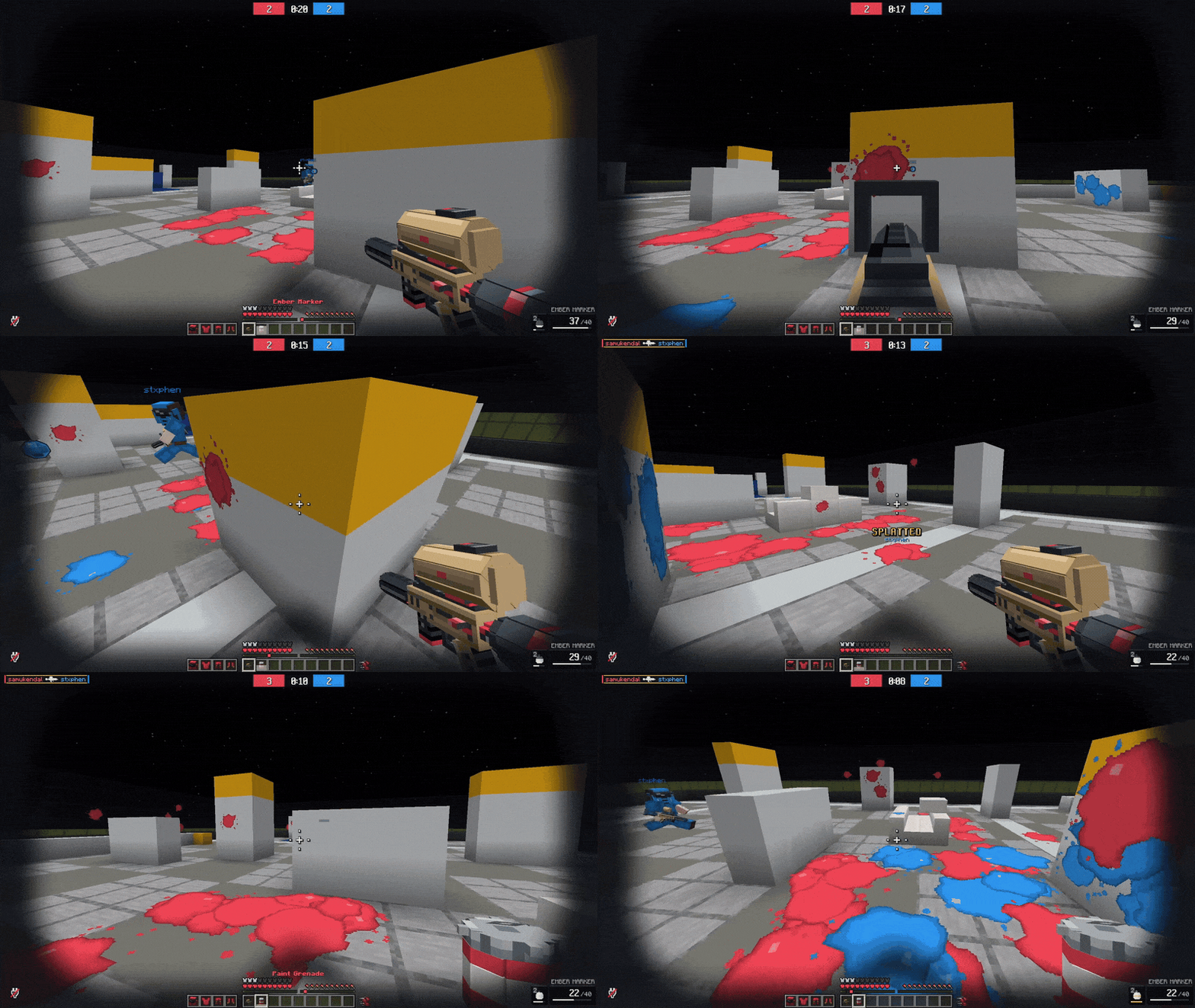
- ✔ 满地油漆:每颗子弹都会在击中物体上留下所属队伍颜色的油漆斑点。
- ✔ 全屏 HUD:显示分数和计时器、击杀信息流、弹药量和手雷充能进度、命中提示、倒计时,以及在你等待复活时显示是谁击中了你。没有标题文字或 Boss 血条。
- ✔ 计分板:按 F 键查看双方队伍的击杀、死亡和命中率,并显示每位玩家的头像。
- ✔ 选择阵营:在大厅中选择红色或蓝色,或者让系统自动平衡双方人数。
- ✔ 一条命令生成竞技场:
/pb arena generate 会在你站立的位置构建一个速球场地,随时可以开始游戏。
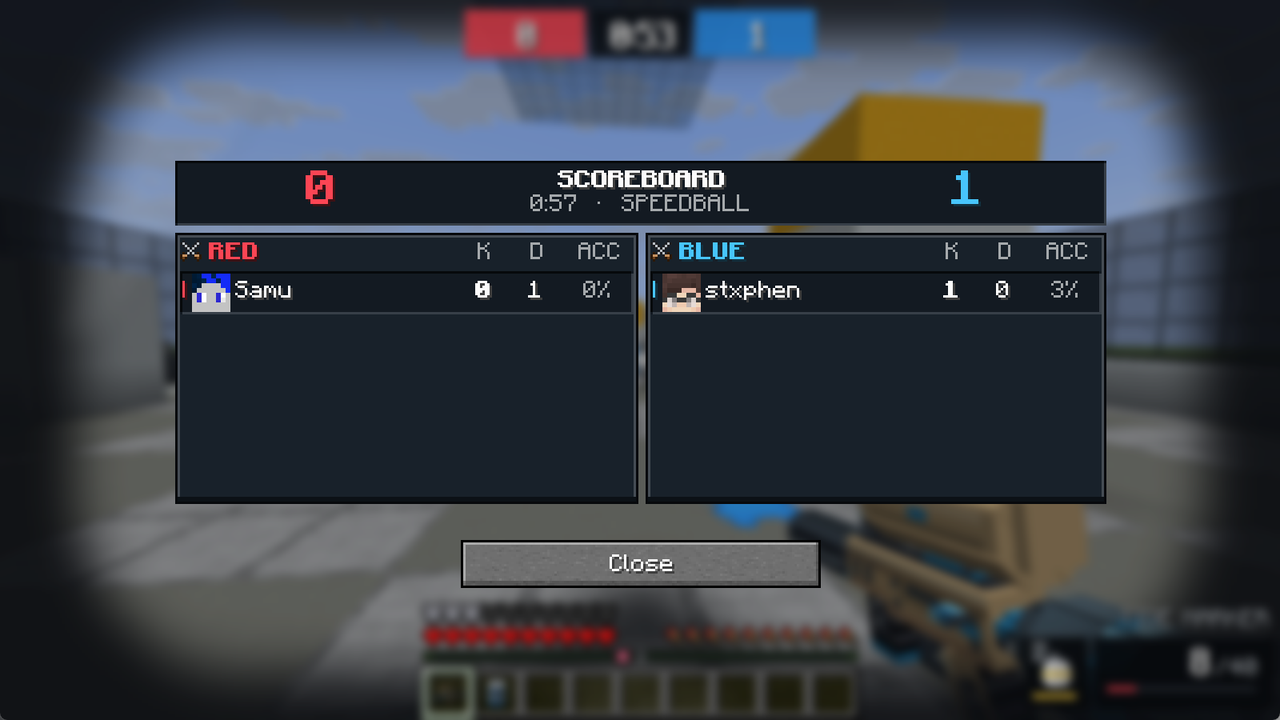
操作说明
|
|
| 右键(按住) |
开火 |
| 左键 |
进入瞄准镜视角 |
| Q |
换弹(弹药耗尽时也会自动换弹) |
| 右键点击手雷 |
投掷手雷 |
| F |
打开计分板 |
| Tab |
玩家列表:顶部显示分数和计时器,下方显示每位玩家的击杀和死亡数 |
安装步骤
- 如果你尚未安装,请安装 RP Engine 0.2.3 或更高版本(免费),并配置好让玩家获取其资源包。
- 将
RPE-paintball.jar 放入 plugins/ 目录中,与 RPEngine.jar 并列,然后启动服务器。
- 其内容会安装到
plugins/RPEngine/content/paintball/ 目录下,引擎会重新加载一次以识别该内容。
- 站在开阔地带,运行
/pb arena generate <id> confirm 来构建场地。
命令与权限
| 命令 |
功能 |
权限节点 |
默认权限 |
| /pb join |
加入大厅 |
paintball.join |
所有人 |
| /pb team red|blue|auto |
为下一场比赛选择阵营 |
paintball.team |
所有人 |
| /pb leave |
离开比赛,恢复你的物品栏和位置 |
none |
所有人 |
| /pb scoreboard |
查看比赛计分板(比赛中也可按 F) |
paintball.scoreboard |
所有人 |
| /pb start |
立即开始比赛,即使只有单人也可以 |
paintball.start |
管理员 |
| /pb stop |
结束比赛 |
paintball.stop |
管理员 |
| /pb arena |
设置竞技场 |
paintball.arena |
管理员 |
| /pb arena generate |
在你站立的位置构建整个场地 |
paintball.arena.generate |
管理员 |
| /pb arena delete |
删除一个竞技场 |
paintball.arena.delete |
管理员 |
| /pb reload |
重载配置文件 |
paintball.reload |
管理员 |
| /pb as |
以其他玩家身份执行命令(用于 NPC) |
paintball.as |
管理员 |
paintball.play 授予三个玩家节点权限,paintball.admin 授予所有管理节点权限,因此仍可作为单行授权使用。paintball.bypass.commands(管理员)允许处于比赛中的玩家使用任何命令,而不仅仅是聊天和 /pb 相关命令。
配置
plugins/RPEPaintball/config.yml 包含比赛时长、击杀上限、复活时间、射速、子弹速度和掉落距离、散布范围、手雷充能时间、各队伍的标记枪配色方案(ember、tide、toxic、sunset 或 gold),以及玩家看到的所有文字内容。
HUD 和计分板是普通的 RP Engine 内容,由 ResourcePack AI Studio 绘制,因此你可以自定义它们的样式,或将配置指向你自己的资源包。
支持
请在 Discord 提问,或在 GitHub 提交问题。请勿在评论中发布 Bug 报告;我们无法在那里回复,而且我们更希望直接修复问题。
Paintball 是基于 GPL-3.0 许可证的自由软件。源代码托管在 GitHub,欢迎贡献。
由 ResourcePack AI 制作
Paintball 基于 RP Engine 的公共 API 构建,该 API 可供任何插件使用。其 HUD、计分板、标记枪和音效均在 resourcepack.ai 中使用资源包网页编辑器制作而成。
What is it?
Team paintball, up to 5v5. One hit splats you, you are back in three seconds, and the team with more kills when the clock runs out wins.
It is an addon for RP Engine: drop it in beside the engine and it brings everything with it. The markers, the masks, the grenade, the paint, the sounds, the HUD and the scoreboard install themselves on first boot. Players need nothing installed.
What it does
- ✔ Markers that shoot where you aim: hold right-click to fire. Every ball is fired so that, drop and all, it lands on the crosshair; from the hip it strays by the spread the crosshair shows.
- ✔ Aim down the sights: left-click to look through the marker's sights, zoomed in, slower on your feet and with no spread.
- ✔ Grenades: right-click to throw. It recharges in your hotbar.
- ✔ Paint everywhere: every ball leaves a splat in its team's colour on whatever it hits.
- ✔ A full-screen HUD: the score and clock, a kill feed, ammo and the grenade's recharge, a hit marker, the countdown, and who splatted you while you wait to come back. No titles, no boss bars.
- ✔ A scoreboard: press F for both teams' kills, deaths and accuracy, with every player's face.
- ✔ Pick a side: choose red or blue in the lobby, or let it balance the teams for you.
- ✔ Arenas in one command:
/pb arena generate builds a speedball field where you stand, ready to play.
Playing
|
|
| Right-click (hold) |
Fire |
| Left-click |
Aim down the sights |
| Q |
Reload (it also reloads itself when empty) |
| Right-click the grenade |
Throw it |
| F |
The scoreboard |
| Tab |
The player list: score and clock on top, each player's kills and deaths |
Installing
- Install RP Engine 0.2.3 or newer (free) if you have not already, and set it up so players get its resource pack.
- Drop
RPE-paintball.jar into plugins/ beside RPEngine.jar and start the server.
- Its content installs into
plugins/RPEngine/content/paintball/ and the engine reloads once to pick it up.
- Stand somewhere open and run
/pb arena generate <id> confirm to build a field.
Commands and permissions
| Command |
What it does |
Permission |
Default |
| /pb join |
Into the lobby |
paintball.join |
Everyone |
| /pb team red|blue|auto |
Pick your side for the next match |
paintball.team |
Everyone |
| /pb leave |
Out, with your inventory and position back |
none |
Everyone |
| /pb scoreboard |
The match scoreboard (or F in a match) |
paintball.scoreboard |
Everyone |
| /pb start |
Start the match now, even alone |
paintball.start |
Operators |
| /pb stop |
End the match |
paintball.stop |
Operators |
| /pb arena |
Set up arenas |
paintball.arena |
Operators |
| /pb arena generate |
Build a whole field where you stand |
paintball.arena.generate |
Operators |
| /pb arena delete |
Remove an arena |
paintball.arena.delete |
Operators |
| /pb reload |
Reload the config |
paintball.reload |
Operators |
| /pb as |
Run a command as another player (for NPCs) |
paintball.as |
Operators |
paintball.play grants the three player nodes and paintball.admin grants every staff node, so either still works as a one-line grant. paintball.bypass.commands (operators) lets a player in a match use any command, not only chat and /pb.
Configuration
plugins/RPEPaintball/config.yml holds the match length, a kill limit, respawn time, fire rate, ball speed and drop, spread, the grenade's recharge, each team's marker colourway (ember, tide, toxic, sunset or gold), and every word a player reads.
The HUD and the scoreboard are ordinary RP Engine content, drawn in ResourcePack AI Studio, so you can restyle them or point the config at your own.
Support
Ask on Discord or open an issue on GitHub. Please don't post bugs in the reviews; we can't reply there, and we would rather fix it.
Paintball is free software under the GPL-3.0 licence. The source is on GitHub, and contributions are welcome.
Made by ResourcePack AI
Paintball is built on RP Engine's public API, the same one any plugin can use. Its HUD, scoreboard, markers and sounds were made in resourcepack.ai, a web editor for resource packs.


 插件

 插件
 插件
 插件

 插件
 插件
评论 0
登录后参与评分
还没有评论,来抢沙发吧