Paper Telegram Bridge
源自 spigot-tg-bridge 的分支,增加了一些新功能。
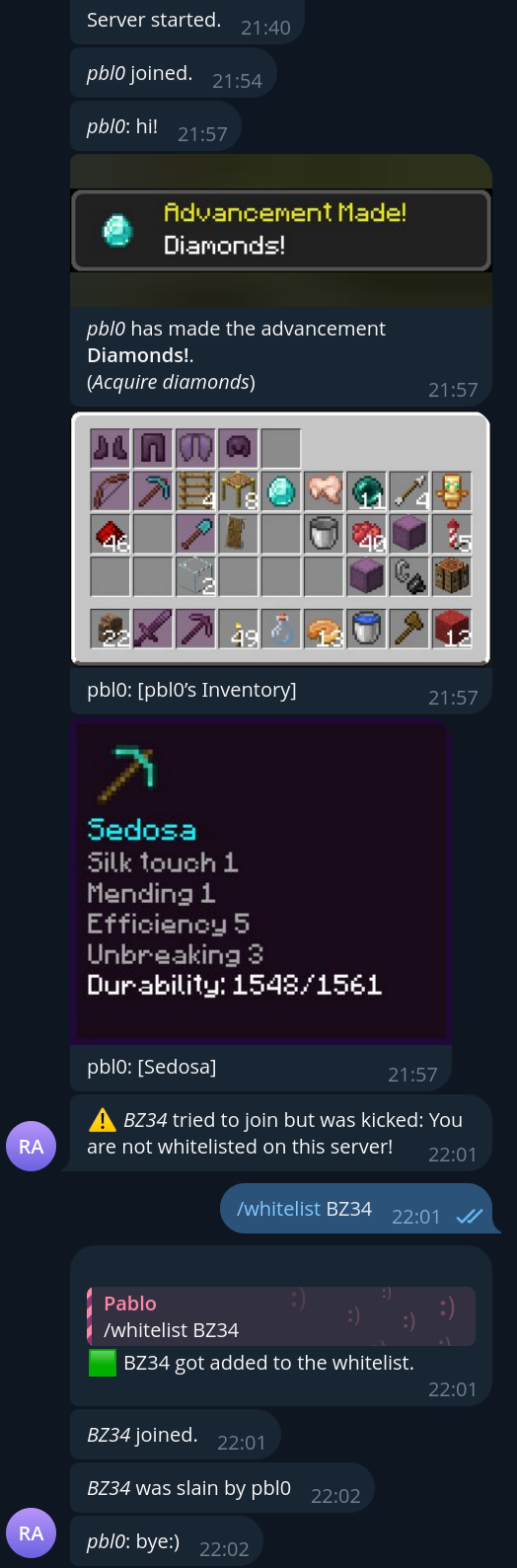
此插件将把 Minecraft 中的聊天消息发送到 Telegram,并将 Telegram 中的消息转发到 Minecraft。
使用方法:
-
从 modrinth 下载并将其放入服务器的 plugins/ 目录 或者 克隆此仓库并在仓库目录内运行 gradle。
-
如果您已经有 Telegram 机器人,请跳过此步骤。否则,通过 BotFather 创建一个新的机器人。
您将按照逐步说明操作,为机器人设置一个 用户名,最重要的是获取机器人的 令牌(token)。
保存此令牌以备将来使用。注意: 为了让您的机器人接收纯文本消息(而非命令),您必须
禁用默认开启的 隐私模式。进入机器人的
设置:Bot Settings -> Group Privacy 并点击 Turn Off。
-
接下来,您需要告知插件有关新机器人的信息。您可以选择以下任一方式:
- 启动 Paper 服务器,插件会记录
"No config file found! Saving default one."。之后,停止服务器并
进行第 4 步。
- 复制 config.yml
到您的服务器目录下的
plugins/PaperTelegramBridge/ 中。
-
config.yml 只是一个 有效的 YAML 文件,是 JSON 的替代方案,但更具
可读性。
现在,将您在第 2 步中获得的机器人的 令牌 粘贴到 config.yml 中,使其看起来像这样:
botToken: abcdefghijklmnopq123123123
# other configuration values...
-
启动 Paper 服务器。
-
将您的机器人添加到您计划使用的聊天群组中。在每个群组中运行 /chat_id 命令。机器人应做出响应并提供一个特殊的值——聊天 ID。现在,打开 config.yml 并将此 ID 粘贴到 chats 部分下,使其看起来像这样:
botToken: abcdefghijklmnopq123123123
chats: [
    -123456789,
    987654321,
    # other chat id's...
  ]
-
(可选)要启用管理员命令如 /whitelist,您需要将 Telegram 用户 ID 添加到 config.yml 中的 admins 列表中。
admins: [
    123456789,
    987654321,
    # other admin user ids...
  ]
-
您可以通过下表描述的更多调整来扩展 config.yml,但这并非必要,如果缺少这些配置,插件将使用默认值。此外,查看 示例。
-
重新启动服务器或在服务器控制台中输入 tgbridge_reload。
插件配置:
| 字段 |
描述 |
类型 |
必填 |
默认值 |
| enable |
是否启用该插件 |
boolean |
:x: |
true |
| botToken |
Telegram 机器人令牌(如何创建机器人) |
string |
:heavy_check_mark: |
- |
| chats |
机器人将工作的聊天列表(以防止未知聊天使用机器人) |
number[] or string[] |
:heavy_check_mark: |
[] |
| topics |
Telegram 论坛主题,如果留空则使用“General”主题。 |
number[] or string[] |
:x: |
[] |
| admins |
被授权使用管理员命令(如 /whitelist)的 Telegram 用户 ID 列表 |
number[] or string[] |
:x: |
[] |
| serverStartMessage |
服务器启动时发送到聊天的内容 |
string |
:x: |
'Server started.' |
| serverStopMessage |
服务器停止时发送到聊天的内容 |
string |
:x: |
'Server stopped.' |
| logJoinLeave |
如果为 true,当玩家加入或离开服务器时,插件会向聊天发送相应消息 |
boolean |
:x: |
true |
| logFromMCtoTG |
如果为 true,插件会将服务器上玩家的聊天消息发送到 Telegram 聊天 |
boolean |
:x: |
true |
| logFromTGtoMC |
如果为 true,插件会将聊天中的消息发送到 Minecraft 服务器 |
boolean |
:x: |
true |
| logPlayerDeath |
如果为 true,当玩家死亡时,插件会向 Telegram 发送消息 |
boolean |
:x: |
false |
| logPlayerAsleep |
如果为 true,当玩家入睡时,插件会向 Telegram 发送消息 |
boolean |
:x: |
false |
| logPlayerAdvancement |
如果为 true,当玩家获得成就时,插件会向 Telegram 发送消息 |
boolean |
:x: |
true |
| logInventory |
如果为 true,插件会发送背包、物品或末影箱的图片 阅读更多 |
boolean |
:x: |
true |
| logWhitelistKick |
如果为 true,当玩家因未列入白名单而被踢出时,插件会发送通知 |
boolean |
:x: |
true |
| strings |
用于插件国际化 (i18n) 的标记-字符串字典 |
Map<string, string> |
:x: |
见默认配置 |
| commands |
在 Telegram 机器人中使用的命令文本字典 |
Map<string, string> |
:heavy_check_mark: |
见下文 |
| telegramMessageFormat |
TGtoMC 聊天消息的格式字符串 |
string |
:x: |
见默认配置 |
| minecraftMessageFormat |
MCtoTG 聊天消息的格式字符串 |
string |
:x: |
见默认配置 |
| silentMessages |
禁用 Telegram 聊天中的通知 |
boolean |
:x: |
false |
| apiOrigin |
为机器人使用不同的 API 端点 |
string |
:x: |
|
| disableConfigWatch |
不监听配置文件的变化 |
string |
:x: |
false |
Telegram 机器人命令:
命令可通过配置文件自定义。如果配置文件中不存在某条命令,则该命令将被禁用。
| 命令 |
描述 |
/online |
获取当前在线的玩家 |
/time |
获取服务器上的时间 |
/chat_id |
获取当前运行命令所在聊天的 ID(用于 config.yml) |
/whitelist |
(仅限管理员)管理服务器白名单 - 列出已列入白名单的玩家或添加/移除玩家 |
格式字符串:
+--------+ >--minecraftMessageFormat(message)-> +--------------+
| Paper |                                      | Telegram bot |
+--------+ <--telegramMessageFormat(message)--< +--------------+
适用于 telegramMessageFormat 和 minecraftMessageFormat 配置。
必须包含 %username% 和 %message%。
你可以使用它来自定义消息颜色(着色仅适用于 telegramMessageFormat)。你可以自定义加粗/斜体/删除线格式(仅适用于 minecraftMessageFormat)。
有关更多信息,请参阅 Minecraft 消息颜色代码 和 Telegram 消息格式。
此功能与 此问题 相关
插件命令:
| 命令 |
描述 |
tgbridge_reload |
无需停止服务器即可重新加载插件配置。仅通过服务器控制台有效 |
tgbroadcast |
向所有 Minecraft 玩家和已配置的 Telegram 频道广播消息;玩家、命令方块以及拥有 bukkit.command.say 权限的数据包均可使用 |
权限
| 权限 |
描述 |
tg-bridge.silentjoinleave |
设置为 true 时,机器人不会为该玩家发送加入和离开消息。该玩家也不会出现在 /online 命令中。 |
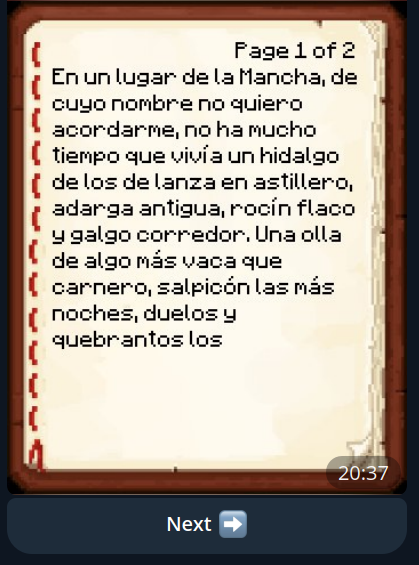
物品栏
类似于 InteractiveChat 插件的行为(非依赖项!)。
已实现的命令:
白名单管理
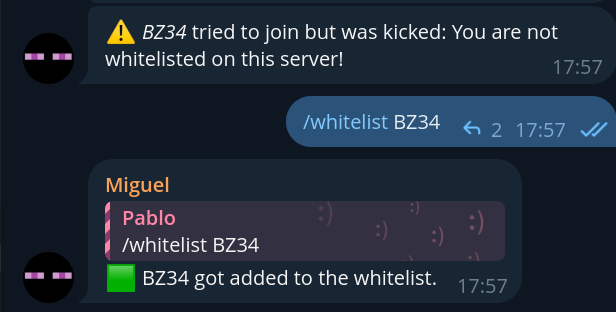
服务器管理员可以直接通过 Telegram 使用 /whitelist 命令管理白名单:
/whitelist - 列出所有已列入白名单的玩家/whitelist <player_name> - 切换玩家的白名单状态(如果未列入白名单则添加,如果已列入则移除)
此命令仅对 admins 配置字段中列出的用户可用。当玩家因未被列入白名单而被踢出时,插件还会发送通知(可通过 logWhitelistKick 配置)。
Paper Telegram Bridge
A fork from spigot-tg-bridge with some new features.
This plugin will send chat messages from Minecraft to Telegram, and from Telegram to Minecraft.
How to use:
-
Download from modrinth and put it in
plugins/ directory on your server OR clone this repo and run gradle inside repo's directory.
-
If you already have telegram bot, skip this step. Otherwise, create it through BotFather.
You'll go through step-by-step instructions, give a bot username and most importantly, obtain a bot token.
Save this token for future use. Note: in order to make your bot hear raw text messages (not commands), you must
disable privacy mode option which is on by default. Go through bot's
settings: Bot Settings -> Group Privacy and click Turn Off.
-
Next, you need to tell plugin about your new bot. You can either:
- Run Paper server, plugin will log
"No config file found! Saving default one.". After that, stop server and
proceed to 4th step.
- Copy config.yml
to
plugins/PaperTelegramBridge/ in your server directory.
-
A config.yml is just a valid YAML file, alternative for JSON, but more
human-readable.
Now, take bot's token which you got in 2nd step and paste them into config.yml, so it looks like this:
botToken: abcdefghijklmnopq123123123
# other configuration values...
-
Run Paper server.
-
Add you bot to chats, where you plan to use it. In each of them, run /chat_id command. The bot should respond and
give special value - chat id. Now, open config.yml and paste this ID under chats section, so it will look
like this:
botToken: abcdefghijklmnopq123123123
chats: [
    -123456789,
    987654321,
    # other chat id's...
  ]
-
(Optional) To enable admin commands like /whitelist, you need to add Telegram user IDs to the admins list in config.yml.
admins: [
    123456789,
    987654321,
    # other admin user ids...
  ]
-
You can extend config.yml with more tweaks, which are described in the table below, but it's not necessary, plugin
will use default values instead, if they're missing. Also, check out the example.
-
Re-run server or type tgbridge_reload into server's console.
Plugin configuration:
| Field |
Description |
Type |
Required |
Default |
| enable |
If plugin should be enabled |
boolean |
:x: |
true |
| botToken |
Telegram bot token (How to create bot) |
string |
:heavy_check_mark: |
- |
| chats |
Chats, where bot will work (to prevent using bot by unknown chats) |
number[] or string[] |
:heavy_check_mark: |
[] |
| topics |
Telegram forum topics, if left empty it will use the General topic. |
number[] or string[] |
:x: |
[] |
| admins |
List of Telegram user IDs authorized to use admin commands like /whitelist |
number[] or string[] |
:x: |
[] |
| serverStartMessage |
What will be sent to chats when server starts |
string |
:x: |
'Server started.' |
| serverStopMessage |
What will be sent to chats when server stops |
string |
:x: |
'Server stopped.' |
| logJoinLeave |
If true, plugin will send corresponding messages to chats, when player joins or leaves server |
boolean |
:x: |
true |
| logFromMCtoTG |
If true, plugin will send messages from players on server, to Telegram chats |
boolean |
:x: |
true |
| logFromTGtoMC |
If true, plugin will send messages from chats, to Minecraft server |
boolean |
:x: |
true |
| logPlayerDeath |
If true, plugin will send message to Telegram if player died |
boolean |
:x: |
false |
| logPlayerAsleep |
If true, plugin will send message to Telegram if player fell asleep |
boolean |
:x: |
false |
| logPlayerAdvancement |
If true, plugin will send message to Telegram if player gets an advancement |
boolean |
:x: |
true |
| logInventory |
If true, plugin will send image of inventory, item or ender chest Read more |
boolean |
:x: |
true |
| logWhitelistKick |
If true, plugin will send notification when a player is kicked due to not being whitelisted |
boolean |
:x: |
true |
| strings |
Dictionary of tokens - strings for plugin i18n |
Map<string, string> |
:x: |
See default config |
| commands |
Dictionary of command text used in Telegram bot |
Map<string, string> |
:heavy_check_mark: |
See below |
| telegramMessageFormat |
Format string for TGtoMC chat message |
string |
:x: |
See default config |
| minecraftMessageFormat |
Format string for MCtoTG chat message |
string |
:x: |
See default config |
| silentMessages |
Disable notification in Telegram chats |
boolean |
:x: |
false |
| apiOrigin |
Use different API endpoint for the bot |
string |
:x: |
|
| disableConfigWatch |
Do not watch the config for changes |
string |
:x: |
false |
Telegram bot commands:
Commands are customizable through config. If command doesn't exist in config, it will be disabled
| Command |
Description |
/online |
Get players, currently online |
/time |
Get time on server |
/chat_id |
Get current chat ID (in which command was run) for config.yml |
/whitelist |
(Admin only) Manage server whitelist - list whitelisted players or add/remove a player |
Format string:
+--------+ >--minecraftMessageFormat(message)-> +--------------+
| Paper |                                      | Telegram bot |
+--------+ <--telegramMessageFormat(message)--< +--------------+
Applies to telegramMessageFormat and minecraftMessageFormat configurations.
Must contain %username% and %message% inside.
You can customize message color with it (coloring works only for telegramMessageFormat). You can customize
bold/italics/strikethrough formatting (works only for minecraftMessageFormat).
See Minecraft message color codes
and Telegram message formatting for more information.
This feature is related to this issue
Plugin commands:
| Command |
Description |
tgbridge_reload |
Reload plugin configuration w/o need to stop the server. Works only through server console |
tgbroadcast |
Broadcast a message to all Minecraft players and configured Telegram chats; usable by players, command blocks, and datapacks with the bukkit.command.say permission |
Permissions
| Permission |
Description |
tg-bridge.silentjoinleave |
When set to true the bot won't send join and leave messages for that player. It will also be hidden from the /online command. |
Inventory
Similar behavior as InteractiveChat plugin (not a dependency!).
Commands implemented:
Whitelist Management
Server admins can manage the whitelist directly from Telegram using the /whitelist command:
/whitelist - List all whitelisted players/whitelist <player_name> - Toggle whitelist status for a player (add if not whitelisted, remove if already whitelisted)
This command is only available to users listed in the admins configuration field. The plugin will also send notifications when players try to join but are kicked due to not being whitelisted (configurable via logWhitelistKick).


 插件

 插件
 插件
 插件
 插件
 插件
评论 0
登录后参与评分
还没有评论,来抢沙发吧