
密码保护
使用 Passwords 保护你的服务器!
Passwords 是一款易于使用且简单的插件,可防止陌生人访问你的 Minecraft 服务器。如果你不想使用白名单,只需将密码告知你的朋友即可。
功能特性
-
为每位玩家设置独立密码
允许玩家创建独特的密码,确保其账户拥有个性化且安全的访问权限。 -
管理员密码选项
管理员可以设置一个主密码,以获得完整权限和 OP(操作员)状态。 -
无缝集成
与任何 Minecraft 服务器 effortless 兼容,无需复杂的配置过程。
示例 config.yml 配置文件
以下是一个示例配置文件,助你快速上手:
点击查看 config.yml
version: "2.6.3"
debug: false
# 密码不支持在消息中使用 PlaceholderAPI。
# 支持的占位符有:&player& -> 玩家名称
# 占位符仅在消息中生效

settings:
  # check-type: server : 整个服务器共用一个密码。
  # check-type: player : 每位玩家拥有独立的密码。(仅首次加入时生效。如需重置,请删除玩家数据或使用 /setpassword 命令)
  # check-type: none   : 不进行密码检查。
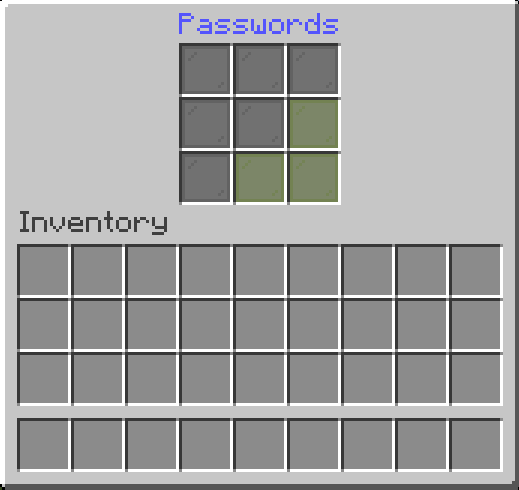
  # check-type: pattern : 玩家必须输入如下的图案密码
  #                                                            "o x o"
  #                                                            "x x x"
  #                                                            "x x x"
  check-type: server
  # GUI 界面名称
  gui-name: Enter Passwords
  # 设置密码时的显示名称
  set-password-name: Set Password
  # 踢出玩家时显示的提示信息。
  fail-message: The password is incorrect!
  # 当未输入密码就关闭 UI 界面时
  close-ui-message: You need to enter a password!
  # 启用欢迎消息。
  welcome-message-enabled: true
  # 登录后的欢迎消息。
  welcome-message: Welcome to ExampleServer
  # 欢迎消息第二行(仅限标题模式)
  welcome-message-second: Passwords
  # 欢迎消息的显示类型:message; actionbar; title
  welcome-message-display-type: message
  # 启用登录游戏模式切换。
  login-gamemode-enabled: true
  # 玩家登录后获得的游戏模式:survival, creative, adventure, spectator
  login-gamemode: survival
  # 玩家密码长度(适用于 check-type: player)
  player-password-length: 4
  # 被禁止使用的密码(仅适用于 check-type: player & server)
  blocked-passwords:
    - 1111
  # 登出时保存玩家背包,并在登录时恢复。(!!!!!! 警告:如果 passwords 文件夹中的 data 文件夹或玩家数据被删除,玩家背包将会丢失 !!!!)
  save-player-inventory: false
  # 自动保存玩家背包
  enable-auto-save: true
  # 每 5 分钟保存一次玩家背包(前提是 save-player-inventory 为 true)
  save-player-inventory-intervall: 10 # 单位为分钟(最少 3 分钟)
  # 登录期间无敌(注意:这可能会导致利用漏洞时无法受到坠落伤害)
  invulnerable-on-login: true

server:
  # 服务器密码(密码长度不限 | 适用于 check-type: server)
  password: 1234
  # 员工密码(密码长度不限 | 适用于 check-type: server)
  staff-password: 8181
  # 员工权限(登录后授予玩家)
  staff-permissions:
    - passwords.*
  # 登出时移除员工权限
  remove-staff-permissions-on-logout: true
  # 图案密码(适用于 check-type: pattern)
  pattern:
    - oxo
    - xxx
    - xxx

# 目前处于开发阶段,尚不可用!!
# 不兼容 Folia
skript:
  # 执行示例事件
  behavior: "Example"
指令列表
点击查看指令
/setpassword <Password>→ 设置你的密码。/setplayerpassword <Player> <Password>→ 设置某玩家的密码。/logout <Player>→ 使某玩家下线。/preload→ 重载插件配置
开发者指南:Maven/Gradle 配置
点击查看 Maven/Gradle 配置
Maven:
<dependency>
    <groupId>cho.info</groupId>
    <artifactId>passwords</artifactId>
    <version>(插件版本)</version>
</dependency>

<repositories>
    <repository>
        <id>local-repo</id>
        <url>file:/path/to/my-local-repo</url>
    </repository>
</repositories>
Gradle:
implementation files("$projectDir/lib/passwords-(插件版本).jar")
Passwords
Secure your server with Passords!
Passwords an easy to use and simple plugin to secure your minecraft server from strangers. If you dont want to use a whitlis you can simply give your friends the password and thats it.
Features
-
Custom Passwords for Each Player
Allow players to create unique passwords, ensuring personalized and secure access to their accounts. -
Admin Password Options
Admins can set a master password for full permissions and Op status. -
Seamless Integration
Works effortlessly with any Minecraft server without requiring complex setup.
Sample Config.yml
Below is an example configuration file to get you started:
Click to view config.yml
version: "2.6.3"
debug: false
# Password dose not supports PlaceholderAPI in messages.
# Supported placeholders are: &player& -> Player Name
# Placeholders are only supported in messages

settings:
  # check-type: server : One password for the entire server.
  # check-type: player : A unique password for each player. (Works only on the first join. To reset, delete player data or use the /setpassword command)
  # check-type: none   : No password check.
  # check-type: pattern : The player must enter a pattern like "o x o"
  #                                                            "x x x"
  #                                                            "x x x"
  check-type: server
  # GUI Name
  gui-name: Enter Passwords
  # Set password name
  set-password-name: Set Password
  # Message that will be displayed as the kick reason.
  fail-message: The password is incorrect!
  # When the UI is closed without a password
  close-ui-message: You need to enter a password!
  # Enable welcome message.
  welcome-message-enabled: true
  # Welcome message after login.
  welcome-message: Welcome to ExampleServer
  # Welcome message second line (Only for title)
  welcome-message-second: Passwords
  # Display type for the welcome message: message; actionbar; title
  welcome-message-display-type: message
  # Enable login gamemode.
  login-gamemode-enabled: true
  # Gamemode every player will have upon login: survival, creative, adventure, spectator
  login-gamemode: survival
  # Player password length (for the check-type: player)
  player-password-length: 4
  # Blocked passwords ( only for the check-type: player & server )
  blocked-passwords:
    - 1111
  # Saves the player inventory on logout and restores it on login. ( !!!!! Waring: When the data folder or the player data in the passwords folder is deleted, the player inventory will be lost !!!!! )
  save-player-inventory: false
  # Saves the player inventory automatically
  enable-auto-save: true
  # Saves the player inventory every 5 minutes (if save-player-inventory is true)
  save-player-inventory-intervall: 10 # in minutes ( min 3 )
  # Invulnerable on login (note: this will prevent fall damage when exploited)
  invulnerable-on-login: true

server:
  # Server password (the password can be any length | for the check-type: server)
  password: 1234
  # Staff password (the password can be any length | for the check-type: server)
  staff-password: 8181
  # Staff permissions (will be given to the player after login)
  staff-permissions:
    - passwords.*
  # Remove staff permissions on logout
  remove-staff-permissions-on-logout: true
  # Password pattern (for the check-type: pattern)
  pattern:
    - oxo
    - xxx
    - xxx

# Currently Under development not working !!!!
# Not working on Folia
skript:
  # Executest the event for Example
  behavior: "Example"
Commands
Click to view commands
/setpassword <Password>→ Set your password./setplayerpassword <Player> <Password>→ Ser a Player's password./logout <Player>→ Logout player./preload-> Reload Plugin Config
For Developers: Maven/Gradle Setup
Click to view Maven/Gradle setup
Maven:
<dependency>
    <groupId>cho.info</groupId>
    <artifactId>passwords</artifactId>
    <version>(Plugin version)</version>
</dependency>

<repositories>
    <repository>
        <id>local-repo</id>
        <url>file:/path/to/my-local-repo</url>
    </repository>
</repositories>
Gradle:
implementation files("$projectDir/lib/passwords-(Plugin version).jar")

下载 Passwords
需要联机服务器吗?
稳定流畅、一键部署,几分钟即可和朋友联机开服
最低仅需 8 元/月 即可畅快联机
下载 Passwords
需要联机服务器吗?
稳定流畅、一键部署,几分钟即可和朋友联机开服
最低仅需 8 元/月 即可畅快联机
下载 Passwords
需要联机服务器吗?
稳定流畅、一键部署,几分钟即可和朋友联机开服
最低仅需 8 元/月 即可畅快联机
下载 Passwords
需要联机服务器吗?
稳定流畅、一键部署,几分钟即可和朋友联机开服
最低仅需 8 元/月 即可畅快联机
下载 Passwords
下载 Passwords
下载 Passwords
下载 Passwords
下载 Passwords
需要联机服务器吗?
稳定流畅、一键部署,几分钟即可和朋友联机开服
最低仅需 8 元/月 即可畅快联机
下载 Passwords
需要联机服务器吗?
稳定流畅、一键部署,几分钟即可和朋友联机开服
最低仅需 8 元/月 即可畅快联机
新增:
- 支持 26.1 及更高版本
- reload 命令(/preload)
- 添加对 Folia 的支持
修复:
- 修复了一个无需密码即可登录的漏洞
- 修复了配置文件重载不佳的问题
- 修复了每次调用时 DataManager 都会创建新实例的问题
关于这个资源的讨论、问题反馈与使用心得
还没有讨论,来发第一帖吧
你是这个资源的作者?登录后可认领此资源。
相似资源
 插件

PacketEvents 是一款专为 Minecraft Java 版打造的协议库,旨在简化数据包的处理与传输。
 插件
ExyliaPlugins 的库。
 插件
通过对话框或铁砧界面帮助你的 Anthme
 插件
自定义你的Minecraft头像!
 插件
重新定义服务器上的生物运输方式。使用高度可定制的口袋道具,安全地捕获、存储和释放任何实体。
 插件
为基于 Spigot/Paper/Folia 的服务器添加对 Vivecraft 的支持
评论 0
登录后参与评分
还没有评论,来抢沙发吧