PdxTrackRouter
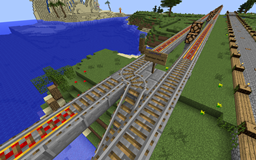
查看最新截图!
PdxTrackRouter 插件允许用户创建自动路由的矿车轨道系统。这是通过“目的地”指示牌和“路口”指示牌结合实现的。在没有路口指示牌的情况下,矿车的行为将保持正常。
目的地指示牌应放置在用户可能想要选择新目的地的位置。指示牌的格式为:
- [destination]
- 目的地名称
- 自由文本
- 自由文本
当用户右键点击目的地指示牌时,其目的地标签将被存储。
路口指示牌用于创建自动切换轨道。指示牌应放置在 3/4 道岔拐角处,或作为墙面指示牌位于路口上方,或位于路口所在方块的下方。如果需要更多行,这些指示牌可以垂直堆叠。路口指示牌的格式如下:
- [junction]
- DESTINATION: DIRECTION
- DESTINATION: DIRECTION
- ...
目的地可以是任何适合写在指示牌上的字符串,并且应该与用户可用的 [destination] 指示牌相对应。方向应为 "north"(北)、"south"(南)、"east"(东)、"west"(西)之一。(仅检查首字母)。
空矿车始终被路由到 "empty"(空)目的地。箱子矿车被路由到 "chest"(箱子)目的地。动力矿车被路由到 "engine"(引擎)目的地。任何矿车都会匹配 "default"(默认)目的地。如果路口指示牌上没有路由匹配,路口将尝试让矿车直行穿过路口而不转向。这些目的地可在 config.yml 中配置。
插件会清除指示牌上的所有空白字符和颜色/格式设置,因此用户可以自由使用 Essentials 等插件来美化他们的指示牌。
该插件不会阻止玩家破坏轨道或指示牌。为此应使用方块保护插件。
手持指示牌右键点击空矿车或箱子矿车,可将你的目的地偏好传输到该矿车。这对于在轨道系统中随矿车一起运输装满货物的箱子矿车非常有用。已设置目的地的矿车将以全速移动,以便你可以跟随它们。此工具可配置。
命令
/destination [DESTINATION] - 覆盖你的目的地偏好,如果未指定则清除它。
/changesign # TEXT - 更改准星所指的指示牌的一行。这是一个特权操作,需要 op 权限或 trackrouter.changesign 权限。
示例:/changesign 4 New line here
/junctions - 搜索与你当前站立位置的轨道相连的目的地。这可能会很慢,因为它必须加载区块,因此它在后台运行以避免造成延迟。
路口编辑
要编辑路口,请右键点击 [junction] 指示牌或路口轨道方块,并输入以下任一命令。小心将此命令给予他人,因为他们可以通过在现有指示牌上放置路口指示牌并编辑以访问下一个指示牌,从而轻松编辑其他类型的保护指示牌。我对于如何防止这种情况持开放态度。行号从 [junction] 之后的第一行开始计为 1,并贯穿整个指示牌堆栈。
- /junction insert # TEXT - 在位置 # 插入新行
- /junction delete # - 删除位置 # 的行并将其他行上移
- /junction change # TEXT - 更改位置 # 的行并保持其余部分不变
- /junction list - 打印当前路口指示牌的各行内容
自动储物矿车(卸)载
该插件支持配置储物矿车进入箱子的装载和卸载功能。当储物矿车经过金块时,它会从与该金块侧面接触的箱子中装载物品。当矿车经过钻石块时,它会向与该方块接触的箱子中卸载物品。这些方块是可配置的,并且可以使用 config.yml 禁用此功能。
小心使用此功能。如果玩家可以在箱子旁边建造,他们可以从中提取物品。
权限
- trackrouter.changesign - 就地更改指示牌上的行 - 默认 op
- trackrouter.junctions - 使用 /junctions 命令 - 默认 op
- trackrouter.destination - 使用 /destination 命令 - 默认 true
- trackrouter.sign.junction.create - 创建新的路口指示牌 - 默认 true
- trackrouter.sign.junction.edit - 就地编辑路口指示牌 - 默认 op
- trackrouter.sign.destination.create - 创建新的目的地指示牌 - 默认 true
- trackrouter.sign.destination.use - 使用目的地指示牌 - 默认 true
- trackrouter.transfertool - 将你的目的地偏好传输到矿车 - 默认 true
源代码
源代码可在 github 上找到,并根据 GPLv3 许可。
演示
在 pdxmc.com 实时查看该插件
乘坐电梯前往“火车站”一楼(Floor 1),并尝试各种车站。此外,二楼还有几个小示例。
枢纽使用电梯:可以通过右键点击电梯按钮上方的指示牌来选择目的地楼层。
PdxTrackRouter
Check out the new screenshots!
The PdxTrackRouter plugin allows users to create automatically routed mine cart rail systems. This is accomplished through a combination of "destination" signs and "junctions" signs. Minecarts will behave normally in the absence of any junction signs.
Destination signs should be placed wherever a user might want to select a new destination. The format for the signs is:
- [destination]
- destination name
- freeform text
- freeform text
When a user right clicks on a destination sign his destination tag will be stored.
Junction signs create automatic switching tracks. The signs should be placed at the corner of a 3/4 way rails junction or above the junction as a wall-sign, or below the block the junction is built on. Many of these signs may be stacked vertically if more lines are needed. The format of the junction sign is:
- [junction]
- DESTINATION: DIRECTION
- DESTINATION: DIRECTION
- ...
The destination can be any string which fits on the sign and should correspond to [destination] signs available to the user. The direction should be one of "north","south","east","west". (Only the first letter is checked).
Empty carts are always routed to the "empty" destination. Chest carts are routed to the "chest" destination. Powered carts are routed to the "engine" destination. Any cart will match the "default" destination. If no route on the junction sign matches the junction will attempt to send the cart straight through the junction without turning. These destinations are configurable in config.yml
The plugin will scrub all whitespace and color/formatting from the signs, so users are free to make their signs pretty using a plugin like Essentials.
The plugin does not stop players from breaking tracks or signs. A block protection plugin should be used for that.
Right click on an empty cart or chest cart with a sign in your hand to transfer your destination preference to that cart. This is great for moving chest carts full of goods along with you on the rail system. Carts with destinations set will move at full speed so that you can go with them. The tool is configurable.
Commands
/destination [DESTINATION] - Override your destination preference or clear it if left unspecified.
/changesign # TEXT - Change a line on the sign your cross-hairs are pointing at. This is a privileged operation and requires op or trackrouter.changesign
Example: /changesign 4 New line here
/junctions - Search for destinations which are connected to the piece of track you are standing on. This can be slow as it has to load chunks, so it runs in the background to avoid creating lag.
Junction Editing
To edit a junction, right click on the [junction] sign or the junction rail block and enter any of the following commands. BE CAREFUL giving this command to people as they can easily edit other kinds of protection signs at this point by placing a junction sign over an existing sign and edit through to the next sign. I'm open to ideas for how to protect against this. Line numbers start a 1 for the first line after the [junction] and continue through the whole stack of signs.
- /junction insert # TEXT - Insert a new line at position #
- /junction delete # - Delete the line at position # and move the others up
- /junction change # TEXT - Change the line at position # and leave the rest alone
- /junction list - Print the lines of the current junction sign
Automatic Storage Cart (un)loading
The plugin supports configurable loading and unloading of storage carts into chests. When a storage cart passes over a gold block it will load from the chests touching the sides of that gold block. When a cart passes over a diamond block it will unload into the chests touching that block. The blocks are configurable and the feature can be disabled using config.yml.
BE CAREFUL with this feature. If a player can build next to a chest he can extract the items from it.
Permissions
- trackrouter.changesign - Change lines on signs in-place - default op
- trackrouter.junctions - Use the /junctions command - default op
- trackrouter.destination - Use the /destination command - default true
- trackrouter.sign.junction.create - Create new junction signs - default true
- trackrouter.sign.junction.edit - Edit junction signs in place - default op
- trackrouter.sign.destination.create - Create new destination signs - default true
- trackrouter.sign.destination.use - Use destination signs - default true
- trackrouter.transfertool - Transfer your destination preference to a cart - default true
Source
Source code is available on github and is licensed under GPLv3
Demo
See the plugin live at pdxmc.com
Head down the elevators to the "Train Station" floor 1 and try out the various stations. Additionally, there are a number of small examples on floor 2.
The hub uses elevators: Destination floors can be select by right clicking on the sign above the button at an elevator.

 插件
 插件

 插件
 插件

 插件

 插件
评论 0
登录后参与评分
还没有评论,来抢沙发吧