? PickupFilter
PickupFilter 是一款功能全面的物品拾取过滤解决方案,提供可自定义的配置档案和图形用户界面(GUI)。
什么是配置档案?
- 用户可以创建配置档案,这些是独立的过滤器,允许在不同场景下针对不同的物品进行过滤。
- 每个配置档案都是独一无二的,拥有各自被过滤的物品列表以及各自的过滤状态(白名单/黑名单)。
- 非常适合用于活动多样的服务器,例如职业系统。
主要特性
- 物品过滤: 玩家可以精确筛选他们想要或不想要拾取的物品。再也不用担心背包杂乱无章了!
- 基于配置档案: 玩家可以通过命令或 GUI 随时创建、管理和切换配置档案。非常适合应对如职业等多样化的活动。
- 插件集成: 支持与 EcoEnchants 和 WorldGuard 等插件集成,使得诸如“念力”(自动拾取)附魔能够与物品过滤器协同工作,并允许管理员设置无过滤区域(如宝箱房或皮纳塔派对),以确保物品不会丢失。该插件还设计为可与实体堆叠类插件(如 RoseStacker)配合使用。
- 现代化 GUI: 玩家可以通过直观的 GUI 轻松编辑配置档案和过滤器,支持拖拽操作、Shift+点击功能、易于编辑的过滤器列表、快速切换黑白名单以及开关过滤器的快捷按钮。玩家无需记忆冗长的命令。
- 高度可定制: 所有 GUI 均可自定义,包括重新排列物品位置、隐藏或显示按钮、更改物品名称、描述、材质,甚至支持通过自定义模型数据使用服务器资源包!查看配置文件 此处 以了解您可以控制哪些内容!
- 智能默认值: 当玩家没有激活任何配置档案时,插件将恢复为原版拾取行为。
- 快捷命令: 提供一系列快捷命令供玩家编辑其当前激活的配置档案。玩家还可以使用命令向过滤器中添加或删除任何原版物品,无需将这些物品放入背包中!
- 自定义物品: 支持带有自定义 NBT 数据的物品,它们可以被添加到配置档案中,且仅完全匹配的物品才会被过滤。
- 高性能 & 轻量级
- 持久化数据存储 使用 JSON 文件存储每个用户的数据。管理员可以通过命令删除这些数据!
⚙️ 集成
必需依赖项
WorldGuard
WorldGuard 是一个必需的依赖项。WorldGuard 区域的标志位(flag)为 pickup-filter,默认情况下在全局范围内均允许使用。
若要完全禁用区域内的物品过滤器,请将标志位设置为 deny。
在宝箱房、皮纳塔派对、掉落派对等区域完全禁用物品过滤器可能非常有用,以防止任何意外行为发生。
其他支持
EcoEnchants
已添加对 EcoEnchants 的支持,允许诸如“念力”(自动拾取)之类的附魔考虑物品过滤器的影响。
RoseStacker
已支持 RoseStacker,确保被过滤的物品在地面掉落时能够正确堆叠。
⌨️ 命令与权限
命令别名:
/itemfilter
/if
/pickupfilter
/pf
主要命令
| 命令 |
描述 |
权限 |
/itemfilter info |
显示有关插件的一般信息。 |
无需权限 |
/itemfilter toggle |
为用户开启或关闭整个物品过滤器。 |
pickupfilter.toggle |
/itemfilter |
打开一个 GUI 以查看所有配置档案,点击即可编辑。 |
pickupfilter.profiles |
配置档案管理
| 命令 |
描述 |
权限 |
/itemfilter profile create <name> |
创建一个新的拾取配置档案。(最大配置档案数量取决于配置中的 maxAllowedProfiles 设置) |
pickupfilter.profile.create, pickupfilter.profile.create.max.<i> |
/itemfilter profile delete <profile> [confirmation] |
删除一个拾取配置档案。(如果是当前激活的档案,则需要输入 "confirm" 进行确认。) |
pickupfilter.profile.delete |
/itemfilter profile use <profile> |
激活指定的配置档案。 |
pickupfilter.profile.use |
/itemfilter profile rename <profile> <name> |
重命名一个配置档案。 |
pickupfilter.profile.rename |
/itemfilter profile mode <profile> <mode> |
将配置档案的模式设置为白名单或黑名单。 |
pickupfilter.profile.mode |
快捷当前配置档案管理
| 命令 |
描述 |
权限 |
/itemfilter add [item] |
将手中持有的物品(或指定物品)添加到当前激活的配置档案中。 |
pickupfilter.add |
/itemfilter remove [item] |
从当前激活的配置档案中移除手中持有的物品(或指定物品)。 |
pickupfilter.remove |
/itemfilter edit |
打开一个 GUI 以修改当前激活的配置档案。 |
pickupfilter.edit |
/itemfilter mode <mode> |
将当前配置档案设置为白名单或黑名单模式。 |
pickupfilter.mode |
管理员命令
| 命令 |
描述 |
权限 |
/itemfilter admin reload |
重新加载插件配置文件。 |
pickupfilter.admin.reload |
/itemfilter admin delete <player> |
删除离线玩家的所有已保存拾取及配置档案数据。(可由玩家本人或控制台执行) |
pickupfilter.admin.delete |
智能自动补全
所有命令均具备智能自动补全功能,可自动补全配置档案名称、白名单/黑名单模式以及用于添加或删除到配置档案的原版物品等信息。
? 配置文件
查看默认配置文件 此处。
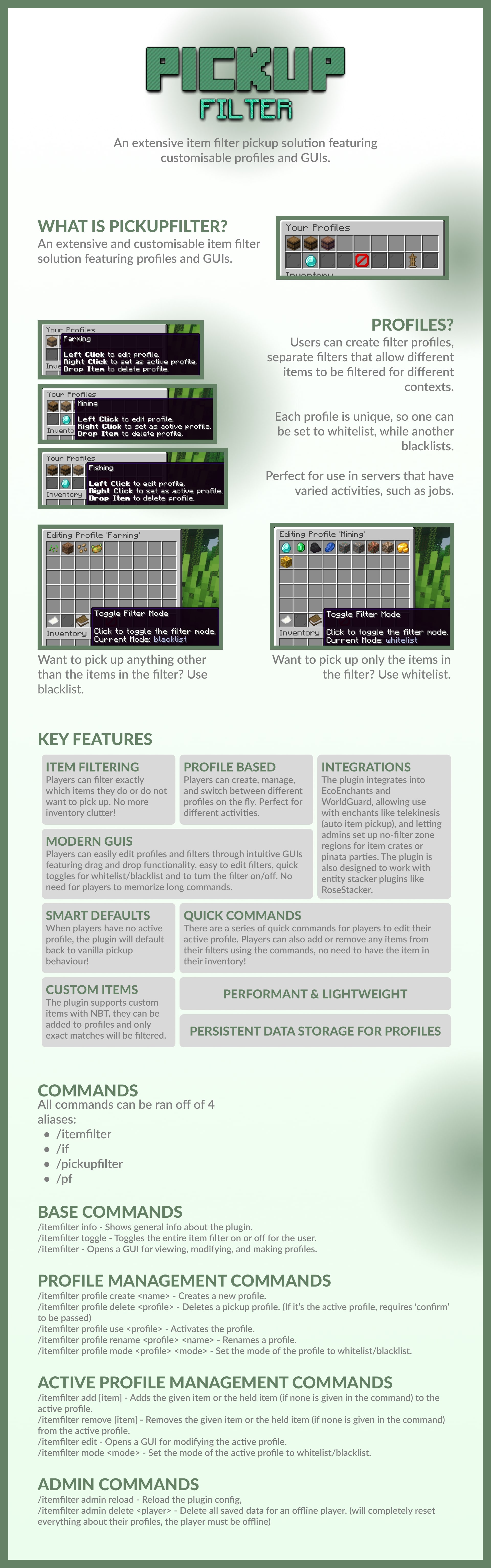
查看信息图表(包含 GUI 的截图)
❓ 支持
有任何问题?加入下方的支持 Discord 并创建工单:
或者,你也可以通过以下邀请链接加入支持 Discord:
? PickupFilter
PickupFilter is an extensive item filter pickup solution featuring customisable profiles and GUIs.
Profiles?
- Users can create profiles, which are separate filters that allow different items to be filtered for different contexts.
- Each profile is unique, having their own filtered items, and own filter state (whitelist/blacklist).
- Perfect for use in servers with varied activities, such as jobs.
Key Features
- Item Filtering: Players can filter exactly which items they do or do not want to pick up. No more inventory clutter!
- Profile Based: Players can create, manage, and switch between profiles on the fly using commands or the GUI. Perfect for varied activities like jobs.
- Integrations: Integrations into plugins like EcoEnchants and WorldGuard are present, allowing enchants like telekinesis (auto item-pickup) to function with the item filter, and letting admins set up no-filter zone regions for item crates or pinata parties to ensure no items are lost. The plugin is also designed to work with entity stacker plugins like RoseStacker.
- Modern GUIs: Players can easily edit profiles and filters through intuitive GUIs featuring drag and drop functionality, shift click functionality, easy to edit filters, quick toggles for blacklist/whitelist and to toggle the filter on/off. No need for players to memorise long commands.
- Customisable: All GUIs can be customised to re-arrange items, hide or show buttons, change item names, lore, materials, there's even server resourcepack support with custom model data! View the config file here to see what kind of things you have control over!
- Smart Defaults: When players have no active proifle, the plugin will default back to vanilla pickup behaviour.
- Quick Commands: There are a series of quick commands for players to edit their active profile. Players can also add or remove any vanilla items from their filters using the commands, no need to have the item in their inventory!
- Custom Items: Support for items with custom NBT is present, they can be added to profiles and only exact matches will be filtered.
- Performant & Lightweight
- Persistent Data Storage using JSON files for each user. These can be deleted via admin commands!
⚙️ Integrations
Required Dependencies
WorldGuard
WorldGuard is a required dependency. The flag for WorldGuard regions is pickup-filter, and by default it is allowed everywhere.
To entirely disable the item filter in regions, set the flag to deny.
It may be useful to completely disable the item filter in regions such as crates, pinata parties, drop parties, etc to prevent any unwanted behaviour.
Other Support
EcoEnchants
Support has been added to allow enchants like telekinesis (auto item-pickup) to take the item filter into account.
RoseStacker
RoseStacker support exists to ensure filtered items are stacked appropriately when dropped on the ground.
⌨️ Commands & Permissions
Command Aliases:
/itemfilter
/if
/pickupfilter
/pf
Main Commands
| Command |
Description |
Permission |
/itemfilter info |
Shows general info about the plugin. |
No permission |
/itemfilter toggle |
Toggles the entire item filter on and off for the user. |
pickupfilter.toggle |
/itemfilter |
Opens a GUI for viewing all profiles, which can be clicked to edit them. |
pickupfilter.profiles |
Profile Management
| Command |
Description |
Permission |
/itemfilter profile create <name> |
Creates a new pickup profile. (max number of profiles up to config settings.maxAllowedProfiles) |
pickupfilter.profile.create, pickupfilter.profile.create.max.<i> |
/itemfilter profile delete <profile> [confirmation] |
Deletes a pickup profile. (Requires "confirm" if it's the active one.) |
pickupfilter.profile.delete |
/itemfilter profile use <profile> |
Activates the given profile. |
pickupfilter.profile.use |
/itemfilter profile rename <profile> <name> |
Renames a profile. |
pickupfilter.profile.rename |
/itemfilter profile mode <profile> <mode> |
Sets the mode of the profile to whitelist or blacklist. |
pickupfilter.profile.mode |
Quick Active Profile Management
| Command |
Description |
Permission |
/itemfilter add [item] |
Adds the held item (or specified item) to the active profile. |
pickupfilter.add |
/itemfilter remove [item] |
Removes the held item (or specified item) from the active profile. |
pickupfilter.remove |
/itemfilter edit |
Opens a GUI for modifying the active profile. |
pickupfilter.edit |
/itemfilter mode <mode> |
Sets the current profile to whitelist or blacklist mode. |
pickupfilter.mode |
Admin Commands
| Command |
Description |
Permission |
/itemfilter admin reload |
Reloads the plugin config. |
pickupfilter.admin.reload |
/itemfilter admin delete <player> |
Deletes all saved pickup & profile data for an offline player. (player & console runnable) |
pickupfilter.admin.delete |
Smart Autocompletion
All commands feauture smart autocompletion for information like profile names, whitelist/blacklist mode, and vanilla items for adding/removing to or from profiles.
? Config
View the default config here.
View Information Graphic (includes screenshots of the GUIs)
❓ Support
Have any questions? Join the support Discord below and create a support ticket:
Alternatively, you can join the support Discord using the following invite link:


 插件

 插件
 插件
 插件
 插件
 插件
评论 0
登录后参与评分
还没有评论,来抢沙发吧