
PipelessPipes
一个简单但功能强大的服务器物品传输系统。
你是否厌倦了铺设无尽的管道?那么这就是你的解决方案! PipelessPipes 是一个轻量级插件,允许你直接连接容器并在它们之间传输物品。它支持使用白名单或黑名单对物品进行过滤,从而使物品管理更加轻松快捷。此外,你还可以向过滤器中添加无限数量的物品。
? 功能特性
- ? 容器间的即时物品传输
- ⚙️ 可自定义的过滤器
- ✅ 白名单 & ❌ 黑名单,便于控制
- ⚡ 快速简单的设置
- ✒️ 无需冗长的命令
- ? 支持英语和德语(玩家可以选择自己的语言)
- ? 完全可定制:管道扳手纹理、消息以及 GUI 文本
❓ 使用方法
- 首先,你需要一把 管道扳手 (Pipewrench)。通过以下命令获取:
/pipe givePipeTool - 点击任意容器(例如:箱子、大型箱、桶、熔炉、发射器、投掷器等)。
- (可选)如果你或某位玩家想要更改显示的语言(仅对自己生效),可以使用
/pipe setLanguage <deutsch|englisch>命令
定义容器
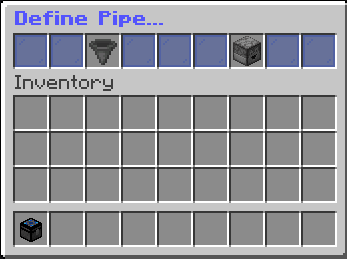
点击后,将打开一个包含两个选项的 GUI:
- 定义为输入端 (Define as Input)
- 定义为输出端 (Define as Output)
输入管道

如果将容器设置为 输入端,GUI 允许你:
- 将其更改为输出端
- 从网络中移除它
输出管道

如果将容器设置为 输出端,GUI 允许你:
- 将其更改为输入端
- 从网络中移除它
- 管理过滤器
过滤器

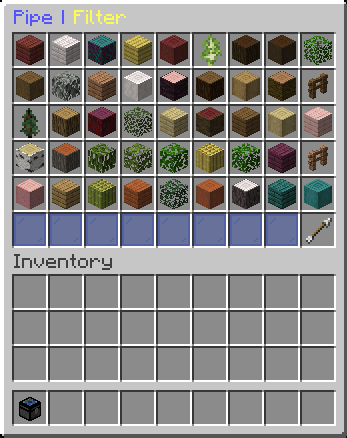
当你打开过滤器 GUI 时,你会看到:
- 白色/黑色染料 (White-/Black Dye) → 在 whitelist(默认)和 blacklist 之间切换
- 屏障方块 / 副手物品 (Barrier / Item in offhand) → 将副手中的物品添加到过滤器
- 矿车式储物箱 (Chest minecart) → 将容器中所有物品添加到过滤器
- 书 (Book) → 通过聊天命令手动添加物品:
/pipe addFilterItem [Item](将 [Item] 替换为实际物品名称) - 红色羊毛 (Red Wool) → 重置过滤器
- 末影之眼 (Ender Eye) → 查看完整过滤器。你可以在那里点击某个物品以将其从过滤器中移除。

? 权限
| Permission | Default | Description |
|---|---|---|
pipelesspipes.command.pipe |
true | 使用 /pipe 命令 |
pipelesspipes.command.language |
true | 设置显示语言 |
pipelesspipes.command.pipe.addFilterItem |
true | 通过命令添加过滤器物品 |
pipelesspipes.command.pipe.admin |
false (op) | 获取管道扳手 |

你是这个资源的作者?登录后可认领此资源。
相似资源
 插件

数据包事件PacketEvents
retrooper
PacketEvents 是一款专为 Minecraft Java 版打造的协议库,旨在简化数据包的处理与传输。
前置科技
28
 插件
ExyliaLib
ExyliaServices
ExyliaPlugins 的库。
前置实用
26
 插件
Vessel
muhdfdeen
重新定义服务器上的生物运输方式。使用高度可定制的口袋道具,安全地捕获、存储和释放任何实体。
生物存储
13
 插件
WorldEdit
me4502
一个在游戏内运行的 Minecraft 地图编辑器! 支持选区、蓝图、复制粘贴、笔刷和脚本。 可在创造模式中使用,也可在生存模式中临时使用。
前置管理
10
 插件

LobbyAPI
Zombie_Striker_Dev
创建用户友好的菜单以前往不同的世界
管理交通
9
 插件
tkChat
tkkr
专为 Velocity 打造的自制聊天插件,功能丰富——支持跨服群组/全局/私聊消息,并集成 LibertyBans 的禁言功能。
管理社交
9
评论 0
登录后参与评分
还没有评论,来抢沙发吧